How to Increase Sales Pipeline With Cold Email in 2026
Cold email still builds pipeline in 2026 — but only if the arithmetic works. Here's the reply-rate math, list-sourcing rules, and sending limits that separate a full calendar from a spam folder.
TL;DR
- Pipeline from cold email is arithmetic, not inspiration: contacts × deliverability × reply rate × meeting rate × ACV. Fix the weakest multiplier first.
- The weakest multiplier is almost always list quality. A 6% bounce rate does more damage to your pipeline than a mediocre subject line ever will.
- In 2026, sending volume per mailbox is capped by reputation, not by your tool. Plan for 25–40 sends per mailbox per day and scale mailboxes, not blast size.
- A 4-touch sequence over 12–14 days outperforms 8-touch marathons on reply quality and unsubscribe rate.
- Track meetings-held and pipeline-created weekly. Open rate is now close to useless as a decision metric.
What Does "Pipeline From Cold Email" Actually Mean?#
Pipeline is the dollar value of qualified opportunities your outbound motion creates in a period. Not replies. Not "interested" tags in a sequencer. Opportunities a rep would defend in a forecast call.
That distinction matters because most cold email programs report on the wrong layer. A team celebrates a 9% reply rate, then discovers 60% of those replies were "not now," "wrong person," or an out-of-office. The number that funds your quarter is meetings held that convert to stage-2 opportunities.
So when you set out to increase sales pipeline with cold email, you are really tuning a five-variable equation:
Pipeline = Contacts Reached × Inbox Rate × Reply Rate × Meeting Rate × Avg Deal SizeEvery tactic you read about — subject lines, personalization, spintax, warmup — is an attempt to move one of those five numbers. The useful question is never "is cold email dead?" It is "which of my five multipliers is currently the smallest, and what does it cost to double it?"
What Do the Numbers Need to Look Like?#
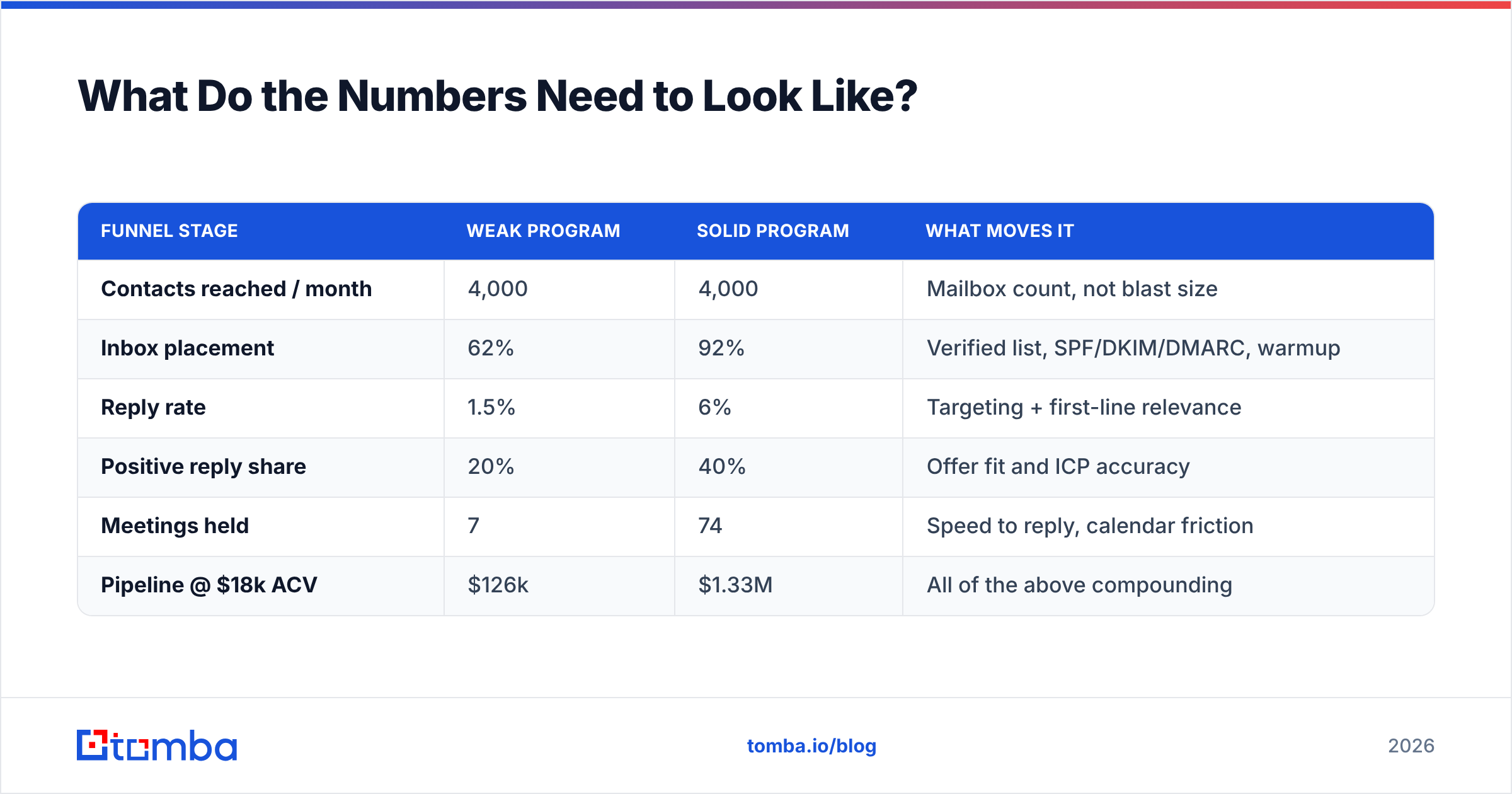
Here is the working model most B2B teams should plan against in 2026. These are conservative mid-market benchmarks, not best-case screenshots from a vendor deck.
| Funnel stage | Weak program | Solid program | What moves it |
|---|---|---|---|
| Contacts reached / month | 4,000 | 4,000 | Mailbox count, not blast size |
| Inbox placement | 62% | 92% | Verified list, SPF/DKIM/DMARC, warmup |
| Reply rate | 1.5% | 6% | Targeting + first-line relevance |
| Positive reply share | 20% | 40% | Offer fit and ICP accuracy |
| Meetings held | 7 | 74 | Speed to reply, calendar friction |
| Pipeline @ $18k ACV | $126k | $1.33M | All of the above compounding |
Read that table twice. The "weak" and "solid" columns send the same number of emails. The 10x gap in pipeline comes entirely from multiplier quality. This is why buying a bigger sending plan rarely fixes a broken outbound motion — you are scaling the wrong term in the equation.
Two more things the table implies. First, small percentage gains compound multiplicatively, so a 20% improvement in three stages roughly doubles output. Second, a single catastrophic multiplier (say, 40% inbox placement after a domain gets flagged) makes every other optimization irrelevant.
Why Does List Quality Beat Copy?#
Because bad data attacks two multipliers at once. A stale contact record both fails to reach a human and damages the sender reputation that determines whether your other emails reach humans. Copy only affects one multiplier.
Practically, list quality breaks down into six checks. Run all six before a single send:
- Deliverable address — the mailbox exists and accepts mail today, not in 2023. Run every import through an email verifier and drop anything that returns invalid or unknown.
- Catch-all handling — catch-all domains accept everything, so SMTP verification tells you nothing. Segment them separately with a catch-all verifier and send to them at lower volume with a stricter bounce watch.
- Role-account exclusion — info@, sales@, support@, and noreply@ inflate your list and depress your reply rate. Strip them.
- Persona match — job title alone is a weak filter. "Head of Growth" at a 12-person startup and at a 4,000-person enterprise are different buyers with different problems.
- Trigger relevance — a new funding round, a job posting for a role your product supports, or a tech-stack change gives you a reason to write. Without a trigger you are writing to a list, not to a person.
- Recency — B2B contact data decays roughly 2–2.5% per month through job changes alone. A list built nine months ago is meaningfully worse than one built last week.

Teams that skip step 1 usually find out via a hard bounce spike in week two, at which point the domain reputation damage takes 3–6 weeks to unwind. It is far cheaper to verify than to recover.
How Should You Source the List?#
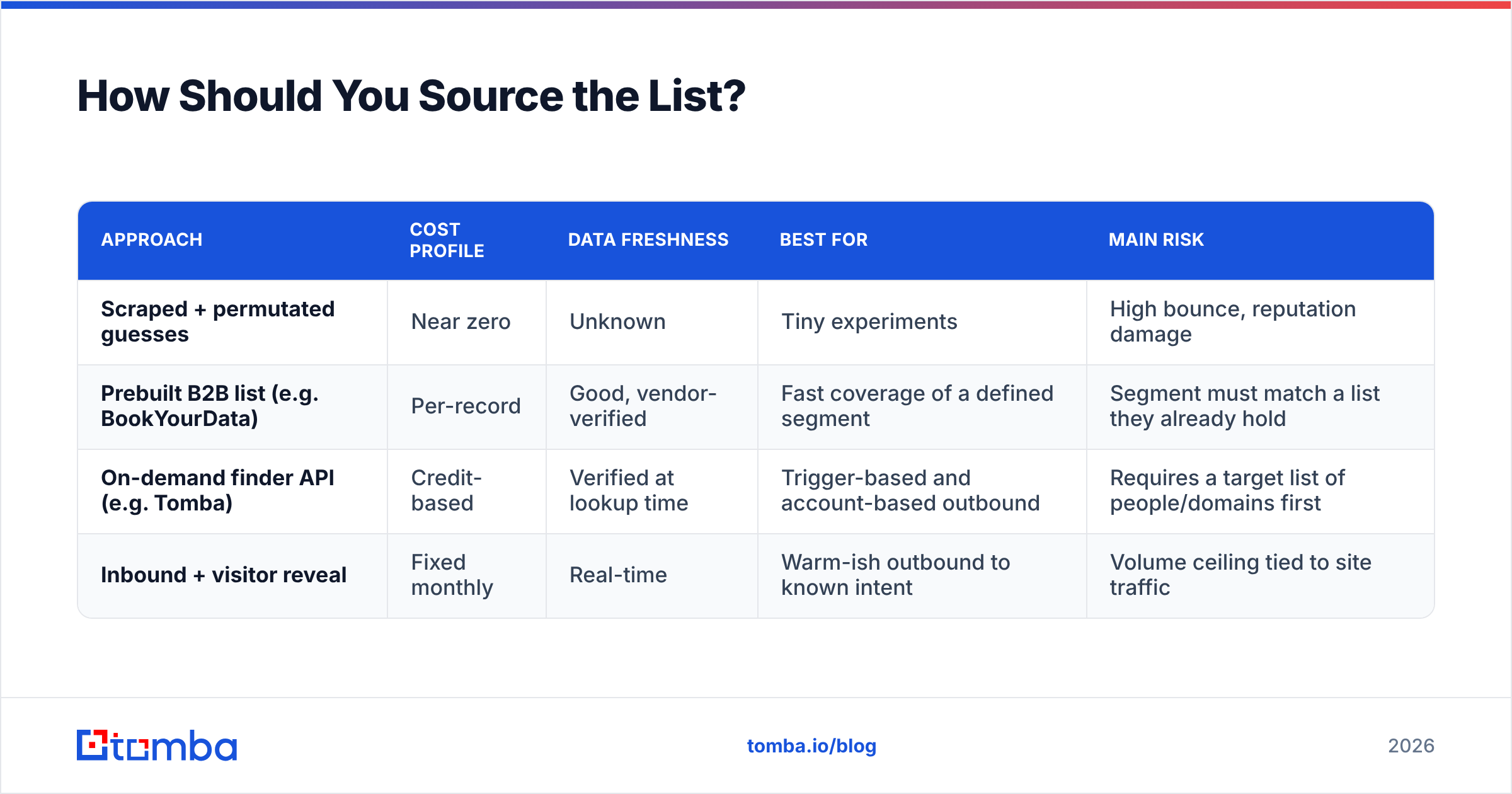
There are four realistic sourcing paths, and mature teams use two or three in combination rather than betting on one.
| Approach | Cost profile | Data freshness | Best for | Main risk |
|---|---|---|---|---|
| Scraped + permutated guesses | Near zero | Unknown | Tiny experiments | High bounce, reputation damage |
| Prebuilt B2B list (e.g. BookYourData) | Per-record | Good, vendor-verified | Fast coverage of a defined segment | Segment must match a list they already hold |
| On-demand finder API (e.g. Tomba) | Credit-based | Verified at lookup time | Trigger-based and account-based outbound | Requires a target list of people/domains first |
| Inbound + visitor reveal | Fixed monthly | Real-time | Warm-ish outbound to known intent | Volume ceiling tied to site traffic |
The pattern that works: use a prebuilt list to establish a broad addressable segment, then layer a finder API on top for the accounts you actually prioritize this month. Tools like Tomba's domain search return every discoverable address at a company plus its email pattern, which lets you resolve a named contact from a LinkedIn profile or a job posting without buying an entire vertical.
Pricing matters at scale, so run the math per usable contact rather than per credit. On Tomba's plans, the free tier gives 25 searches a month for testing the data before you commit, Starter runs $49/mo, Growth $99/mo, and Pro $249/mo. Compare that against the fully loaded cost of an SDR spending four hours a week hand-checking addresses — the tooling is almost always the cheaper input.
What Sending Infrastructure Do You Need?#
Since Google and Yahoo tightened bulk-sender requirements, infrastructure has stopped being an afterthought. The current baseline, per Google's sender guidelines, is authentication, a spam-complaint rate under 0.3%, and one-click unsubscribe for bulk mail.
Your minimum viable setup:
- Separate sending domains. Never send cold volume from your primary corporate domain. Register 2–4 lookalike domains and redirect them to your site.
- SPF, DKIM, and DMARC on every one. Check your records with an SPF checker before the first send, not after the first bounce report.
- Warmup before volume. Two to three weeks of ramped, engaged sending per mailbox. Use an email warmup calculator to plan the ramp instead of guessing.
- 25–40 sends per mailbox per day, hard cap. Two mailboxes per domain. Scale by adding mailboxes, not by raising per-mailbox volume.
- Plain text, one link maximum. No tracking pixels if you can live without open rates — and in 2026 you can, because Apple and Gmail privacy proxies have made open rate a noise metric.
Do the arithmetic on that: 8 mailboxes × 35 sends × 21 working days ≈ 5,880 sends per month. That is your real capacity. Any plan that assumes 30,000 monthly sends from four mailboxes is a plan to get filtered.
What Should the Sequence Look Like?#
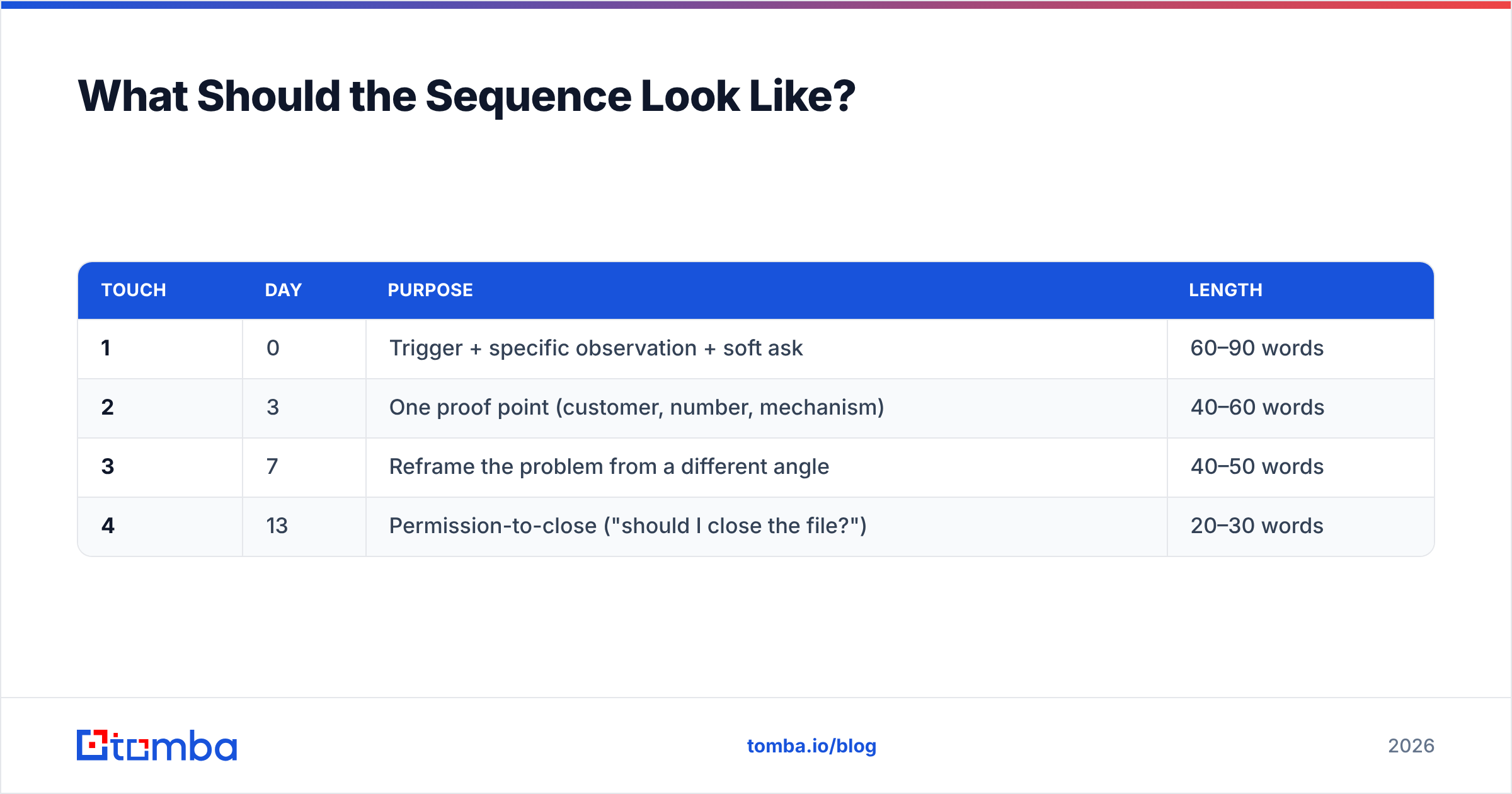
Shorter than you think, and spaced wider than most sequencers default to.
| Touch | Day | Purpose | Length |
|---|---|---|---|
| 1 | 0 | Trigger + specific observation + soft ask | 60–90 words |
| 2 | 3 | One proof point (customer, number, mechanism) | 40–60 words |
| 3 | 7 | Reframe the problem from a different angle | 40–50 words |
| 4 | 13 | Permission-to-close ("should I close the file?") | 20–30 words |
Four touches over roughly two weeks. Add a fifth only if you have genuinely new information — a relevant case study, a product change, a public event at their company. Sending an eighth "just bumping this to the top of your inbox" does not create pipeline; it creates spam complaints, and complaints cost you the inbox-rate multiplier that everything else depends on.
On the copy itself, three rules hold up across most tests:
- The first line must be unguessable. If your opener could be pasted into any of the other 400 emails on the list, it reads as automated regardless of merge tags.
- One ask, and make it small. "Worth a look?" outperforms "do you have 30 minutes Tuesday at 2pm?" at the first touch.
- Write to a problem, not a product. Buyers filter on whether you understand their situation, not on your feature list. HubSpot's own sales research has said versions of this for a decade and it keeps replicating.

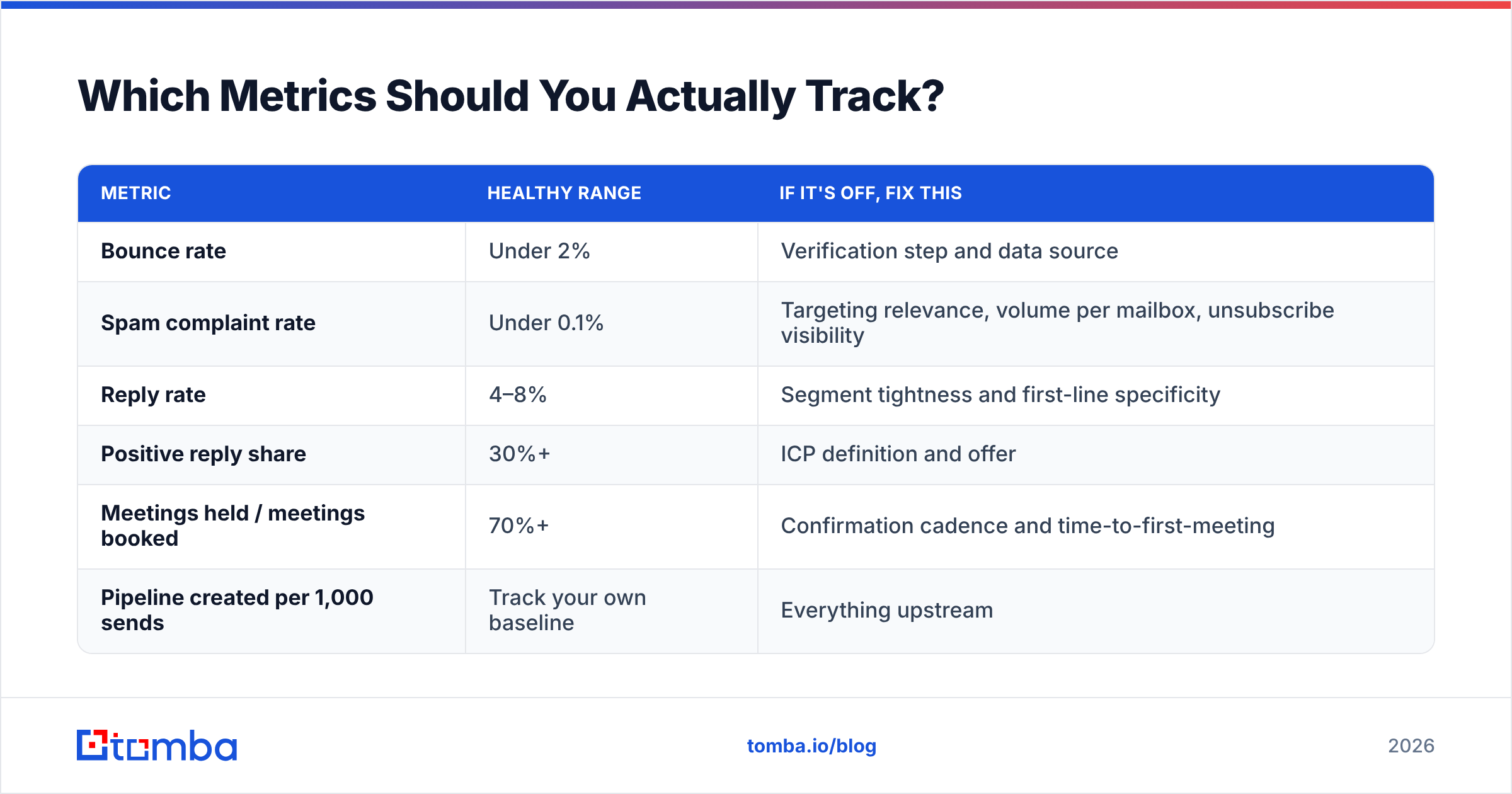
Which Metrics Should You Actually Track?#
Weekly, in this order. If a metric does not change a decision, cut it from the dashboard.
| Metric | Healthy range | If it's off, fix this |
|---|---|---|
| Bounce rate | Under 2% | Verification step and data source |
| Spam complaint rate | Under 0.1% | Targeting relevance, volume per mailbox, unsubscribe visibility |
| Reply rate | 4–8% | Segment tightness and first-line specificity |
| Positive reply share | 30%+ | ICP definition and offer |
| Meetings held / meetings booked | 70%+ | Confirmation cadence and time-to-first-meeting |
| Pipeline created per 1,000 sends | Track your own baseline | Everything upstream |
That last row is the only one that survives a board meeting. Establish your baseline in month one, then measure every change against it. A campaign that lifts reply rate but drops positive-reply share has made your team busier without making the company richer.
Open rate deserves a specific note: stop making decisions with it. Privacy proxies pre-fetch images, which inflates opens by an unpredictable margin per audience. Use it as a directional smoke alarm for deliverability collapse, not as a subject-line A/B verdict.
What Kills Pipeline Fastest?#
Ranked by damage per unit of effort saved:
- Skipping verification. One import of a stale purchased list can take a domain from 90% inbox placement to 50% in a week.
- Scaling volume before product-message fit. If 1,000 well-targeted sends produce zero positive replies, 10,000 will produce zero positive replies and a burned domain.
- Targeting by title only. Company size, stack, and stage change the buyer's problem more than the title does.
- Slow reply handling. A positive reply answered in 30 minutes books a meeting far more often than the same reply answered the next afternoon. Route replies to a human, not to a queue.
- No suppression hygiene. Re-contacting a closed-lost account or an existing customer with a cold pitch is the fastest way to get an internal complaint escalated to a domain-level block.
None of these are clever failures. They are all the result of optimizing for send volume because send volume is the easiest number to move.
Where Should You Start This Month?#
Pick the smallest multiplier and fix only that. If your bounce rate is above 3%, spend the month on data — nothing else you do will show up in the numbers until that is under control. If deliverability is clean but reply rate sits under 2%, your segment is too broad; cut the list to 200 accounts you can actually describe a specific problem for, and write to those.
Then rebuild the list properly. Start with a defined account set, pull contacts and company email patterns with the Tomba Email Finder, verify every address before it enters your sequencer, and enrich what survives so your first line has something real to say. The free tier gives you 25 searches to check the data quality against accounts you already know before you spend anything — which is exactly the test you should run on any data vendor, including this one.
Build the list right, and the copy has a fighting chance. Build it wrong, and the best email you ever write lands in a folder nobody opens.
Related guides#
// get started
Find, verify and enrich your first contacts today
Start on the free plan with 25 searches a month, then scale when your team is ready.
Free plan · No credit card required · GDPR & CCPA
// about the author