9 Best Infraforge Alternatives for Cold Email in 2026
Infraforge sells private cold email infrastructure: dedicated IPs, bulk domains, unlimited mailboxes. Here's how nine alternatives compare on price, setup speed, control and deliverability — and when switching is actually worth it.

TL;DR
- Infraforge (from the Salesforge family) sells private cold email infrastructure: your own dedicated IPs, bulk domain purchase, and mailboxes provisioned in minutes. Most people shopping for Infraforge alternatives want either lower per-mailbox cost, a different mailbox provider, or infrastructure they fully own.
- The real comparison points are mailbox provider type (Google/Microsoft resold vs. private SMTP), IP dedication, domain handling, DNS automation, and how quickly you can replace a burned domain.
- Private-SMTP providers (Infraforge, Mailreef, Maildoso) win on price per mailbox at volume. Resold Google Workspace providers (Zapmail, Mailforge-style setups) win on inbox placement into Gmail-hosted recipients.
- Below $10k/month in pipeline at stake, buying Google Workspace directly and running 5–10 domains is usually cheaper and less fragile than any infra vendor.
- Infrastructure is the second-biggest lever. The biggest is list quality: a verified, correctly targeted list on mediocre infra beats a bad list on perfect infra every single time.
What is Infraforge, and why do teams look for alternatives?#
Infraforge is the email infrastructure product in the Salesforge suite. Instead of buying mailboxes one at a time from Google or Microsoft, you buy domains in bulk, get mailboxes provisioned on private infrastructure with dedicated IPs, and get SPF/DKIM/DMARC records written for you. It targets agencies and outbound teams running dozens to hundreds of sending accounts.
That model solves a real problem. Manually buying 40 domains, waiting on registrar propagation, creating 120 mailboxes in an admin console, and hand-editing DNS is a multi-day slog that nobody wants to repeat every quarter.
So why do people search for Infraforge alternatives? In practice, four reasons keep coming up:
- Provider mix. Infraforge is private-SMTP-first. Some teams get materially better Gmail placement from mailboxes that genuinely live on Google Workspace, and want a vendor that resells those instead.
- Per-mailbox economics at scale. At 200+ mailboxes, a $1–2 monthly difference per mailbox is a line item somebody notices.
- Bundling. Infraforge sits inside a suite (Salesforge for sending, Warmforge for warmup). If you already pay for Instantly, Smartlead or Lemlist, you may not want a second ecosystem.
- Ownership. Some teams want infrastructure on their own cloud account, where no vendor can suspend 300 mailboxes on a Friday afternoon.
What should you actually compare in cold email infrastructure?#
Ignore the marketing pages for a second. These six attributes determine whether an infrastructure vendor works for you:
- Mailbox provider type — Private SMTP (the vendor runs the mail servers) vs. resold Google Workspace or Microsoft 365. Private SMTP is cheaper and unlimited; resold Workspace often lands better in Gmail-hosted inboxes and survives Google's bulk-sender checks more predictably.
- IP dedication — Shared pool, semi-dedicated, or fully dedicated. Shared pools are cheap and get poisoned by other customers' bad lists. Dedicated IPs require enough consistent volume to build reputation, or they look untrusted.
- Domain handling — Does the vendor register domains for you, auto-configure DNS, and handle the redirect from your sending domain to your main site? Manual DNS across 30 domains is where most self-built setups break.
- Replacement speed — When a domain burns (it will), how fast can you spin up a replacement with warmed mailboxes? Measure this in hours, not features.
- Warmup approach — Bundled, third-party-compatible, or nonexistent. Avoid vendors whose warmup is a closed network that only emails other customers of the same vendor.
- Exit cost — Can you export domains and point them elsewhere, or are they registered under the vendor's account in a way that makes leaving painful? Ask this before you buy, not after.
A fair benchmark: any setup should get you from "signed up" to "sending warmed mail from a new domain" in under two weeks, and from "domain burned" to "replacement live" in under 48 hours.
How do the main Infraforge alternatives compare?#
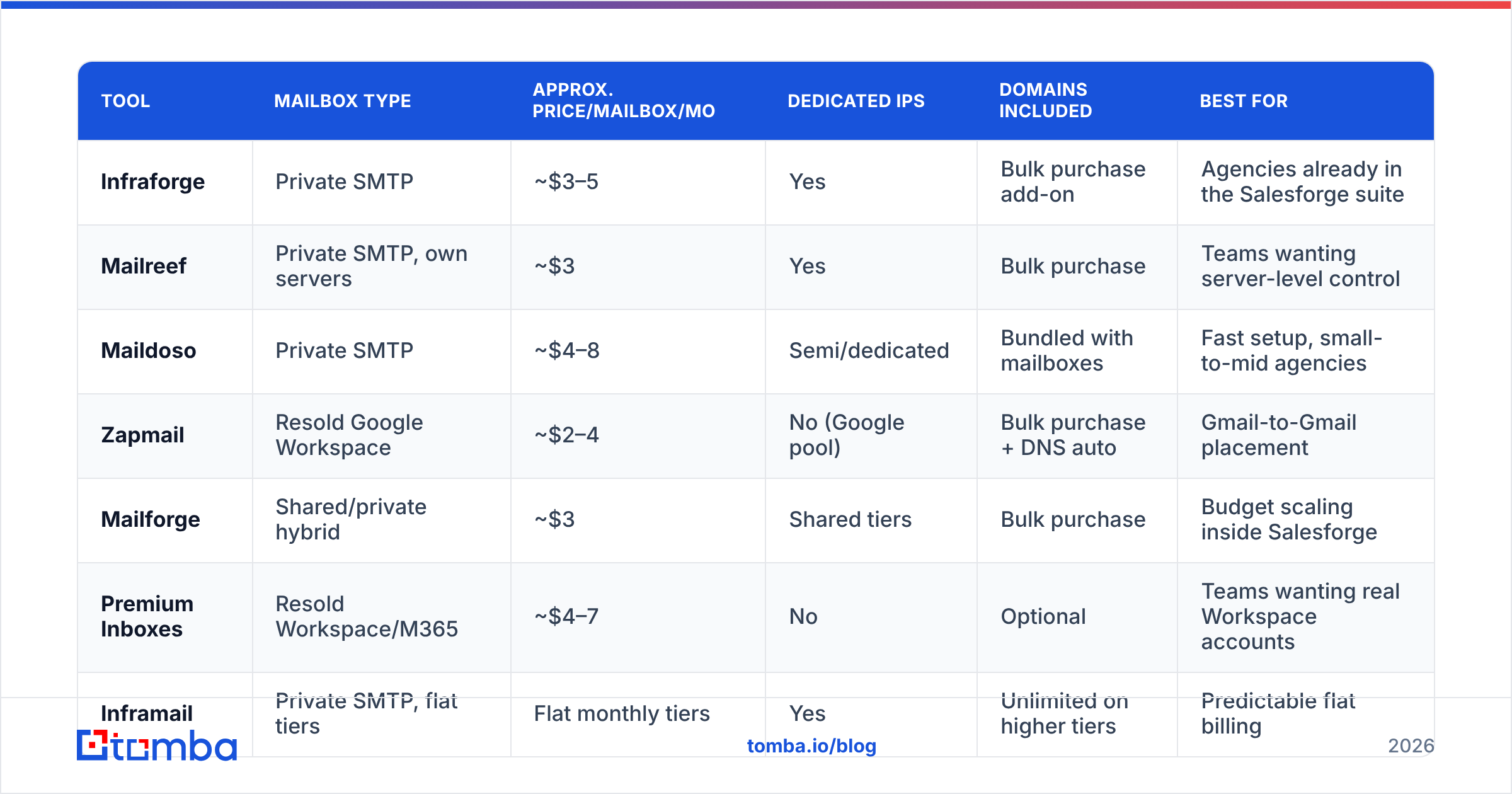
Prices below are approximate list prices at the time of writing and move often. Treat them as a shape, not a quote, and check each vendor's current page before you commit. Volume discounts at 100+ mailboxes are common and rarely published.
| Tool | Mailbox type | Approx. price/mailbox/mo | Dedicated IPs | Domains included | Best for |
|---|---|---|---|---|---|
| Infraforge | Private SMTP | ~$3–5 | Yes | Bulk purchase add-on | Agencies already in the Salesforge suite |
| Mailreef | Private SMTP, own servers | ~$3 | Yes | Bulk purchase | Teams wanting server-level control |
| Maildoso | Private SMTP | ~$4–8 | Semi/dedicated | Bundled with mailboxes | Fast setup, small-to-mid agencies |
| Zapmail | Resold Google Workspace | ~$2–4 | No (Google pool) | Bulk purchase + DNS auto | Gmail-to-Gmail placement |
| Mailforge | Shared/private hybrid | ~$3 | Shared tiers | Bulk purchase | Budget scaling inside Salesforge |
| Premium Inboxes | Resold Workspace/M365 | ~$4–7 | No | Optional | Teams wanting real Workspace accounts |
| Inframail | Private SMTP, flat tiers | Flat monthly tiers | Yes | Unlimited on higher tiers | Predictable flat billing |
| Google Workspace (direct) | Google, first-party | ~$7/user | No | Buy separately | Under ~30 mailboxes total |
| Microsoft 365 (direct) | Microsoft, first-party | ~$6/user | No | Buy separately | Enterprise-heavy target lists |
Two patterns fall out of that table.
First, the private-SMTP vendors cluster tightly around $3–5 per mailbox. If you are choosing between Infraforge, Mailreef and Maildoso purely on price, you are optimizing a rounding error. Choose on support responsiveness, replacement speed, and whether you can export your domains.
Second, resold Google Workspace is no longer meaningfully more expensive than private SMTP once vendors apply bulk pricing. That changes the old calculus where private infra was the only affordable path to 200 mailboxes.
Is dedicated IP infrastructure better than Google Workspace?#
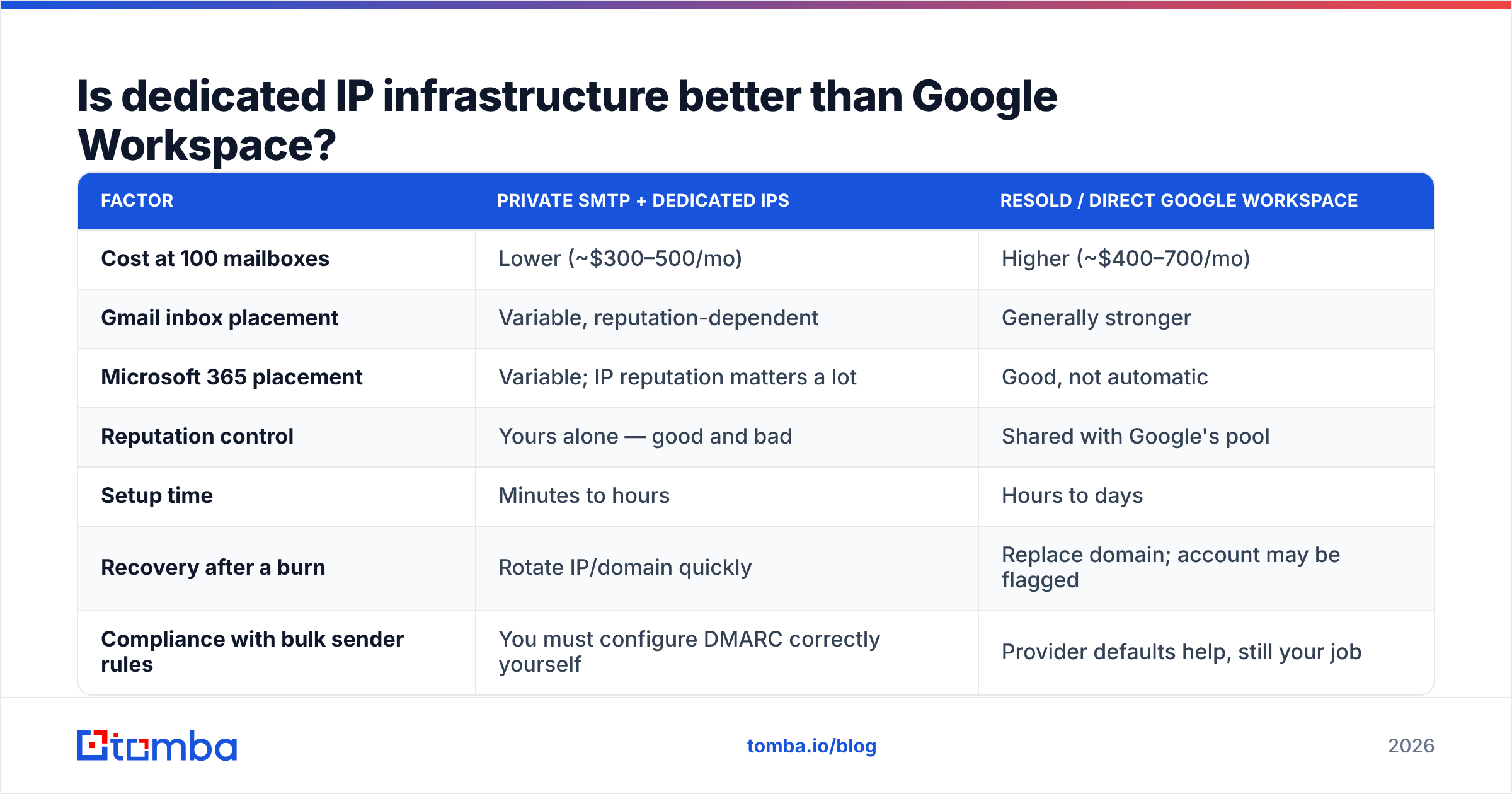
It depends on who you are emailing, and this is the decision that matters most.
| Factor | Private SMTP + dedicated IPs | Resold / direct Google Workspace |
|---|---|---|
| Cost at 100 mailboxes | Lower (~$300–500/mo) | Higher (~$400–700/mo) |
| Gmail inbox placement | Variable, reputation-dependent | Generally stronger |
| Microsoft 365 placement | Variable; IP reputation matters a lot | Good, not automatic |
| Reputation control | Yours alone — good and bad | Shared with Google's pool |
| Setup time | Minutes to hours | Hours to days |
| Recovery after a burn | Rotate IP/domain quickly | Replace domain; account may be flagged |
| Compliance with bulk sender rules | You must configure DMARC correctly yourself | Provider defaults help, still your job |
Dedicated IPs are not an automatic upgrade. An IP with no sending history is untrusted, and it takes consistent daily volume over several weeks to build reputation on it. If you send 300 emails a day spread across 40 mailboxes, you may never generate enough volume per IP to establish a signal — which is exactly the case where resold Workspace outperforms.
Whatever you pick, Google's bulk sender requirements apply: authenticated SPF and DKIM, a DMARC record, one-click unsubscribe on marketing mail, and spam complaint rates under 0.3%. Check your setup with a SPF checker before you send a single campaign, and monitor domains in Google Postmaster Tools once volume starts. If you are fuzzy on the terminology, Tomba's email deliverability glossary entry covers the vocabulary in plain language.
Which Infraforge alternative fits which team?#
Mailreef — The closest philosophical match to Infraforge. Private mail servers, dedicated IPs, bulk domains, and pricing in the same band. Pick it if you want infrastructure-level control and a vendor whose whole product is infrastructure rather than one module in a suite. The trade-off is that you get fewer bundled sending features.
Maildoso — Fast provisioning and a clean setup experience, priced slightly higher. Popular with agencies that want infrastructure handled and do not want to think about DNS. If your team's technical bandwidth is limited, the premium is usually worth it.
Zapmail — Resold Google Workspace at bulk pricing with automated DNS. The right answer when your target list is heavy on Gmail-hosted companies — startups, agencies, SMBs, most of tech. Weaker fit for enterprise lists sitting behind Microsoft 365 and Proofpoint-style filters.
Mailforge — Infraforge's cheaper sibling, also from Salesforge. Shared infrastructure tiers instead of fully private. It exists because not everyone needs dedicated IPs, and the honest read is that most teams under 100 mailboxes do not. If you are leaving Infraforge on cost alone, look here before looking outside the suite.
Premium Inboxes — Real Workspace or Microsoft 365 accounts with white-glove setup. Higher touch, higher price, fewer surprises. Good fit for teams selling into regulated industries where "we send from real corporate mailboxes" matters.
Inframail — Flat-fee tiers rather than per-mailbox pricing. Attractive if your mailbox count fluctuates or you plan to run a large number of low-volume accounts. Do the arithmetic against per-mailbox pricing at your actual count; the flat model wins above a certain threshold and loses below it.
Google Workspace or Microsoft 365 direct — Under roughly 30 mailboxes, buy them yourself. Register 5–10 domains, create 3 mailboxes each, warm them properly. It costs more per mailbox and less in total, and nothing is locked to a vendor. Check current tiers on Google Workspace and compare user reviews of the infra vendors on G2 before committing budget.

Does more infrastructure actually fix low reply rates?#
Usually not, and this is the uncomfortable part of the infrastructure conversation.
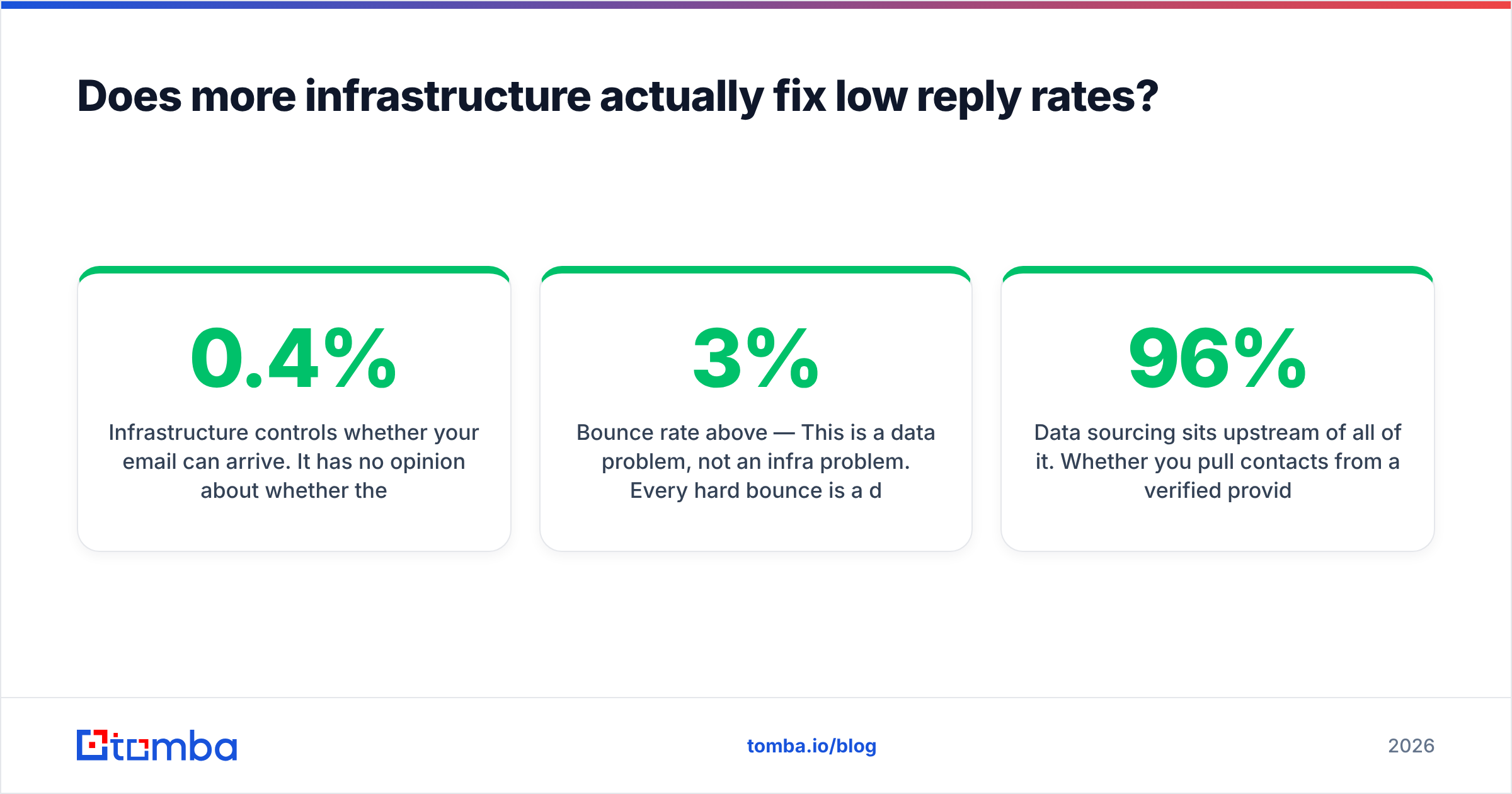
Infrastructure controls whether your email can arrive. It has no opinion about whether the person on the other end should receive it. If your reply rate is 0.4%, adding 100 mailboxes gets you more 0.4% at higher cost. Work through the diagnosis in this order:
- Bounce rate above 3% — This is a data problem, not an infra problem. Every hard bounce is a direct hit to domain reputation, and no amount of dedicated IP helps. Run your list through an email verifier before it touches a sequence.
- Delivered but no opens — Placement problem. Check authentication, warmup age, sending volume ramp, and whether your copy trips spam filters.
- Opens but no replies — Targeting or offer problem. Infrastructure is irrelevant here. Fix the ICP definition and the first line.
- Good replies, not enough of them — Now volume helps, and now infrastructure spend pays back.
Most teams that churn through three infrastructure vendors in a year are solving problem one or three with a tool built for problem four.
Data sourcing sits upstream of all of it. Whether you pull contacts from a verified provider like BookYourData, enrich from your CRM, or find addresses directly by domain with a domain search, the quality of that input sets the ceiling on everything your infrastructure does afterward. A 96% deliverable list on shared IPs will outperform a scraped list on dedicated IPs, consistently.
How do you migrate off Infraforge without burning reputation?#
Switching vendors means switching domains and mailboxes, and a sloppy migration costs you weeks. A safe sequence:
- Do not cancel first. Keep existing mailboxes sending at normal volume while the new ones warm. Overlap for at least three weeks.
- Register new domains on your own registrar account where possible, then point nameservers at the new vendor. This keeps your exit cheap next time.
- Warm the new mailboxes for 14–21 days before any real campaign traffic. Use the warmup calculator to plan a realistic ramp rather than guessing at daily increments.
- Move volume in thirds. Shift a third of your daily sends per week. If reply rates or bounce rates move badly, you know which cohort caused it.
- Re-verify the list before the first send on new domains. New infrastructure plus a stale list is the fastest way to burn a fresh domain in a week.
- Watch complaint rate, not just bounce rate. Complaints above 0.3% will get new domains throttled no matter whose servers they run on.
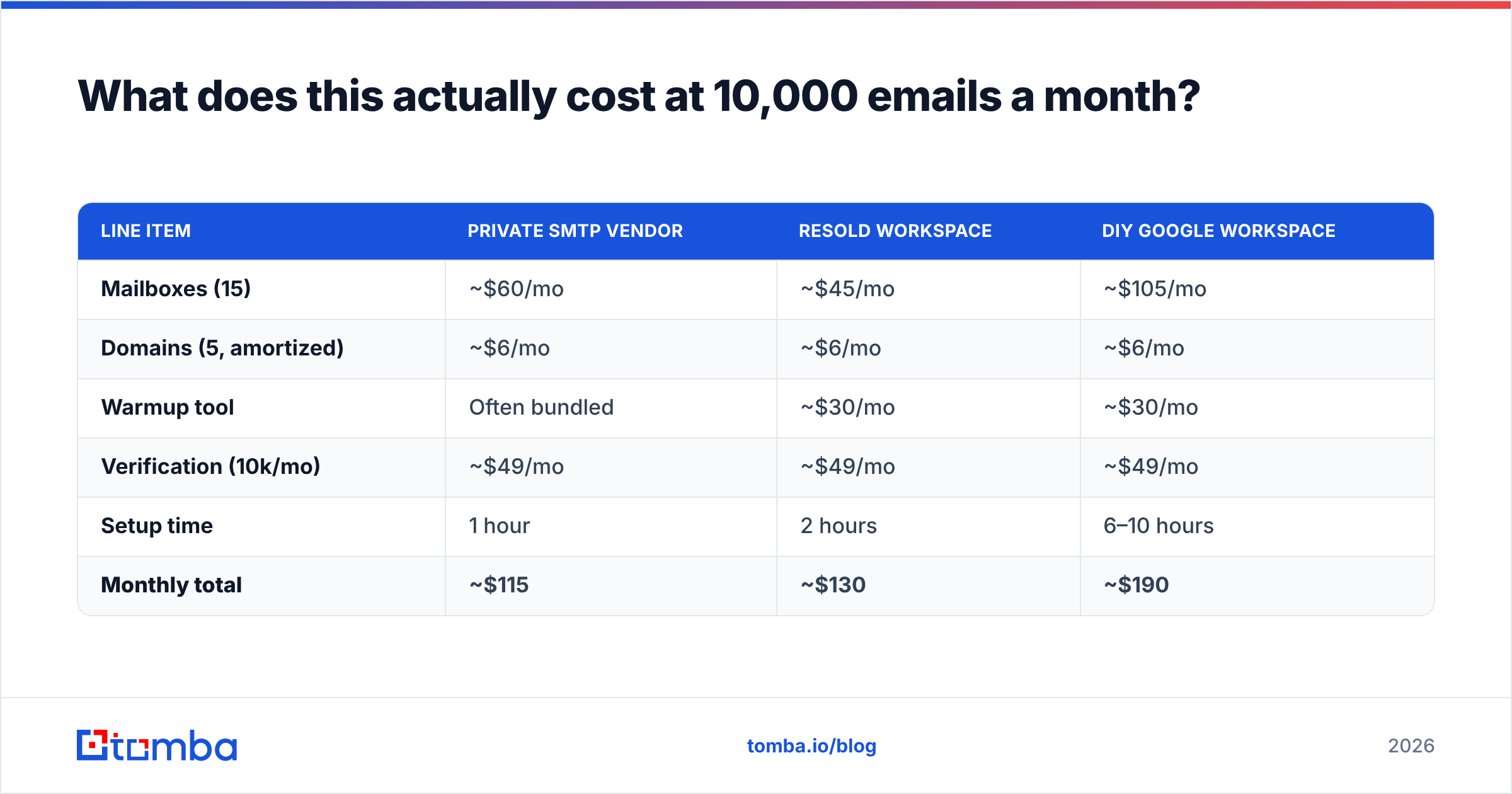
What does this actually cost at 10,000 emails a month?#
Assume 10,000 sends per month, 30 emails per mailbox per day, roughly 12–15 mailboxes across 5 domains.
| Line item | Private SMTP vendor | Resold Workspace | DIY Google Workspace |
|---|---|---|---|
| Mailboxes (15) | ~$60/mo | ~$45/mo | ~$105/mo |
| Domains (5, amortized) | ~$6/mo | ~$6/mo | ~$6/mo |
| Warmup tool | Often bundled | ~$30/mo | ~$30/mo |
| Verification (10k/mo) | ~$49/mo | ~$49/mo | ~$49/mo |
| Setup time | 1 hour | 2 hours | 6–10 hours |
| Monthly total | ~$115 | ~$130 | ~$190 |
Two takeaways. At this volume the infrastructure difference is about $75 a month, which is noise against one closed deal. And verification is a comparable line item to the entire mailbox bill — which tells you something about where the leverage sits.
The math flips at 100+ mailboxes, where private SMTP saves real money and the DIY option becomes an administrative burden nobody wants to own.
Which Infraforge alternative should you choose?#
Short version:
- Under 30 mailboxes: buy Google Workspace directly. Skip the vendor layer entirely.
- Gmail-heavy target list, 30–150 mailboxes: Zapmail or Premium Inboxes.
- Mixed or enterprise list, 50–300 mailboxes: Mailreef or Maildoso.
- Already in the Salesforge ecosystem: try Mailforge before leaving; the cheaper sibling solves most "Infraforge is too expensive" complaints.
- Fluctuating mailbox count: Inframail's flat tiers, after you run the arithmetic.
None of these choices matter if the addresses you send to are wrong. Before you spend another dollar on inboxes, fix the input: use the Tomba Email Finder to pull verified, correctly-formatted addresses by domain, name or company, with verification built into the same workflow. The free tier covers 25 searches a month, Starter is $49/mo, and Growth is $99/mo — see full Tomba pricing for volume tiers. Get the list right, and mediocre infrastructure will outperform anyone else's dedicated IPs.
Related guides#
// get started
Find, verify and enrich your first contacts today
Start on the free plan with 25 searches a month, then scale when your team is ready.
Free plan · No credit card required · GDPR & CCPA
// about the author