Instantly vs Saleshandy (2026): Full Cold Email Comparison
Instantly and Saleshandy both promise unlimited inboxes and better reply rates. We compare pricing at real volume, deliverability tooling, lead data quality, and agency features to show which one actually fits your outbound motion.
TL;DR
- Instantly wins on scale and inbox management. Unlimited connected mailboxes on paid plans, a genuinely good unified inbox, and a deliverability network built for teams sending tens of thousands of emails a month.
- Saleshandy wins on price-per-seat and sequence control. Cheaper entry tiers, unlimited email accounts from the first paid plan, and multi-stage sequences with LinkedIn and call steps baked in.
- Neither is a data company. Both bundle a "lead database," and both bundle it at a quality level that will bounce your campaigns if you send to it unverified.
- Cost diverges sharply at volume. Instantly's higher tiers jump to hundreds of dollars a month once you add lead credits; Saleshandy's per-prospect pricing scales more predictably but caps features lower.
- The real decision: pick the sender you like, then fix the input. Bad data sinks both platforms equally.
Cold email tooling has split into two jobs that used to be one: finding the person and reaching the person. Instantly and Saleshandy both live squarely in the second job. Picking between them is mostly a question of how many mailboxes you run, how much you care about sequence branching, and how much you're willing to pay once your list grows past a few thousand contacts.
Here's the honest breakdown.
What is Instantly and what is Saleshandy?#
Instantly (instantly.ai) launched as a warmup-first product and grew into a full outbound suite. Its pitch is volume: connect as many sending mailboxes as you want, rotate sends across them automatically, warm them with a peer-to-peer network, and manage every reply in one unified inbox. In 2024–2026 it added a lead database, an AI SDR layer, a CRM-lite pipeline view, and an inbox-placement tester. It is the tool most agencies reach for when the requirement is "send a lot, from many domains, without getting burned."
Saleshandy (saleshandy.com) came from the email-tracking world and evolved into a sequencing platform. Its pitch is control: multi-step, multi-channel sequences with conditional logic, unified inbox, sender rotation, a B2B lead finder, and a client-management layer for agencies. It typically undercuts Instantly on the entry tier and prices prospects separately from sending.
Both do the same five core things — connect mailboxes, warm them, send sequences, rotate senders, catch replies. The differences show up in the corners.
How do Instantly and Saleshandy compare head-to-head?#
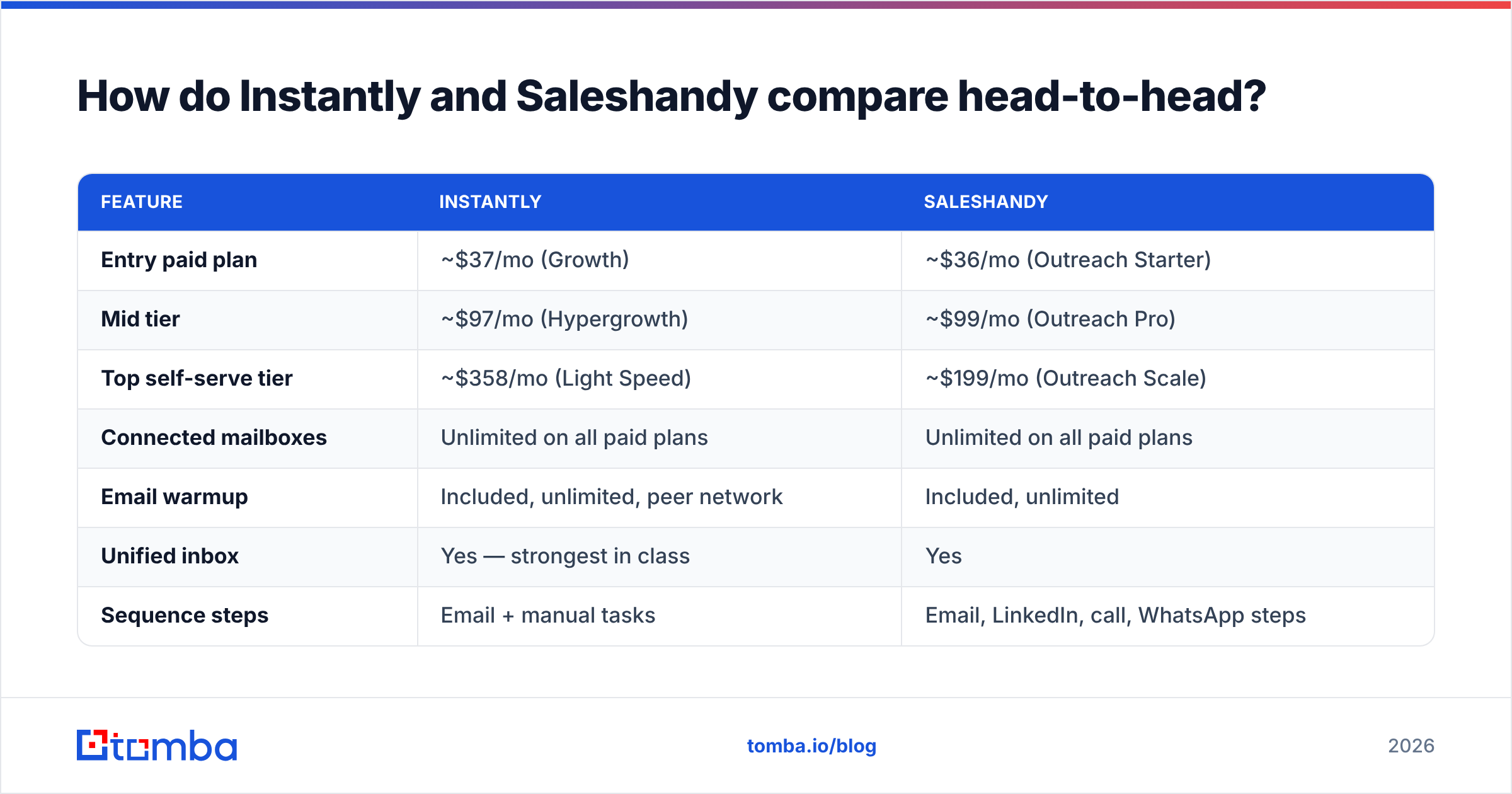
| Feature | Instantly | Saleshandy |
|---|---|---|
| Entry paid plan | ~$37/mo (Growth) | ~$36/mo (Outreach Starter) |
| Mid tier | ~$97/mo (Hypergrowth) | ~$99/mo (Outreach Pro) |
| Top self-serve tier | ~$358/mo (Light Speed) | ~$199/mo (Outreach Scale) |
| Connected mailboxes | Unlimited on all paid plans | Unlimited on all paid plans |
| Email warmup | Included, unlimited, peer network | Included, unlimited |
| Unified inbox | Yes — strongest in class | Yes |
| Sequence steps | Email + manual tasks | Email, LinkedIn, call, WhatsApp steps |
| Conditional branching | Limited | Yes (sequence conditions) |
| Lead database | Yes, credit-based add-on | Yes, prospect-credit based |
| Built-in verification | Basic, credit-charged | Basic, credit-charged |
| Agency / client workspaces | Yes (higher tiers) | Yes (client management on Pro+) |
| Native CRM | Lightweight pipeline | Lightweight pipeline |
| API access | Yes | Yes |
| Best for | High-volume multi-domain sending | Structured multichannel sequences |
Prices reflect publicly listed monthly rates at the time of writing and change often — check both vendors' pricing pages before you commit. Annual billing cuts both by roughly 30%.
The table flattens something important: these plans aren't priced on the same axis. Instantly charges mostly for sending features plus lead credits. Saleshandy charges mostly for active prospects plus seats. That means the "which is cheaper" answer flips depending on whether your bottleneck is volume or headcount.
Which one is actually cheaper at real sending volume?#
Run the numbers against a realistic motion instead of the pricing page.
Say you're a four-person outbound team emailing 15,000 new contacts a quarter across 12 mailboxes on 4 domains.
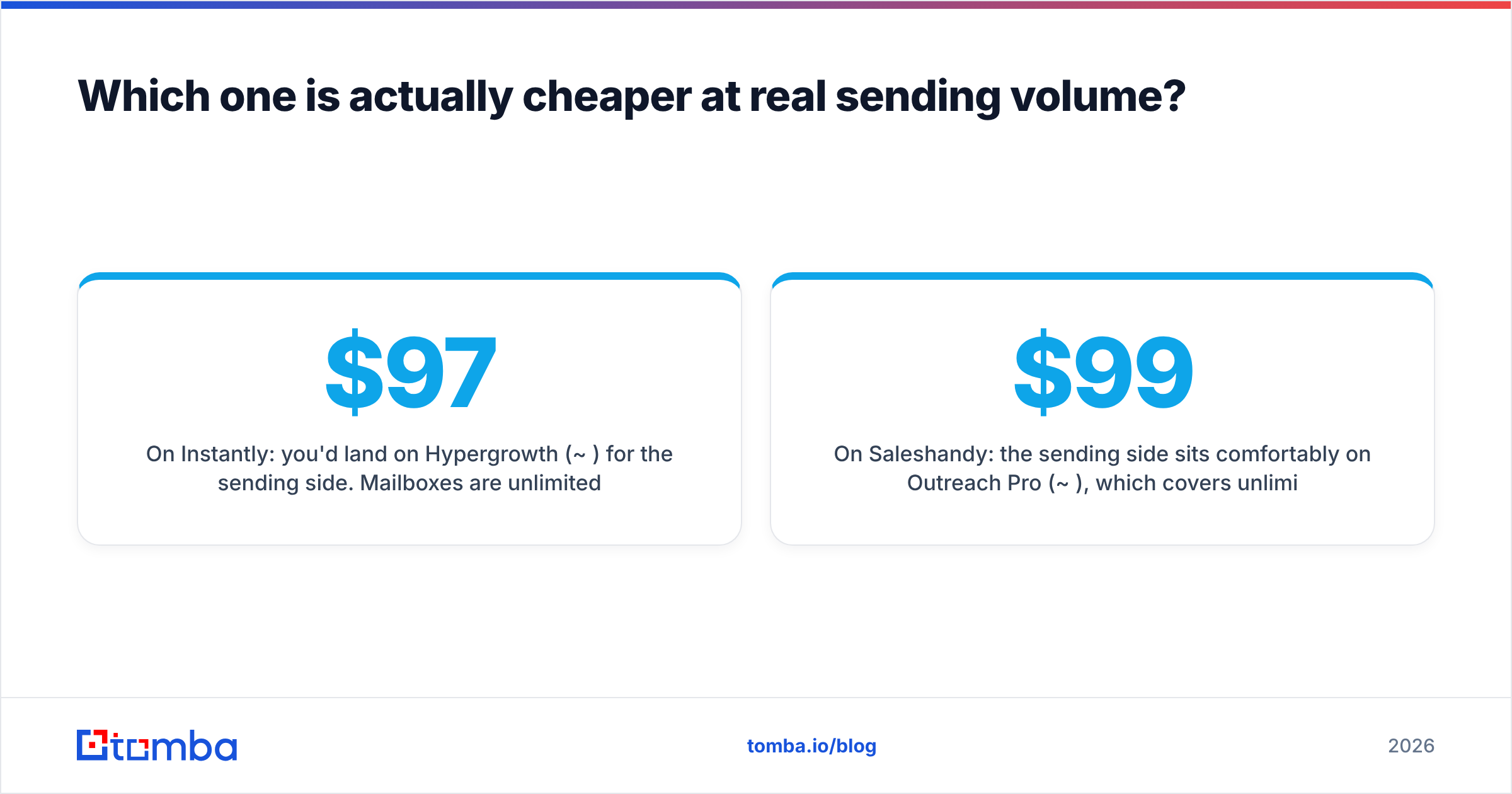
On Instantly: you'd land on Hypergrowth ($97/mo) for the sending side. Mailboxes are unlimited, so the 12 inboxes cost nothing extra. But if you want leads from Instantly's database, you're buying credits on top — and the volume you'd need for 15,000 contacts pushes many teams toward Light Speed ($358/mo) or a separate credit purchase. Total: roughly $100–$360/mo depending on how much data you buy in-platform.
On Saleshandy: the sending side sits comfortably on Outreach Pro ($99/mo), which covers unlimited mailboxes and a healthy active-prospect allowance. Extra seats and higher prospect caps push you to Scale ($199/mo). Lead-finder credits are separate. Total: roughly $99–$200/mo.
Saleshandy is the cheaper line item in most mid-market scenarios. Instantly justifies the premium if — and only if — you're running the kind of multi-domain, multi-client operation where its deliverability network and inbox management save real hours.

The trap in both cases is the same: the bundled lead credits look free and aren't. A credit spent on a stale contact costs you the credit, the send, and a slice of your domain reputation. That's the third line item nobody puts in the spreadsheet.
Which has better deliverability tooling?#
Instantly, narrowly — but the gap is smaller than its marketing implies.
Here's what actually moves inbox placement on either platform, in order of impact:
- Authentication done properly. SPF, DKIM and DMARC aligned on every sending domain. Neither tool does this for you; both will happily send from a misconfigured domain. Run an SPF checker on each domain before you connect a single mailbox.
- List hygiene before the first send. Bounce rate above roughly 3% is the single fastest way to torch a new domain. This is an input problem, not a platform problem.
- Warmup duration and ramp curve. Both include unlimited warmup. Instantly's peer network is larger, which produces more natural engagement signals; Saleshandy's is adequate but smaller. Use an email warmup calculator to set a ramp you can actually sustain rather than guessing at "50 a day."
- Sender rotation and per-mailbox caps. Both rotate. Instantly's rotation logic is more granular and its per-mailbox throttling is easier to tune across dozens of accounts.
- Content and link hygiene. Tracking pixels, shortened links and image-heavy HTML all cost placement. Both platforms let you disable open tracking; most experienced senders do.
- Reply handling speed. Positive engagement is a ranking signal. Instantly's unified inbox is faster to triage at scale, which compounds over months.
Instantly's edge is item 3 and item 4 — network size and rotation granularity — plus an inbox-placement tester on higher tiers that shows you whether you're landing in Primary, Promotions or Spam across major providers. Saleshandy covers the fundamentals well but gives you less diagnostic visibility when something goes wrong.
None of that matters if your list is dirty. Email deliverability is decided at the list level long before it's decided at the platform level, which is why teams that obsess over warmup settings while importing scraped CSVs keep getting the same result.
How good is the lead data inside each platform?#
This is where both tools are weakest, and it's worth being blunt about it.
Instantly's lead database and Saleshandy's lead finder are both licensed, aggregated B2B datasets wrapped in a search UI. They're convenient — you filter by title and industry, push contacts straight into a sequence, and never leave the tab. Convenience is the entire value proposition.
The cost is freshness. Aggregated datasets lag reality by months. Job changes, domain migrations and departmental reshuffles all silently degrade the records, and neither platform re-verifies at the moment of export by default. Real-world reports on G2 for both products cluster around the same complaint: the sending engine is solid, the bundled data bounces more than expected.
There are three sane ways to handle that:
- Verify inside the platform. Both offer verification, both charge credits for it, and both are less thorough than a dedicated verifier on catch-all domains.
- Verify outside the platform. Export, run the list through a dedicated email verifier, reimport only the valid rows. Slower, much cleaner.
- Source outside the platform entirely. Build lists from a data provider whose core business is accuracy, then use Instantly or Saleshandy purely as the sending layer. This is what most teams sending serious volume end up doing.
Option three is the one that separates a 1% bounce rate from a 9% one. A dedicated provider like Tomba runs live SMTP-level checks, resolves catch-all domains that generic tools mark "unknown," and returns confidence scores you can threshold on before a contact ever reaches a sequence. If you're evaluating the sending platforms specifically as data sources, it's also worth reading the Instantly alternative breakdown for where the bundled database actually falls short.

Which is better for agencies running multiple clients?#
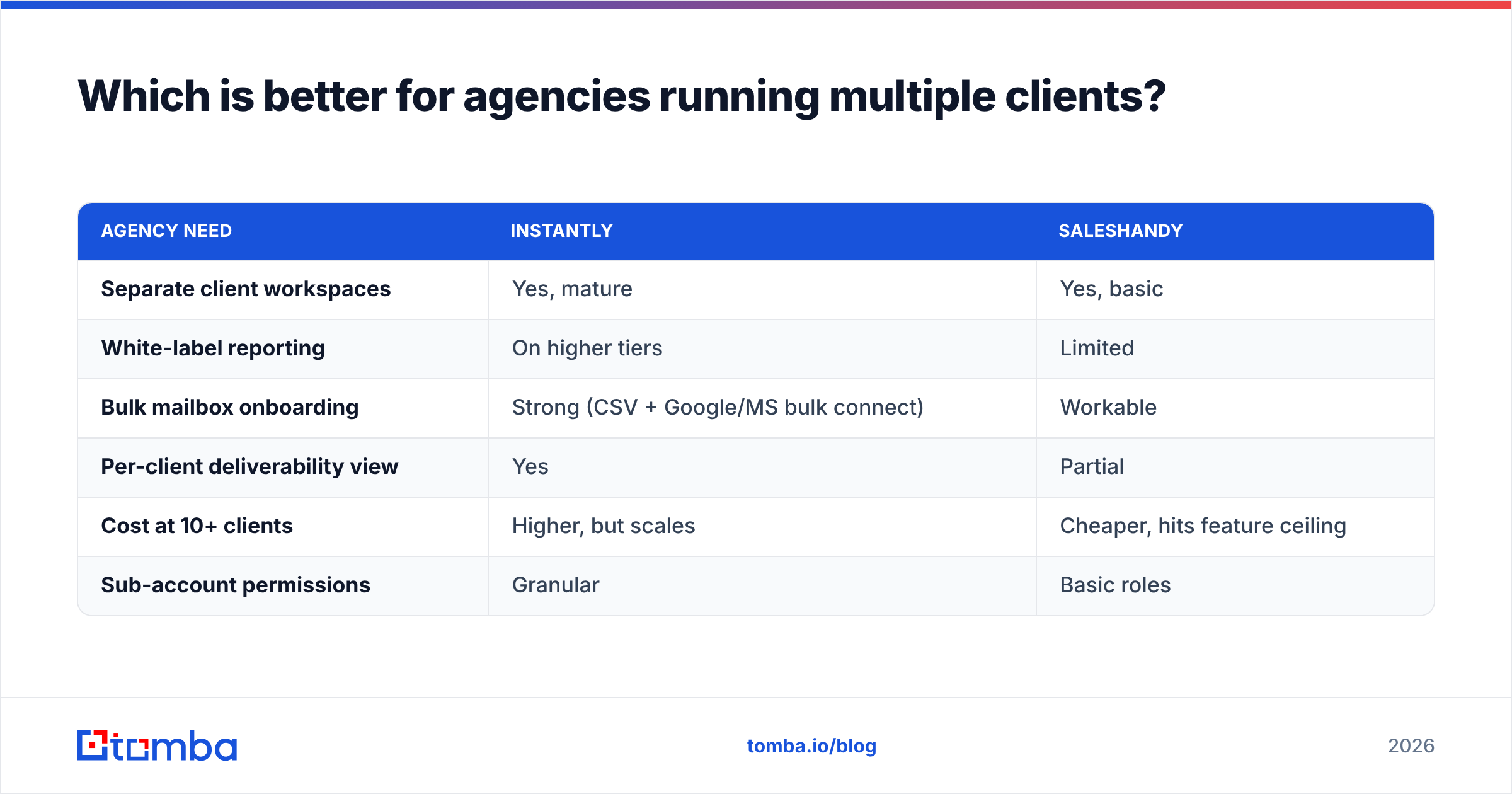
Instantly, if you're above five clients. Saleshandy, if you're below.
Instantly's workspace model was designed with agencies as a primary user. You get separate workspaces per client, per-workspace sending domains, white-label options on higher tiers, and client-facing reporting that doesn't require you to export screenshots. Mailbox sprawl — the 200-inbox reality of a real lead-gen agency — is handled without the UI collapsing.
Saleshandy's client management is newer and lighter. It does the job for a handful of accounts: segregate prospects, assign sequences, report per client. Past a certain scale you start feeling the ceiling, particularly around bulk mailbox operations and cross-client analytics.
| Agency need | Instantly | Saleshandy |
|---|---|---|
| Separate client workspaces | Yes, mature | Yes, basic |
| White-label reporting | On higher tiers | Limited |
| Bulk mailbox onboarding | Strong (CSV + Google/MS bulk connect) | Workable |
| Per-client deliverability view | Yes | Partial |
| Cost at 10+ clients | Higher, but scales | Cheaper, hits feature ceiling |
| Sub-account permissions | Granular | Basic roles |
Which should you choose for your situation?#
- Solo founder or two-person team, under 3,000 contacts a month. Saleshandy. The entry tier does everything you need, the sequence builder is more capable at the low end, and you'll save enough monthly to fund a real data source.
- SDR team of 3–10 with a multichannel motion. Saleshandy, unless deliverability is already a fire. The LinkedIn and call steps inside sequences remove a coordination tax that Instantly pushes you to solve with a second tool.
- High-volume outbound across many domains. Instantly. Rotation control, inbox-placement testing and the unified inbox pay for themselves once you're past roughly 20 mailboxes.
- Lead-gen agency with 5+ clients. Instantly. Workspace architecture and white-labeling are not optional at that size.
- You already have a sending tool and the problem is reply rate. Neither. Your problem is targeting and data quality, and swapping senders will not fix it.
That last case is more common than the vendor comparison posts admit. Teams evaluating Instantly vs Saleshandy are often solving the wrong variable — the sending engine is rarely the constraint once both are configured correctly. Response rate tracks list relevance far more tightly than it tracks which platform pushed the SMTP request. If your response rate is under 2% on a clean, well-authenticated setup, the fix is upstream of both products.
What do you actually lose by picking wrong?#
Less than you'd think, which is the reassuring part. Both platforms export sequences and contacts. Both integrate with the major CRMs. Migration is a weekend, not a quarter. The switching cost that matters is domain reputation — and that travels with your domains, not your tool.
So the practical advice: run a 30-day trial on both with a small, verified list. Send the same sequence to two matched segments. Compare bounce rate, spam-placement rate and reply rate. You'll learn more in a month of real sending than from any feature matrix, including this one.
Just make sure the list is genuinely clean on both sides, or you're measuring noise. Two platforms sending to the same 8%-invalid list will both look mediocre, and you'll have burned a month proving nothing.
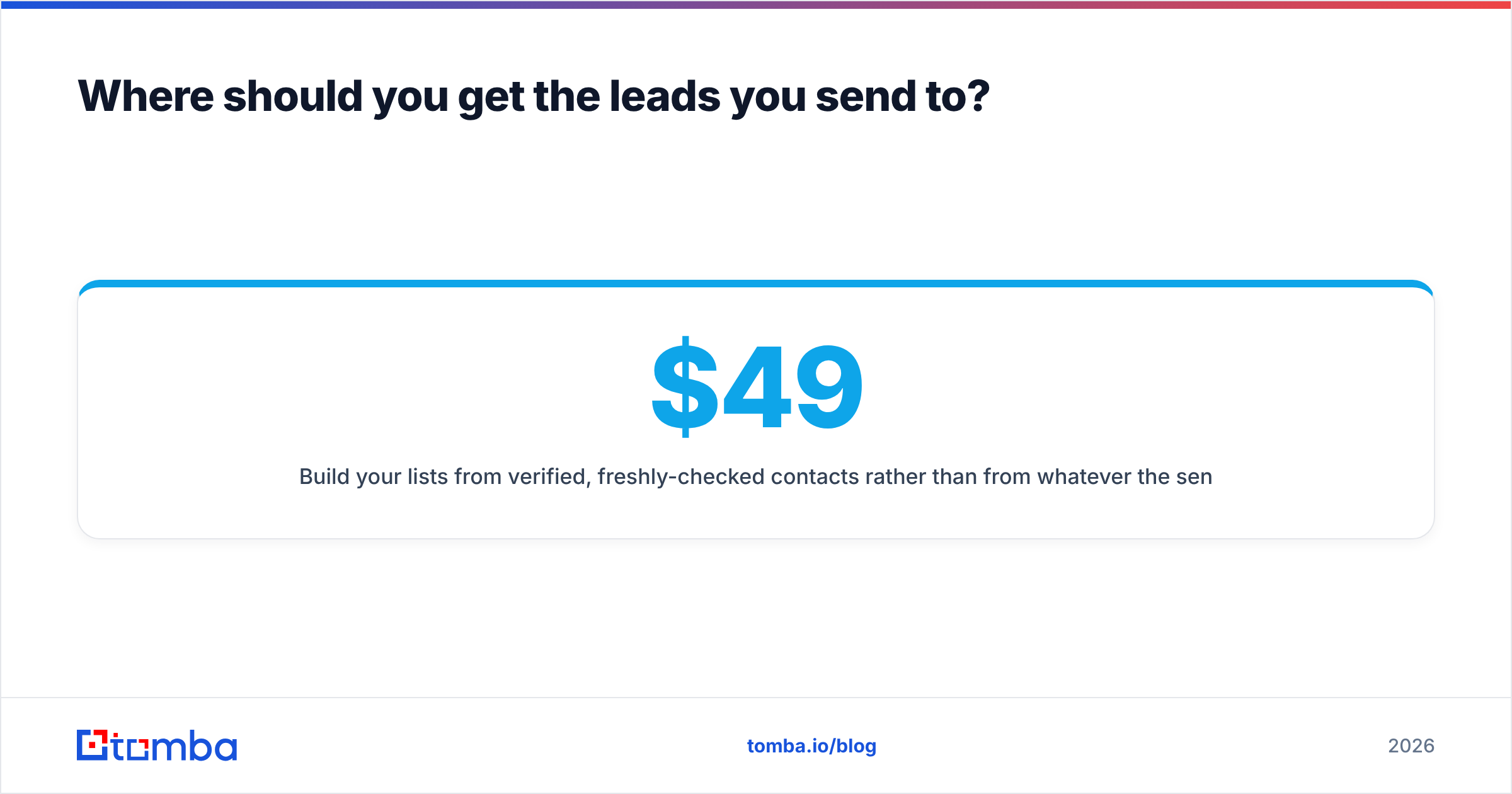
Where should you get the leads you send to?#
Whichever sender you choose, the input decides the outcome. That's the one conclusion this comparison keeps arriving at.
Build your lists from verified, freshly-checked contacts rather than from whatever the sending platform bundles. The Tomba Email Finder finds professional email addresses by name, domain or company, validates them at the SMTP level, and returns a confidence score you can filter on before anything hits a sequence. Start on the free tier — 25 searches a month, no card — and if it holds up, plans run $49/mo (Starter), $99/mo (Growth) and $249/mo (Pro). Full Tomba pricing is public, and the API drops straight into whichever sender you land on.
Pick Instantly or Saleshandy on the features you'll actually use. Then feed it data that deserves the send.
Related guides#
// get started
Find, verify and enrich your first contacts today
Start on the free plan with 25 searches a month, then scale when your team is ready.
Free plan · No credit card required · GDPR & CCPA
// about the author