IP Warm Up Service: What It Costs and When You Need One
Managed IP warm-up sells you a schedule, a reputation monitor, and someone to blame. Here is what it actually costs, what it can't fix, and when running the ramp yourself beats paying for it.

TL;DR
- An IP warm up service is a managed ramp: someone else owns the sending schedule, the seed-list monitoring, and the throttling decisions while a new dedicated IP builds reputation with Gmail, Outlook, and Yahoo.
- Expect $100–$500/month for tooling-led warm-up, and $1,500–$5,000 for a one-off managed ramp run by a deliverability consultancy. Anything cheaper is usually a seed-network loop, not a real warm-up.
- Most senders under roughly 100,000 emails per month do not need a dedicated IP at all, which means they do not need an IP warm up service either. Shared IP pools already carry reputation.
- Warm-up cannot repair bad data. Bounce rate above 2% or spam complaints above 0.3% will kill a ramp no matter who manages it.
- The cheapest reliable path: clean the list first, ramp over 4–6 weeks on a published schedule, and monitor Google Postmaster Tools daily. That is a spreadsheet and a verification step, not a retainer.
What is an IP warm up service?#
An IP warm up service is a paid, managed process that gradually increases sending volume from a new or dormant dedicated IP address so mailbox providers learn to trust it. Instead of you deciding how many emails to send on day 7 versus day 21, the vendor runs a schedule, watches reputation signals, and slows or accelerates the ramp based on what Gmail and Microsoft report back.
Think of it like establishing credit. A brand-new IP has no history, and mailbox providers treat no history as suspicious history. You do not get a $50,000 credit line on day one. You get a small limit, you pay it off reliably, and the limit grows. Send 50,000 cold emails from an IP with zero history and you have effectively walked into a bank asking for a mortgage with no name, no address, and no job.
Technically, a warm-up establishes a sending fingerprint across three dimensions at once: volume (how much), consistency (how regularly), and engagement (how many recipients open, reply, and do not complain). Mailbox providers score all three. Volume alone does nothing — 10,000 emails a day to a list that never replies builds a bad reputation faster than no reputation at all.

The services in this market split into three rough camps, and they are not interchangeable:
- ESP-native warm-up — SendGrid, Mailgun, Amazon SES, and Postmark all offer automated IP warm-up as part of a dedicated-IP plan. The platform throttles your sends against a built-in schedule. Usually included or a small add-on.
- Seed-network warm-up tools — Instantly, Warmbox, Mailreach, Lemwarm and similar products send artificial mail between pooled inboxes, open it, and mark it as important. Cheap, popular with cold-email teams, and increasingly discounted by Google.
- Managed deliverability consulting — a human deliverability engineer runs the ramp, sets up authentication, monitors postmaster feeds, negotiates with ISPs on blocklist removals, and reports weekly. Expensive, and the only option that actually diagnoses root cause.
Do you actually need a dedicated IP in 2026?#
Probably not, and this is the question that saves most people the money.
A dedicated IP only helps if you send enough volume to generate a reputation signal in the first place. Mailbox providers evaluate IPs over rolling windows; if you send 8,000 emails a month from your own IP, the signal is too sparse to be read reliably, and your reputation decays between sends. You end up with a permanently cold IP that you re-warm every quarter.
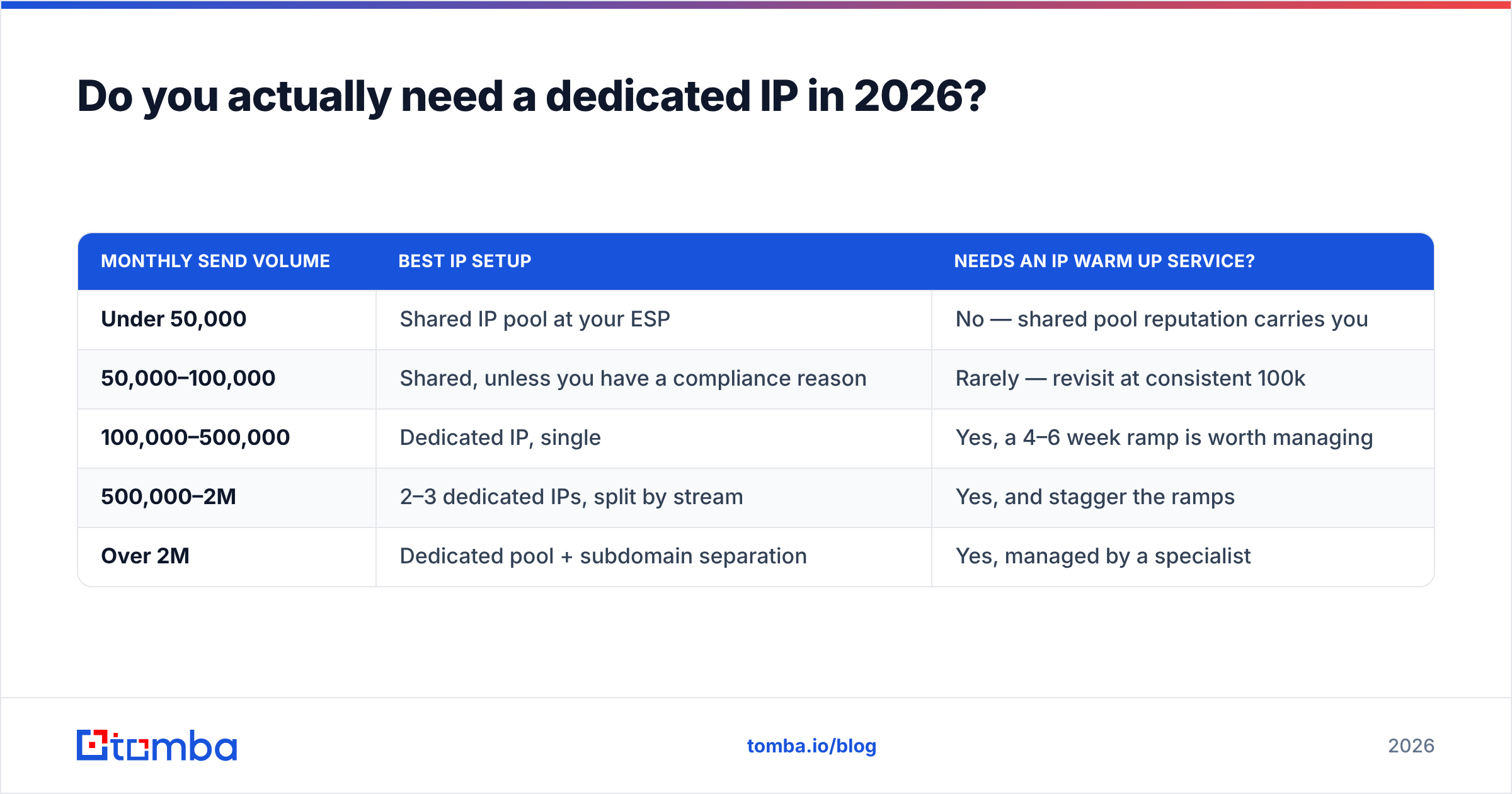
The rough thresholds most deliverability teams work from:
| Monthly send volume | Best IP setup | Needs an IP warm up service? |
|---|---|---|
| Under 50,000 | Shared IP pool at your ESP | No — shared pool reputation carries you |
| 50,000–100,000 | Shared, unless you have a compliance reason | Rarely — revisit at consistent 100k |
| 100,000–500,000 | Dedicated IP, single | Yes, a 4–6 week ramp is worth managing |
| 500,000–2M | 2–3 dedicated IPs, split by stream | Yes, and stagger the ramps |
| Over 2M | Dedicated pool + subdomain separation | Yes, managed by a specialist |
Two exceptions push you to a dedicated IP earlier. First, regulated industries where a neighbour on a shared pool getting blocklisted is an unacceptable business risk. Second, senders with genuinely excellent engagement who are being held back by a mediocre shared pool — rare, but real.
If you are running cold outbound rather than marketing broadcasts, the calculus changes again. Cold outbound is usually low-volume-per-mailbox by design: dozens of sends per inbox per day across many mailboxes. That architecture does not want a dedicated IP. It wants clean domains, correct authentication, and a verified list. Running an IP warm up service on top of a cold-outbound stack is solving a problem you do not have.
How does IP warm-up actually work, step by step?#
Every credible warm-up follows the same skeleton. The vendor's value is in judgment at each step, not in owning a secret schedule.
- Authentication first, always. SPF, DKIM, and DMARC must pass before a single production email goes out. Google and Yahoo's bulk-sender rules made DMARC mandatory for senders above 5,000 messages a day, and an unauthenticated warm-up is dead on arrival. Check your record with an SPF checker before you start, and read the DMARC specification overview if you are setting policy for the first time.
- Segment your best recipients. Week one goes only to people who opened or clicked in the last 30 days. You are buying engagement signal at the moment it matters most. Never start a ramp on a re-engagement segment.
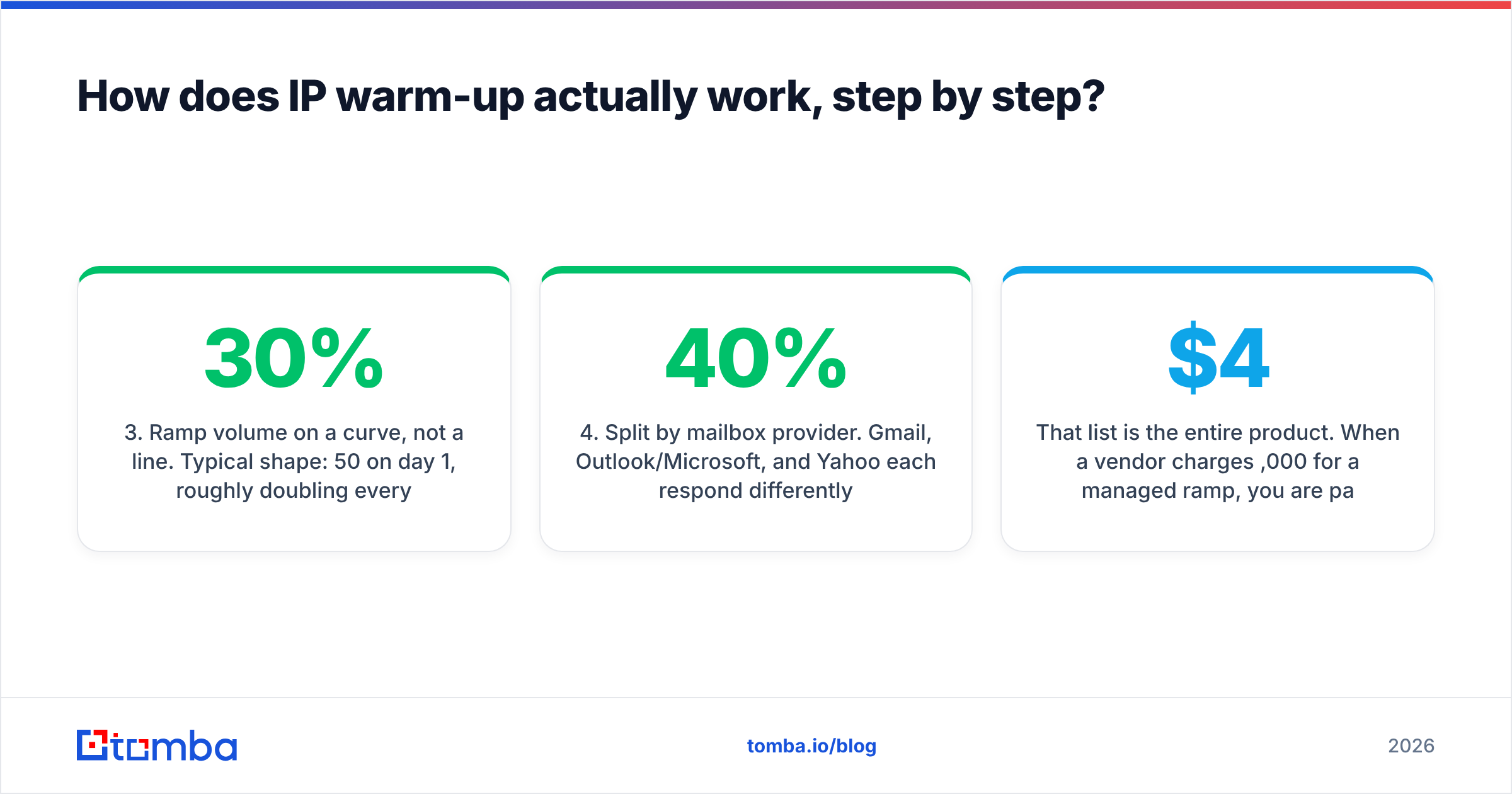
- Ramp volume on a curve, not a line. Typical shape: 50 on day 1, roughly doubling every two days through week two, then 20–30% daily increases through weeks three and four. Hold volume flat any day where complaint rate rises.
- Split by mailbox provider. Gmail, Outlook/Microsoft, and Yahoo each respond differently. Microsoft in particular throttles aggressively and recovers slowly, so many teams ramp Microsoft addresses 30–40% slower than Gmail.
- Monitor daily, not weekly. Google Postmaster Tools domain reputation, Microsoft SNDS data, bounce rate, and complaint rate. One bad day caught on day 9 is a pause. The same bad day caught on day 20 is a re-ramp.
- Hold the volume after you arrive. Reputation is built on consistency. Hitting 200,000/day once and then sending nothing for ten days undoes most of the ramp.
That list is the entire product. When a vendor charges $4,000 for a managed ramp, you are paying for someone to watch step 5 every morning and make the correct call at step 3 — which, to be fair, is exactly where most in-house ramps fail.
What does an IP warm up service cost?#
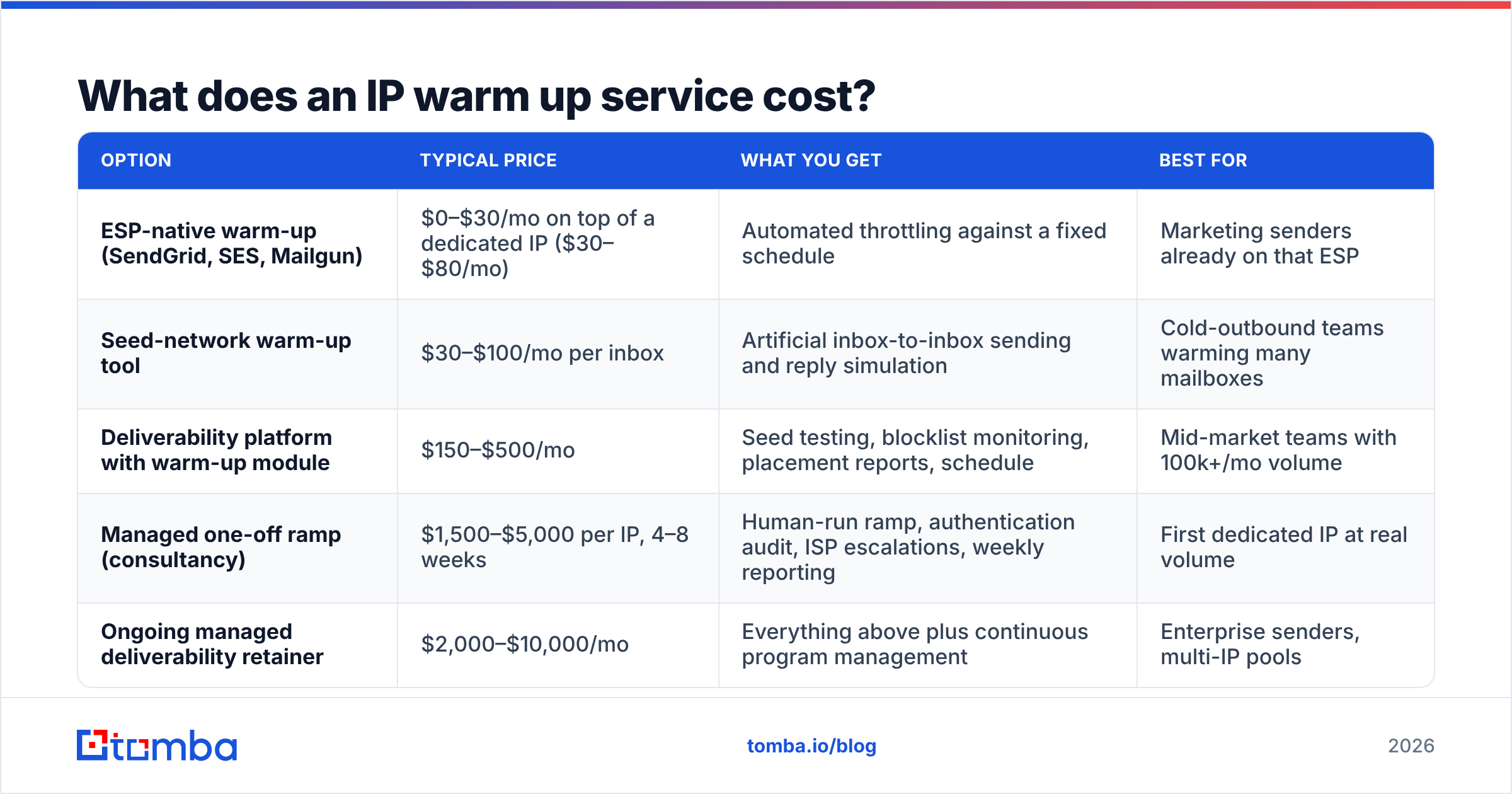
Pricing splits cleanly by camp. These are market ranges as of 2026, not quotes.
| Option | Typical price | What you get | Best for |
|---|---|---|---|
| ESP-native warm-up (SendGrid, SES, Mailgun) | $0–$30/mo on top of a dedicated IP ($30–$80/mo) | Automated throttling against a fixed schedule | Marketing senders already on that ESP |
| Seed-network warm-up tool | $30–$100/mo per inbox | Artificial inbox-to-inbox sending and reply simulation | Cold-outbound teams warming many mailboxes |
| Deliverability platform with warm-up module | $150–$500/mo | Seed testing, blocklist monitoring, placement reports, schedule | Mid-market teams with 100k+/mo volume |
| Managed one-off ramp (consultancy) | $1,500–$5,000 per IP, 4–8 weeks | Human-run ramp, authentication audit, ISP escalations, weekly reporting | First dedicated IP at real volume |
| Ongoing managed deliverability retainer | $2,000–$10,000/mo | Everything above plus continuous program management | Enterprise senders, multi-IP pools |
The hidden cost nobody prices: time-to-full-volume. A 6-week ramp on a 500,000/month program means roughly 6 weeks of suppressed send capacity. If your average revenue per email is $0.04, that delay is worth more than any vendor's fee, which is the actual argument for paying a professional to not blow the ramp and start over.

Is a warm-up service better than doing it yourself?#
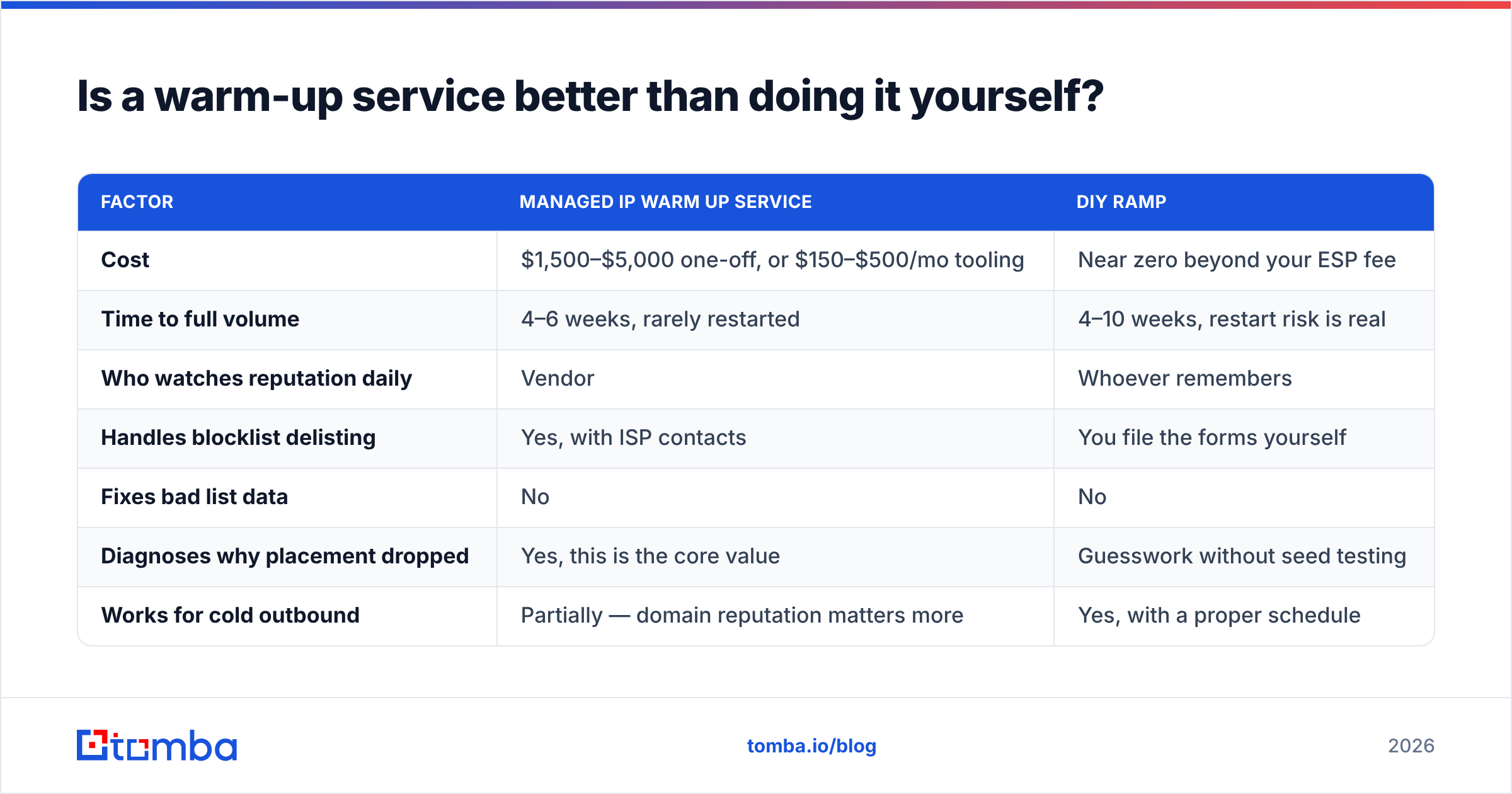
For most teams, DIY wins on cost and loses on discipline. Here is the honest split.
| Factor | Managed IP warm up service | DIY ramp |
|---|---|---|
| Cost | $1,500–$5,000 one-off, or $150–$500/mo tooling | Near zero beyond your ESP fee |
| Time to full volume | 4–6 weeks, rarely restarted | 4–10 weeks, restart risk is real |
| Who watches reputation daily | Vendor | Whoever remembers |
| Handles blocklist delisting | Yes, with ISP contacts | You file the forms yourself |
| Fixes bad list data | No | No |
| Diagnoses why placement dropped | Yes, this is the core value | Guesswork without seed testing |
| Works for cold outbound | Partially — domain reputation matters more | Yes, with a proper schedule |
| Risk if you have under 100k/mo volume | Money spent on a non-problem | Correct choice |
The single best predictor of a successful ramp is not who runs it. It is list quality going in. A managed service with a 6% bounce rate will fail; a spreadsheet-driven ramp with a 0.4% bounce rate will succeed. That is why every competent consultancy starts by demanding you run the list through email verification before they will touch the schedule — and why teams that do the verification step often discover they did not need the consultancy.
What actually kills an IP warm-up?#
Five failure modes account for nearly everything.
- Unverified list data. Hard bounces above 2% during a ramp signal list purchase or scraping. Mailbox providers respond by throttling everything. Run a bulk verify pass and suppress every unknown and risky result before day 1 — not after the first bad day.
- Catch-all domains treated as valid. A catch-all accepts everything at SMTP time and drops it silently. Your bounce rate looks great and your engagement rate collapses, which reads to Gmail as "nobody wants this mail." A catch-all verifier separates genuinely deliverable catch-all addresses from black holes.
- Volume whiplash. 40,000 on Tuesday, 2,000 on Wednesday, 60,000 on Thursday. Providers read irregularity as botnet behaviour. Smooth beats big.
- Mixing streams on one IP. Transactional receipts and cold prospecting from the same IP means your password resets inherit your prospecting complaint rate. Separate streams, separate subdomains, ideally separate IPs.
- Complaints above 0.3%. Google's published bulk-sender requirements put the hard line at 0.3% spam complaints, and warm-up does not buy you an exemption. Read Google's sender guidelines directly rather than relying on a vendor's summary of them.
None of these are solved by sending more email. They are solved before the first send.
How do you measure whether the warm-up is working?#
Three feeds, checked daily, tell you everything:
Google Postmaster Tools gives you domain and IP reputation on a four-step scale (Bad / Low / Medium / High), spam rate, and authentication pass rates. A ramp that has not reached Medium reputation by week three is not working.
Microsoft SNDS provides complaint rates and filter verdicts for Outlook, Hotmail, and Live traffic. Register at the Smart Network Data Services portal before the ramp starts; enrollment takes days.
Seed-list placement testing tells you inbox versus spam versus missing, per provider. This is the only signal that shows placement rather than acceptance — an email can be accepted at SMTP and still land in spam.
Watch your own metrics too. If your open rate holds steady while volume triples, the ramp is healthy. If open rate declines as volume climbs, you are outrunning your reputation and should hold volume flat for 3–4 days. It also helps to know your baseline response rate before the ramp, so you can tell a deliverability problem apart from a copy problem.
For planning the curve itself, a simple email warmup calculator will generate a day-by-day volume schedule in less time than it takes to book a vendor call.
Who should actually buy one?#
Buy a managed IP warm up service if you are moving 500,000+ emails a month onto new infrastructure, you are migrating ESPs under a deadline, you have been blocklisted before, or you are in a regulated vertical where a placement failure has compliance consequences. In those cases the fee is cheap relative to the revenue at risk.
Skip it if you send under 100,000 a month, if you are running cold outbound across many mailboxes rather than one high-volume IP, or if you have never verified your list. In the last case especially, the money is better spent on data quality — a warm-up service cannot make invalid addresses valid, and no schedule survives a list that bounces.
The uncomfortable summary: warm-up is a scheduling problem wrapped around a data problem. Vendors sell you the schedule because the schedule is easy to sell. The data problem is the one that decides whether your mail reaches the inbox in week six.
Start with the data, not the schedule. Before you pay anyone to ramp an IP, make sure the addresses you are ramping toward are real. Tomba Email Finder returns verified, source-attributed business emails with confidence scores, so your warm-up sends to people who exist and can reply — the single strongest reputation signal there is. The free tier covers 25 searches a month, and paid plans start at $49/mo with bulk processing and API access included; see Tomba pricing for the full breakdown.
Related guides#
// get started
Find, verify and enrich your first contacts today
Start on the free plan with 25 searches a month, then scale when your team is ready.
Free plan · No credit card required · GDPR & CCPA
// about the author