Lead Data Enrichment in 2026: How It Actually Works
Most enrichment budgets get burned on fields nobody uses. Here is how lead data enrichment really works in 2026, what the waterfall approach costs, and how to measure whether yours is paying for itself.
TL;DR
- Lead data enrichment is the process of taking a thin record (an email, a domain, a form fill) and appending firmographic, technographic, and contact data from external sources so sales and marketing can route, score, and personalize it.
- Match rate matters more than field count. A provider returning 40 fields on 35% of your list is worse than one returning 8 fields on 80%.
- Waterfall enrichment — querying providers in sequence until one returns a hit — is now the default architecture for serious teams. It raises coverage 20-40 points over any single vendor.
- Enrichment decays. B2B contact data goes stale at roughly 2-2.5% per month, which means an untouched database loses about a quarter of its accuracy every year.
- Budget for verification, not just discovery. An enriched email that bounces costs you sender reputation, which is more expensive than the credit you spent finding it.
What is lead data enrichment?#
Lead data enrichment is the automated process of expanding an incomplete lead record with additional verified attributes pulled from external data sources.
Think of it like a library catalog card. Someone hands you a slip of paper with just a book title scribbled on it. Enrichment is the librarian who walks to the shelf and comes back with the author, publisher, ISBN, page count, and which three other books cite it. The slip of paper was technically a record. It just was not usable.
In practice, the input is usually one of three things:
- An email address — from a form fill, a webinar registration, or a list import. You want the person's name, title, company, seniority, and the company's size and industry.
- A company domain — from website visitor identification or an account list. You want headcount, revenue band, tech stack, funding, location, and the contacts inside it.
- A name plus company — from a LinkedIn export or a conference attendee list. You want a deliverable work email and ideally a direct phone.
The output is a record your systems can actually act on: route to the right rep, score against your ICP, trigger the right sequence, or exclude entirely because the company has 4 employees and you sell to enterprises.
What fields does enrichment typically return?#
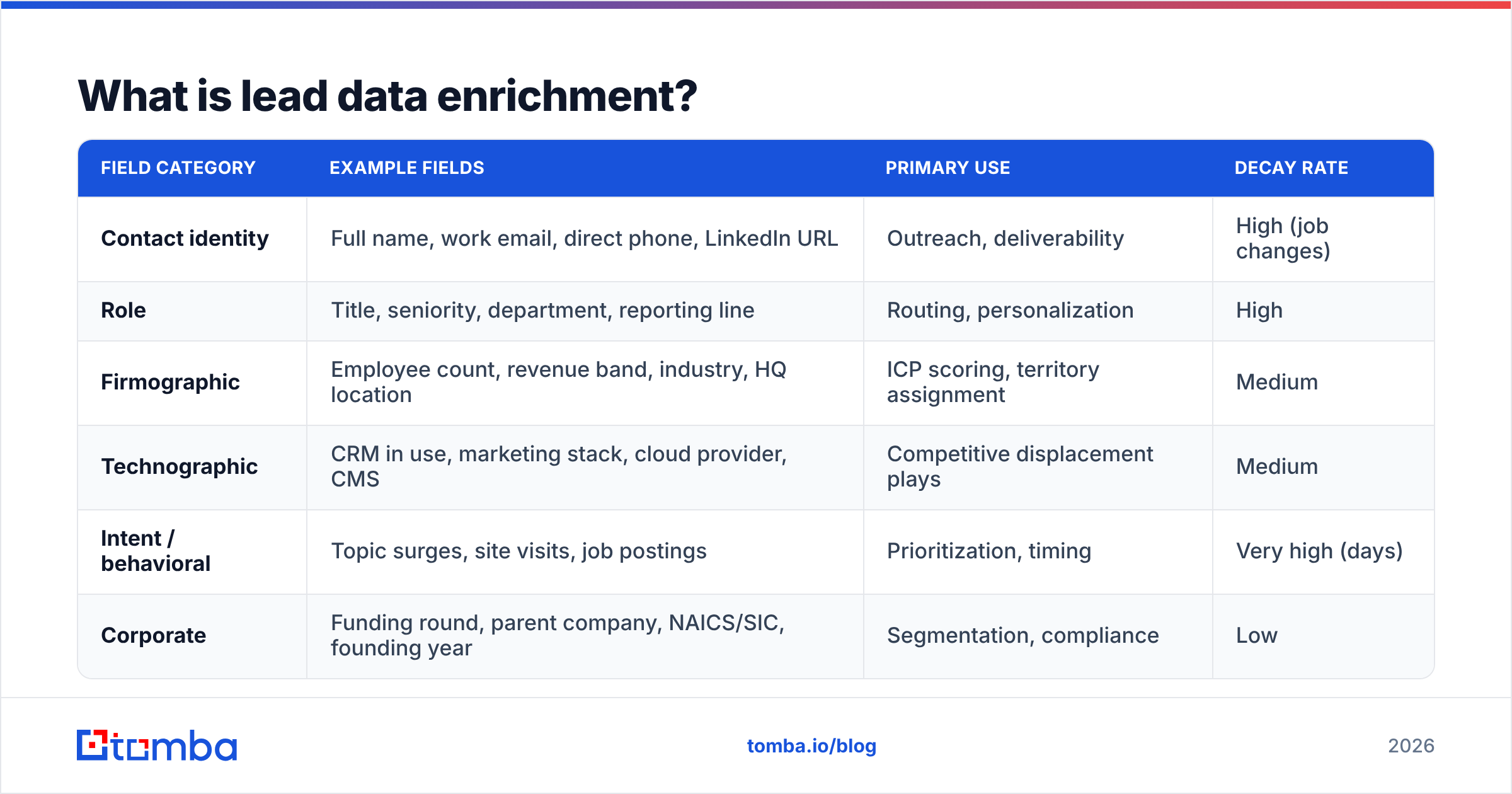
| Field category | Example fields | Primary use | Decay rate |
|---|---|---|---|
| Contact identity | Full name, work email, direct phone, LinkedIn URL | Outreach, deliverability | High (job changes) |
| Role | Title, seniority, department, reporting line | Routing, personalization | High |
| Firmographic | Employee count, revenue band, industry, HQ location | ICP scoring, territory assignment | Medium |
| Technographic | CRM in use, marketing stack, cloud provider, CMS | Competitive displacement plays | Medium |
| Intent / behavioral | Topic surges, site visits, job postings | Prioritization, timing | Very high (days) |
| Corporate | Funding round, parent company, NAICS/SIC, founding year | Segmentation, compliance | Low |
Most teams over-index on the bottom half of that table because it looks impressive in a demo. The fields that actually change what a rep does tomorrow morning sit in the top three rows.

Why does enrichment matter more in 2026 than it did in 2022?#
Three things changed, and they compound.
Form fields collapsed. Conversion optimization pushed most B2B forms down to email plus maybe company name. The data you used to ask for — title, headcount, budget — you now have to infer. Enrichment is how you get it back without hurting conversion. HubSpot's own research on form length has been pointing this direction for years, and the market followed.
Inbox providers got strict. Google and Yahoo's bulk sender requirements made bounce rates a survival metric, not a hygiene metric. Sending to an unverified enriched address is now a direct threat to your email deliverability, not just a wasted send. Enrichment without verification is a liability.
AI SDR tooling raised the cost of bad input. When a human rep got a garbage record, they noticed and skipped it. When an AI agent gets a garbage record, it writes a confident, personalized, completely wrong email and sends it at scale. Garbage-in-garbage-out got a lot louder.
The practical consequence: enrichment moved from a marketing ops nice-to-have to a shared RevOps dependency. If you run revenue operations, enrichment quality is now one of the numbers you own.
How does waterfall enrichment work?#
Waterfall enrichment queries multiple data providers in a defined sequence, stopping at the first one that returns an acceptable result for a given record.
Here is the everyday version: you are trying to reach a friend. You text first because it is free and usually works. No reply in an hour, you call. No answer, you email. No answer, you message their partner. Each step costs more effort than the last, and you stop the moment one works. Waterfall enrichment is that, automated, with a credit meter attached.
The sequence usually looks like:
- Check your own data first. Query your CRM and past enrichment cache before spending a cent. Somewhere between 10% and 30% of "new" leads already exist in your system under a different email or spelling. Run a remove duplicates pass before anything else.
- Pattern inference. If you already know a company's email format —
first.last@,flast@,first@— you can construct a candidate address for free and just verify it. A company email pattern check often resolves a record for the price of a verification rather than a discovery. - Primary discovery provider. Your cheapest high-match-rate source, run across the full remaining list. This is where most of your volume should resolve.
- Secondary providers. Specialists for the gaps — a provider strong in EMEA, one strong in sub-100-employee companies, one strong in direct dials.
- Verification on everything. Regardless of source, every address gets checked before it enters a sending system. Catch-all domains need a separate treatment — a standard SMTP check returns "accept" for everything, which is why a dedicated catch-all verifier exists as a distinct step.
- Write back with provenance. Store which provider supplied which field and when. Without provenance you cannot ever answer "why is this record wrong," and you will re-enrich fields you already paid for.
What does a waterfall actually save you?#
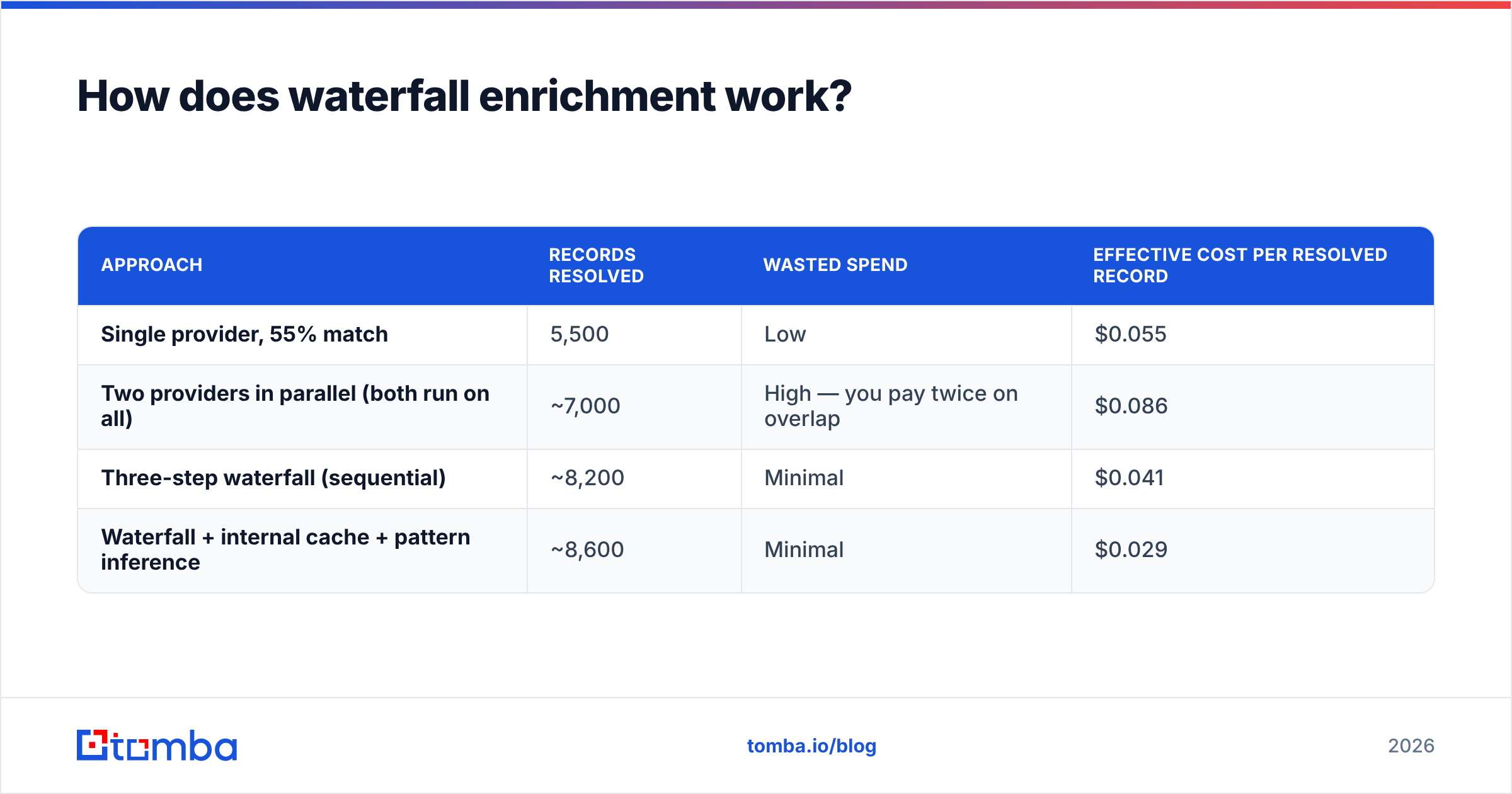
Assume 10,000 records, a $0.03 blended cost per successful enrichment, and these match rates:
| Approach | Records resolved | Wasted spend | Effective cost per resolved record |
|---|---|---|---|
| Single provider, 55% match | 5,500 | Low | $0.055 |
| Two providers in parallel (both run on all) | ~7,000 | High — you pay twice on overlap | $0.086 |
| Three-step waterfall (sequential) | ~8,200 | Minimal | $0.041 |
| Waterfall + internal cache + pattern inference | ~8,600 | Minimal | $0.029 |
The parallel row is the trap. Running two providers across the same full list feels thorough and doubles your bill on the ~50% of records where both would have hit. Sequence matters more than volume.
How do you evaluate an enrichment provider honestly?#
Ignore the field count on the pricing page. Evaluate on four axes.
1. Match rate on your list, not their sample. Every vendor's published match rate was measured on a list that flatters them. Take 500 records you already know the answers to — closed-won accounts with verified contacts — strip the fields, and run them through each candidate. Anything else is marketing.
2. Accuracy at the field level. A returned title of "Manager" when the person is a VP is technically a hit and practically a miss. Sample 100 returned records manually. Accept the tedium; it is the only honest test.
3. Freshness and refresh cadence. Ask when the record was last verified, not when it was first collected. A provider that cannot tell you is telling you.
4. Compliance posture. GDPR lawful basis, CCPA handling, opt-out propagation, and where the data was sourced. G2's data provider category reviews surface compliance complaints faster than any vendor doc will.
How do the main approaches compare?#
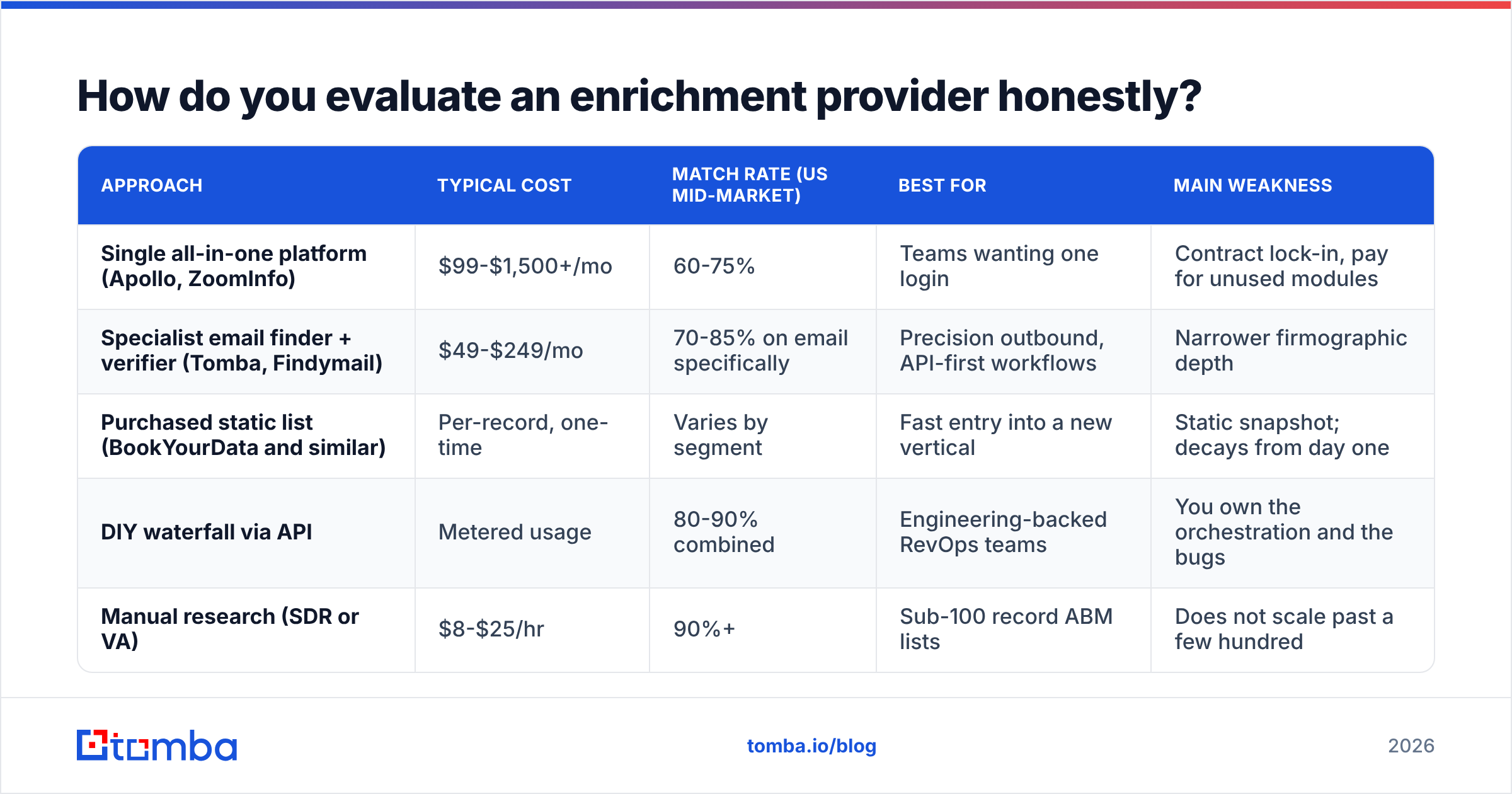
| Approach | Typical cost | Match rate (US mid-market) | Best for | Main weakness |
|---|---|---|---|---|
| Single all-in-one platform (Apollo, ZoomInfo) | $99-$1,500+/mo | 60-75% | Teams wanting one login | Contract lock-in, pay for unused modules |
| Specialist email finder + verifier (Tomba, Findymail) | $49-$249/mo | 70-85% on email specifically | Precision outbound, API-first workflows | Narrower firmographic depth |
| Purchased static list (BookYourData and similar) | Per-record, one-time | Varies by segment | Fast entry into a new vertical | Static snapshot; decays from day one |
| DIY waterfall via API | Metered usage | 80-90% combined | Engineering-backed RevOps teams | You own the orchestration and the bugs |
| Manual research (SDR or VA) | $8-$25/hr | 90%+ | Sub-100 record ABM lists | Does not scale past a few hundred |
The honest read: static list purchases and specialist finders are not competitors so much as different moments. A curated list from a vendor like BookYourData gets you into a new segment quickly with verified records; a finder plus verifier keeps that segment accurate six months later when a fifth of it has churned. Teams that run both tend to spend less than teams that bet everything on one.
For a tools-specific breakdown, the Apollo alternative and Clearbit alternative comparisons go deeper on per-vendor tradeoffs than a general guide can.
Where should enrichment sit in your stack?#
Three viable architectures, in increasing order of control.
Enrich at capture. A webhook fires the moment a form is submitted, enrichment runs, and the enriched record lands in the CRM within seconds. Best for inbound-heavy motions where routing speed determines conversion. The risk is that enrichment latency becomes form latency if you do it synchronously — always make the write-back async.
Enrich on a schedule. A nightly or weekly job sweeps records missing key fields and fills them. Cheaper and more controllable, but a lead sitting unrouted for 18 hours is a lead your competitor already called. Fine for account-level firmographics, bad for inbound contacts.
Enrich on demand. A rep clicks a button in the CRM or a browser extension and pulls data for the one record in front of them. Lowest cost, highest relevance, zero coverage guarantee. Works well as a third layer on top of the other two — a browser extension covers the long tail your batch jobs missed.
Most mature stacks run all three. Capture-time for inbound, scheduled for account data hygiene, on-demand for the exceptions.
Wiring matters as much as choice. If your CRM is the system of record, the enrichment job should write there and let everything else sync downstream — a HubSpot integration or Salesforce integration that writes directly beats a spreadsheet middleman every time. Salesforce's own data management documentation is blunt about the cost of parallel systems of record, and enrichment is one of the most common ways teams accidentally create one.

What does enrichment actually cost — and what should you not pay for?#
Pricing models cluster into three shapes:
- Per credit. You pay per successful lookup. Transparent, easy to forecast, punishes low match rates in your favor because misses are usually free. Tomba pricing follows this model — a free tier at 25 searches/month, Starter at $49/mo, Growth at $99/mo, and Pro at $249/mo, with credits covering finding, verification, and enrichment from one pool.
- Per seat. Common with all-in-one platforms. Fine if every seat actively prospects, expensive the moment you add ops and marketing users who need API access rather than a UI.
- Per record, one-time. List purchases. Predictable and cheap upfront; the hidden cost is the decay clock starting the second you download the CSV.
Things not worth paying extra for, in most stacks:
- Intent data as a premium add-on before you have a working enrichment base. Intent on a record you cannot reach is a report, not a pipeline.
- Fields your CRM has no home for. If there is no field, no workflow, and no report consuming it, you are buying a column that nothing reads.
- Unlimited plans with fair-use clauses. Read the clause. "Unlimited" that throttles at 2,000/day is a 60,000/month plan with worse marketing.
- Enrichment on records you will never contact. Filter to ICP first, then enrich. Enriching then filtering is the single most common way teams double their bill for the same output.
How do you keep enriched data from rotting?#
Set a decay budget and defend it.
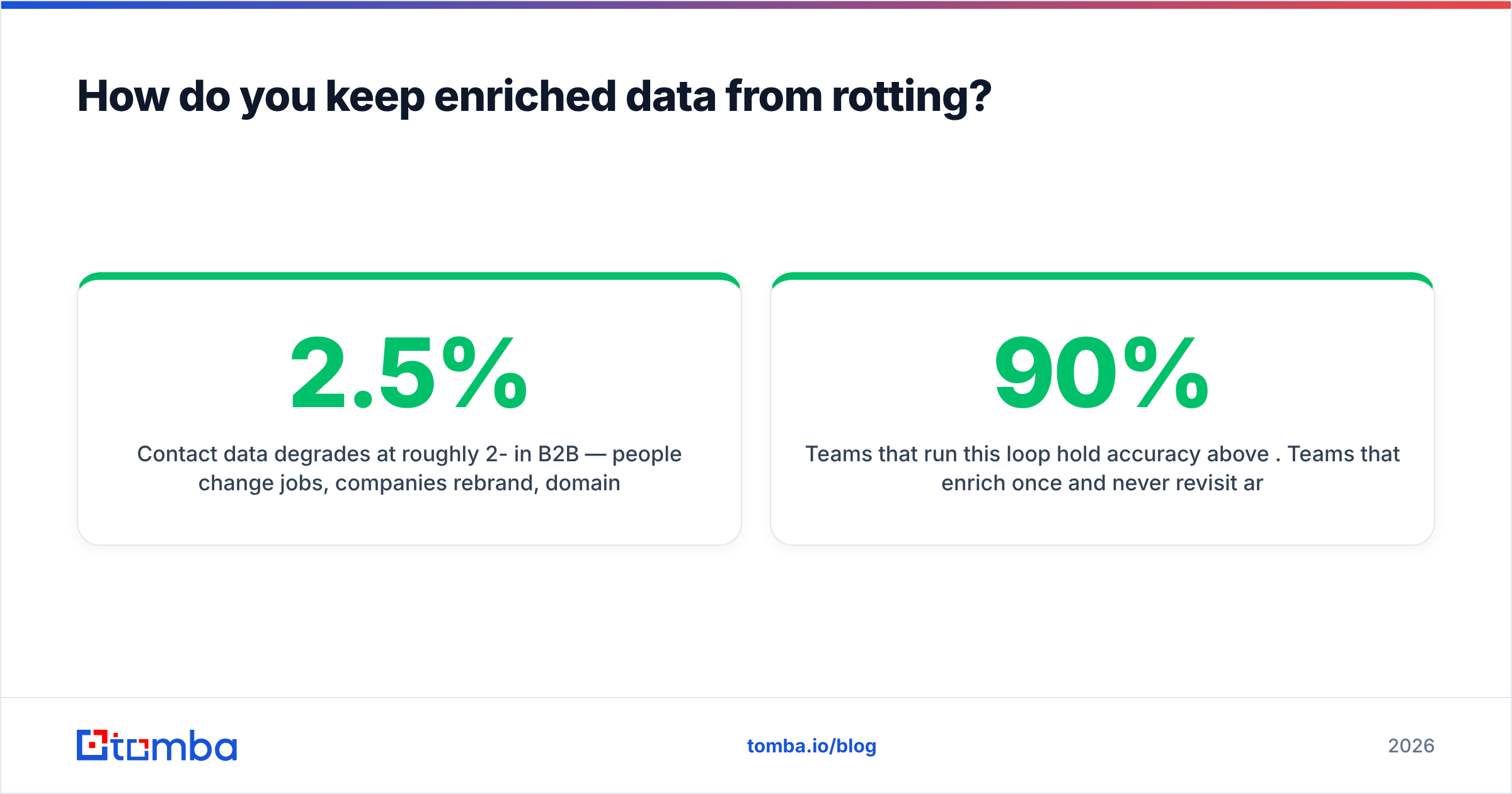
Contact data degrades at roughly 2-2.5% per month in B2B — people change jobs, companies rebrand, domains migrate. Compounded, that is 25-30% annual drift. Treating your database as an asset that appreciates is the wrong mental model; it is more like fresh produce with a refrigeration bill.
A workable hygiene loop:
- Re-verify before every campaign, not on a schedule. Verification is cheap relative to a bounce. Run the segment you are about to mail through an email verifier the day before send, not last quarter.
- Watch for domain-level signals. A spike in bounces from one domain usually means an MX change or a migration, not individual churn. Fix it at the domain level with a fresh domain search rather than record by record.
- Track a staleness field. Every enriched record gets a
last_verified_attimestamp. Anything older than 90 days entering a send queue gets re-checked automatically. - Suppress, do not delete. A bounced record still tells you that person left. That is a trigger — a job change is one of the strongest buying signals you will get for free.
- Feed replies back in. An auto-responder saying "I no longer work at X" is enrichment data. Parse it and act on it.
Teams that run this loop hold accuracy above 90%. Teams that enrich once and never revisit are typically sending to a list that is 30% fiction by month twelve, and they usually discover it through a deliverability incident rather than a dashboard.
What does a good enrichment workflow look like end to end?#
A concrete sequence you can copy:
- Define the ICP filter first. Headcount, geo, industry, and one disqualifier. Apply it before spending any credits.
- Dedupe the input. Against CRM and against itself.
- Resolve company domains. A company name without a domain is nearly useless for enrichment matching — normalize to domain early.
- Run the waterfall for contacts. Cache hit, then pattern inference, then primary provider, then specialists.
- Verify everything, including catch-alls. Separate treatment for catch-all domains; do not let them through as "valid."
- Enrich firmographics at the account level, not the contact level. You need headcount once per company, not once per contact. This alone can cut a bill by 60% on multi-contact accounts.
- Write back with provenance and timestamps.
- Measure match rate, bounce rate, and reply rate by source. If one provider's records reply at half the rate of another's, that is your real quality signal — not the vendor's accuracy claim.
For high-volume runs, batch processing beats record-by-record API calls on both cost and rate limits — a bulk email finder workflow handles a 20,000-row list in one pass instead of 20,000 round trips.
Frequently asked questions#
Is lead data enrichment GDPR-compliant? It can be, but compliance lives with you as the data controller, not with the provider. You need a lawful basis — usually legitimate interest for B2B contact data — a documented balancing test, and a working opt-out path. Ask providers for their sourcing documentation and DPA before signing.
How much of my list should successfully enrich? On a clean, ICP-filtered US mid-market list, expect 75-85% email coverage from a well-built waterfall. Below 60% usually means your input data is the problem — bad domains, misspelled names, or companies too small to have public presence — not the provider.
Should I enrich inbound leads or only outbound lists? Inbound first, always. An inbound lead has demonstrated intent and has the shortest time-to-value window. Enriching outbound lists matters, but enriching an inbound form fill within 60 seconds changes whether it gets routed correctly at all.
Can I just build this myself with an API? Yes, and many teams should. The orchestration logic — cache, sequence, fallback, verify, write back — is a few hundred lines. The Tomba API and similar endpoints handle the hard part. What you are buying from a managed waterfall tool is the vendor relationships and the retry logic, not magic.
Getting the first step right#
Enrichment fails upstream more often than downstream. If the email you started from is wrong, every appended field is attached to the wrong person, and your CRM fills up with confidently incorrect records that nobody trusts six months later.
Start by making contact discovery accurate, then layer firmographics on top of records you know are real. Tomba Email Finder resolves a name and domain into a verified work email in one call, with verification built into the same credit pool rather than billed as a separate product — which means the waterfall step that matters most does not need a second vendor contract. The free tier gives you 25 searches a month, which is enough to run the 500-record accuracy test described above on your own data before you commit to anything.
Test it against your closed-won list. That number, not a vendor's, is the only one worth deciding on.
Related guides#
// get started
Find, verify and enrich your first contacts today
Start on the free plan with 25 searches a month, then scale when your team is ready.
Free plan · No credit card required · GDPR & CCPA
// about the author