Lead Generation Cold Email: The 2026 Playbook That Works
Cold email still books meetings in 2026 — but only when the data, the domain setup and the sequence all hold up. Here is the full playbook, with the numbers, the tables and the mistakes that kill reply rates.
TL;DR
- Lead generation cold email still works in 2026, but the win is decided before you write a single word: list quality, verification, and domain infrastructure account for most of the variance in reply rates.
- A bounce rate above 3% is the single fastest way to torch a sending domain. Verify every address, and treat catch-all domains as a separate risk bucket.
- Personalization at scale beats deep personalization for most teams. One researched line plus a specific, falsifiable claim outperforms a four-paragraph "I loved your podcast episode" essay.
- Expect 30-60% open rates, 3-8% reply rates, and 1-3% meeting rates on a well-built campaign. Anything advertised above that is either a tiny sample or a lie.
- Sequences of 3-4 emails over 12-18 days capture roughly 80% of total replies. Beyond email six, you are mostly generating spam complaints.
What is lead generation cold email, and why does it still work in 2026?#
Lead generation cold email is the practice of sending unsolicited but relevant, permission-compliant emails to people who fit your ideal customer profile, with the goal of starting a sales conversation. It is not bulk marketing email, and it is not newsletter blasting. The technical, legal, and strategic constraints are different at every layer.
It still works for one boring reason: it is the only outbound channel where you can reach a named decision-maker, at near-zero marginal cost, without paying a platform for access. LinkedIn throttles connection requests. Cold calling connect rates keep sliding. Paid acquisition costs in B2B SaaS have climbed for six straight years. Email remains the cheapest path to a human inbox.
What has changed is the floor. In 2018 you could scrape a list, send 500 emails a day from your main domain, and book meetings. In 2026, Google and Microsoft enforce authentication requirements — SPF, DKIM, DMARC alignment, and a spam complaint rate below 0.3% — that quietly kill sloppy senders. Google's own bulk sender guidelines spell out the thresholds. The campaigns that work now look more like infrastructure projects than copywriting projects.

What actually determines cold email results?#
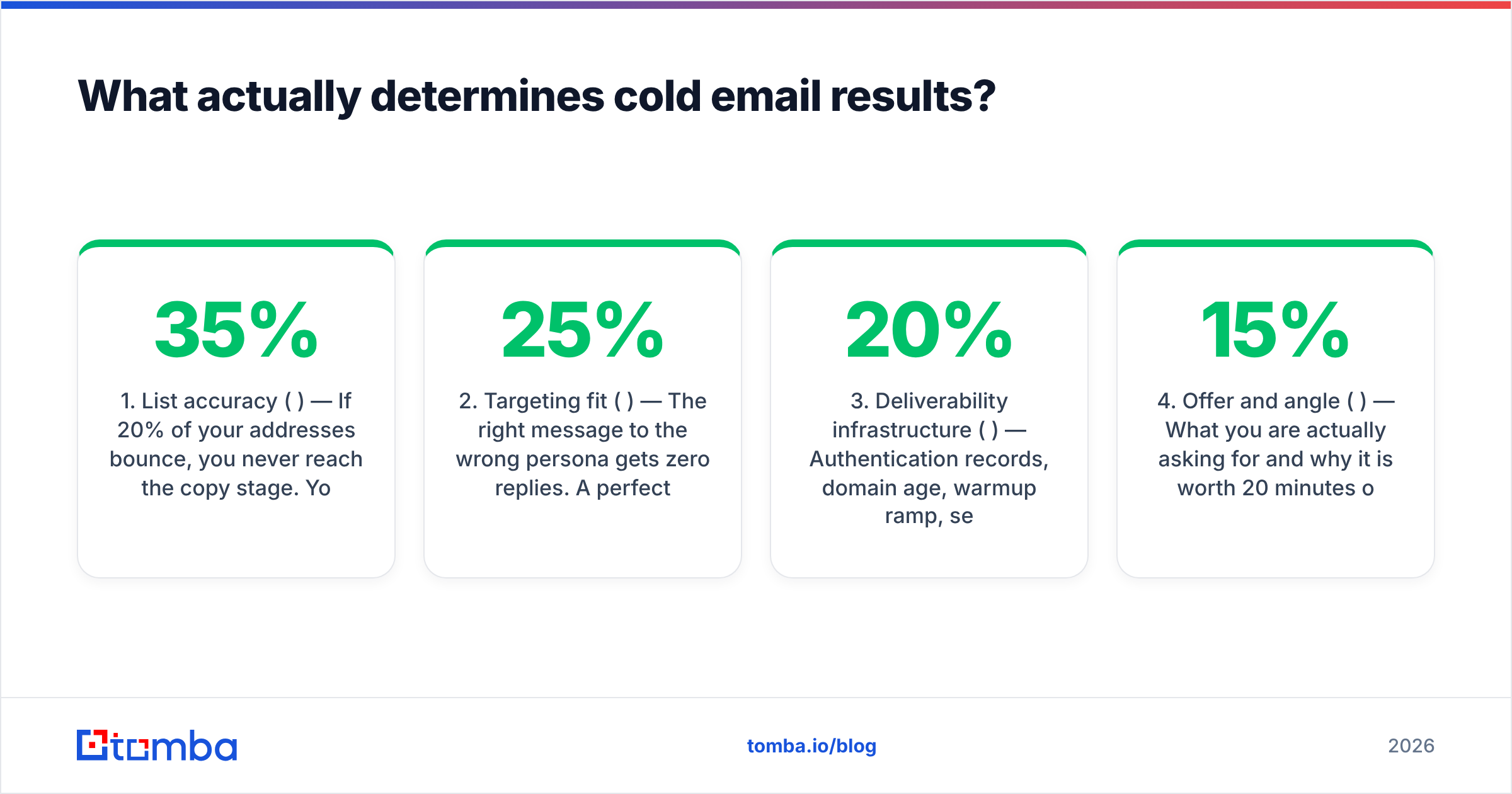
Most teams obsess over subject lines. Subject lines matter, but they sit fourth on the list of things that move your numbers. Here is the realistic weighting based on what breaks campaigns in practice:
- List accuracy (35%) — If 20% of your addresses bounce, you never reach the copy stage. Your domain reputation collapses in week two and every subsequent send lands in spam, including the good addresses.
- Targeting fit (25%) — The right message to the wrong persona gets zero replies. A perfectly targeted list with mediocre copy still books meetings.
- Deliverability infrastructure (20%) — Authentication records, domain age, warmup ramp, sending volume per mailbox, and inbox placement testing.
- Offer and angle (15%) — What you are actually asking for and why it is worth 20 minutes of a stranger's time.
- Copy craft (5%) — Subject line, opener, CTA phrasing. Real, but marginal compared to everything above it.
The uncomfortable implication: if your reply rate is 0.4%, rewriting the email will not save you. Rebuild the list.
How do you build a cold email list that does not bounce?#
There are three ways to source B2B contact data, and they fail in different ways.
Scraping and guessing. You infer the pattern (first.last@, f.last@, first@) and generate permutations. Free, fast, and roughly 40-60% accurate depending on the industry. Fine for a handful of accounts, catastrophic at 5,000. If you go this route, run the output through a free email checker before it touches a sequence.
Buying a static list. You get a CSV. Data decays at roughly 22-30% per year as people change jobs, so a list assembled 14 months ago is meaningfully wrong. Reputable vendors like BookYourData sell verified, pay-as-you-go lists with bounce guarantees, which removes most of that risk — but a static file is still a snapshot, and you are paying for records you may never contact.
Finding and verifying on demand. You define the ICP, pull contacts by domain or role at the moment you need them, and verify each address against live mail servers before the send. Slower per record, dramatically more accurate, and you only pay for what you use.
For most teams running continuous outbound, the third approach wins. A domain search returns every discoverable address at a target company along with the department and confidence score; an email verifier then confirms deliverability with an SMTP-level check. Run the two in sequence and a typical bounce rate lands under 2%.
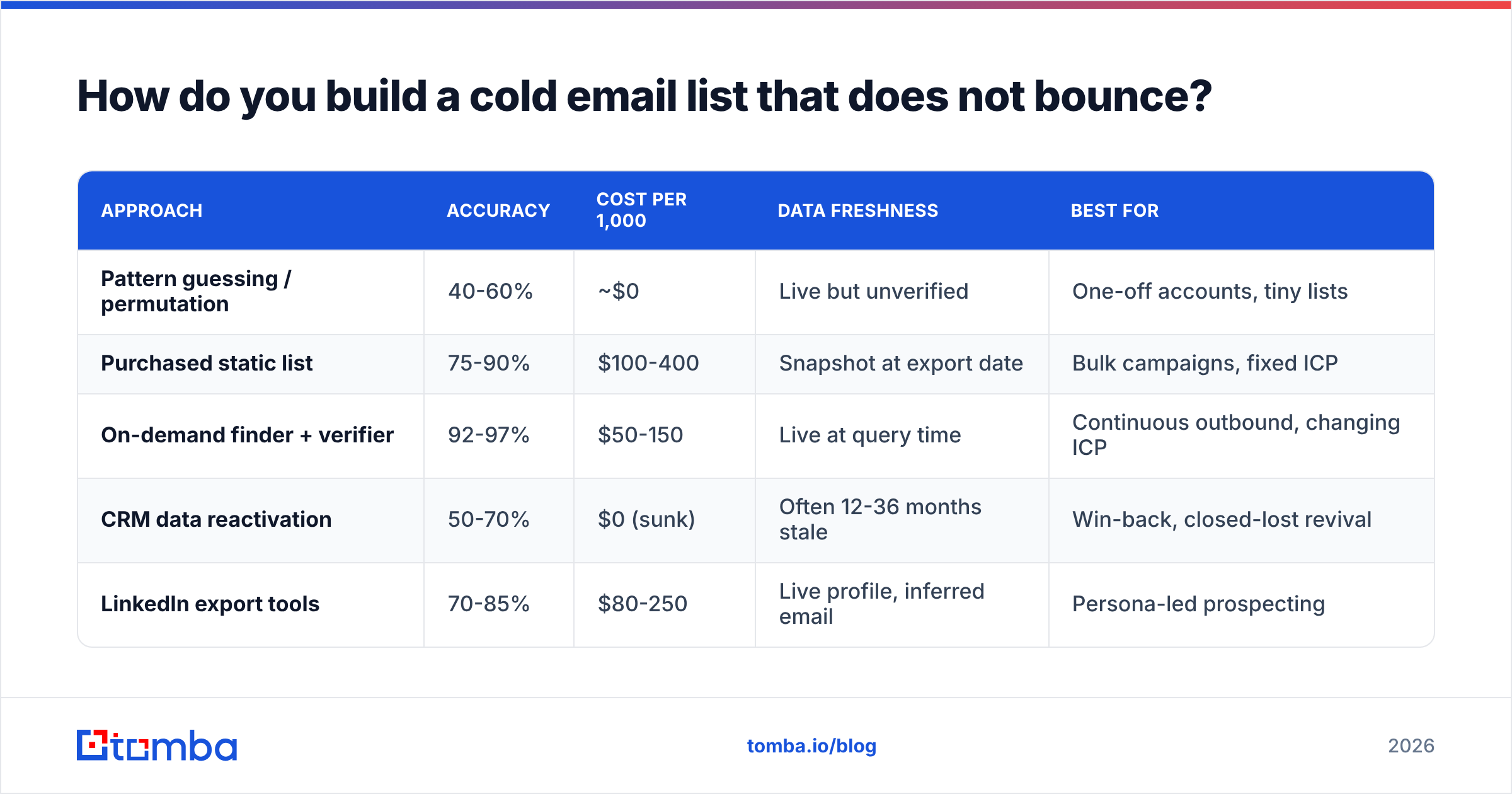
How do the sourcing approaches compare?#
| Approach | Accuracy | Cost per 1,000 | Data freshness | Best for |
|---|---|---|---|---|
| Pattern guessing / permutation | 40-60% | ~$0 | Live but unverified | One-off accounts, tiny lists |
| Purchased static list | 75-90% | $100-400 | Snapshot at export date | Bulk campaigns, fixed ICP |
| On-demand finder + verifier | 92-97% | $50-150 | Live at query time | Continuous outbound, changing ICP |
| CRM data reactivation | 50-70% | $0 (sunk) | Often 12-36 months stale | Win-back, closed-lost revival |
| LinkedIn export tools | 70-85% | $80-250 | Live profile, inferred email | Persona-led prospecting |

Reference: independent accuracy benchmarks across major email-finding providers, 2026.
What is the catch-all problem, and how do you handle it?#
A catch-all domain accepts mail sent to any address at that domain, valid or not. The server says "yes" to everything, so a standard verification check returns "accepted" with no real information. Roughly 20-25% of B2B domains are configured this way, and they cluster in enterprise and security-conscious industries — exactly where your best deals live.
Three options, in order of quality:
- Skip them entirely. Safe, but you delete a fifth of your total addressable market, weighted toward larger accounts.
- Send anyway and eat the risk. Some of those addresses are real and some route to a black hole that silently feeds spam traps. Bounce data won't warn you.
- Use a dedicated catch-all resolution layer. Tools that cross-reference pattern data, historical send outcomes, and secondary signals to score catch-all addresses probabilistically. A catch-all verifier returns a confidence band instead of a useless "accepted," so you can segment high-confidence catch-alls into a separate, lower-volume mailbox and protect your primary domain.
Segmenting matters more than the tool choice. Never mix unverified catch-alls into the same mailbox as your clean list.
How should you set up deliverability before the first send?#
Do not send lead generation cold email from your primary company domain. Ever. Buy separate sending domains, ideally close variants of your brand (getacme.com, tryacme.com, acme-hq.com), and route all outbound through those. If reputation burns, your invoicing and support email survives.
The pre-launch checklist:
- Authenticate everything. SPF, DKIM, and DMARC with a policy of at least
p=nonemoving towardp=quarantine. Check your records with an SPF checker before you touch anything else — misaligned SPF is the most common silent failure. - Age the domain. Minimum two weeks after registration before sending anything, four weeks preferred. Fresh domains get filtered aggressively.
- Warm up gradually. Start at 5-10 emails per mailbox per day, increase by roughly 20% per week, and cap at 30-50 per mailbox per day permanently. Use a warmup calculator to build the ramp schedule rather than guessing.
- Set up a custom tracking domain. Shared tracking domains from your sequencer are used by thousands of senders, some of whom are spammers. Their reputation becomes yours.
- Test inbox placement weekly. Seed accounts across Gmail, Outlook, and one corporate Microsoft 365 tenant. Placement drifts without warning, and open rate alone won't tell you.
- Monitor blacklists. Run a blacklist checker on your sending IPs and domains monthly.
Volume math people get wrong: if you need 3,000 sends per month and each mailbox safely handles 40 per day (roughly 880/month), you need 4 mailboxes minimum, spread across at least 2 domains. Trying to push 3,000 through one mailbox is how campaigns die in week three.
What does a cold email sequence that books meetings look like?#
Four emails, 14 days, one thread. Each message does one job.
Email 1 — Day 0. The specific observation. Two to four sentences. Name a concrete thing about their business you noticed, connect it to a problem you solve, ask a low-friction question. No attachments, no links, no calendar embed. Under 90 words.
Email 2 — Day 3. The proof. Reply to your own thread. One customer result with a number and a company type they recognize. "We did X for a 40-person Series A fintech; they went from Y to Z in six weeks." Still no calendar link.
Email 3 — Day 8. The angle switch. If the first framing did not land, try a different pain point entirely. Same person, different hypothesis about what keeps them up at night. This email frequently outperforms email one.
Email 4 — Day 14. The clean close. "Sounds like this isn't a priority — I'll close the loop. If that changes, reply here." No guilt, no "just bumping this to the top of your inbox," no fake urgency. Break-up emails reliably pull 15-25% of total campaign replies because they remove the pressure to respond.
Stop there. Emails five through eight add single-digit reply volume and multiply your spam complaint rate, which is the metric that actually determines whether email one ever reaches an inbox next quarter.
What benchmarks should you hold yourself to?#
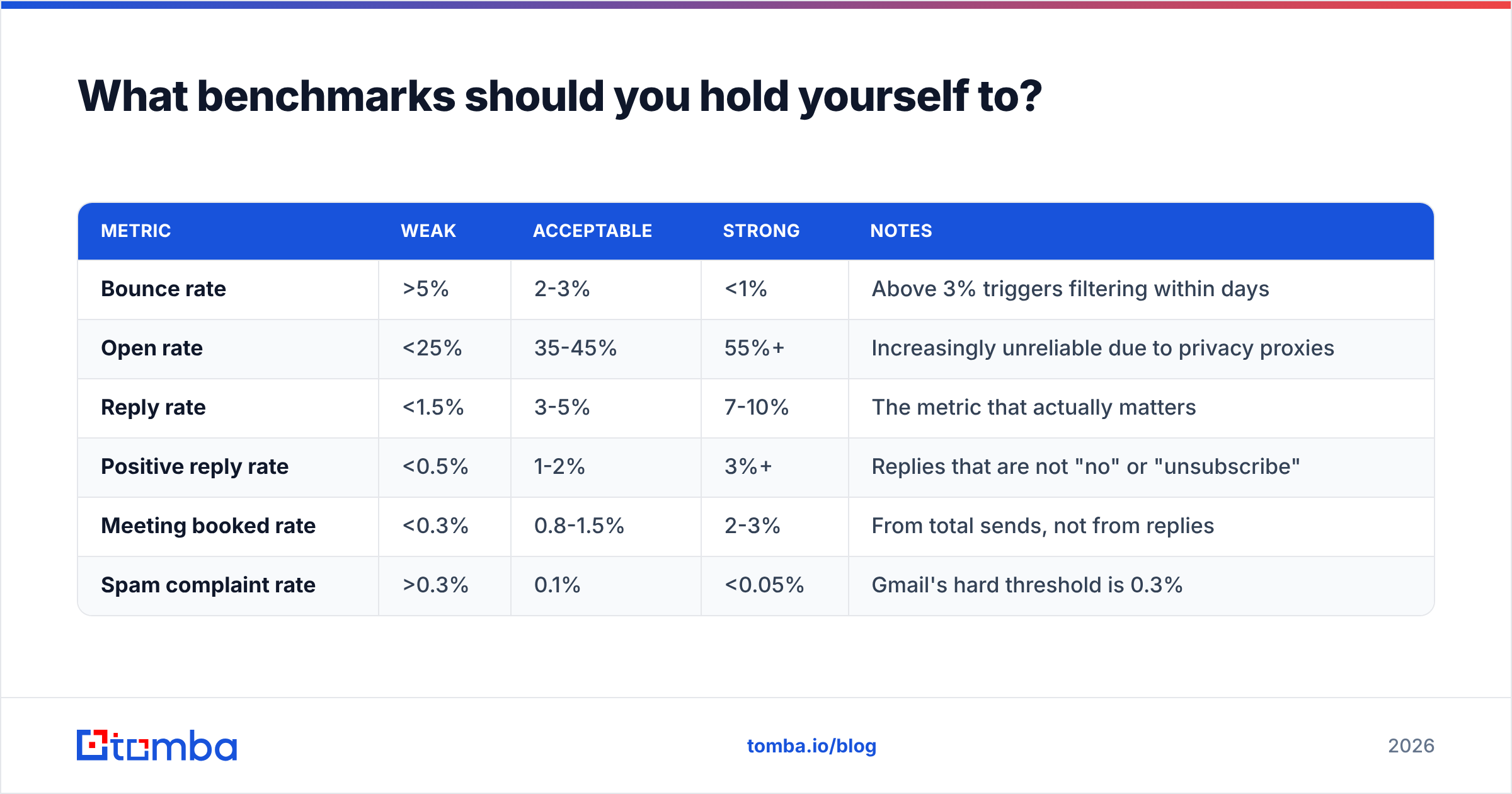
Published cold email benchmarks are wildly inconsistent because everyone measures differently and self-reported numbers skew high. Here is a realistic band for B2B outbound to a well-targeted list in 2026:
| Metric | Weak | Acceptable | Strong | Notes |
|---|---|---|---|---|
| Bounce rate | >5% | 2-3% | <1% | Above 3% triggers filtering within days |
| Open rate | <25% | 35-45% | 55%+ | Increasingly unreliable due to privacy proxies |
| Reply rate | <1.5% | 3-5% | 7-10% | The metric that actually matters |
| Positive reply rate | <0.5% | 1-2% | 3%+ | Replies that are not "no" or "unsubscribe" |
| Meeting booked rate | <0.3% | 0.8-1.5% | 2-3% | From total sends, not from replies |
| Spam complaint rate | >0.3% | 0.1% | <0.05% | Gmail's hard threshold is 0.3% |
Open rate deserves an asterisk. Apple Mail Privacy Protection and corporate scanning gateways pre-fetch images, which inflates opens and fires false positives. Track it as a directional signal for deliverability changes, not as a performance metric. Reply rate is the number you optimize; response rate is what your pipeline model should actually run on.
Is cold email better than LinkedIn outreach or cold calling?#
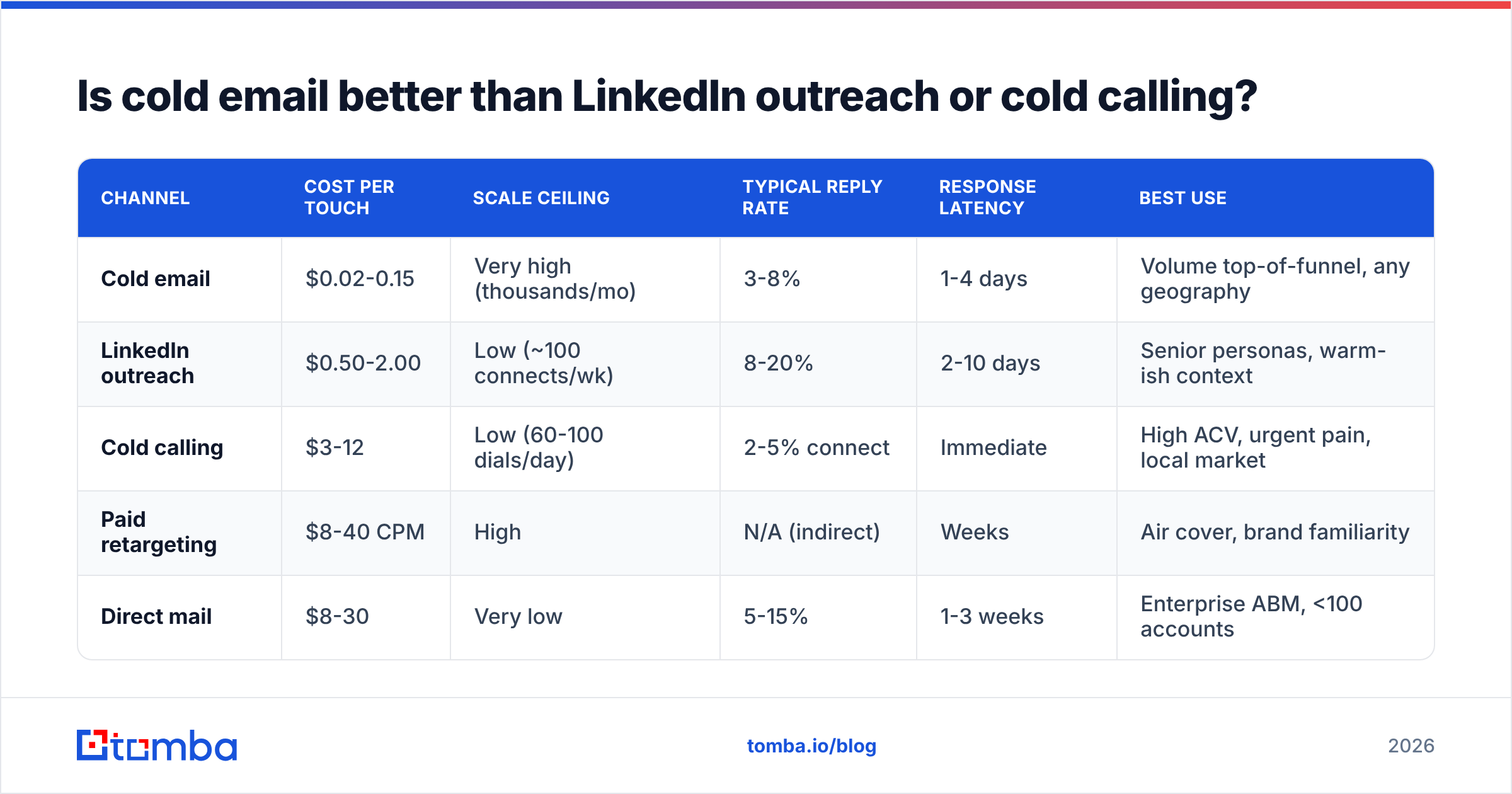
They solve different problems, and the honest answer is that the best outbound teams run at least two in parallel.
| Channel | Cost per touch | Scale ceiling | Typical reply rate | Response latency | Best use |
|---|---|---|---|---|---|
| Cold email | $0.02-0.15 | Very high (thousands/mo) | 3-8% | 1-4 days | Volume top-of-funnel, any geography |
| LinkedIn outreach | $0.50-2.00 | Low (~100 connects/wk) | 8-20% | 2-10 days | Senior personas, warm-ish context |
| Cold calling | $3-12 | Low (60-100 dials/day) | 2-5% connect | Immediate | High ACV, urgent pain, local market |
| Paid retargeting | $8-40 CPM | High | N/A (indirect) | Weeks | Air cover, brand familiarity |
| Direct mail | $8-30 | Very low | 5-15% | 1-3 weeks | Enterprise ABM, <100 accounts |
The pattern that consistently outperforms single-channel: email as the primary sequence, LinkedIn as a soft touch between emails two and three, and a call reserved for accounts that opened three times without replying. Pair a verified email with a direct dial from a phone finder and you can run that multi-touch play without buying three separate data vendors.
Worth noting what G2 reviewers consistently flag across sales engagement categories: the complaints are rarely about the sequencer. They are about the data feeding it.
What are the legal rules for cold email?#
Cold email is legal in most jurisdictions when you follow the rules. Ignoring them is both a compliance risk and a deliverability risk, since complaint rates drive filtering.
United States (CAN-SPAM). B2B cold email is permitted. You must not use deceptive headers or subject lines, must include a valid physical postal address, must provide a clear opt-out, and must honor opt-outs within 10 business days. No prior consent required.
EU and UK (GDPR / PECR). B2B contact at a corporate role address generally qualifies under legitimate interest, but you need a documented legitimate interest assessment, must disclose your data source if asked, and must honor objections immediately. Individual sole traders and partnerships get consumer-level protection in the UK. Never email a personal address.
Canada (CASL). The strictest of the three. Implied consent exists where a business address is conspicuously published without a "no unsolicited email" disclaimer, and where your message relates to their role. Penalties are real. Document your basis per contact.
Practical rule: keep a record of where each address came from. If your data provider publishes its data sources, you can answer a GDPR access request in minutes instead of scrambling.
What mistakes kill campaigns most often?#
- Sending before verification. The most expensive shortcut in outbound. One unverified 5,000-record send can cost you a domain.
- Merging fields you did not check. "Hi {{firstName}}," rendering literally is the fastest trust-destroyer in cold email. Audit every merge field on a sample of 50 before launch.
- Selling the product instead of the meeting. The email's only job is to earn a reply. Feature lists belong on the call.
- Ignoring the reply-to-negative ratio. Ten replies that all say "not interested, remove me" is not a 10% reply rate — it is a targeting failure with a countdown timer on your domain.
- Scaling a campaign that has not proven itself. Validate on 200 sends. If reply rate is under 2%, fix the list or the angle before you send 5,000.
- Rotating copy weekly without changing the list. If the segment is wrong, you are A/B testing your way around the actual problem.
How do you scale from 200 emails a month to 5,000?#
Scaling is an infrastructure problem, not a copy problem. In order:
- Prove the segment. One ICP, 200 sends, measured over three weeks. Reply rate above 3% before you touch anything else.
- Add mailboxes, not volume per mailbox. Four mailboxes at 40/day beats one at 160/day every time, by a wide margin.
- Systematize list-building. Manual prospecting caps out around 50 verified contacts per hour. Move to bulk email finding or wire the Tomba API into your CRM so enrichment happens on record creation rather than in a spreadsheet.
- Split by segment, not by volume. Five campaigns of 1,000 to tightly defined personas beat one campaign of 5,000 to "VP of Sales at any SaaS company."
- Instrument the funnel. Track sends, bounces, replies, positive replies, and meetings per segment per week. Without segment-level data you cannot tell which half is working.
- Re-verify quarterly. Your list decays whether you use it or not. Anything older than 90 days goes back through verification before reuse.
A useful sanity check on cost: at typical Tomba pricing, the Growth plan at $99/mo covers enough finds and verifications to feed a 3,000-5,000 email-per-month program. If your data spend is a large multiple of your sequencer spend, you are probably overpaying for records you never contact.
Ready to build the list first?#
Every part of this playbook depends on one input: accurate, verified, current contact data. The copy, the sequence, the warmup schedule — none of it recovers from a list that bounces.
Start with the Tomba Email Finder. Search by domain, name, or company, get confidence-scored results with the source behind each one, and verify before anything enters your sequencer. The free tier gives you 25 searches a month to test the accuracy against a list you already know the answers to. When it holds up, Starter is $49/mo and Growth is $99/mo — less than the cost of one burned sending domain.
Related guides#
// get started
Find, verify and enrich your first contacts today
Start on the free plan with 25 searches a month, then scale when your team is ready.
Free plan · No credit card required · GDPR & CCPA
// about the author