LeadEngineAI vs Mystrika (2026): Honest Cold Email Comparison
One tool promises AI-generated pipeline. The other is a deliverability workhorse with a cult following. Here is how LeadEngineAI and Mystrika actually differ on sending, warmup, data, and price — and which one deserves your budget in 2026.
LeadEngineAI vs Mystrika is a choice between two habits. One tool tries to do the work for you. The other hands you the controls and expects you to drive. Here is how the two differ on sending, warmup, data, and price.
TL;DR
- Mystrika is a cold email sending tool built around deliverability. Think many sending accounts, a big warmup pool, a shared inbox, and A/Z testing. Its fans care about inbox placement, not dashboards.
- LeadEngineAI rides the newer "let AI build the pipeline" wave. It finds leads, writes copy, and runs the sequence. Less control, faster start.
- Neither tool is a data product. Both assume your contacts are real. That gap is where most cold email fails.
- The price models differ. Mystrika sells cheap seats and volume. LeadEngineAI sells credits for AI work. Check both price pages first.
- Pick Mystrika if you send at volume and own your process. Pick LeadEngineAI if you want the tool to think for you. Verify your list either way.
What are LeadEngineAI and Mystrika?#
Different animals wearing the same "cold outreach" label.
Mystrika is a cold email engine. You connect mailboxes, warm them up, load a list, write a sequence, and send. Its focus is inbox placement: warmup rotation, sending limits, and a shared inbox for replies. It grew popular with bootstrappers for two reasons. Prices were low, and placement held up at volume. You can see the current feature set on Mystrika's site.
LeadEngineAI belongs to the 2024–2026 wave of AI-first sales tools. The pitch is speed. Describe your buyer, and the tool builds a list, drafts the copy, and runs the sequence. You buy one flow instead of three tools.
That gap matters more than any feature list. Mystrika sells you control over how mail gets delivered. LeadEngineAI sells you less work. Those are opposite trades. The right pick depends on your real bottleneck: quality or volume.
One caution before the comparison. This market moves fast, and vendor pages change every month. Use the sections below as a way to judge the two. Check the live pricing page before you sign.
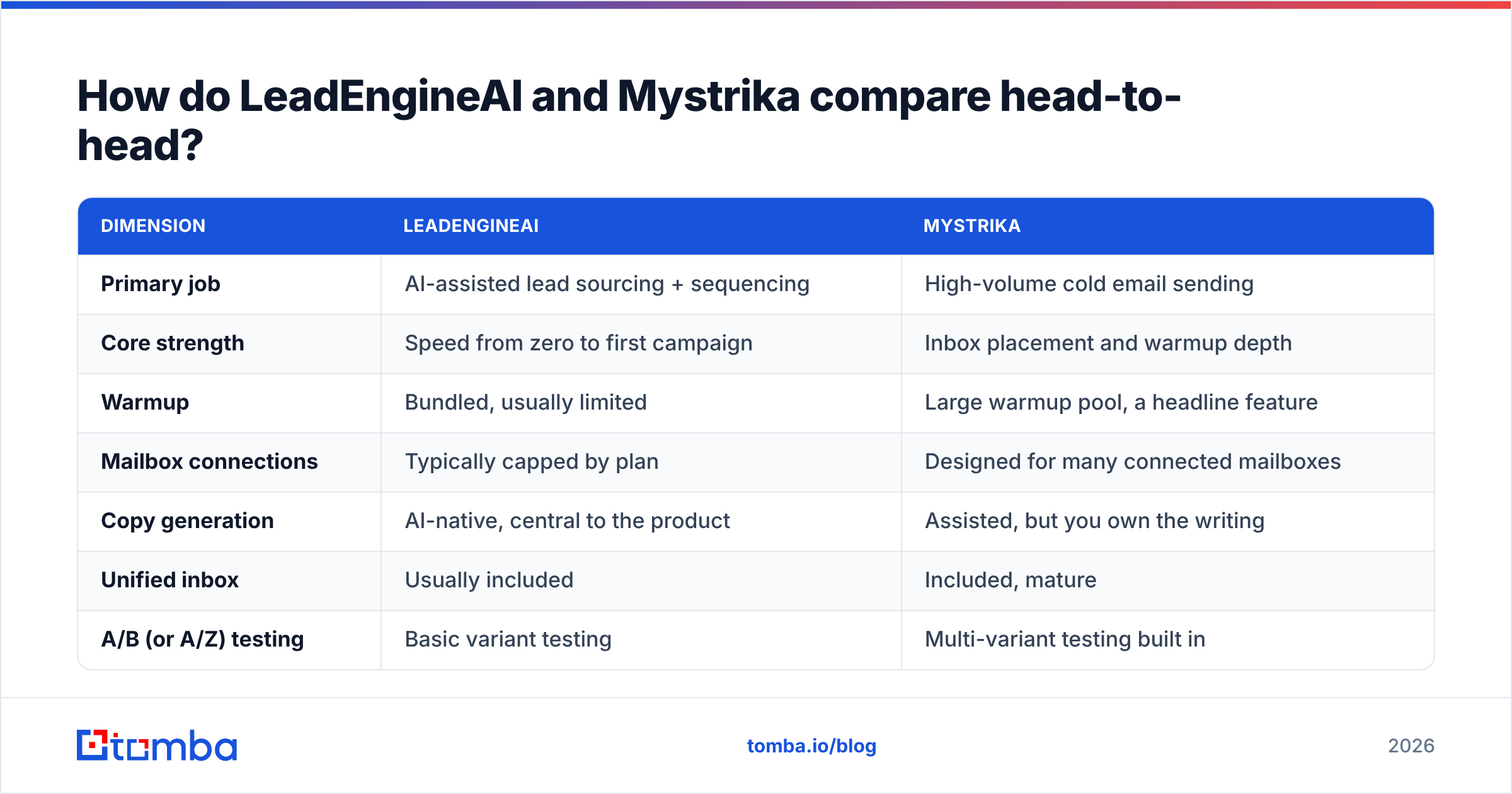
LeadEngineAI vs Mystrika: how do they compare head-to-head?#
| Dimension | LeadEngineAI | Mystrika |
|---|---|---|
| Primary job | AI-assisted lead sourcing + sequencing | High-volume cold email sending |
| Core strength | Speed from zero to first campaign | Inbox placement and warmup depth |
| Warmup | Bundled, usually limited | Large warmup pool, a headline feature |
| Mailbox connections | Typically capped by plan | Designed for many connected mailboxes |
| Copy generation | AI-native, central to the product | Assisted, but you own the writing |
| Unified inbox | Usually included | Included, mature |
| A/B (or A/Z) testing | Basic variant testing | Multi-variant testing built in |
| Built-in contact data | Yes — AI-sourced lists | No — bring your own list |
| Email verification | Light or third-party | Light or third-party |
| Pricing model | Credit / AI-usage based | Seat + volume, historically very low cost |
| Best for | Founders and 1–3 person GTM teams | Agencies and volume outbound teams |
| Learning curve | Low | Medium |
Read the table as two beliefs, not a scoreboard. Does your outbound already work, and you just need more sends without burning domains? The right column wins. Have you never run a campaign, and you want a list and a first draft today? The left column wins.
Which tool actually handles deliverability better?#
Mystrika, and it is not close.
Deliverability is a system, not a feature. It rests on domain age, DNS records, a slow volume ramp, clean lists, and real replies. Mystrika is built around those things. Warmup runs all day across a large pool. Sends spread over many mailboxes. Caps apply per inbox, not per campaign. Big senders landed on that same design years ago. It also lines up with what inbox providers now ask for. Google and Yahoo raised the bar on spam complaints and made domain records a must, as set out in Google's own bulk sender guidelines.
AI-first tools usually bundle warmup, but it is a side feature. When one tool builds both the list and the copy, two risks stack up:
- Guessed contacts bounce. A high bounce rate is the fastest way to lose a domain.
- AI copy at scale looks the same across thousands of sends. Filters flag that as bulk mail.
Neither risk is fatal. Both are real. If you go AI-first, check every address before it enters a sequence. Read a sample of the copy in each campaign too.
Here is a simple test. Can you see daily sends per mailbox, bounce rate per domain, and spam complaints in the dashboard? If not, the tool hides what you need to protect your email deliverability. Mystrika shows more. Most AI-first tools show less.
What are the real differences in day-to-day workflow?#
Here is where the two split apart in ways a feature grid hides.
Building and writing
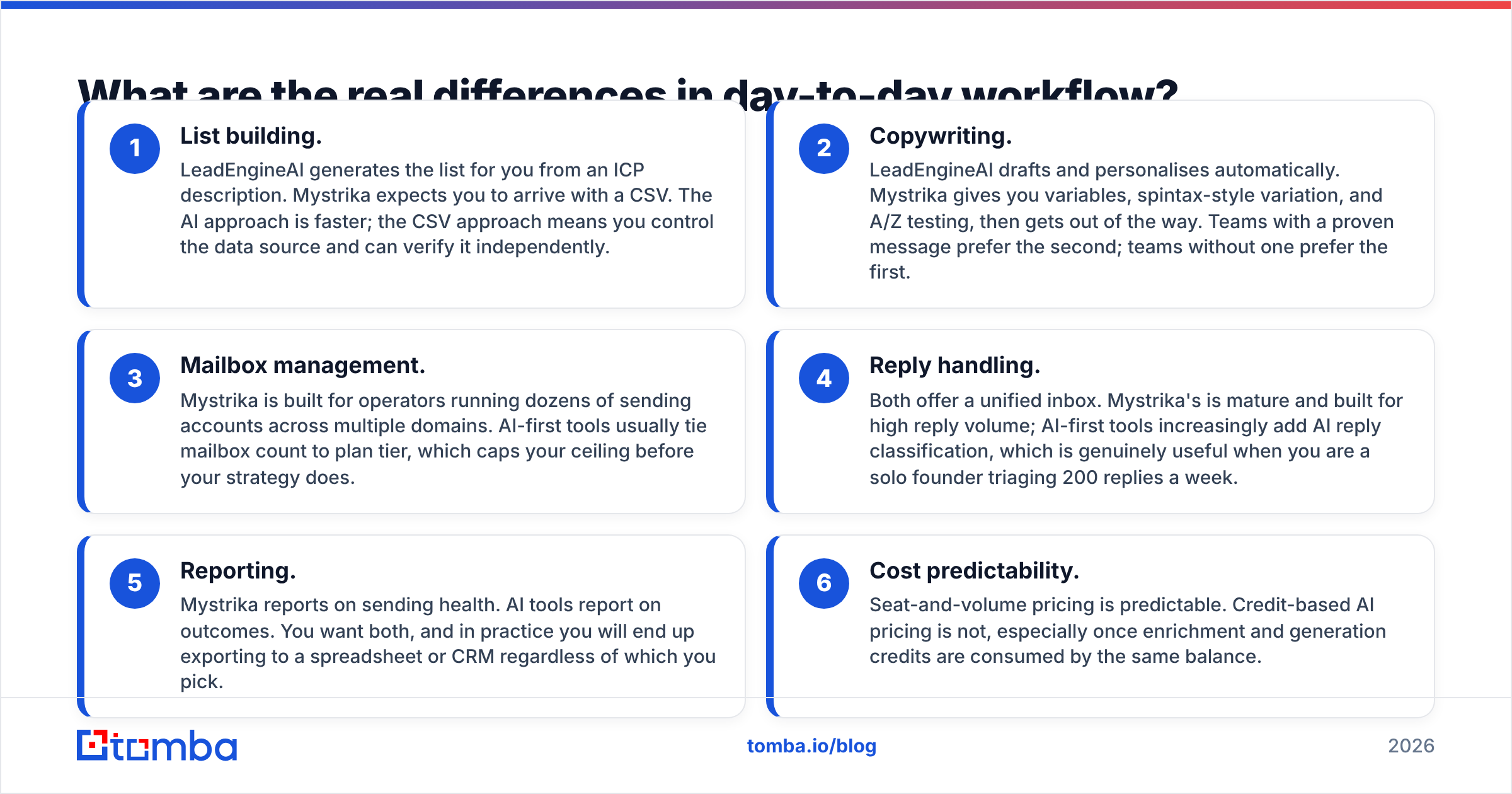
- List building. LeadEngineAI builds the list from a short brief. Mystrika expects a CSV. The AI way is faster. The CSV way lets you pick the source and check it.
- Copy. LeadEngineAI drafts and tailors each note. Mystrika gives you variables and A/Z testing, then steps back. Teams with a proven message prefer the second.
Running and paying
- Mailboxes. Mystrika suits operators with dozens of accounts across many domains. AI-first tools tie mailbox count to your plan, which caps you early.
- Replies. Both offer a shared inbox. Mystrika's is mature. AI tools sort replies for you, which helps a solo founder facing 200 replies a week.
- Reporting. Mystrika reports on sending health. AI tools report on results. You want both, so expect to export to a sheet or CRM anyway.
- Cost. Seat and volume pricing is easy to predict. Credit pricing is not, since one balance covers lookups and AI writing.
That last point matters. Credit plans feel fine until a campaign eats a month of credits in four days. Do the math first. Count your monthly contacts, then price the sourcing, the enrichment, and the writing. The total often runs two to three times the headline price.
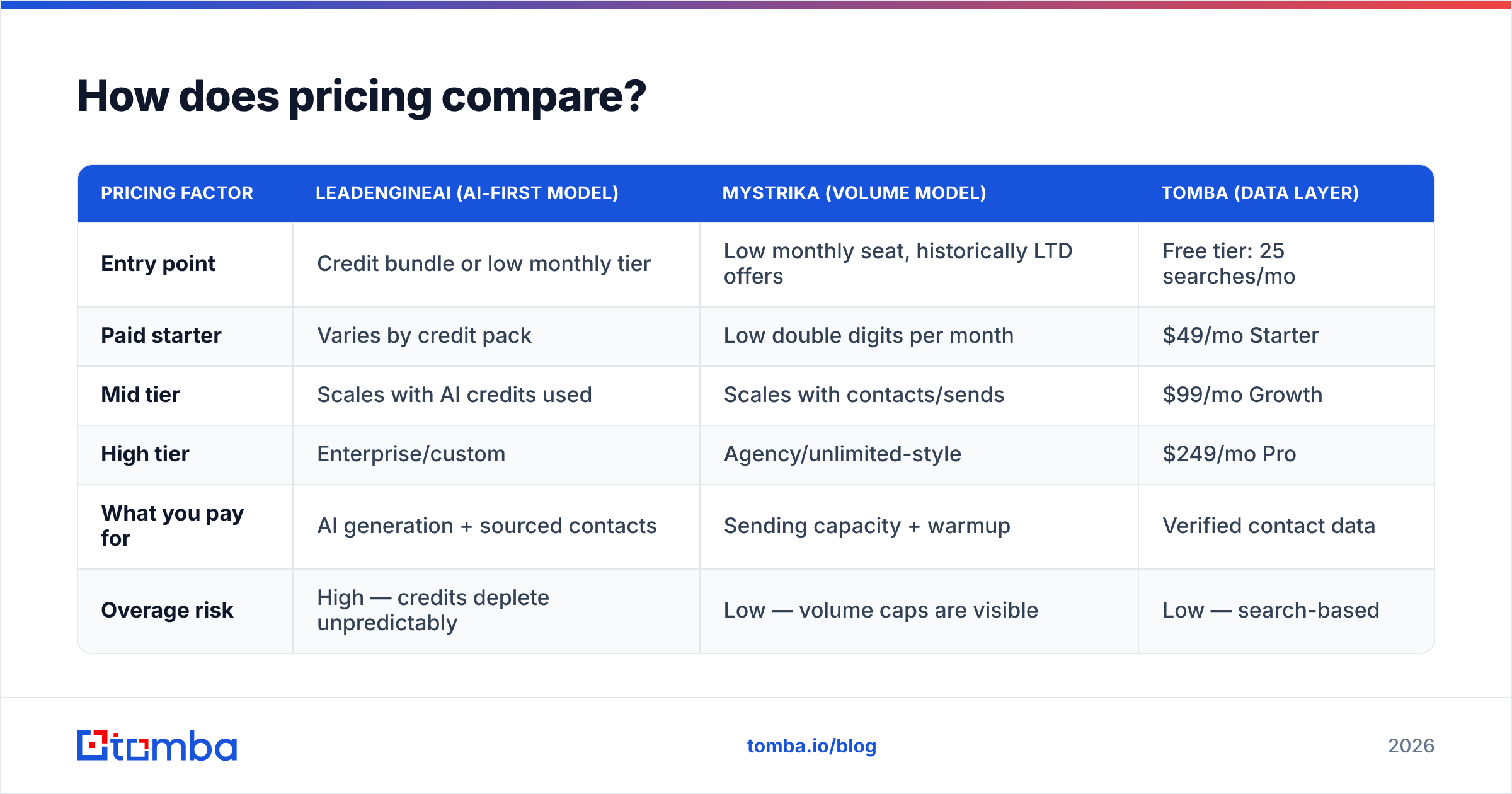
How does pricing compare?#
Both vendors change prices often. Read this as structure, not a quote.
| Pricing factor | LeadEngineAI (AI-first model) | Mystrika (volume model) | Tomba (data layer) |
|---|---|---|---|
| Entry point | Credit bundle or low monthly tier | Low monthly seat, historically LTD offers | Free tier: 25 searches/mo |
| Paid starter | Varies by credit pack | Low double digits per month | $49/mo Starter |
| Mid tier | Scales with AI credits used | Scales with contacts/sends | $99/mo Growth |
| High tier | Enterprise/custom | Agency/unlimited-style | $249/mo Pro |
| What you pay for | AI generation + sourced contacts | Sending capacity + warmup | Verified contact data |
| Overage risk | High — credits deplete unpredictably | Low — volume caps are visible | Low — search-based |
The honest read: Mystrika is usually the cheaper line for raw sending. That has been its pitch for years. LeadEngineAI costs more per contact, but it can replace two or three other tools. Whether that saves money depends on your current bills.
You can compare the data layer on Tomba pricing. It sits in the third column above for a reason. Most teams end up buying a sending tool and a data tool, not one product that does both well.
Where do both tools leave a gap?#
Contact data quality. Every time.
A sending platform's job ends at delivery. It cannot tell you whether first.last@company.com is a live mailbox owned by a real employee. Mystrika leaves that to you. AI-first tools hint that they solve it, which is worse. A made-up address that looks right is more dangerous than no address at all.
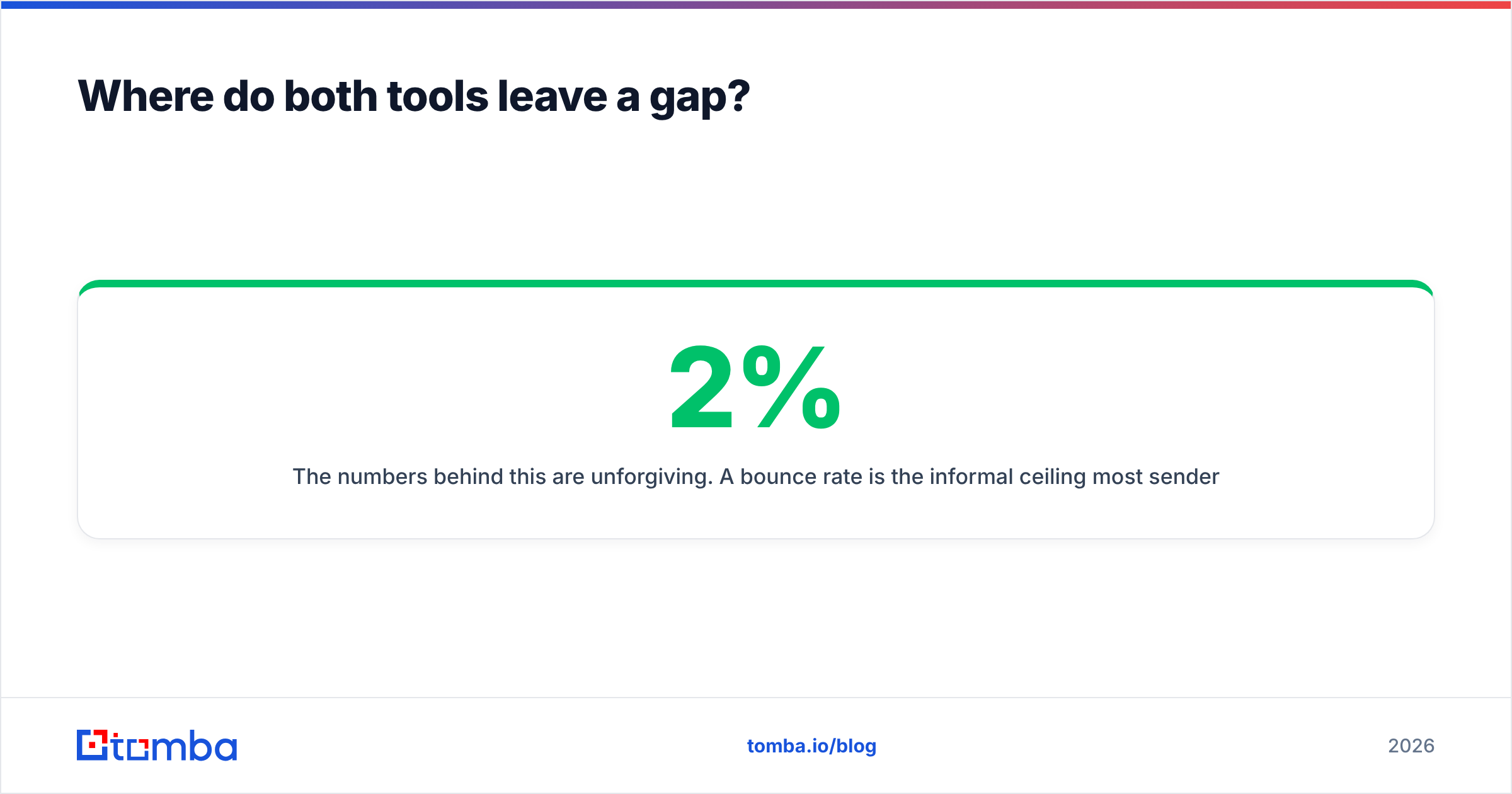
The numbers are harsh. Most senders treat a 2% bounce rate as the ceiling. Past about 5%, you damage sender reputation. Past that, you burn domains faster than warmup can heal them. If 15% of an AI-built list is stale, no warmup saves the campaign.
The fix is dull and it works. Put a verify step between sourcing and sending, whatever platform you use.
- Run every list through an email verifier before it hits a sequence.
- Treat catch-all domains as their own case. A catch-all verifier tells you if the server takes every address or the mailbox is real.
- Find the addresses you are missing with domain search instead of guessing them.
- Ramp volume slowly. An email warmup calculator shows how long a new domain needs. It is almost always longer than you hoped.
Reviews on G2 land on the same complaint in both categories. The tool worked. The list did not. That is a data problem in a sending tool's clothes.
Which one should you choose in 2026?#
Choose on your real constraint, not the demo.
Choose Mystrika if:
- You send real volume, 10k emails a month or more, across several domains.
- You run an agency and manage client sending setups.
- You already have a message that converts, and you need reach, not ideas.
- Cost per send matters more than cost per hour of your time.
Choose LeadEngineAI if:
- You are one to three people, and outbound is a slice of your week.
- You have no list, no message, and no process, and you need all three by Friday.
- You will trade control for fewer tools.
- You will audit AI-built contacts before you send.
Choose neither, yet, if: your domain is under 30 days old, your SPF and DMARC records are missing, or your buyer profile is still "B2B SaaS." No platform fixes those. Run an SPF checker first. It takes two minutes and saves you a wasted month.
For most teams, LeadEngineAI vs Mystrika is the wrong frame. The answer is a stack, not a winner. You need a data layer that gives you real contacts, a sending layer that guards placement, and the habit of cleaning the list before you scale. The sending tool is the cheapest part to swap. The data under it decides whether any of it works.
Frequently asked questions#
Is Mystrika better than LeadEngineAI for deliverability? Usually yes. Placement is the core of Mystrika's design, not a bundled extra. Still, a tidy AI-first setup with a checked list beats a sloppy Mystrika account with a scraped one.
Can I use both? Yes, and some teams do. They research and draft in LeadEngineAI, then send from Mystrika. It costs more, but the jobs stay separate.
Do either of them verify emails properly? Neither is a real verification tool. Both run basic checks. If bounce rate matters, and it should, run a proper verify pass on its own.
What about deliverability on new domains? The rules are the same everywhere. Set up your records, warm up for a few weeks, start at 10 to 20 sends per mailbox a day, and watch complaints. Tools change the ceiling, not the ramp.
Where to start#
Whichever way the LeadEngineAI vs Mystrika call goes, the leverage sits upstream. Fix the list and the campaign fixes itself. Run the best sequencer in the world against dead contacts, and you will still spend three months rebuilding your domain.
Start by finding contacts that exist. The Tomba Email Finder finds work addresses by domain, name, or company, with checks built into the same flow. The free tier gives you 25 searches a month, no card. Load the clean output into Mystrika or LeadEngineAI, and let the sending tool do the one job it does well.
Related guides#
// get started
Find, verify and enrich your first contacts today
Start on the free plan with 25 searches a month, then scale when your team is ready.
Free plan · No credit card required · GDPR & CCPA
// about the author