Mail Extraction: How to Pull Clean Emails From Text, Files & Sites
Mail extraction looks like a regex problem. Most of the real work comes after the regex runs: cleaning, verifying, staying compliant and keeping your sender reputation. Here are five extraction methods compared, with the workflow that keeps your list usable.
TL;DR
- Mail extraction means pulling email addresses out of unstructured sources such as text, PDFs, spreadsheets, web pages and inboxes, and turning them into a clean list you can use.
- The extraction step is easy. Most of the risk comes afterwards, from duplicates, syntax junk, role addresses, dead mailboxes and catch-all domains.
- There are five practical methods: manual copy-paste, regex scripts, browser extensions, file extractors, and domain search through an API. Each one fits a different volume and source.
- Never send to an extracted list until you've deduplicated and verified it. Unverified lists are the fastest way to damage your sender reputation.
- If you're extracting emails because you want contacts at specific companies, an email finder that starts from the domain is usually cleaner than scraping.
What is mail extraction?#
Mail extraction is the process of detecting and collecting email addresses from a source that wasn't built to give them to you. The source might be a pasted block of text, a 200-page PDF of conference attendees, a CSV export with emails buried in a "notes" column, a website's contact pages, or years of email threads.
Think of it as panning for gold. The river (your source) holds plenty of material, and the extractor is the pan. What comes out still has to be sorted, because some of it is fool's gold: typos, expired addresses, noreply@ inboxes, and strings that only look like emails, such as image@2x.png.
Under the hood, almost every extractor runs some version of a pattern match. An email address has a well-defined structure, a local part, an @, and a domain (see the email address format on Wikipedia), so a regular expression can find candidates quickly. Tools differ mostly in what they do around that match: how they handle obfuscation like name [at] company [dot] com, how they deal with file formats, and whether they validate anything at all.
Why do teams still need mail extraction in 2026?#
Data providers have grown a lot, yet extraction still has real uses:
- Event and webinar lists. Partner-shared attendee lists usually arrive as PDFs or messy spreadsheets.
- CRM cleanup. Older CRMs often hold emails inside free-text fields, call notes or signatures instead of the email column.
- Inbox mining. Your own sent and received mail contains warm contacts that never got logged.
- Research and journalism. Author pages, papers and press releases list contact emails inline.
- Migration projects. Moving from one tool to another often means pulling addresses out of exports that weren't designed for re-import.
In all of these cases you already have a legitimate relationship with the data, or a clear reason to process it. That matters. Extraction is a data-handling technique, and the legal question is about what you do with the result. We cover that below.
How does mail extraction actually work?#
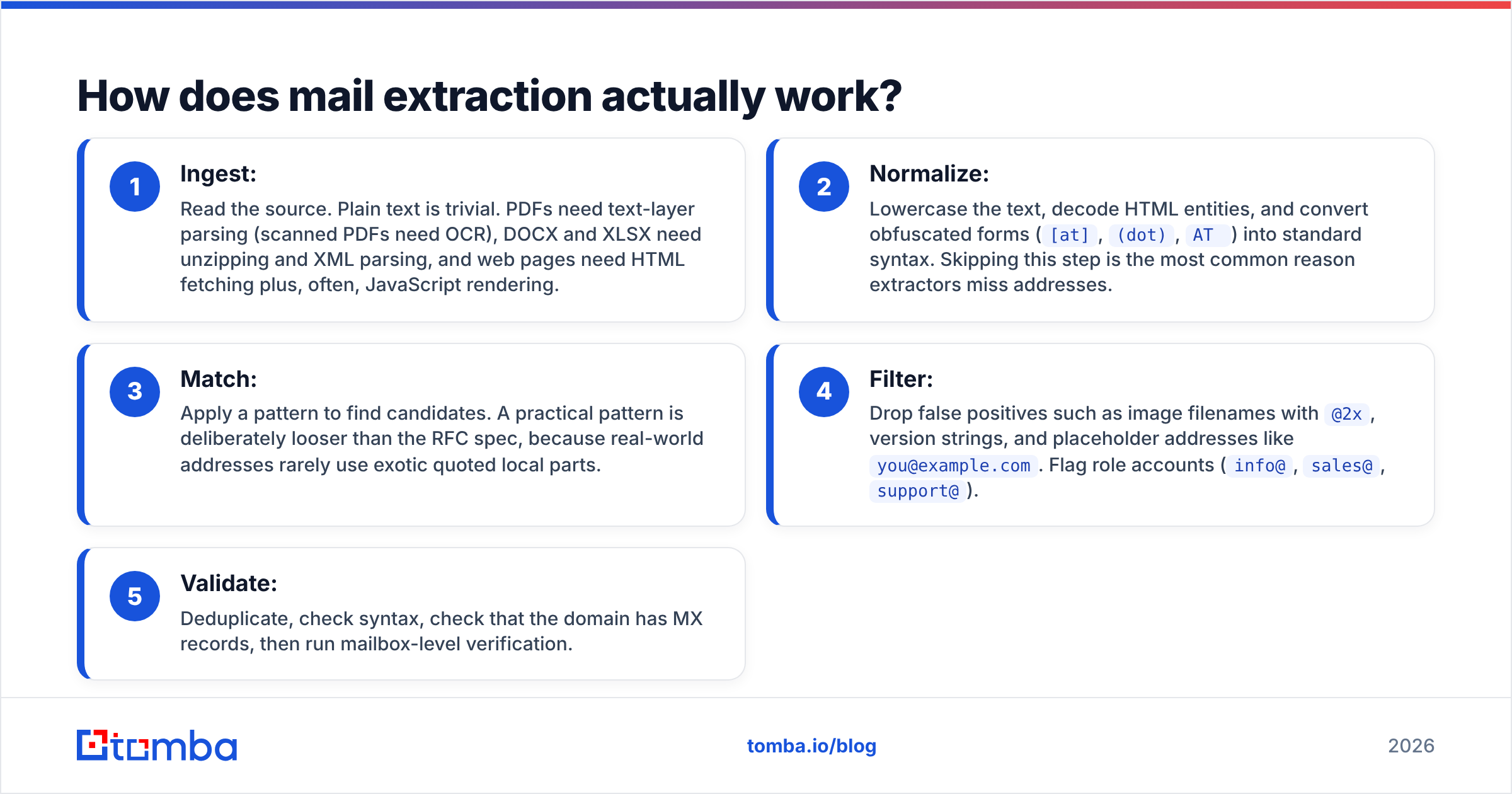
Each extraction pipeline, from a 20-line Python script to a commercial tool, follows the same five stages:
- Ingest: Read the source. Plain text is trivial. PDFs need text-layer parsing (scanned PDFs need OCR), DOCX and XLSX need unzipping and XML parsing, and web pages need HTML fetching plus, often, JavaScript rendering.
- Normalize: Lowercase the text, decode HTML entities, and convert obfuscated forms (
[at],(dot),AT) into standard syntax. Skipping this step is the most common reason extractors miss addresses. - Match: Apply a pattern to find candidates. A practical pattern is deliberately looser than the RFC spec, because real-world addresses rarely use exotic quoted local parts.
- Filter: Drop false positives such as image filenames with
@2x, version strings, and placeholder addresses likeyou@example.com. Flag role accounts (info@,sales@,support@). - Validate: Deduplicate, check syntax, check that the domain has MX records, then run mailbox-level verification.
Most free tools do stages 1–3 well and stop there. The quality gap between "a list of strings with @ in them" and "a list you can send to" sits almost entirely in stages 4 and 5.

What are the main mail extraction methods?#
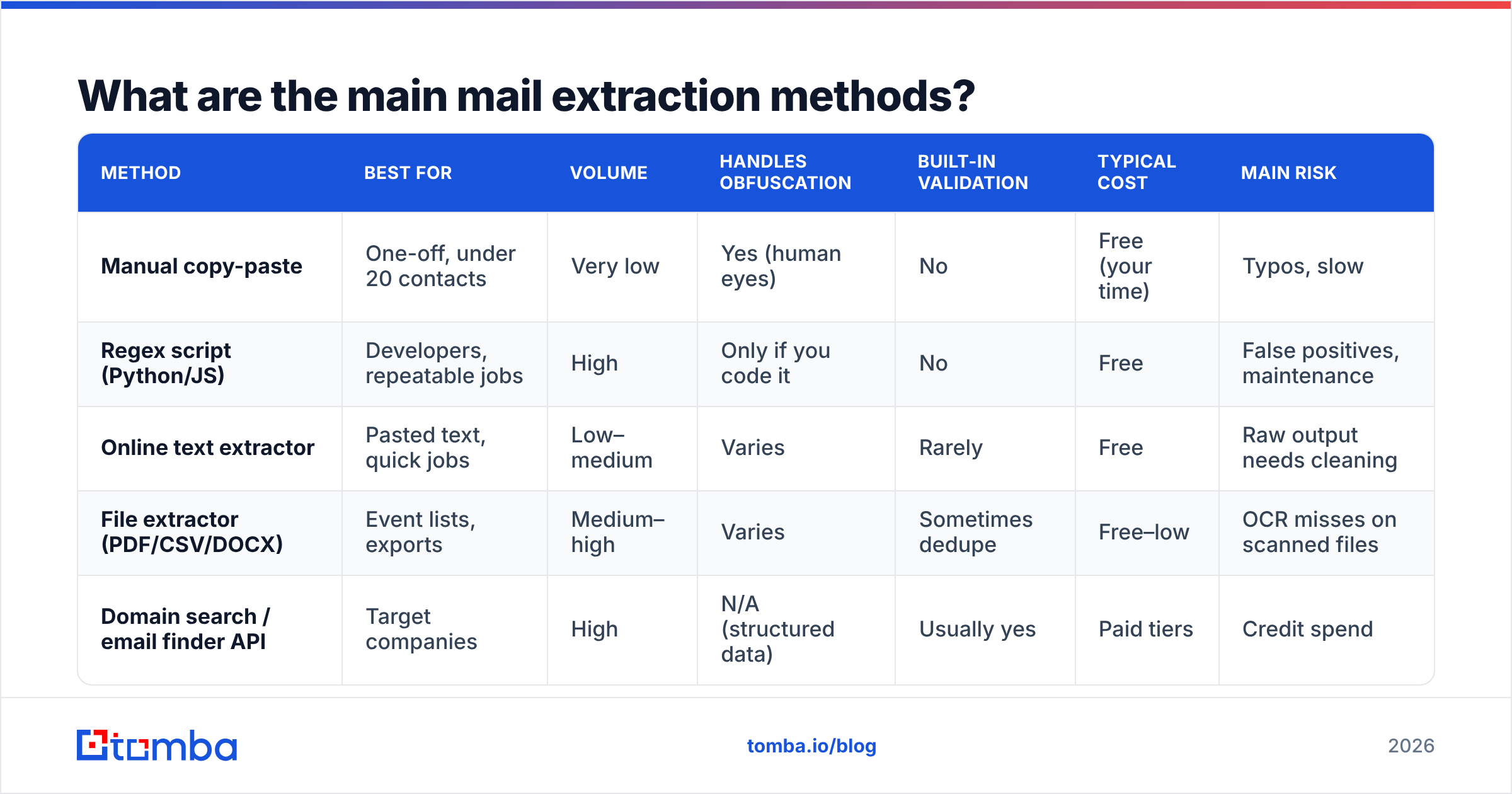
Five methods cover nearly every real situation. Here's how they compare on the attributes that matter.
| Method | Best for | Volume | Handles obfuscation | Built-in validation | Typical cost | Main risk |
|---|---|---|---|---|---|---|
| Manual copy-paste | One-off, under 20 contacts | Very low | Yes (human eyes) | No | Free (your time) | Typos, slow |
| Regex script (Python/JS) | Developers, repeatable jobs | High | Only if you code it | No | Free | False positives, maintenance |
| Online text extractor | Pasted text, quick jobs | Low–medium | Varies | Rarely | Free | Raw output needs cleaning |
| File extractor (PDF/CSV/DOCX) | Event lists, exports | Medium–high | Varies | Sometimes dedupe | Free–low | OCR misses on scanned files |
| Domain search / email finder API | Target companies | High | N/A (structured data) | Usually yes | Paid tiers | Credit spend |
1. Manual copy-paste#
Still fine for tiny jobs. If you need five addresses from a partner's email signature block, opening a tool would take longer than copying them. It stops being reasonable at roughly 20 contacts, which is about where human error starts to show up in your bounce rate.
2. Regex scripts#
If you're comfortable in Python, a script using the re module will extract thousands of addresses per second from any text you can load. The catch is maintenance. You'll keep adding normalization rules for obfuscation, exclusions for false positives, and handlers for new file types. Scripts suit repeatable internal jobs, like nightly parsing of a CRM notes export. They're a poor fit for one-off tasks done by non-engineers.
3. Online text extractors#
Paste a block of text and get a list back. A free email extractor like this handles the common cases (mixed text, HTML snippets, signatures) without any setup. It's the right tool when someone sends you a wall of text and you need the addresses in under a minute.
4. File extractors#
Event attendee PDFs, exported Excel sheets and Word documents are where file-based tools pay off. Uploading the file directly avoids the formatting damage that copy-paste does to tables and multi-column PDFs. If your source is a document instead of raw text, use a tool that can extract emails from a file directly. Check whether it supports OCR if the PDF was scanned rather than exported.
5. Domain search and email finder APIs#
This is the one method that doesn't scrape at all. You start from a company domain or a person's name, and the tool returns addresses from an indexed database, usually with a confidence score and source URLs. This is the better approach when your real goal is "contacts at these 300 companies" and not "whatever addresses happen to sit in this document." Tomba, Hunter, Snov.io, BookYourData and Apollo all offer versions of this. Each has a different data model and pricing structure, so test against your own target accounts before you commit.
Which mail extraction method should you choose?#
Match the method to the source and the volume:
- You have text in your clipboard: use an online text extractor.
- You have a file: use a file extractor, and confirm OCR support for scans.
- You have a recurring internal data job: write a script, or call an API from one.
- You have a list of target companies but no contacts: skip extraction and use domain search or an email finder.
- You have fewer than 20 contacts: copy them by hand, then verify anyway.
A common mistake is scraping websites to build a prospect list when what you need is the right person at a company. Scraping a contact page usually returns info@ and press@, which are role addresses that rarely reach a decision-maker and often sit behind ticketing systems. If the goal is the VP of Operations, a name-plus-domain lookup gets you there faster and with fewer bad addresses.
What happens after extraction? (The part that protects your domain)#
This is the section most guides skip. A freshly extracted list is a liability until it's cleaned. Old PDFs contain people who changed jobs years ago, scraped pages contain decoy addresses, and pasted text brings trailing punctuation that breaks syntax.
Run every extracted list through this sequence before it reaches a sending tool:
- Strip and normalize: Trim whitespace, remove trailing periods and commas, and lowercase the domain part.
- Deduplicate: The same person often appears several times across a document. Duplicate sends look spammy and waste credits downstream.
- Remove obvious junk: Filenames, placeholders,
noreply@,donotreply@, and test addresses. - Segment role accounts: Keep
info@andsales@out of personalized sequences. They may be fine for partnership outreach, but they need separate copy. - Verify at mailbox level: Use an email verifier to sort addresses into valid, invalid, risky and catch-all. Send only to valid addresses, and treat catch-all domains cautiously, at low volume.
Why so strict? Mailbox providers watch bounce rates closely. Google's and Yahoo's bulk-sender requirements, in force since 2024, made authentication and low complaint rates mandatory for high-volume senders, and a hard-bounce spike from a dirty extracted list is one of the quickest ways to land in spam folders. You can't send your way out of a bad reputation, only wait it out.
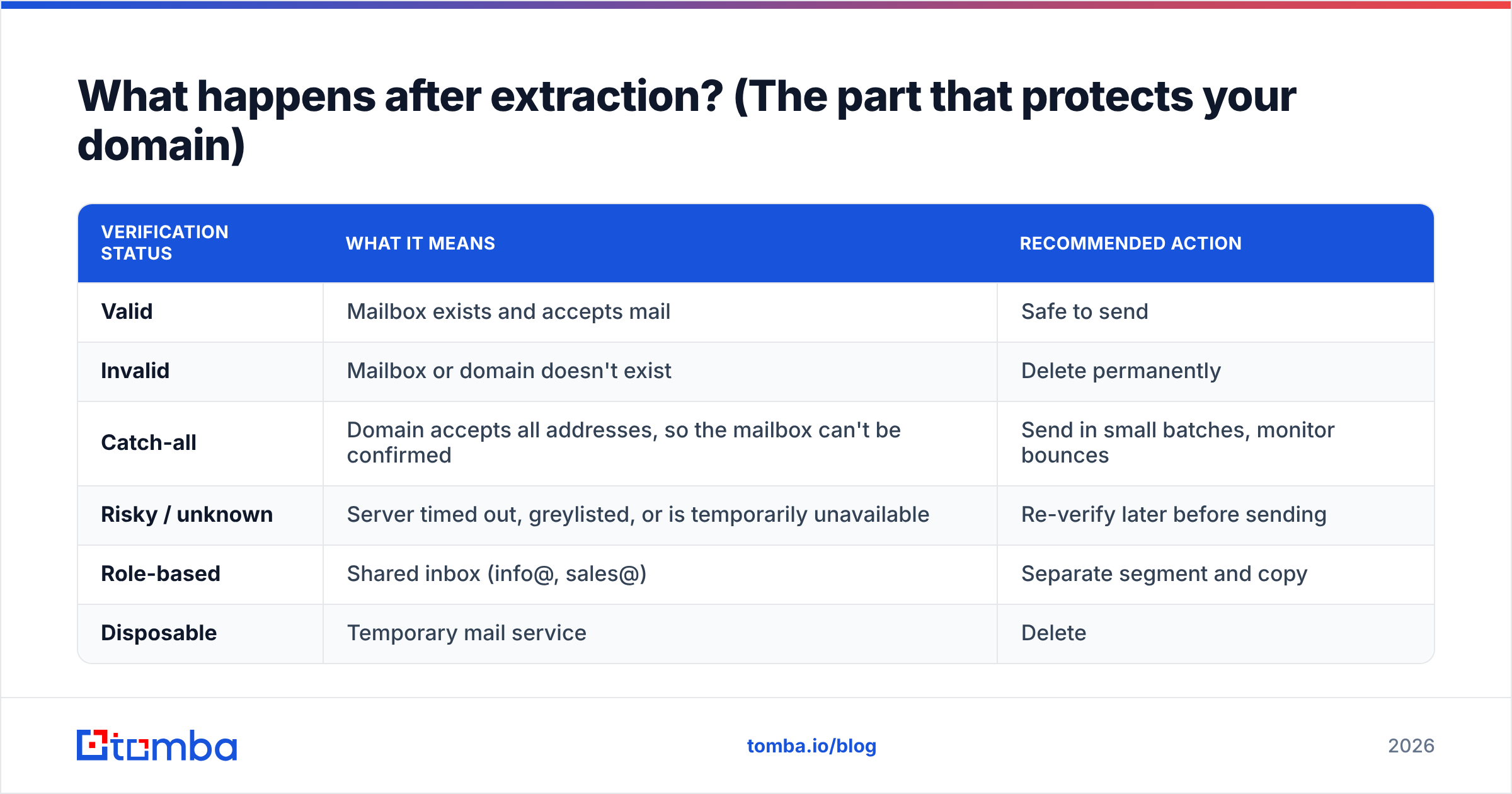
Here's a reference for what each verification status means and what to do with it:
| Verification status | What it means | Recommended action |
|---|---|---|
| Valid | Mailbox exists and accepts mail | Safe to send |
| Invalid | Mailbox or domain doesn't exist | Delete permanently |
| Catch-all | Domain accepts all addresses, so the mailbox can't be confirmed | Send in small batches, monitor bounces |
| Risky / unknown | Server timed out, greylisted, or is temporarily unavailable | Re-verify later before sending |
| Role-based | Shared inbox (info@, sales@) | Separate segment and copy |
| Disposable | Temporary mail service | Delete |
Is mail extraction legal?#
Extraction itself is a technical act. Legality depends on the source, the jurisdiction and what you do with the addresses. The short version:
- EU and UK (GDPR / UK GDPR): Email addresses tied to an individual are personal data. You need a lawful basis, usually legitimate interest for B2B outreach, plus a documented balancing test, a clear opt-out, and the ability to tell people where you got their data. See the overview of the General Data Protection Regulation. Germany and some other member states are stricter on unsolicited email than the GDPR baseline.
- United States (CAN-SPAM): Commercial email is allowed without prior consent, but you need accurate headers, a physical address, a working unsubscribe, and you must honor opt-outs promptly. The FTC's CAN-SPAM compliance guide is the authoritative reference. Note that CAN-SPAM explicitly prohibits sending to addresses harvested from websites using automated means, which is a strong reason to avoid indiscriminate scraping.
- Canada (CASL): Much stricter. Generally requires express or implied consent before you send commercial messages.
- Website terms of service: Many sites prohibit scraping, regardless of privacy law.
The practical rule: extract from sources where you have a legitimate relationship (your own inbox, an attendee list you were given with permission to contact, your CRM) and avoid harvesting random websites. This isn't legal advice. If you operate across several regions, have counsel review your process once and document it.

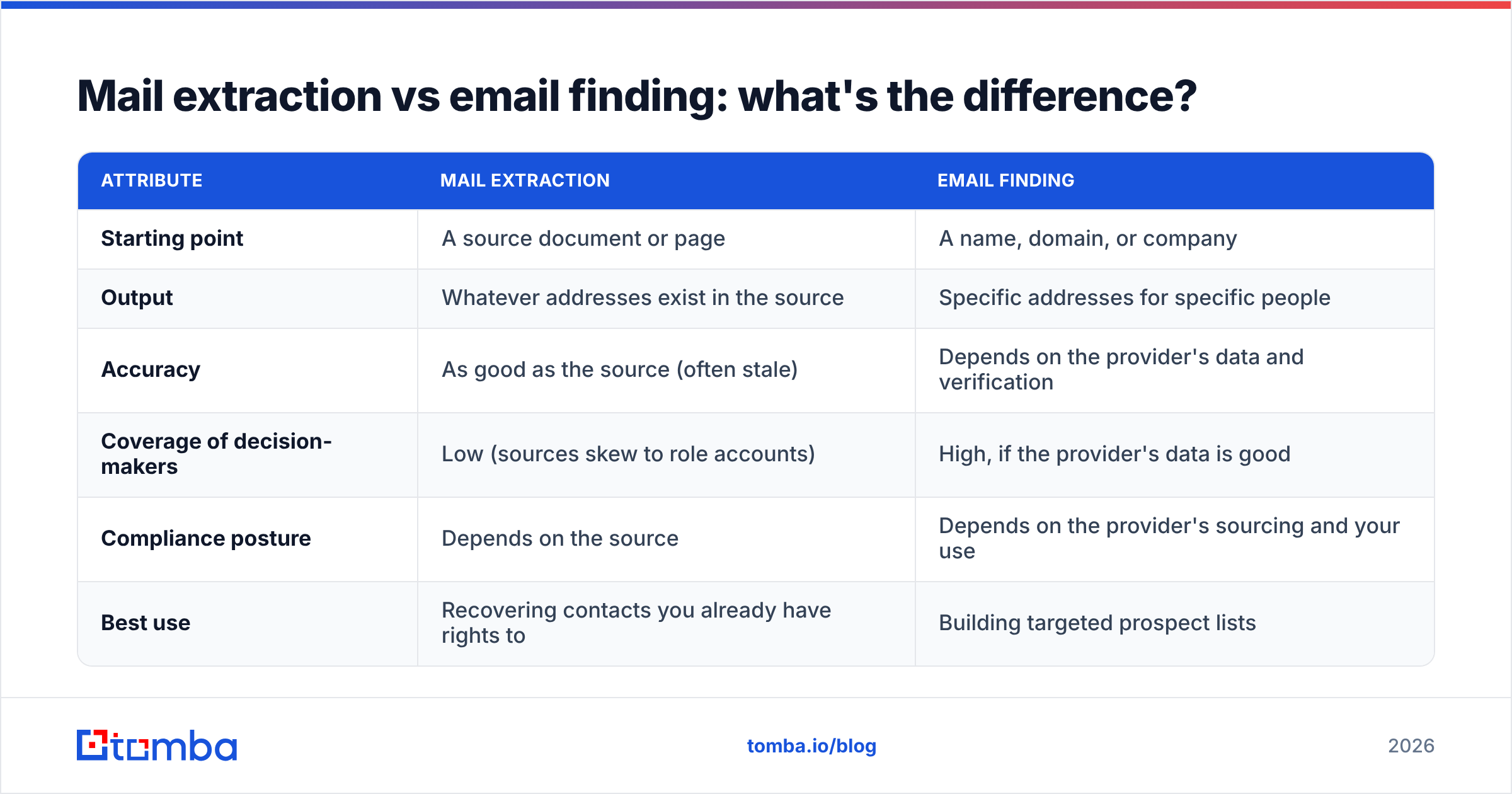
Mail extraction vs email finding: what's the difference?#
People mix these up, and the confusion leads to wrong tool choices.
| Attribute | Mail extraction | Email finding |
|---|---|---|
| Starting point | A source document or page | A name, domain, or company |
| Output | Whatever addresses exist in the source | Specific addresses for specific people |
| Accuracy | As good as the source (often stale) | Depends on the provider's data and verification |
| Coverage of decision-makers | Low (sources skew to role accounts) | High, if the provider's data is good |
| Compliance posture | Depends on the source | Depends on the provider's sourcing and your use |
| Best use | Recovering contacts you already have rights to | Building targeted prospect lists |
Extraction answers "what's in here?" Finding answers "how do I reach this person?" Most outbound teams need both: extraction to recover and clean what they already own, and finding to fill gaps for target accounts that aren't in any document.
What mistakes ruin extracted email lists?#
These five problems come up repeatedly in post-mortems after campaigns go wrong:
- Trusting old sources. A 2022 attendee PDF has a meaningful share of people who've since changed jobs. B2B contact data decays steadily every year, so verify anything that's more than a few months old.
- Skipping catch-all handling. Catch-all domains pass basic SMTP checks, then bounce or silently drop mail later. Isolate them and send at low volume.
- Mixing role and personal addresses. Personalized "Hi Sarah" copy sent to
info@gets forwarded to the bin, or reported. - Sending from your primary domain. Use a secondary sending domain for cold outreach so a bad batch doesn't hurt your main domain's deliverability for invoices and support mail.
- No source log. If someone asks where you got their address, under GDPR you need an answer. Keep a column recording the source file and date.
How do you build a repeatable mail extraction workflow?#
For a team that handles extracted lists regularly, here's a pipeline that holds up:
- Intake: Drop source files into one shared folder, named with source and date.
- Extract: Run a file or text extractor and export to CSV.
- Clean: Normalize, dedupe, strip junk, and tag role accounts.
- Verify: Run bulk verification and keep only valid addresses, plus catch-all addresses in a separate low-volume segment.
- Enrich (optional): Add job title, company size and LinkedIn URL so you can segment by persona.
- Load: Import into your CRM or sequencer with the source field filled in.
- Re-verify: Re-check anything that sits unused for more than 90 days before sending.
If you work at volume, steps 2–5 are worth automating through an API so nobody has to touch a spreadsheet. If you work at low volume, the free tools are enough. Just don't skip step 4.
Final verdict: which approach wins?#
No single method wins. Here's how the choice usually plays out:
- For quick, one-off jobs, free text and file extractors are all you need, provided you verify afterwards.
- For repeatable internal pipelines, scripts or APIs save hours each week.
- For prospecting, extraction is usually the wrong starting point. Starting from target domains and names gives better contacts with fewer bounces and a cleaner compliance story.
Whatever you choose, verification is the step you can't skip. Extracting is the easy part. Keeping your domain healthy depends on cleaning the list before it reaches a sending tool.
If your extraction work keeps turning up generic inboxes instead of the people you want to reach, try starting from the company instead. Tomba Email Finder returns professional addresses from a domain, a name or a company, with source URLs and built-in verification, so you send to real decision-makers instead of info@. The free tier includes 25 searches a month, which is enough to test it against your own target accounts before choosing a paid plan, starting at $49/mo.
Related guides#
// start free
See who Tomba finds at any company
Type a company's domain to see its people, their roles and verified work emails, each with the pages it was found on. Free account, no card.
Free plan · No credit card required · GDPR & CCPA
// about the author