Mailbox Warmup in 2026: How to Warm a New Inbox Without Burning It
A new mailbox that sends 200 cold emails on day one goes to spam by day three. Here is the 2026 mailbox warmup playbook: a day-by-day schedule, which tools are worth paying for, and when warmup alone won't fix your deliverability.

TL;DR
- Mailbox warmup means slowly increasing how much a new or dormant inbox sends, so Gmail, Outlook, and Yahoo learn to trust it before you start cold outreach.
- Plan on 2-4 weeks. Start at 5-10 emails a day and stop at 30-50 cold emails per inbox per day, even once the inbox is fully warm.
- Warmup tools automate the ramp with peer-to-peer networks. They help, but they can't make up for broken SPF/DKIM/DMARC, bounce-heavy lists, or copy that reads like spam.
- If more than 2% of your emails bounce, your warmup work is wasted. Verify every list before it goes into a sequence.
- Keep warmup running at low volume after launch. Treat it as ongoing upkeep, not something you do once.
What is mailbox warmup?#
Mailbox warmup is how you build a sending history for an email account that doesn't have one yet. A new Google Workspace or Microsoft 365 inbox starts out unknown to the receiving servers that decide between the inbox and the spam folder. To them, a brand-new address sending hundreds of messages to strangers behaves exactly like a spammer.
Warmup fixes this by doing what a real person does: start with a few emails, get replies, and send a little more each week. Over time, mailbox providers attach positive signals to your domain and IP: opens, replies, messages moved out of spam, and almost no complaints. Together those signals make up your sender reputation, and that reputation decides where your cold emails end up.
Think of it as a credit score for your inbox. You can't borrow $50,000 the day you open your first account. You start with a small limit, pay it off on time, and the limit goes up. Inbox providers work the same way, except the limit is your daily volume, and spam complaints count as missed payments.
Why does warmup matter more in 2026 than it used to?#
Because the rules got stricter and the providers now enforce them. In February 2024, Google and Yahoo started requiring bulk senders to authenticate with SPF, DKIM, and DMARC, to offer one-click unsubscribe, and to keep spam complaint rates under 0.3%. Google's email sender guidelines spell out those requirements. Microsoft brought similar requirements to Outlook.com consumer inboxes in 2025.
These rules formally apply to senders of 5,000+ messages a day, but in practice the filters judge everyone the same way. A new inbox with no history, no authentication, and a sudden spike in volume trips every alarm at once.
How does mailbox warmup actually work?#
Warmup is really five separate jobs that run together. When warmup fails, it's usually because one of them got skipped.
- Authenticate before you send anything. Publish SPF, DKIM, and DMARC records for the sending domain. If authentication is missing, the first 50 warmup emails already count against you. Run your domain through an SPF checker before day one.
- Ramp volume gradually. Start at 5-10 emails a day and add 2-5 a day each week. Never jump by 3x overnight. Providers look at the rate of change as much as the total.
- Generate positive engagement. Warmup emails get opened, replied to, starred, and pulled out of spam. That is the main signal that you are a real sender and not a script.
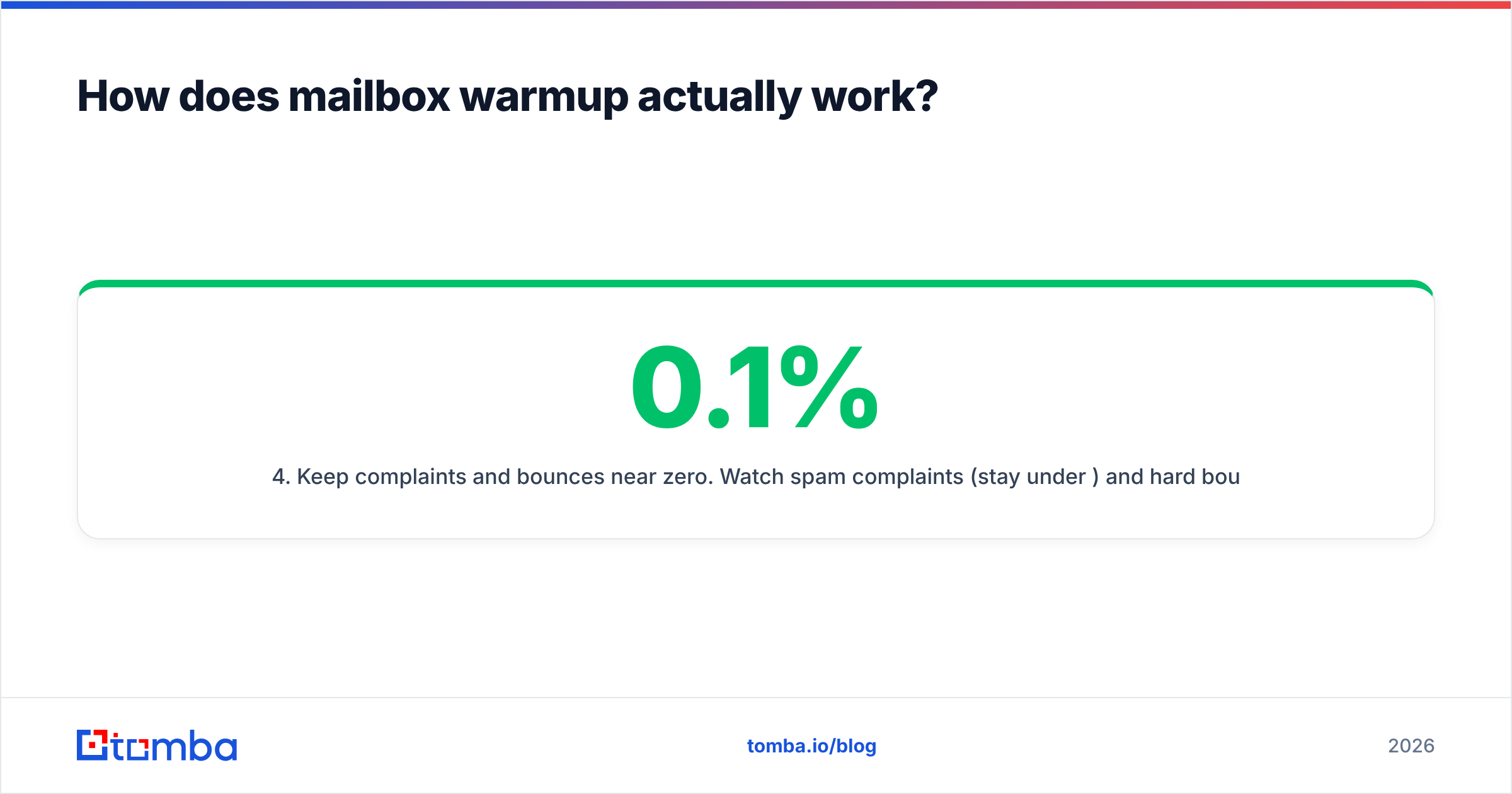
- Keep complaints and bounces near zero. Watch spam complaints (stay under 0.1%) and hard bounces (stay under 2%). One bad list import can undo three weeks of warmup.
- Monitor and adjust. Check Google Postmaster Tools and your warmup tool's placement reports every week. If inbox placement drops, pause the ramp until it recovers.
The automated tools mostly cover steps 2 and 3. Steps 1, 4, and 5 are your job.

What does a good mailbox warmup schedule look like?#
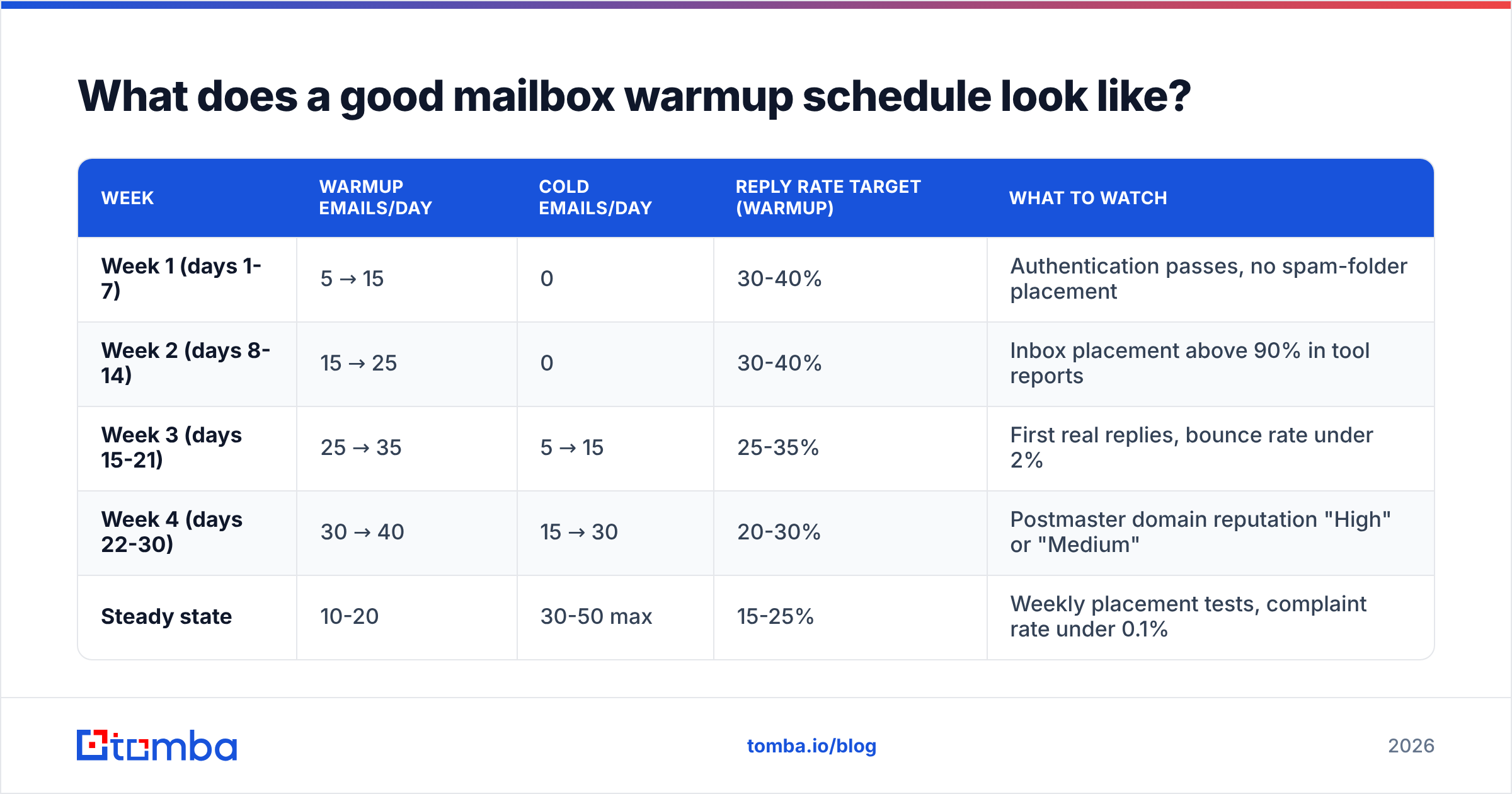
The schedule below is a conservative 30-day ramp for one Google Workspace or Microsoft 365 inbox on a domain with a little history. On a domain registered last week, stretch every phase by 50%. The warmup calculator can build a version for your own volume and number of inboxes.
| Week | Warmup emails/day | Cold emails/day | Reply rate target (warmup) | What to watch |
|---|---|---|---|---|
| Week 1 (days 1-7) | 5 → 15 | 0 | 30-40% | Authentication passes, no spam-folder placement |
| Week 2 (days 8-14) | 15 → 25 | 0 | 30-40% | Inbox placement above 90% in tool reports |
| Week 3 (days 15-21) | 25 → 35 | 5 → 15 | 25-35% | First real replies, bounce rate under 2% |
| Week 4 (days 22-30) | 30 → 40 | 15 → 30 | 20-30% | Postmaster domain reputation "High" or "Medium" |
| Steady state | 10-20 | 30-50 max | 15-25% | Weekly placement tests, complaint rate under 0.1% |
Some practical notes on running it:
- Spread sends across the working day. Twenty emails at 9:00:00 AM look automated. Twenty emails between 8 AM and 5 PM with random gaps look human.
- Don't send on weekends during weeks 1-2. Real B2B senders rarely do, so the pattern looks more natural.
- Cap cold volume per inbox, not per domain. If you need 300 cold emails a day, use 6-8 inboxes at 40-50 each. Don't push one inbox to 300.
- Use secondary domains for outbound. Send cold email from something like
getacme.comortryacme.comso a reputation hit never touches theacme.cominbox your customers and invoices use.
How long should a mailbox warmup take?#
Plan on 14 days at minimum and 30 if you can. A domain registered in the last 30 days needs the full month and often more. An existing domain where you're only adding a new inbox can usually start light cold sends in week 2. An inbox that has sat idle for 90+ days should be treated as new, because providers forget faster than most people expect.
Do mailbox warmup tools actually work?#
Mostly yes, with caveats. Most warmup tools run a peer-to-peer network: your inbox emails other members' inboxes, and theirs email yours. The tool opens those messages automatically, replies, marks them important, and moves them out of spam. To Gmail or Outlook, it looks like a healthy back-and-forth.
There are two catches. First, mailbox providers know these networks exist and keep getting better at discounting obvious warmup patterns, such as identical reply templates, tracking strings in subject lines, or thousands of inboxes that only email each other. Second, warmup engagement can make your reputation look better than your real sending deserves. If your cold campaigns get 0.5% replies and a 3% bounce rate, warmup traffic won't save you for long.
Use warmup tools to build trust and protect it. Don't use them to cover up a list or copy problem.
Which mailbox warmup tools are worth comparing?#
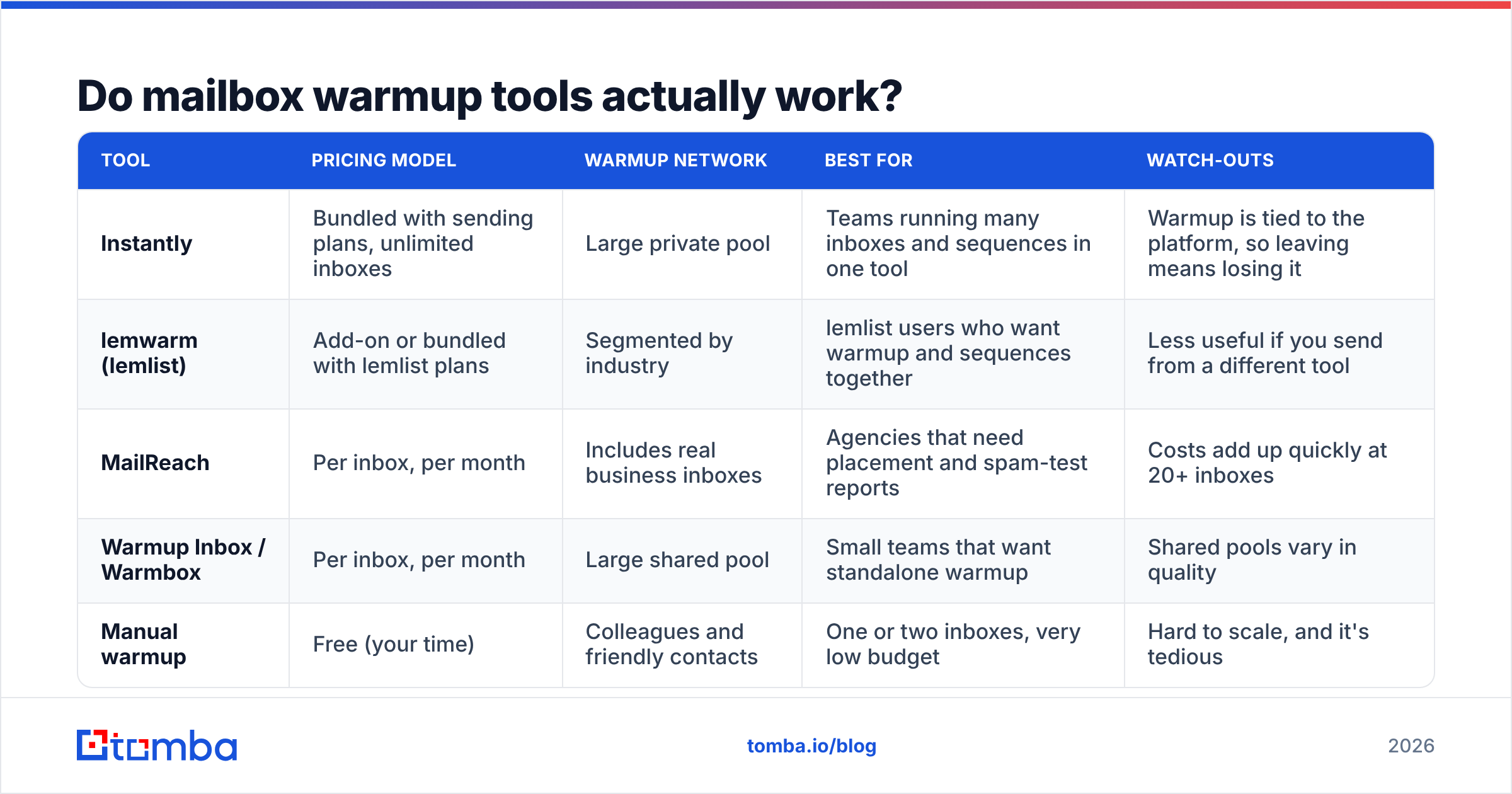
Pricing in this category changes often and usually depends on the number of inboxes, so check each vendor's current plans before you buy. The table compares how the main options are set up, not exact list prices.
| Tool | Pricing model | Warmup network | Best for | Watch-outs |
|---|---|---|---|---|
| Instantly | Bundled with sending plans, unlimited inboxes | Large private pool | Teams running many inboxes and sequences in one tool | Warmup is tied to the platform, so leaving means losing it |
| lemwarm (lemlist) | Add-on or bundled with lemlist plans | Segmented by industry | lemlist users who want warmup and sequences together | Less useful if you send from a different tool |
| MailReach | Per inbox, per month | Includes real business inboxes | Agencies that need placement and spam-test reports | Costs add up quickly at 20+ inboxes |
| Warmup Inbox / Warmbox | Per inbox, per month | Large shared pool | Small teams that want standalone warmup | Shared pools vary in quality |
| Manual warmup | Free (your time) | Colleagues and friendly contacts | One or two inboxes, very low budget | Hard to scale, and it's tedious |
If you already pay for a sequencer that includes warmup, use that before buying a standalone tool. Standalone tools are worth it when you need cross-platform placement reports or when you want to keep warmup separate from the platform you send from.
What breaks a mailbox warmup?#
Most warmup failures come from a handful of habits that keep showing up.
Sending to unverified lists. This is the most common mistake. You spend three weeks warming an inbox, then import a 2,000-row CSV from an old spreadsheet and get an 8% hard-bounce rate on day one. Providers read that as list scraping. Run every list through an email verifier first, and handle catch-all domains carefully: they accept everything at the SMTP level and can still bounce later.
Tracking pixels and link shorteners from day one. Open tracking adds a remote image, and link tracking rewrites URLs through a shared domain that other senders may have burned. During warmup and the first weeks of cold sending, turn off open tracking and use a custom tracking domain or plain links.
Changing too many things at once. New domain, new inbox, new copy, new list, and new sending tool all in the same week means that when placement drops, you can't tell which change caused it. Change one variable at a time.
Stopping warmup after launch. A lot of teams turn warmup off once cold campaigns start. Then their reputation slips, because their real engagement rate is far lower than the warmup traffic was. Keep 10-20 warmup emails a day running alongside cold sends.
Image-heavy or link-heavy copy. Three links, an embedded logo, and an HTML signature full of social icons look like a newsletter, not a one-to-one email. Plain text with one link at most is the safest format during the ramp.

How do you know your mailbox warmup is working?#
Measure it. Don't rely on how it feels. The signals that matter:
- Google Postmaster Tools. Free, and it shows domain reputation (Bad / Low / Medium / High), spam rate, and authentication pass rates for Gmail recipients. It only reports data once you send meaningful volume to Gmail addresses, so expect it to stay empty in week 1.
- Seed or placement tests. Send to a panel of seed inboxes across Gmail, Outlook, Yahoo, and corporate filters, and record where each message lands. Most paid warmup tools include these.
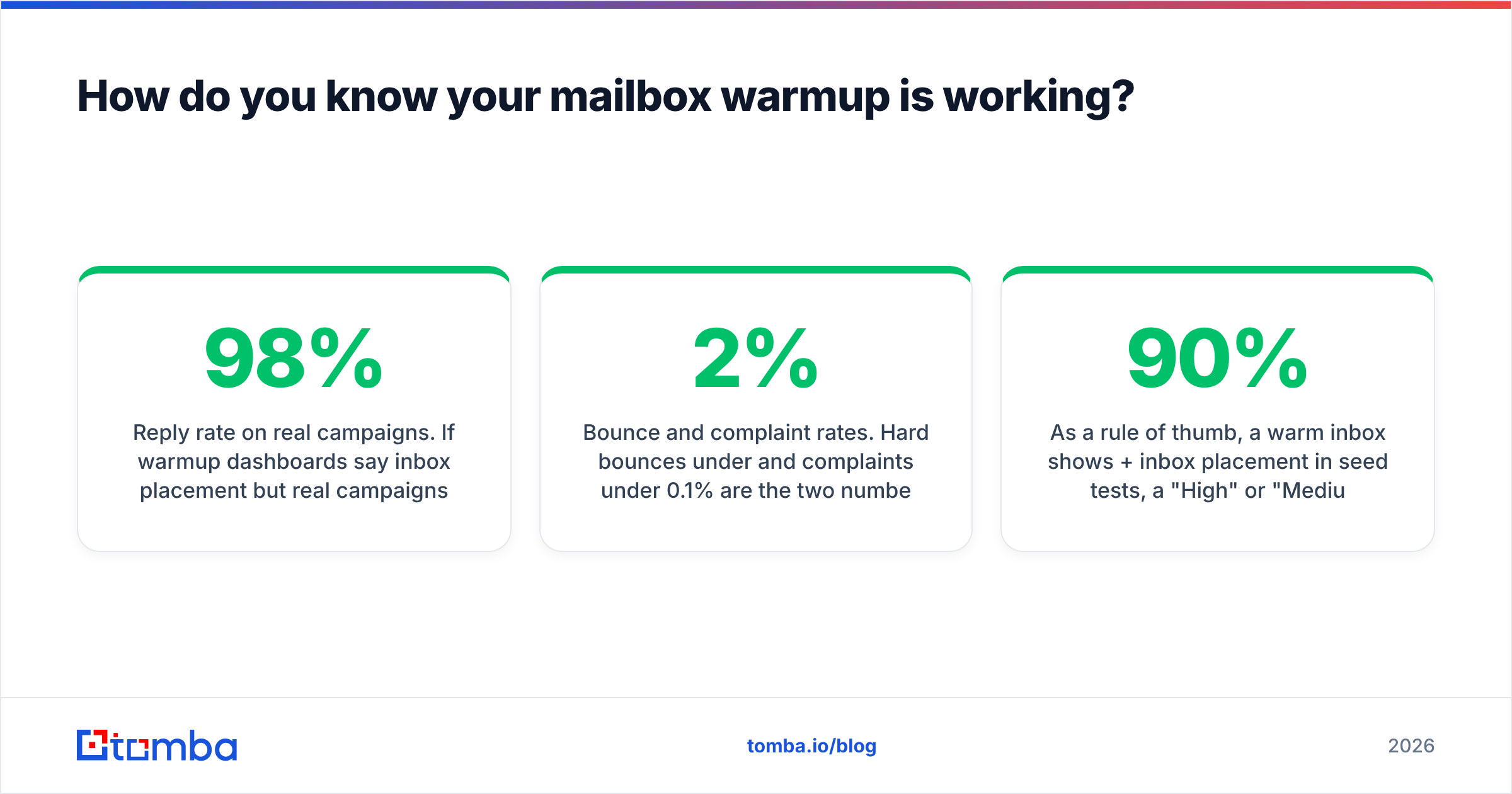
- Reply rate on real campaigns. If warmup dashboards say 98% inbox placement but real campaigns get zero replies on decent copy, the dashboard is wrong or your list is.
- Bounce and complaint rates. Hard bounces under 2% and complaints under 0.1% are the two numbers that most directly protect the reputation you built.
As a rule of thumb, a warm inbox shows 90%+ inbox placement in seed tests, a "High" or "Medium" Postmaster reputation, and real reply rates in line with your industry baseline (often 2-8% for well-targeted B2B cold email).
Is mailbox warmup enough to fix bad deliverability?#
No. Warmup builds and keeps trust, but it can only work with the infrastructure, data, and copy you give it. If deliverability is already broken, fix things in this order:
- Authentication: SPF, DKIM, and DMARC pass and align. The Wikipedia overview of DMARC explains how the three fit together if you're setting them up for the first time.
- Blacklists: confirm the sending IP and domain aren't listed.
- List quality: verify, deduplicate, and remove role addresses like info@ and sales@ from cold sequences.
- Volume: drop to warmup levels and ramp again.
- Copy: shorter, plainer, more personal, with fewer links.
- Warmup: restart it and keep it running.
If the problem is a domain with a "Bad" Postmaster reputation and a history of complaints, moving outbound to a fresh secondary domain and warming it properly is often faster than repairing the old one.
What's the mailbox warmup checklist before your first cold campaign?#
Before you send cold email from a newly warmed inbox, confirm all of these:
- SPF, DKIM, and DMARC published and passing (check with a header analyzer on a test email)
- At least 14 days of warmup completed, ideally 21-30
- Seed tests show 90%+ inbox placement across Gmail and Outlook
- Cold volume capped at 30-50 a day per inbox, starting at 5-15
- Open tracking off, or a custom tracking domain configured
- List verified, with bounce risk under 2% and catch-alls flagged or excluded
- Warmup set to keep running at 10-20 a day after launch
- An unsubscribe line or one-click option in every message
Where does Tomba fit into your mailbox warmup plan?#
Warmup builds trust, and bad contact data destroys it faster than anything else on this list. Pulling addresses from scraped lists or guessing email patterns by hand is what produces the bounce spikes that wipe out weeks of ramp-up. Tomba Email Finder finds professional email addresses by domain, name, or company, with verification built into the same workflow, so the first contacts you send to from a newly warmed inbox are real and deliverable. You can start on the free tier with 25 searches a month, and paid plans begin at $49/mo when your outbound volume grows. Warm the inbox, verify the list, then send.
Related guides#
// start free
See who Tomba finds at any company
Type a company's domain to see its people, their roles and verified work emails, each with the pages it was found on. Free account, no card.
Free plan · No credit card required · GDPR & CCPA
// about the author