Mailforge Alternatives: 8 Cold Email Infrastructure Picks for 2026
Mailforge made cheap shared-infrastructure mailboxes popular. These eight Mailforge alternatives compare on per-mailbox cost, dedicated IPs, warmup, and when each one makes sense.
TL;DR
- Mailforge sells cheap cold email mailboxes on shared infrastructure. Third-party reviews put it at roughly $2–3 per mailbox per month, with a 10-mailbox minimum. Domains and warmup cost extra.
- The main reasons people leave are shared IP reputation, having no warmup or verification included, and wanting more control as they scale.
- Infraforge (from the same company) and Inframail fit teams that want dedicated IPs. Maildoso is usually the cheapest per mailbox at high volume. Zapmail fits teams that need pre-warmed inboxes quickly. Google Workspace / Microsoft 365 direct fits small, careful senders.
- No mailbox provider can rescue a bad list. Verify every address before you send, or your new infrastructure will burn out just as fast as the old one.
What is Mailforge, and why are people looking for alternatives?#
Mailforge is a cold email infrastructure provider from the Salesforge family. You buy domains and mailboxes in bulk, and Mailforge sets up DNS (SPF, DKIM, DMARC) automatically. Then you connect the inboxes to a sequencer such as Salesforge, Instantly, or Smartlead. You can see the current offer on the official Mailforge site.
Mailforge's appeal is economics. According to third-party reviews published in 2026, Mailforge mailboxes cost roughly $2–3 each per month, with domains billed separately (around $14/year for a .com). One comparison puts 200 Mailforge mailboxes at about $484/month, against roughly $1,680/month for the same count bought straight from Google Workspace.
So why switch? The complaints people actually raise fall into four groups:
- Shared IPs. Your reputation is pooled with other senders. If someone on your pool sends junk, you can feel it in your inbox placement.
- No warmup bundled. You need a separate warmup tool from day one, which adds cost and setup time.
- No list verification. Mailforge provides mailboxes, not data quality. Bounces still count against your domains.
- Scaling and control. Agencies running hundreds of inboxes across clients often want dedicated IPs, per-client isolation, or flat-rate pricing.
If one of those is your pain point, the alternatives below fix it in different ways.
How should you evaluate a Mailforge alternative?#
Before you look at the list, decide what you are optimising for. Buying cold email infrastructure is like renting delivery vans. The cheapest van is fine until your neighbour's van gets you all banned from the loading dock.
- IP model. Shared IPs are cheap but pooled. Dedicated IPs isolate your reputation but cost more and need careful volume management.
- Mailbox type. Some providers resell real Google Workspace or Microsoft 365 seats, while others run their own SMTP/IMAP servers. Mailbox type affects inbox placement at Gmail and Outlook recipients.
- Pricing model. Per mailbox, per slot, or flat fee with unlimited inboxes. Flat fees usually win past about 40 mailboxes.
- What's bundled. Check whether DNS setup, warmup, domain purchase, and mailbox migration are included.
- Sequencer fit. Make sure you can export or connect inboxes to the tool you already use, without manual CSV work for every inbox.
- Exit cost. Find out whether you can take your domains with you if you leave.
What are the best Mailforge alternatives in 2026?#
Here is the shortlist, ordered from "closest to Mailforge" to "most different."
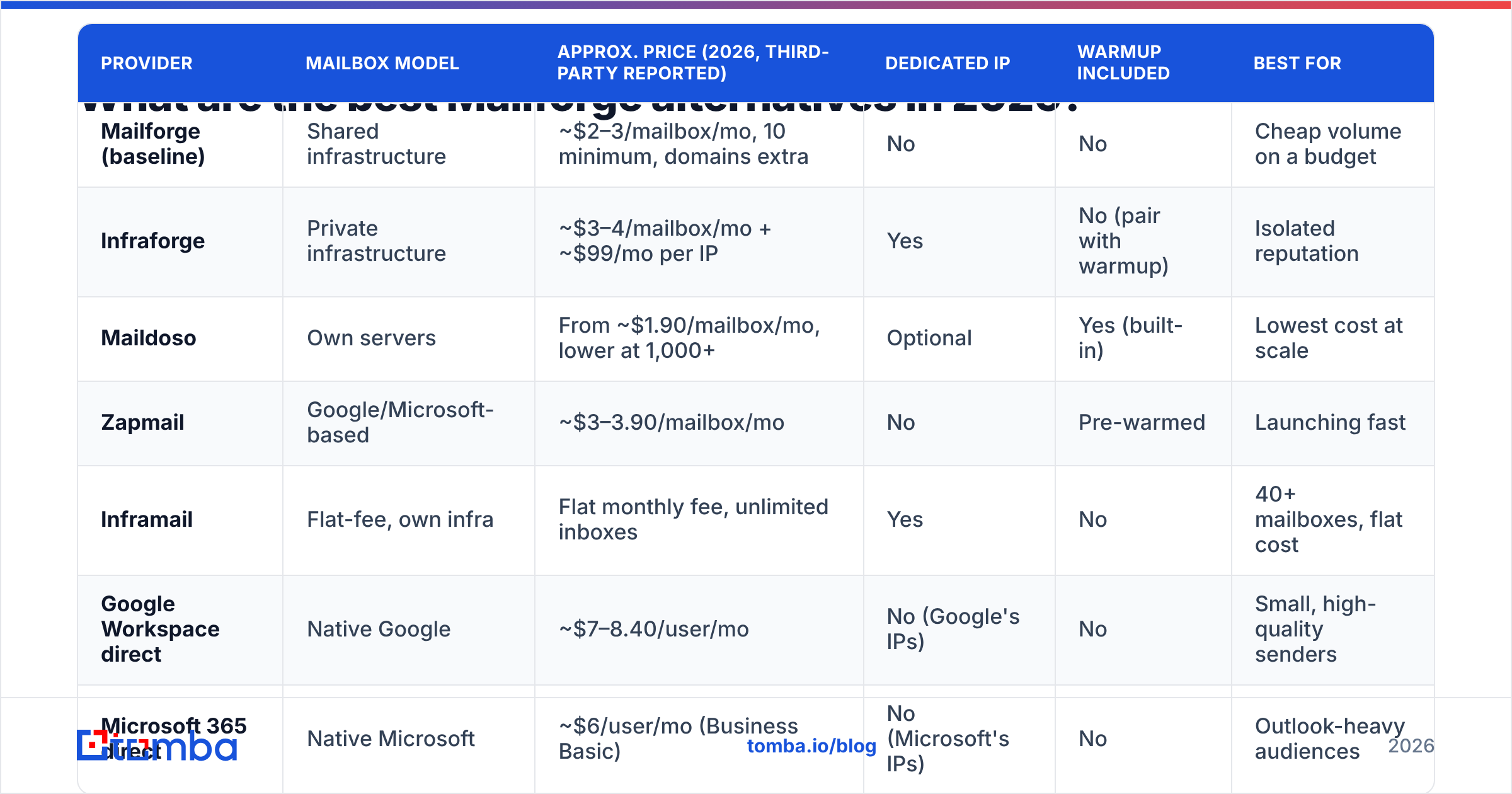
| Provider | Mailbox model | Approx. price (2026, third-party reported) | Dedicated IP | Warmup included | Best for |
|---|---|---|---|---|---|
| Mailforge (baseline) | Shared infrastructure | ~$2–3/mailbox/mo, 10 minimum, domains extra | No | No | Cheap volume on a budget |
| Infraforge | Private infrastructure | ~$3–4/mailbox/mo + ~$99/mo per IP | Yes | No (pair with warmup) | Isolated reputation |
| Maildoso | Own servers | From ~$1.90/mailbox/mo, lower at 1,000+ | Optional | Yes (built-in) | Lowest cost at scale |
| Zapmail | Google/Microsoft-based | ~$3–3.90/mailbox/mo | No | Pre-warmed | Launching fast |
| Inframail | Flat-fee, own infra | Flat monthly fee, unlimited inboxes | Yes | No | 40+ mailboxes, flat cost |
| Google Workspace direct | Native Google | ~$7–8.40/user/mo | No (Google's IPs) | No | Small, high-quality senders |
| Microsoft 365 direct | Native Microsoft | ~$6/user/mo (Business Basic) | No (Microsoft's IPs) | No | Outlook-heavy audiences |
| Sequencer DFY mailboxes (Instantly, Smartlead) | Reseller, varies | Varies by plan | Varies | Usually yes | All-in-one convenience |
Prices change often and most published figures come from comparison blogs rather than official rate cards. Check each vendor's pricing page before you commit.

1. Infraforge: the dedicated-IP upgrade#

Infraforge is Mailforge's sibling product. It gives you private infrastructure and dedicated IPs instead of a shared pool. If you like the Mailforge workflow but don't want your reputation tied to strangers, this is the least disruptive move, since the dashboard, DNS automation, and Salesforge integration all carry over.
- Pros: reputation isolation, familiar UX, works with major sequencers.
- Cons: roughly double the per-mailbox cost once you add the IP fee, and a dedicated IP that sends too little volume can actually look worse to filters than a healthy shared pool.
- Choose it if: you send steady, predictable daily volume and have had placement problems on shared IPs.
2. Maildoso: cheapest per mailbox at volume#
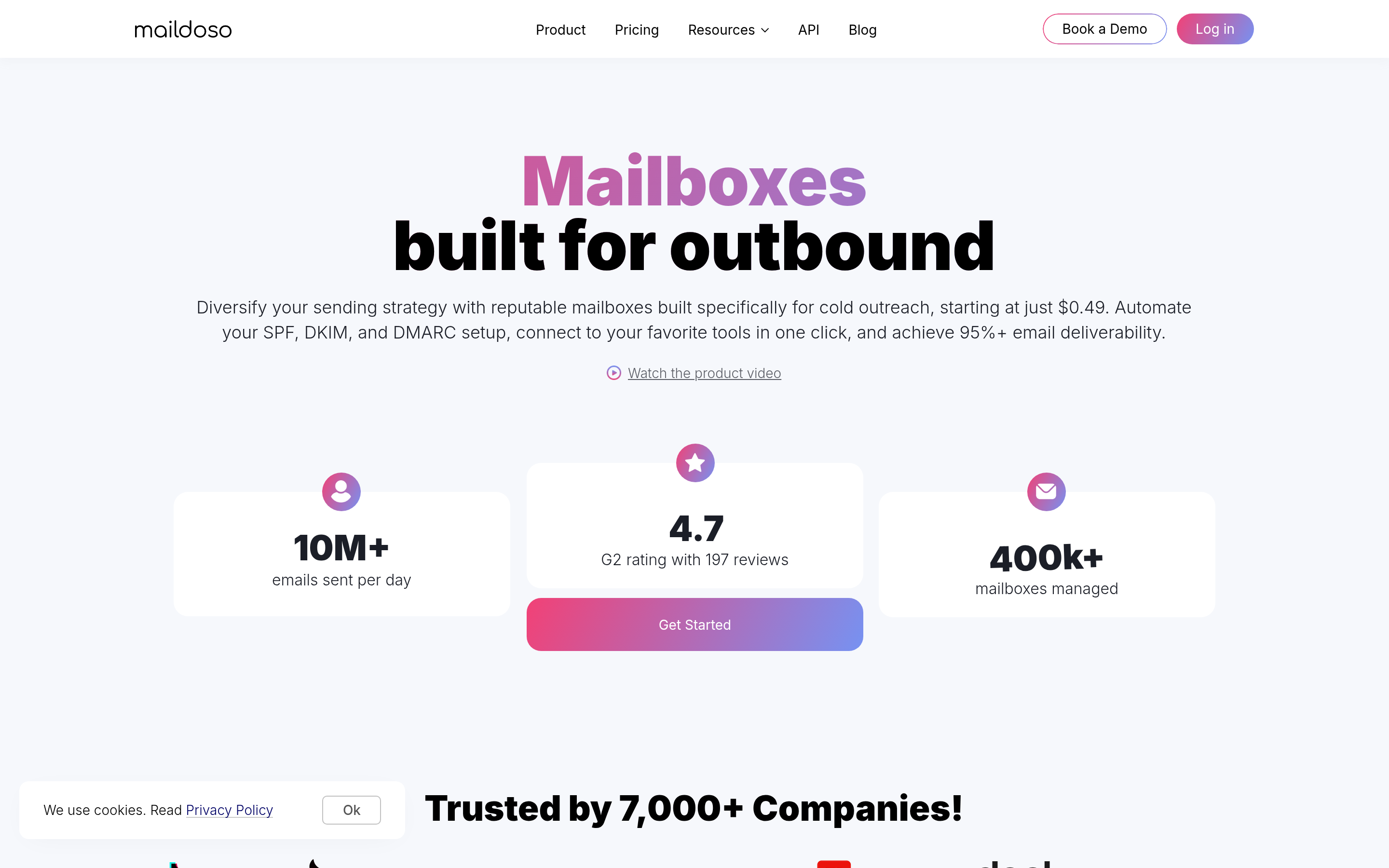
Maildoso runs its own mail servers and prices aggressively. Reported entry pricing is around $1.90/mailbox on shared IPs, and per-mailbox costs drop sharply past 1,000 inboxes. Warmup is built in, which removes a line item Mailforge users pay for separately.
- Pros: very low unit cost, bundled warmup, dedicated IP options.
- Cons: these aren't native Google or Microsoft mailboxes, so placement at Gmail- and Outlook-hosted prospects can differ from Workspace-based inboxes. Test before you migrate everything.
- Choose it if: you run high-volume agency outbound and your margins depend on cost per inbox.
3. Zapmail: pre-warmed Google and Microsoft inboxes#
Zapmail provisions Google Workspace and Microsoft-based mailboxes and sells them pre-warmed, so you skip most of the two-to-four-week ramp. Reported pricing sits around $3–3.90 per mailbox, or about $39/month for 10.
- Pros: native provider mailboxes, faster time-to-send, simple setup.
- Cons: costs more per inbox than Mailforge, and "pre-warmed" doesn't mean "ready for full volume on day one."
- Choose it if: you have a campaign launching next week and can't wait for warmup.
4. Inframail: flat-fee, unlimited inboxes#
Inframail flips the pricing model. Instead of paying per mailbox, you pay a flat monthly fee (reported from about $86/month on annual billing) for a dedicated IP and unlimited inboxes. Warmup isn't included.
- Pros: cost stays flat as you add inboxes, dedicated IP included.
- Cons: expensive if you only need 10–20 inboxes, and you still need a warmup tool.
- Choose it if: you run 40+ mailboxes and want a predictable bill.
5. Google Workspace direct#
Buying Workspace seats yourself is the "boring" option, and it's still a good one for small teams. You get native Gmail mailboxes on Google's infrastructure and full admin control, at about $7–8.40 per user per month depending on billing (Google Workspace pricing).
- Pros: strongest reputation baseline, no reseller in the middle, you own everything.
- Cons: three to four times the per-mailbox cost of Mailforge, and DNS setup is manual unless you script it.
- Choose it if: you send fewer than about 30 mailboxes' worth of volume and care more about reply quality than raw scale.
6. Microsoft 365 direct#
The same logic applies on the Microsoft side. Business Basic seats run about $6/user/month. If your ICP is enterprise, government, or manufacturing, where Outlook and Exchange dominate, sending from Microsoft mailboxes can help placement with Microsoft-hosted recipients.
- Pros: native Outlook placement, low seat cost.
- Cons: Microsoft's outbound throttling is stricter than Google's, and tenant setup is fiddlier.
- Choose it if: most of your prospects run on Microsoft 365.
7. Sequencer done-for-you mailboxes#
Instantly, Smartlead, and similar sequencers now sell done-for-you mailboxes directly inside their platforms. Domains, DNS, warmup, and sending all live in one bill and one dashboard.
- Pros: fewest moving parts, warmup usually included, one support channel.
- Cons: less portability. Moving sequencers later can mean rebuilding your infrastructure, and per-inbox pricing tends to sit above Mailforge.
- Choose it if: you're a solo founder or small team and value simplicity over unit cost.
8. Premium reseller providers (Hypertide, Premium Inboxes, and similar)#
A tier of smaller resellers sells hand-configured Google or Microsoft inboxes, often with white-glove setup and agency-oriented account management. Pricing and quality vary a lot, so ask for placement test results before you buy.
- Choose it if: you want someone else to own the setup and you're paying for service, not just mailboxes.
Is a dedicated IP better than Mailforge's shared infrastructure?#
Not automatically. A dedicated IP isolates your sender reputation, which helps if you're careful and hurts if you aren't. Mailbox providers judge an IP by its consistency. An IP that sends 50 emails one day and 2,000 the next looks suspicious. A shared pool smooths that out.
Use this rule of thumb:
| Your situation | Better fit |
|---|---|
| < 1,000 emails/day, irregular volume | Shared (Mailforge, Zapmail, Workspace) |
| 1,000–5,000/day, steady volume | Either; test both |
| > 5,000/day, consistent cadence | Dedicated (Infraforge, Inframail, Maildoso dedicated) |
| Agency with many clients | Dedicated per client, or separate shared pools |
Whatever you pick, make sure your SPF, DKIM, and DMARC records are correct before sending. A quick pass with an SPF checker catches the most common misconfigurations, such as duplicate SPF records or too many DNS lookups.
Which Mailforge alternative is cheapest?#
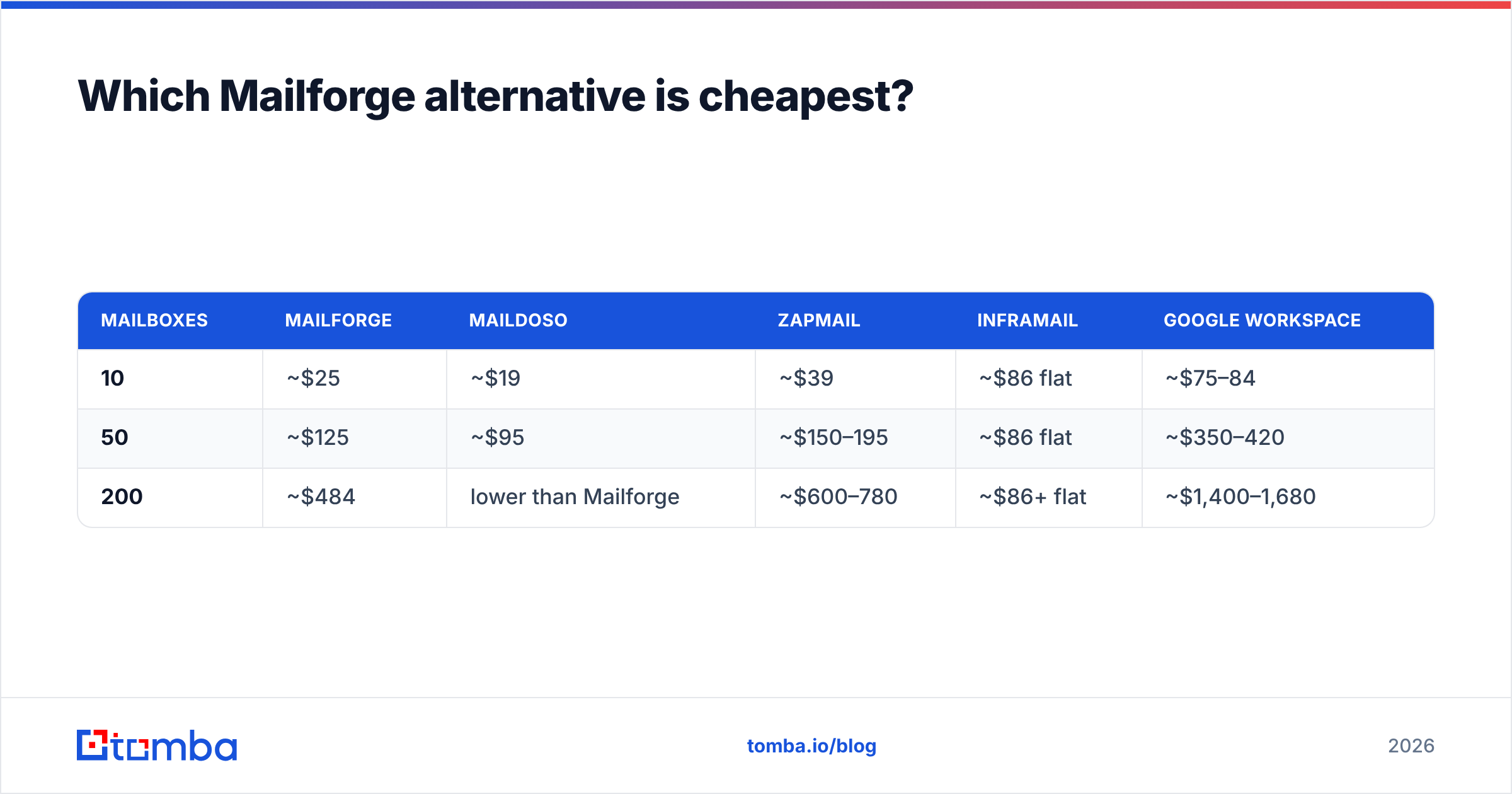
It depends on how many mailboxes you run. Here's a rough monthly comparison using the third-party prices above (mailboxes only, before domains and warmup):
| Mailboxes | Mailforge | Maildoso | Zapmail | Inframail | Google Workspace |
|---|---|---|---|---|---|
| 10 | ~$25 | ~$19 | ~$39 | ~$86 flat | ~$75–84 |
| 50 | ~$125 | ~$95 | ~$150–195 | ~$86 flat | ~$350–420 |
| 200 | ~$484 | lower than Mailforge | ~$600–780 | ~$86+ flat | ~$1,400–1,680 |
Two things to notice:
- Flat-fee pricing wins at scale, but only if you actually use the inboxes. Unused inboxes on a flat plan are free. Unused inboxes on per-seat plans are waste.
- Warmup is a hidden cost. Mailforge and Inframail don't bundle it, so add a warmup subscription to the total. Use a warmup calculator to plan how many inboxes you need for your target daily volume, so you don't over-buy.
What do teams get wrong when switching cold email infrastructure?#
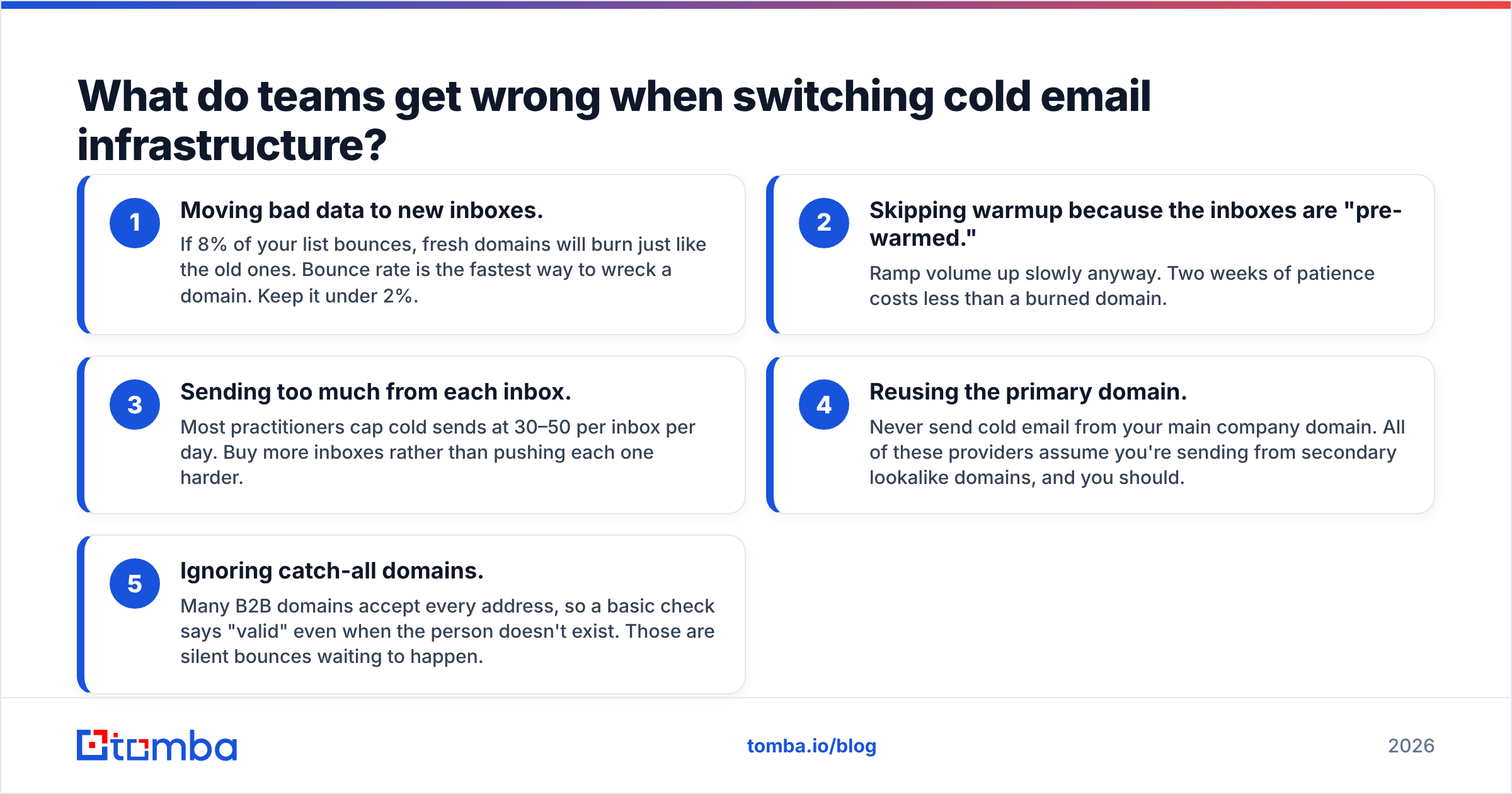
Most migrations fail for reasons that have nothing to do with the provider.
- Moving bad data to new inboxes. If 8% of your list bounces, fresh domains will burn just like the old ones. Bounce rate is the fastest way to wreck a domain. Keep it under 2%.
- Skipping warmup because the inboxes are "pre-warmed." Ramp volume up slowly anyway. Two weeks of patience costs less than a burned domain.
- Sending too much from each inbox. Most practitioners cap cold sends at 30–50 per inbox per day. Buy more inboxes rather than pushing each one harder.
- Reusing the primary domain. Never send cold email from your main company domain. All of these providers assume you're sending from secondary lookalike domains, and you should.
- Ignoring catch-all domains. Many B2B domains accept every address, so a basic check says "valid" even when the person doesn't exist. Those are silent bounces waiting to happen.

Does your mailbox provider matter more than your list?#
No. Infrastructure decides whether you're allowed to reach the inbox. Your list decides whether you deserve to. Hard bounces, spam-trap hits, and complaints from people who were never a fit will damage Mailforge mailboxes, Infraforge IPs, and Google Workspace seats equally.
That's why the most resilient outbound stacks have three layers:
- Data layer: accurate, current B2B contacts. Use an email finder to get the right address for the right person, rather than guessing patterns.
- Hygiene layer: run every list through an email verifier before it touches a sequencer, with separate handling for catch-all results.
- Sending layer: whichever Mailforge alternative fits your volume and budget from the tables above.
When you get the first two layers right, the choice of sending provider becomes a cost-optimisation question rather than a firefight. When you get them wrong, no provider will save you.
Which Mailforge alternative should you pick?#
- Want the same workflow with isolated reputation? Infraforge.
- Want the lowest cost per inbox at hundreds of mailboxes? Maildoso.
- Need to send next week? Zapmail.
- Running 40+ inboxes and want a flat bill? Inframail.
- Small team, quality over quantity? Google Workspace or Microsoft 365 direct.
- Want one dashboard for everything? Your sequencer's done-for-you mailboxes.
And if Mailforge is working for you, with low bounces, steady placement, and a fair price, there's no rule that says you have to leave. Infrastructure switching costs are real. Fix your data first, then re-evaluate.
Ready to protect whichever infrastructure you choose?#
New domains and inboxes only stay healthy if the addresses you send to are real. Tomba Email Finder finds professional email addresses by domain, name, or company, so your sequences start with contacts that exist instead of guessed patterns. Pair it with verification and you can keep bounce rates low on Mailforge, Infraforge, Maildoso, or plain Google Workspace. The free tier includes 25 searches a month, and paid plans start at $49/month if you want to test it on your next campaign.
Related guides#
// start free
See who Tomba finds at any company
Type a company's domain to see its people, their roles and verified work emails, each with the pages it was found on. Free account, no card.
Free plan · No credit card required · GDPR & CCPA
// about the author