The Cold Email Guide for 2026: Lists, Copy, and Replies
Most cold email advice optimizes the wrong layer. This guide breaks the channel into list, infrastructure, copy, and sequence — and shows which one is actually capping your reply rate.
TL;DR
- Cold email fails in a fixed order: bad list → bad infrastructure → bad copy → bad sequence. Fixing copy while your bounce rate sits at 9% is wasted effort.
- Keep bounces under 2%. Above 3%, Google and Microsoft start throttling you before a prospect ever sees the subject line.
- A good reply rate in 2026 is 5–12% for a well-targeted list. Anyone quoting 40% is counting "out of office" as a reply.
- Volume per inbox should stay under ~40 sends/day. Scale with more mailboxes, not more sends per mailbox.
- Personalization that works is research-based (a trigger event, a hiring signal, a stack change) — not
{{first_name}}merge tags.
What is cold email, and why does it still work in 2026?#
Cold email is an unsolicited, one-to-one business message sent to someone who has a plausible commercial reason to hear from you. That last clause is the whole game. It is not spam because it is targeted, individually relevant, and easy to opt out of. It is not marketing email because it does not require prior consent under CAN-SPAM in the US (it does require consent under GDPR in most EU B2C contexts, and legitimate-interest documentation for B2B — check your jurisdiction).
It still works because the alternative channels got worse. LinkedIn InMail acceptance has collapsed. Cold calls connect at 2–4%. Paid acquisition costs for B2B SaaS keep climbing. Email remains the only channel where you own the identifier, control the timing, and can run a controlled experiment across 500 accounts in a week.
What changed is the floor. In 2019 you could buy a list, blast 10,000 addresses, and land in the inbox. Since Google and Yahoo tightened bulk-sender requirements — enforced SPF/DKIM/DMARC alignment, a one-click unsubscribe header, and a hard 0.3% spam-complaint threshold — the sloppy end of the market is now algorithmically filtered before a human sees anything. The Google bulk sender guidelines are the actual rulebook, not a suggestion.
So the modern cold email guide is less about clever subject lines and more about not tripping wires.
Why does the order of operations matter more than the copy?#
Because each layer gates the next. Here is the dependency chain, and the failure symptom you see at each stage:
- List quality. If the address is wrong, nothing downstream matters. Symptom: bounce rate above 3%, low open rate, sudden reputation drop.
- Infrastructure. SPF, DKIM, DMARC, a warmed sending domain, and a separate domain from your primary. Symptom: high bounce-adjusted deliverability but near-zero opens — you're in spam.
- Targeting. The right person at the right company at the right moment. Symptom: emails land, get opened, get zero replies.
- Copy. Relevance, brevity, a single ask. Symptom: opens are fine, replies are polite refusals.
- Sequence. Follow-up cadence and channel mix. Symptom: first email gets replies, nothing else does.
Diagnose top-down. Most teams start at step 4 because copy is the fun part.
How do you build a list that doesn't burn your domain?#
Three sourcing paths, each with a different cost/quality curve.
Bought databases. Fast, cheap per record, and stale. A B2B database decays roughly 22–30% per year as people change jobs. If a vendor sells you a static CSV with no verification timestamp, assume a third of it is dead.
Scraped or manually built. You identify accounts first (fit signals: headcount, tech stack, funding, job postings), then find the person, then find the address. Slower, dramatically better reply rates. This is what most sub-$5M ARR teams should actually do.
Enriched from intent. Start with people already showing behavior — visiting your pricing page, following a competitor, hiring for a role your product supports — then enrich to a contact record. Highest reply rate, smallest volume.
Whichever path, the non-negotiable step is verification. Run every address through an email verifier before it enters a sequence. A verifier does SMTP-level checks, catches syntax errors, flags role accounts (info@, sales@), identifies disposables, and separates catch-all domains — which need catch-all verification rather than a simple valid/invalid verdict, because a catch-all server accepts everything and tells you nothing.
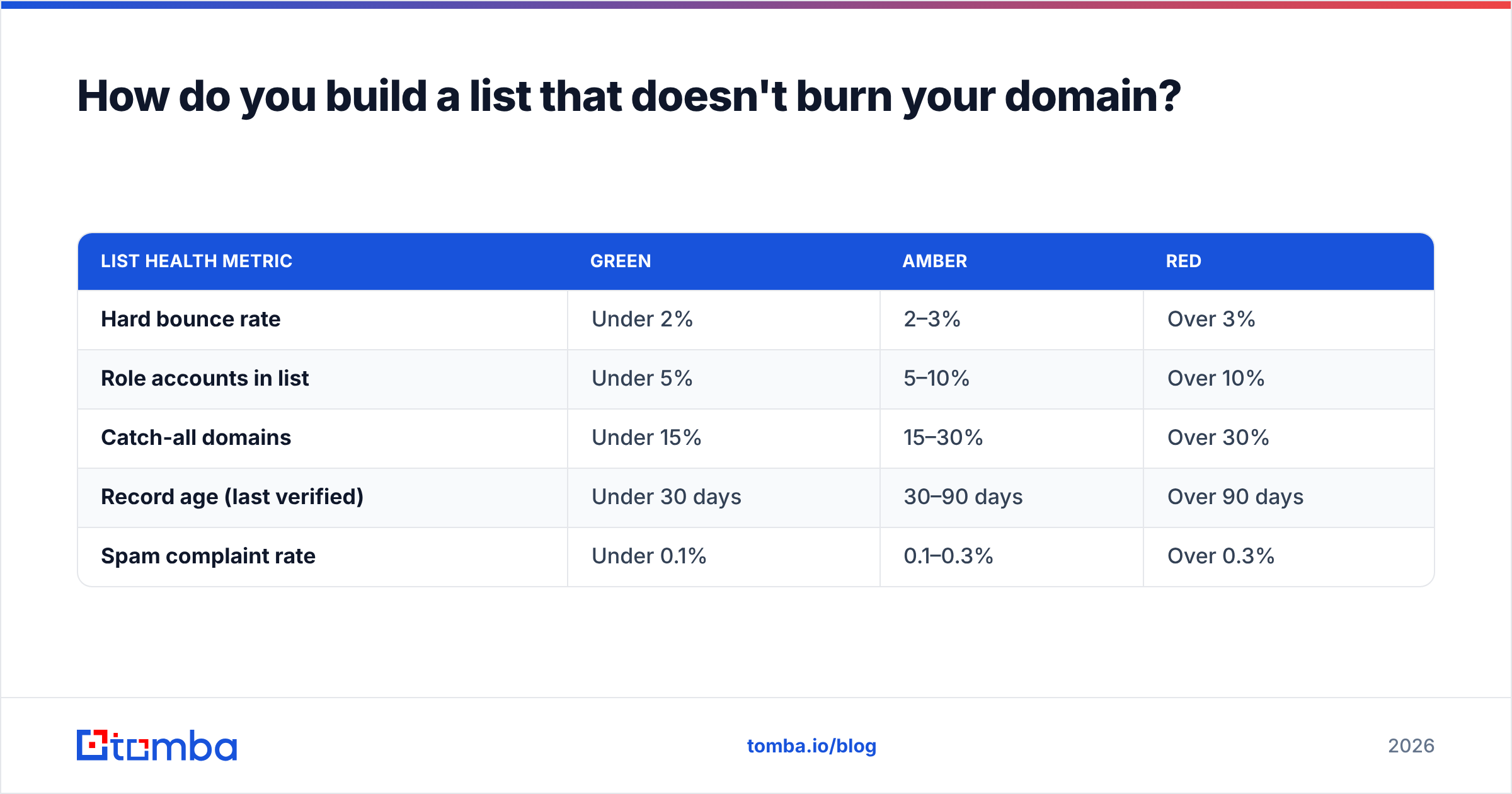
Target metrics before you send:
| List health metric | Green | Amber | Red |
|---|---|---|---|
| Hard bounce rate | Under 2% | 2–3% | Over 3% |
| Role accounts in list | Under 5% | 5–10% | Over 10% |
| Catch-all domains | Under 15% | 15–30% | Over 30% |
| Record age (last verified) | Under 30 days | 30–90 days | Over 90 days |
| Spam complaint rate | Under 0.1% | 0.1–0.3% | Over 0.3% |
If you find a list vendor advertising 99% accuracy, ask what the denominator is. Most measure "syntactically valid" — a bar that nobody@nowhere.com clears.
What infrastructure do you actually need?#
You need a sending domain that is not your company's primary domain. If acme.com is where invoices and support tickets come from, do not run outbound from it. Buy getacme.com or acme-hq.com, point it at the same brand, and isolate the reputational blast radius.
On that domain:
- SPF — authorizes which servers may send as you. Validate the record with an SPF checker rather than eyeballing the TXT string; a single extra include can blow the 10-lookup limit and silently fail everything.
- DKIM — cryptographically signs each message so receivers can confirm it wasn't altered.
- DMARC — tells receivers what to do when SPF or DKIM fails. Start at
p=none, read the aggregate reports for two weeks, then move top=quarantine. - Custom tracking domain — shared tracking domains from sequencing tools get blacklisted by association.
- One-click unsubscribe (List-Unsubscribe header) — required by Gmail and Yahoo for bulk senders and, more practically, it converts would-be spam complaints into harmless unsubscribes.
Then warm up. A brand-new domain sending 200 emails on day one is indistinguishable from a spammer. Ramp over 3–4 weeks: 5 sends/day, then 10, then 20, up to a steady state of 30–40 per mailbox. Use a warmup calculator to build the ramp schedule rather than guessing, and understand that email deliverability is a reputation score accumulated over weeks, not a setting you toggle.
To scale past 40/day, add mailboxes — not volume per mailbox. Ten mailboxes at 35 sends each gives you 350/day at a per-inbox volume that looks like a human.
How do you write a cold email people actually answer?#
Short answer: make the first two sentences prove you did work they can verify.
The structural template that survives testing:
- Trigger line (1 sentence). A specific, checkable observation. "You're hiring three SDRs in Austin." "Your docs still reference the v2 API."
- Relevance bridge (1 sentence). Why that observation implies a problem you address. Not a pitch — an implication.
- Proof (1 sentence, optional). A named customer with a similar profile and a concrete number.
- The ask (1 sentence). Low friction, singular, and answerable with one word. "Worth a 12-minute call Thursday?" beats "Would you be open to exploring how we might partner?"
Length target: 60–110 words. Nothing that requires scrolling on a phone. No images, no attachments, no more than one link — each of those adds spam-filter weight and none of them raise reply rates.
Subject lines: lowercase, 2–5 words, no punctuation gimmicks, and never a question that implies a survey. "quick question" is dead — it's been used so heavily that Gmail's classifier treats it as a weak spam signal. Prefer something that reads like an internal note: "austin sdr hiring", "your v2 docs".
Personalization tiers, ranked by measured lift:
- Account-level trigger (funding, hiring, tech change) — largest, most durable lift.
- Role-level pain (what a VP of RevOps at a 200-person Series B actually owns) — moderate lift, fully templatable.
- Person-level detail (their podcast appearance, their post) — high lift, does not scale, often reads as surveillance if overdone.
- Merge-tag personalization (
Hi {{first_name}}, saw you work at {{company}}) — approximately zero lift in 2026. Prospects pattern-match it instantly.
HubSpot's own outbound benchmarks and its sales resource library put well-targeted B2B reply rates in the 5–12% band. Treat anything above that as a signal your list is unusually narrow — which is good — not that your copy is magic.
Which sequence structure gets the most replies?#
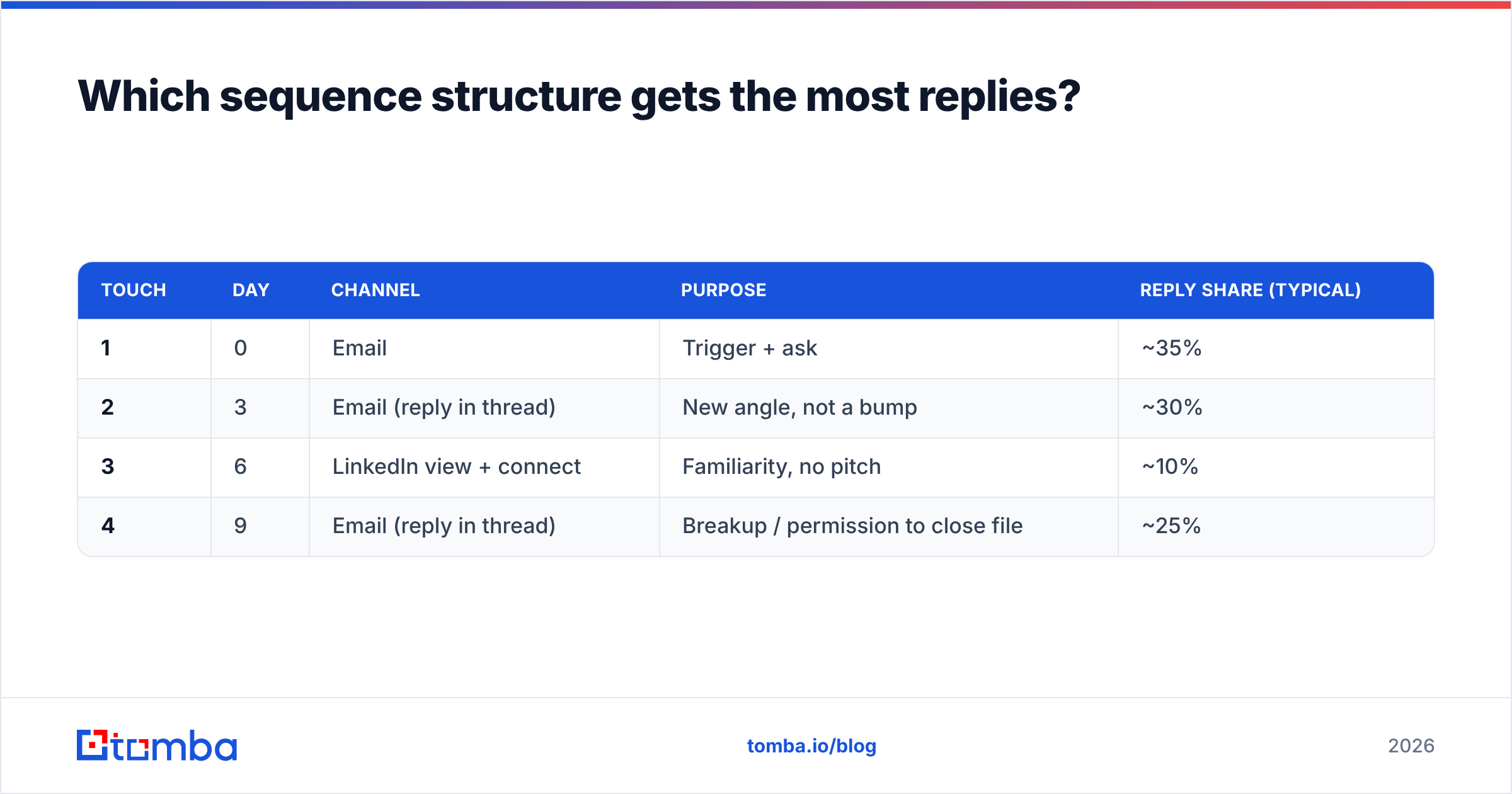
Most replies to a cold sequence do not come from email one. They come from emails two and three, sent 3 and 7 days later. But the marginal value collapses after four touches, and each extra touch raises complaint risk.
A defensible four-touch structure:
| Touch | Day | Channel | Purpose | Reply share (typical) |
|---|---|---|---|---|
| 1 | 0 | Trigger + ask | ~35% | |
| 2 | 3 | Email (reply in thread) | New angle, not a bump | ~30% |
| 3 | 6 | LinkedIn view + connect | Familiarity, no pitch | ~10% |
| 4 | 9 | Email (reply in thread) | Breakup / permission to close file | ~25% |
Two rules that matter more than the table:
Never send "just bumping this to the top of your inbox." It transfers zero information and signals you have nothing to add. Every follow-up must contain a new fact — a different use case, a customer story, a resource.
Reply inside the original thread. It preserves context, keeps the thread out of Promotions, and lets the prospect read the whole exchange in one scroll.
What are the mistakes that quietly kill campaigns?#
- Sending Monday 9am. Everyone read the same blog post. Tuesday through Thursday, 7–8am local or 1–2pm local, outperform in most tested segments simply because the queue is shorter.
- Tracking opens. Open pixels inflate spam scores, and since Apple Mail Privacy Protection they report phantom opens. Track replies. Replies are the only metric that survives contact with reality.
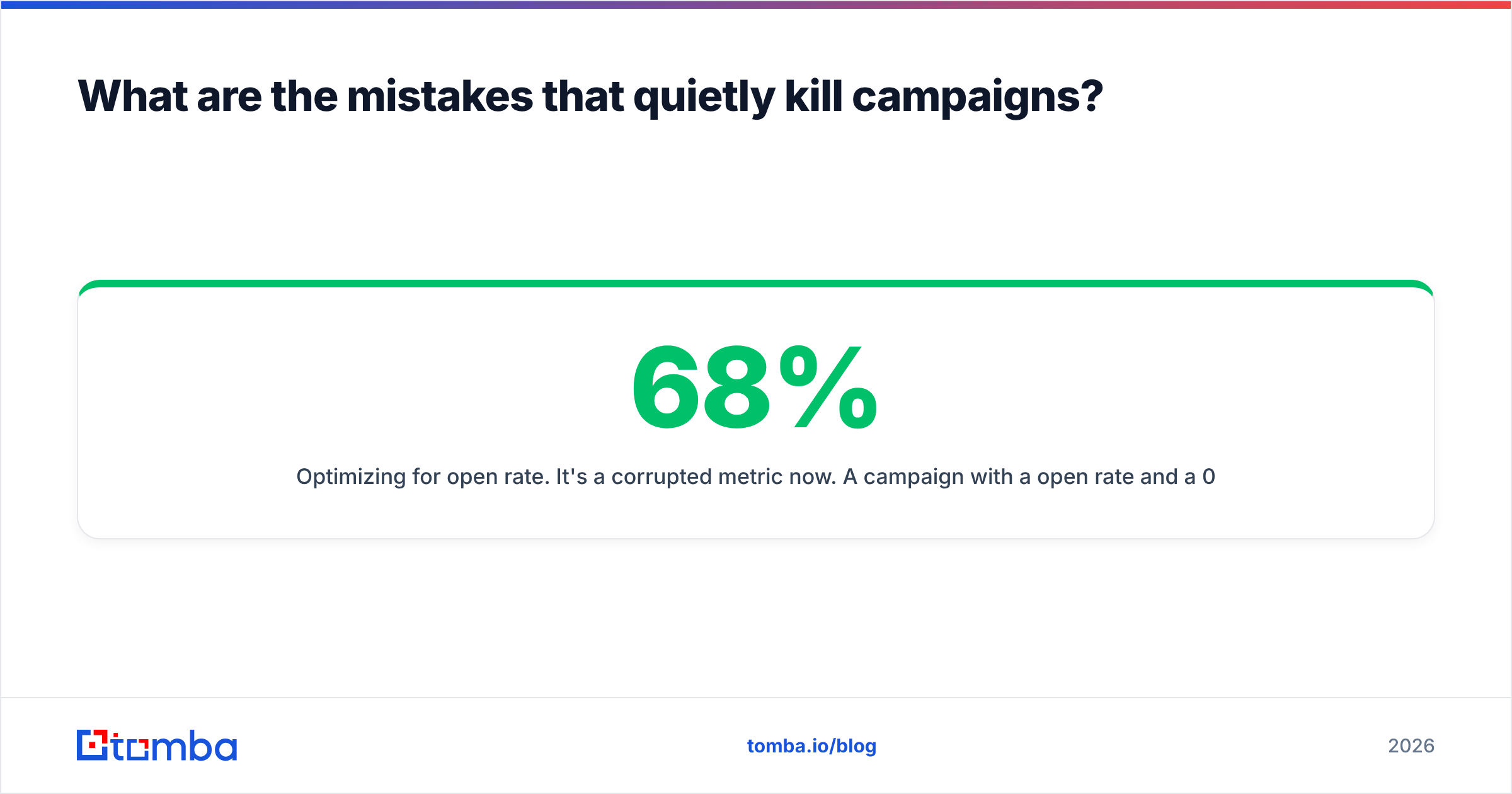
- Optimizing for open rate. It's a corrupted metric now. A campaign with a 68% open rate and a 0.4% reply rate is worse than one with 34% opens and 6% replies.
- One giant blast. Split into cohorts of 200–300 with a single variable changed. You cannot learn anything from a 5,000-send campaign with four differences.
- Ignoring the catch-all pile. Roughly a quarter of B2B domains are catch-all. Dumping them into a sequence unverified is the single most common cause of a sudden bounce spike.
- Never removing dead records. Suppress hard bounces immediately and permanently. Re-sending to a dead address twice is how a warm domain becomes a cold one.
How do you measure whether it's working?#
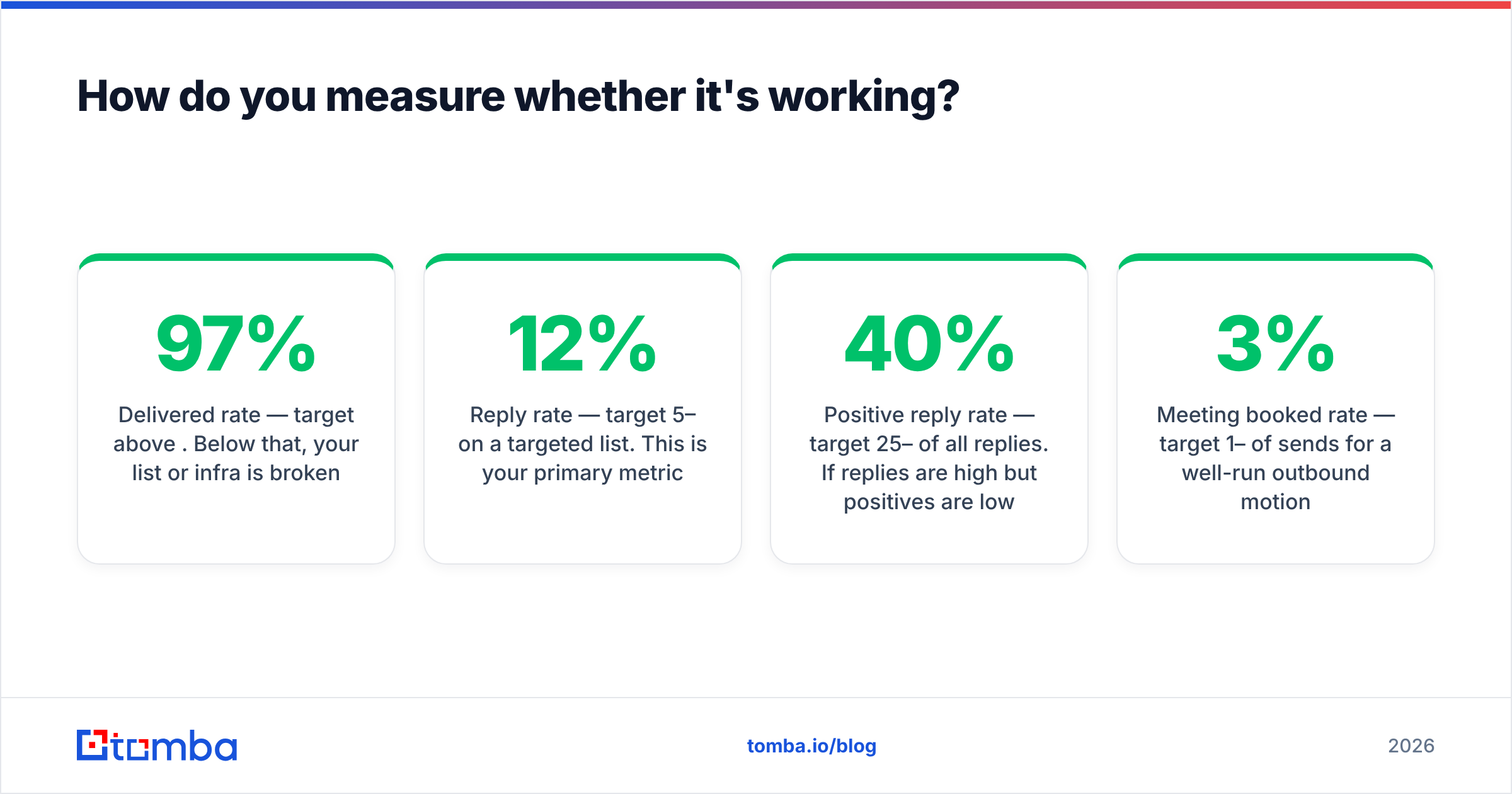
Build the funnel backwards from meetings, and instrument each stage:
- Delivered rate — target above 97%. Below that, your list or infra is broken.
- Reply rate — target 5–12% on a targeted list. This is your primary metric.
- Positive reply rate — target 25–40% of all replies. If replies are high but positives are low, your targeting is off, not your copy.
- Meeting booked rate — target 1–3% of sends for a well-run outbound motion.
- Spam complaint rate — must stay under 0.1%. Check it in Google Postmaster Tools weekly, not monthly.
Run one experiment at a time. Change the trigger line, hold everything else fixed, and give it 300 sends before you read the result. Two hundred sends with a 6% baseline reply rate produces about twelve replies — that is not a sample, that is an anecdote.
If you want vendor-neutral perspective on which sequencing and data tools your peers actually keep after year one, G2's sales software category is a more honest signal than any vendor comparison page — including this one.
Where should you start this week?#
Pick fifty accounts. Not five hundred. For each, name the one person who owns the problem you solve, find a trigger from the last ninety days, and write fifty individual emails. It will take you two days. You will learn more from the reply patterns than from six months of automated volume, and you will have a working template to scale.
Then automate the mechanical parts — finding and verifying the addresses — and keep the research manual until the pattern is obvious.
That first part is where most teams stall. Start with the Tomba Email Finder: give it a name and a company domain, and it returns the verified professional address with a confidence score and the sources it drew from. The free tier covers 25 searches a month, which is plenty to build your first fifty-account test list, and paid plans start at $49/mo when the experiment works and you need volume. Verify before you send — your domain reputation is the one asset in cold email you cannot buy back.
Related guides#
// get started
Find, verify and enrich your first contacts today
Start on the free plan with 25 searches a month, then scale when your team is ready.
Free plan · No credit card required · GDPR & CCPA
// about the author