Cold Emailing Service in 2026: How to Choose the Right One
Most cold emailing services sell you a sending engine and quietly leave the hard parts — data, domains, warmup — as your problem. Here's what each tier actually covers, what it costs, and where the money leaks.
TL;DR
- A "cold emailing service" is really three separate purchases bundled under one word: data, infrastructure (domains, inboxes, warmup), and the sending platform itself. Most vendors sell you one and imply the other two.
- The sending platform is the cheapest part. Expect $30–$100/month. Data and inbox infrastructure are where 70–80% of a real cold email budget goes.
- Done-for-you agencies charge $2,000–$8,000/month and mostly resell the same three components with a strategist attached. Sometimes worth it. Usually not, if you have one competent operator in-house.
- The single biggest cost you never see on an invoice: bad data. A 20% bounce rate does not cost you 20% of your list — it costs you the domain.
- Build order matters. Data quality → domain infrastructure → sequencing platform. Reverse that order and you will pay for a great platform that sends great emails into spam.
What is a cold emailing service, actually?#
Ask ten founders what a cold emailing service is and you get three different answers. That confusion is not accidental — it is how the category is priced.
Think of it like opening a restaurant. The sending platform is your kitchen equipment: ovens, timers, a ticket system. The infrastructure is the building, the gas line, the health inspection certificate. The data is whether anyone in the neighborhood actually eats what you cook. Buy a beautiful kitchen, skip the gas hookup and the market research, and you have a very expensive room.
Here is the honest decomposition:
- Data layer. Who you email. Contact discovery, email verification, enrichment, ICP filtering. This is where campaigns are won or lost before a single send.
- Infrastructure layer. Secondary domains, mailboxes (Google Workspace, Microsoft 365, or dedicated SMTP), SPF/DKIM/DMARC records, warmup, and inbox rotation.
- Sequencing layer. The tool that actually schedules, personalizes, sends, tracks opens/replies, and stops the sequence when someone responds. This is what people picture when they say "cold emailing service."
- Human layer. Copy, offer, targeting logic, reply handling. No software fixes a bad offer.
Vendors blur these deliberately. A sequencer's landing page will show you a screenshot of a beautiful campaign dashboard, mention "built-in warmup," and never say the word data. An agency will quote you $4,000/month and never itemize which of the four layers that covers.
What does a cold emailing service cost in 2026?#
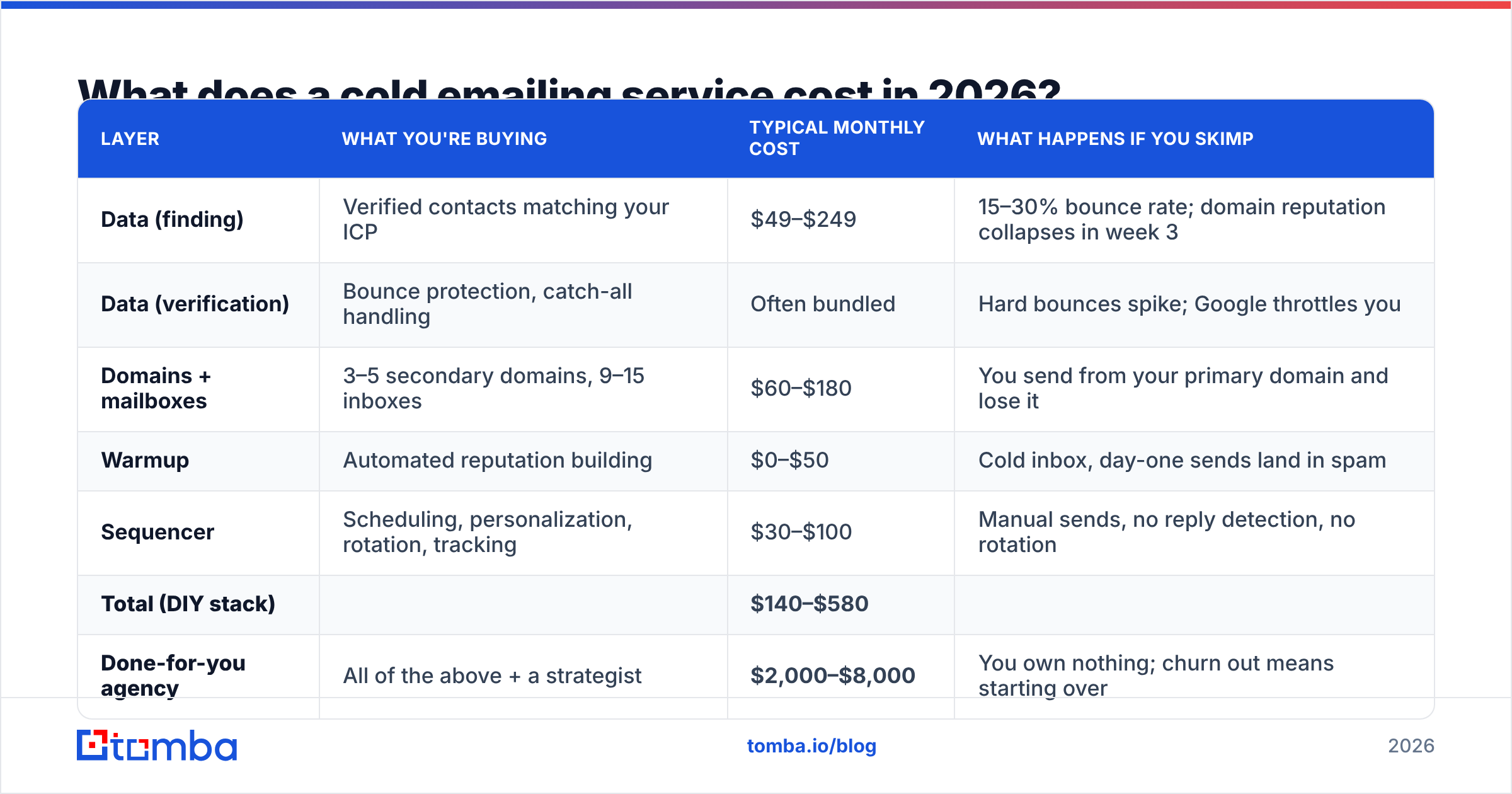
Below is what a realistic 3-person outbound team actually spends per month, broken out by layer. Prices are list prices as of mid-2026 and move around — treat them as order-of-magnitude, not quotes.
| Layer | What you're buying | Typical monthly cost | What happens if you skimp |
|---|---|---|---|
| Data (finding) | Verified contacts matching your ICP | $49–$249 | 15–30% bounce rate; domain reputation collapses in week 3 |
| Data (verification) | Bounce protection, catch-all handling | Often bundled | Hard bounces spike; Google throttles you |
| Domains + mailboxes | 3–5 secondary domains, 9–15 inboxes | $60–$180 | You send from your primary domain and lose it |
| Warmup | Automated reputation building | $0–$50 | Cold inbox, day-one sends land in spam |
| Sequencer | Scheduling, personalization, rotation, tracking | $30–$100 | Manual sends, no reply detection, no rotation |
| Total (DIY stack) | $140–$580 | ||
| Done-for-you agency | All of the above + a strategist | $2,000–$8,000 | You own nothing; churn out means starting over |
Two things jump out.
First, the sequencer — the thing everyone shops for first — is the smallest line item. Instantly and Smartlead both start well under $100/month and both do the job. Arguing about which one wins is arguing about the cheapest component in the stack.
Second, the gap between a competent DIY stack ($400) and a mid-tier agency ($4,000) is roughly a 10x multiplier for strategy and execution labor. That is a defensible price if the agency is genuinely doing offer design, list building, and reply handling. It is indefensible if they are reselling a Smartlead seat and a scraped CSV.
The costs that never appear on an invoice#
- Domain burn. A torched sending domain costs you 4–8 weeks of pipeline and about $12 to replace — but the replacement needs a fresh warmup cycle before it's useful.
- Reply-handling time. Every 1,000 emails sent generates 20–60 replies, of which maybe 15 are real conversations and the rest are out-of-offices, unsubscribes, and "who are you." Budget an hour a day.
- List rot. B2B contact data decays at roughly 2–2.5% per month as people change jobs. A list you built in January is meaningfully worse in July.
- Opportunity cost of bad targeting. Sending 5,000 emails to a wrong-fit ICP is more expensive than sending 500 to a right-fit one, because you now have data telling you the channel doesn't work when the real problem was the list.
Should you use a done-for-you agency or build the stack yourself?#
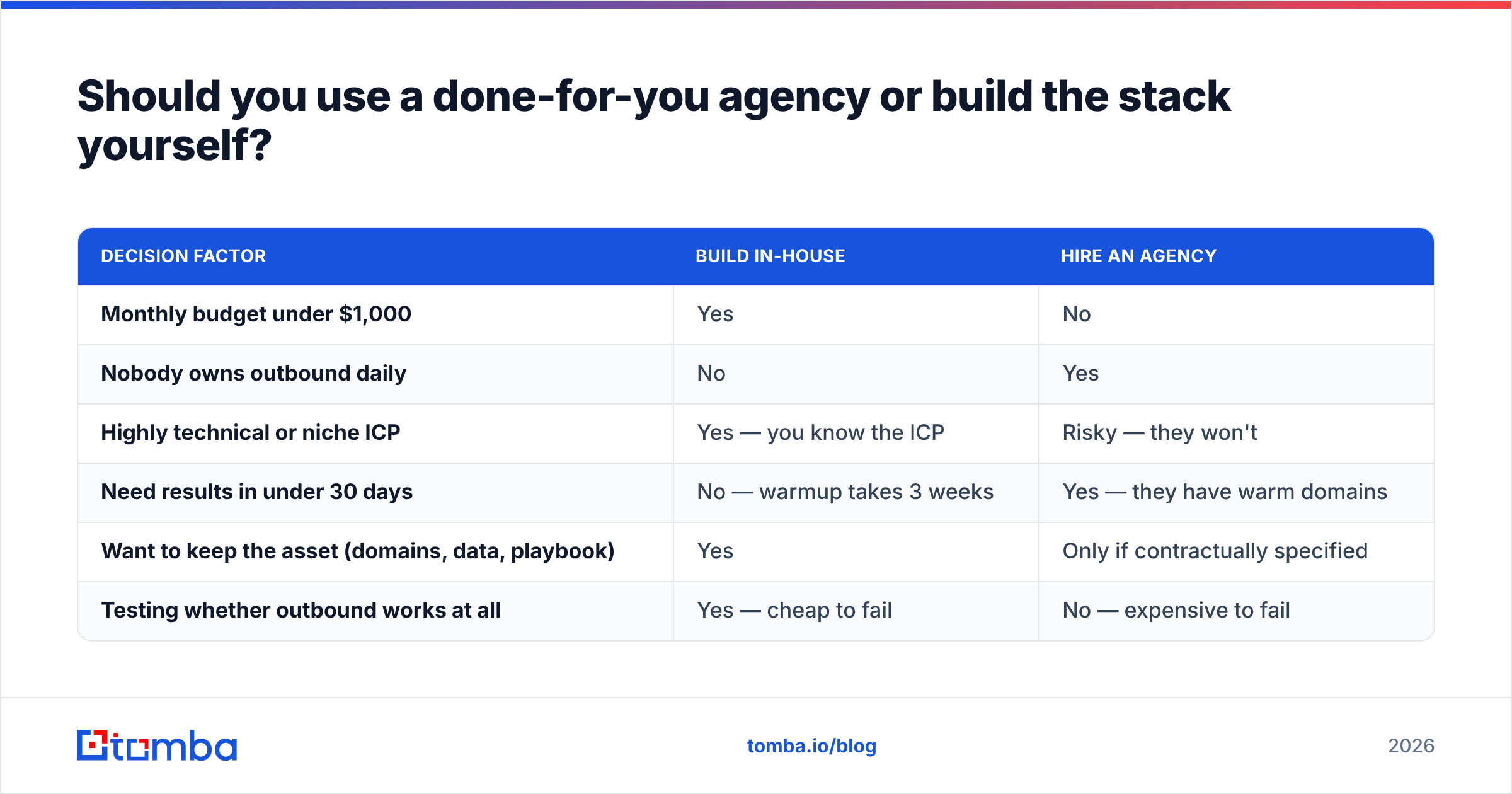
The honest answer depends on one variable: do you have someone who will own this daily?
Cold email is not a set-and-forget channel. Domains need monitoring, copy needs iteration, replies need answering within hours, and lists need rebuilding monthly. If nobody on your team owns that, an agency is not overpriced — it is the only version that works.
| Decision factor | Build in-house | Hire an agency |
|---|---|---|
| Monthly budget under $1,000 | Yes | No |
| Nobody owns outbound daily | No | Yes |
| Highly technical or niche ICP | Yes — you know the ICP | Risky — they won't |
| Need results in under 30 days | No — warmup takes 3 weeks | Yes — they have warm domains |
| Want to keep the asset (domains, data, playbook) | Yes | Only if contractually specified |
| Testing whether outbound works at all | Yes — cheap to fail | No — expensive to fail |
A middle path most teams miss: buy the data and infrastructure, rent the strategy. Hire a fractional outbound consultant for 10 hours a month to design the offer and the sequence, and run the machine yourself. That lands around $1,200/month all-in and you keep every asset.
How do you avoid destroying your sending domain?#
This is the section that matters most, and the one every vendor undersells because the answer is "go slowly."
Google and Microsoft both tightened bulk-sender requirements in 2024 and have kept ratcheting since. The practical thresholds you are being measured against:
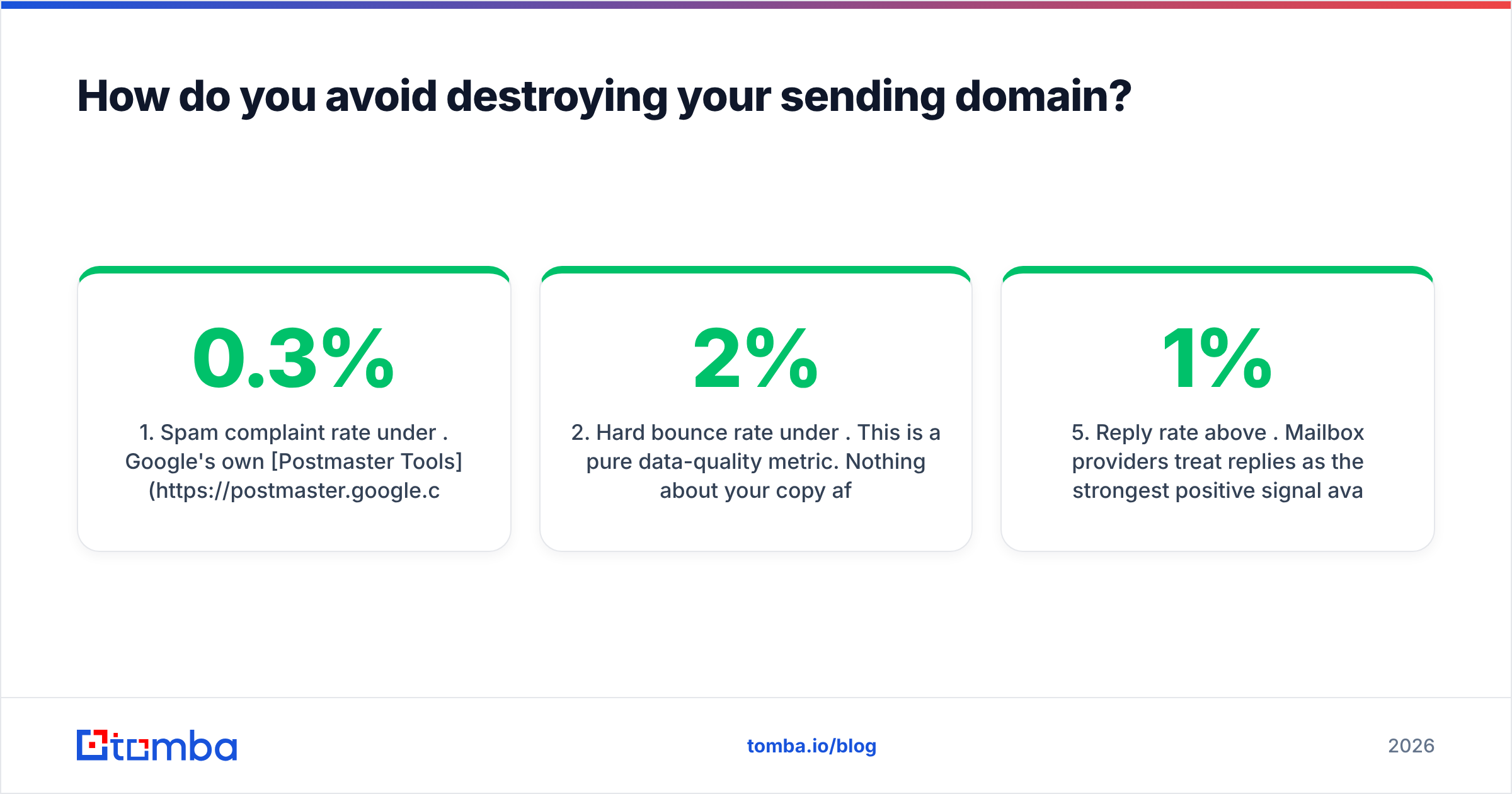
- Spam complaint rate under 0.3%. Google's own Postmaster Tools is the scoreboard. Above 0.3% and you are throttled. Above 0.5% and you are effectively blocked.
- Hard bounce rate under 2%. This is a pure data-quality metric. Nothing about your copy affects it. Either the mailbox exists or it does not.
- Authenticated sending — SPF, DKIM, and DMARC. All three, on every sending domain. Not optional anymore. Check yours with a free SPF checker before you send a single email.
- Volume ramp. New mailbox → 5 emails/day for week one, 15/day week two, 30/day week three, cap at 40–50/day per mailbox permanently. Yes, permanently. The temptation to push to 100/day is how domains die.
- Reply rate above 1%. Mailbox providers treat replies as the strongest positive signal available. A campaign that gets zero replies looks identical to spam from the outside.
- One primary domain, never used for cold email. Buy
getcompany.co,trycompany.com,company-hq.comas sending domains. Yourcompany.comMX record is a business asset. Don't gamble it.
Notice that items 2 and 5 are downstream of data quality, not of your sending tool. You cannot warm your way out of a bad list. This is why the build order is data → infrastructure → sequencer, and why teams who buy the sequencer first end up rebuilding everything.

If you want to model the ramp before committing, run the numbers through an email warmup calculator — it will tell you how many mailboxes you actually need to hit your target daily volume without exceeding per-inbox limits. Most people are shocked. Sending 500 emails a day means running 12 mailboxes, not 2.
What separates a good cold emailing service from a bad one?#
Strip away the marketing and there are six evaluation criteria that predict outcomes. Everything else is a feature checkbox.
- Bounce guarantee, in writing. Any data vendor confident in its accuracy will credit you back for bounces above a threshold. Vendors who won't put a number on it are telling you something.
- Catch-all handling that isn't a coin flip. Roughly 20–25% of B2B domains are catch-all — they accept mail to any address, so a standard SMTP check returns "valid" for
asdfgh@company.com. A service that marks all catch-alls as "risky" is punting. One that resolves them with pattern inference and secondary signals is doing the work. Tomba's catch-all verifier exists specifically for this gap. - Inbox rotation with per-mailbox caps. Sending 500/day across 12 mailboxes is safe. Sending 500/day across 2 is not. The platform must enforce this, not just permit it.
- Native reply detection that stops sequences. Sounds basic. Several tools still send follow-up #3 to someone who replied to #1. Nothing kills credibility faster.
- An API you can actually use. If your data lives in your CRM and your sequencer lives in a browser tab, you will do manual CSV surgery forever. A proper email finder API lets you enrich on trigger — new signup, new job change, new funding round — instead of in monthly batches.
- Exportable everything. Contacts, sequences, reply history. If you can't leave, you didn't buy a tool, you rented a hostage situation.
On the data side specifically, the market has consolidated into three rough shapes. Database-first vendors (Apollo, ZoomInfo, BookYourData) sell you access to a large pre-built contact universe — strong when your ICP is broad and well-covered, and BookYourData in particular is worth a look if you want pay-as-you-go list purchasing without a platform subscription. Finder-first vendors like Tomba resolve emails on demand from a domain plus a name, which suits niche or long-tail ICPs where no pre-built database has coverage. Verification-only vendors (ZeroBounce, NeverBounce) clean lists you already have. Most serious teams use two of the three.
Independent review aggregators are useful for sanity-checking vendor claims — G2's email verification category at least surfaces bounce complaints that don't appear on any vendor's homepage.
How do you build the stack in the right order?#
Ninety days, cheapest path to a working outbound motion:
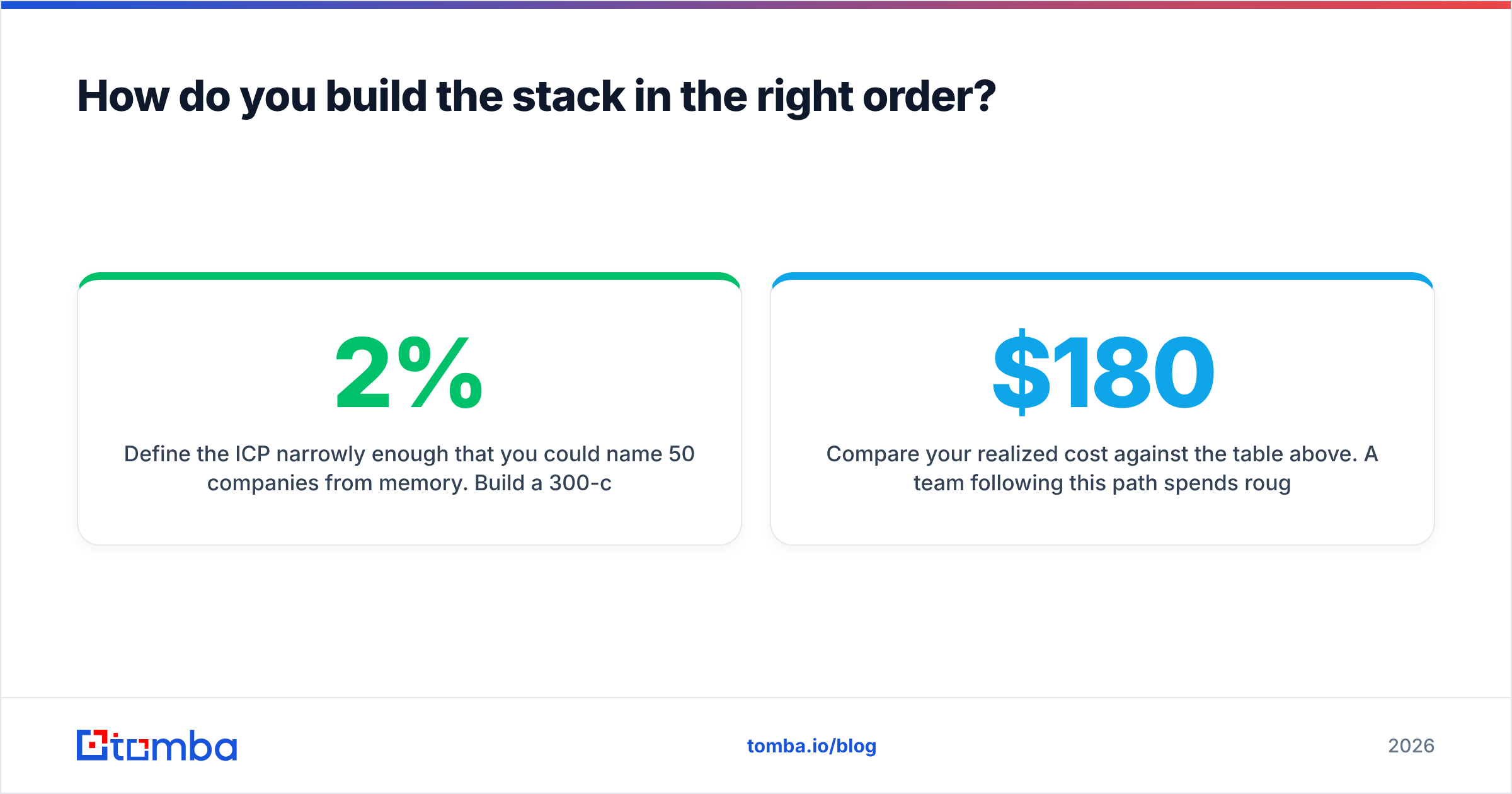
Days 1–7 — Data and ICP. Define the ICP narrowly enough that you could name 50 companies from memory. Build a 300-contact seed list. Use a domain search to pull every reachable contact at a target account, then verify every address before it enters the list. Target: under 2% bounce on a test send of 50.
Days 8–28 — Infrastructure. Buy three secondary domains. Attach 3 mailboxes to each (9 total). Configure SPF, DKIM, DMARC on all three. Start warmup on day 8 and do not send a single cold email until day 28. This is the boring part. It is also the part that makes everything after it work.
Days 29–35 — Sequencer and first campaign. Pick a sequencer. Genuinely, almost any of them. Import your 300 verified contacts. Write a 3-email sequence: 60 words, one ask, no attachments, no images, no tracking pixels (open tracking is now a deliverability liability more than an insight). Send 45/day across 9 mailboxes.
Days 36–90 — Iterate on the list, not the copy. The instinct after a bad first campaign is to rewrite the email. The higher-leverage move is almost always to rebuild the list. A mediocre email to a perfectly-targeted 200 outperforms a brilliant email to a loosely-targeted 2,000, and it does so without risking your domains.
Compare your realized cost against the table above. A team following this path spends roughly $180 in month one, $260 in month two, and knows by day 90 whether outbound is a channel worth funding — for less than one week of an agency retainer.
Is a cold emailing service still worth it in 2026?#
Yes, but the margin for sloppiness is gone.
The channel got harder in exactly the way that rewards operators who care about data. Filters now punish volume-without-engagement, which means the spray-and-pray playbook that worked in 2019 is actively harmful. What replaced it is smaller, sharper, and more verification-dependent: 200 well-researched contacts a week, sent from properly authenticated domains, with a specific enough offer that people reply.
That shape of outbound is cheaper than the old one. It just requires you to spend your money in the unglamorous places — email verification, domain hygiene, ICP research — instead of on the dashboard with the nicest charts. Understanding email deliverability as a system, not a setting, is the whole game.
The teams still complaining that "cold email is dead" are, without exception, the teams sending unverified lists from their primary domain at 200 emails a day. Cold email isn't dead. It's just no longer forgiving.
Start with the data, not the dashboard#
Every cold emailing service you evaluate will assume you already have a clean, verified, ICP-matched list. None of them will give you one.
That's the layer to solve first. The Tomba Email Finder resolves professional email addresses from a domain, a name, or a company — with verification built into the same call, so bad addresses never reach your sequencer and never touch your domain reputation. The free tier gives you 25 searches a month to test accuracy against contacts you already know. If it holds up, the Starter plan is $49/month; full Tomba pricing runs from there to Growth at $99 and Pro at $249, with an API, a Chrome extension, and bulk tooling on every paid tier.
Verify your list first. Then go shopping for a sequencer — and enjoy how little it costs once you know what it's actually for.
Related guides#
Ready to find emails that actually work?
Join 150,000+ professionals who stopped guessing and started sending. Free credits on signup — no credit card required.
Get the Tomba newsletter
Practical outbound tactics and product updates — once every two weeks.
About the author