Cold Emailing Software in 2026: How to Pick the Right Stack
Most cold emailing software sells you sending volume. The bottleneck is almost never sending — it's data quality, inbox capacity, and deliverability. Here's how the 2026 tools actually compare.
TL;DR
- Cold emailing software is three separate jobs bundled into one price: finding and verifying contacts, sending at scale across many inboxes, and protecting deliverability. Most vendors are strong at one and mediocre at the other two.
- Sending volume is the cheapest part of the stack and the easiest thing to oversell. Data quality and inbox capacity are what actually cap your reply rate.
- Expect the real monthly cost to be 2–4x the sticker price once you add mailboxes, domains, verification credits, and warmup.
- Unlimited-inbox pricing (Instantly, Smartlead) wins for high-volume agencies. Per-seat pricing (Outreach, Salesloft, HubSpot) wins for teams that live in a CRM.
- Pair a dedicated data layer with a dedicated sending layer. All-in-one platforms that promise both usually have a stale contact database behind the sequence builder.
What is cold emailing software, exactly?#
Cold emailing software is any tool that sends unsolicited-but-permitted business email at scale, tracks the outcome, and keeps you out of spam. That's the honest definition. The marketing definition — "AI-powered outbound revenue platform" — describes the same three components with more adjectives.
Think of it like a restaurant. The sequence builder is the dining room: visible, pretty, the thing everyone photographs. The contact data is the ingredients. Deliverability infrastructure is the kitchen's health inspection. You can redecorate the dining room forever, but if the ingredients are rotten and the kitchen fails inspection, nobody eats.
Technically, a modern cold email stack has four layers:
- Data layer — finding verified work emails for the people on your ICP list. This is where an email finder and an email verifier live.
- Infrastructure layer — secondary sending domains, mailboxes (Google Workspace, Microsoft 365, or dedicated SMTP), SPF/DKIM/DMARC records, and warmup.
- Sending layer — the sequencer itself: campaigns, steps, delays, A/B tests, reply detection, unsubscribe handling.
- Reporting layer — opens (increasingly useless), clicks, replies, positive replies, meetings booked.
Almost every buying mistake comes from treating layer 3 as the whole product. Vendors encourage this, because layer 3 is the layer with the pretty screenshots.
Wait — that's not right. Here it is properly:
Why does cold emailing software fail most of the time?#
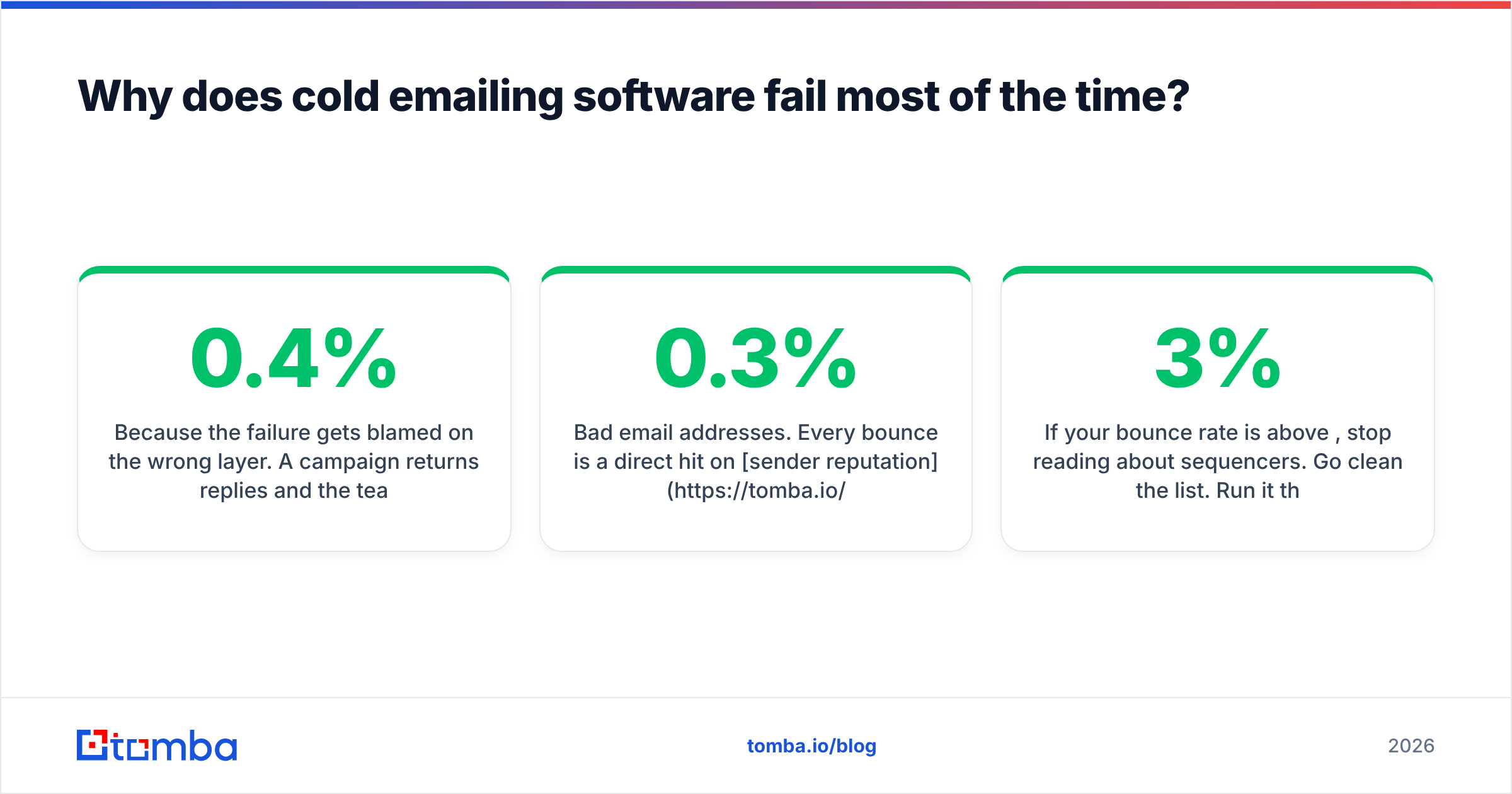
Because the failure gets blamed on the wrong layer. A campaign returns 0.4% replies and the team rewrites the subject line. Six subject lines later, nothing has changed, because the problem was never the copy.
Here is the actual dependency chain, in order of how much damage each link does:
- Bad email addresses. Every bounce is a direct hit on sender reputation. Google's bulk sender guidelines put the spam-complaint ceiling at 0.3%, and mailbox providers treat high bounce rates as the strongest signal that you bought a list. A 12% bounce rate will kill a domain faster than any subject line can save it.
- Insufficient inbox capacity. Sending 40+ cold emails a day from one mailbox is asking for a throttle. Real capacity means many mailboxes across several secondary domains, each sending 20–30 a day.
- No warmup, or fake warmup. Warmup networks that just bounce mail between subscribed accounts are increasingly transparent to Gmail's filters. Warmup buys you a ramp, not immunity.
- Wrong ICP. Perfect deliverability to the wrong 5,000 people produces perfect silence.
- Copy. Genuinely last. It matters — a lot, once the first four are solved — but it is never the first thing to fix.
If your bounce rate is above 3%, stop reading about sequencers. Go clean the list. Run it through a bulk verify pass, drop the unknowns, and re-measure before you touch anything else.
How do the major cold emailing software options compare?#
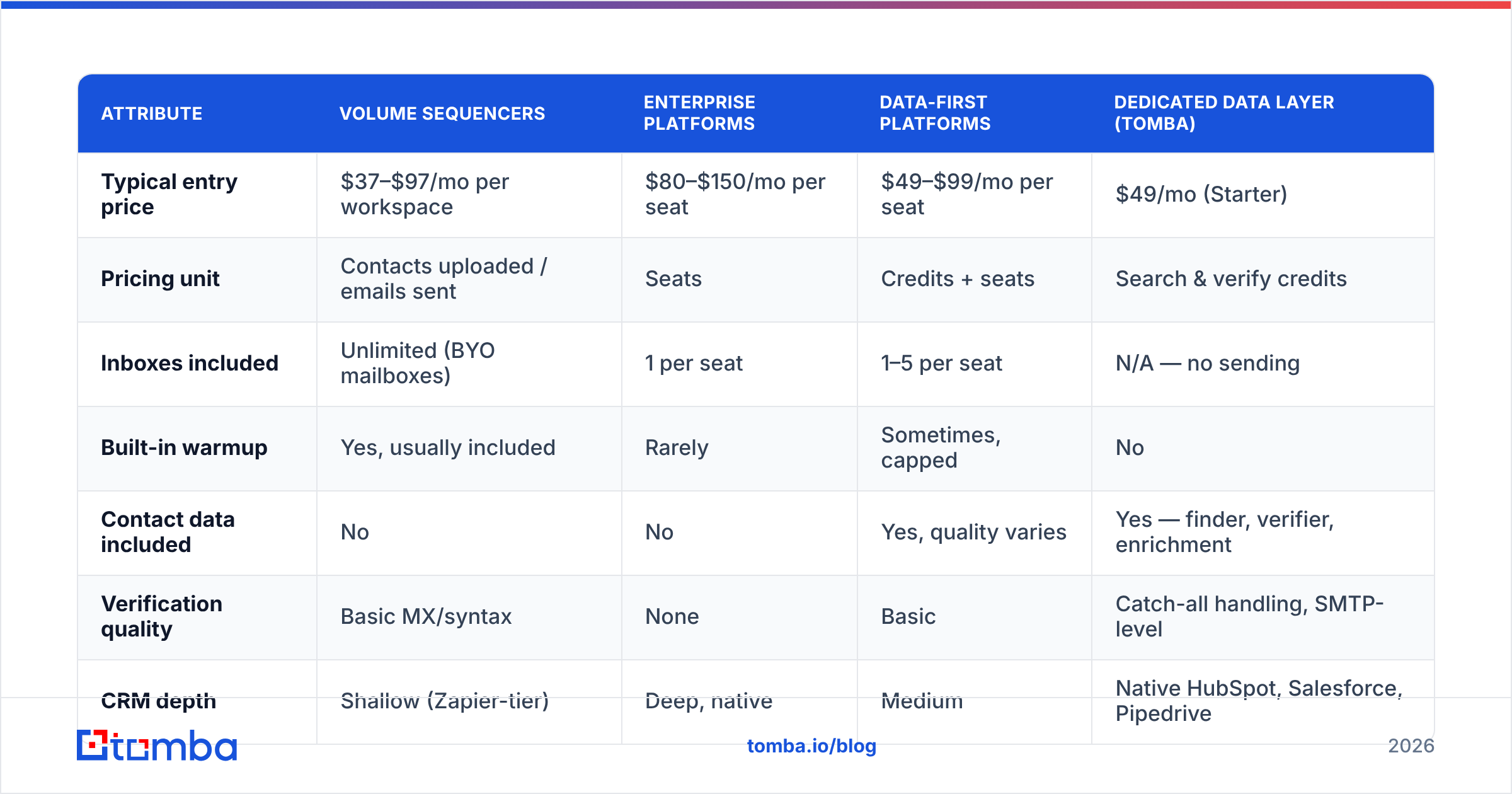
The market splits into three shapes. Volume sequencers (Instantly, Smartlead, Lemlist) price by workspace and let you connect unlimited inboxes — built for agencies and lean outbound teams running many domains. Enterprise engagement platforms (Outreach, Salesloft, HubSpot Sales Hub) price per seat, sit on top of a CRM, and treat email as one channel among calls, LinkedIn, and tasks. Data-first platforms (Apollo, and to a degree Lusha) bundle a contact database with a lightweight sequencer.
| Attribute | Volume sequencers | Enterprise platforms | Data-first platforms | Dedicated data layer (Tomba) |
|---|---|---|---|---|
| Typical entry price | $37–$97/mo per workspace | $80–$150/mo per seat | $49–$99/mo per seat | $49/mo (Starter) |
| Pricing unit | Contacts uploaded / emails sent | Seats | Credits + seats | Search & verify credits |
| Inboxes included | Unlimited (BYO mailboxes) | 1 per seat | 1–5 per seat | N/A — no sending |
| Built-in warmup | Yes, usually included | Rarely | Sometimes, capped | No |
| Contact data included | No | No | Yes, quality varies | Yes — finder, verifier, enrichment |
| Verification quality | Basic MX/syntax | None | Basic | Catch-all handling, SMTP-level |
| CRM depth | Shallow (Zapier-tier) | Deep, native | Medium | Native HubSpot, Salesforce, Pipedrive |
| API access | Paid tiers | Enterprise only | Rate-limited | All paid tiers |
| Best for | Agencies, 5k+ sends/mo | AE teams inside a CRM | Solo founders, quick starts | Any stack needing clean data |
| Real cost at 10k contacts/mo | $400–$700 all-in | $1,200+ | $500–$900 | $99 (Growth) |
The last row is the one buyers miss. A $97/mo sequencer that requires 20 Google Workspace mailboxes ($7 each), 5 secondary domains ($12/yr each), and 20k verification credits lands somewhere near $300–$400 before you've sent an email. That's not a scam — it's just the true cost of the infrastructure. Budget for it upfront so you don't discover it in month two.
What should you actually evaluate before buying?#
Ignore the feature grid on the vendor's pricing page. It is written to make every checkbox green. Evaluate these six things instead, in this order:
- Bounce rate on your own list. Upload 500 known-good contacts and 500 scraped ones. Measure. A tool that can't distinguish them isn't verifying anything meaningful. This single test tells you more than any G2 review — though G2's category page is a decent starting shortlist.
- Catch-all handling. Roughly 15–20% of B2B domains are catch-all, meaning the server accepts everything and verifies nothing. Most tools mark these "risky" and hand you the problem back. A proper catch-all verifier actually resolves a large share of them, which is often the difference between a 4,000-contact campaign and a 3,200-contact one.
- Inbox rotation logic. Does the sender distribute across mailboxes intelligently, or round-robin blindly? Blind rotation means one flagged mailbox drags the whole domain.
- Reply detection accuracy. Out-of-office replies counted as positive replies will inflate your dashboards and destroy your forecasting. Test it with a real OOO.
- Unsubscribe and compliance handling. One-click unsubscribe headers are now table stakes for bulk senders. If the tool doesn't inject them, you are the compliance layer.
- API and export. Can you get your data out? Can you pull contacts in programmatically? A locked platform is a platform you will pay to leave. Check whether the API is on all paid tiers or gated behind an enterprise call.
Notice that four of six are data or infrastructure questions. Only one touches the sequencer.
Is an all-in-one platform better than a split stack?#
For most teams under 20 reps: no. Split the stack.
The all-in-one pitch is seductive — one login, one invoice, one vendor to blame. The problem is that the two halves have opposite economics. Sending software wants you to send more; its costs scale with volume, which is cheap. Data software wants you to search less; its costs scale with database maintenance and verification, which is expensive. When one company sells both, the data side subsidizes the sending side, and the database is where the corners get cut.
You see this in practice as: a beautiful sequence builder, a "500 million contacts" claim on the homepage, and a 14% bounce rate on export. The contacts exist. They were also accurate in 2022.
The split-stack alternative:
- Data: a dedicated finder + verifier. Run domain search to map an account's email pattern, verify at the SMTP level, drop anything unresolved.
- Sending: a dedicated sequencer with unlimited inboxes — Instantly, Smartlead, or whatever your team already knows.
- Warmup: included with the sequencer, ramped over 3–4 weeks. Use a warmup calculator to figure out how long before your domains can carry real volume.
- CRM: wherever the revenue team lives. HubSpot's sales tooling or Salesforce, synced by native integration rather than a fragile Zap.
Two vendors. Each one competent at its own job. The integration cost is one afternoon.
The exception: if you are one person sending 200 emails a month, an all-in-one is fine. Optimization at that volume is a hobby, not a strategy.
How much does cold emailing software really cost in 2026?#
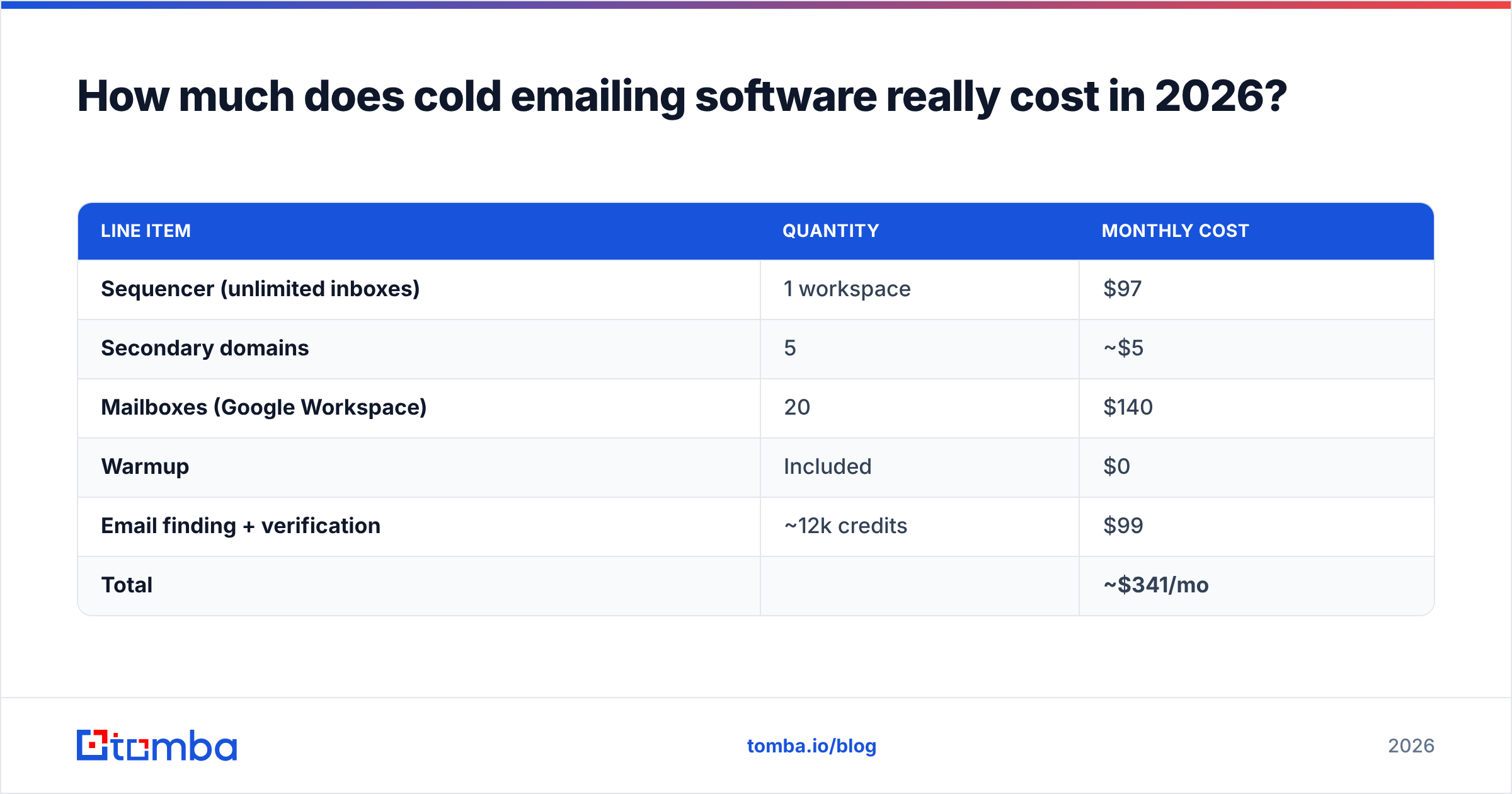
Build the number from components, not from the pricing page. For a team sending 10,000 cold emails per month:
| Line item | Quantity | Monthly cost |
|---|---|---|
| Sequencer (unlimited inboxes) | 1 workspace | $97 |
| Secondary domains | 5 | ~$5 |
| Mailboxes (Google Workspace) | 20 | $140 |
| Warmup | Included | $0 |
| Email finding + verification | ~12k credits | $99 |
| Total | ~$341/mo |
Two things stand out. First, mailboxes — not software — are the largest single line. Second, the data layer at $99/mo on Growth is the cheapest place to buy the biggest improvement, because every bounce it prevents protects the $140 of mailboxes you just bought.
Teams routinely get this backwards: they cheap out on verification to save $50, burn three domains, and spend $200 replacing them plus six weeks of warmup they can't get back.
A note on the free tiers. Tomba's free plan gives 25 searches a month — enough to test accuracy on accounts you already know, not enough to run a campaign. Treat every free tier as a test harness, not a strategy. Vendors that offer a genuinely usable free tier are usually selling your data elsewhere; vendors that offer none are usually hiding something behind the demo call. A small, honest free tier is the healthy signal.
Which cold emailing software should you choose?#
Match the tool to the constraint you actually have:
- You're an agency running 10+ clients. Volume sequencer with unlimited inboxes, plus a data layer with a real API so you can automate list building per client. Per-seat pricing will bankrupt you here.
- You're an SDR team inside Salesforce or HubSpot. Enterprise engagement platform. The CRM sync is worth the per-seat premium; the sequencer's raw sending capacity is not your bottleneck.
- You're a founder doing your own outbound. One good sequencer's cheapest tier, one secondary domain, three mailboxes, and obsessive list hygiene. Skip the enrichment suite until you've booked ten meetings.
- You're rebuilding after a domain got burned. Stop sending entirely. Fix data first, then infrastructure, then resume at 20% of previous volume. Nothing else works.
- You need contacts more than you need sending. You don't have a sequencer problem. Buy a data layer and export to whatever you already use — a spreadsheet is a perfectly good sequencer at low volume, and the Google Sheets add-on closes that loop.
There are good vendors in every one of those buckets. Providers like BookYourData serve teams that want a curated, ready-built list rather than a search-and-verify workflow — a legitimate approach when your ICP is stable and you'd rather buy coverage than build it. The failure mode is never "picked the wrong good tool." It's "picked a tool that fixed layer 3 when the problem was layer 1."
What's changing in 2026?#
Three shifts worth planning around:
Open tracking is dead as a metric. Apple Mail Privacy Protection and Gmail's image proxying have made open rates statistical noise. Any vendor still leading with open-rate dashboards is optimizing for a number that hasn't meant anything since 2021. Measure replies and meetings.
Authentication enforcement is tightening. SPF, DKIM, and DMARC are no longer optional for anyone sending in volume. Check yours with an SPF checker before every new domain goes live, and set DMARC to at least p=none with reporting turned on so you can see who's spoofing you.
AI-generated copy has commoditized personalization. When everyone's first line is "Loved your post about X," the merge-tag personalization that worked in 2022 now reads as automation. The signal has moved to relevance of timing and offer, not surface-level customization. Which, again, is a data problem — knowing who changed jobs, who's hiring, who just raised — not a copywriting problem.
The common thread: every trend pushes value away from the sending layer and toward the data layer. Buy accordingly.
Where should you start?#
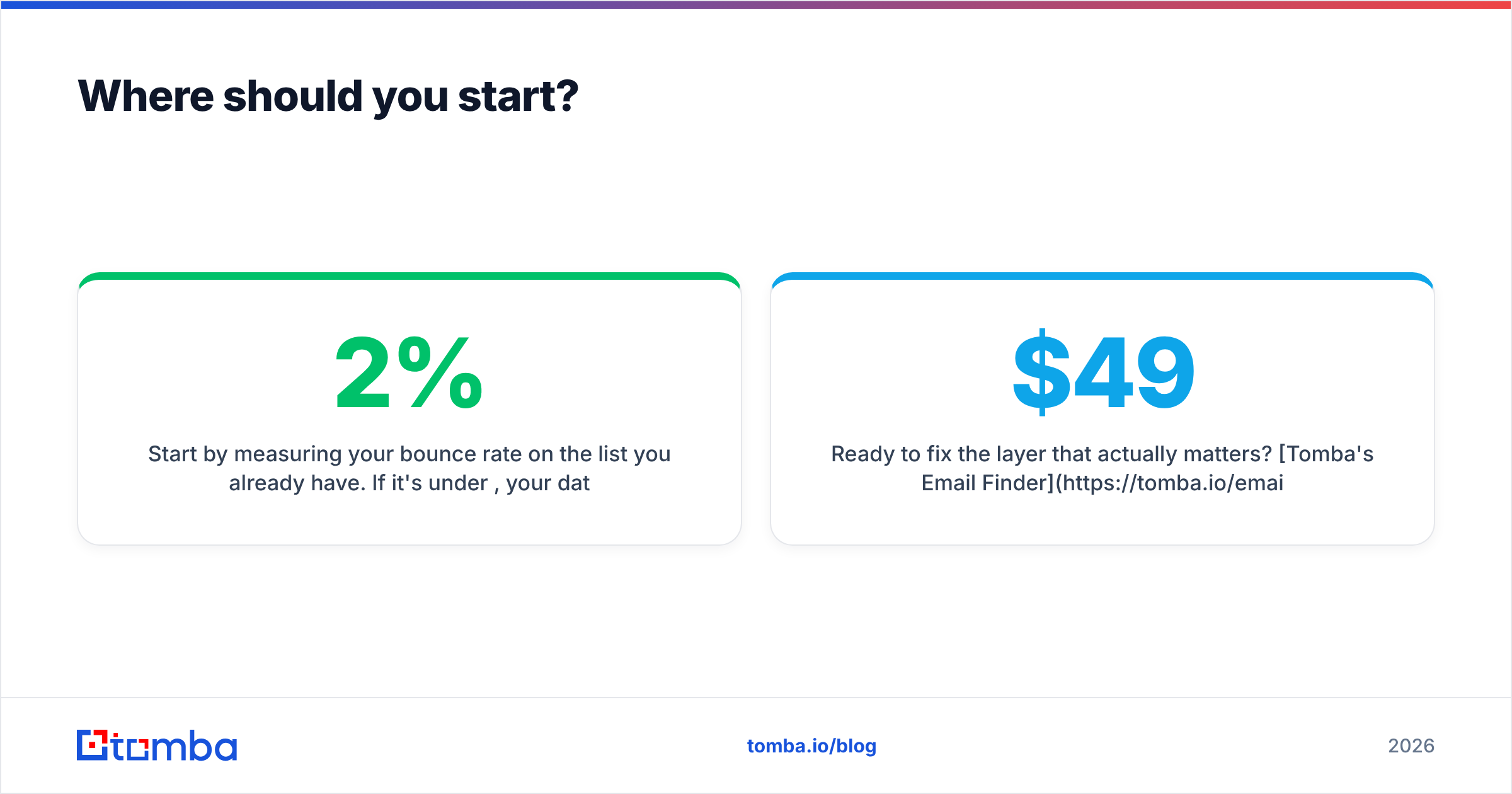
Start by measuring your bounce rate on the list you already have. If it's under 2%, your data is fine and you should invest in inbox capacity and copy. If it's above 5%, no sequencer on the market will save you, and every dollar you spend on one is a dollar lit on fire.
Clean the list, verify the addresses, then send.
Ready to fix the layer that actually matters? Tomba's Email Finder resolves work emails by domain, name, or company, verifies them at the SMTP level, and handles catch-all domains that other tools quietly hand back as "risky." Start on the free tier with 25 searches to test accuracy against contacts you already know, then scale to Starter at $49/mo or Growth at $99/mo when the numbers hold up. Plug it into whatever sequencer you already trust — your deliverability will do the arguing for you.
Related guides#
Ready to find emails that actually work?
Join 150,000+ professionals who stopped guessing and started sending. Free credits on signup — no credit card required.
Get the Tomba newsletter
Practical outbound tactics and product updates — once every two weeks.
About the author