Cold Emailing Tips: 12 Tactics That Get Replies in 2026
Most cold emailing tips are recycled advice from 2018. These 12 are built around what actually moves reply rates in 2026: inbox math, list hygiene, one-idea messages, and follow-up sequences that don't beg.
TL;DR
- Reply rate is downstream of three things in order: who you email, whether it lands, and what it says. Most cold emailing tips obsess over the third and ignore the first two.
- Keep each sending inbox under ~50 emails/day, keep bounce rate under 2%, and verify every address before it enters a sequence. Everything else is decoration.
- One idea per email. One ask. Under 90 words. If your email needs a scroll on mobile, it needs a cut.
- Follow-ups drive 40-55% of total replies in a well-built sequence. Send 3-4, spaced 3-4 days apart, each adding new information — never "just bumping this."
- Personalization has a ceiling. Relevance doesn't. A generic email to the exactly right person beats a hand-researched email to the wrong one.
Cold email still works in 2026. What stopped working is the version of it that treats volume as a strategy. Google and Microsoft tightened bulk sender enforcement, spam filters got better at pattern-matching templated copy, and buyers got faster at deleting anything that smells like a sequence.
The tips below are ordered by how much they actually move your reply rate — not by how novel they sound.
What actually determines cold email reply rates?#
Three variables, in strict priority order. Getting variable one wrong makes variables two and three irrelevant.
- List quality (targeting + data accuracy). If 30% of your addresses bounce or belong to people who can't buy, no subject line saves you. This is where most campaigns die and where almost nobody looks.
- Deliverability (does it reach the primary inbox). An email in Promotions or Spam has a 0% reply rate regardless of how good the copy is. This is infrastructure, not writing.
- Message relevance (does it earn 8 seconds). Copy matters — but it's the third lever, not the first. A great email to a bad list is a great email nobody reads.
A useful mental model: cold email is a leaky funnel where each stage multiplies. 80% deliverability × 40% open × 5% reply = 1.6% net reply rate. Fix deliverability to 95% and the same copy yields 1.9%. Fix the list so opens hit 55% and you're at 2.6% — a 63% lift without touching a single word of the email.
Why does list hygiene beat clever copywriting?#
Because bounces compound. Mailbox providers read your bounce rate as a proxy for "does this sender know who they're emailing." Cross roughly 2-3% and throttling starts. Cross 5% and you're training the filter to distrust your domain — a state that takes weeks to unwind.
Three habits fix this permanently:
- Verify before you send, not after. Run every address through an email verifier as it enters your CRM, not as a cleanup pass before launch. Lists decay 22-30% per year as people change jobs.
- Treat catch-all domains as a separate bucket. Catch-all servers accept everything, so a standard SMTP check tells you nothing. Route them through a catch-all verifier or accept them at a lower confidence tier and send them last.
- Source, don't scrape. Addresses guessed by a permutator and never validated are the single largest source of bounces in B2B outbound. Use a domain search to pull verified addresses tied to a company's real pattern instead.
The compounding effect is unglamorous but real: a 1% bounce rate lets you send from the same domain for years. A 6% bounce rate burns a domain in a quarter, and warming a replacement costs you three to four weeks of pipeline.
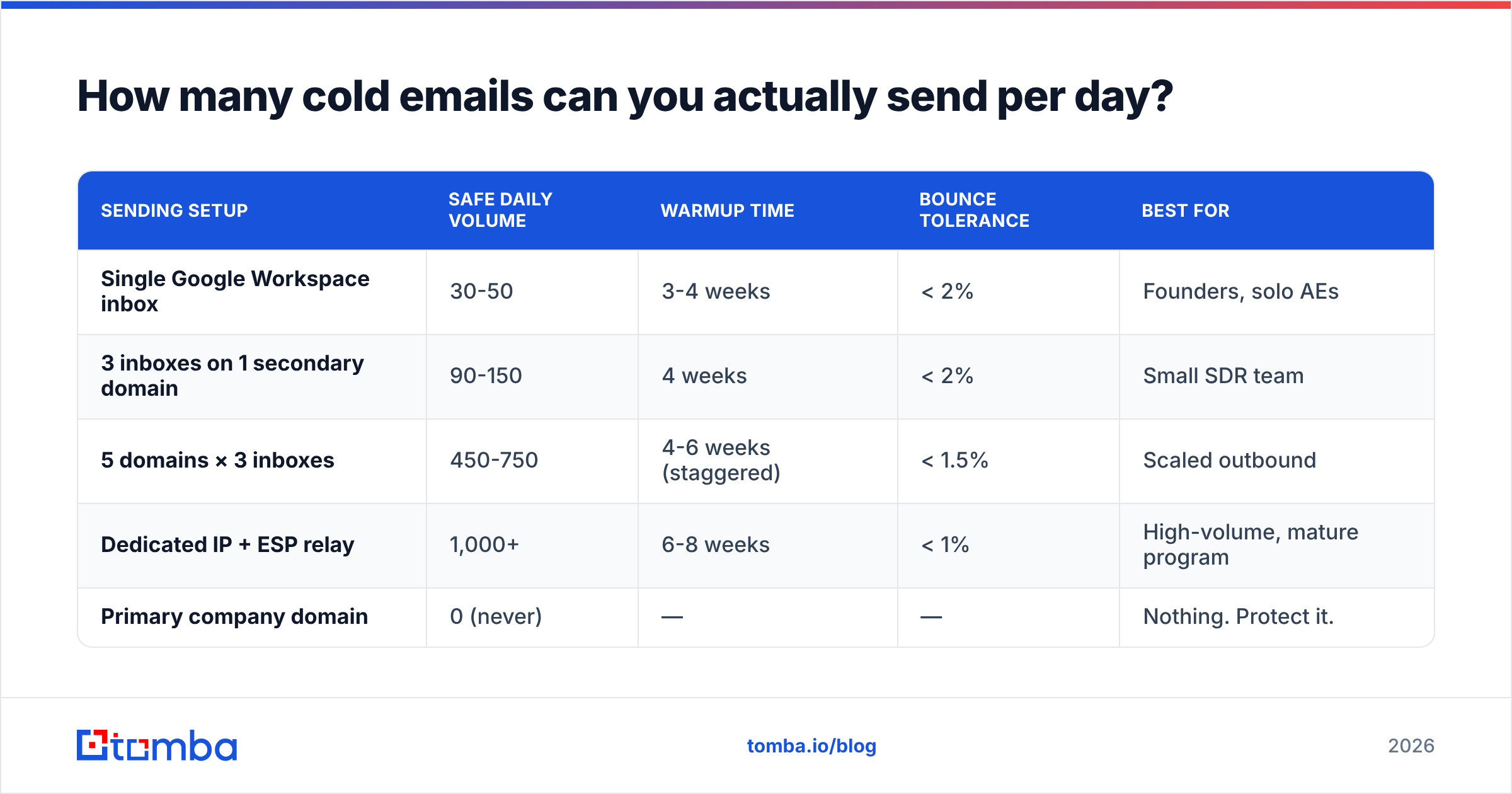
How many cold emails can you actually send per day?#
Fewer than you think, and fewer than your sending tool's marketing page implies.
| Sending setup | Safe daily volume | Warmup time | Bounce tolerance | Best for |
|---|---|---|---|---|
| Single Google Workspace inbox | 30-50 | 3-4 weeks | < 2% | Founders, solo AEs |
| 3 inboxes on 1 secondary domain | 90-150 | 4 weeks | < 2% | Small SDR team |
| 5 domains × 3 inboxes | 450-750 | 4-6 weeks (staggered) | < 1.5% | Scaled outbound |
| Dedicated IP + ESP relay | 1,000+ | 6-8 weeks | < 1% | High-volume, mature program |
| Primary company domain | 0 (never) | — | — | Nothing. Protect it. |
Two rules that follow from this table:
Never send cold email from your primary domain. Buy getacme.com or acme-hq.com, point it at your main site, and burn that instead. If reputation tanks, your invoices and support replies still land.
Ramp, don't launch. Start at 5-10 sends/day per inbox and add ~5 per day per week. Use a warmup calculator to map the schedule rather than eyeballing it. Google's own sender guidelines spell out the authentication and spam-complaint thresholds you're being measured against — read them once, configure once, stop guessing.
Authentication is table stakes: SPF, DKIM, and DMARC on every sending domain. Run an SPF checker after any DNS change, because a single extra include: can silently push you past the 10-lookup limit and invalidate the whole record.
What should a cold email actually say?#
Ninety words. One idea. One ask. Here's the anatomy that consistently outperforms:
- Line one names a specific, observable trigger. "Saw you're hiring three enterprise AEs in Q3." Not "I hope this email finds you well." The trigger proves you're not blasting — which is the only thing the reader is actually evaluating in the first two seconds.
- Line two connects the trigger to a problem they already have. Don't explain your product. Name the friction the trigger implies. "Most teams that scale AE headcount that fast see ramp time double before ops catches up."
- Line three is proof, compressed. One customer, one number, one sentence. "We cut ramp from 90 to 51 days at [comparable company]." No case-study links in email one.
- Line four is a low-friction ask. "Worth a look?" or "Want the 2-page breakdown?" outperforms "Do you have 15 minutes Thursday at 2pm?" by a wide margin — because the second one asks for a calendar commitment before you've earned attention.
- No signature bloat. Name, company, one link. Every image, banner, and tracking pixel is another spam signal. Strip them.
The single most common failure I see reviewing real sequences: the email describes the sender. Rewrite any sentence starting with "We are" or "Our platform" until the subject of the sentence is the reader.
Test the copy before it ships. Run it through a spam checker and cut anything that trips it — but understand that spam-word lists are a weak signal in 2026. Filters weight engagement history far more heavily than the word "free." A clean domain sending "free" outperforms a burnt domain sending Shakespeare.
Do subject lines and personalization still matter?#
Yes, but not the way most cold emailing tips claim.
Subject lines should be 2-5 words, lowercase, and look like something a colleague would send. "quick question about ramp time" beats "Transform Your Sales Onboarding Today." Lowercase isn't a trick — it's a signal that this wasn't written by a marketing tool. Avoid personalization tokens in the subject; {{firstName}} in a subject line is now a tell, not a delight.
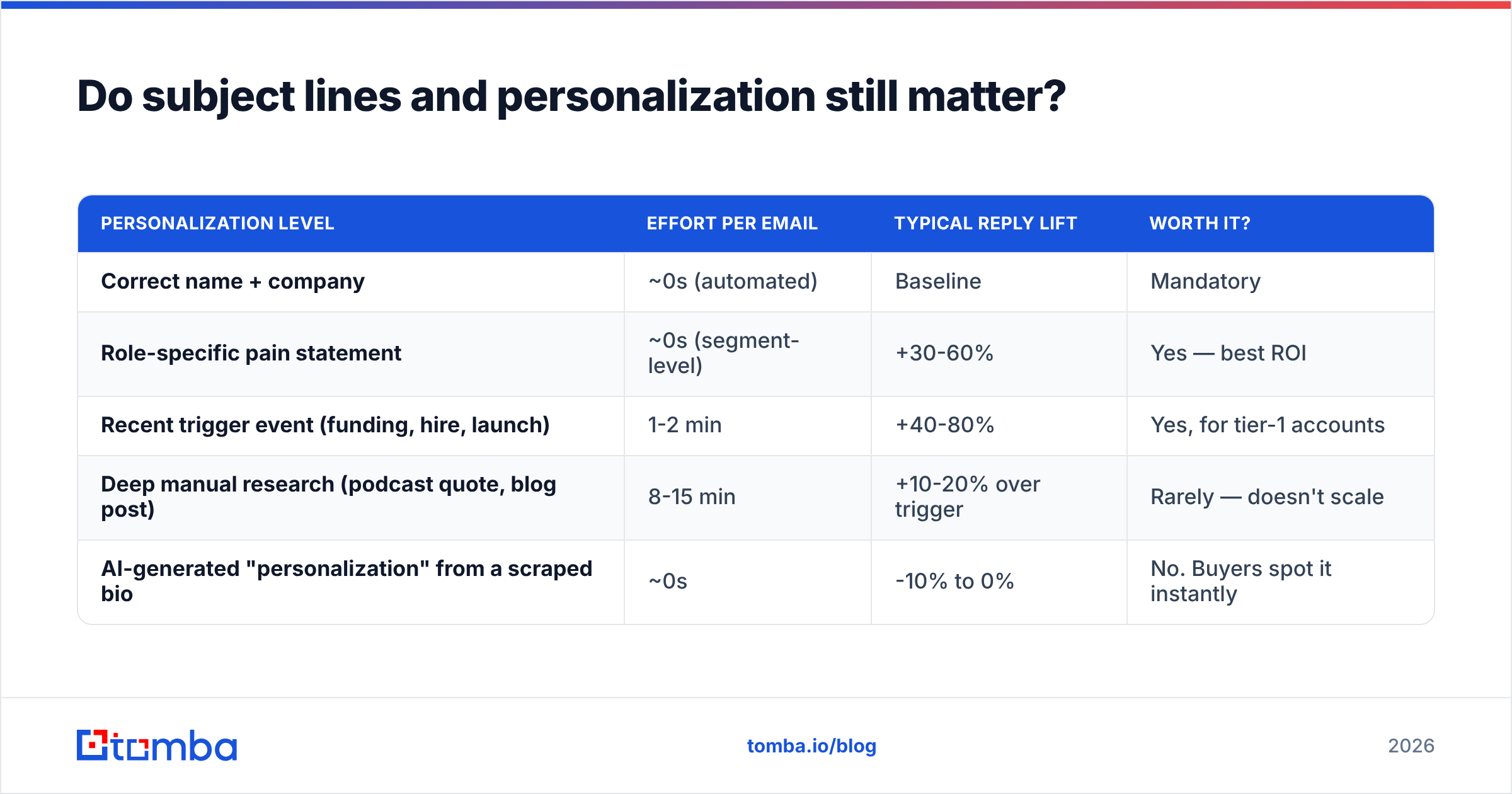
Personalization has diminishing returns past a point. Here's the honest hierarchy:
| Personalization level | Effort per email | Typical reply lift | Worth it? |
|---|---|---|---|
| Correct name + company | ~0s (automated) | Baseline | Mandatory |
| Role-specific pain statement | ~0s (segment-level) | +30-60% | Yes — best ROI |
| Recent trigger event (funding, hire, launch) | 1-2 min | +40-80% | Yes, for tier-1 accounts |
| Deep manual research (podcast quote, blog post) | 8-15 min | +10-20% over trigger | Rarely — doesn't scale |
| AI-generated "personalization" from a scraped bio | ~0s | -10% to 0% | No. Buyers spot it instantly |
The last row is the important one. Machine-written flattery ("Loved your take on the future of RevOps!") now reads as an automation signature and actively depresses replies. If you can't say something a human would say, say nothing and let the segment-level relevance carry the email.
Segment tightly enough and you barely need personalization. Fifty VP Sales at 50-200 person Series B SaaS companies who all just posted an SDR role share one problem. Write to the problem, not the person.

How should you structure a follow-up sequence?#
Most replies don't come from email one. In well-instrumented sequences, emails two through four generate 40-55% of total responses. The mistake is treating follow-ups as reminders instead of new attempts.
The four-touch structure that works:
- Day 0 — the core pitch. Trigger, problem, proof, soft ask. 90 words.
- Day 3 — new angle, not a bump. Same problem, different proof point or a different stakeholder's pain. 50 words.
- Day 8 — a resource, no ask. Send the thing itself — a benchmark, a teardown, a one-pager. "No reply needed, thought this was relevant." This is the highest-converting email in most sequences because it's the only one that gives before it takes.
- Day 15 — the close-out. "I'll stop here — should I circle back next quarter, or is this not a priority?" The permission-to-close email reliably pulls a 5-9% reply rate on its own, including a meaningful share of yeses.
Never send more than four. Never send "just floating this to the top of your inbox." A bump with no new information tells the reader their attention is worth less than your sequence template.
And reply in-thread, not as a new message. Threaded replies inherit the engagement signals of the original and look like conversation rather than campaign.
Which tools do you actually need?#
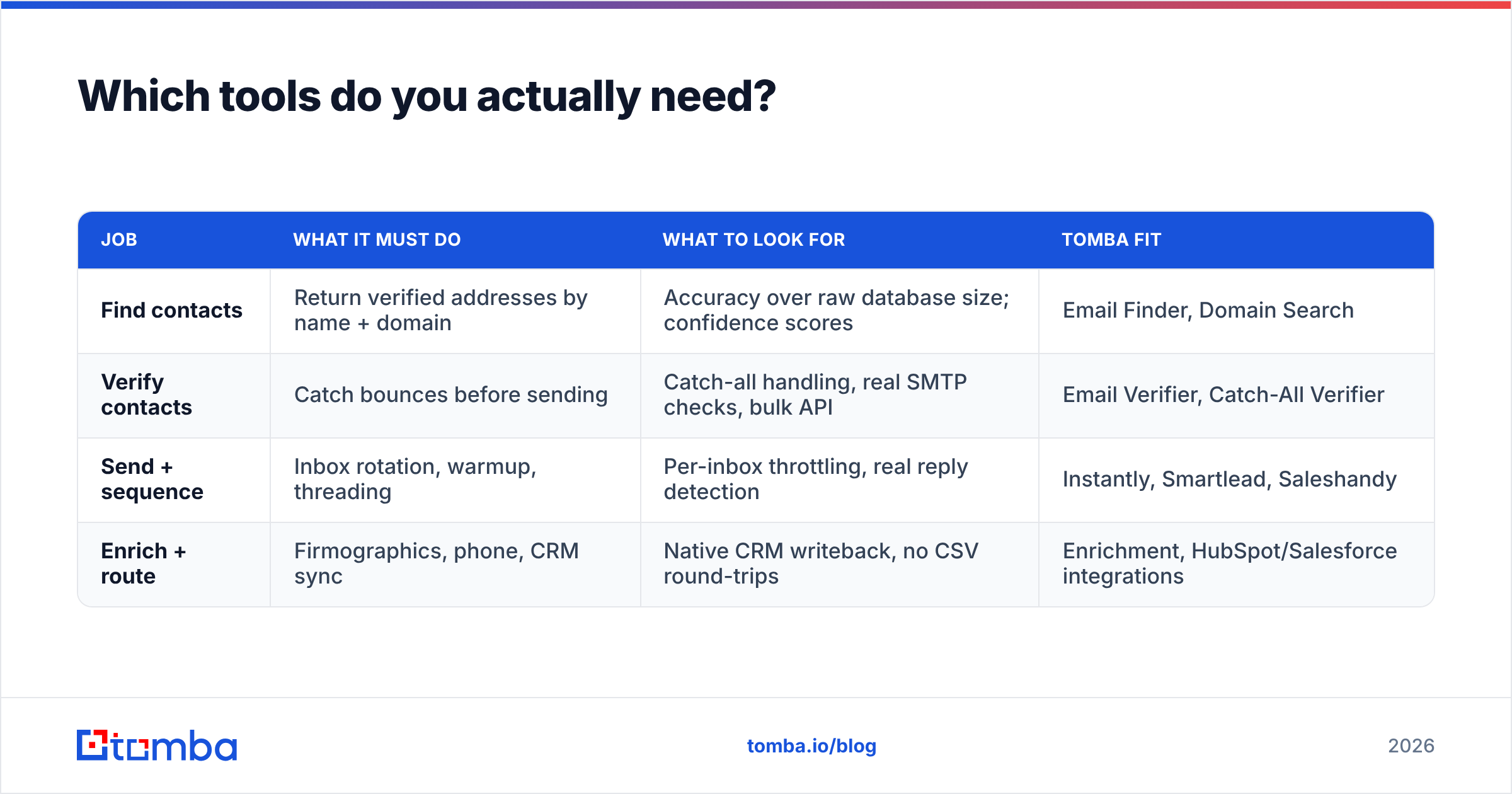
Fewer than the market wants you to buy. The stack decomposes into four jobs:
| Job | What it must do | What to look for | Tomba fit |
|---|---|---|---|
| Find contacts | Return verified addresses by name + domain | Accuracy over raw database size; confidence scores | Email Finder, Domain Search |
| Verify contacts | Catch bounces before sending | Catch-all handling, real SMTP checks, bulk API | Email Verifier, Catch-All Verifier |
| Send + sequence | Inbox rotation, warmup, threading | Per-inbox throttling, real reply detection | Instantly, Smartlead, Saleshandy |
| Enrich + route | Firmographics, phone, CRM sync | Native CRM writeback, no CSV round-trips | Enrichment, HubSpot/Salesforce integrations |
Data vendors sit in the first two rows and they are not interchangeable. Coverage-first databases (Apollo, ZoomInfo) win on breadth; accuracy-first finders win on bounce rate. Providers like BookYourData take a purchase-by-record approach that suits teams with a fixed, well-defined ICP list and no appetite for a subscription. Tomba sits on the accuracy side, with verification built into the same call that finds the address — which matters because a "found" email that bounces costs you domain reputation, not just a credit.
Check what buyers say rather than what vendors claim: G2's email-finder category is the least-bad public signal on real bounce rates, and vendor accuracy claims should always be validated against your own 500-contact test list before you commit.
On budget: a working outbound stack for a 3-person team runs roughly $150-350/month all-in. Tomba pricing starts free at 25 searches/month, with Starter at $49/mo and Growth at $99/mo — deliberately structured so verification isn't a separate line item you're tempted to skip.
What are the mistakes that quietly kill campaigns?#
These don't announce themselves. You just watch reply rates decay and blame the market.
- Tracking pixels on cold email. Open tracking inserts a 1×1 image and a redirect domain. Both are spam signals. Turn open tracking off on cold sequences; measure replies, which is the only metric that pays rent.
- Link in email one. Every hyperlink is a filter decision point. Earn the reply first, then send the link.
- Sending Monday 9am. Everyone's automation fires then. Tuesday-Thursday, 6:30-7:30am recipient local time consistently clears a less crowded inbox.
- No unsubscribe path. One line — "Reply 'stop' and I'll close this out" — cuts spam complaints materially. Spam complaints above 0.3% are the fastest way to lose a domain.
- Not segmenting bounces from rejections. A hard bounce means bad data. A soft bounce means throttling. Treating them the same means you'll fix the wrong problem for a month.
- Scaling before the message converts. If 200 emails to a tight segment yield zero replies, sending 2,000 yields zero replies at ten times the reputation cost. Volume amplifies whatever you already have, including nothing. See HubSpot's outbound benchmarks for what "working" looks like before you scale.
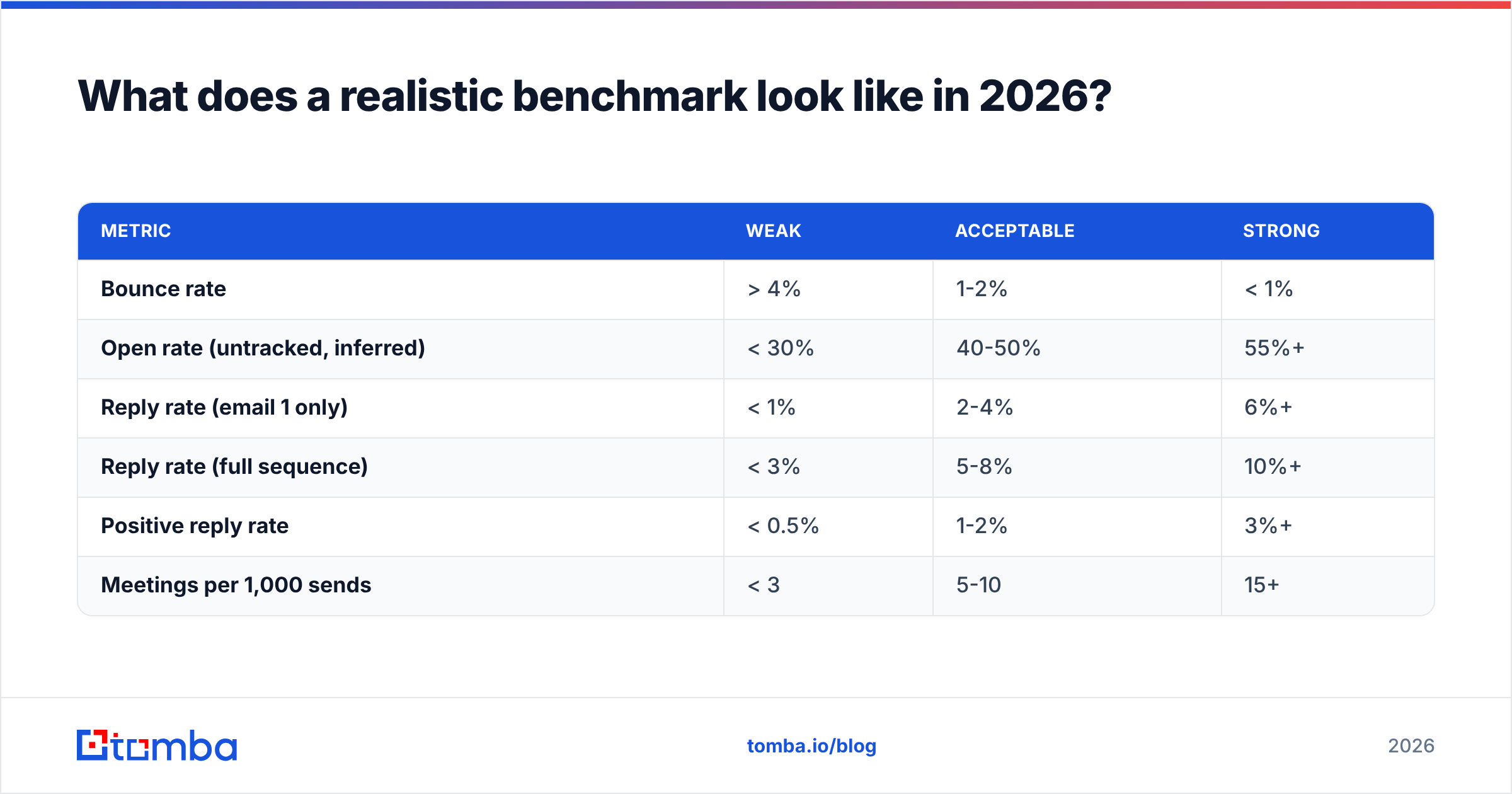
What does a realistic benchmark look like in 2026?#
Set expectations honestly, or you'll optimize against fiction.
| Metric | Weak | Acceptable | Strong |
|---|---|---|---|
| Bounce rate | > 4% | 1-2% | < 1% |
| Open rate (untracked, inferred) | < 30% | 40-50% | 55%+ |
| Reply rate (email 1 only) | < 1% | 2-4% | 6%+ |
| Reply rate (full sequence) | < 3% | 5-8% | 10%+ |
| Positive reply rate | < 0.5% | 1-2% | 3%+ |
| Meetings per 1,000 sends | < 3 | 5-10 | 15+ |
If you're below "acceptable" on bounce rate, fix that first and re-measure everything else afterward. It will move all the other rows. Nothing in the copywriting section will.
Where should you start tomorrow?#
Pick one segment of 100 accounts you can describe in a single sentence. Find the right person at each. Verify every address. Write one 90-word email to the shared problem. Send 25 a day from a warmed secondary domain. Add three follow-ups. Measure replies, not opens. Then, and only then, change the copy.
The reason most cold emailing tips fail isn't that they're wrong — it's that they're applied at the wrong layer. Better subject lines can't rescue a list where a third of the addresses don't exist.
Start where the leverage is. Tomba's Email Finder returns verified, confidence-scored addresses by name and domain, with verification baked into the same request — so the contacts entering your sequence are the ones that actually exist. Free tier gives you 25 searches to test it against a list you already know the answers to. That's the right way to evaluate any data vendor, including this one.
Related guides#
Ready to find emails that actually work?
Join 150,000+ professionals who stopped guessing and started sending. Free credits on signup — no credit card required.
Get the Tomba newsletter
Practical outbound tactics and product updates — once every two weeks.
About the author