The Best Cold Outreach Tools in 2026: A No-Fluff Stack Guide
Building a cold outreach stack in 2026? See how finders, sequencers, warmup, and deliverability tools actually compare — and which ones are worth paying for.
Cold outreach in 2026 is not a single tool — it's a chain. Bad data feeds bad emails, bad emails land in spam, and no amount of clever copy saves a message nobody sees. The teams that book meetings treat outreach as a stack: find, verify, warm, send, track. This guide breaks that stack down category by category, tells you what each layer actually does, and shows you where to spend and where to save.
TL;DR: What you actually need#
- Five layers, not fifty tools. A working cold outreach stack is data (finder), verification, deliverability/warmup, a sequencer, and a CRM. Everything else is optional.
- Data quality decides everything downstream. A 95%-accurate email finder plus a verifier prevents the bounces that wreck your sender reputation before your copy ever gets read.
- Deliverability is the silent killer. Warmup and domain setup (SPF, DKIM, DMARC) matter more than subject-line tricks in 2026.
- Consolidate where you can. Overlapping tools waste budget and create data sync headaches. One good finder beats three mediocre ones.
- Best-value starting stack: a finder like Tomba Email Finder + verifier, a sequencer like Instantly or Smartlead, and a lightweight CRM — under $200/month for most small teams.
What counts as a "cold outreach tool"?#
A cold outreach tool is anything that helps you contact a prospect who has not opted in — and get a reply instead of a spam complaint. In practice that splits into five jobs:
- Find the contact. You need a verified email or phone number tied to a real decision-maker, not a generic
info@inbox. - Verify it's deliverable. Sending to dead addresses spikes your bounce rate and burns your domain.
- Protect deliverability. Warmup, DNS records, and inbox rotation keep you out of spam.
- Send and sequence. Personalized, multi-step campaigns with follow-ups — automated but human-sounding.
- Track and manage. A CRM or pipeline view so replies turn into deals, not lost threads.
Most "all-in-one" platforms claim to cover all five. In reality they're strong in one or two layers and weak in the rest. Knowing which layer a tool actually wins helps you avoid paying premium prices for filler features.

What are the main categories of cold outreach tools?#
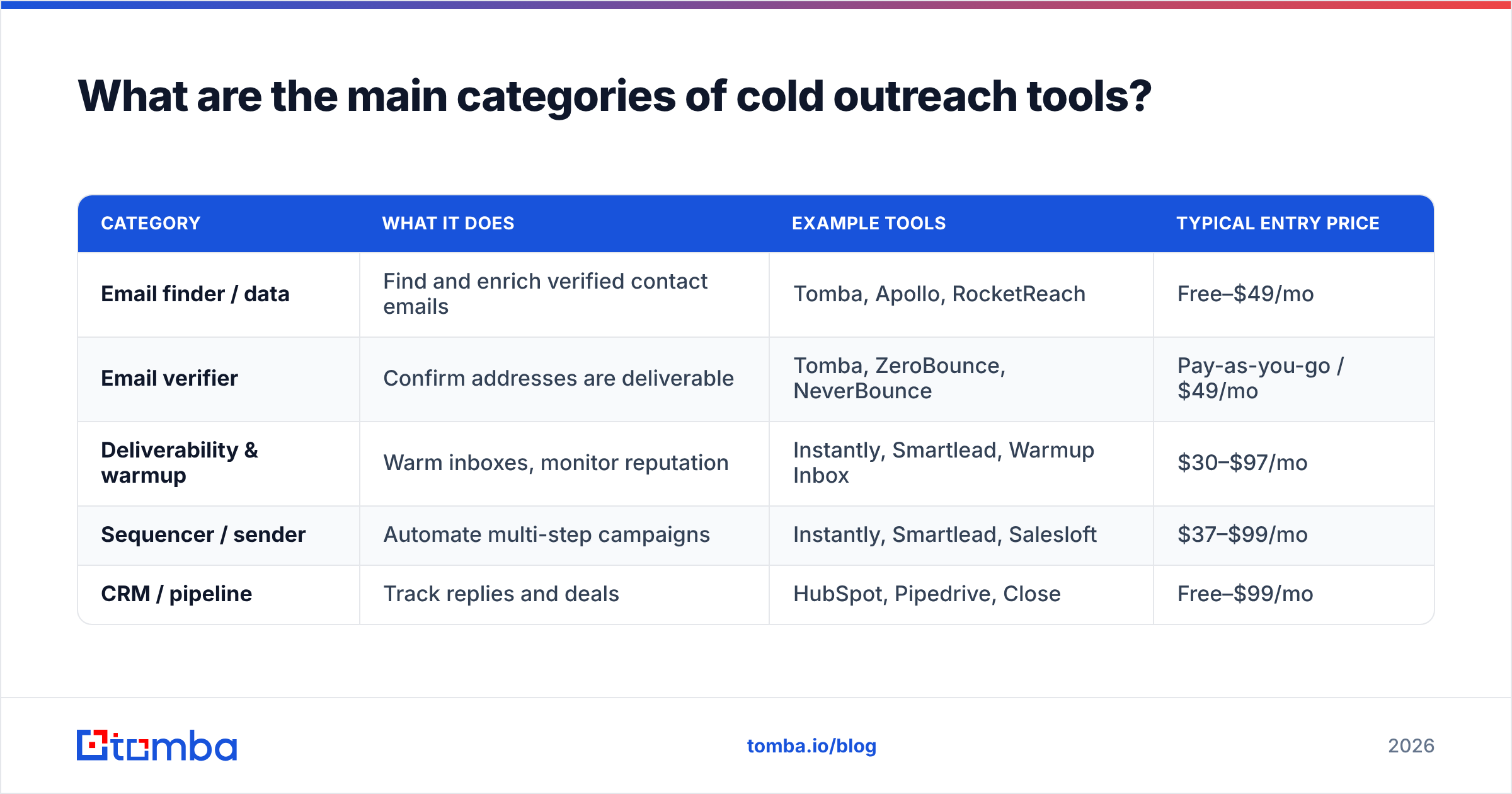
Here's how the market breaks down in 2026, with the job each category does and roughly what you'll pay.
| Category | What it does | Example tools | Typical entry price |
|---|---|---|---|
| Email finder / data | Find and enrich verified contact emails | Tomba, Apollo, RocketReach | Free–$49/mo |
| Email verifier | Confirm addresses are deliverable | Tomba, ZeroBounce, NeverBounce | Pay-as-you-go / $49/mo |
| Deliverability & warmup | Warm inboxes, monitor reputation | Instantly, Smartlead, Warmup Inbox | $30–$97/mo |
| Sequencer / sender | Automate multi-step campaigns | Instantly, Smartlead, Salesloft | $37–$99/mo |
| CRM / pipeline | Track replies and deals | HubSpot, Pipedrive, Close | Free–$99/mo |
Notice the overlap: several tools straddle two categories. Instantly and Smartlead, for example, bundle warmup with sending. That's convenient, but it also means the data layer — the finder and verifier — is usually the piece you buy separately, because it's the piece that most determines results.
Why does data quality matter more than the sequencer?#
Because a great sequencer sending to bad data still bounces. Deliverability platforms measure your reputation partly by bounce rate. Send to a list where 20% of addresses are dead, and mailbox providers throttle you — even your good emails start hitting spam. Fix the data, and the same copy suddenly performs.
This is why the finder-plus-verifier layer is the highest-leverage spend in the stack. A quality email finder sourced from public and verified data gets you the right address; an email verifier confirms it's live before you ever load it into a campaign. Tomba pairs both, plus a catch-all verifier for the domains that accept everything and tell you nothing.
Accuracy claims vary wildly across vendors, so test before you commit. Run 50 known contacts through a tool's finder and check the hit rate and bounce rate yourself. Independent review sites like G2 are useful for spotting patterns in real user complaints — especially around data freshness, which decays fast as people change jobs.
Which sending and sequencing tools should you use?#
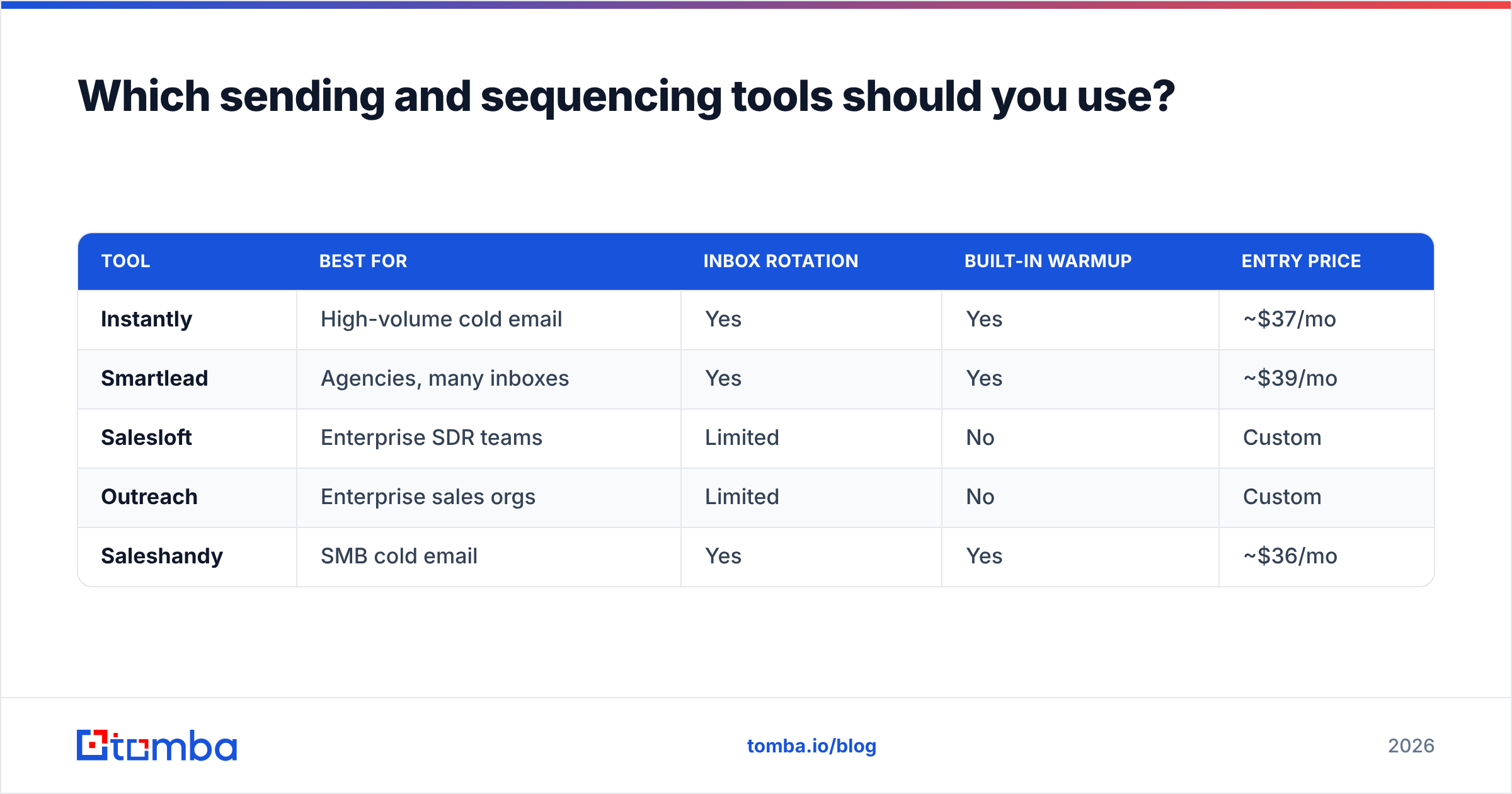
The sender is where personalization meets scale. In 2026 the practical split is between lightweight, deliverability-first tools built for cold email (Instantly, Smartlead) and heavier sales-engagement platforms built for full teams (Salesloft, Outreach). Here's how the popular options compare on the things that actually matter for cold outreach.
| Tool | Best for | Inbox rotation | Built-in warmup | Entry price |
|---|---|---|---|---|
| Instantly | High-volume cold email | Yes | Yes | ~$37/mo |
| Smartlead | Agencies, many inboxes | Yes | Yes | ~$39/mo |
| Salesloft | Enterprise SDR teams | Limited | No | Custom |
| Outreach | Enterprise sales orgs | Limited | No | Custom |
| Saleshandy | SMB cold email | Yes | Yes | ~$36/mo |
For a small team or founder-led sales, a deliverability-first sender like Instantly or Smartlead usually wins on price and inbox management. For a 20-rep SDR org that lives inside a CRM, Salesloft or Outreach earns its cost through workflow depth — but you'll still bring your own data layer. If you're weighing the heavier platforms, it's worth reading up on an Outreach alternative or Salesloft alternative before signing an annual contract.
How important is deliverability and warmup?#
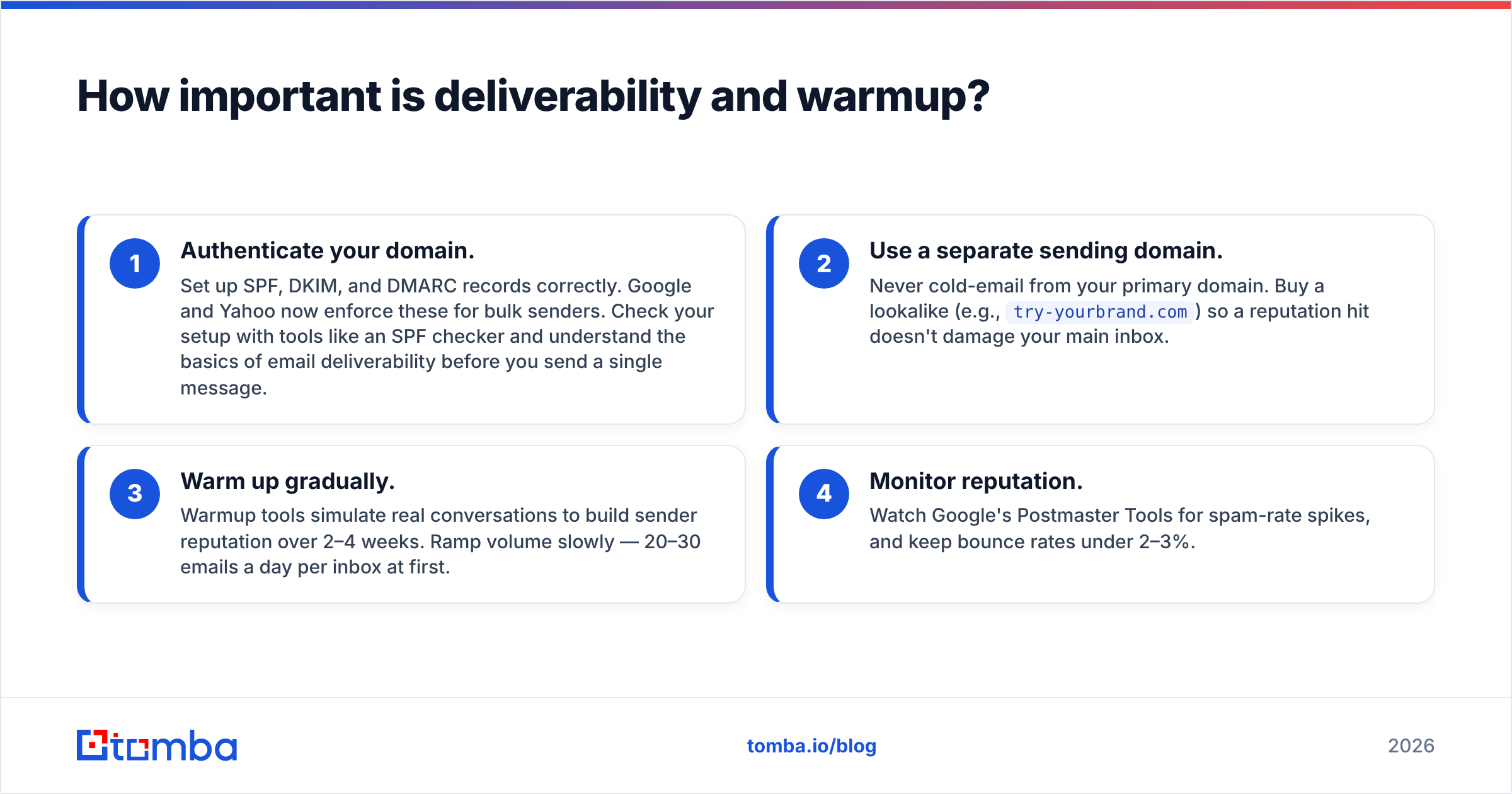
Critical — and it's the layer most beginners skip. You can have perfect data and perfect copy, but if your domain isn't authenticated and warmed, mailbox providers quietly route you to spam. Nobody tells you; your reply rate just stays at zero.
The non-negotiables in 2026:
- Authenticate your domain. Set up SPF, DKIM, and DMARC records correctly. Google and Yahoo now enforce these for bulk senders. Check your setup with tools like an SPF checker and understand the basics of email deliverability before you send a single message.
- Use a separate sending domain. Never cold-email from your primary domain. Buy a lookalike (e.g.,
try-yourbrand.com) so a reputation hit doesn't damage your main inbox. - Warm up gradually. Warmup tools simulate real conversations to build sender reputation over 2–4 weeks. Ramp volume slowly — 20–30 emails a day per inbox at first.
- Monitor reputation. Watch Google's Postmaster Tools for spam-rate spikes, and keep bounce rates under 2–3%.
Skipping warmup is the single most common reason new campaigns fail. It's also why bundled sender-plus-warmup tools have become the default — the two jobs are inseparable.
Do you need an all-in-one platform or a best-of-breed stack?#
Most teams do better with a best-of-breed stack, not a do-everything platform. The all-in-one pitch is tempting: one login, one bill, one dashboard. But the "everything" tools tend to be average at each job, and their bundled data is often the weakest link — stale, low-hit-rate, or expensive per credit.
Here's the honest trade-off:
- All-in-one (Apollo, Amplemarket): Convenient, single vendor, decent for getting started. Data quality and deliverability controls are often the compromise. If you're outgrowing one, an Apollo alternative that separates data from sending can lift results.
- Best-of-breed stack: A dedicated finder + verifier, a dedicated sender, a dedicated CRM. More setup, but each layer is genuinely good, and you can swap any one piece without ripping out the rest.
The middle path most winning teams take: use a best-of-breed data layer (because data quality drives everything) and accept a bundled sender + warmup for convenience. That keeps your highest-leverage spend on the piece that matters most while consolidating the operational tooling.
Integration is what makes best-of-breed practical. If your finder pushes clean contacts straight into your sender and CRM, you avoid CSV chaos. Tomba connects to the tools you already run through native integrations — HubSpot, Pipedrive, Zapier, Google Sheets — so enriched data flows without manual exports.
How much should a cold outreach stack cost?#
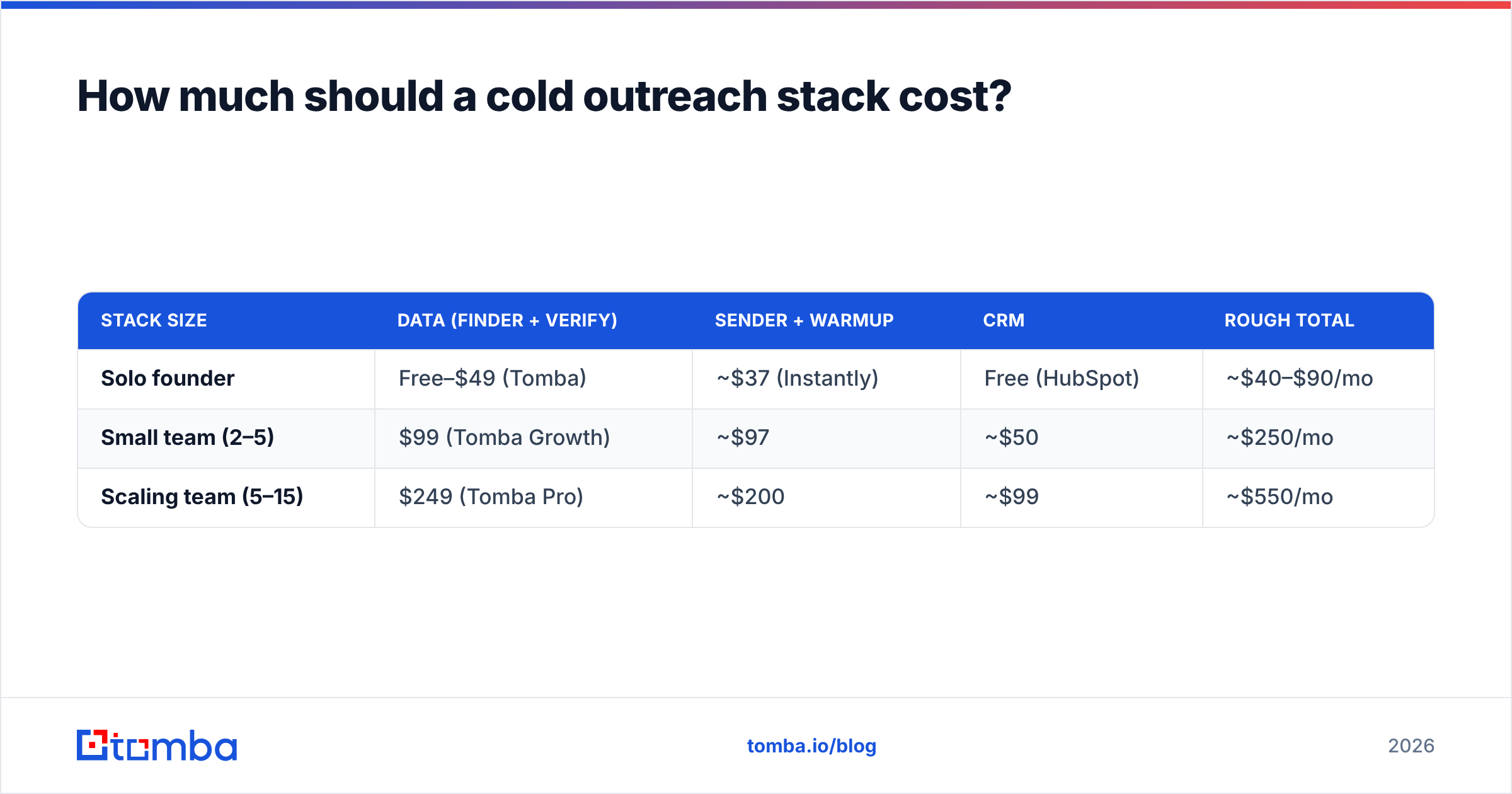
Less than you think, if you buy by layer instead of by hype. Here's a realistic monthly budget for three team sizes.
| Stack size | Data (finder + verify) | Sender + warmup | CRM | Rough total |
|---|---|---|---|---|
| Solo founder | Free–$49 (Tomba) | ~$37 (Instantly) | Free (HubSpot) | ~$40–$90/mo |
| Small team (2–5) | $99 (Tomba Growth) | ~$97 | ~$50 | ~$250/mo |
| Scaling team (5–15) | $249 (Tomba Pro) | ~$200 | ~$99 | ~$550/mo |
A solo founder can run a legitimate cold outreach motion for under $100/month. Tomba's pricing starts with a free tier (25 searches/month), then Starter at $49/mo, Growth at $99/mo, and Pro at $249/mo — so the data layer scales with you instead of forcing an enterprise contract on day one. If you run large lists, a bulk email finder keeps per-contact costs predictable as volume grows.
The mistake teams make is stacking overlapping tools — two finders, two verifiers, a standalone warmup they don't need — and paying $800/month for what a focused stack does for $250. Audit your stack quarterly and cut anything whose job another tool already covers.
What about AI and personalization tools?#
AI copy tools have flooded the market, and they're genuinely useful for first drafts — but they don't replace the fundamentals. A perfectly AI-personalized email to a dead address still bounces. Use AI to scale the writing, not to skip the data and deliverability work.
Practical uses that work in 2026:
- First-line personalization at scale — pulling a relevant detail per prospect so openers don't read like mass mail.
- Subject-line variants — generate and A/B test with a subject line tester instead of guessing.
- Reply handling — draft responses faster so hot leads don't cool while you're busy.
The guardrail: keep AI output human. Over-templated, obviously-generated copy is now a spam signal in its own right. Prospects can smell it, and so can filters. Personalize with real data — job change, funding round, tech stack — not generic flattery.
The bottom line: build the data layer first#
If you take one thing from this guide: the finder-plus-verifier layer is where cold outreach is won or lost. Sequencers, warmup, and CRMs are commodities you can swap. Clean, accurate, verified contact data is the input that decides whether the entire machine produces meetings or bounces.
Start there. Get the right emails, confirm they're deliverable, then let a good sender and a simple CRM do the rest.
Ready to fix the layer that matters most? Tomba Email Finder gives you verified professional emails by name, domain, or company — with a built-in verifier and catch-all detection so your list is clean before it ever hits a campaign. Start free with 25 searches a month, no card required, and scale up only when your pipeline does.
Related guides#
Ready to find emails that actually work?
Join 150,000+ professionals who stopped guessing and started sending. Free credits on signup — no credit card required.
Get the Tomba newsletter
Practical outbound tactics and product updates — once every two weeks.
About the author