Contact Management Software in 2026: The Complete Guide
Contact management software keeps every lead, deal, and conversation in one clean, searchable place. Here's how to pick the right tool in 2026 — and keep the data inside it accurate.
Your best deal this quarter is probably sitting in someone's inbox, half-remembered, with a phone number nobody wrote down. That's the problem contact management software exists to solve: one clean, searchable home for every person you sell to, support, or partner with.
This guide breaks down what contact management software actually does, how it differs from a full CRM, what to look for in 2026, and — the part most buyers skip — how to keep the data inside it from rotting.
TL;DR#
- Contact management software centralizes people, companies, and interaction history so nothing lives in one rep's head or a random spreadsheet.
- It's the lightweight core of a CRM — great when you need organized contacts and activity tracking without heavy pipeline automation.
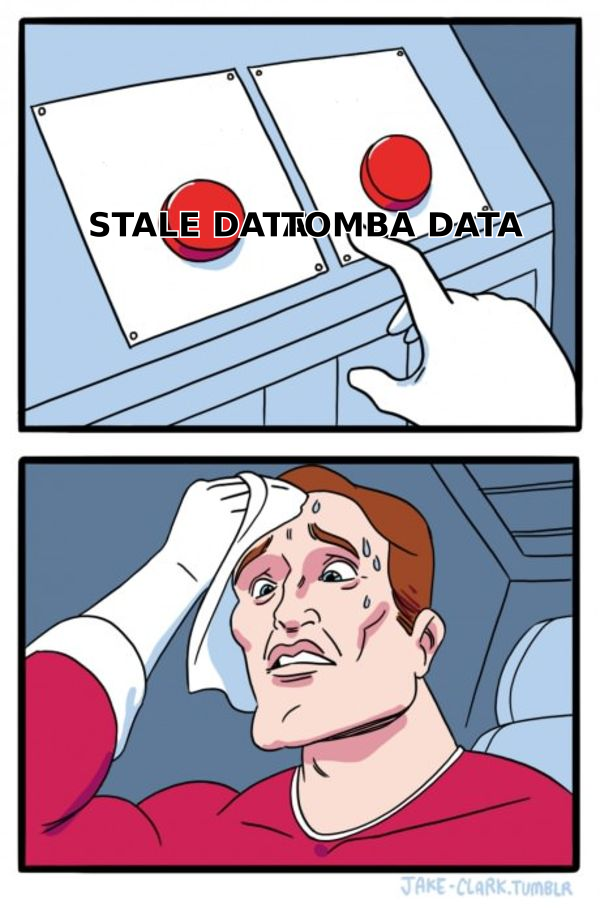
- The biggest hidden cost isn't the subscription; it's stale data. Up to 30% of B2B contact data decays every year.
- Pair your tool with an enrichment and verification layer so records stay accurate. Tomba's data enrichment and email verifier plug directly into that gap.
- Start with your real workflow, not a feature checklist. Most teams overbuy.
What is contact management software?#
Contact management software is a system that stores and organizes your contacts — names, emails, phone numbers, companies, roles — alongside the history of every interaction you've had with them.
Think of it like a shared address book with a memory. A paper address book tells you who someone is. Contact management software tells you who they are, when you last spoke, what they asked for, which deal they're tied to, and what you promised to do next. Technically, it's a database with a relationship layer on top: contacts link to companies, companies link to deals, deals link to activities.
The goal is simple: no contact should depend on a single person's inbox or memory. When a rep leaves, the relationship stays.
Contact management software vs. CRM: what's the difference?#
People use these terms interchangeably, but they're not the same thing. Contact management is the foundation; a CRM is the whole building.
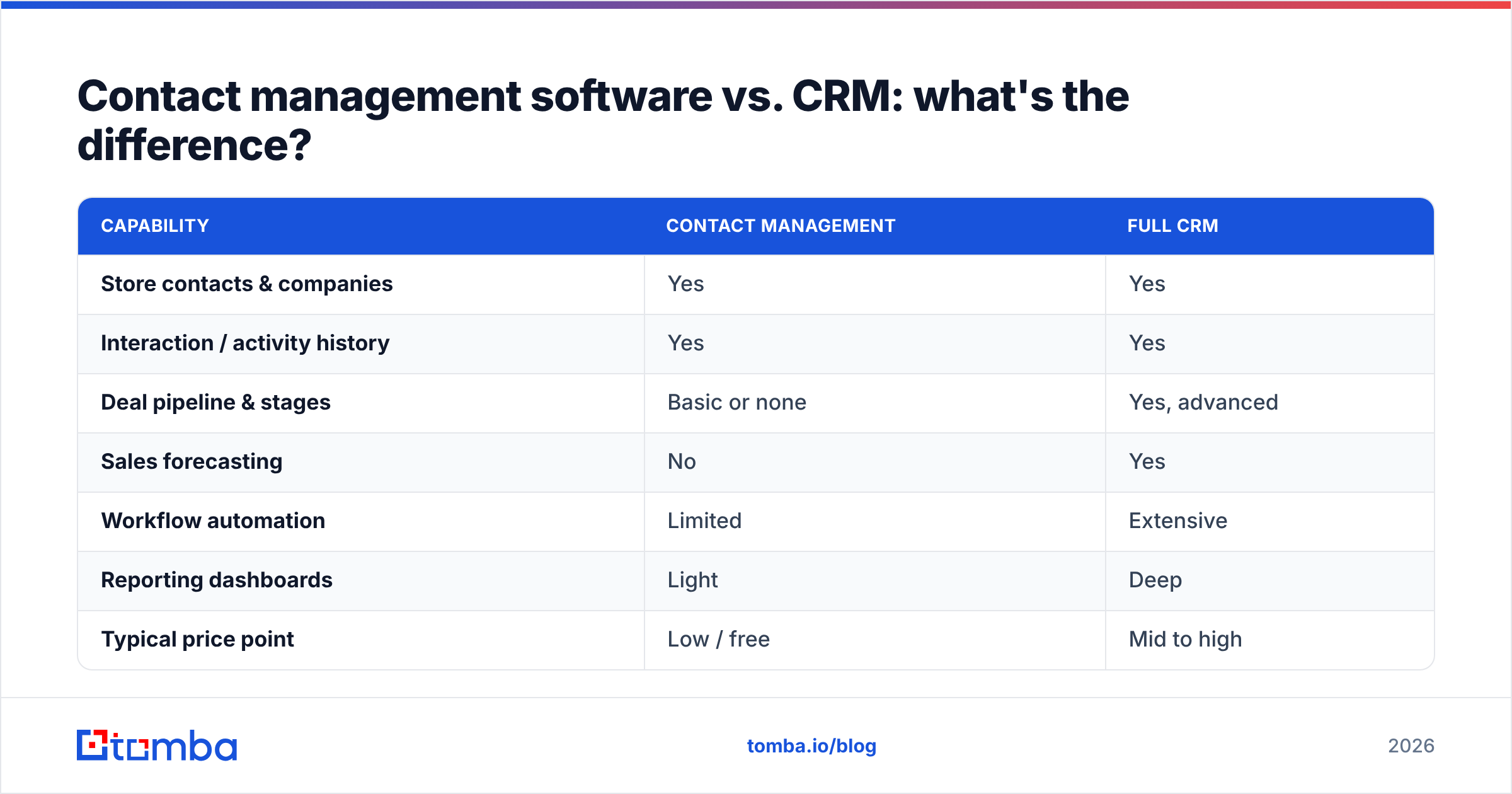
Contact management answers "who do we know and what's the history?" A full CRM adds pipeline stages, forecasting, automation, reporting, and revenue attribution on top of that foundation.
| Capability | Contact Management | Full CRM |
|---|---|---|
| Store contacts & companies | Yes | Yes |
| Interaction / activity history | Yes | Yes |
| Deal pipeline & stages | Basic or none | Yes, advanced |
| Sales forecasting | No | Yes |
| Workflow automation | Limited | Extensive |
| Reporting dashboards | Light | Deep |
| Typical price point | Low / free | Mid to high |
| Best for | Small teams, solo, ops | Scaling sales orgs |
If you're a two-person consultancy or an ops team that just needs a clean, shared record of relationships, contact management software is often enough. If you're running a multi-rep sales motion with forecasting pressure, you'll grow into a full CRM. Many tools blur the line — most modern CRMs started life as contact managers.
What features actually matter in 2026?#
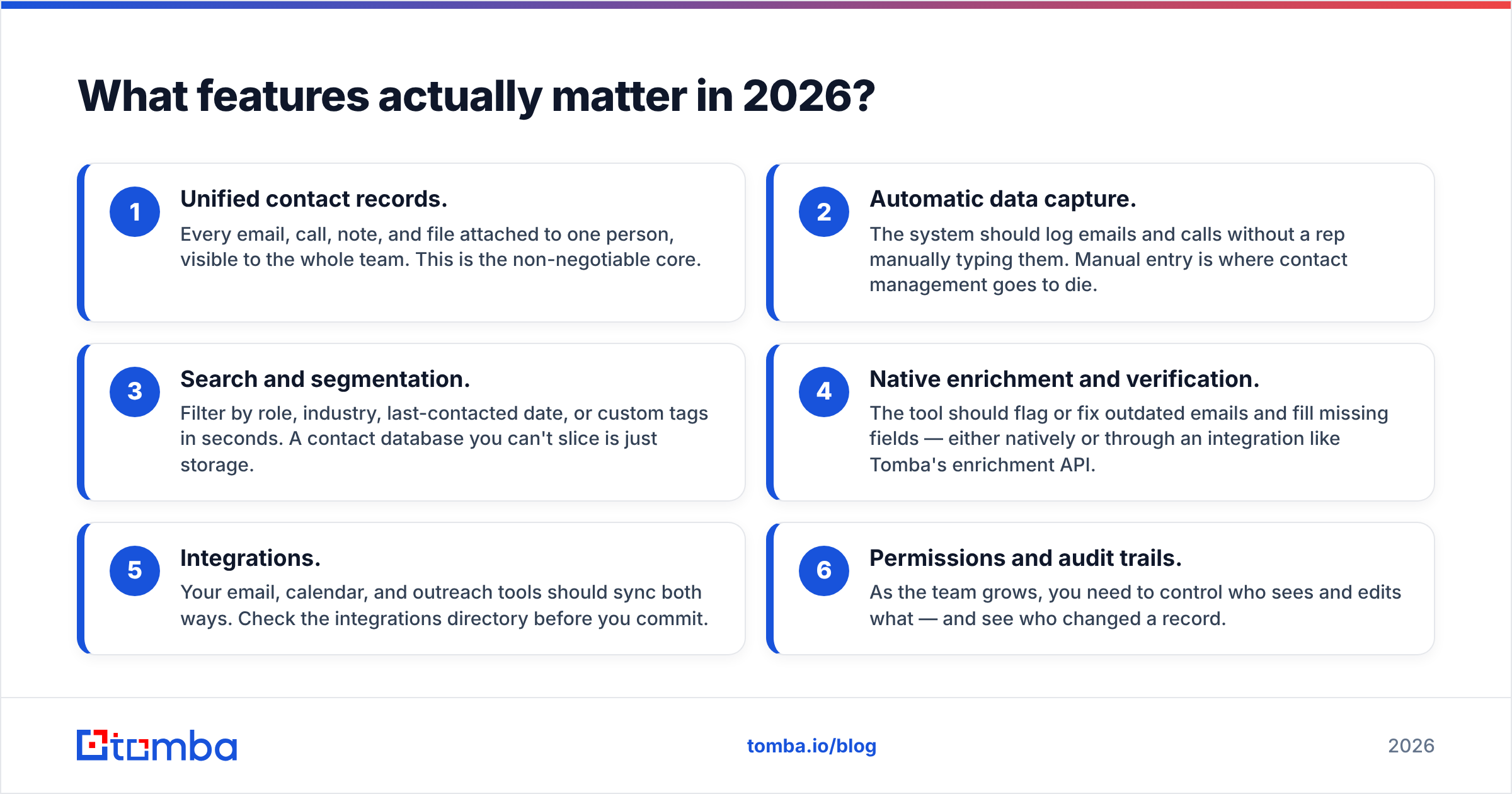
Vendors will sell you 200 features. You'll use about eight. Here are the ones that separate a tool you'll live in from one you'll abandon in a month.
- Unified contact records. Every email, call, note, and file attached to one person, visible to the whole team. This is the non-negotiable core.
- Automatic data capture. The system should log emails and calls without a rep manually typing them. Manual entry is where contact management goes to die.
- Search and segmentation. Filter by role, industry, last-contacted date, or custom tags in seconds. A contact database you can't slice is just storage.
- Native enrichment and verification. The tool should flag or fix outdated emails and fill missing fields — either natively or through an integration like Tomba's enrichment API.
- Integrations. Your email, calendar, and outreach tools should sync both ways. Check the integrations directory before you commit.
- Permissions and audit trails. As the team grows, you need to control who sees and edits what — and see who changed a record.
Notice what's not on that list: AI meeting summaries, sentiment scoring, and other shiny extras. They're nice. They're not why the tool succeeds or fails. Clean, current data is.
Why does contact data quality matter more than the software?#
Because the fanciest contact management software is worthless if the records inside it are wrong.
B2B contact data decays fast. People change jobs, companies rebrand, email formats shift, and phone numbers get reassigned. Industry estimates put annual B2B data decay at roughly 22–30% — meaning up to a third of your database is stale within a year if you do nothing. Gartner and other analysts have flagged poor data quality as one of the most expensive, least-tracked costs in go-to-market operations.
Here's the pattern that kills teams: they invest in software, migrate their contacts, feel organized for a quarter, then slowly watch bounce rates climb and reps stop trusting the system. Once trust breaks, people revert to private spreadsheets and the whole point is lost.
The fix is treating data hygiene as an ongoing process, not a one-time import:
- Verify emails before you send. A quick pass through an email verifier strips dead addresses and protects your sender reputation.
- Enrich thin records. When a contact has a name and company but no valid email, an email finder fills the gap by domain and name.
- Re-verify on a schedule. Run your list through bulk verification quarterly, not annually.
- Catch the catch-alls. Domains that accept everything need a catch-all verifier so you don't mistake "accepted" for "deliverable."
How do the popular tools compare?#
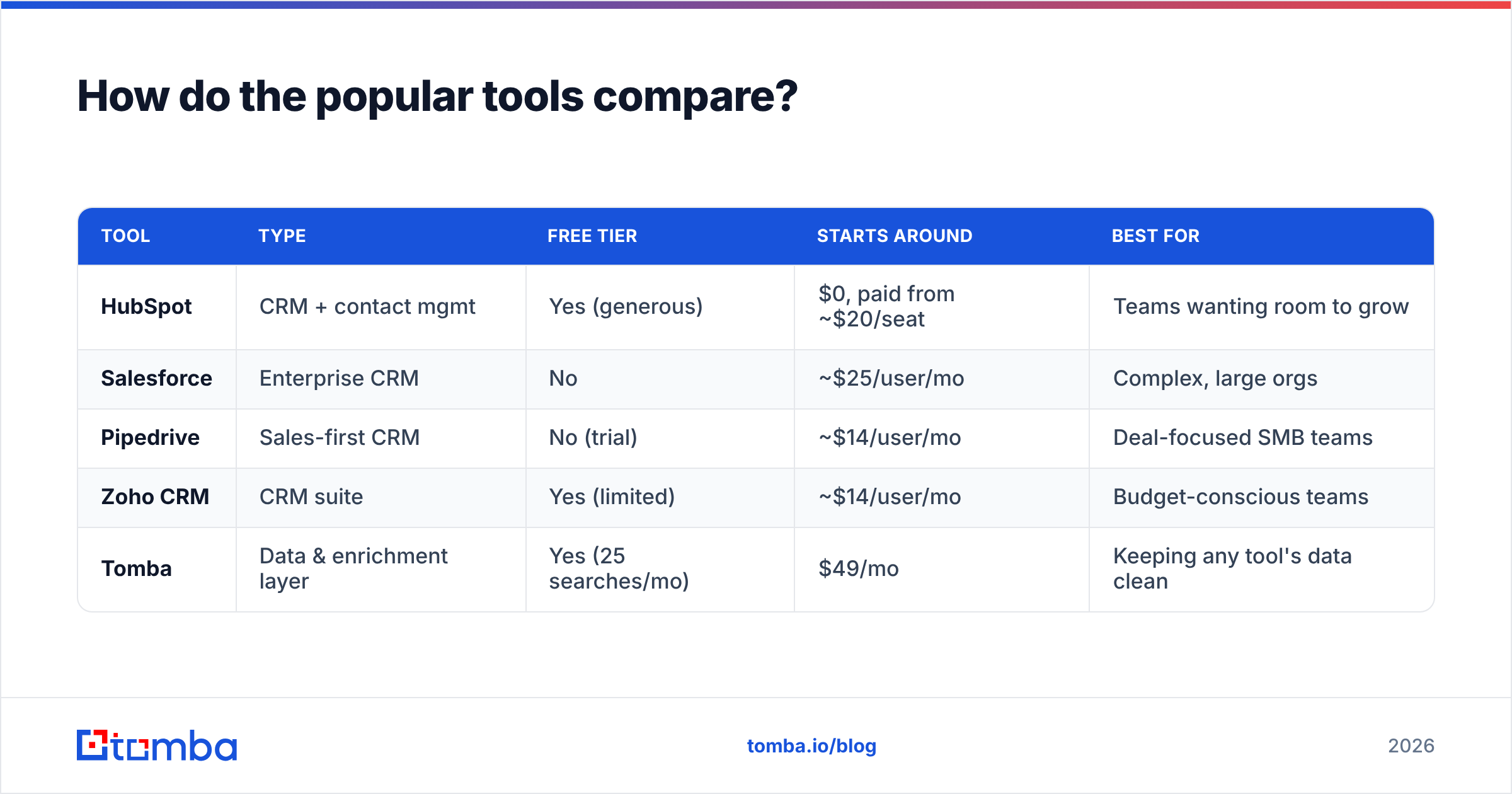
The market splits into three rough tiers. Here's an honest map, with real starting prices (always confirm current pricing on each vendor's page, since tiers shift).
| Tool | Type | Free tier | Starts around | Best for |
|---|---|---|---|---|
| HubSpot | CRM + contact mgmt | Yes (generous) | $0, paid from ~$20/seat | Teams wanting room to grow |
| Salesforce | Enterprise CRM | No | ~$25/user/mo | Complex, large orgs |
| Pipedrive | Sales-first CRM | No (trial) | ~$14/user/mo | Deal-focused SMB teams |
| Zoho CRM | CRM suite | Yes (limited) | ~$14/user/mo | Budget-conscious teams |
| Tomba | Data & enrichment layer | Yes (25 searches/mo) | $49/mo | Keeping any tool's data clean |
A key point: HubSpot, Salesforce, Pipedrive, and Zoho are where you store and work your contacts. Tomba isn't competing with them — it's the layer that keeps the contacts inside those systems accurate. You choose one system of record, then feed it verified, enriched data. For a side-by-side of feature depth, G2's CRM category is a solid neutral reference.
If you're comparing full sales-engagement suites too, browse Tomba's alternatives library — it breaks down where each competitor is strong and weak without the usual sales spin.
How much should you pay for contact management software?#
Pay for the workflow you actually run today, not the org chart you hope to have in two years.
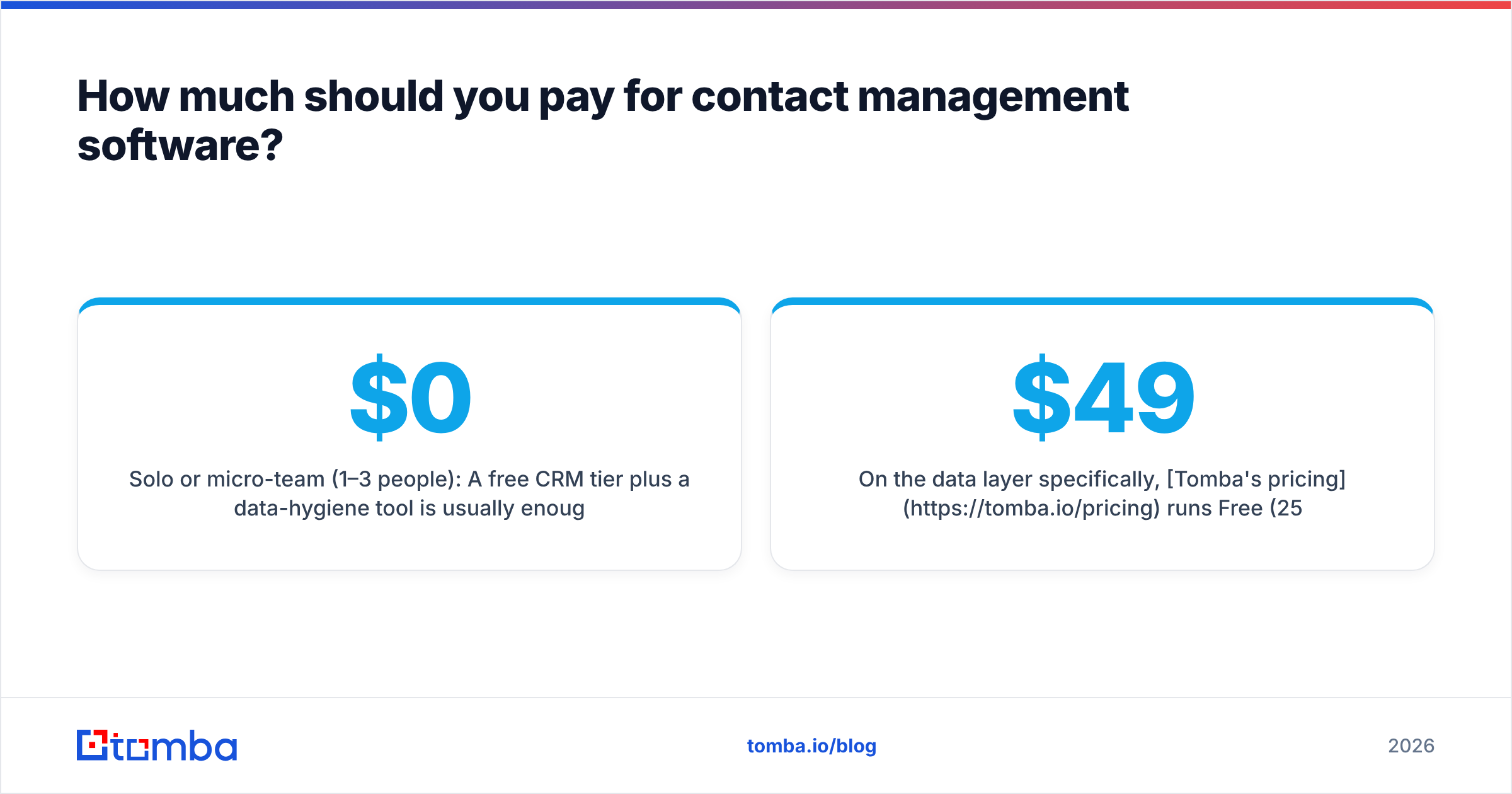
- Solo or micro-team (1–3 people): A free CRM tier plus a data-hygiene tool is usually enough. Total realistic spend: $0–$60/month.
- Growing sales team (4–15 reps): A paid CRM seat plus enrichment. Budget for both the per-seat CRM cost and a data layer.
- Scaling org (15+): Enterprise CRM with dedicated ops. Here data quality tooling stops being optional — bad data at scale wastes real payroll.
On the data layer specifically, Tomba's pricing runs Free (25 searches/mo), Starter at $49/mo, Growth at $99/mo, and Pro at $249/mo, with Enterprise custom. The math that matters: if verified data saves each rep even one hour a week chasing bad numbers, the tool pays for itself before lunch on the first day.
The costly mistake isn't overpaying for software — it's underpaying for data accuracy and then eating the cost in bounced emails, wasted sequences, and reps who quietly stop trusting the system.
How do you actually roll it out without it failing?#
Most contact management projects fail on adoption, not features. Here's the sequence that works:
- Clean before you migrate. Don't import a mess. Dedupe with a tool like Tomba's remove duplicates utility and verify emails first. Garbage in, garbage forever.
- Set one system of record. Pick the single place contacts live. Everything else syncs to it. No parallel spreadsheets.
- Automate capture from day one. If reps have to hand-type activity, they won't. Connect email and calendar sync immediately.
- Define required fields — sparingly. Three mandatory fields people fill beats fifteen they skip.
- Schedule re-verification. Put a recurring bulk verify job on the calendar so decay never compounds.
- Make it faster than the old way. Adoption is a UX problem. If the tool saves time, people use it. If it adds clicks, they route around it.
The teams that win treat the software as a habit to build, not a box to check. The tool is 20% of success; the process around it is 80%.
Is contact management software worth it?#
Yes — but only if you protect the asset inside it.
The software gives you structure: one home for every relationship, visible to your whole team, resilient to turnover. That alone justifies the cost for almost any team past one person. But structure without accuracy is a filing cabinet full of wrong addresses. The organizations that get real ROI pair a solid system of record with disciplined data hygiene — verify, enrich, dedupe, repeat.
Choose the CRM or contact manager that fits your workflow. Then make the data inside it trustworthy, because that's the part that actually drives revenue.
Keep your contacts accurate with Tomba#
Whatever contact management software you pick, its value collapses the moment the emails and phone numbers inside it go stale. That's where Tomba fits: use the Tomba Email Finder to fill missing addresses by name and domain, run your list through the email verifier before every campaign, and enrich thin records with data enrichment — all connectable to your CRM through Tomba's integrations and API. Start free with 25 searches a month, and give your contact database a reason to be trusted again.
Related guides#
Ready to find emails that actually work?
Join 150,000+ professionals who stopped guessing and started sending. Free credits on signup — no credit card required.
Get the Tomba newsletter
Practical outbound tactics and product updates — once every two weeks.
About the author