What Is an Online CRM? The Complete 2026 Guide for B2B Teams
An online CRM keeps every contact, deal, and follow-up in one cloud workspace. Here's how to choose one in 2026 without overpaying — plus the data layer most guides forget.
Picking a CRM online in 2026 is less about the logo you recognize and more about the workflow you can actually sustain. The tools are cheaper and smarter than they were three years ago, but the failure mode is the same: teams buy a powerful platform, load it with stale data, and quietly go back to spreadsheets within a quarter.
This guide cuts through that. You'll get a plain definition, a feature checklist that maps to real revenue work, an honest pricing comparison, and the one thing most CRM roundups skip — where the clean contact data that makes a CRM useful actually comes from.
TL;DR#
- An online CRM (cloud CRM) is a browser-based system of record for contacts, deals, activities, and pipeline — no local install, accessible from anywhere, updated by the vendor.
- The real cost isn't the seat price. It's data decay, add-ons, and enrichment — budget for those before you commit.
- For most B2B teams, the decision comes down to HubSpot vs. Pipedrive vs. Salesforce vs. a lightweight combo — matched to team size and process maturity.
- A CRM is only as good as the records inside it. Pair it with a reliable email finder and email verifier so reps aren't chasing dead addresses.
- Start with the simplest tool that fits your pipeline stages today — you can graduate later.
What is an online CRM?#
An online CRM is a cloud-hosted customer relationship management platform you access through a web browser or mobile app, with no software to install or servers to maintain. Think of it as a shared kitchen for your revenue team: everyone cooks in the same space, the ingredients (contacts, deals, notes) are visible to all, and the landlord — the vendor — handles the plumbing, security patches, and upgrades.
Contrast that with the old on-premise model, where a company installed CRM software on its own machines and paid IT to keep it alive. The cloud shift, popularized by Salesforce two decades ago, moved the burden to the vendor and turned CRM into a subscription. Today, "online CRM" and "cloud CRM" are effectively synonyms.
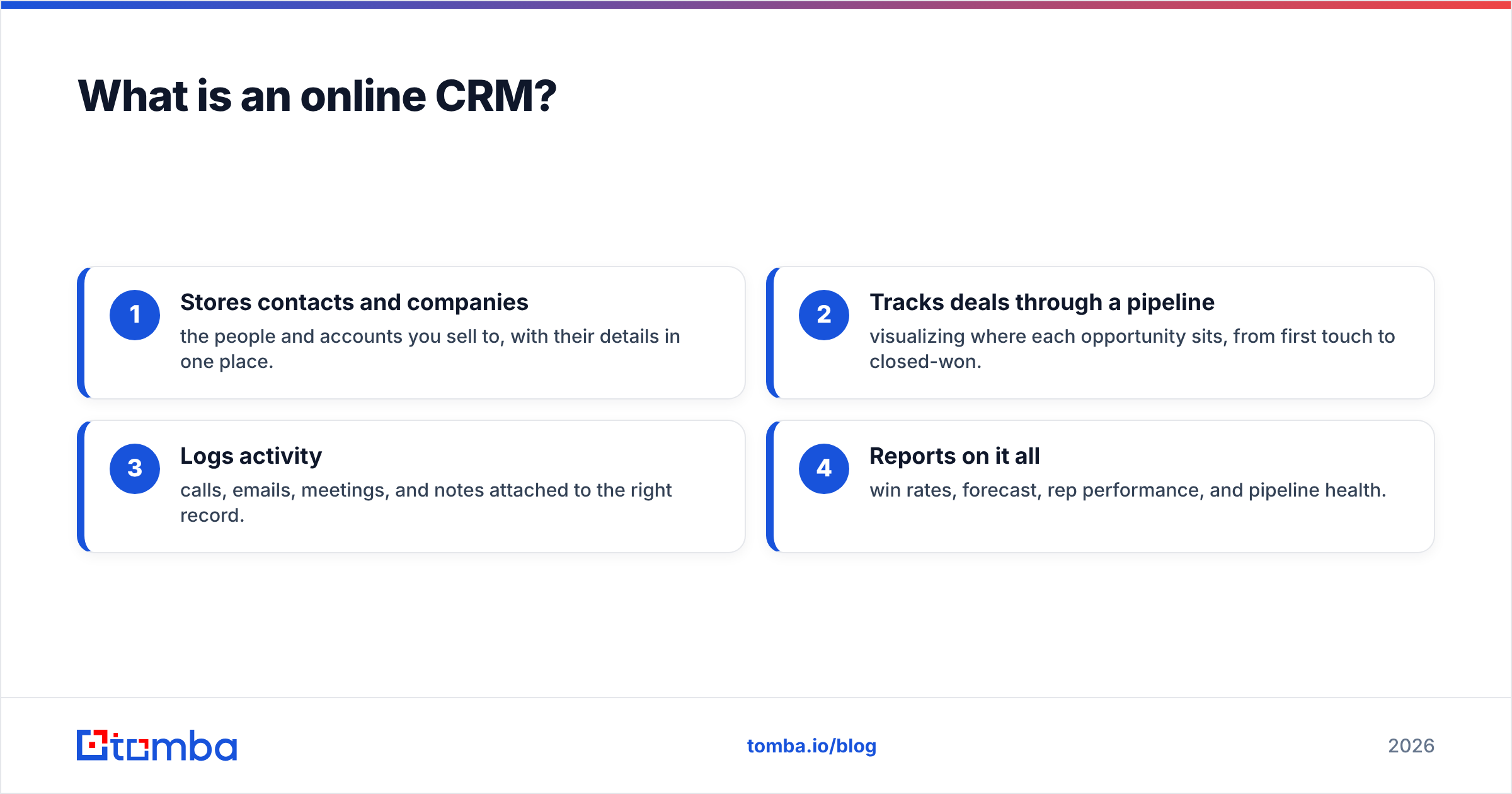
At its core, any CRM does four things:
- Stores contacts and companies — the people and accounts you sell to, with their details in one place.
- Tracks deals through a pipeline — visualizing where each opportunity sits, from first touch to closed-won.
- Logs activity — calls, emails, meetings, and notes attached to the right record.
- Reports on it all — win rates, forecast, rep performance, and pipeline health.
Everything else — automation, AI summaries, sequences, quoting — is a layer on top of those fundamentals.

Why move from spreadsheets to a CRM online?#
Spreadsheets work until they don't. A single rep with 40 accounts can survive on a well-kept sheet. Add a second rep, a handoff, or a manager who wants a forecast, and the cracks appear fast: overwritten cells, no activity history, and zero accountability for follow-ups.
An online CRM fixes the structural problems a spreadsheet can't:
- Shared, live state — no emailing
pipeline_v7_FINAL.xlsxaround. - Automatic activity capture — emails and calls log themselves instead of relying on memory.
- Reminders and tasks — the system nudges the rep so deals don't rot.
- Reporting that isn't a manual rebuild — dashboards update in real time.
- Permissions — reps see their book, managers see everything, and nobody nukes a formula by accident.
The switch pays off in follow-through. Most deals need multiple touches to close, and the response rate on outbound climbs sharply when reps are prompted to follow up on schedule instead of forgetting.
What features actually matter in an online CRM?#
Vendors list hundreds of features. Only a handful move revenue. Here's what to weigh, roughly in order of impact for a B2B team.
1. Pipeline and deal management. The visual board is the daily driver. It should map to your sales process stages, not force you into a generic template.
2. Email integration and sequences. Two-way sync with Gmail or Outlook, plus the ability to send tracked, multi-step sequences, keeps reps working inside the CRM instead of bouncing between tabs.
3. Contact and data enrichment. A record with just a name and company is nearly useless. The best setups auto-append job titles, verified emails, and phone numbers. This is where a dedicated data enrichment layer earns its keep.
4. Automation. Rule-based tasks — assign this lead, create that follow-up, move a deal on reply — remove busywork and enforce process.
5. Reporting and forecasting. Custom dashboards for win rate, pipeline velocity, and activity, without exporting to a spreadsheet.
6. Integrations. Your CRM sits at the center of the stack. It must connect to your outreach tools, calendar, and data sources — natively or through Zapier and Make.
Which online CRM is right for your team?#
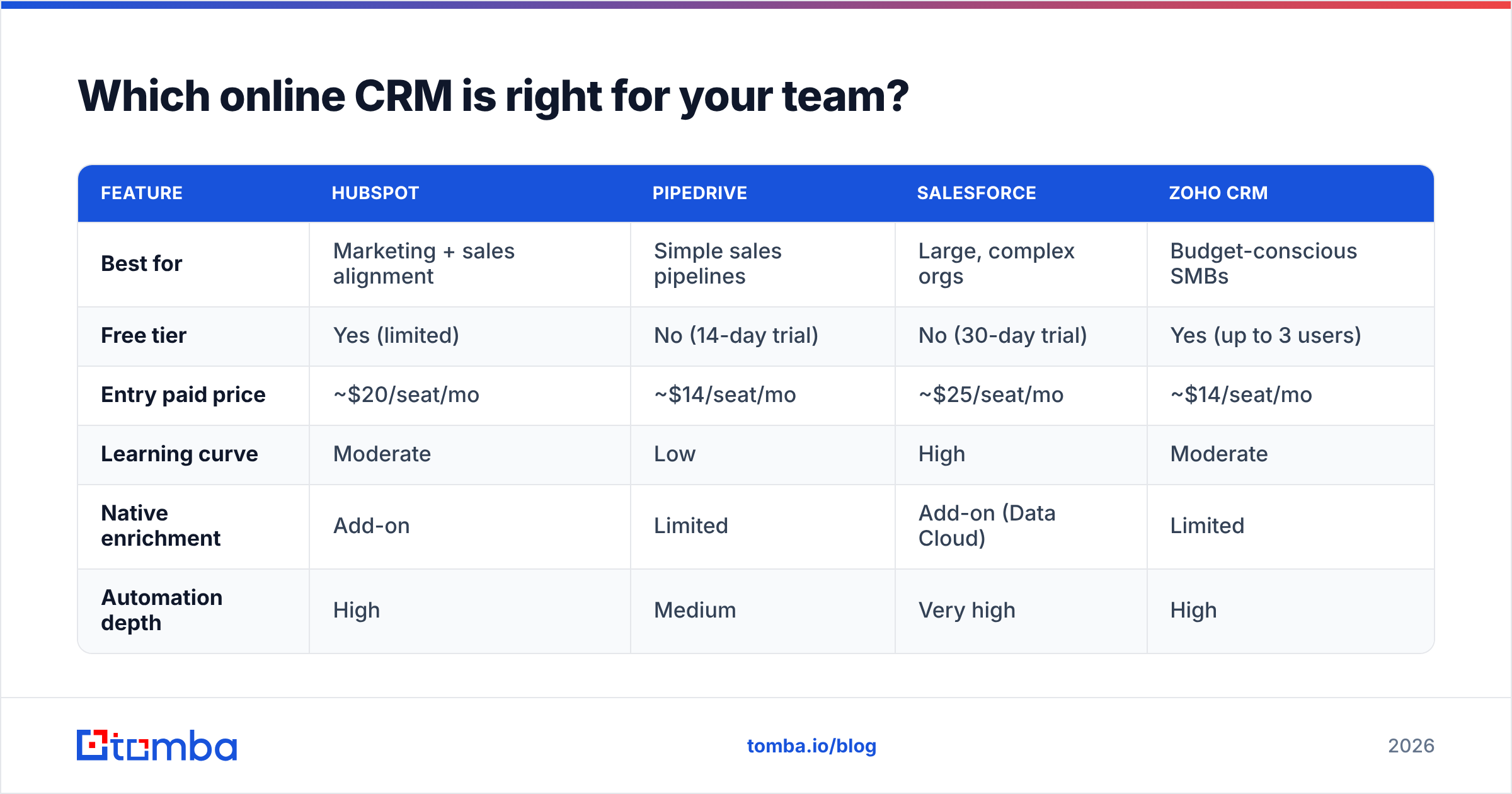
There's no single "best" CRM — only the best fit for your team size and process maturity. Here's how the mainstream options actually stack up.
| Feature | HubSpot | Pipedrive | Salesforce | Zoho CRM |
|---|---|---|---|---|
| Best for | Marketing + sales alignment | Simple sales pipelines | Large, complex orgs | Budget-conscious SMBs |
| Free tier | Yes (limited) | No (14-day trial) | No (30-day trial) | Yes (up to 3 users) |
| Entry paid price | ~$20/seat/mo | ~$14/seat/mo | ~$25/seat/mo | ~$14/seat/mo |
| Learning curve | Moderate | Low | High | Moderate |
| Native enrichment | Add-on | Limited | Add-on (Data Cloud) | Limited |
| Automation depth | High | Medium | Very high | High |
A few honest takes on that table:
- Pick Pipedrive if you want reps selling on day one and your process is straightforward. It's the least likely to trigger a "we bought too much CRM" regret.
- Pick HubSpot if marketing and sales need to share one system and you value polish over raw configurability.
- Pick Salesforce if you're 50+ reps with custom processes and a budget for an admin. Below that, it's usually overkill.
- Pick Zoho if price is the deciding factor and you're comfortable trading some polish for value.
Compare current plans on each vendor's own pricing page and on a third-party review site like G2 before committing — feature tiers shift often.
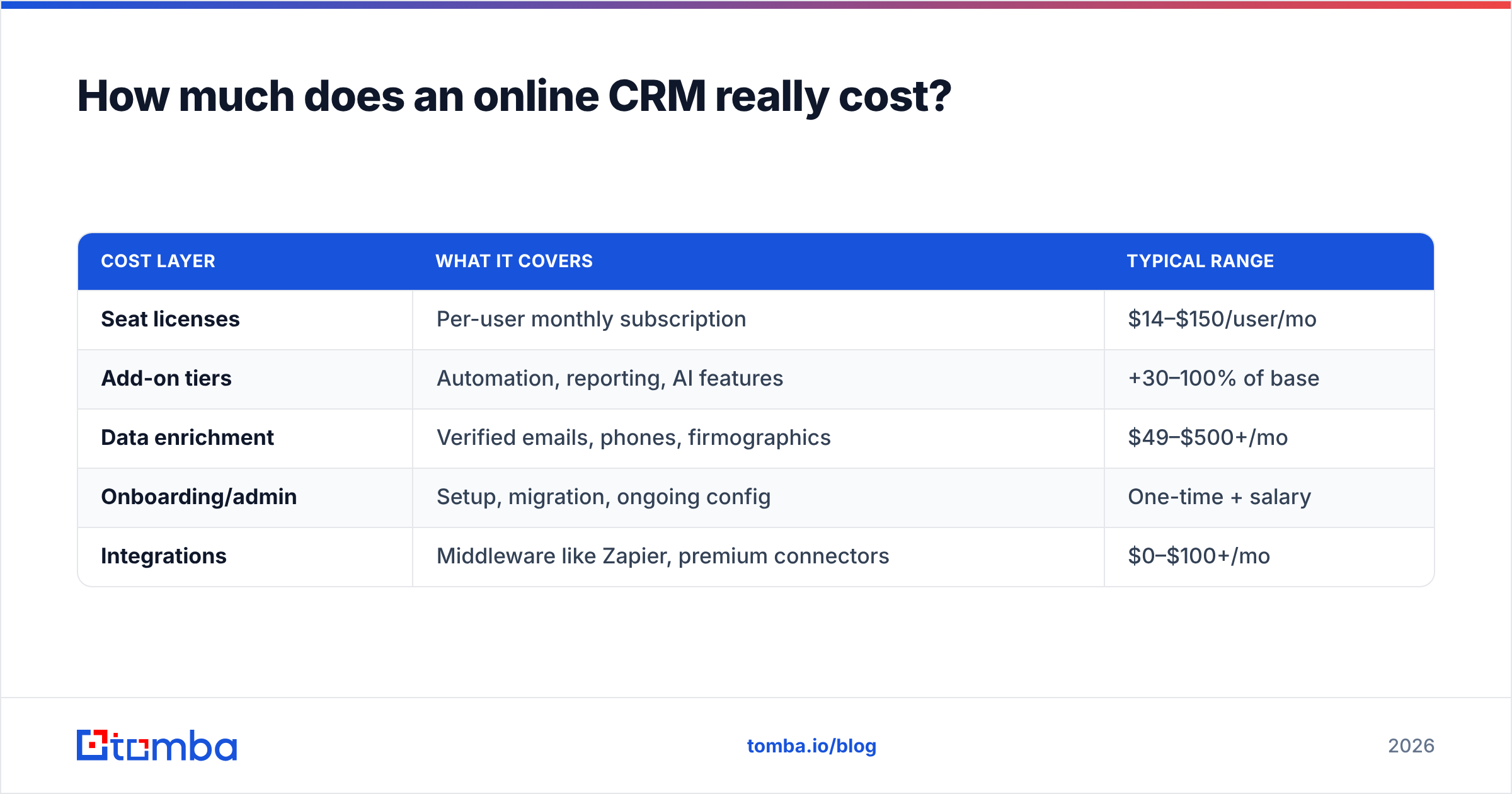
How much does an online CRM really cost?#
The sticker price is the smallest line item. Here's the fuller picture teams miss.
| Cost layer | What it covers | Typical range |
|---|---|---|
| Seat licenses | Per-user monthly subscription | $14–$150/user/mo |
| Add-on tiers | Automation, reporting, AI features | +30–100% of base |
| Data enrichment | Verified emails, phones, firmographics | $49–$500+/mo |
| Onboarding/admin | Setup, migration, ongoing config | One-time + salary |
| Integrations | Middleware like Zapier, premium connectors | $0–$100+/mo |
The pattern: the CRM subscription is often 40–60% of true total cost. The rest is data and the people who keep it clean. A cheap CRM stuffed with bad records costs more in wasted rep time than a pricier one fed with verified data.
That's the trap. You save $10/seat on the platform, then reps burn hours emailing addresses that bounce. Which brings us to the part most guides skip.
Why is data quality the real CRM decision?#
A CRM online is a filing cabinet — it doesn't create data, it stores what you put in. Garbage in, garbage forecast. Contact data decays fast: people change jobs, companies rebrand, and email formats shift. Within a year, a meaningful chunk of any B2B database goes stale without maintenance.
This is why the smartest CRM rollouts pair the platform with a dedicated data layer:
- Find the right contact — use an email finder or domain search to pull verified addresses for a target account before it ever enters the CRM.
- Verify before you send — run new and existing records through an email verifier so bounces don't wreck your sender reputation.
- Enrich thin records — append titles, phones, and social profiles with contact enrichment so reps have context, not just a name.
- Bulk clean on a schedule — periodic bulk verify runs keep decay from compounding.
Tools like Tomba plug into this workflow directly. Its email finder API and native HubSpot integration and Pipedrive integration let you enrich records at the point of entry, so the CRM stays trustworthy instead of slowly rotting. For reps living in the browser, a Chrome extension finds and verifies contacts on the fly.
The point isn't to sell you a second tool for its own sake. It's that a CRM's ROI is capped by the quality of its inputs, and inputs are exactly what a CRM doesn't handle on its own.
How do you roll out a CRM online without it failing?#
Most CRM projects don't fail on features. They fail on adoption. Here's a lean rollout that survives contact with real reps.
- Map your pipeline stages first. Define the 4–7 stages a deal moves through before you touch the software. The tool should mirror your process, not dictate it.
- Import clean data only. Don't dump a decade of messy spreadsheets in. Remove duplicates, verify emails, and enrich the accounts that matter. A small clean database beats a huge dirty one.
- Automate the boring parts. Set up task creation, lead assignment, and follow-up reminders on day one so reps feel the tool working for them.
- Make one field mandatory, not twenty. Over-requiring fields is the fastest way to kill adoption. Start minimal.
- Report weekly from the CRM. If the forecast comes from the CRM and nowhere else, reps keep it updated. If you accept a side spreadsheet, they'll use the spreadsheet.
The through-line: reduce friction and prove value fast. A rep who books a meeting because the CRM reminded them will keep it current. A rep who sees it as data-entry homework will quietly abandon it.
Online CRM vs. all-in-one sales platforms: which wins?#
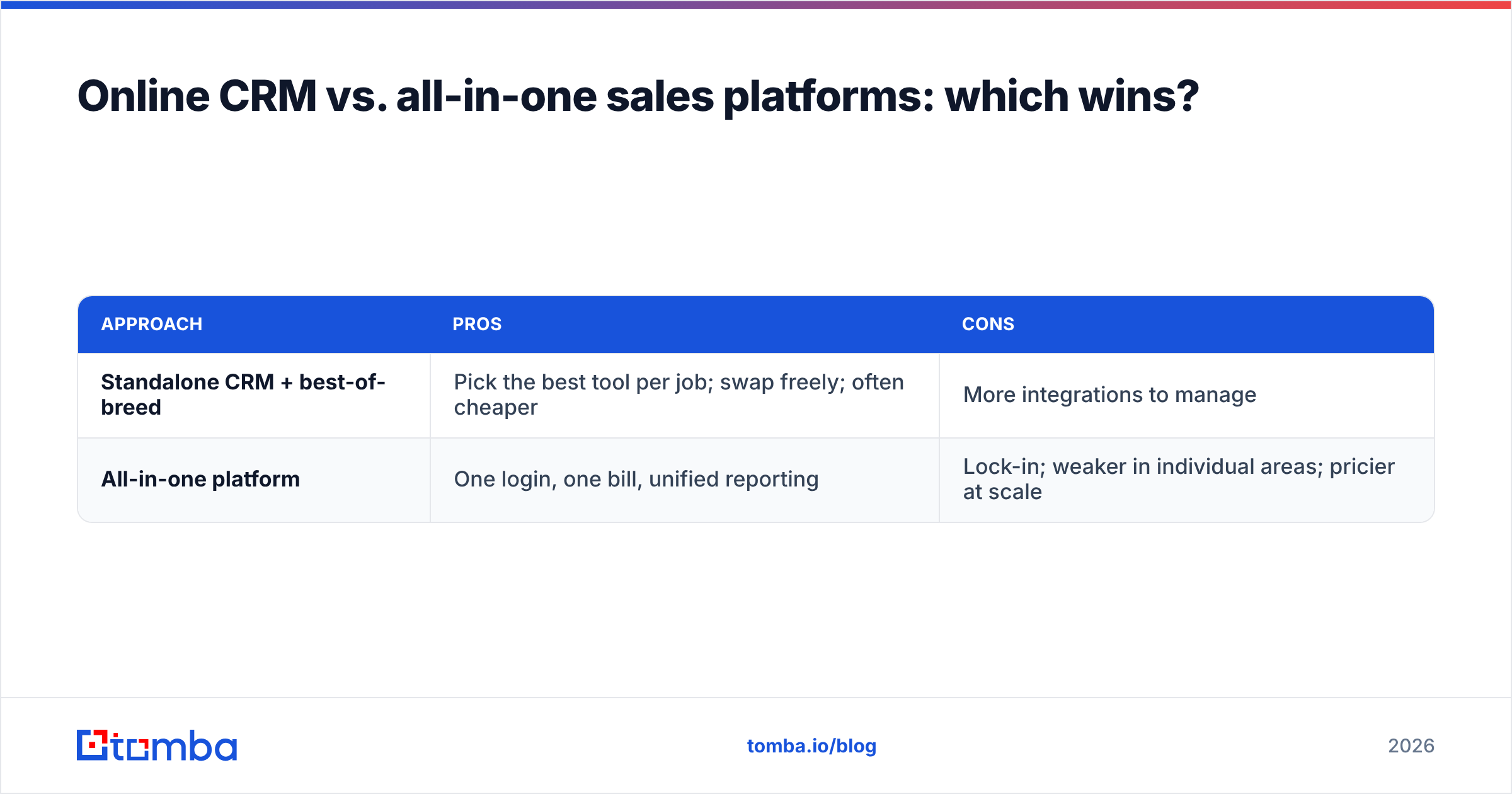
A newer category blends the CRM with outreach, dialing, and data in one subscription — think Apollo, Salesloft, or Outreach. Are they better than a focused CRM plus best-of-breed tools?
| Approach | Pros | Cons |
|---|---|---|
| Standalone CRM + best-of-breed | Pick the best tool per job; swap freely; often cheaper | More integrations to manage |
| All-in-one platform | One login, one bill, unified reporting | Lock-in; weaker in individual areas; pricier at scale |
For teams under ~25 reps, a focused CRM (Pipedrive or HubSpot) plus a dedicated data and outreach layer usually wins on flexibility and cost. Larger teams that value consolidation over best-in-class components lean toward all-in-one — accepting that each module is "good enough" rather than great. If you're weighing the all-in-one route, it's worth reading up on the Apollo alternative landscape before you sign, since data quality varies widely between platforms.
Neither is universally right. The mistake is assuming the all-in-one bundle removes the data problem — it doesn't. Bundled databases still decay, and you still need a verification step in the loop.
Frequently asked questions#
Is an online CRM secure enough for B2B data? Yes, for the vast majority of teams. Reputable cloud CRMs offer encryption, SSO, granular permissions, and compliance certifications that most companies couldn't match on their own hardware. Review the vendor's security docs and your regional compliance needs before committing.
Can I use an online CRM for free? Several offer genuine free tiers — HubSpot and Zoho are the notable ones. They're fine to start, but you'll hit limits on automation, reporting, and record counts as you grow. Treat free as a trial of the workflow, not a permanent home.
How is an online CRM different from a database? A B2B database is a source of contacts you pull into your CRM. The CRM is where you work those contacts through a pipeline. You need both: the database (or an email finder) to source and enrich, the CRM to manage relationships and deals.
What's the fastest way to get value on day one? Import a small, verified list of your best-fit accounts, set up follow-up reminders, and run your weekly forecast from the CRM. Value comes from follow-through, not from filling every field.
The bottom line#
An online CRM is table stakes for any B2B team past a single rep — but the platform is only half the equation. The other half is the data flowing into it. The teams that get durable ROI treat their CRM and their contact data as one system: a clean pipeline tool fed by verified, enriched records.
Choose the simplest CRM that fits your process today, then protect it with a data layer that keeps records accurate. Start by finding and verifying the contacts that matter with the Tomba Email Finder — feed your CRM addresses that actually reach a human, and every downstream metric improves. Check current Tomba pricing to see how it fits alongside whichever CRM you pick.
Related guides#
Ready to find emails that actually work?
Join 150,000+ professionals who stopped guessing and started sending. Free credits on signup — no credit card required.
Get the Tomba newsletter
Practical outbound tactics and product updates — once every two weeks.
About the author