CRM With Email Warmup: Best Tools and Setup Guide 2026
Most CRMs don't warm up your domain — which is exactly why your cold email lands in spam. Here's how a CRM with email warmup works, which tools bundle it, and how to set it up so replies actually come back.

Your CRM tracks every deal, logs every email, and scores every lead. What most of them quietly skip is the one thing that decides whether your outreach is ever seen: sender reputation. If your domain isn't warmed up, a beautiful CRM sequence just delivers your pitch straight to the spam folder, at scale, faster than you can burn a domain.
This guide breaks down what "CRM with email warmup" actually means, which tools genuinely bundle warmup versus bolt it on, and how to wire the two together so your cold email reaches the inbox.
TL;DR#
- Most CRMs do not warm up email. Warmup is a deliverability function; CRMs are pipeline tools. You almost always need a dedicated warmup layer alongside or inside your sending stack.
- "CRM with email warmup" usually means a sales-engagement platform (Instantly, Smartlead, Salesloft-style tools) that combines sequencing, a lightweight CRM, and automated warmup — not Salesforce or HubSpot out of the box.
- Warmup fixes reputation, not lists. A verified, accurate contact list matters just as much; sending to dead addresses tanks the reputation warmup just built.
- The winning stack is layered: clean data (find + verify) → warmup → CRM/sequencer → monitoring. No single box does all four well.
- Set warmup to run for 2–4 weeks before real volume, keep daily ramp gradual, and never confuse a warmed domain with a warmed content strategy.
What does "CRM with email warmup" actually mean?#
Think of your sending domain like a new driver applying for insurance. No history means the mailbox providers — Gmail, Outlook, Yahoo — treat you as high risk. Email warmup is the driving record you build on purpose: small, human-looking sends that get opened, replied to, and marked "not spam," gradually convincing providers you're trustworthy. Technically, warmup is an automated exchange of low-volume emails across a peer network that raises your sender reputation before you send cold outreach at volume.
A CRM, by contrast, is your system of record — contacts, deals, activities, pipeline stages. The two solve different problems. When people search for a "CRM with email warmup," they almost always want one connected workflow: a place to store leads, sequence them, and protect the domain doing the sending.
In practice, three product categories claim that combined label:
- Sales-engagement platforms with built-in warmup — tools like Instantly and Smartlead pair sequencing, inbox rotation, a basic CRM view, and native warmup.
- Traditional CRMs plus a warmup add-on — HubSpot or Pipedrive connected to a standalone warmup service via integration.
- All-in-one outbound suites — heavier platforms that include CRM, dialer, sequencing, and deliverability tooling.
Only the first truly ships warmup inside the box. The other two assemble it.

Why doesn't a normal CRM warm up your email?#
Because deliverability and relationship management are separate disciplines, and bolting reputation control onto a CRM is genuinely hard. Salesforce and HubSpot are built to store and route data, not to babysit the SMTP-level signals that Gmail's filters care about. They assume you already send from a healthy domain.
That assumption breaks the moment you start cold outreach. Here's the failure chain teams hit constantly:
- New domain, no history → filters default to skepticism → first campaign lands in spam.
- High volume too fast → providers read it as a spam blast → domain reputation drops.
- Dirty list with bounces → hard bounces above ~2% signal a spammer → placement collapses.
- No engagement signals → no opens or replies means nothing tells providers you're wanted.
A CRM does nothing about any of these. It will happily log 5,000 sends that all bounced. That's why treating email deliverability as a first-class layer — not a CRM feature — is the correct mental model.
Which tools combine CRM features with email warmup?#
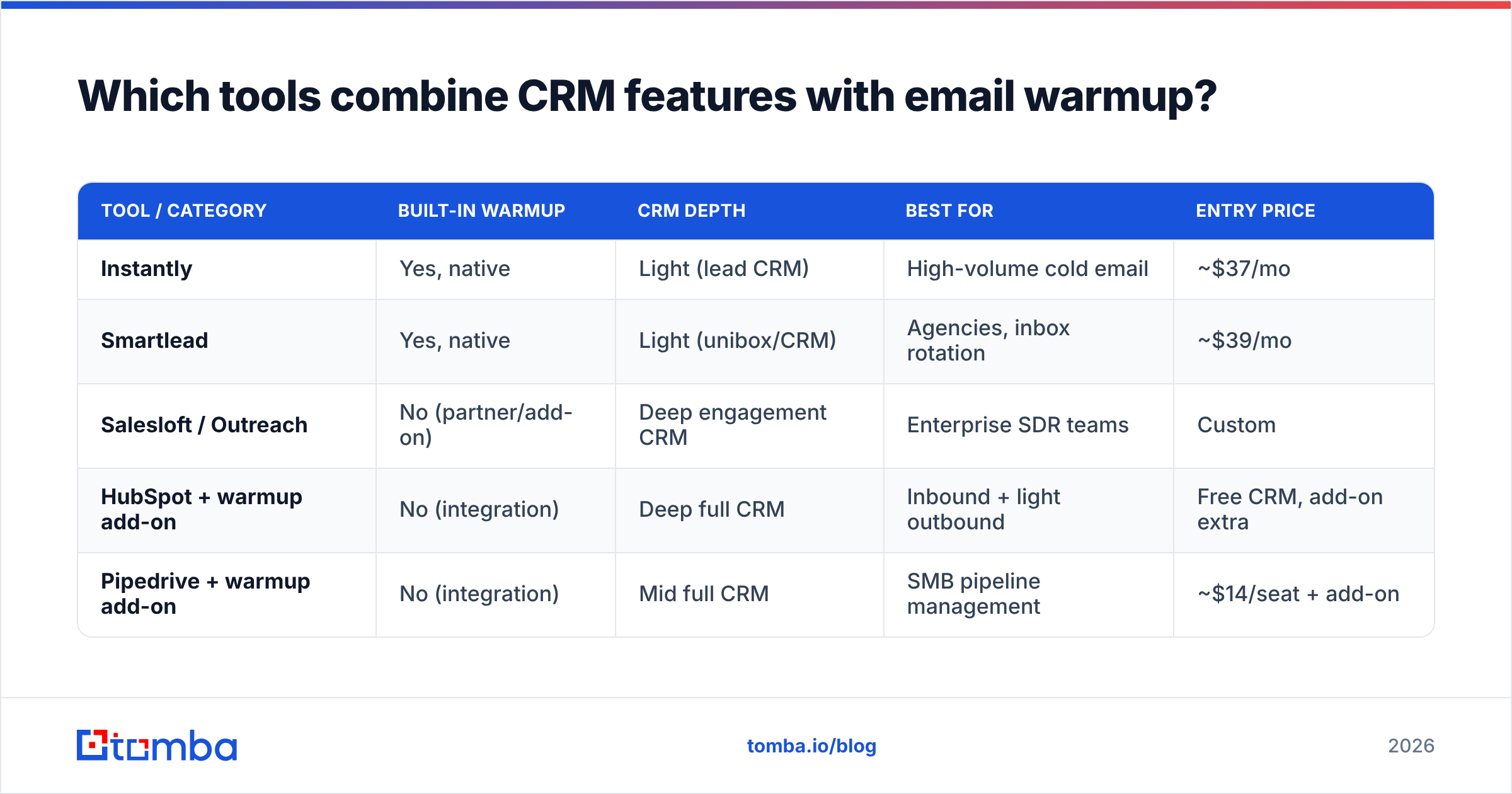
Below is an honest comparison of the categories teams actually evaluate. Prices are indicative entry tiers and change often — check each vendor before you buy.
| Tool / Category | Built-in warmup | CRM depth | Best for | Entry price |
|---|---|---|---|---|
| Instantly | Yes, native | Light (lead CRM) | High-volume cold email | ~$37/mo |
| Smartlead | Yes, native | Light (unibox/CRM) | Agencies, inbox rotation | ~$39/mo |
| Salesloft / Outreach | No (partner/add-on) | Deep engagement CRM | Enterprise SDR teams | Custom |
| HubSpot + warmup add-on | No (integration) | Deep full CRM | Inbound + light outbound | Free CRM, add-on extra |
| Pipedrive + warmup add-on | No (integration) | Mid full CRM | SMB pipeline management | ~$14/seat + add-on |
The pattern is clear: the tools with native warmup are lighter on CRM, and the tools with deep CRM depend on an external warmup service. There is no single product that is simultaneously a best-in-class CRM and a best-in-class warmup engine. Pick the layer that matters most and integrate the rest.
If you're leaning toward a lightweight sequencer, note that platforms in the Instantly and Smartlead tier are frequently evaluated as an Instantly alternative precisely because warmup quality and network size vary a lot between them.
How do you set up email warmup with your CRM?#
Treat it as a four-layer stack. Each layer feeds the next, and skipping one undermines the rest.
- Authenticate the domain. Publish SPF, DKIM, and DMARC before anything else. Warmup on an unauthenticated domain is wasted effort. Use a quick SPF checker to confirm your record resolves and isn't over the 10-lookup limit.
- Clean and verify the list. Warmup builds reputation; sending to invalid addresses destroys it. Run every contact through an email verifier so hard bounces stay near zero. This is the single most-skipped step.
- Run warmup for 2–4 weeks. Start at a low daily volume (often 10–20 warmup emails/day) and let the tool ramp automatically. Don't send real campaigns during the early ramp.
- Send from the CRM gradually. Once warmed, begin real outreach at a fraction of your target volume and increase weekly. Keep monitoring placement.
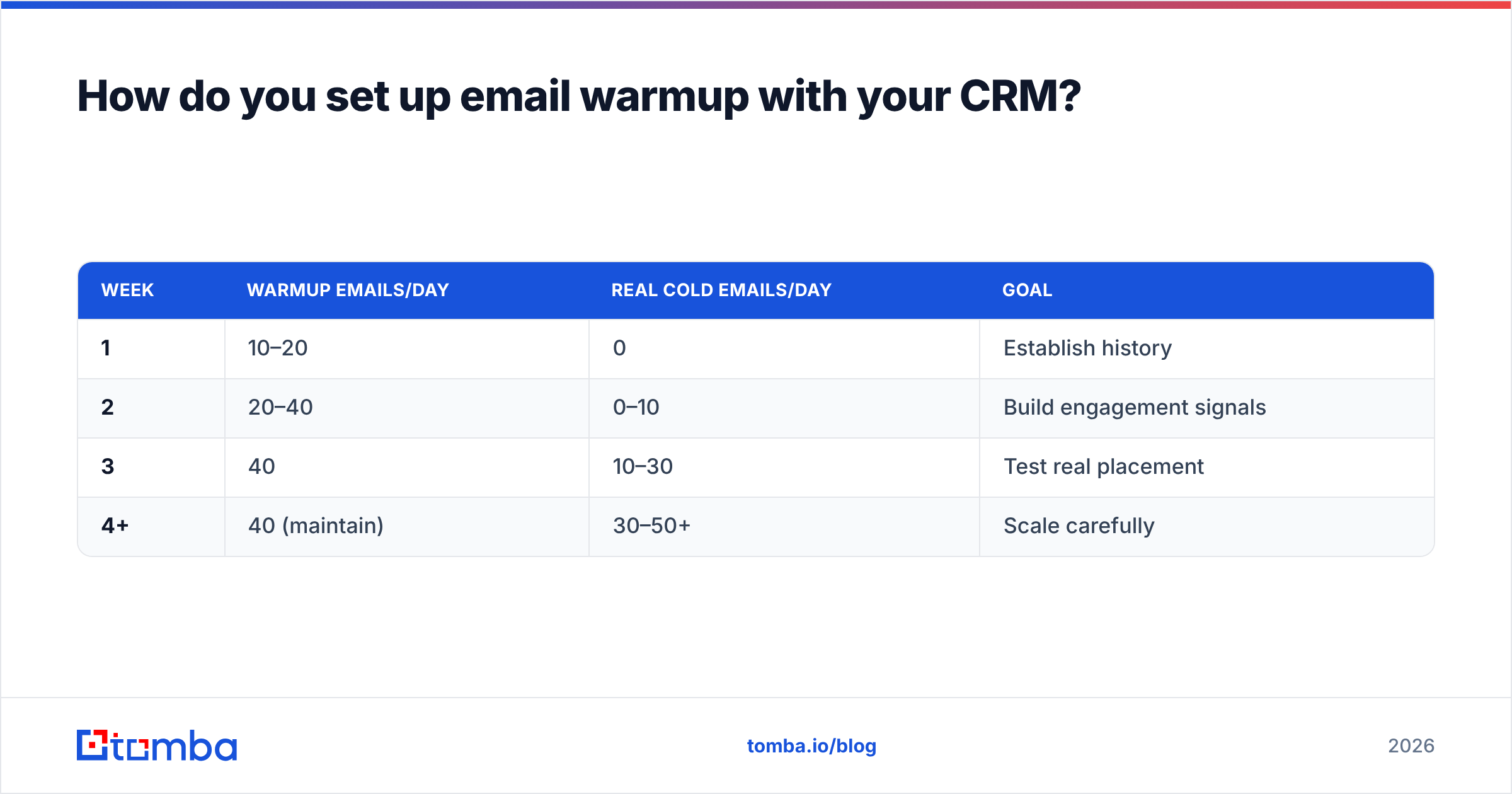
A common ramp curve looks like this:
| Week | Warmup emails/day | Real cold emails/day | Goal |
|---|---|---|---|
| 1 | 10–20 | 0 | Establish history |
| 2 | 20–40 | 0–10 | Build engagement signals |
| 3 | 40 | 10–30 | Test real placement |
| 4+ | 40 (maintain) | 30–50+ | Scale carefully |
If you want to model your own numbers, the email warmup calculator gives a ramp target based on your goal volume. Google's own Postmaster Tools is the free reputation graph you should watch throughout — it shows exactly how Gmail rates your domain.
Is a CRM with email warmup enough on its own?#
No — and this is where most teams lose the plot. Warmup solves reputation. It does nothing for targeting, data quality, or message relevance. You can have a perfectly warmed domain and still get zero replies because you emailed the wrong people with a generic pitch.
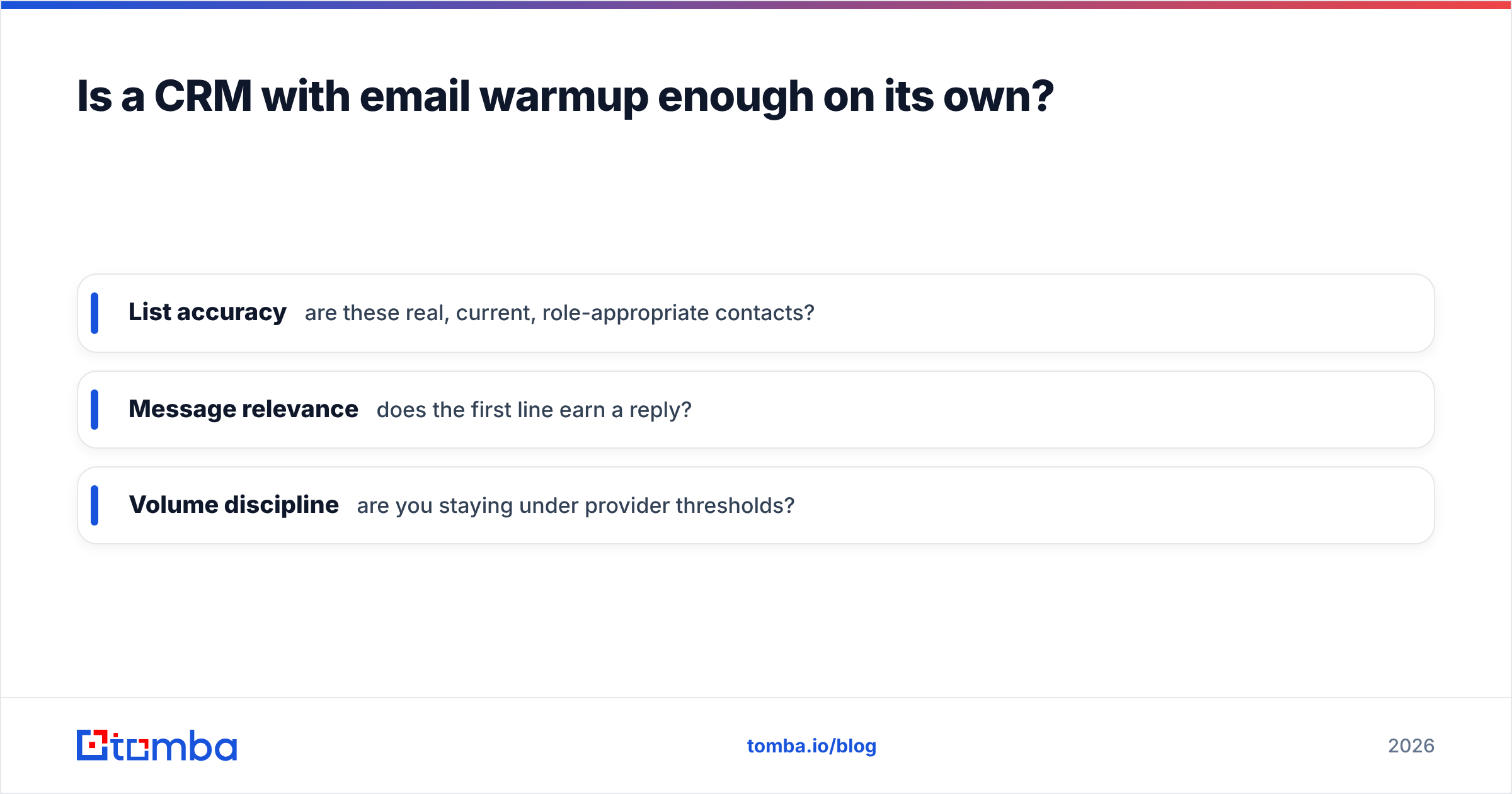
The reply rate you actually want depends on three things warmup can't touch:
- List accuracy — are these real, current, role-appropriate contacts?
- Message relevance — does the first line earn a reply?
- Volume discipline — are you staying under provider thresholds?
That's why the strongest outbound stacks separate the jobs cleanly. You find and verify contacts with a data tool, warm the domain with a warmup service, sequence from the CRM, and watch email deliverability metrics the whole time. Tomba sits in the first layer of that stack — sourcing and verifying the addresses your warmed CRM will send to. Accurate data is what keeps bounce rates low enough that warmup investment isn't wasted.
What features should you look for?#
When you evaluate any "CRM with email warmup," score it against these criteria rather than the marketing page:
- Warmup network size and quality. A larger, higher-reputation peer network warms faster and safer. Ask how many real inboxes participate.
- Automatic ramp control. The tool should raise volume for you, not require manual daily tuning.
- Inbox rotation. Spreading sends across multiple mailboxes protects any single domain from overload.
- Native deliverability monitoring. Spam-placement tests and reputation dashboards inside the tool beat guessing.
- Clean CRM sync. Two-way sync with your system of record so warmup and pipeline data don't drift apart.
- List hygiene hooks. Bonus points if it integrates verification so you're not importing dead contacts.
Independent review sites like G2 are useful for cross-checking vendor claims about warmup network quality — read the 3-star reviews, not the 5-star ones, for the real story.
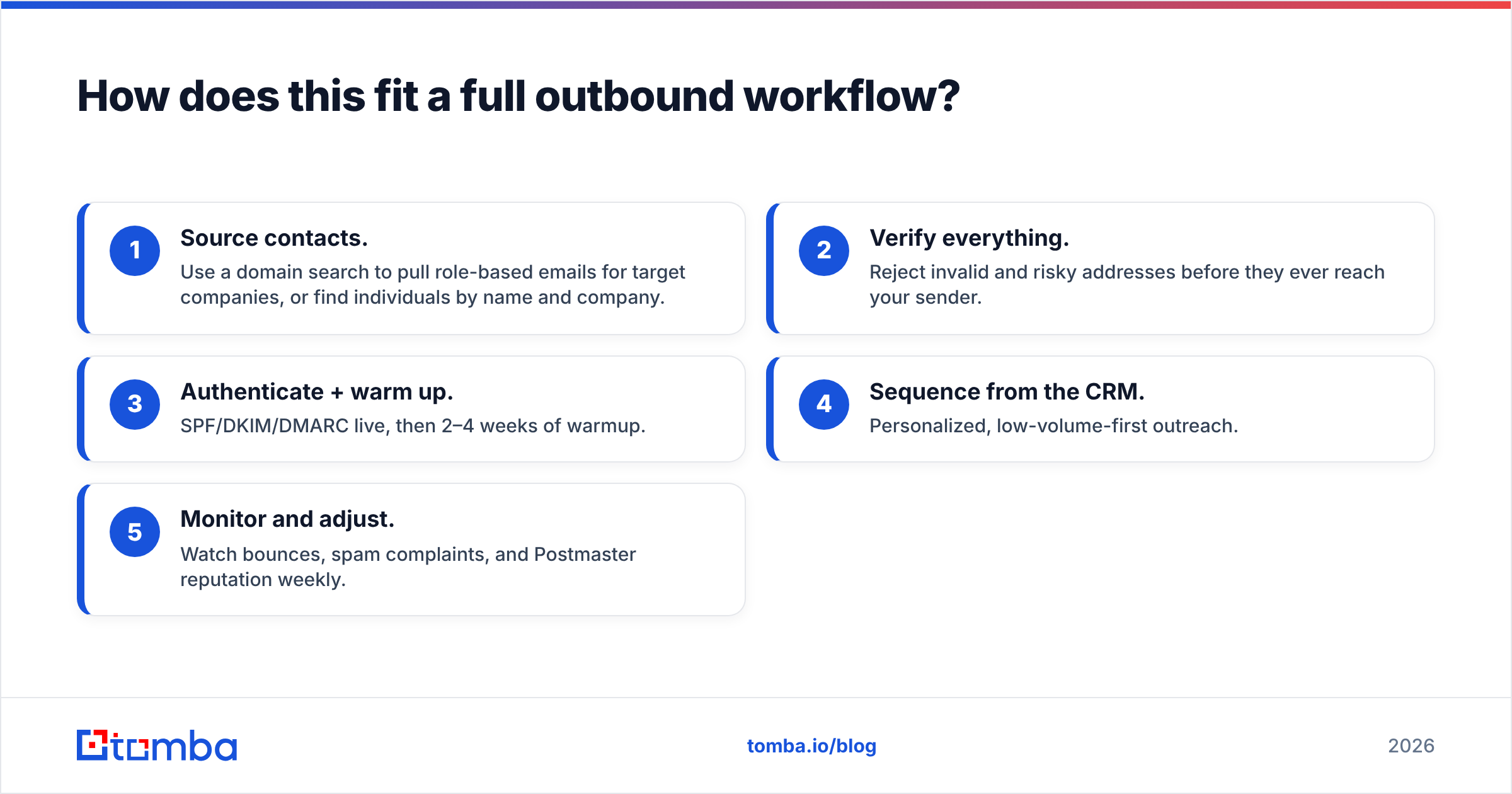
How does this fit a full outbound workflow?#
Here's the end-to-end sequence that consistently lands in the inbox:
- Source contacts. Use a domain search to pull role-based emails for target companies, or find individuals by name and company.
- Verify everything. Reject invalid and risky addresses before they ever reach your sender.
- Authenticate + warm up. SPF/DKIM/DMARC live, then 2–4 weeks of warmup.
- Sequence from the CRM. Personalized, low-volume-first outreach.
- Monitor and adjust. Watch bounces, spam complaints, and Postmaster reputation weekly.
Skip step 2 and step 3 does nothing. Skip step 3 and step 4 burns your domain. The layers are a chain, and warmup is only one link. For teams standardizing this, wiring your data tool directly into the CRM via native integrations removes the manual CSV shuffle that introduces stale, bounce-prone contacts in the first place.
Compared to older CRMs that treated deliverability as someone else's problem, HubSpot and similar platforms now publish serious deliverability guidance — a sign the whole industry has accepted that reputation is upstream of pipeline. Your stack should reflect that ordering too.
Frequently asked questions#
Do I need warmup if I only send from an existing, established domain? Less so — an aged domain with real conversation history already has reputation. But if you're spinning up new sending domains or dedicated cold-email domains, warmup is non-negotiable.
Can I warm up and send cold campaigns from the same inbox at once? Keep them separated early. Let warmup establish a baseline for the first 1–2 weeks before layering real outreach on top, then run both together at controlled volume.
Does warmup guarantee inbox placement? No. It maximizes the reputation half of the equation. Bad lists, spammy copy, and reckless volume can still override a good reputation. Warmup is necessary, not sufficient.
Is a standalone CRM plus a separate warmup tool worse than an all-in-one? Not necessarily. A best-of-breed CRM plus a dedicated warmup service often outperforms a jack-of-all-trades, as long as the two sync cleanly. Prioritize the layer your team leans on most.
The bottom line#
A "CRM with email warmup" isn't one magic product — it's a discipline. The CRM stores and sequences; warmup protects reputation; verified data keeps the whole thing from bouncing. Get all three working together and your outreach lands. Miss one and even the best CRM sends your pitch to spam.
Start at the top of the stack, where accuracy is decided. Before your warmed domain sends a single message, feed it a clean, verified list: use the Tomba Email Finder to source accurate professional emails and verify them, so every send your CRM makes reaches a real person — and the reputation you warmed up stays intact. Check current Tomba pricing to match a plan to your outreach volume.
Related guides#
Ready to find emails that actually work?
Join 150,000+ professionals who stopped guessing and started sending. Free credits on signup — no credit card required.
Get the Tomba newsletter
Practical outbound tactics and product updates — once every two weeks.
About the author