Direct Marketing Emails: The 2026 B2B Playbook That Works
Direct marketing emails still outperform most paid channels — but only when the list, the offer, and the sending infrastructure line up. Here's the 2026 playbook, with benchmarks and a channel cost comparison.
TL;DR
- Direct marketing emails are still the cheapest per-reply B2B channel in 2026 — roughly $0.02–$0.15 per contacted prospect versus $8–$60 per LinkedIn or Google click.
- The variable that decides everything is list quality, not copy. A 30% invalid list drives bounce rates past the 2% threshold where Google and Microsoft start throttling you.
- Google and Yahoo's 2024 bulk-sender rules (SPF, DKIM, DMARC, one-click unsubscribe, <0.3% spam complaints) are now enforced baseline, not a suggestion.
- Segment-then-send beats blast-then-apologize: 200 researched contacts with a role-specific offer routinely outperform 5,000 generic sends.
- Measure reply rate and pipeline created, not open rate. Apple Mail Privacy Protection made opens a vanity number years ago.
What are direct marketing emails?#
Direct marketing emails are messages you send straight to a named recipient with a specific commercial ask — book a demo, download a report, start a trial, reply for pricing. No intermediary, no ad auction, no algorithm deciding who sees it. You own the list, you control the message, and you carry the compliance risk.
That last part is where most teams get sloppy. "Direct marketing email" covers three quite different things that get lumped together:
- Opt-in marketing email — the recipient subscribed. Newsletters, product updates, nurture sequences. Lowest risk, highest engagement, slowest to scale.
- Cold B2B outreach — the recipient never asked, but you have a legitimate business reason and a verified work address. Legal in the US under CAN-SPAM with disclosure and opt-out; legal in most of the EU under legitimate interest for B2B, with caveats by country.
- Purchased-list blasting — someone else's data, no relationship, no verification. This is what gets domains blacklisted, and it is what people mean when they say "email doesn't work anymore."
The channel's reputation problem comes almost entirely from category three. Categories one and two still produce the best cost-per-meeting numbers in B2B, and the data hasn't moved much: HubSpot's marketing research continues to show email delivering some of the strongest ROI of any owned channel.

How do direct marketing emails compare to other B2B channels?#
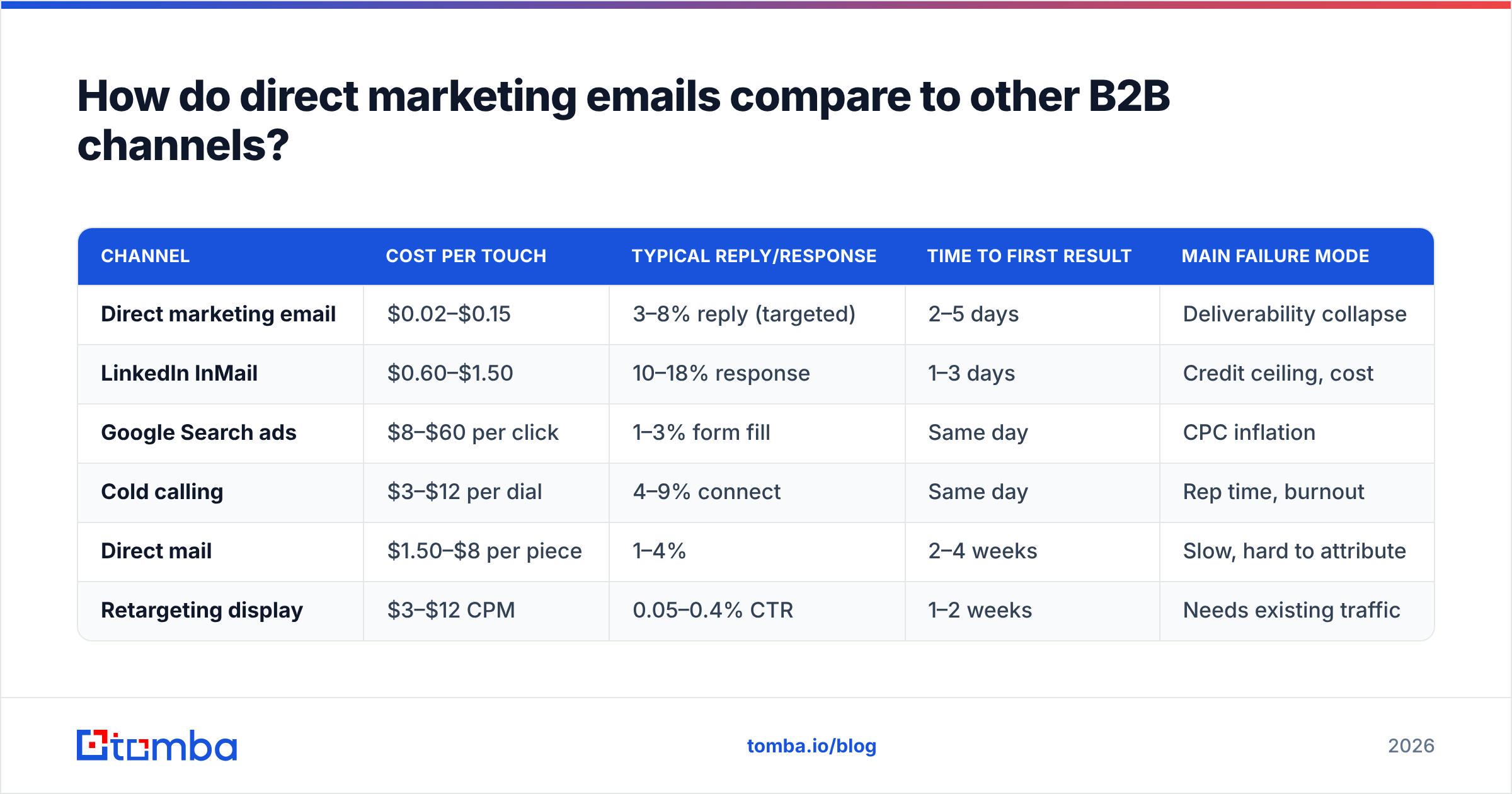
Cost per touch is where email wins outright. Cost per qualified touch is where it gets interesting, because a bad list inflates your denominator without adding anything to the numerator.
| Channel | Cost per touch | Typical reply/response | Time to first result | Main failure mode |
|---|---|---|---|---|
| Direct marketing email | $0.02–$0.15 | 3–8% reply (targeted) | 2–5 days | Deliverability collapse |
| LinkedIn InMail | $0.60–$1.50 | 10–18% response | 1–3 days | Credit ceiling, cost |
| Google Search ads | $8–$60 per click | 1–3% form fill | Same day | CPC inflation |
| Cold calling | $3–$12 per dial | 4–9% connect | Same day | Rep time, burnout |
| Direct mail | $1.50–$8 per piece | 1–4% | 2–4 weeks | Slow, hard to attribute |
| Retargeting display | $3–$12 CPM | 0.05–0.4% CTR | 1–2 weeks | Needs existing traffic |
Read that table as a portfolio, not a ranking. Email's advantage is that it scales cheaply enough to be your volume channel while calls and LinkedIn handle the accounts worth manual effort. The teams getting 2026-level results run all three against the same account list rather than picking a winner.
Why does list quality decide the outcome?#
Because mailbox providers score you on behavior before they ever look at your content.
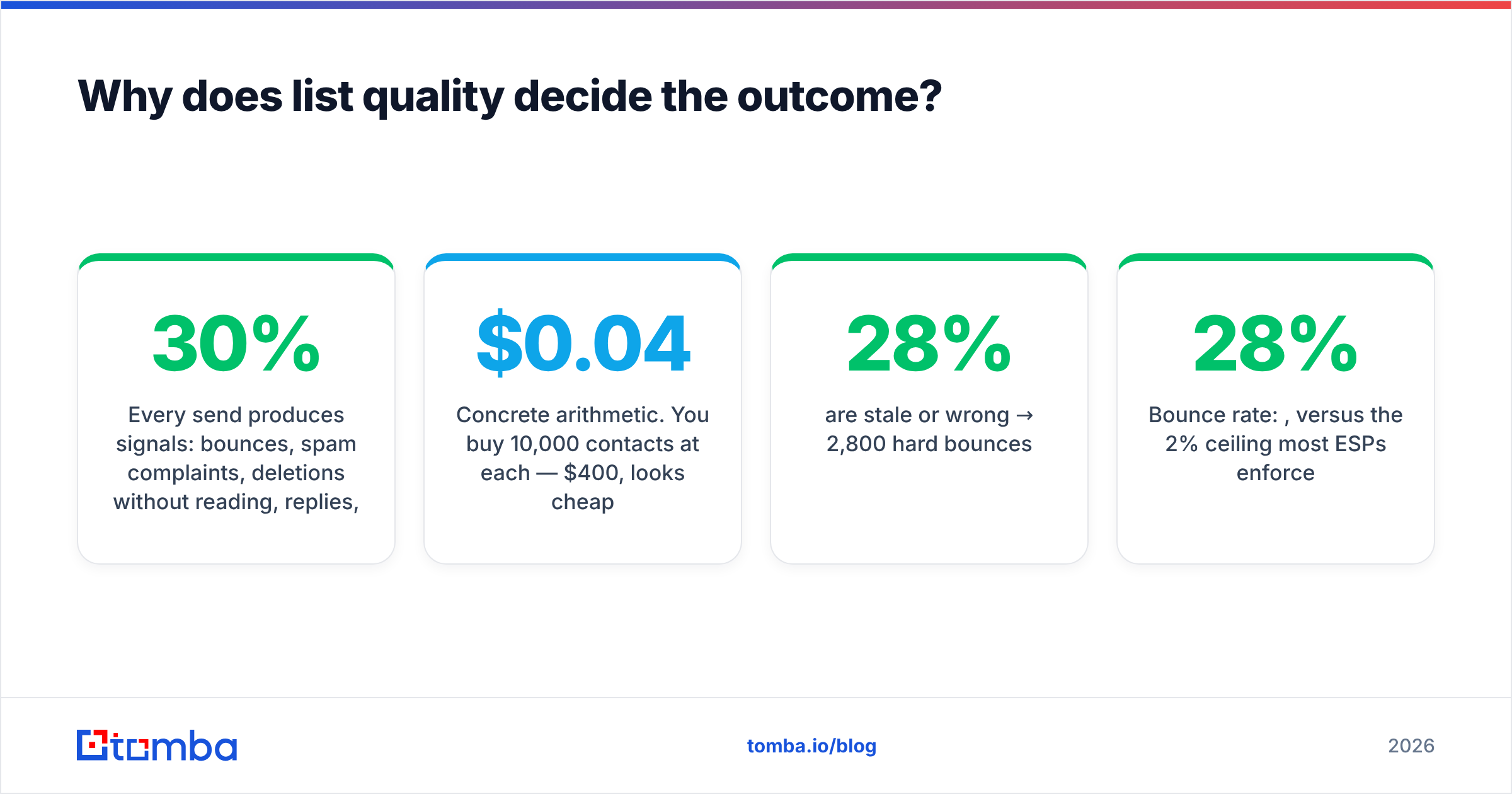
Every send produces signals: bounces, spam complaints, deletions without reading, replies, moves to folder. Gmail and Outlook aggregate those signals per sending domain and per IP. A list where 30% of addresses no longer exist produces a bounce rate that crosses the danger line on the first send — and once your domain reputation drops, even your good addresses start landing in spam.
Concrete arithmetic. You buy 10,000 contacts at $0.04 each — $400, looks cheap.
- 28% are stale or wrong → 2,800 hard bounces
- Bounce rate: 28%, versus the 2% ceiling most ESPs enforce
- Your ESP suspends the account after send one
- Domain reputation takes 4–8 weeks to recover, if it recovers
- Actual cost: $400 plus two months of your primary sending domain
Now the alternative. You take the same 10,000 target names, run them through an email verifier, discard the 2,800 dead ones, and send to 7,200 confirmed addresses. Bounce rate lands under 1.5%. Reputation holds. Same campaign, opposite outcome, and the only difference is a verification step that costs a fraction of the list itself.
This is also why sourcing matters more than list size. Building from a live source — domain search against your ICP's company list, or pulling verified contacts through an email finder — gives you data that was confirmed recently rather than scraped in 2023 and resold four times since.
The four list-hygiene steps that matter#
- Verify before every campaign, not once at import. B2B data decays around 22–30% a year as people change roles. A list verified six months ago is not a verified list.
- Handle catch-all domains separately. Catch-all servers accept everything, so standard verification returns "unknown." Route them through a catch-all verifier and hold the genuinely unresolvable ones out of your main send.
- Suppress aggressively. Unsubscribes, complaints, three-time non-openers on engaged campaigns, competitors, current customers, and anyone in an active deal cycle.
- Deduplicate across sequences. Nothing burns a domain faster than the same prospect getting three unrelated campaigns from three reps in one week.
What does the 2026 compliance baseline look like?#
Two things changed the game and neither is optional now.
Authentication. Since February 2024, Google and Yahoo require bulk senders (5,000+ messages a day to their users) to publish SPF, DKIM, and DMARC records, keep spam complaints under 0.30%, and include one-click unsubscribe headers on marketing mail. Microsoft rolled out equivalent requirements for Outlook.com in 2025. Check your SPF record and DMARC alignment before you touch a campaign — misaligned auth is the single most common cause of "my emails just stopped delivering."
Consent law. The rules differ by geography and you should know which applies:
- US (CAN-SPAM) — cold B2B email is legal. You must identify yourself, include a physical address, not deceive in the subject line, and honor opt-outs within 10 business days.
- EU (GDPR + ePrivacy) — B2B cold email generally runs on legitimate interest, but member states vary. Germany and Italy are strict; the UK and Netherlands allow B2B outreach to corporate addresses more readily. Document your legitimate interest assessment.
- Canada (CASL) — the toughest. Implied consent from an existing business relationship or a publicly listed business address, with penalties up to CAD $10M.
Neutral summary: if you are sending to verified corporate addresses, disclosing who you are, and making opt-out trivial, you are inside the lines in most of the world. If you are blasting scraped personal Gmail addresses, you are not, regardless of jurisdiction.
How do you structure a direct marketing email that gets replies?#
Short version: one reader, one problem, one ask.
Subject line. 3–6 words, lowercase or sentence case, no brackets, no "Re:" fakery. "quick question about your onboarding flow" beats "🚀 Transform Your Onboarding Today." If you're testing at volume, run variants through a subject line tester before committing 5,000 sends to a guess.
First line. This is the only line that has to earn the next one. It must contain something you could not have written to anyone else — a hiring signal, a product change, a specific page on their site, a stat from their industry that they'd recognize as theirs.
Body. 50–125 words. State the problem you observed, state what you do about it in one sentence, offer proof in a number, stop.
Ask. A single, low-friction question. "Worth a look?" converts better than "Do you have 30 minutes Tuesday at 2pm ET?" because it costs the reader nothing to answer.
Signature. Real name, real company, real physical address, working unsubscribe. Plain text. No image logos, no tracking pixels if you can avoid them — both hurt deliverability and neither tells you anything reliable since Apple Mail Privacy Protection started pre-fetching images.

What tools do you actually need?#
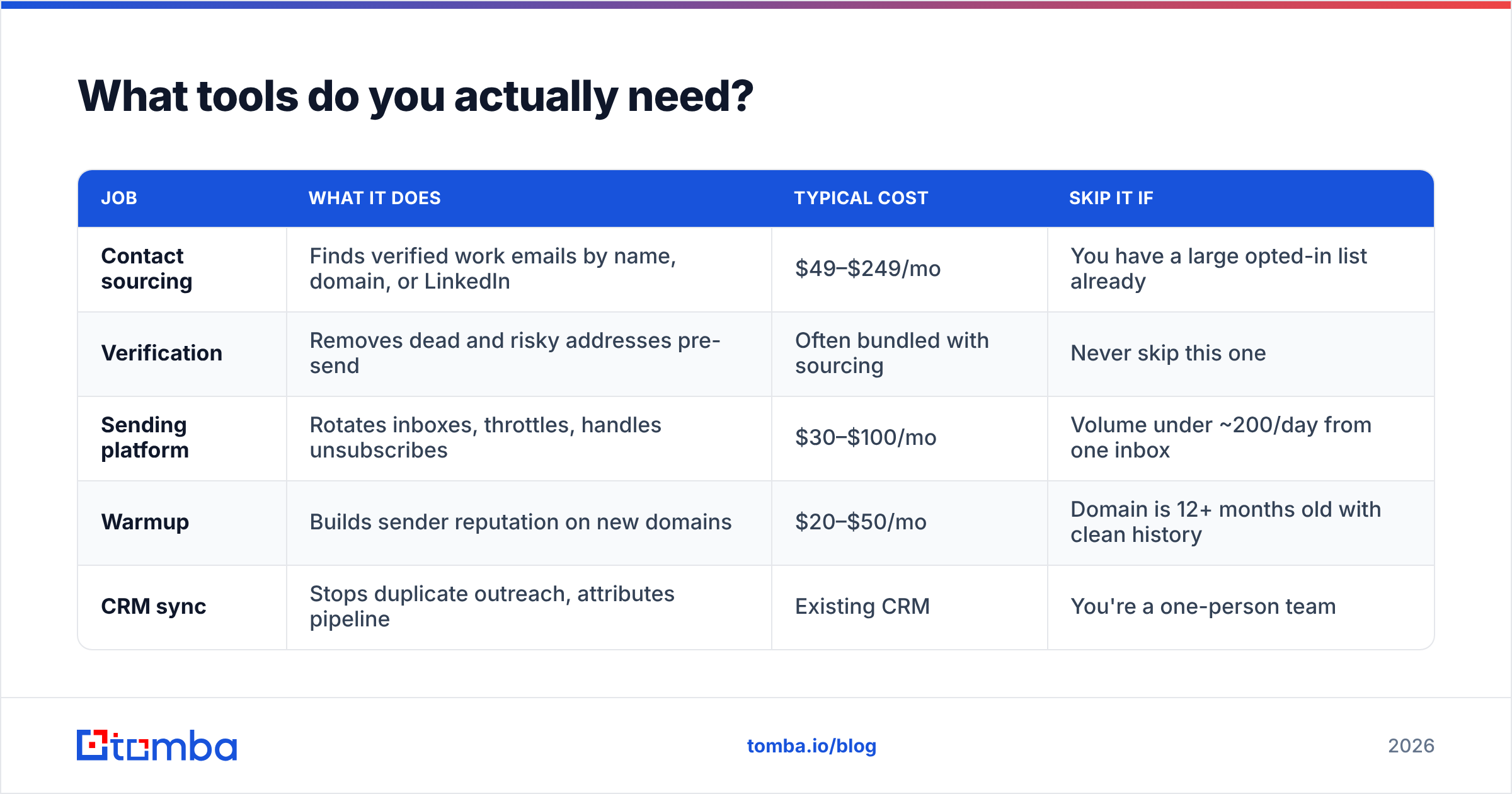
Fewer than vendors suggest. The stack has four jobs: find contacts, verify them, send them, and track what happened.
| Job | What it does | Typical cost | Skip it if |
|---|---|---|---|
| Contact sourcing | Finds verified work emails by name, domain, or LinkedIn | $49–$249/mo | You have a large opted-in list already |
| Verification | Removes dead and risky addresses pre-send | Often bundled with sourcing | Never skip this one |
| Sending platform | Rotates inboxes, throttles, handles unsubscribes | $30–$100/mo | Volume under ~200/day from one inbox |
| Warmup | Builds sender reputation on new domains | $20–$50/mo | Domain is 12+ months old with clean history |
| CRM sync | Stops duplicate outreach, attributes pipeline | Existing CRM | You're a one-person team |
On the sourcing layer, the realistic options fall into three buckets:
- Database-first platforms (Apollo, ZoomInfo) — enormous coverage, mixed freshness, priced for teams. Good when you need firmographic filtering more than address precision. If cost is the issue, an Apollo alternative built around finding rather than browsing usually lands cheaper.
- Verified-list vendors (BookYourData and similar) — you buy a defined, pre-verified list with a bounce guarantee. Genuinely useful when you want a clean file for a specific segment without running the sourcing yourself, and the accuracy guarantees are real.
- Finder-and-verifier tools (Tomba, Hunter, Findymail) — you supply the target companies or names, the tool returns confirmed addresses. Best fit when you already know who you want to reach and need the address to be correct today.
Tomba sits in that third bucket. Tomba pricing starts with a free tier at 25 searches a month, then Starter at $49/mo, Growth at $99/mo, and Pro at $249/mo, with finding and verification in the same workflow so you're not paying two vendors and reconciling two exports.
Whichever you pick, check the vendor's own accuracy claims against third-party reviews on G2 rather than their landing page. Every tool in this space claims 95%+ accuracy; the reviews tell you what happens on your ICP specifically.
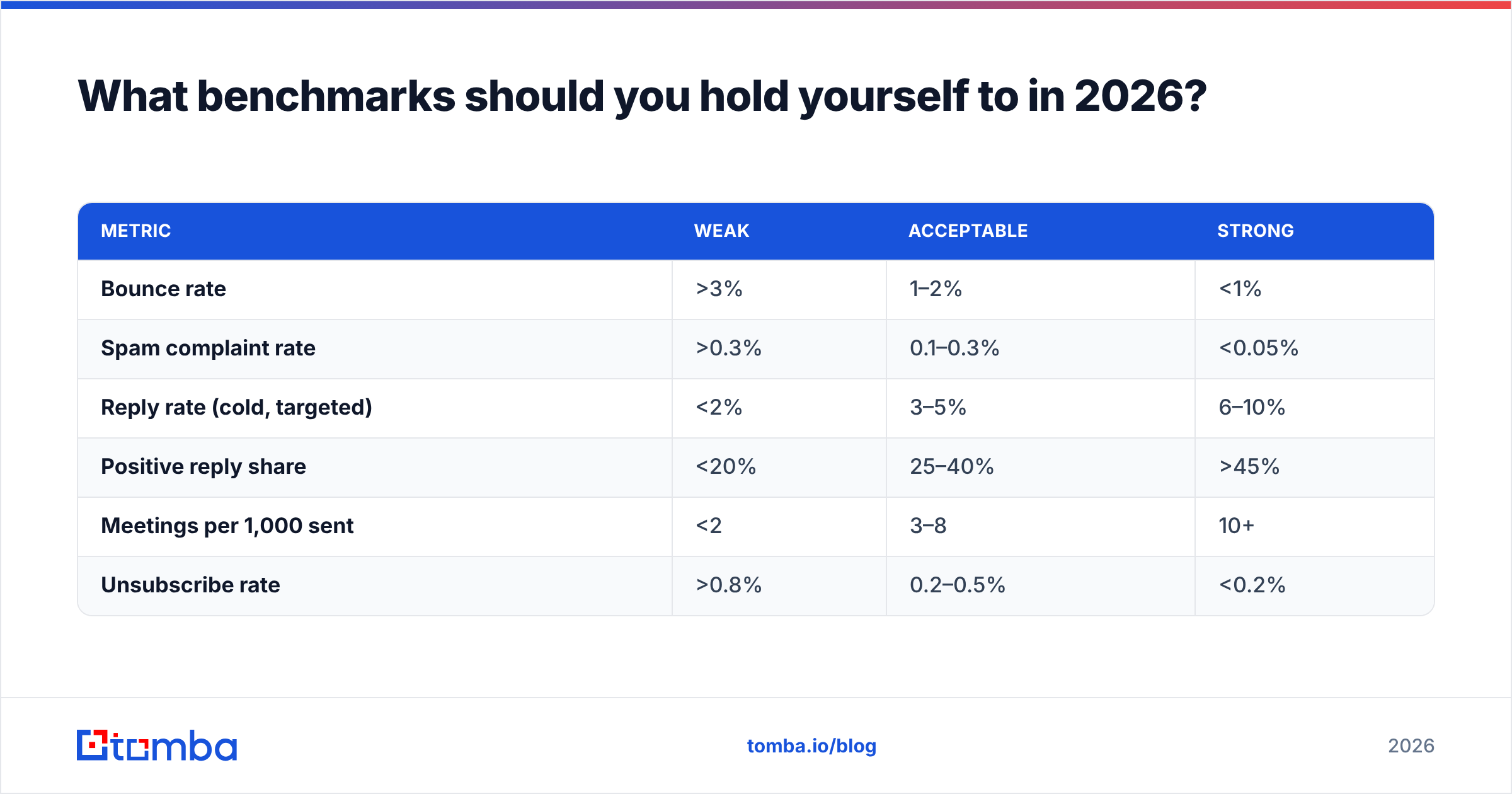
What benchmarks should you hold yourself to in 2026?#
Stop reporting open rate. Apple Mail Privacy Protection, Gmail's image proxy, and corporate scanning gateways inflate opens to the point of uselessness — many senders now see "opens" from bots within seconds of delivery.
Track these instead:
| Metric | Weak | Acceptable | Strong |
|---|---|---|---|
| Bounce rate | >3% | 1–2% | <1% |
| Spam complaint rate | >0.3% | 0.1–0.3% | <0.05% |
| Reply rate (cold, targeted) | <2% | 3–5% | 6–10% |
| Positive reply share | <20% | 25–40% | >45% |
| Meetings per 1,000 sent | <2 | 3–8 | 10+ |
| Unsubscribe rate | >0.8% | 0.2–0.5% | <0.2% |
If your reply rate is under 2% but your bounce rate is clean, the problem is targeting or offer — not deliverability. If replies are fine but nothing converts to a meeting, the problem is that you're reaching the wrong seniority. Diagnose in that order; most teams rewrite copy when the list was the issue.
Volume discipline matters as much as the metrics. Practical 2026 limits: 30–50 cold emails per inbox per day on Google Workspace or Microsoft 365, ramped over 3–4 weeks on a new domain. Need 500 a day? That's 10–15 inboxes across secondary domains, not one inbox pushed to breaking point. Use a warmup calculator to plan the ramp rather than guessing.
What are the mistakes that kill campaigns?#
- Sending from your primary domain. Use a lookalike (getcompany.com, trycompany.com) so a reputation hit doesn't take down your invoices and support mail with it.
- Merge-field personalization only. "Hi {{first_name}}, I noticed {{company}} is doing great things" is worse than no personalization — it signals automation immediately.
- Nine-touch sequences. Reply rates for touches 5+ are typically under 0.5% while unsubscribes and complaints keep climbing. Three to four touches over 12 days, then stop.
- No suppression of existing relationships. Emailing a current customer a cold pitch is the fastest way to get an internal escalation.
- Ignoring the reply. Teams spend weeks on sequences and then take 19 hours to answer a "sure, tell me more." Sub-hour reply time roughly doubles meeting conversion.
- Chasing volume before product-message fit. If 200 well-researched sends produce zero positive replies, 20,000 will produce zero positive replies at scale and a burned domain.
For a deeper structural view of how outreach fits the wider funnel, Salesforce's sales resources cover the handoff from reply to pipeline better than most vendor blogs.
Is direct email still worth it in 2026?#
Yes — with a narrower definition of "it" than five years ago.
The version that stopped working is the volume play: buy data, blast, hope. Filtering got better, senders got worse, and mailbox providers now enforce reputation with real teeth. The version that still works is closer to research-driven direct mail with instant delivery: a tight list of accounts you have a genuine reason to contact, verified addresses, a message that couldn't have been sent to anyone else, and a reply-time commitment that treats an interested response as urgent.
Judged that way, direct marketing emails remain the highest-leverage channel in B2B, because nothing else lets you reach 200 precisely chosen buyers for less than the price of one Google click.
Start with the list, not the copy. Build your target account file, then use the Tomba Email Finder to pull verified work addresses by domain, name, or company — with verification built into the same workflow, so your bounce rate stays under 1% before the first message goes out. The free tier gives you 25 searches a month to test your ICP; Starter is $49/mo when you're ready to run real volume.
Related guides#
Ready to find emails that actually work?
Join 150,000+ professionals who stopped guessing and started sending. Free credits on signup — no credit card required.
Get the Tomba newsletter
Practical outbound tactics and product updates — once every two weeks.
About the author