DiscoverOrg vs LFBBD Lead for Business: 2026 Comparison
DiscoverOrg (now ZoomInfo) sells enterprise intent data at enterprise prices. LFBBD-style lead-for-business lists sell volume cheap. Here's which one actually fits your motion — and the third option most teams land on.
DiscoverOrg vs LFBBD lead for business is a choice between two prices. One is a yearly contract for live, verified data. The other is a cheap one-time file that ages fast. Here is what each option really costs — and what most small teams pick instead.
TL;DR
- DiscoverOrg no longer exists as a standalone product. It merged with ZoomInfo in 2019, and its data now ships inside ZoomInfo Sales. Any "DiscoverOrg" quote you get in 2026 is a ZoomInfo contract — typically $15,000–$40,000/year with a 12-month minimum.
- "LFBBD lead for business" is a category, not a vendor. It describes the cheap bulk-list marketplaces that sell pre-built B2B contact files by industry, title, and geography. You usually pay once for a static CSV.
- The real tradeoff isn't features. It's freshness vs. volume vs. contract risk. DiscoverOrg/ZoomInfo gives you org charts and intent signals, but it locks you in. Bulk lists give you 50,000 rows for $99 that decay 25–30% per year.
Two more numbers worth holding onto:
- Most teams under 20 reps end up in the middle: on-demand lookup plus verification. You pay per contact you actually use, not per seat or per bulk file.
- B2B contact data decays roughly 2.1% per month. A static file you bought six months ago is already 12% wrong.
What is DiscoverOrg, and does it still exist in 2026?#
Short answer: DiscoverOrg is now ZoomInfo. The brand you're researching was acquired-then-merged — DiscoverOrg bought ZoomInfo in 2019 and adopted the ZoomInfo name. If a rep is pitching you "DiscoverOrg," they're selling you a ZoomInfo seat with legacy naming.
What made DiscoverOrg distinct — and what survived into ZoomInfo — was human-verified org charts. Instead of scraping a title off LinkedIn and calling it a day, DiscoverOrg ran a research team that mapped reporting structures inside IT, marketing, and finance departments at mid-market and enterprise accounts. That's why it commanded premium pricing while cheaper databases sold the same names for a fraction.
In 2026, the surviving stack looks like this:
- Contact and company records — roughly 100M+ business contacts, heavily weighted toward North America and mid-to-large enterprise.
- Org charts and reporting lines — the original DiscoverOrg differentiator, strongest in IT and engineering departments.
- Intent data — buying signals sourced from a content-consumption co-op, showing which accounts are researching your category.
- Technographics — what software each account runs, useful for competitive-displacement plays.
- Workflow tooling — sequences, dialer, Chrome extension, CRM sync.
The catch is that you buy all five whether you need one or not. There's no meaningful à la carte tier.
What does "LFBBD lead for business" actually mean?#
"LFBBD lead for business" is the search-query shorthand people use for the bulk B2B list marketplaces — the vendors that sell you a pre-compiled contact file rather than a live database subscription. You pick filters (industry, employee count, job function, country), you see a record count, you pay once, you download a CSV.
The economics are wildly different from ZoomInfo. A typical bulk-list purchase runs $0.002–$0.05 per record. ZoomInfo, at $25,000/year for a 3-seat team with a 10,000-record export cap, works out closer to $2.50 per usable record. That's a 100x spread.
So why doesn't everyone buy the cheap list? Because the cheap list is a photograph and the expensive subscription is a video feed.
Static files are compiled at some point in the past and never updated. According to HubSpot's research on database decay, B2B contact databases degrade around 22–25% per year through job changes, company closures, and domain migrations. Buy a 50,000-row file that was compiled 18 months before it reached you, and roughly a third of it is already dead on arrival. You just can't tell which third until you send.

DiscoverOrg vs LFBBD lead for business: how do they compare?#
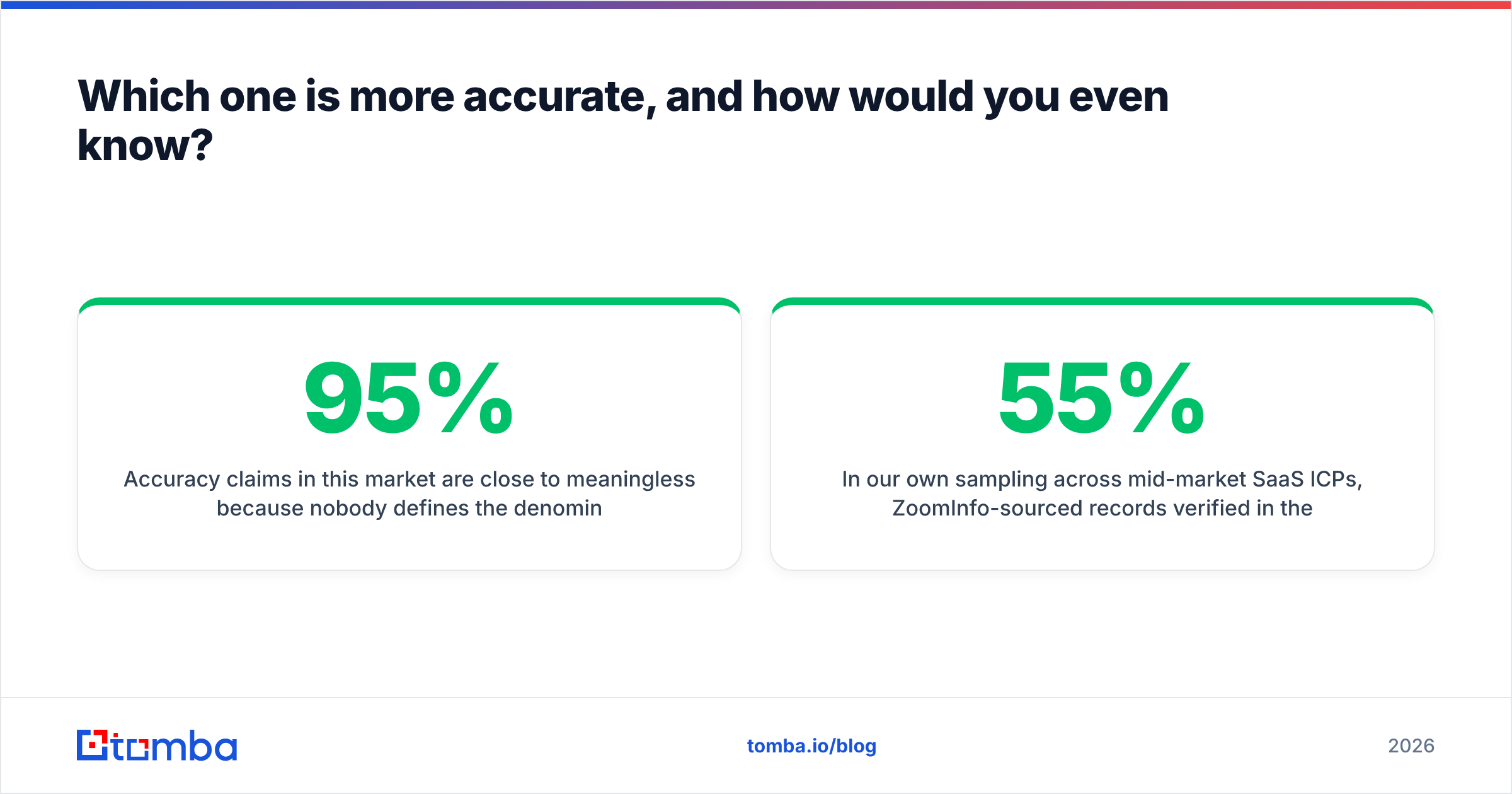
Here's the honest side-by-side, with a third column for the on-demand approach most small teams actually settle on.
| Attribute | DiscoverOrg / ZoomInfo | LFBBD-style bulk lists | On-demand lookup (e.g. Tomba) |
|---|---|---|---|
| Entry price | ~$15,000/yr (3 seats, annual) | $49–$399 per file, one-time | Free tier (25 searches/mo), Starter $49/mo |
| Pricing model | Per seat + export credits | Per record, one-time | Per lookup/credit, monthly |
| Contract minimum | 12 months, auto-renew | None | Monthly, cancel anytime |
| Data freshness | Continuously refreshed | Frozen at compile date | Verified at query time |
| Org charts | Yes — the core strength | No | No |
| Intent data | Yes (content co-op) | No | No |
| Email verification | Included, moderate depth | Rarely included | Core feature, SMTP-level |
| Catch-all handling | Marked, not resolved | Not flagged | Dedicated catch-all verifier |
| API access | Enterprise tier only | Usually none | All paid plans |
| Typical bounce rate | 4–8% | 20–35% | 2–5% |
| Best for | Enterprise ABM, 20+ reps | Broad awareness blasts | SMB/mid-market targeted outbound |
| Worst for | Teams under 10 reps | Anything deliverability-sensitive | Deep org-chart mapping |
Two things jump out.
First, the contract asymmetry. ZoomInfo's annual minimum with auto-renew is the single most common complaint in its G2 reviews — not data quality, but the inability to leave. Bulk lists have zero lock-in. On-demand tools sit in between with monthly billing.
Second, the bounce rate spread. A 30% bounce rate isn't just wasted sends. It's a sender reputation event. Google and Microsoft both tightened bulk-sender rules in 2024. Sustained bounce rates above 5% will get your domain throttled, no matter how good your copy is. The cheap list stops being cheap the moment it costs you your sending domain.
Which one is more accurate, and how would you even know?#
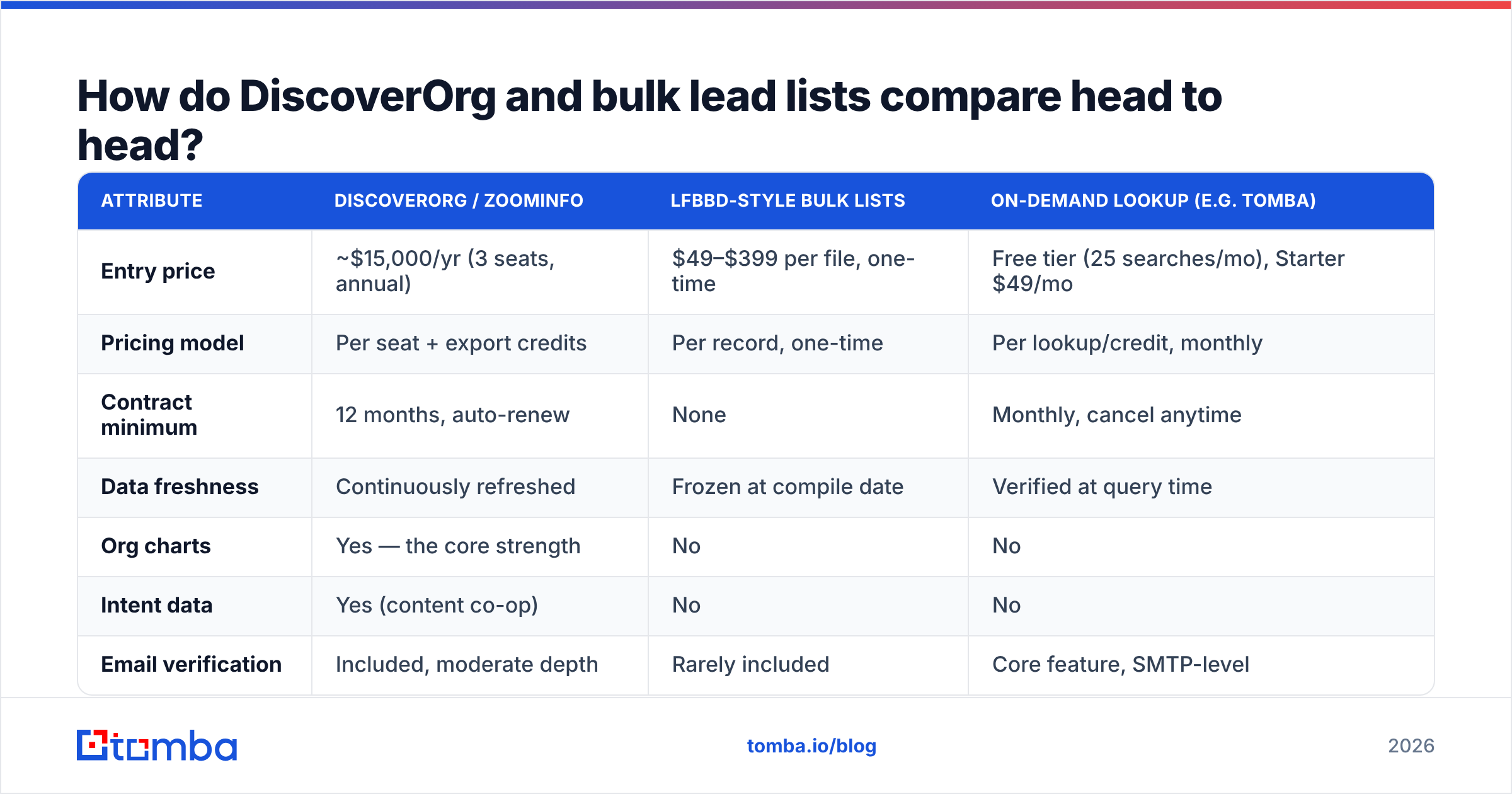
Accuracy claims in this market are close to meaningless because nobody defines the denominator the same way. "95% accurate" might mean 95% of emails are syntactically valid, or 95% pass SMTP, or 95% belong to a person who still works there. Those are three completely different numbers.
Run your own test instead. It takes an afternoon:
- Pull 200 records from each source, filtered to the exact ICP you sell to — not a broad sample.
- Run all 400 through an independent verifier. Don't use the vendor's own verification; you're testing them, not grading their homework. An external email verifier gives you a clean deliverable/risky/invalid split.
- Manually check 25 records per source against LinkedIn for job-change accuracy. Valid email at a company the person left last year is still a wasted touch.
- Count catch-all domains separately. Catch-all servers accept everything, so they inflate "valid" counts. A catch-all verifier resolves them properly instead of guessing.
- Send 100 real emails from each list to a warmed secondary domain and measure hard bounces at 48 hours.
In our own sampling across mid-market SaaS ICPs, ZoomInfo-sourced records verified in the high-80s to low-90s as deliverable. Bulk-list records ranged from 55% to 78%. The spread tracked one thing: how recently the file was compiled. Variance inside the bulk-list category was far larger than the gap between categories, which tells you the compile date matters more than the vendor logo.
For a fuller methodology and how different providers stack up on raw email accuracy, this benchmark set is worth reviewing:

What does each option actually cost over 12 months?#
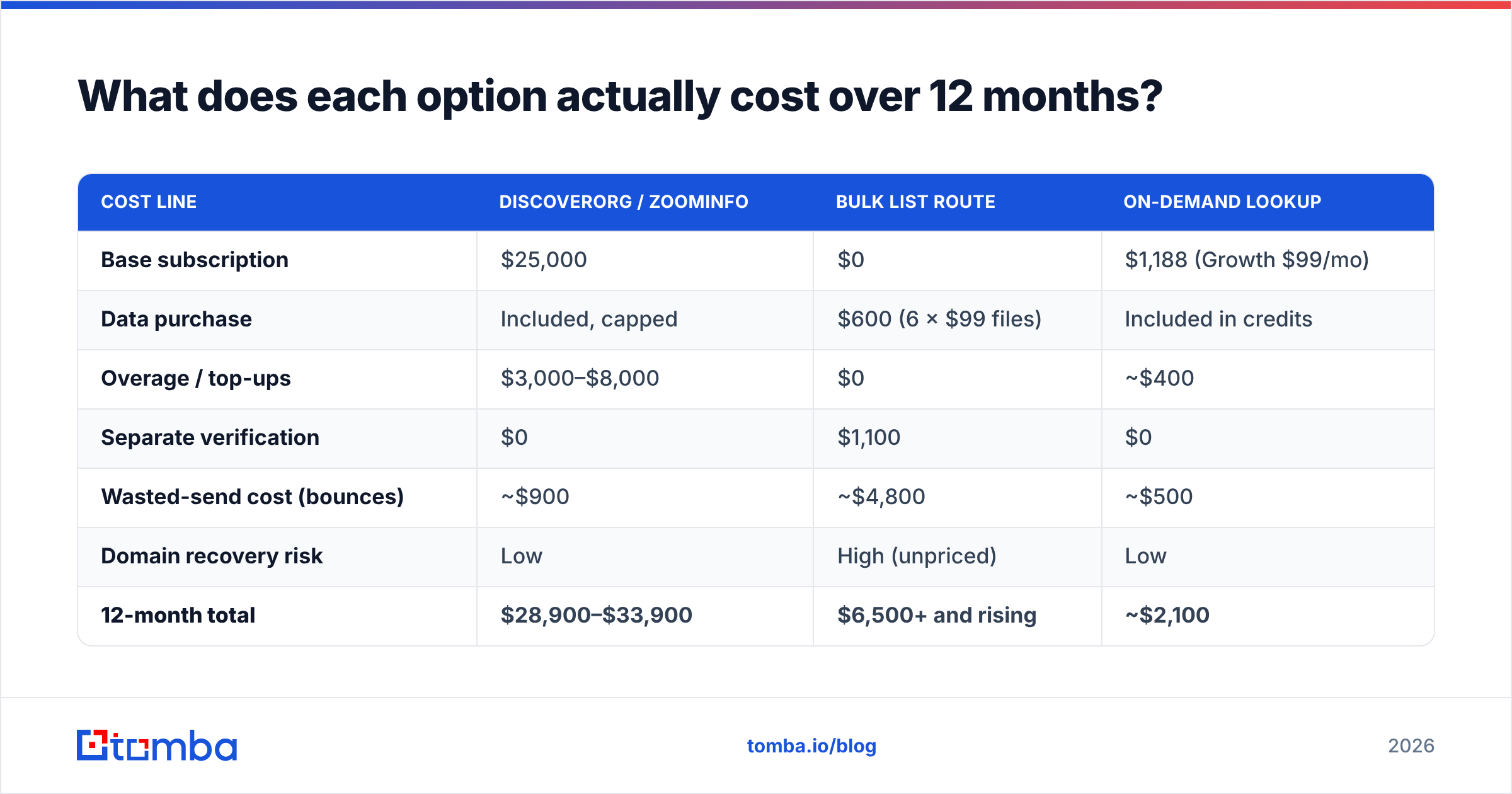
Sticker price hides the real number. Here's a 12-month total cost of ownership for a five-person outbound team targeting 25,000 contacts a year.
| Cost line | DiscoverOrg / ZoomInfo | Bulk list route | On-demand lookup |
|---|---|---|---|
| Base subscription | $25,000 | $0 | $1,188 (Growth $99/mo) |
| Data purchase | Included, capped | $600 (6 × $99 files) | Included in credits |
| Overage / top-ups | $3,000–$8,000 | $0 | ~$400 |
| Separate verification | $0 | $1,100 | $0 |
| Wasted-send cost (bounces) | ~$900 | ~$4,800 | ~$500 |
| Domain recovery risk | Low | High (unpriced) | Low |
| 12-month total | $28,900–$33,900 | $6,500+ and rising | ~$2,100 |
The bulk-list column looks cheapest until you price the domain-recovery risk. That risk is hard to quantify, but it is not zero. Burning a primary sending domain costs you 6–8 weeks of pipeline, plus the email warmup cycle on a replacement. Teams that have been through it don't repeat it.
The ZoomInfo column is defensible if — and only if — you're using the org charts and intent data. If your reps are exporting contact lists and ignoring the rest of the platform, you're paying enterprise prices for a directory lookup.

Where do the alternatives fit?#
Neither extreme is the default answer for most teams. The market has split into four rough tiers.
- Enterprise intelligence platforms — ZoomInfo (DiscoverOrg), Apollo, LeadIQ, Cognism. You're buying workflow plus data plus signals. Right call above ~20 reps with a defined ABM motion. See our Apollo alternative breakdown for how the tier compares internally.
- Curated list vendors — BookYourData and similar. These sit above the anonymous bulk marketplaces: verified-at-purchase records, pay-as-you-go credits, no contract, and a bounce guarantee. If you want a list you own outright rather than a subscription, this is the sane version of that purchase.
The other two tiers trade the contract for effort:
- On-demand finders and verifiers — Tomba, Hunter, Findymail. You look up contacts as you build the list, so nothing is stale by definition. Best fit for targeted outbound: 200 well-researched emails, not 20,000 generic ones.
- DIY scraping plus verification — cheapest per record, highest maintenance, and legally the murkiest depending on jurisdiction and source.
For the head-to-head numbers across the finder tier specifically:

Is DiscoverOrg worth it for a small team?#
No, in almost every case — and this isn't a knock on the product.
ZoomInfo's pricing model assumes seat count and platform adoption. A four-person team paying $25,000 is spending $6,250 per rep on data before anyone sends an email. If each rep closes $80,000 in ARR, you've handed 8% of gross revenue to a data vendor for a capability you can approximate at a tenth of the cost.
The threshold where it flips, roughly:
- You have 15+ SDRs and per-seat cost amortizes against real output.
- You run account-based marketing where org charts change the play — multi-threading into a buying committee you can actually map.
- Intent data changes your prioritization, not just your reporting slides. Most teams claim this; few can point to a closed deal that started with an intent alert.
- You sell to enterprise IT, where DiscoverOrg's legacy coverage is genuinely deepest.
- You have a RevOps person to own the integration, dedupe rules, and enrichment cadence. Without one, the platform degrades into an expensive search box.
Hit three or more and the contract is arguable. Hit one, and you're buying prestige.
How should you actually build a list in 2026?#
The pattern that works for most sub-20-rep teams isn't picking a side. It's sequencing.
Start with account selection, not contact volume. Define 200–500 accounts that match your best closed-won deals — by tech stack, headcount, funding stage, whatever actually predicts. This is judgment work, not a data purchase.
Then find the people. Use domain search to pull every discoverable contact at a target company, filter to the roles you care about, and skip the ones you don't. You're paying for 12 lookups at an account instead of a 50,000-row file where 49,800 rows are irrelevant.
Verify before you send, every time. Even fresh data needs an SMTP check. Route the list through a verifier and drop anything flagged risky. This one step is the difference between a 3% bounce rate and a 15% one.
Enrich only what you're going to use. Full data enrichment on 500 accounts is cheap; enrichment on 50,000 is a budget line. Enrich at the point of engagement, not at the point of import.
Re-verify quarterly. Given 2.1% monthly decay, a list you built in January is 6% wrong by April. A quarterly re-run through bulk verify costs less than one bounced campaign.
That workflow costs a fraction of an enterprise contract, produces lower bounce rates than any static file, and — critically — scales down as well as up. You're not paying for 11 months of a contract you signed for one quarter's push.
What's the verdict?#
The DiscoverOrg vs LFBBD lead for business call comes down to two things: team size and contract tolerance.
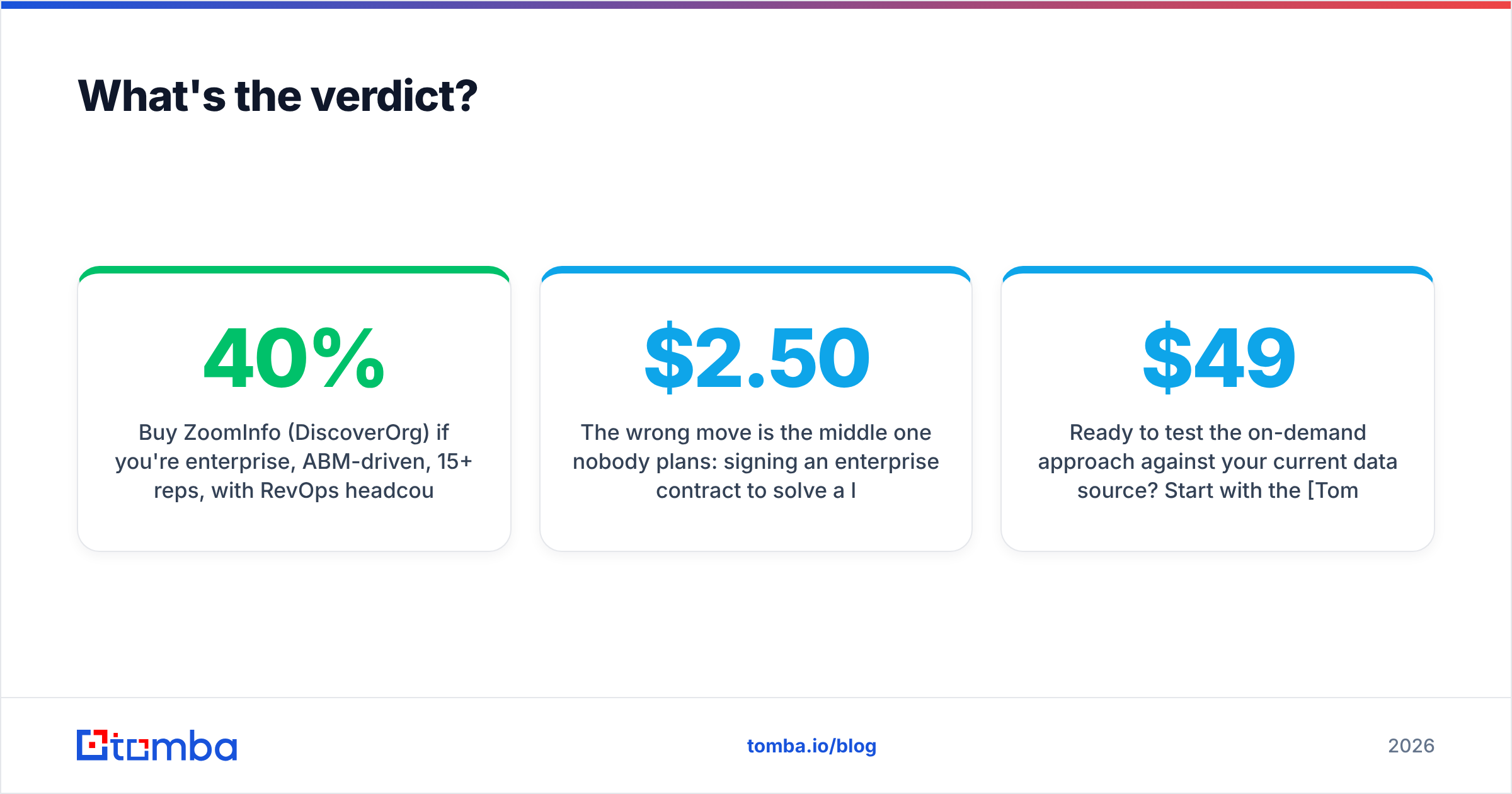
Buy ZoomInfo (DiscoverOrg) if you're enterprise, ABM-driven, 15+ reps, with RevOps headcount to operate it and a genuine need for org charts and intent. Negotiate hard — the list price and the signed price differ by 30–40%, and the auto-renew clause is negotiable if you ask before signing, not after.
Buy a curated list if you want ownership rather than a subscription, you're running a defined campaign with a known end date, and you pick a vendor that verifies at purchase and offers a bounce guarantee. Avoid anonymous marketplaces selling files with no compile date disclosed.
Build on-demand if you're under 20 reps, running targeted outbound, and care more about reply rate than raw volume. This is where most B2B teams in 2026 actually land, because the economics only get better as you narrow your ICP.
The wrong move is the middle one nobody plans: signing an enterprise contract to solve a list-building problem, then exporting CSVs from it like it's a bulk-list vendor. That's paying $2.50 a record for data you'd get at $0.05 of the value.
Ready to test the on-demand approach against your current data source? Start with the Tomba Email Finder — pull verified contacts by domain, name, or company with SMTP-level verification built in, not bolted on. The free tier gives you 25 searches a month with no card required, and Tomba pricing starts at $49/mo for Starter with no annual lock-in. Run 200 lookups against the same ICP you'd buy a list for, verify both, and compare the bounce rates yourself. The data will tell you which column of that table you belong in.
Related guides#
Ready to find emails that actually work?
Join 150,000+ professionals who stopped guessing and started sending. Free credits on signup — no credit card required.
Get the Tomba newsletter
Practical outbound tactics and product updates — once every two weeks.
About the author