DNS Reputation: How It Silently Kills Cold Email Delivery
Your DNS reputation decides whether mailbox providers trust your domain before they ever read your subject line. Here's how it's scored, how to check it, and how to fix a damaged one.
TL;DR
- DNS reputation is the trust score mailbox providers attach to your sending domain, its subdomains, and the IPs those records resolve to — evaluated before your content is ever scanned.
- It is built from four inputs: authentication records (SPF, DKIM, DMARC), domain age and hosting history, blocklist status, and recipient engagement tied back to the domain.
- Google Postmaster Tools and Microsoft SNDS are the only two sources that show you the score providers actually use. Third-party checkers are proxies, not truth.
- A damaged DNS reputation takes 3–8 weeks to repair, and the repair is almost entirely about volume discipline and list hygiene — not copy.
- The cheapest prevention is not sending to addresses that bounce. Verification before send is worth more than any warmup tool.
What is DNS reputation?#
DNS reputation is the trust rating that mailbox providers — Gmail, Outlook, Yahoo, corporate filters like Proofpoint and Mimecast — assign to your sending domain and the DNS records attached to it.
Think of it like a credit score for a business address. Before a bank reads your loan application, it pulls your credit file. Before Gmail reads your email, it pulls your domain's file: how long has this domain existed, does it publish valid authentication records, do its IPs appear on blocklists, and what happened the last 10,000 times mail arrived from it?
Technically, "DNS reputation" is a loose umbrella covering several distinct signals that all resolve through DNS lookups:
- Authentication records — SPF, DKIM, and DMARC published as TXT records on your domain. Missing or misconfigured records are an immediate downgrade.
- Reverse DNS (PTR) alignment — the sending IP must resolve back to a hostname that resolves forward to the same IP. Broken rDNS is a hard fail at many enterprise gateways.
- DNSBL / RBL listings — Spamhaus, SORBS, Barracuda, and dozens of smaller lists are queried via DNS at connection time. A listing can drop your inbox rate to near zero within hours.
- Domain age and history — a domain registered six weeks ago carries no trust. A domain previously used for bulk mail carries whatever reputation that mail earned.
- Engagement feedback — opens, replies, "not spam" clicks, spam complaints, and hard bounces, aggregated at the domain level.
The critical thing to understand: items 1–4 are evaluated before your message body is ever parsed. You can write the best cold email of your career and never reach a human if your domain fails at the DNS layer.

How do mailbox providers actually score DNS reputation?#
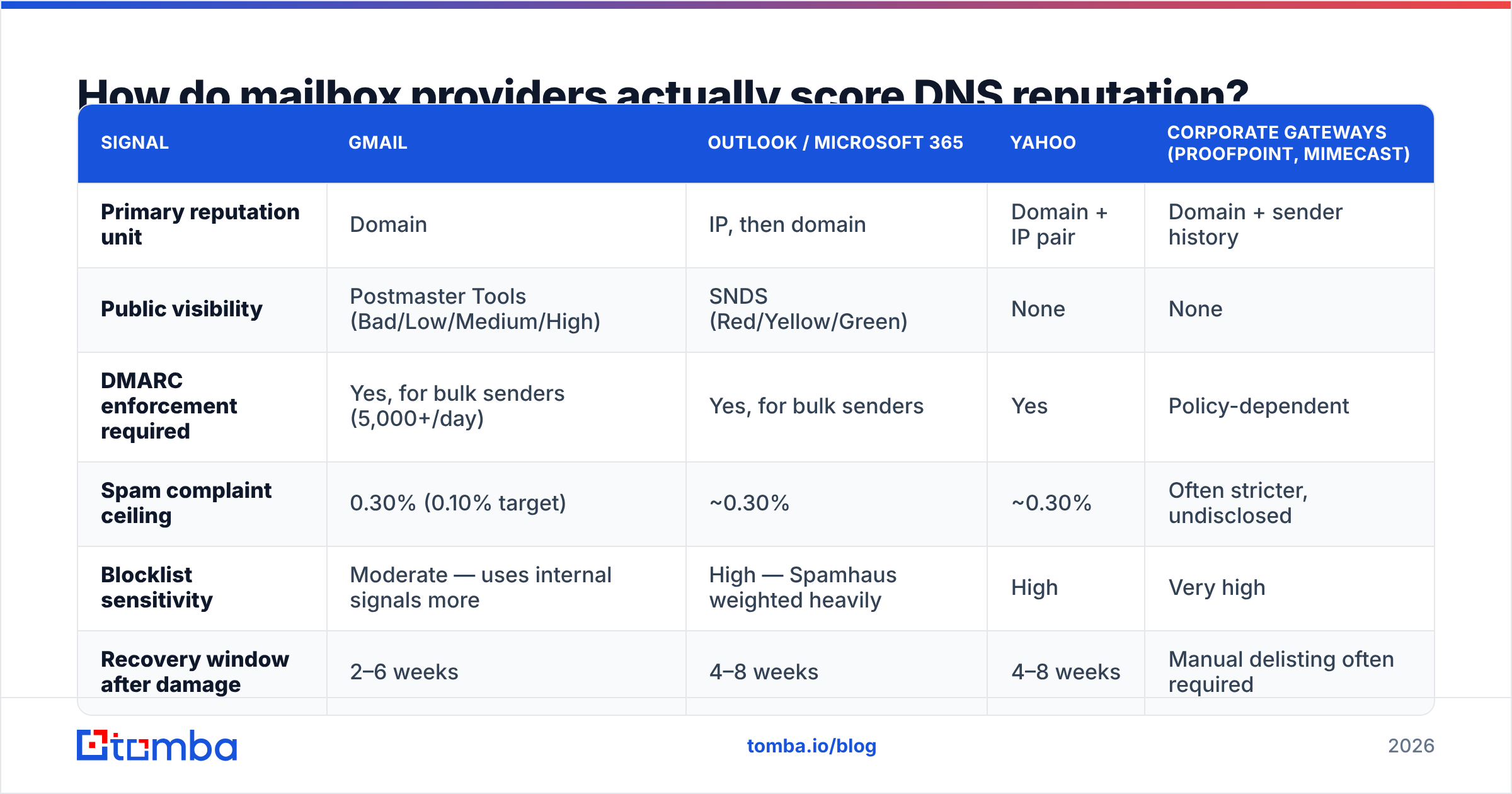
There is no single published algorithm, but the inputs are well documented across vendor docs. Here's how the major providers differ:
| Signal | Gmail | Outlook / Microsoft 365 | Yahoo | Corporate gateways (Proofpoint, Mimecast) |
|---|---|---|---|---|
| Primary reputation unit | Domain | IP, then domain | Domain + IP pair | Domain + sender history |
| Public visibility | Postmaster Tools (Bad/Low/Medium/High) | SNDS (Red/Yellow/Green) | None | None |
| DMARC enforcement required | Yes, for bulk senders (5,000+/day) | Yes, for bulk senders | Yes | Policy-dependent |
| Spam complaint ceiling | 0.30% (0.10% target) | ~0.30% | ~0.30% | Often stricter, undisclosed |
| Blocklist sensitivity | Moderate — uses internal signals more | High — Spamhaus weighted heavily | High | Very high |
| Recovery window after damage | 2–6 weeks | 4–8 weeks | 4–8 weeks | Manual delisting often required |
Two practical implications fall out of this table.
First, Gmail scores your domain, Outlook scores your IP first. If you're on shared sending infrastructure, a neighbor's bad behavior hurts you at Outlook far more than at Gmail. If you're on a dedicated IP with a young domain, Gmail hurts more.
Second, complaint rate is the single hardest ceiling. Google's sender guidelines put the enforcement threshold at 0.30% spam complaints and recommend staying under 0.10%. That's three complaints per thousand sends. At 2,000 cold emails a month, six people hitting "report spam" puts you in the danger zone.
What are the four DNS records that decide whether you land?#
Get these right before you think about anything else. This is the entire foundation.
- SPF (Sender Policy Framework) — a TXT record listing which servers may send on your domain's behalf. Keep it under 10 DNS lookups or it fails with a permerror. Use
-all(hard fail) once you're confident the list is complete;~all(softfail) is a reasonable starting point. Check yours with a SPF checker before you trust it. - DKIM (DomainKeys Identified Mail) — a cryptographic signature proving the message wasn't altered in transit. Use 2048-bit keys. Rotate them every 6–12 months. A single mismatched selector silently breaks alignment across your entire send.
- DMARC — the policy record that tells receivers what to do when SPF or DKIM fail, and where to send aggregate reports. Start at
p=nonewithrua=reporting for two weeks, read the reports, then move top=quarantineand finallyp=reject. Skipping the reporting phase is how people accidentally block their own invoices. - PTR / reverse DNS — set by whoever owns the sending IP. Must resolve to a real hostname on your domain, and that hostname must resolve back to the same IP. Ask your ESP or host if you're unsure; many will not set it for shared IPs, which is itself a signal.
Add a fifth if you want the full picture: BIMI. It requires DMARC at enforcement plus a verified mark certificate, and it displays your logo in the inbox. It doesn't directly improve reputation, but it's a strong trust signal for recipients — and the DMARC enforcement it forces you into does help.
How do you check your DNS reputation right now?#
Three tiers of evidence, in order of reliability.
Tier 1 — the providers themselves. Google Postmaster Tools shows domain reputation (Bad / Low / Medium / High), spam rate, authentication pass rates, and delivery errors. Microsoft SNDS shows IP-level complaint and trap-hit data. These are the actual scores that gate your mail. Everything else is inference. The catch: Postmaster Tools requires meaningful volume to Gmail before it populates data — a few hundred sends a day won't fill the dashboards.
Tier 2 — blocklist queries. Query the major DNSBLs directly. Spamhaus (ZEN), Barracuda, SORBS, and SpamCop cover most of what matters. A blacklist checker hits dozens in one pass. Recheck weekly if you send cold; listings can appear and auto-expire within a week and you'll never see it in your open rates.
Tier 3 — composite scorers. Tools that combine authentication checks, blocklist status, and heuristics into a single number. Useful for a fast read on a new domain, but the number is their opinion, not Gmail's. Treat a bad score as a prompt to investigate, never as the diagnosis itself. A sender reputation checker is the right tool for this tier.
Run all three the same day. If Postmaster says High and a composite scorer says "poor," trust Postmaster. If Postmaster says Low and everything else looks clean, the problem is engagement — you're sending to people who don't want your mail.
What actually damages DNS reputation?#
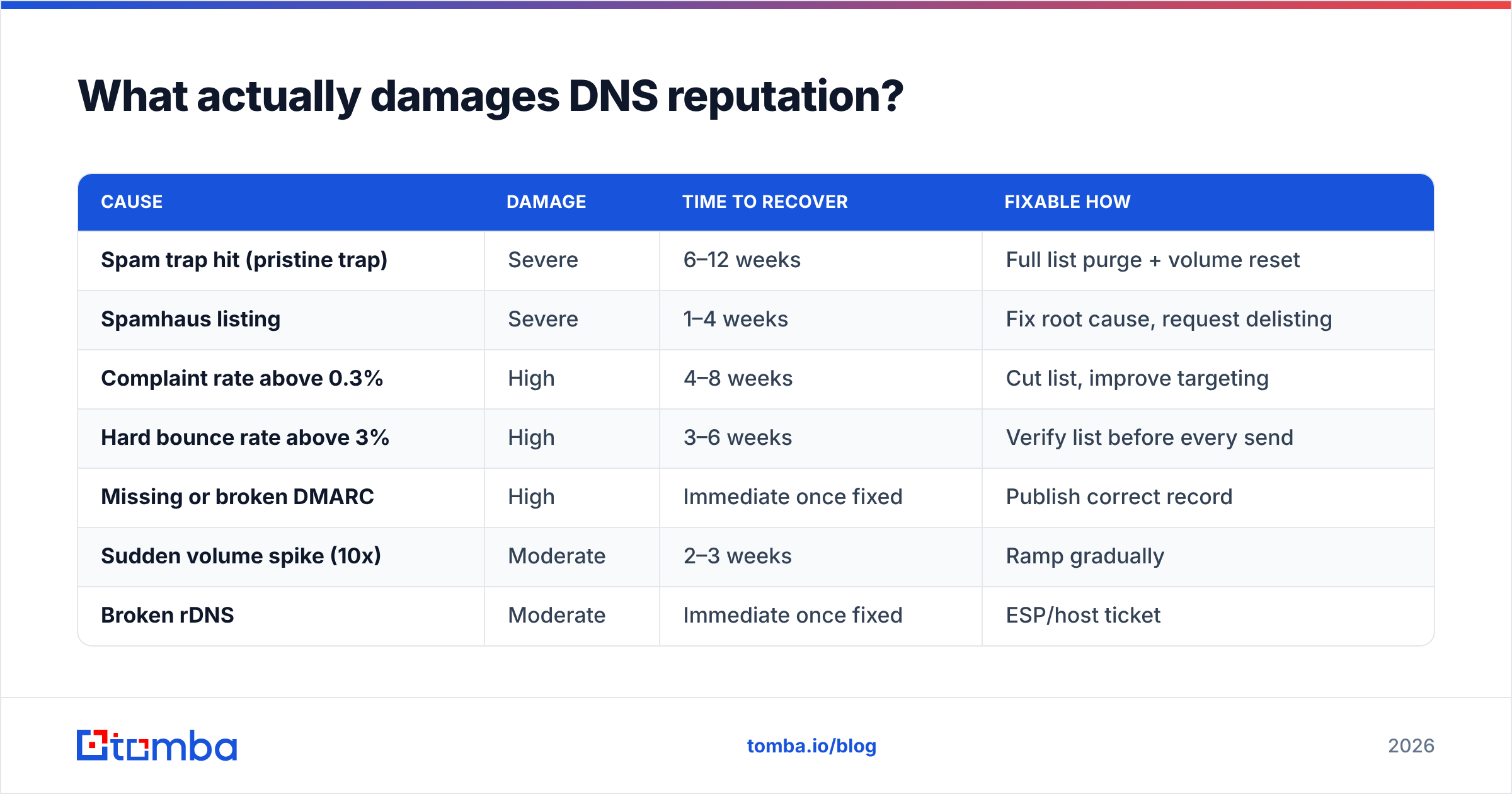
Ranked by how much damage they do per incident, based on how providers weight them:
| Cause | Damage | Time to recover | Fixable how |
|---|---|---|---|
| Spam trap hit (pristine trap) | Severe | 6–12 weeks | Full list purge + volume reset |
| Spamhaus listing | Severe | 1–4 weeks | Fix root cause, request delisting |
| Complaint rate above 0.3% | High | 4–8 weeks | Cut list, improve targeting |
| Hard bounce rate above 3% | High | 3–6 weeks | Verify list before every send |
| Missing or broken DMARC | High | Immediate once fixed | Publish correct record |
| Sudden volume spike (10x) | Moderate | 2–3 weeks | Ramp gradually |
| Broken rDNS | Moderate | Immediate once fixed | ESP/host ticket |
| Link to a blocklisted domain | Moderate | 1–2 weeks | Remove link, use own domain |
| Low engagement (no opens/replies) | Slow burn | Ongoing | Better targeting |
Two entries deserve expansion.
Spam traps are addresses that never opted into anything. Pristine traps were never valid — they were seeded on web pages to catch scrapers. Recycled traps were real addresses abandoned and repurposed by the provider. Hitting a pristine trap tells the provider you're scraping or buying lists, which is why the penalty is so steep. Nothing in your copy or your warmup schedule can offset it. The only defense is not having them on your list in the first place.
Hard bounces are the most common self-inflicted wound in cold email. A 3% hard bounce rate is a flashing signal that you didn't verify. Providers read it as "this sender doesn't know who they're mailing," which correlates strongly with spam. This is the failure mode that a proper email verifier exists to prevent, and it's the highest-ROI fix on this entire list because it costs cents per address and prevents weeks of recovery.
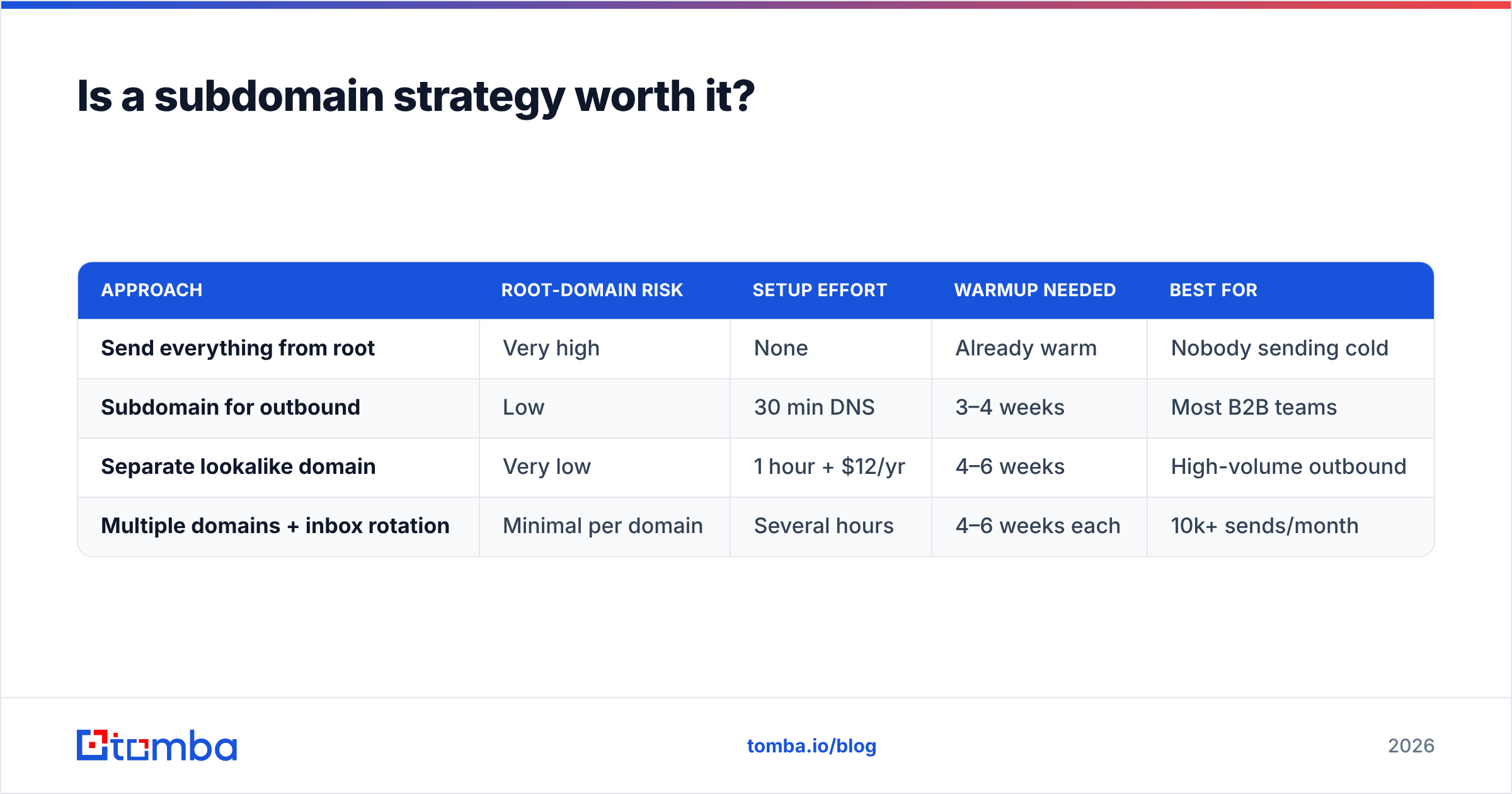
Is a subdomain strategy worth it?#
Yes, for most B2B senders — with one caveat.
The pattern: keep your root domain (yourcompany.com) for human, one-to-one mail and transactional messages. Send cold outbound from a subdomain (outreach.yourcompany.com) or a separate but similar domain (yourcompany.co, getyourcompany.com). Marketing newsletters go from a third (news.yourcompany.com).
Why it works: reputation damage on a subdomain does not fully transfer to the root. If a cold campaign goes badly, your invoices and support replies still land. Providers do consider organizational-domain reputation, so the insulation is partial — but partial insulation beats none.
The caveat: a brand-new subdomain inherits some of the parent's trust but starts with almost no sending history of its own. You still have to warm it. Budget 3–4 weeks of ramping before real volume, using a warmup calculator to plan the curve rather than guessing.
| Approach | Root-domain risk | Setup effort | Warmup needed | Best for |
|---|---|---|---|---|
| Send everything from root | Very high | None | Already warm | Nobody sending cold |
| Subdomain for outbound | Low | 30 min DNS | 3–4 weeks | Most B2B teams |
| Separate lookalike domain | Very low | 1 hour + $12/yr | 4–6 weeks | High-volume outbound |
| Multiple domains + inbox rotation | Minimal per domain | Several hours | 4–6 weeks each | 10k+ sends/month |
How do you repair a damaged DNS reputation?#
There's no shortcut, but there is a sequence. Work it in order — skipping steps is why most recovery attempts stall.
Week 1 — stop the bleeding. Pause all cold sending from the affected domain. Not reduce, pause. Every additional bad send extends the recovery window. Pull your Postmaster Tools data and identify which signal is red: spam rate, authentication, or IP reputation.
Week 1 — fix the root cause. Re-validate SPF, DKIM, DMARC, and rDNS. Query every major blocklist and file delisting requests where you're listed, including the actual fix in the request — Spamhaus rejects requests that don't demonstrate a change. Then purge the list that caused it: remove every address you can't verify, every role account (info@, sales@, admin@), and every contact with no engagement in 90 days.
Weeks 2–3 — send only to your best. Resume at roughly 10% of your prior volume, targeting only recipients who have opened or replied in the last 30 days. You're manufacturing positive engagement signals. Reply-generating messages beat open-generating ones here; a reply is the strongest positive signal a domain can earn.
Weeks 4–6 — ramp deliberately. Increase volume 20–30% per week while watching complaint rate daily. If complaints tick above 0.1%, hold at the current volume for another week rather than pushing through.
Ongoing — verify before every campaign. Not once at import. Before every send. B2B data decays at roughly 22–30% per year — people change jobs, companies restructure, domains get retired. A list verified six months ago is a list with a meaningful bounce rate today.
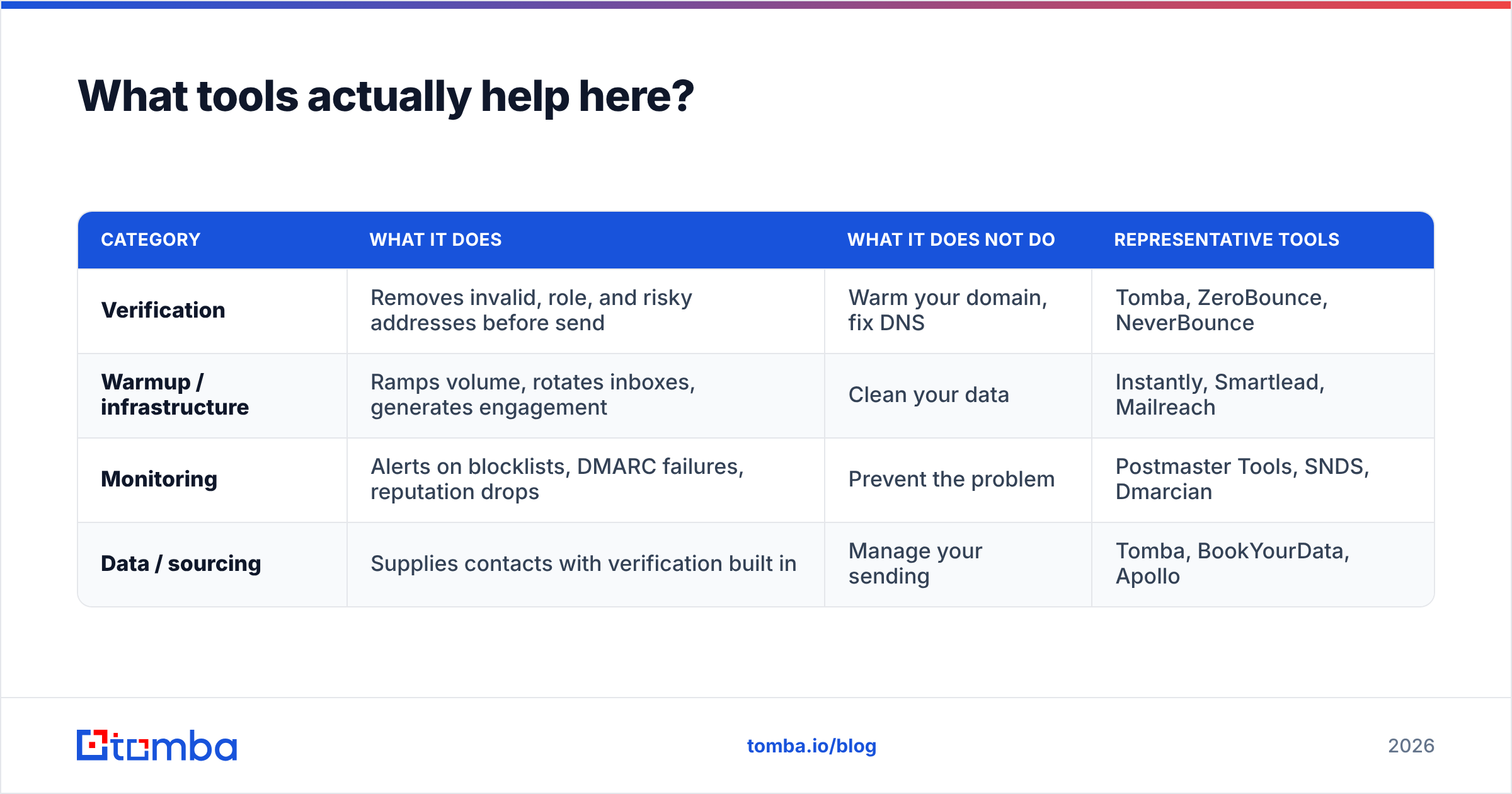
What tools actually help here?#
The market splits into three categories, and confusing them wastes money.
| Category | What it does | What it does NOT do | Representative tools |
|---|---|---|---|
| Verification | Removes invalid, role, and risky addresses before send | Warm your domain, fix DNS | Tomba, ZeroBounce, NeverBounce |
| Warmup / infrastructure | Ramps volume, rotates inboxes, generates engagement | Clean your data | Instantly, Smartlead, Mailreach |
| Monitoring | Alerts on blocklists, DMARC failures, reputation drops | Prevent the problem | Postmaster Tools, SNDS, Dmarcian |
| Data / sourcing | Supplies contacts with verification built in | Manage your sending | Tomba, BookYourData, Apollo |
Most teams over-invest in warmup and under-invest in verification. Warmup tools generate artificial engagement that providers have gotten steadily better at discounting; verification removes the bounces that trigger the penalty in the first place. If you can only fund one, fund verification.
On sourcing: buying a list is not automatically fatal — the failure is buying an unverified one. Reputable B2B data vendors like BookYourData verify at point of purchase, which materially reduces bounce risk versus scraped data. If you're building lists from company domains rather than buying, domain search plus verification gets you a list with a bounce rate you can predict.
For cost comparison, Tomba pricing starts with a free tier at 25 searches per month, Starter at $49/mo, Growth at $99/mo, and Pro at $249/mo — with verification included rather than billed as a separate product, which matters when you're verifying before every campaign rather than once at import.
What should you do this week?#
A concrete checklist, in priority order:
- Verify your four records. SPF under 10 lookups, DKIM at 2048-bit, DMARC at least at
p=nonewith reporting, rDNS resolving both directions. Fix anything broken today — these are the only same-day wins available. - Enroll in Postmaster Tools and SNDS. You cannot manage what you can't see, and both take under 15 minutes to set up.
- Query the blocklists. Weekly, not once. Set a calendar reminder.
- Verify your active list. Every address, before the next campaign. Target under 2% bounce; under 1% is achievable with good data.
- Move cold outbound to a subdomain if it's still on your root domain. This is the highest-leverage structural change available.
- Audit your engagement floor. If a segment hasn't opened in 90 days, stop mailing it. Those addresses are dragging your domain-level engagement score down and, given data decay, a share of them are now recycled traps.
For deeper background on how the individual signals interact, Google's sender guidelines and the M3AAWG sender best practices are the two references worth reading in full. Most third-party blog advice on this topic is a paraphrase of those two documents.
Where does this leave you?#
DNS reputation is unglamorous infrastructure work that determines whether any of your glamorous work matters. You can A/B test subject lines forever, but if your domain fails at the DNS layer, none of those tests are measuring what you think they're measuring — they're measuring which variant your filter happened to let through.
The good news: the fundamentals are finite. Four records, two dashboards, one weekly blocklist check, and a hard rule about verifying before you send. That's the whole discipline. Teams that follow it consistently outperform teams with better copy and worse hygiene, every time.
Start with the input that causes the most damage per dollar of prevention: the bounce. Run your list through the Tomba Email Finder to build contacts from verified company domains rather than scraped or aged sources, and every downstream reputation signal gets easier to hold. The free tier covers 25 searches a month if you want to test the bounce rate on a sample before committing to a plan.
Related guides#
Ready to find emails that actually work?
Join 150,000+ professionals who stopped guessing and started sending. Free credits on signup — no credit card required.
Get the Tomba newsletter
Practical outbound tactics and product updates — once every two weeks.
About the author