What Is a DNSBL Blacklist? How Email Blocking Works
A DNSBL is usually the reason your cold email vanished before anyone saw it. Here's how DNS blacklists decide who gets blocked, which lists actually matter, and how to get delisted fast.
TL;DR
- A DNSBL blacklist (DNS-based Blackhole List) is a list of IP addresses or domains, published over DNS. Mail servers query it in milliseconds before they accept your message.
- Getting listed on a major list like Spamhaus SBL/XBL can drop your inbox rate to near zero overnight. The block happens at connection time, before your subject line matters.
- Not all lists carry the same weight. Spamhaus, Spamcop, and Barracuda influence real filtering decisions; dozens of obscure lists influence nothing.
- The most common trigger for a listing is not "bad copy" — it's hitting spam traps and dead addresses from an unverified list.
- Delisting takes minutes on self-service lists and days on manual ones. Preventing the listing (verify before you send) costs far less than fixing it.
What is a DNSBL blacklist?#
A DNSBL blacklist is a blocklist you look up the same way you look up a website. Think of it like a bouncer with a clipboard: before the club (the receiving mail server) lets your IP through the door, it glances at a list of known troublemakers. If your name is on it, you don't get in — and nobody reads the message you were carrying.
Technically, a DNS-based Blackhole List publishes its data as DNS records. The receiving server reverses your sending IP, appends the list's zone, and does a standard A-record lookup. If 192.0.2.10 is listed on zen.spamhaus.org, the server queries 10.2.0.192.zen.spamhaus.org and gets an answer like 127.0.0.4. That return code tells the server why you're listed. No answer means you're clean.
The whole exchange takes a few milliseconds and costs the receiver almost nothing. That's exactly why DNSBLs have survived since the late 1990s while heavier reputation systems have come and gone. According to the DNSBL entry on Wikipedia, the technique dates back to the original MAPS RBL in 1997. It is still one of the first filters most mail servers apply.
You'll see the terms DNSBL, RBL, and blocklist used interchangeably. RBL (Realtime Blackhole List) is a trademark of the original Spamhaus/MAPS project. In practice, everyone means the same thing: a list of senders to reject.
How does a DNSBL actually work?#
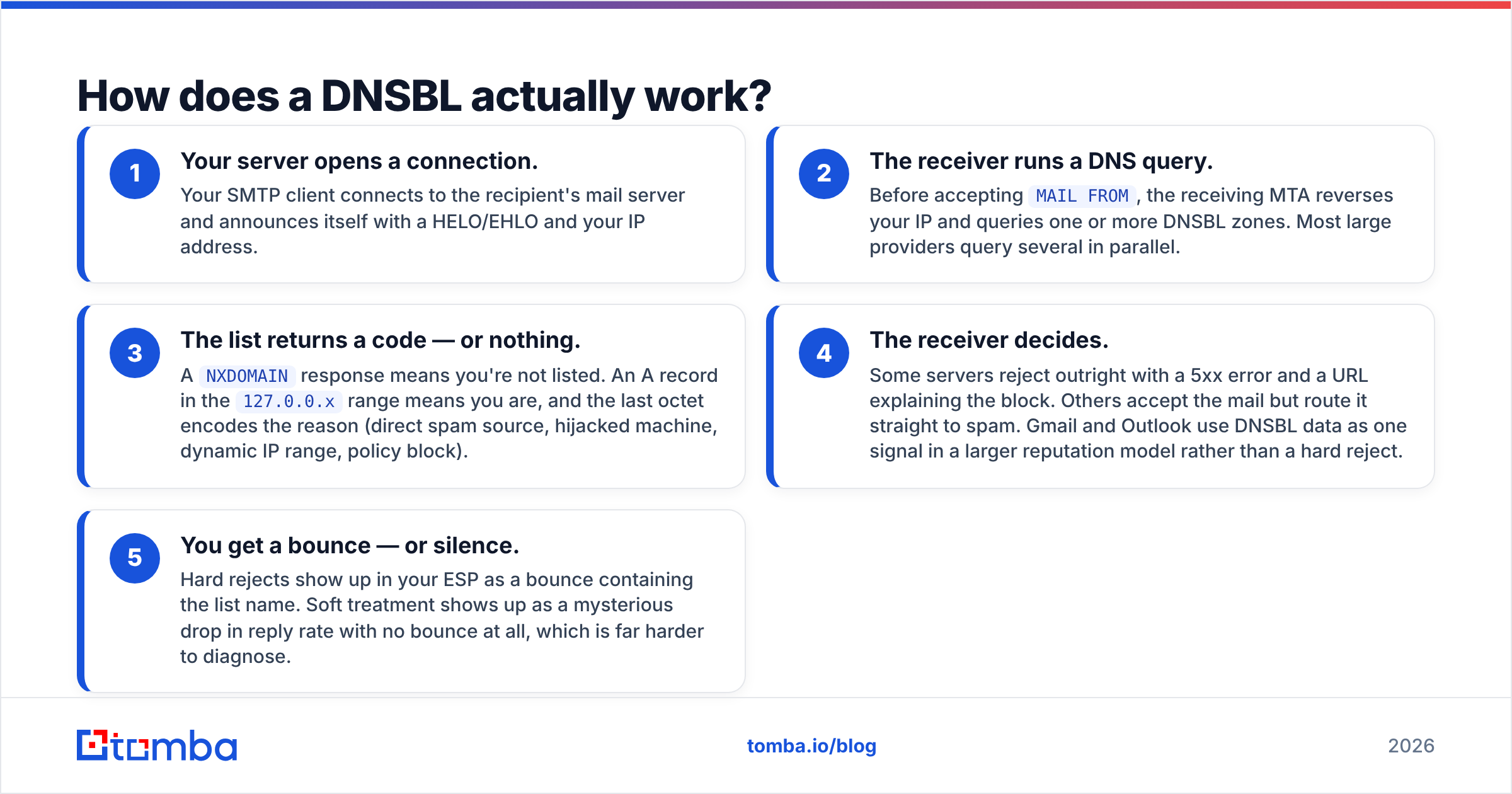
Here's the sequence, start to finish, every time you send:
- Your server opens a connection. Your SMTP client connects to the recipient's mail server and announces itself with a HELO/EHLO and your IP address.
- The receiver runs a DNS query. Before accepting
MAIL FROM, the receiving MTA reverses your IP and queries one or more DNSBL zones. Most large providers query several in parallel. - The list returns a code — or nothing. A
NXDOMAINresponse means you're not listed. An A record in the127.0.0.xrange means you are, and the last octet encodes the reason (direct spam source, hijacked machine, dynamic IP range, policy block).
The receiver takes it from there. What happens next depends on how strict that provider is.
- The receiver decides. Some servers reject outright with a 5xx error and a URL explaining the block. Others accept the mail but route it straight to spam. Gmail and Outlook use DNSBL data as one signal in a larger reputation model rather than a hard reject.
- You get a bounce — or silence. Hard rejects show up in your ESP as a bounce containing the list name. Soft treatment shows up as a mysterious drop in reply rate with no bounce at all, which is far harder to diagnose.
That fifth step is why DNSBL problems go unnoticed for weeks. If your campaign platform reports 98% "delivered" but your reply rate collapsed, you may be delivered-to-spam, not delivered-to-inbox.
Which DNSBLs actually matter in 2026?#
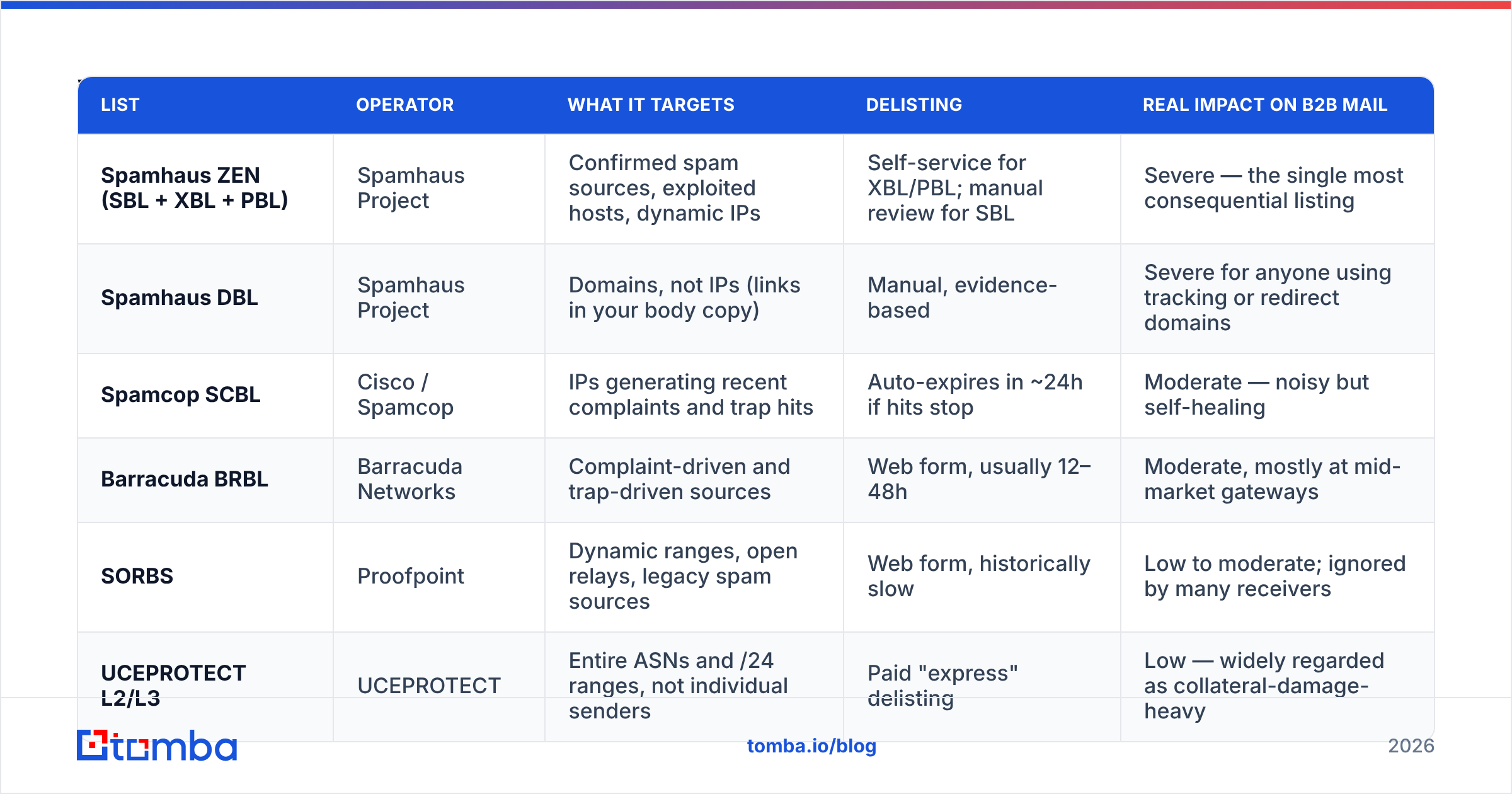
There are hundreds of public lists. Fewer than ten meaningfully change whether your mail lands. Here's how the ones that matter compare:
| List | Operator | What it targets | Delisting | Real impact on B2B mail |
|---|---|---|---|---|
| Spamhaus ZEN (SBL + XBL + PBL) | Spamhaus Project | Confirmed spam sources, exploited hosts, dynamic IPs | Self-service for XBL/PBL; manual review for SBL | Severe — the single most consequential listing |
| Spamhaus DBL | Spamhaus Project | Domains, not IPs (links in your body copy) | Manual, evidence-based | Severe for anyone using tracking or redirect domains |
| Spamcop SCBL | Cisco / Spamcop | IPs generating recent complaints and trap hits | Auto-expires in ~24h if hits stop | Moderate — noisy but self-healing |
| Barracuda BRBL | Barracuda Networks | Complaint-driven and trap-driven sources | Web form, usually 12–48h | Moderate, mostly at mid-market gateways |
| SORBS | Proofpoint | Dynamic ranges, open relays, legacy spam sources | Web form, historically slow | Low to moderate; ignored by many receivers |
| UCEPROTECT L2/L3 | UCEPROTECT | Entire ASNs and /24 ranges, not individual senders | Paid "express" delisting | Low — widely regarded as collateral-damage-heavy |
Two practical rules follow from this table.
First, not every listing deserves panic. A UCEPROTECT Level 3 listing means someone else on your provider's network misbehaved. Most receivers don't consult it. A Spamhaus SBL listing, by contrast, means Spamhaus has evidence tied to your sending and you should stop sending immediately.
Second, domain-level lists now matter as much as IP lists. If you send through a shared pool at a large ESP, your IP reputation is partly out of your hands. But your link domain, your tracking domain, and your From domain are entirely yours. The Spamhaus Project's own documentation is explicit that domain blocklisting is where most modern enforcement happens.
Why did your IP or domain get listed?#
Almost every listing traces back to one of five causes, and four of them are list-quality problems rather than content problems.
- Spam traps. These are addresses that exist only to catch senders who don't verify. Pristine traps were never real. Recycled traps were real accounts abandoned and repurposed. One trap hit from a scraped list can trigger a listing on its own.
- High hard-bounce rate. Sustained bounce rates above roughly 3–5% signal to receivers that you're mailing a list you didn't validate. Bounces are the loudest possible signal that you bought or scraped your data.
- Complaint spikes. A cluster of "report spam" clicks in a short window pushes you onto complaint-driven lists like Spamcop fast. Volume matters less than complaint rate.
The last two causes have nothing to do with your copy at all.
- Compromised infrastructure. A hacked WordPress box, an open relay, an unsecured form, or a stolen SMTP credential means your IP is genuinely sending spam — you just aren't the one writing it. This is what Spamhaus XBL exists to catch.
- Neighborhood effects. On shared IPs and shared ASNs, someone else's behavior can list the range you sit in. Nothing you did, but your mail still stops.
Notice the pattern: three of these five are downstream of sending to addresses you never confirmed were real. That's the leverage point. Reputation damage is expensive to repair and cheap to avoid.
Is a DNSBL different from a spam filter or an allowlist?#
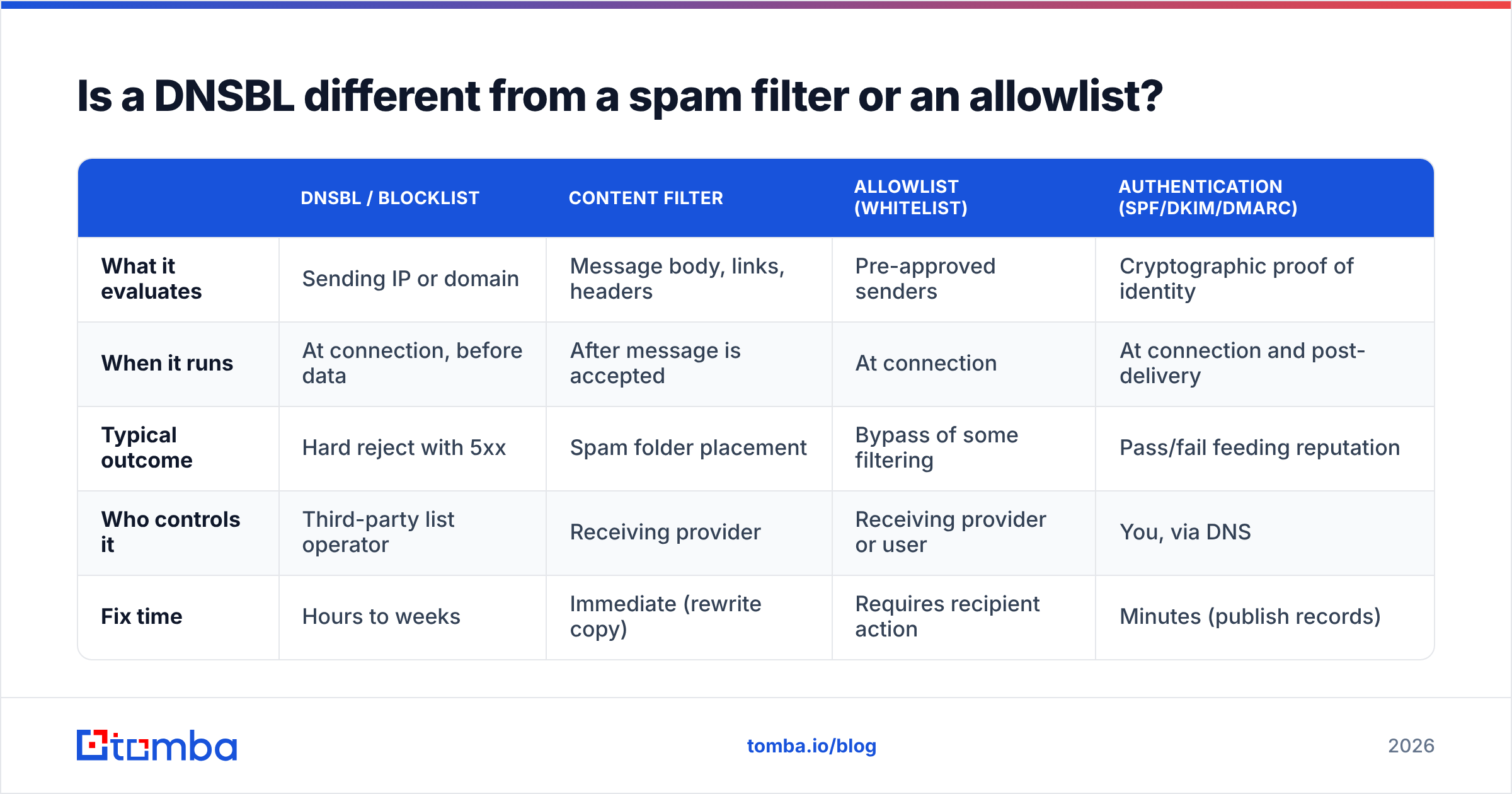
They solve different parts of the same problem, and conflating them leads to bad debugging.
| DNSBL / blocklist | Content filter | Allowlist (whitelist) | Authentication (SPF/DKIM/DMARC) | |
|---|---|---|---|---|
| What it evaluates | Sending IP or domain | Message body, links, headers | Pre-approved senders | Cryptographic proof of identity |
| When it runs | At connection, before data | After message is accepted | At connection | At connection and post-delivery |
| Typical outcome | Hard reject with 5xx | Spam folder placement | Bypass of some filtering | Pass/fail feeding reputation |
| Who controls it | Third-party list operator | Receiving provider | Receiving provider or user | You, via DNS |
| Fix time | Hours to weeks | Immediate (rewrite copy) | Requires recipient action | Minutes (publish records) |
The practical takeaway: if you rewrite your subject line to escape a DNSBL block, you're solving the wrong problem. Your message never got far enough to be read. If you pass authentication and sit on no list but still land in spam, the cause is content, engagement, or sending patterns. Start with a spam checker rather than a delisting form.
Authentication deserves a note here. Publishing a correct SPF record, DKIM signature, and DMARC policy won't get you off a DNSBL. But their absence makes any listing hurt far more, because receivers have no positive identity signal to weigh against the negative one. Run an SPF checker before you touch anything else. Treat sender reputation as a composite score: authentication, complaints, bounces, engagement, and blocklist status. That view will save you a lot of misdiagnosis.
How do you check if you're on a DNSBL?#
Do this in three passes, from fastest to most thorough.
Pass 1 — Multi-list scan. Run your sending IP and your domain through a multi-list checker to see every DNSBL blacklist hit at once. A blacklist checker queries dozens of zones and tells you which ones returned a hit. Check the IP your mail actually leaves from (not your website's IP). Then check every domain in your message: From domain, link domain, tracking domain, and image host.
Pass 2 — Read the return code. Don't stop at "listed." Each list publishes a lookup page that decodes the 127.0.0.x value. Spamhaus 127.0.0.2 means SBL (a policy or evidence-based listing). 127.0.0.4 through 127.0.0.7 means XBL (exploited machine). 127.0.0.10/.11 means PBL (an IP range that shouldn't be sending mail directly at all). Each of those points at a completely different fix.
Pass 3 — Check the provider view. Google Postmaster Tools and Microsoft SNDS show you what the two largest receivers think of your IP and domain independent of any public list. If Postmaster shows your domain reputation as "Low" or "Bad" while every public DNSBL is clean, your problem is engagement, not blocklisting.
Do this on a schedule, not just when something breaks. A weekly check on your sending IPs takes two minutes and catches listings while they're still cheap to resolve.
How do you get delisted — and how long does it take?#
Fix the cause first. Every list operator can see whether the behavior stopped. Requesting removal while you're still sending gets you re-listed within hours and lowers your credibility with manual reviewers.
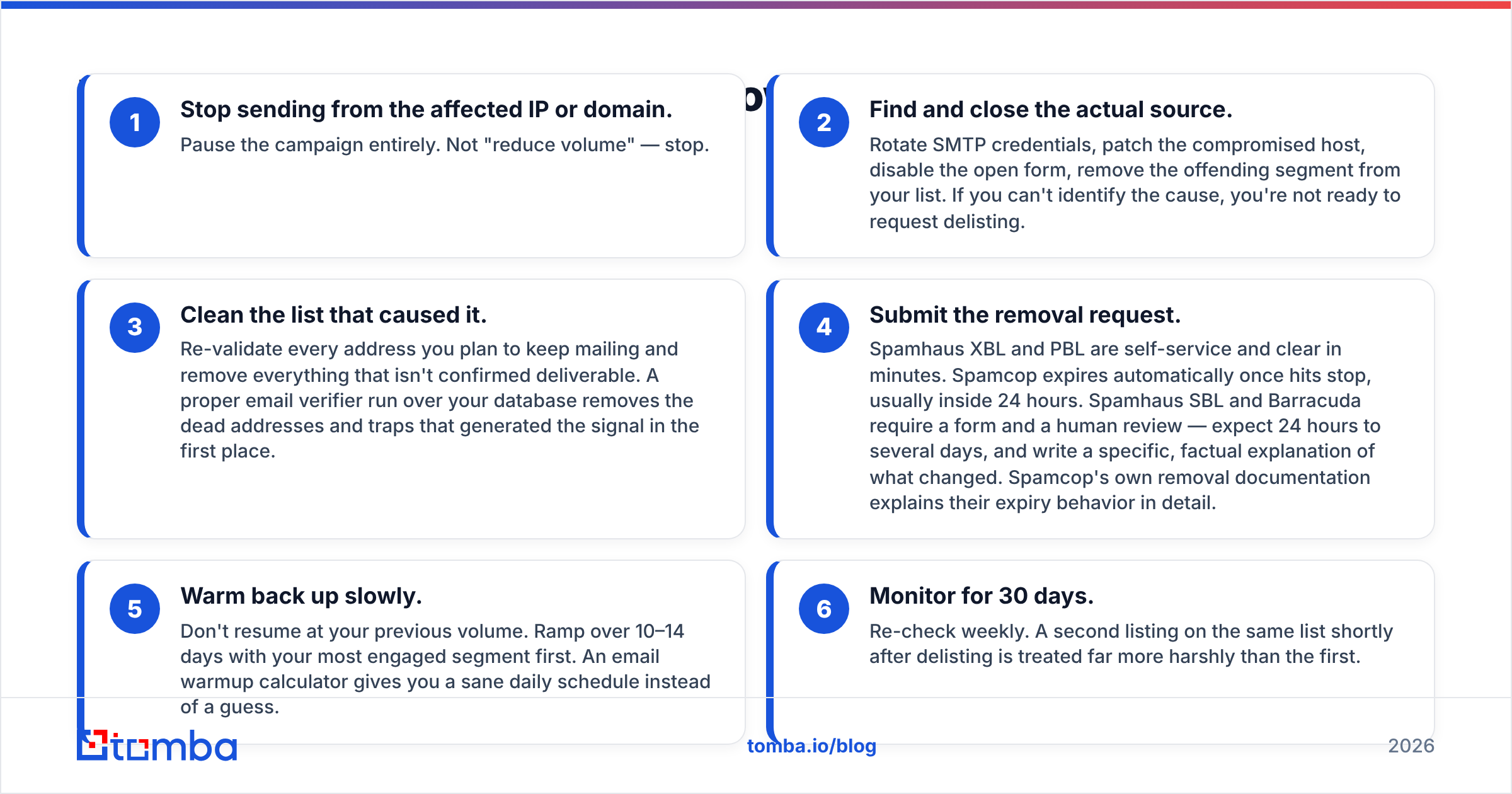
- Stop sending from the affected IP or domain. Pause the campaign entirely. Not "reduce volume" — stop.
- Find and close the actual source. Rotate SMTP credentials, patch the compromised host, disable the open form, remove the offending segment from your list. If you can't identify the cause, you're not ready to request delisting.
- Clean the list that caused it. Re-validate every address you plan to keep mailing and remove everything that isn't confirmed deliverable. A proper email verifier run over your database removes the dead addresses and traps that generated the signal in the first place.
Only then do you ask for removal. Rushing this step is what gets people listed a second time.
- Submit the removal request. Spamhaus XBL and PBL are self-service and clear in minutes. Spamcop expires automatically once hits stop, usually inside 24 hours. Spamhaus SBL and Barracuda require a form and a human review — expect 24 hours to several days, and write a specific, factual explanation of what changed. Spamcop's own removal documentation explains their expiry behavior in detail.
- Warm back up slowly. Don't resume at your previous volume. Ramp over 10–14 days with your most engaged segment first. An email warmup calculator gives you a sane daily schedule instead of a guess.
- Monitor for 30 days. Re-check weekly. A second listing on the same list shortly after delisting is treated far more harshly than the first.
Never pay a list that charges for "express removal" unless you've exhausted every other option. Paid-delisting lists are widely distrusted by receivers precisely because of that model, which means the listing was probably costing you very little in the first place.

How do you stay off DNSBLs permanently?#
The teams that never deal with blocklists share the same handful of habits.
Verify before every send, not once a year. B2B contact data decays at roughly 25–30% per year as people change jobs. A list that was clean in January contains dead mailboxes by July. Running bulk verify as a standing step in your workflow — not an occasional cleanup project — is the single highest-leverage change most teams can make.
Source data you can trust. Scraped lists and cheap "10 million B2B contacts" dumps are trap-dense by construction. Sourcing addresses through an email finder that validates at discovery time means dead addresses never enter your CRM. Vendors like Tomba and BookYourData both publish their verification methodology, which is the right thing to ask any data provider for before you buy.
Segment by engagement. Stop mailing addresses that haven't opened or replied in six months. Suppressing them costs you nothing real and removes the exact cohort most likely to be a recycled trap.
Separate your sending streams. Transactional mail, newsletters, and cold outbound should not share a domain or an IP. When cold outbound takes a reputation hit, you don't want your password resets going down with it.
Authenticate everything. SPF, DKIM, and a DMARC policy at p=quarantine or stronger. This is table stakes at Gmail and Microsoft in 2026 and costs an afternoon to set up.
Keep bounce rate under 2%. Treat it as a hard operational threshold, not a vanity metric. If a campaign crosses it, pause and re-verify before the next send rather than pushing through.
Does a DNSBL listing always kill your campaign?#
No — and knowing the difference saves you from overreacting.
A Spamhaus SBL or ZEN listing on your primary sending IP is an emergency. Stop everything and work the delisting process. A UCEPROTECT Level 3 listing affecting your entire hosting provider's range is background noise; most receivers never query it, and there's nothing you can do about your neighbors anyway.
The honest test is your own data. If your bounce rate spiked, your inbox placement dropped, and you're seeing 5xx rejects that name a list, the listing is real and costing you money. If every metric is stable and you only found the listing because a checker tool flagged something obscure, note it and move on.
What you should never do is treat a listing as a content problem. No amount of subject-line testing fixes a connection-level reject.
Where do you start?#
Start upstream. Most DNSBL blacklist listings are the visible symptom of a list you never validated: dead addresses, scraped contacts, and traps that were guaranteed to fire the moment you pressed send. Fixing infrastructure after the fact is slow and manual, and it puts you at the mercy of someone else's review queue.
Tomba's Email Finder sources professional addresses by domain, name, or company and validates them at discovery, so trap-dense records never reach your sequencer. Pair it with the email verifier for lists you've already built. That removes the cause of most listings instead of negotiating your way out of them. The free tier includes 25 searches a month; paid plans start at $49/mo on Starter, with Growth at $99/mo — full Tomba pricing is public if you want to size it against your list volume.
Clean data in, no blocklist out. That's the whole strategy.
Related guides#
Ready to find emails that actually work?
Join 150,000+ professionals who stopped guessing and started sending. Free credits on signup — no credit card required.
Get the Tomba newsletter
Practical outbound tactics and product updates — once every two weeks.
About the author