Do I Need a Dedicated IP for Email? The 2026 Deliverability Guide
A dedicated IP only helps if you send enough volume to keep it warm. Here are the real thresholds, costs, warmup timelines, and the cases where shared IPs beat dedicated ones outright.
TL;DR
- A dedicated IP only pays off when you send enough mail to keep it warm — roughly 100,000+ emails per month on a predictable schedule. Below that, a well-run shared pool almost always outperforms it.
- A brand-new dedicated IP starts with zero reputation, not good reputation. You are trading someone else's history for none at all, and that costs you 4–8 weeks of warmup.
- Cost ranges from $0 (bundled) to ~$30/month per IP at most ESPs, but the real cost is the warmup schedule and the monitoring discipline it forces on you.
- Cold outreach at 30–50 emails per inbox per day almost never justifies a dedicated IP. Your list quality, authentication, and content matter 10x more.
- The decision tree: volume → consistency → control needs → budget. If you fail the first two, stop. Nothing downstream saves you.
What is a dedicated IP for email?#
A dedicated IP is a single sending IP address assigned to your account alone. Every message that leaves it carries your reputation and nobody else's.
Think of it like renting a warehouse loading dock. A shared IP is a public loading bay: dozens of companies use it, the freight inspector judges the bay by everyone's paperwork, and one repeat offender can slow down the whole line. A dedicated IP is your own dock with your name on it. Nothing anyone else does affects your inspection record — but you also arrive with no record at all on day one, and the inspector treats unknown docks with suspicion.
Technically, mailbox providers like Gmail, Outlook, and Yahoo build reputation signals at two levels: the sending domain and the sending IP. Domain reputation has become the dominant signal over the past several years, especially at Google, which is exactly why the dedicated-IP question is less urgent in 2026 than it was in 2016. But IP reputation still matters at Microsoft, at corporate filters like Proofpoint and Mimecast, and for anyone sending high volume.
Do I need a dedicated IP for email?#
Short answer: probably not, unless you send more than 100,000 emails per month on a consistent schedule.
The reason is mechanical, not philosophical. Reputation is built from a rolling window of sending data. Most receivers evaluate roughly the last 30 days. If you send 5,000 emails a month from your own IP, you are feeding filters a trickle of signal — too little to establish a stable, positive reputation, and each individual complaint carries outsized weight. On a shared pool with millions of messages a month, the same complaint disappears into the noise.
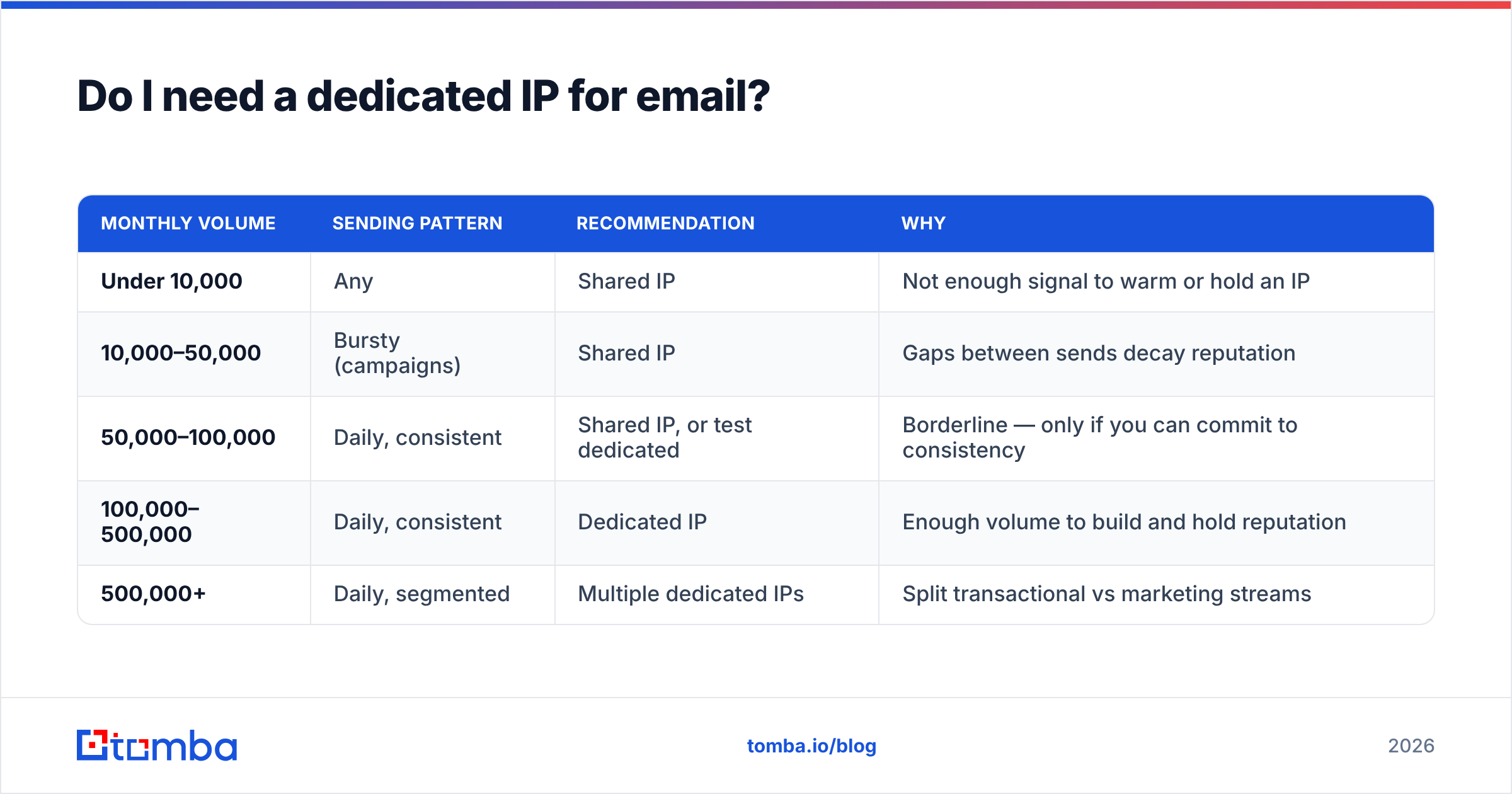
Here is the practical threshold table most deliverability teams work from:
| Monthly volume | Sending pattern | Recommendation | Why |
|---|---|---|---|
| Under 10,000 | Any | Shared IP | Not enough signal to warm or hold an IP |
| 10,000–50,000 | Bursty (campaigns) | Shared IP | Gaps between sends decay reputation |
| 50,000–100,000 | Daily, consistent | Shared IP, or test dedicated | Borderline — only if you can commit to consistency |
| 100,000–500,000 | Daily, consistent | Dedicated IP | Enough volume to build and hold reputation |
| 500,000+ | Daily, segmented | Multiple dedicated IPs | Split transactional vs marketing streams |
Notice what is not in that table: "because a vendor recommended it," "because we want to look professional," or "because our open rates dropped." None of those are IP problems. A sudden open-rate drop is far more likely to be a list-hygiene, authentication, or content problem — and moving to a fresh IP in the middle of one makes it worse, not better.
What is the real difference between shared and dedicated IPs?#
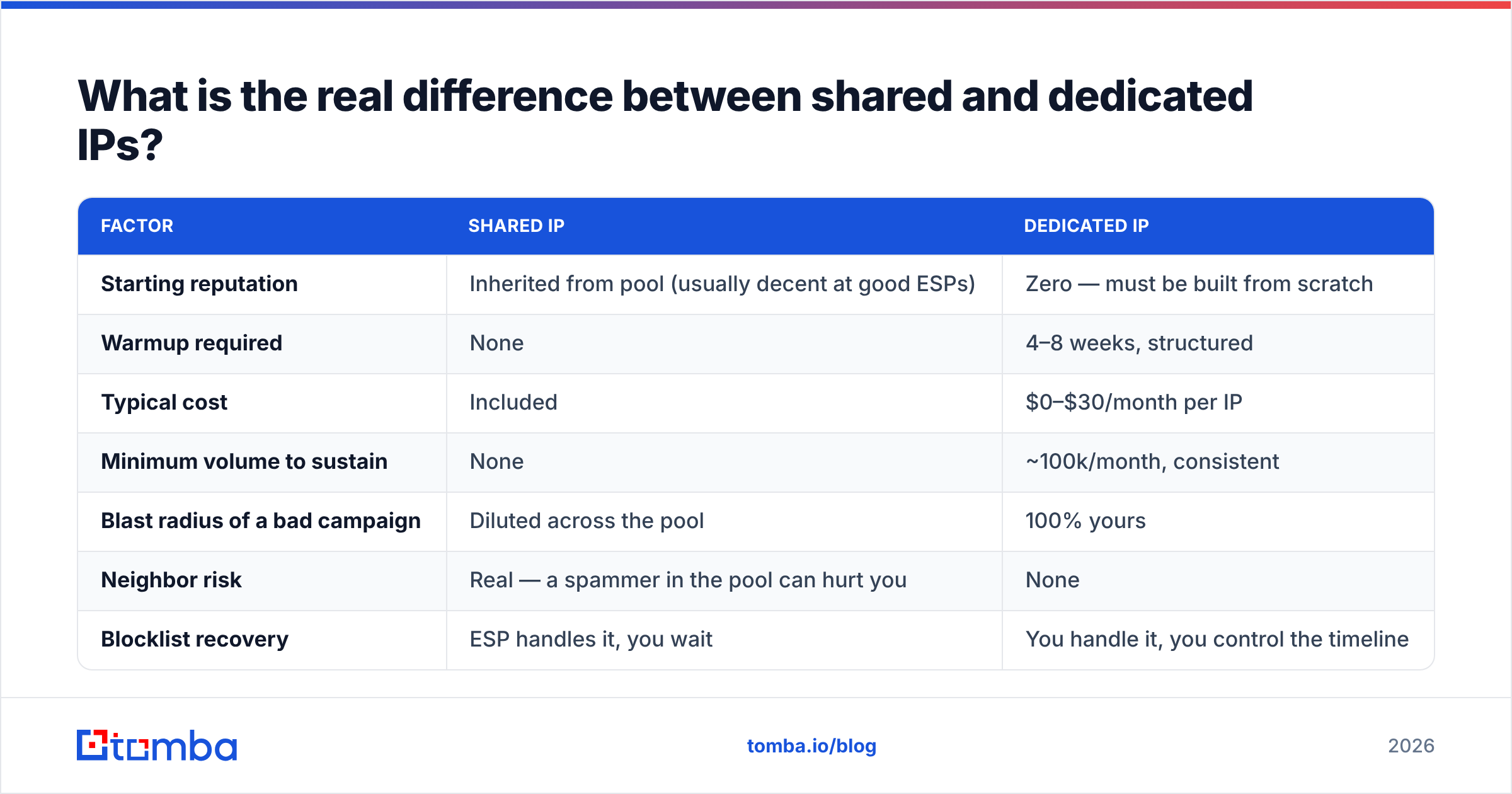
The trade-off is control versus borrowed reputation. Here is the honest side-by-side:
| Factor | Shared IP | Dedicated IP |
|---|---|---|
| Starting reputation | Inherited from pool (usually decent at good ESPs) | Zero — must be built from scratch |
| Warmup required | None | 4–8 weeks, structured |
| Typical cost | Included | $0–$30/month per IP |
| Minimum volume to sustain | None | ~100k/month, consistent |
| Blast radius of a bad campaign | Diluted across the pool | 100% yours |
| Neighbor risk | Real — a spammer in the pool can hurt you | None |
| Blocklist recovery | ESP handles it, you wait | You handle it, you control the timeline |
| Best for | Under 100k/month, bursty sends, cold outreach | High-volume transactional, large ESP migrations, regulated senders |
| Visibility in Postmaster Tools | Aggregated, hard to attribute | Clean, per-IP data you can act on |
Two rows deserve unpacking.
Neighbor risk is overstated at reputable ESPs. Providers like SendGrid, Postmark, and Amazon SES actively police their shared pools — suppression enforcement, complaint thresholds, automatic account suspension. The horror stories about "shared IP neighbors" mostly come from cheap SMTP relays with no vetting. If you are on a mainstream ESP, your shared pool is likely healthier than an IP you warm yourself.
Blast radius is understated. People want a dedicated IP for control, then discover control means responsibility. One bad list purchase, one re-engagement campaign to a 3-year-old segment, and the damage lands entirely on you. There is no pool to absorb it, and no ESP deliverability team quietly fixing it in the background.
How much does a dedicated IP actually cost?#
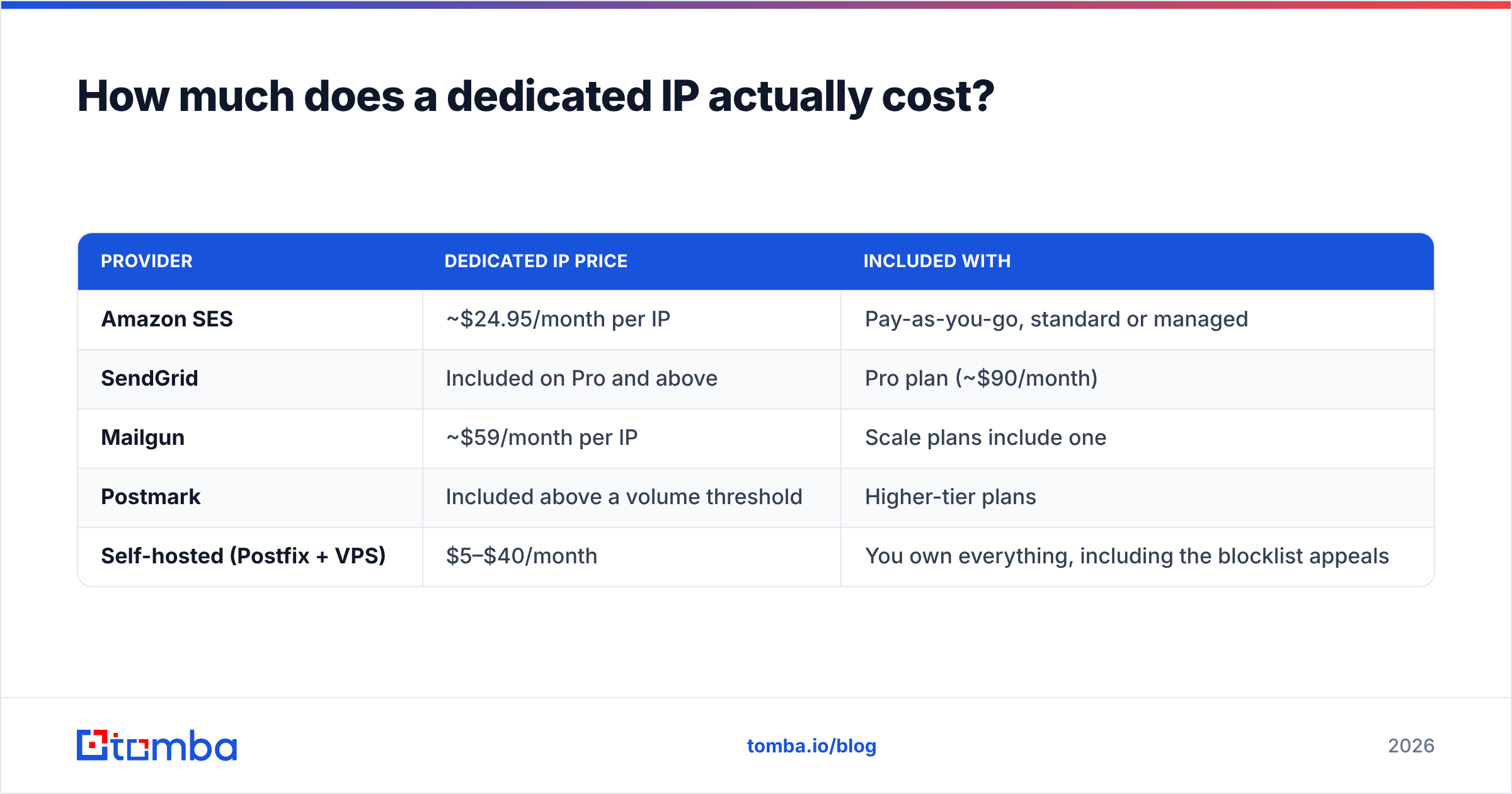
The sticker price is the small part. Here is what the line items actually look like in 2026:
| Provider | Dedicated IP price | Included with |
|---|---|---|
| Amazon SES | ~$24.95/month per IP | Pay-as-you-go, standard or managed |
| SendGrid | Included on Pro and above | Pro plan (~$90/month) |
| Mailgun | ~$59/month per IP | Scale plans include one |
| Postmark | Included above a volume threshold | Higher-tier plans |
| Self-hosted (Postfix + VPS) | $5–$40/month | You own everything, including the blocklist appeals |
Add to that: your time. A proper warmup is 30–60 days of daily monitoring, segment-by-segment ramping, and bounce triage. If a deliverability contractor runs it for you, budget $1,500–$5,000 for the ramp. If you run it yourself, budget an hour a day for the first month.
There is also a hidden cost people forget: you now need clean data before you send, not after. On a shared pool, a 6% bounce rate is survivable. On a fresh dedicated IP, a 6% bounce rate during warmup can get you throttled at Microsoft for months. That means running every list through an email verifier before it touches the new IP is no longer optional hygiene — it is the precondition for the whole project working.
How long does IP warmup take, step by step?#
Warmup is the process of proving to receivers that your new IP sends wanted mail. You do it by starting small, sending only to your most engaged contacts, and doubling volume gradually while watching complaint and bounce rates.
A workable 6-week structure:
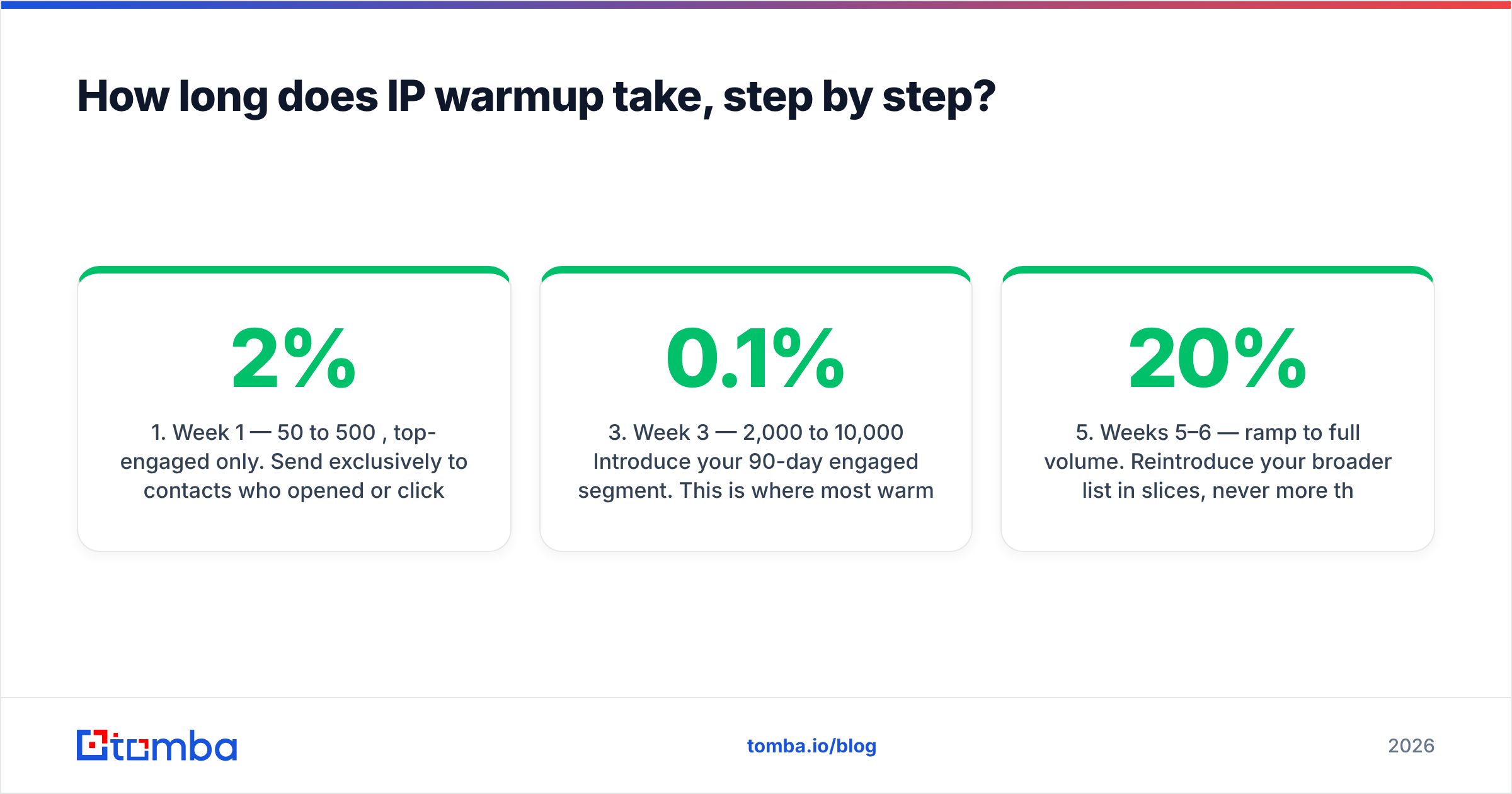
- Week 1 — 50 to 500/day, top-engaged only. Send exclusively to contacts who opened or clicked in the last 30 days. Split by mailbox provider so Gmail, Outlook, and Yahoo each see steady volume. Target: bounce rate under 2%, complaints under 0.05%.
- Week 2 — 500 to 2,000/day. Double roughly every other day. Watch sender reputation in Google Postmaster Tools; it should appear as "High" or "Medium" by the end of the week. If it reads "Low," stop doubling and hold volume flat.
- Week 3 — 2,000 to 10,000/day. Introduce your 90-day engaged segment. This is where most warmups break, because engagement rates drop and complaint rates rise simultaneously. Hold if complaints exceed 0.1%.
- Week 4 — 10,000 to 40,000/day. Add transactional mail if you are consolidating streams. Transactional traffic has excellent engagement and pulls your averages up — but never mix it permanently with marketing on the same IP.
- Weeks 5–6 — ramp to full volume. Reintroduce your broader list in slices, never more than 20% new-to-this-IP recipients per send.
- Ongoing — never let it go cold. An IP that sits idle for 30 days effectively needs re-warming. This is the constraint that disqualifies most seasonal or campaign-based senders.
If any week produces a spike in soft bounces from a single provider, roll back to the previous volume level and hold for three days. Deferrals ("4.7.0 too many messages") are the receiver asking you to slow down, not a bug to route around. A warmup calculator will get you a starting schedule, but the daily read on bounce and complaint data is what actually decides your pace.

Does a dedicated IP improve deliverability on its own?#
No. This is the single most expensive misconception in the category.
A dedicated IP is a container for reputation, not a source of it. Move bad sending practices to a dedicated IP and you get the same inbox placement, faster, with worse recovery options. What actually drives placement, in rough order of impact:
- Authentication. SPF, DKIM, and DMARC alignment. Since Google and Yahoo tightened bulk-sender requirements, DMARC is table stakes for anyone sending over 5,000 messages a day to their users. Check your records with an SPF checker before you touch anything IP-related.
- List quality. Invalid addresses, spam traps, and role accounts. A 2% hard-bounce rate is a warning; 5% is a fire.
- Engagement. Opens, clicks, replies, and — most heavily weighted — "not spam" recoveries versus "report spam" clicks.
- Complaint rate. Google's public guidance is to stay under 0.3%, and to treat 0.1% as your real ceiling.
- Content and infrastructure consistency. Consistent From name, consistent domain, working unsubscribe (one-click List-Unsubscribe headers), no URL shorteners on shared domains.
- IP reputation. Real, but downstream of everything above.
If you fix the first five and your placement is still poor, then IP-level factors are worth investigating. Start by confirming you are not on a blocklist at all — a blacklist checker takes thirty seconds and rules out the loudest possible cause before you spend a month warming a new address.
When does a dedicated IP actively hurt you?#
Four scenarios, all common:
You send in bursts. A quarterly newsletter to 200,000 people totals 800,000 emails a year — well over the volume threshold on paper. But the IP goes cold between sends, so every campaign is effectively a cold start. Shared pools handle bursty sending far better because the pool stays warm on other senders' traffic.
You are doing cold outreach. Cold email runs at 30–50 sends per mailbox per day across many inboxes and domains, specifically to distribute risk. Consolidating that onto one dedicated IP concentrates exactly the risk the architecture exists to spread. Cold senders need domain diversity and pristine email deliverability hygiene, not a dedicated IP.
You are mid-crisis. Deliverability has tanked, someone suggests a fresh IP. Moving to an unwarmed IP while your domain reputation is damaged solves nothing — domain reputation follows you — and adds a warmup penalty on top. Fix the domain first.
You do not have someone watching the data. A dedicated IP without daily monitoring of Google Postmaster Tools and Microsoft SNDS is a liability. You will find out about problems from your sales team, three weeks late.
How do you decide? A five-question checklist#
Run these in order. A "no" at any point means stay on shared.
- Do you send 100,000+ emails per month? If not, stop here.
- Do you send on a consistent daily or near-daily schedule? Gaps longer than a week are disqualifying.
- Is your hard-bounce rate under 2% and complaint rate under 0.1% today? If not, fix data quality first — a dedicated IP will amplify the problem.
- Can you commit 4–8 weeks to a monitored warmup? Including the willingness to pause and hold volume when metrics slip.
- Do you have a reason that shared cannot satisfy? Regulatory isolation, a need for per-IP data in Postmaster Tools, a planned ESP migration, or genuine documented harm from pool neighbors.
Five yeses, get the dedicated IP. Four or fewer, spend the same money on data quality and see your placement improve faster.
What about subdomains and multiple IPs?#
If you clear the checklist, structure matters more than the IP count.
Separate your streams by subdomain, not just by IP. Transactional mail from mail.yourdomain.com, marketing from news.yourdomain.com, cold outreach from an entirely separate domain. Since domain reputation carries more weight than IP reputation at Google, subdomain separation gives you most of the isolation benefit at zero cost and zero warmup risk.
Add a second IP only above ~500,000/month. Two IPs split your volume in half, which halves the reputation signal each one gets. Below half a million monthly, one IP is stronger than two.
Managed dedicated IPs are a reasonable middle path. Amazon SES Dedicated IPs (managed) automates the ramp schedule and scales the IP pool for you. You give up some control, but you avoid the most common failure mode: a human ramping too fast because the campaign calendar said so.
What should you do instead if you are under the threshold?#
Put the money into the inputs. In order of return:
- Verify before you send. Every list, every time — including opt-ins older than 90 days. A validated list is the cheapest deliverability improvement available. If you are building lists rather than importing them, sourcing addresses that are verified at discovery time is cheaper than cleaning them later; Tomba's email finder returns a confidence score with each result so low-confidence addresses never reach your sender.
- Fix authentication completely. SPF, DKIM, DMARC at
p=quarantineminimum, plus a one-click unsubscribe header. - Segment by engagement. Suppress anyone with zero opens in 180 days. It feels like losing reach; it is the fastest way to raise placement for everyone else.
- Monitor weekly. Postmaster Tools, SNDS, and your ESP's complaint dashboard. Fifteen minutes a week catches problems a month before revenue does.
- Keep sending volume steady. Consistency helps on shared IPs too — receivers model expected volume per sender, and a 10x spike reads as compromise.
The verdict#
Dedicated IPs are a scaling tool, not a fix. If you send six figures of mail every month on a steady schedule and you have someone who will watch the numbers daily, a dedicated IP gives you clean attribution, isolation from neighbors, and control over your own recovery. If you do not, it hands you a warmup project, a monthly bill, and full ownership of every mistake — in exchange for reputation you were already getting for free.
Start where the leverage is. Bad addresses are the number-one cause of bounce spikes, blocklist listings, and the reputation damage people blame on shared IPs. Run your list through Tomba's Email Finder to source verified, confidence-scored addresses before your first send — the free tier covers 25 searches a month, and paid plans start at $49/month on the Starter tier with bulk processing and API access. Fix the data, then decide whether the IP question still matters.
Related guides#
Ready to find emails that actually work?
Join 150,000+ professionals who stopped guessing and started sending. Free credits on signup — no credit card required.
Get the Tomba newsletter
Practical outbound tactics and product updates — once every two weeks.
About the author