Domain Blacklisted Recovery: The 2026 Delisting Playbook
Your domain hit Spamhaus and replies flatlined overnight. Here's the exact triage order, delisting request wording, and 30-day rebuild plan that actually gets mail back in the inbox.
TL;DR
- A blacklist listing is a symptom, not the disease. Delisting before you fix the cause gets you re-listed in days, and repeat offenders sit longer the second time.
- Triage in this order: confirm the listing → identify which asset is listed (domain, sending IP, or link domain) → stop all sending → fix the root cause → request removal → rebuild volume slowly.
- Spamhaus DBL, SURBL, and SpamCop cover most real damage. Most of the 200+ "blacklists" a free checker flags are irrelevant to Gmail and Outlook delivery.
- Bad list hygiene causes the majority of domain listings. Spam traps in a purchased or scraped list are the single fastest way to get burned.
- Expect 7-14 days to delisting and 30-45 days to full reputation recovery. Plan volume accordingly instead of blasting the moment you're clear.
Your reply rate did not slowly decline. It fell off a cliff on a Tuesday. Bounce messages started quoting a URL you have never visited, and someone forwarded you a screenshot of your own email sitting in a spam folder. That pattern — sudden, total, with a URL in the bounce string — is a blacklist listing, and it needs a different response than a normal deliverability slump.
This guide covers what actually happens during domain blacklisted recovery: how to confirm it, which lists matter, how to word a removal request so a human approves it, and how to rebuild sending volume without triggering a second listing.
What does it mean when your domain is blacklisted?#
A blacklist (increasingly called a blocklist or DNSBL) is a published list of domains and IP addresses associated with spam. Receiving mail servers query these lists in real time during the SMTP conversation. If your sending domain, your sending IP, or a domain linked inside your email body appears on a list the receiver trusts, your message gets rejected outright or dumped into spam before any content filtering happens.
Three different assets can be listed, and they are not interchangeable:
- Your sending domain — the domain in your From address and Return-Path. This is the most damaging listing because it follows you across every IP and every sending tool you switch to.
- Your sending IP — the server IP your mail leaves from. On shared infrastructure (most ESPs, most cold email tools), a neighbor's behavior can list you. On a dedicated IP, it's yours alone.
- A link domain in your body copy — the URL shortener, tracking domain, or landing page you link to. Spamhaus DBL and SURBL list these aggressively, and a listing here poisons every email containing that link even though your sending domain is clean.
Teams routinely spend a week fixing the wrong asset. Read the actual bounce string before you touch anything — it names the list and usually names the listed entity.

Which blacklists actually matter in 2026?#
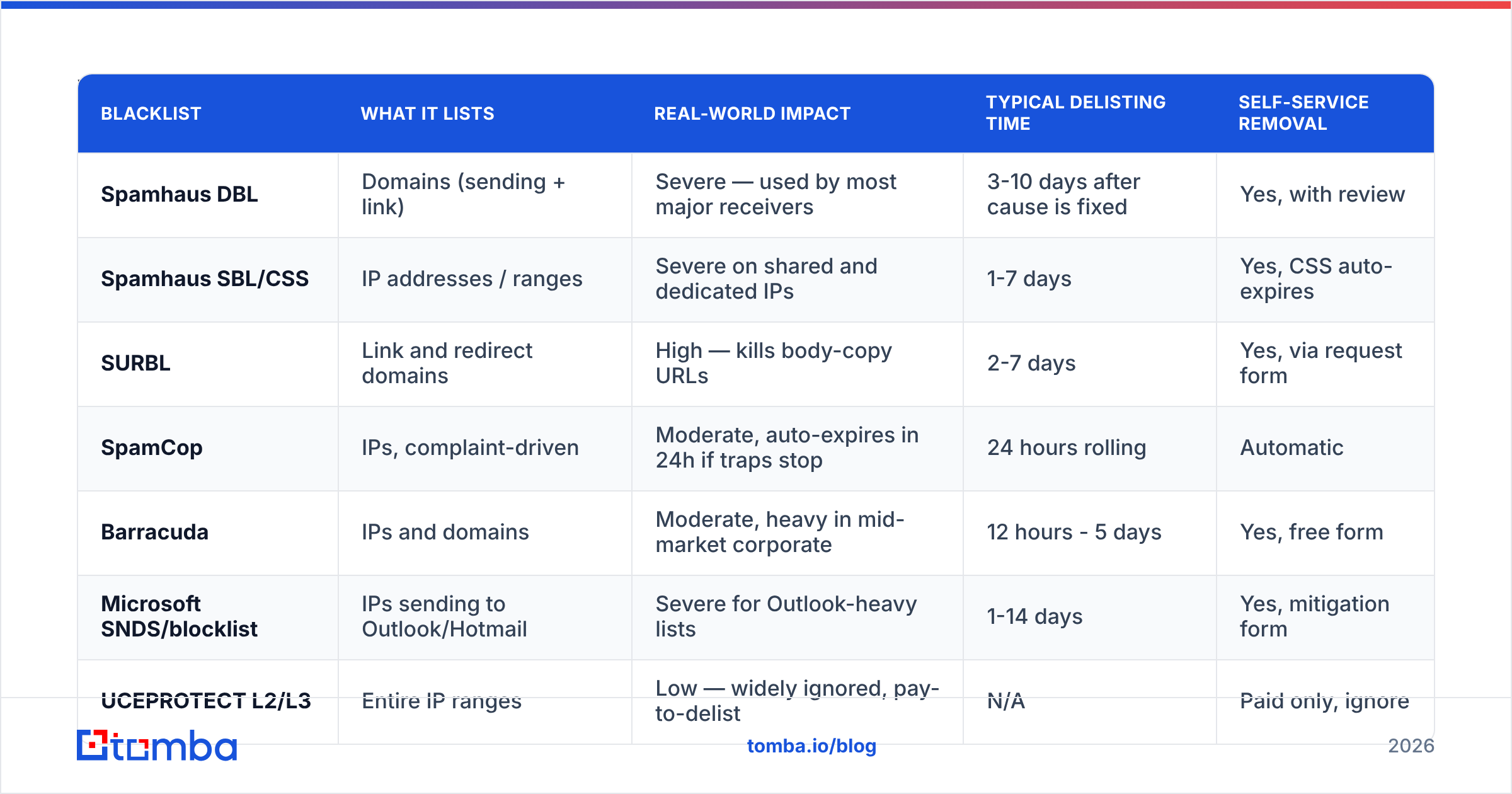
Free "check 200 blacklists" tools produce alarming red rows that mean nothing. A listing on an obscure regional DNSBL with three subscribers has zero effect on whether Gmail accepts your mail. Focus on the handful with real market weight.
| Blacklist | What it lists | Real-world impact | Typical delisting time | Self-service removal |
|---|---|---|---|---|
| Spamhaus DBL | Domains (sending + link) | Severe — used by most major receivers | 3-10 days after cause is fixed | Yes, with review |
| Spamhaus SBL/CSS | IP addresses / ranges | Severe on shared and dedicated IPs | 1-7 days | Yes, CSS auto-expires |
| SURBL | Link and redirect domains | High — kills body-copy URLs | 2-7 days | Yes, via request form |
| SpamCop | IPs, complaint-driven | Moderate, auto-expires in 24h if traps stop | 24 hours rolling | Automatic |
| Barracuda | IPs and domains | Moderate, heavy in mid-market corporate | 12 hours - 5 days | Yes, free form |
| Microsoft SNDS/blocklist | IPs sending to Outlook/Hotmail | Severe for Outlook-heavy lists | 1-14 days | Yes, mitigation form |
| UCEPROTECT L2/L3 | Entire IP ranges | Low — widely ignored, pay-to-delist | N/A | Paid only, ignore |
Two rules follow from that table. First, if you are only listed on UCEPROTECT L2 or a no-name aggregator, do nothing and keep sending — paying a delisting fee to a list nobody queries is a scam tax. Second, if Spamhaus DBL names your sending domain, stop all outbound immediately. Continued sending while listed compounds the complaint data they are using to justify the listing.
Check your own status directly at the Spamhaus lookup tool rather than through a third-party aggregator, and pull your Outlook data from Microsoft's SNDS portal. Aggregators cache results and will tell you you're still listed hours after you're clear.
How do you diagnose the root cause?#
Delisting without diagnosis is the mistake that turns a 10-day problem into a 90-day one. Work through these causes in order of frequency:
- Spam traps in your list. Pristine traps (addresses never used by a human, seeded by list operators) and recycled traps (abandoned addresses reactivated as traps) are the number one cause of domain listings. A single pristine trap hit can trigger a Spamhaus DBL listing. Purchased lists, scraped lists, and lists older than 12 months are trap minefields.
- Volume ramp that outran your reputation. Going from 50 to 2,000 sends a day on a domain with no history reads as a spam cannon to every filter in the chain. New domains need weeks of graduated ramp.
- Complaint rate above 0.3%. Recipients hitting "report spam" feeds directly into complaint-driven lists like SpamCop and Microsoft's internal blocklist. Above 0.3% you are in trouble; above 0.5% you are getting listed.
- Broken or missing authentication. No SPF alignment, no DKIM signature, or a DMARC policy of
p=noneon a domain that gets spoofed. Check your setup with an SPF checker before assuming your list is the problem. - A compromised account or open relay. If someone phished a mailbox on your domain and is now blasting from it, no amount of list hygiene helps until you rotate credentials and close the hole.
- Shared IP contamination. You did everything right and a neighbor on your ESP's shared pool did not. This is the only cause where the fix is "change providers," not "change behavior."
To distinguish between them, pull the last 30 days of bounce logs and sort by SMTP response code. A wall of 550 5.7.1 with a Spamhaus URL points at listing. A high rate of 550 5.1.1 user unknown before the listing points at list hygiene as the cause. If your hard bounce rate was above 3% in the weeks before the listing, you have your answer — your data was stale, and the traps came along for the ride.
How do you actually get delisted?#
Once the cause is fixed and documented, submit removal requests. The wording matters more than people expect. List operators read these, and a request that admits the cause and names the fix gets approved. A request that says "please remove me, I don't send spam" gets ignored.
Use this structure:
Subject: Delisting request — [yourdomain.com] — root cause remediated
Body:
- What was listed and when you noticed it.
- The specific root cause, named plainly. "We imported a 40,000-record list purchased from a third-party vendor in March 2026 without verification. It contained spam traps."
- What you changed, concretely. "We deleted the entire imported list, ran our remaining 12,000 contacts through verification and removed 1,840 invalid addresses, and implemented mandatory verification on all imports going forward."
- What prevents recurrence. Policy changes, not intentions. "No list enters our sending platform without passing verification. Double opt-in is now required for all form signups."
- A single point of contact.
Do not submit repeat requests. Do not submit before the fix is real — Spamhaus checks, and a false claim extends your listing. And do not resume sending while the request is pending.
What should the recovery timeline look like?#
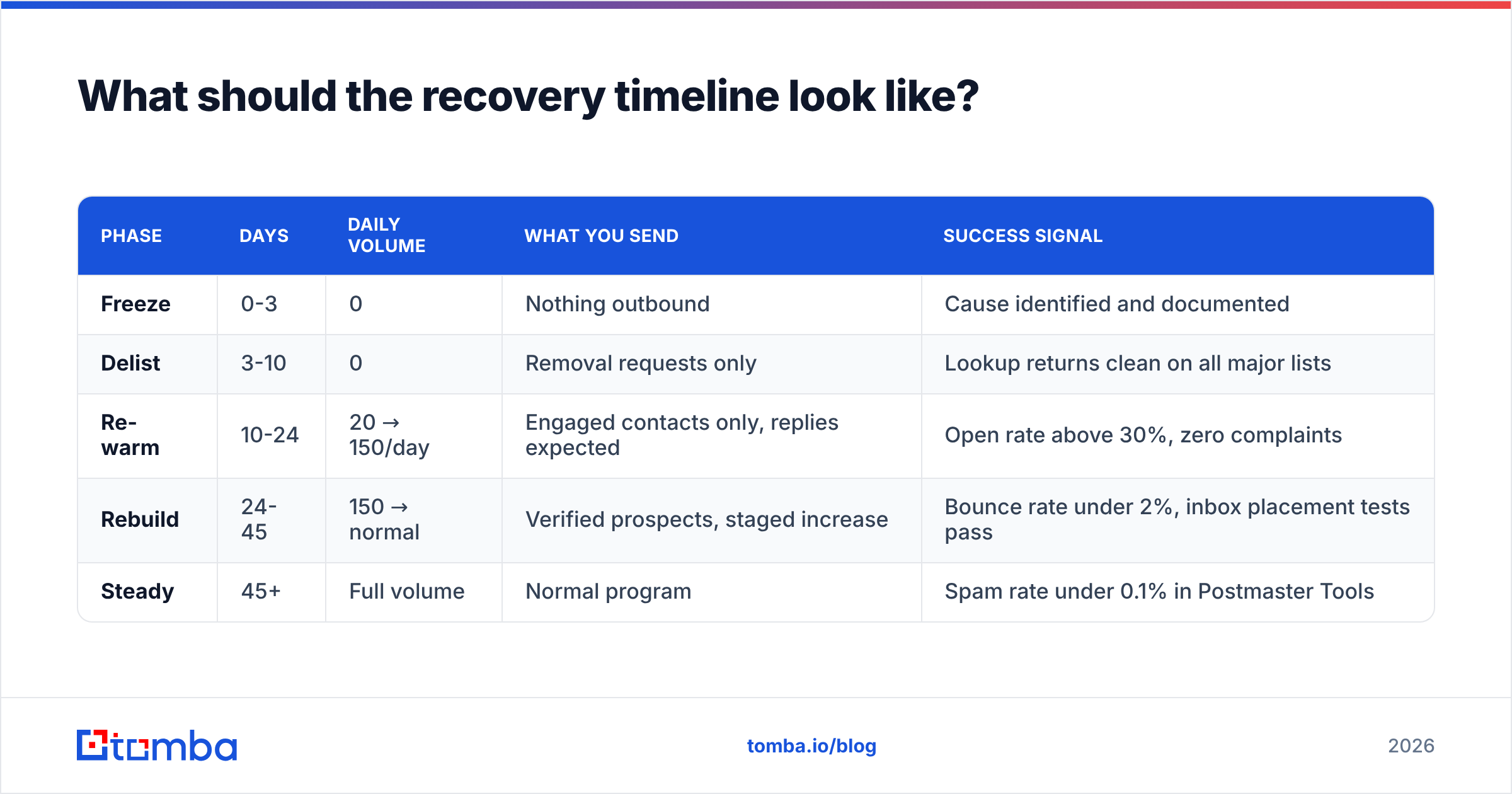
Recovery is two phases with different clocks. Delisting is fast; reputation repair is not. Receiving servers keep their own internal reputation scores that no list operator controls, and Gmail in particular has a memory measured in weeks.
| Phase | Days | Daily volume | What you send | Success signal |
|---|---|---|---|---|
| Freeze | 0-3 | 0 | Nothing outbound | Cause identified and documented |
| Delist | 3-10 | 0 | Removal requests only | Lookup returns clean on all major lists |
| Re-warm | 10-24 | 20 → 150/day | Engaged contacts only, replies expected | Open rate above 30%, zero complaints |
| Rebuild | 24-45 | 150 → normal | Verified prospects, staged increase | Bounce rate under 2%, inbox placement tests pass |
| Steady | 45+ | Full volume | Normal program | Spam rate under 0.1% in Postmaster Tools |
During re-warm, send only to contacts who have replied to you in the last 90 days. You are not prospecting in this phase — you are manufacturing positive engagement signals for the filters watching you. Every reply, every "not in spam" action, every forward pushes your reputation back up faster than volume ever will. Use an email warmup calculator to set the daily step function rather than eyeballing it.
Run inbox placement tests at each phase boundary. If you jump from re-warm to rebuild while still landing in Promotions at Gmail, you'll stall and have to back down again.

Should you burn the domain and start over?#
Sometimes, but far less often than the "just buy a new domain" crowd claims. Burning your primary domain means losing years of accumulated sender reputation and — if it's your company domain — creating brand confusion with every prospect who Googles you.
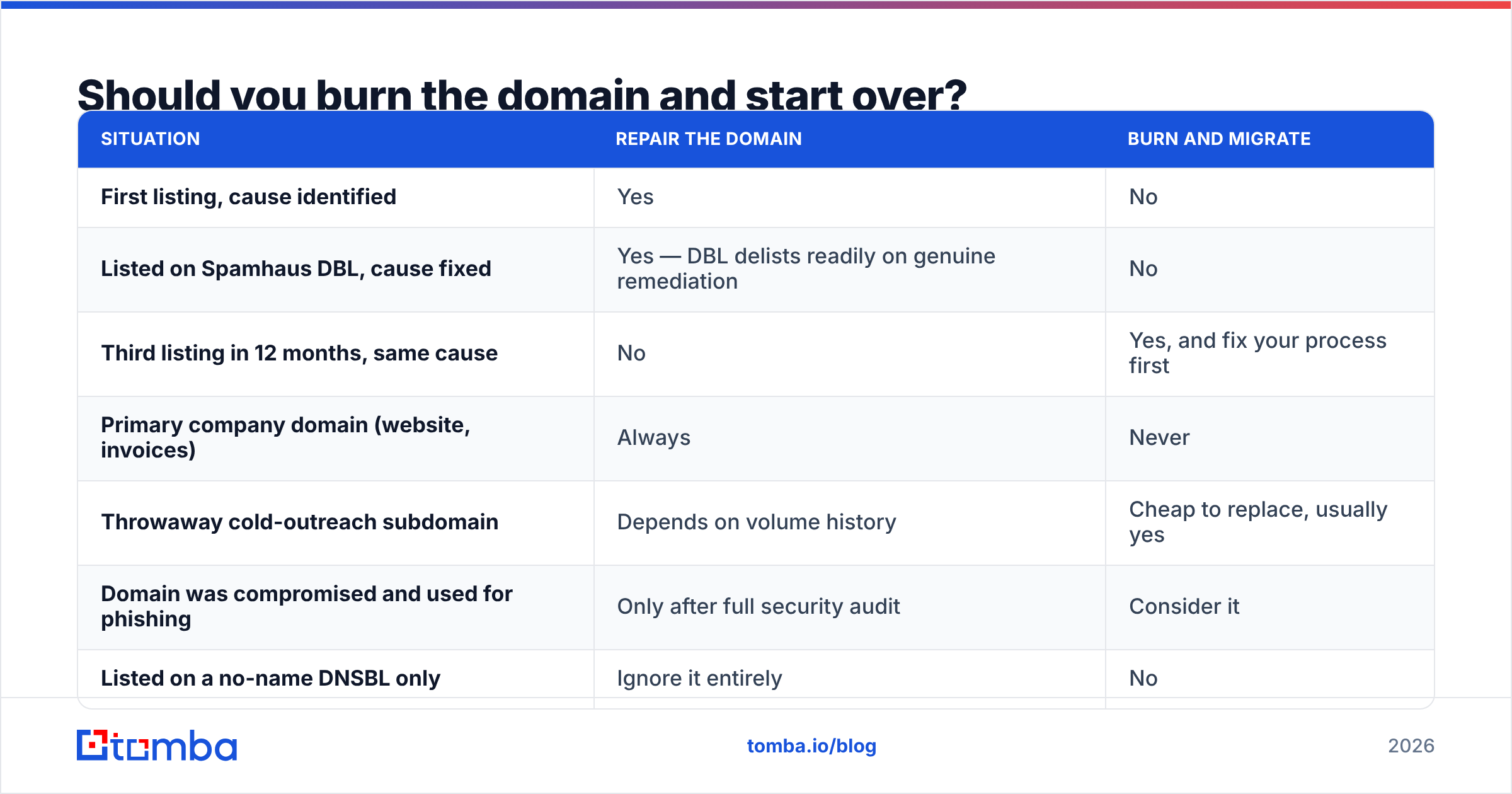
Here's the honest decision matrix:
| Situation | Repair the domain | Burn and migrate |
|---|---|---|
| First listing, cause identified | Yes | No |
| Listed on Spamhaus DBL, cause fixed | Yes — DBL delists readily on genuine remediation | No |
| Third listing in 12 months, same cause | No | Yes, and fix your process first |
| Primary company domain (website, invoices) | Always | Never |
| Throwaway cold-outreach subdomain | Depends on volume history | Cheap to replace, usually yes |
| Domain was compromised and used for phishing | Only after full security audit | Consider it |
| Listed on a no-name DNSBL only | Ignore it entirely | No |
The right architecture prevents this decision from being painful at all: keep your primary domain for corporate mail and reputation, and run cold outreach from separate sending domains. If a sending domain gets torched, your invoices still deliver.
Note that a new domain does not reset your problem if the cause was your data. You'll be back here in six weeks with a new domain and the same spam traps.
How do you prevent a second listing?#
Prevention is data quality plus discipline. Roughly in order of return on effort:
- Verify every address before it enters your sending tool. Not once a quarter — at import, every time. A real-time email verifier catches invalid syntax, dead mailboxes, disposable domains, and role accounts before they can hard-bounce. Verification is the single highest-leverage habit in deliverability.
- Handle catch-all domains separately. Catch-all servers accept everything, so standard verification returns "unknown." Segment them, use a catch-all verifier for a confidence score, and send to them at lower volume with tighter monitoring.
- Source contacts, don't scrape them. Pattern-guessed and scraped addresses carry trap risk that verification can only partly mitigate. Sourcing from a provider that maintains and refreshes its own data — Tomba, BookYourData, or similar — meaningfully lowers trap exposure compared to a scraper output dumped straight into your sequencer.
- Suppress hard bounces immediately and permanently. Any address that hard-bounced once should never receive another send. Recycled traps often present as hard bounces first.
- Monitor Google Postmaster Tools weekly. Spam rate, domain reputation, and authentication pass rates are all visible there. A reputation drop from High to Medium is your warning shot — act on it before the listing.
- Cap volume per mailbox. 50 cold sends per mailbox per day is a workable ceiling. Scale by adding mailboxes and domains, not by pushing one mailbox harder.
- Re-verify quarterly. B2B email data decays at roughly 22-30% per year as people change jobs. Last quarter's clean list is this quarter's bounce problem. Run bulk verify on your active database on a schedule.
Google publishes its sender requirements openly, and they are the practical baseline every B2B sender should meet — SPF and DKIM on every message, DMARC on the organizational domain, one-click unsubscribe for bulk mail, and a spam rate held under 0.3%. Read them at the Google email sender guidelines and treat them as the floor, not the target.
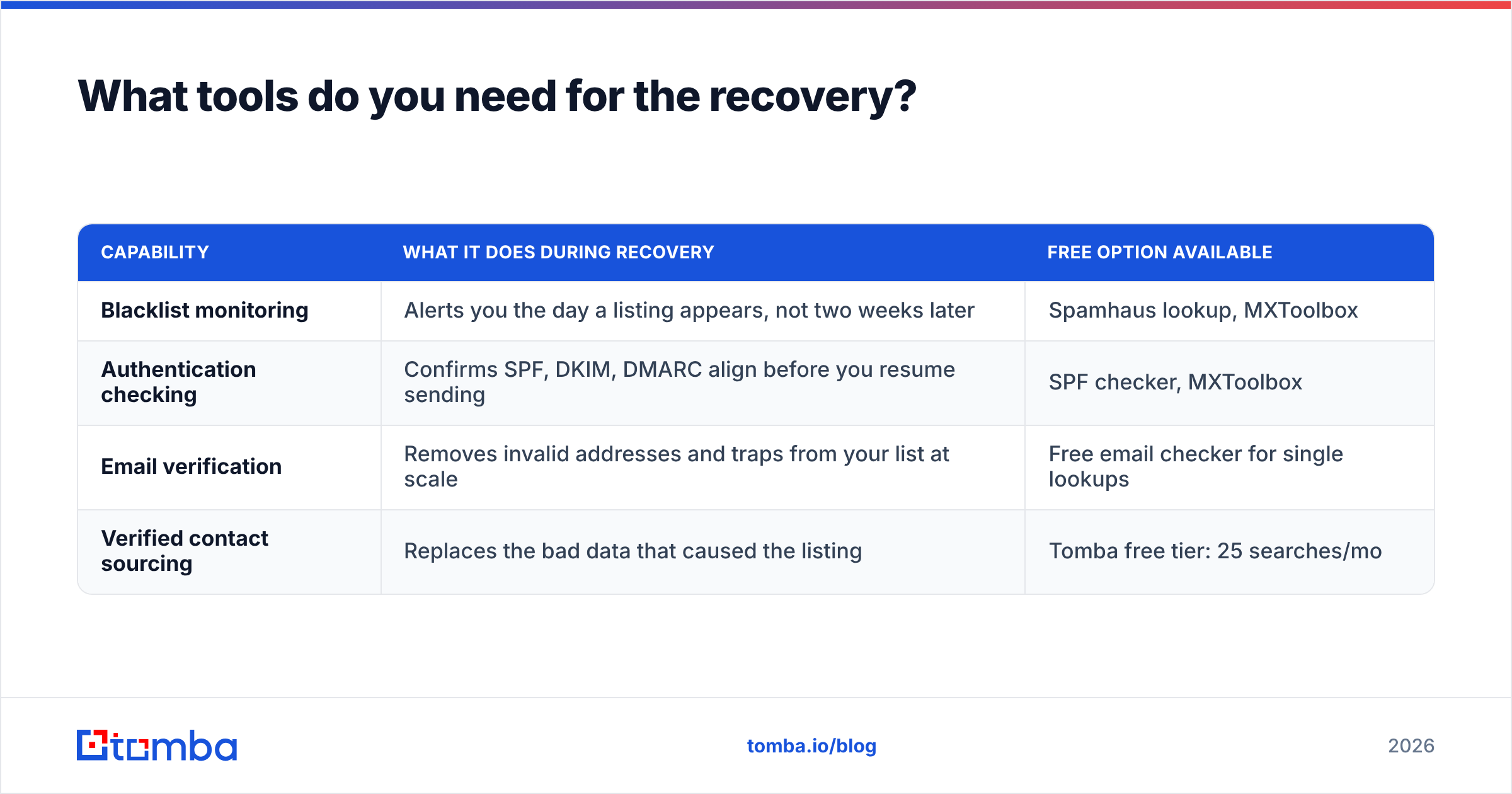
What tools do you need for the recovery?#
You need four capabilities, and they are usually four different products:
| Capability | What it does during recovery | Free option available |
|---|---|---|
| Blacklist monitoring | Alerts you the day a listing appears, not two weeks later | Spamhaus lookup, MXToolbox |
| Authentication checking | Confirms SPF, DKIM, DMARC align before you resume sending | SPF checker, MXToolbox |
| Email verification | Removes invalid addresses and traps from your list at scale | Free email checker for single lookups |
| Verified contact sourcing | Replaces the bad data that caused the listing | Tomba free tier: 25 searches/mo |
On sourcing specifically, cost matters when you are rebuilding a list from scratch. Tomba's plans run Free (25 searches/mo), Starter at $49/mo, Growth at $99/mo, and Pro at $249/mo — full Tomba pricing is public, and every plan includes verification alongside finding, so you're not paying two vendors to solve one problem. Compare against your current stack on a cost-per-verified-contact basis rather than cost-per-credit, because credits spent on addresses that bounce are the reason you're reading this article.
If you run recovery programmatically, the Tomba API lets you gate your CRM imports on a verification response, which is the structural fix for the human-error path that caused most listings in the first place.
Get your list clean before you send again#
Delisting gets your mail accepted. Clean data keeps it that way. The teams that get blacklisted twice are almost always the teams that treated recovery as a paperwork exercise instead of a data problem.
Start by rebuilding your prospect list on verified addresses. The Tomba Email Finder returns professional email addresses with a confidence score and built-in verification, so the contacts entering your sequencer are ones that actually exist — no traps, no guessed patterns, no 8% bounce rate waiting to re-list you. Run your existing database through verification first, then source the gaps. Free tier gives you 25 searches to test the accuracy against addresses you can confirm yourself before you commit to a plan.
Related guides#
Ready to find emails that actually work?
Join 150,000+ professionals who stopped guessing and started sending. Free credits on signup — no credit card required.
Get the Tomba newsletter
Practical outbound tactics and product updates — once every two weeks.
About the author