Domain Lookup Tool: How to Find Every Email on a Domain
A domain lookup tool turns one company URL into a verified contact list. Here's what these tools actually return, how accurate they are in 2026, and which one fits your workflow.
TL;DR
- A domain lookup tool takes a company domain (
stripe.com) and returns the people, email addresses, and infrastructure attached to it — not just DNS records. - There are four different products hiding behind the same phrase: WHOIS/DNS lookup, email domain search, tech-stack lookup, and company enrichment. Pick the wrong one and you get registrar data when you wanted decision-makers.
- Accuracy is the whole game. A tool that returns 40 addresses with a 70% deliverability rate is worse than one that returns 18 at 96%, because bounces cost you sender reputation.
- Expect to pay $39–$99/mo for serious volume. Tomba's domain search starts free at 25 searches/mo and moves to $49/mo on Starter.
- Never send from a raw lookup export. Verify first, drop catch-alls into a separate bucket, and cap first-touch volume per domain.
What is a domain lookup tool?#
A domain lookup tool takes a single domain name as input and returns structured data about who or what sits behind it. Think of it like a reverse phone book for the internet: you already know the address of the building, and the tool tells you who works inside, which floor they're on, and how the mail is routed.
The confusion starts because at least four distinct product categories market themselves with the same words:
- WHOIS / registrar lookup — returns registration date, registrar, name servers, and (post-GDPR, usually redacted) registrant contact. Useful for domain age, ownership disputes, and expiry monitoring. Useless for sales.
- DNS / mail-infrastructure lookup — returns MX, SPF, DMARC, and A records. Tells you whether a company runs Google Workspace or Microsoft 365, whether it has a SPF record configured, and whether the domain is a catch-all. Critical for deliverability decisions.
- Email domain search — returns every professional email address discovered on that domain, plus names, job titles, sources, and a confidence score. This is what most B2B teams actually mean when they say "domain lookup tool."
- Company / tech-stack enrichment — returns headcount, industry, funding, location, and the software running on the site. Good for scoring and segmentation, not for reaching a human.
Most people search for one and buy another. If your goal is "find the head of engineering at this company and email her," category 3 is the one you need, with category 2 as a supporting check.
What can you actually pull from a domain lookup?#
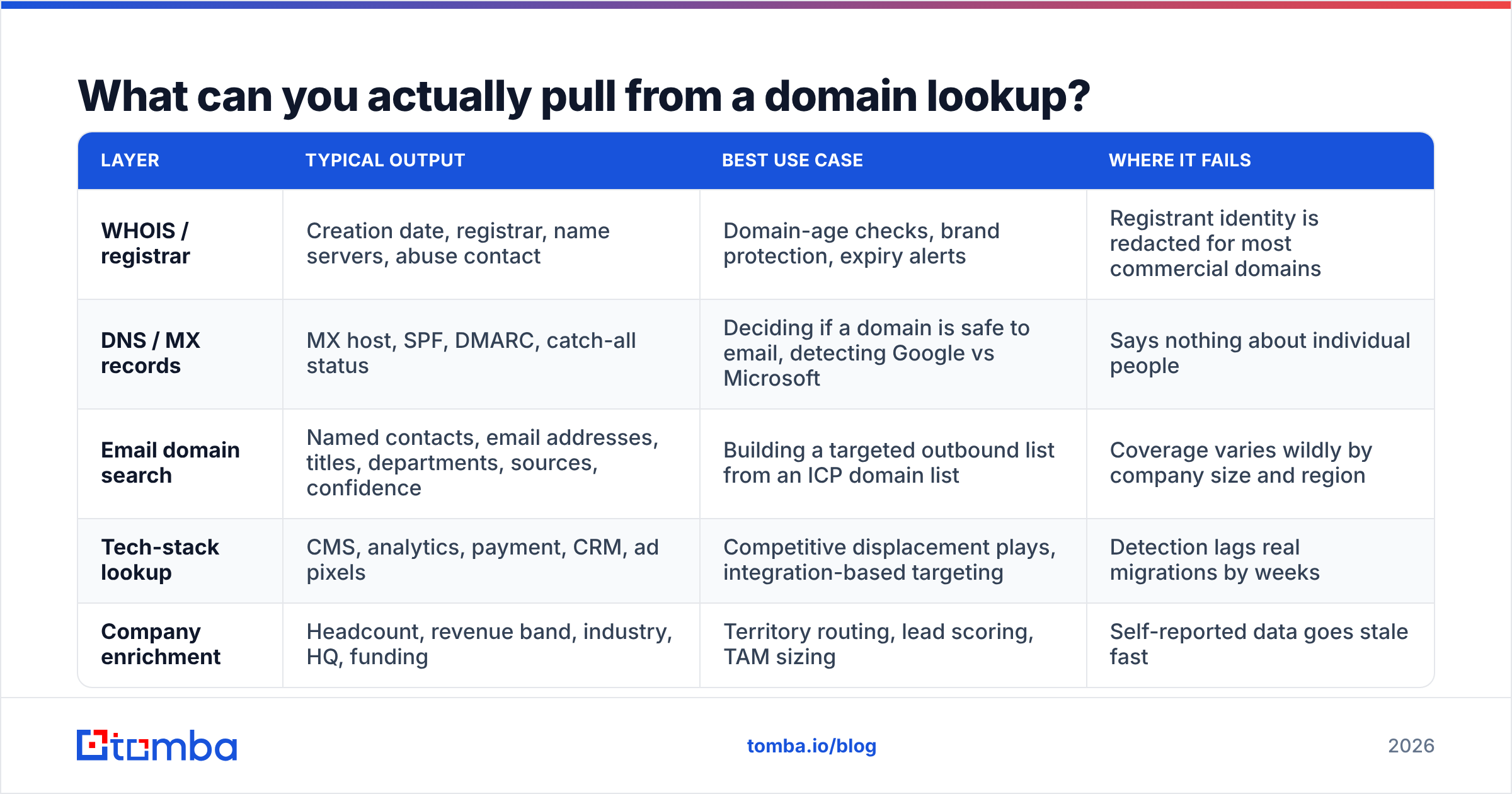
Here's what each layer returns and what it's genuinely good for:
| Layer | Typical output | Best use case | Where it fails |
|---|---|---|---|
| WHOIS / registrar | Creation date, registrar, name servers, abuse contact | Domain-age checks, brand protection, expiry alerts | Registrant identity is redacted for most commercial domains |
| DNS / MX records | MX host, SPF, DMARC, catch-all status | Deciding if a domain is safe to email, detecting Google vs Microsoft | Says nothing about individual people |
| Email domain search | Named contacts, email addresses, titles, departments, sources, confidence | Building a targeted outbound list from an ICP domain list | Coverage varies wildly by company size and region |
| Tech-stack lookup | CMS, analytics, payment, CRM, ad pixels | Competitive displacement plays, integration-based targeting | Detection lags real migrations by weeks |
| Company enrichment | Headcount, revenue band, industry, HQ, funding | Territory routing, lead scoring, TAM sizing | Self-reported data goes stale fast |
A serious workflow chains at least three of these. You start with a list of ICP domains, run an email domain search to get names, check MX and catch-all status to decide send safety, then enrich the company record so your reps know why they're calling.
The info@ habit is the single most expensive shortcut in outbound. Generic mailboxes get triaged by whoever's least busy, and they inflate your bounce and complaint rates because nobody there opted into hearing from you.
How accurate are domain lookup tools in 2026?#
Accuracy is not one number. It's three, and vendors love to publish only the flattering one:
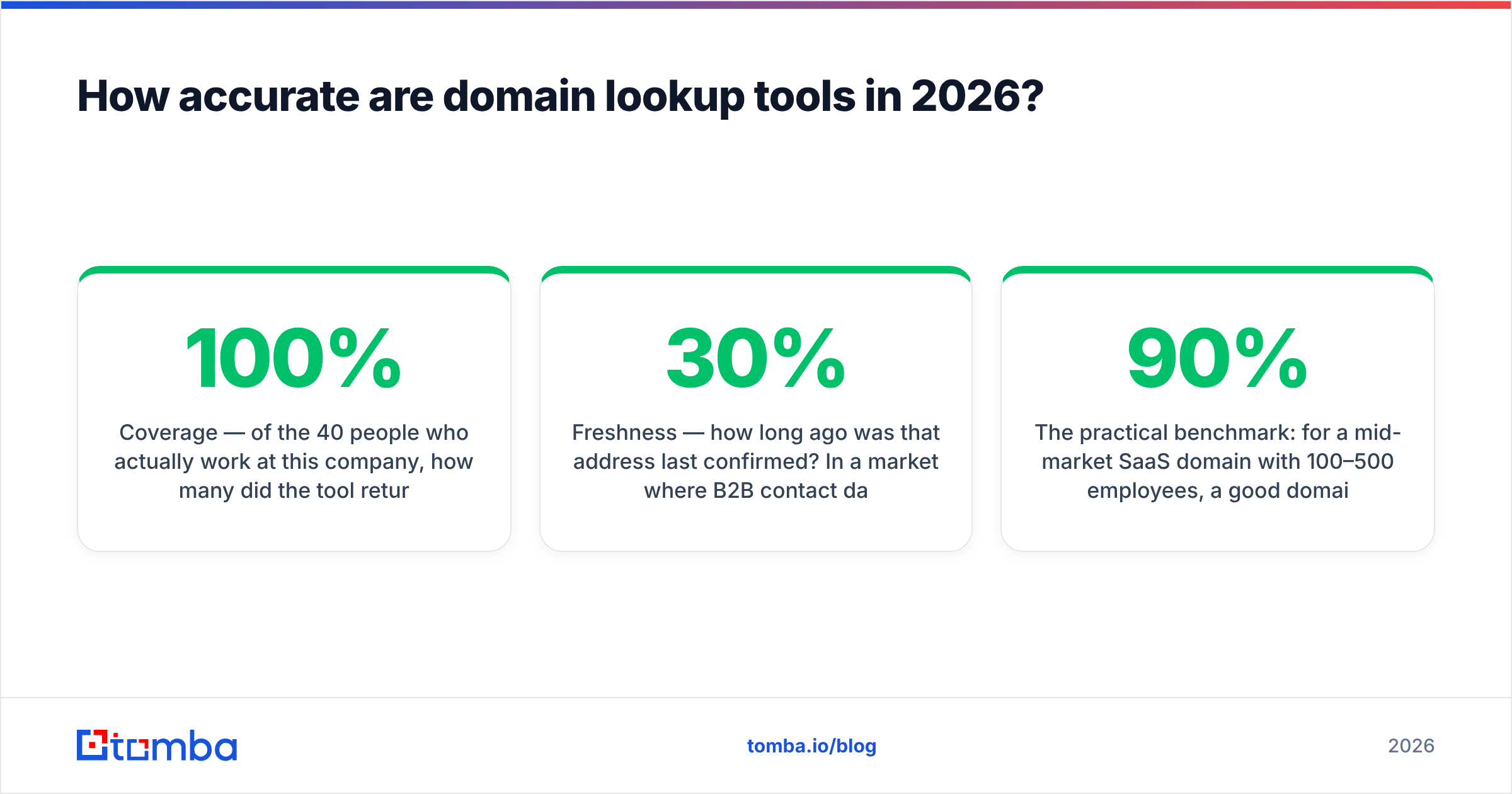
- Coverage — of the 40 people who actually work at this company, how many did the tool return? A tool that finds 6 of 40 has 100% accuracy on a useless sample.
- Deliverability / validity — of the addresses returned, what percentage accept mail? This is the number that protects your domain.
- Freshness — how long ago was that address last confirmed? In a market where B2B contact data decays roughly 25–30% per year through job changes alone, a two-year-old record is a coin flip.

The practical benchmark: for a mid-market SaaS domain with 100–500 employees, a good domain lookup tool should return 20–60 named contacts with 90%+ of the "verified" tier accepting mail on a real send. Below 85% deliverability, you are paying credits to damage your sender reputation.
Two things quietly wreck accuracy scores across every vendor:
Catch-all domains. Roughly a third of business domains accept mail at any address, which means SMTP verification returns "valid" for asdfgh@company.com. Any tool that reports those as verified is inflating its own numbers. Run suspected catch-alls through a dedicated catch-all verifier and treat them as a separate, lower-confidence segment rather than mixing them into your main list.
Pattern guessing presented as discovery. Some tools infer first.last@domain.com from a known pattern and return it with a high confidence score even though the specific mailbox was never observed anywhere. Pattern inference is legitimate — it just needs to be labeled, and it needs an SMTP check behind it. Ask any vendor whether their score reflects observed sources or inferred format. The honest ones will tell you which is which; Tomba exposes the underlying data sources per result so you can see where an address came from.
Which domain lookup tool should you use?#
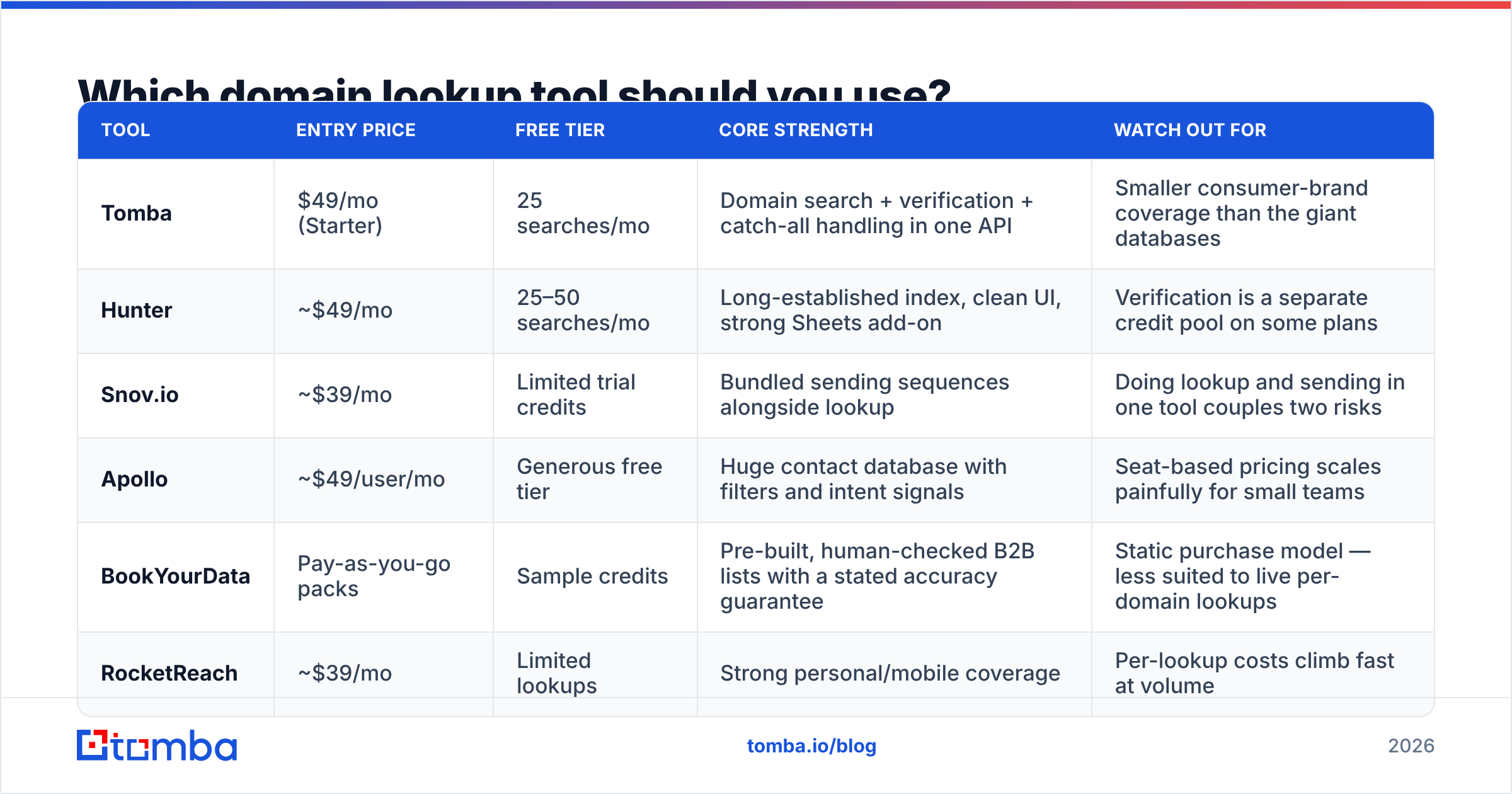
Here's an honest side-by-side of the options B2B teams actually shortlist. Pricing moves — always confirm on the vendor's own page before you commit.
| Tool | Entry price | Free tier | Core strength | Watch out for |
|---|---|---|---|---|
| Tomba | $49/mo (Starter) | 25 searches/mo | Domain search + verification + catch-all handling in one API | Smaller consumer-brand coverage than the giant databases |
| Hunter | ~$49/mo | 25–50 searches/mo | Long-established index, clean UI, strong Sheets add-on | Verification is a separate credit pool on some plans |
| Snov.io | ~$39/mo | Limited trial credits | Bundled sending sequences alongside lookup | Doing lookup and sending in one tool couples two risks |
| Apollo | ~$49/user/mo | Generous free tier | Huge contact database with filters and intent signals | Seat-based pricing scales painfully for small teams |
| BookYourData | Pay-as-you-go packs | Sample credits | Pre-built, human-checked B2B lists with a stated accuracy guarantee | Static purchase model — less suited to live per-domain lookups |
| RocketReach | ~$39/mo | Limited lookups | Strong personal/mobile coverage | Per-lookup costs climb fast at volume |

How to actually choose:
- You have a fixed list of target accounts and need depth per domain. Prioritize domain search quality and built-in verification. Tomba, Hunter.
- You want to buy a finished list and start sending tomorrow. A curated database vendor like BookYourData saves you the assembly work, and their accuracy guarantee is a real risk transfer. The tradeoff is that a static list ages from the day you download it.
- You need filters, intent, and a CRM-shaped workflow. Apollo. Just model the seat cost honestly at your headcount.
- You need mobile numbers as much as emails. Layer a phone finder on top of whichever email source you pick — no single vendor wins both categories.
If you're comparing against a specific incumbent, the head-to-head breakdowns are worth reading: Apollo alternatives and RocketReach alternative cover the tradeoffs in more detail than a single table can.
How do you run a domain lookup at scale?#
Manual lookups are fine for 20 accounts. At 2,000, you need a pipeline. The shape that works:
- Normalize your domain list. Strip
www., protocols, and trailing paths. Deduplicate — you will be surprised how many rows in a CRM export point at the same company through different subdomains. - Run domain search in bulk. Upload a CSV or hit the API. A bulk email finder will process thousands of domains in one job rather than one-at-a-time in a browser tab.
- Filter by role before you verify. Verification costs credits. Don't spend them on the entire company directory — keep only the departments and seniority levels your ICP actually buys from.
- Verify what survives the filter. Push the shortlist through an email verifier and split the output into valid / catch-all / invalid. Only "valid" goes into your primary sequence.
- Enrich and route. Attach firmographics, then assign to territories. This is where a Tomba API call inside your existing enrichment job beats a manual export/import loop.
- Re-run on a schedule. Quarterly is the minimum for any list you plan to keep using. People change jobs; your CSV doesn't know that.

The step teams skip is #4, and it's the one that determines whether the other five mattered. Sending unverified lookup output is how a warmed domain gets throttled in a week.
What about WHOIS and DNS lookups — do they still matter?#
Yes, but for different questions than the ones sales teams ask.
WHOIS still answers ownership and age. A domain registered three weeks ago that's emailing you about an "urgent partnership" deserves suspicion. ICANN's official domain lookup service is the canonical free source, and the WHOIS protocol background explains why so much registrant data is now redacted under GDPR — which is exactly why WHOIS stopped being a prospecting tool around 2018.
DNS lookups matter more than most outbound teams realize. Before you send to a domain, three records are worth checking:
- MX tells you the mail provider. Google Workspace and Microsoft 365 behave differently under volume, and knowing which one you're hitting changes your ramp.
- SPF and DMARC on your sending domain determine whether you land at all. Run your own domain through an SPF checker before a campaign, not after the bounces start.
- Catch-all behavior determines whether verification results can be trusted for that domain at all.
None of this replaces contact discovery. It just stops you from pouring good contacts into a bad send.
How do you keep a domain lookup workflow compliant?#
Lookup data is business contact data, and business contact data is regulated differently depending on where the recipient sits. Three rules that keep you out of trouble regardless of jurisdiction:
- Keep provenance. Store where each address came from and when it was confirmed. If someone asks how you got their email, "our tool found it" is a bad answer; "it was published on your company's team page on this date" is a fine one.
- Honor opt-outs at the person level and the domain level. One unsubscribe from
acme.comshould flag the whole account for review, not just that one row. - Don't scrape what the tool didn't give you. Reputable vendors publish their sourcing. Buying a $12 list of 4 million "verified" addresses from a marketplace is where the liability actually lives.
Peer reviews on G2 are a reasonable sanity check here — look specifically at reviews mentioning bounce rates and support responsiveness rather than the aggregate star rating.
What does a good domain lookup workflow cost?#
Budget by outcome, not by credits. If you need 500 verified contacts a month:
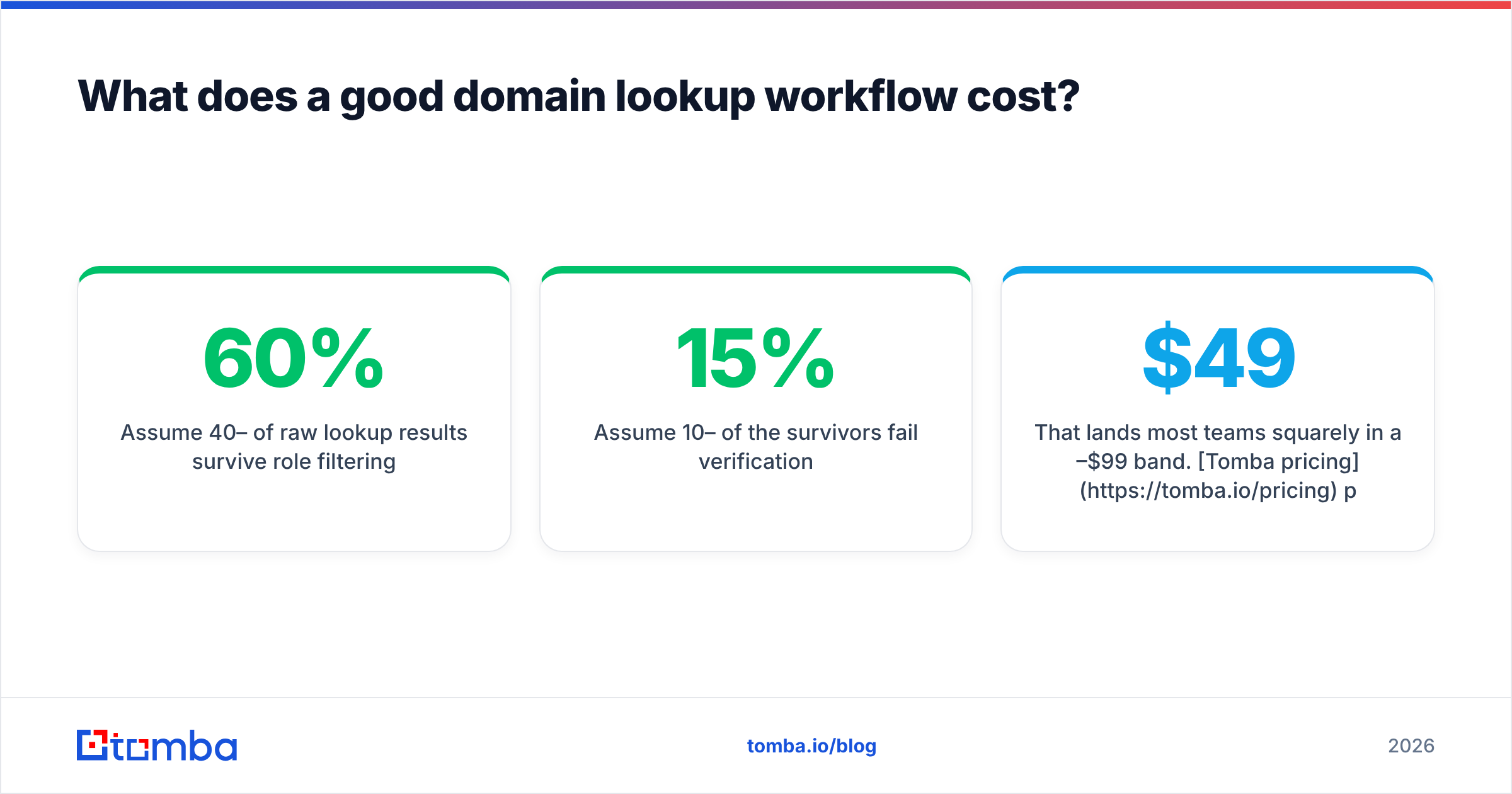
- Assume 40–60% of raw lookup results survive role filtering.
- Assume 10–15% of the survivors fail verification.
- So 500 usable contacts means roughly 1,000–1,400 lookups plus 700–900 verifications.
That lands most teams squarely in a $49–$99/mo band. Tomba pricing puts Starter at $49/mo and Growth at $99/mo, with a free tier at 25 searches/mo if you want to test coverage on your own ICP domains before paying anything. Whatever vendor you evaluate, run the same 20 target domains through each trial and compare on verified contacts returned, not total rows.
Start with your own target list#
Pick 20 domains you genuinely want to sell to. Run them through Tomba's Email Finder and domain search, verify the output, and count how many named decision-makers you end up with per domain. That number — not a vendor's marketing page — is the only benchmark that matters for your market. The free tier covers the test, and if the coverage holds up on your accounts, the same lookup runs through the API at whatever volume your pipeline demands.
Related guides#
Ready to find emails that actually work?
Join 150,000+ professionals who stopped guessing and started sending. Free credits on signup — no credit card required.
Get the Tomba newsletter
Practical outbound tactics and product updates — once every two weeks.
About the author