Domain Reputation Checker: How to Audit Your Sending Domain in 2026
Your domain reputation decides whether cold email lands in the inbox or the spam folder. Here's how to check it across the tools that actually matter, and what to fix first when the score comes back ugly.
TL;DR
- A domain reputation checker scores how mailbox providers and security vendors currently view your sending domain. It is a diagnostic, not a verdict — Gmail and Microsoft keep their real scores private.
- Free tools (Google Postmaster Tools, Talos, MxToolbox, Cloudflare Radar) cover 90% of what you need. Paid platforms mostly repackage the same signals with alerting on top.
- The three things that actually move domain reputation: bounce rate, spam-complaint rate, and authentication (SPF/DKIM/DMARC alignment).
- If your reputation already tanked, list hygiene comes before any warmup tool. Sending to dead addresses is the fastest way to keep it low.
- Budget check: most reputation monitoring is free; the real spend is on verification and data quality upstream.
What is a domain reputation checker?#
A domain reputation checker is a tool that queries public and semi-public reputation signals about your sending domain — blocklist entries, DNS authentication records, historical spam-trap hits, web-security classifications — and returns a score or status.
Think of it like a credit report for your domain. You don't get to see the bank's internal risk model, but you can see the same public records the bank pulls: unpaid debts (blocklists), whether your identity documents check out (SPF, DKIM, DMARC), and how long you've had an account (domain age). Lenders weight those differently, and so do Gmail, Outlook, and Proofpoint.
Two things people conflate constantly:
- Domain reputation — tied to the sending domain in your
From:header and the domain in your links. Follows you across IPs and ESPs. - IP reputation — tied to the sending IP. Shared on most ESPs, dedicated on high-volume infrastructure. You can change IPs; you can't cheaply change a domain you've built links and brand on.
Domain reputation is the one that matters more in 2026, because nearly every serious sender is on shared or rotating IPs, and mailbox providers adapted by weighting the domain more heavily. Email deliverability is now a domain-level game.
Which signals do reputation checkers actually read?#
Here's what sits under the hood of nearly every checker, ranked by how much it moves your inbox placement:
- Authentication alignment — Does SPF pass? Is DKIM signed with your domain? Is DMARC published with a real policy (
p=quarantineorp=reject)? Since the 2024 Gmail/Yahoo bulk-sender rules, this is table stakes, not an optimization. - Complaint rate — Spam-button presses per thousand delivered. Google's public threshold is 0.3%, and you want to live under 0.1%. This is the single largest lever.
- Bounce rate — Hard bounces signal you're mailing a list you didn't verify. Over 3-5% sustained and filtering tightens fast.
- Blocklist presence — Spamhaus DBL, SURBL, Barracuda, SORBS. One listing on a major DBL can drop delivery to near zero overnight.
- Engagement signal — Opens are noisy after Apple MPP, but replies, forwards, and "move to inbox" actions are strong positive signals mailbox providers weight heavily.
- Domain age and history — A domain registered three weeks ago sending 400 cold emails a day looks exactly like a throwaway spam domain, because statistically it usually is.
Note what is not on that list: your subject line word choice. "Spam words" lists are mostly folklore in 2026. Filtering is behavioral and reputational, not lexical.
Which domain reputation checker should you use?#
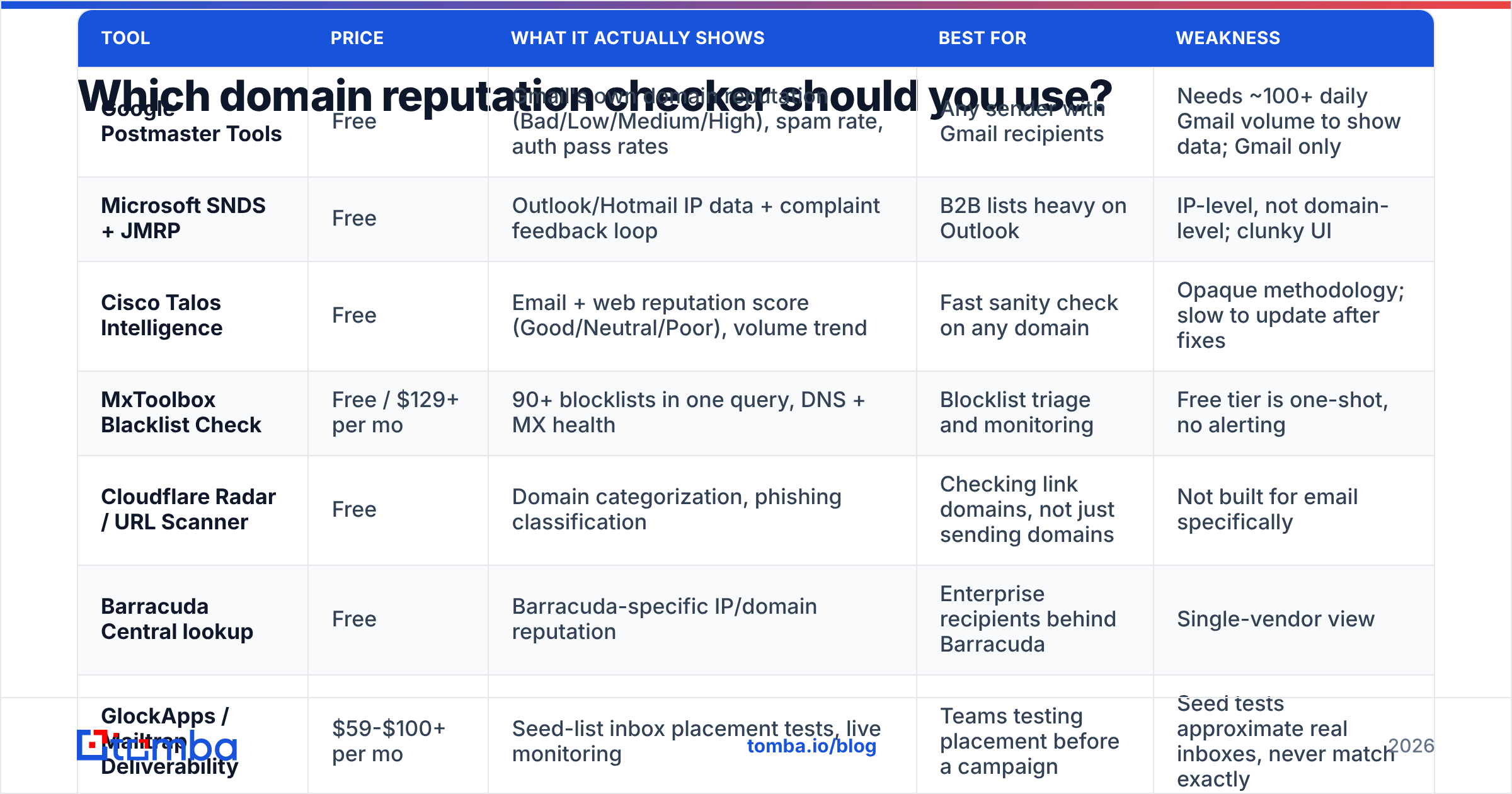
Nobody needs six of these. You need one authoritative source for your own domain (Google Postmaster), one blocklist sweep, and one alerting layer if you send at volume.
| Tool | Price | What it actually shows | Best for | Weakness |
|---|---|---|---|---|
| Google Postmaster Tools | Free | Gmail's own domain reputation (Bad/Low/Medium/High), spam rate, auth pass rates | Any sender with Gmail recipients | Needs ~100+ daily Gmail volume to show data; Gmail only |
| Microsoft SNDS + JMRP | Free | Outlook/Hotmail IP data + complaint feedback loop | B2B lists heavy on Outlook | IP-level, not domain-level; clunky UI |
| Cisco Talos Intelligence | Free | Email + web reputation score (Good/Neutral/Poor), volume trend | Fast sanity check on any domain | Opaque methodology; slow to update after fixes |
| MxToolbox Blacklist Check | Free / $129+ per mo | 90+ blocklists in one query, DNS + MX health | Blocklist triage and monitoring | Free tier is one-shot, no alerting |
| Cloudflare Radar / URL Scanner | Free | Domain categorization, phishing classification | Checking link domains, not just sending domains | Not built for email specifically |
| Barracuda Central lookup | Free | Barracuda-specific IP/domain reputation | Enterprise recipients behind Barracuda | Single-vendor view |
| GlockApps / Mailtrap Deliverability | $59-$100+ per mo | Seed-list inbox placement tests, live monitoring | Teams testing placement before a campaign | Seed tests approximate real inboxes, never match exactly |
The honest recommendation: start free. Google Postmaster Tools plus a weekly blacklist checker sweep covers most senders. Only pay when you have enough volume that a two-day reputation dip costs more than the subscription.
How do you run a domain reputation audit in under 20 minutes?#
Do these in order. Each step feeds the next.
Step 1 — Verify authentication (5 min). Run your domain through an SPF checker and confirm you have one SPF record, under 10 DNS lookups, and no +all. Then confirm DKIM is signing with your domain (not your ESP's) and DMARC is published. If DMARC is still p=none after six months, you're collecting reports nobody reads.
Step 2 — Pull Gmail's verdict (2 min). Google Postmaster Tools shows Domain Reputation as Bad, Low, Medium, or High. "Bad" means most of your mail is going to spam right now. "Low" means it's inconsistent. Anything below High needs work. If you see no data, your Gmail volume is too low to be sampled — that's not a pass, that's a blind spot.
Step 3 — Blocklist sweep (3 min). Check the sending domain, the root domain, and the sending IP. Also check any link-shortener or tracking domain you use — a listed tracking domain poisons a clean sending domain, and this is the single most-missed cause of sudden placement collapse.
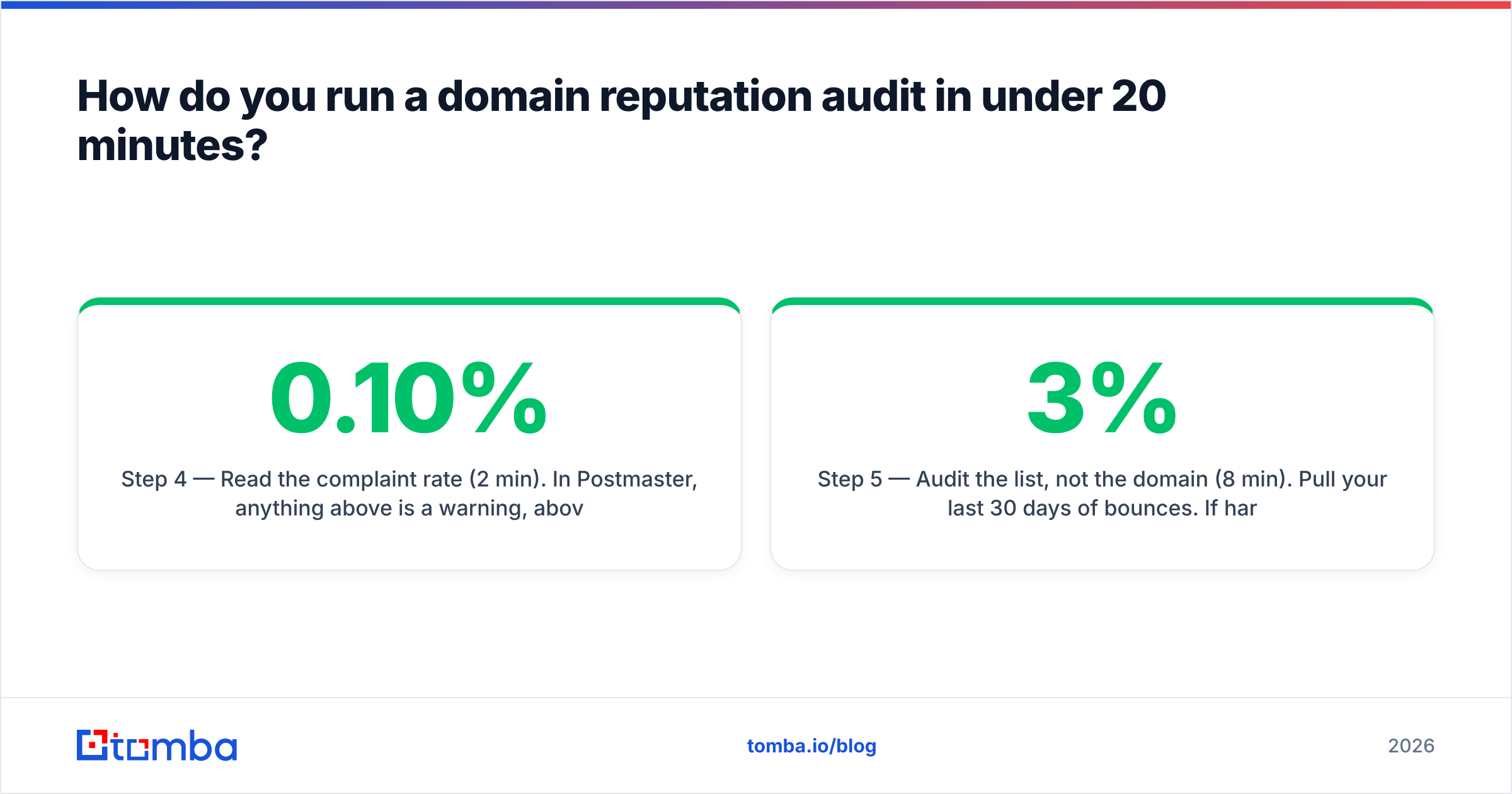
Step 4 — Read the complaint rate (2 min). In Postmaster, anything above 0.10% is a warning, above 0.30% is an emergency. Complaint rate is a lagging indicator; by the time it spikes, the damage is already two weeks in.
Step 5 — Audit the list, not the domain (8 min). Pull your last 30 days of bounces. If hard bounces are above 3%, your reputation problem is a data problem, and no warmup schedule will fix it. Run the list through an email verifier before the next send and check whether your source of contacts is producing garbage.
Why does a "good" score still land you in spam?#
Because reputation checkers read public signals, and mailbox providers score you on private ones.
Talos can call your domain "Good" while Gmail quietly routes 60% of your mail to spam, because Talos is inferring from network-level telemetry and Gmail is watching what its own users do with your specific messages. Two very different datasets.
The gaps that cause false confidence:
- Recipient-side reputation is per-provider. You can be fine at Gmail and dead at Outlook. Microsoft's filtering is notoriously stricter on cold outreach and slower to forgive.
- Subdomain reputation is separate but inherited.
mail.yourdomain.combuilds its own reputation, but a badly burned root domain drags it down. This is why the "just switch to a subdomain" advice half-works. - Content and link reputation ride along. If you link to a domain with a poor reputation — a shortener, a scraped-content site, an unverified partner — that reputation transfers into the filtering decision.
- Volume shape matters as much as volume. Going 0 to 500 sends a day looks like an account compromise. Ramping over four weeks doesn't.

How do you fix a damaged domain reputation?#
The uncomfortable answer first: reputation recovery takes 4-8 weeks of consistent good behavior, and there is no way to buy your way past it. Anyone selling instant reputation repair is selling you a new domain.
Week 1 — Stop the bleeding. Pause all cold sending on the affected domain. Keep transactional and reply-thread mail flowing; it's high-engagement and helps. Fix authentication gaps immediately.
Week 2 — Clean the source.
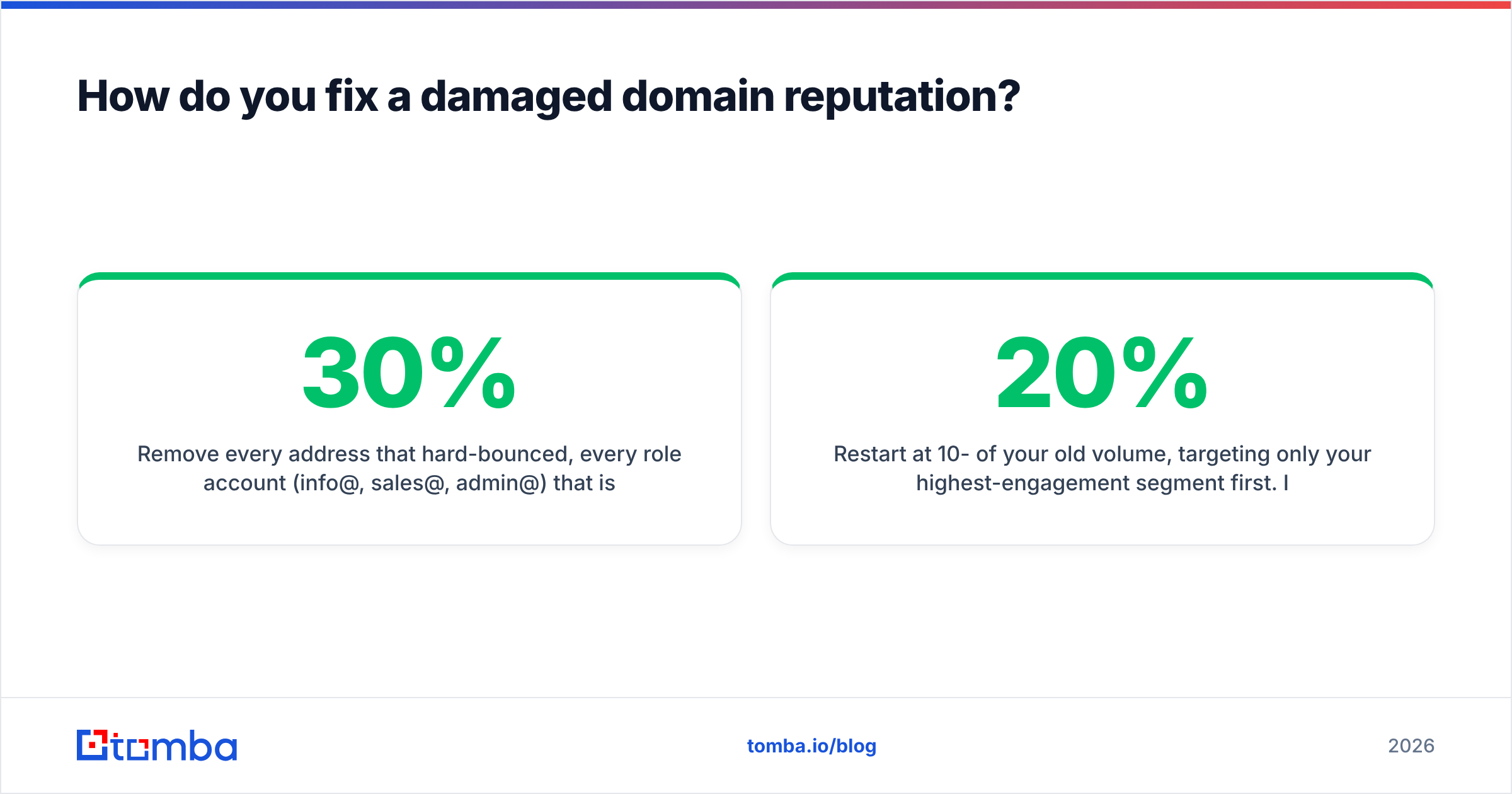
Remove every address that hard-bounced, every role account (info@, sales@, admin@) that isn't a deliberate target, and every contact older than 12 months without re-verification. B2B data decays roughly 22-30% per year through job changes alone. If your contact source can't tell you why an address is valid, treat it as unverified.
Weeks 3-6 — Ramp back. Restart at 10-20% of your old volume, targeting only your highest-engagement segment first. Increase 20-30% per week if complaint rate stays under 0.10%. An email warmup calculator will give you a defensible schedule instead of guessing.
Ongoing — Monitor weekly, not monthly. Set a recurring 15-minute check: Postmaster reputation, complaint rate, blocklist sweep. Reputation degrades quietly and recovers slowly, so the cost of catching it late is asymmetric.
Is buying a new domain a legitimate fix?#
Sometimes — but it's a last resort, and it comes with a cost most people underestimate.
Burning a domain and buying a fresh one resets the reputation clock to zero, which is not the same as "good." A brand-new domain has no trust, and mailbox providers treat unknown domains with suspicion until they earn history. You trade a known-bad score for an unknown one, plus 4-6 weeks of warmup you'd have spent on recovery anyway.
When a new domain genuinely makes sense:
- Your primary domain is listed on Spamhaus DBL and the listing won't clear after remediation
- You need to isolate cold outreach from your corporate mail entirely (a legitimate structural choice, not a fix)
- Your root domain's business identity has changed
When it doesn't:
- Your reputation dropped because you mailed a bad list. Buy a new domain and you'll burn that one too within a quarter. The list is the problem.
That last point is where most "we've gone through five domains this year" teams are stuck. The domain is the symptom. Data quality is the disease.
What's the relationship between data quality and reputation?#
Direct and mechanical. Every invalid address you send to produces a hard bounce, and hard bounces are the fastest-acting negative reputation signal there is. Spam traps — recycled addresses that mailbox providers repurpose specifically to catch senders using stale lists — are worse, because a single hit can trigger a blocklist entry.
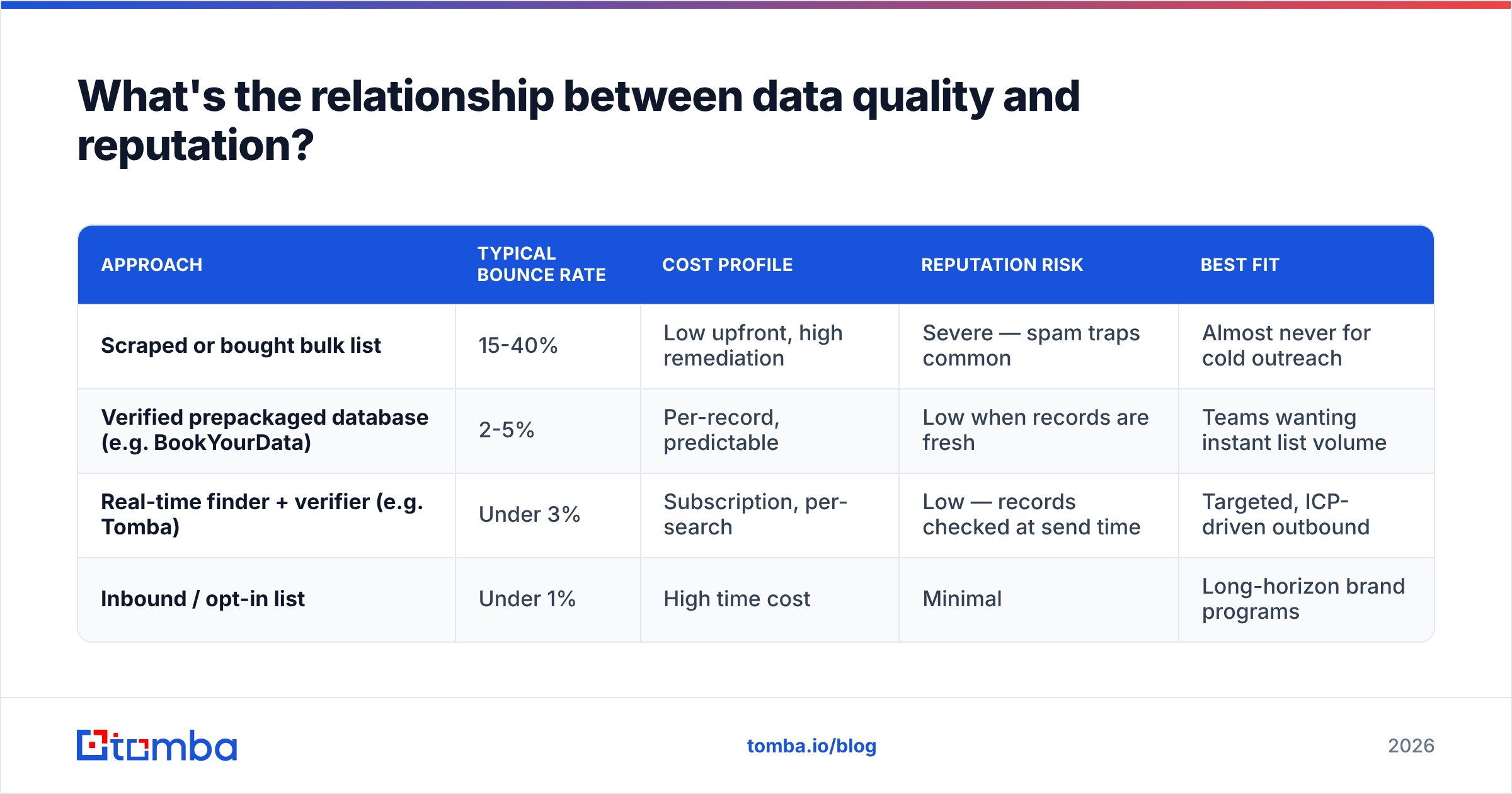
This is where sourcing matters more than tooling. Compare the two common approaches:
| Approach | Typical bounce rate | Cost profile | Reputation risk | Best fit |
|---|---|---|---|---|
| Scraped or bought bulk list | 15-40% | Low upfront, high remediation | Severe — spam traps common | Almost never for cold outreach |
| Verified prepackaged database (e.g. BookYourData) | 2-5% | Per-record, predictable | Low when records are fresh | Teams wanting instant list volume |
| Real-time finder + verifier (e.g. Tomba) | Under 3% | Subscription, per-search | Low — records checked at send time | Targeted, ICP-driven outbound |
| Inbound / opt-in list | Under 1% | High time cost | Minimal | Long-horizon brand programs |
Both prepackaged databases and real-time finders are legitimate; the difference is freshness at the moment of send. A record verified six months ago and a record verified this morning carry very different bounce probabilities, and reputation only cares about the second one.
If you're building lists rather than buying them, using an email finder that verifies at lookup time removes the highest-risk category before it ever touches your sending domain. And for domains where the mail server accepts everything, a dedicated catch-all verifier is the difference between an educated guess and a coin flip.
What should you monitor after the audit?#
Set these four thresholds and treat any breach as a stop-sending event:
- Complaint rate above 0.10% — investigate the segment before the next send
- Hard bounce rate above 3% — the list is stale; re-verify before continuing
- Postmaster domain reputation drops a tier — pause and diagnose, don't push through
- Any new blocklist entry — request delisting the same day; most major lists auto-expire in 7-14 days if the behavior stopped
Also worth tracking: response rate by segment. It's not a reputation metric on paper, but it's the best leading indicator you have. Replies are the strongest positive engagement signal mailbox providers can see, and a collapsing reply rate usually predicts a reputation drop by two to three weeks.
For teams running outbound at scale, wire the blocklist check into your automation instead of doing it by hand. A weekly scheduled job that hits your monitoring endpoint and posts to Slack costs an hour to build and catches problems on day one instead of day nine.
The bottom line#
A domain reputation checker tells you where you stand, not why. Google Postmaster Tools plus a blocklist sweep will diagnose almost any deliverability problem for free — and in most cases the diagnosis points back to list quality, not sending technique.
Fix the data and the reputation follows. Fix the reputation without fixing the data and you're on a treadmill.
If you're rebuilding a list after a reputation hit, or want to stop feeding bad addresses into your sequencer in the first place, Tomba Email Finder verifies each address at lookup time, so the contacts entering your campaigns are checked before they can bounce. The free tier gives you 25 searches a month to test the accuracy on your own ICP; paid plans start at $49/mo on Starter and $99/mo on Growth — full Tomba pricing is public, no sales call required.
Sources: Google Postmaster Tools, Cisco Talos Intelligence, Spamhaus
Related guides#
Ready to find emails that actually work?
Join 150,000+ professionals who stopped guessing and started sending. Free credits on signup — no credit card required.
Get the Tomba newsletter
Practical outbound tactics and product updates — once every two weeks.
About the author