Domain Warm Up Tool: How to Pick One That Actually Works
Most domain warm up tools inflate your open rate with fake engagement and call it deliverability. Here's what actually moves inbox placement in 2026, which tools are worth paying for, and the schedule to follow.
TL;DR
- A domain warm up tool automates the slow ramp of sending volume on a new domain and generates seed engagement so mailbox providers build a positive reputation profile for you.
- Warmup pools alone do not fix deliverability. Google and Microsoft weight real recipient behavior — replies, moves out of spam, adds to contacts — far more than bot opens from a warmup network.
- The three things that actually decide inbox placement: correct authentication (SPF, DKIM, DMARC), a clean verified list, and a complaint rate under Google's 0.3% threshold.
- Expect 3–6 weeks before a new domain handles meaningful cold volume. Tools compress the busywork, not the calendar.
- Budget realistically: warmup runs $20–$50 per inbox per month at scale; list hygiene runs a fraction of that and prevents more damage.
You bought a fresh domain, pointed it at a sending platform, plugged in a warmup service, and 30 days later your campaign still lands in Promotions or Spam. That happens constantly, and the reason is almost never the warmup tool itself. It's that warmup was treated as the whole deliverability strategy instead of one input among four.
This guide covers what a domain warm up tool genuinely does, where warmup networks help and where they're theater, how the main tools compare on price and mechanism, and the ramp schedule that works in 2026 under Google and Yahoo's bulk sender rules.
What is a domain warm up tool?#
A domain warm up tool automates two things: gradual volume ramping and seed engagement generation.
Think of it like establishing credit. A brand-new domain has no history with Gmail, Outlook, or Yahoo — it's an unknown applicant asking for a large loan on day one. Warmup is the equivalent of taking a small secured card, paying it off, and slowly proving you're not a risk. Ramp too fast and you look like someone maxing out five cards in a week.
Mechanically, here's what happens under the hood:
- Pool enrollment — Your mailbox joins a private network of other mailboxes (usually thousands, run by the vendor).
- Scheduled sends — The tool sends a small number of human-looking messages per day from your domain to pool members, increasing daily on a curve.
- Simulated engagement — Pool recipients open, reply, mark as important, and critically, drag messages out of the spam folder back to the inbox.
- Reputation signaling — Those interaction signals feed the mailbox provider's model of your domain. Spam-folder rescues carry the heaviest weight.
- Handoff to real traffic — After 2–4 weeks, you begin blending real campaign sends into the warmed volume, tapering the artificial portion.
The part vendors emphasize is step 3. The part that actually determines your outcome is step 5 — whether your real recipients behave anything like the pool did.

Do domain warm up tools actually work?#
Partially, and the honest answer depends on what you're measuring.
Where warmup demonstrably helps:
- Establishing a nonzero send history so providers have data to score instead of defaulting to suspicious
- Preventing the volume-spike pattern that triggers rate limiting on new domains
- Recovering a domain that dipped after a bad campaign, by re-establishing positive signal density
- Keeping low-volume mailboxes (10–30 sends/day) from looking dormant between campaigns
Where warmup is oversold:
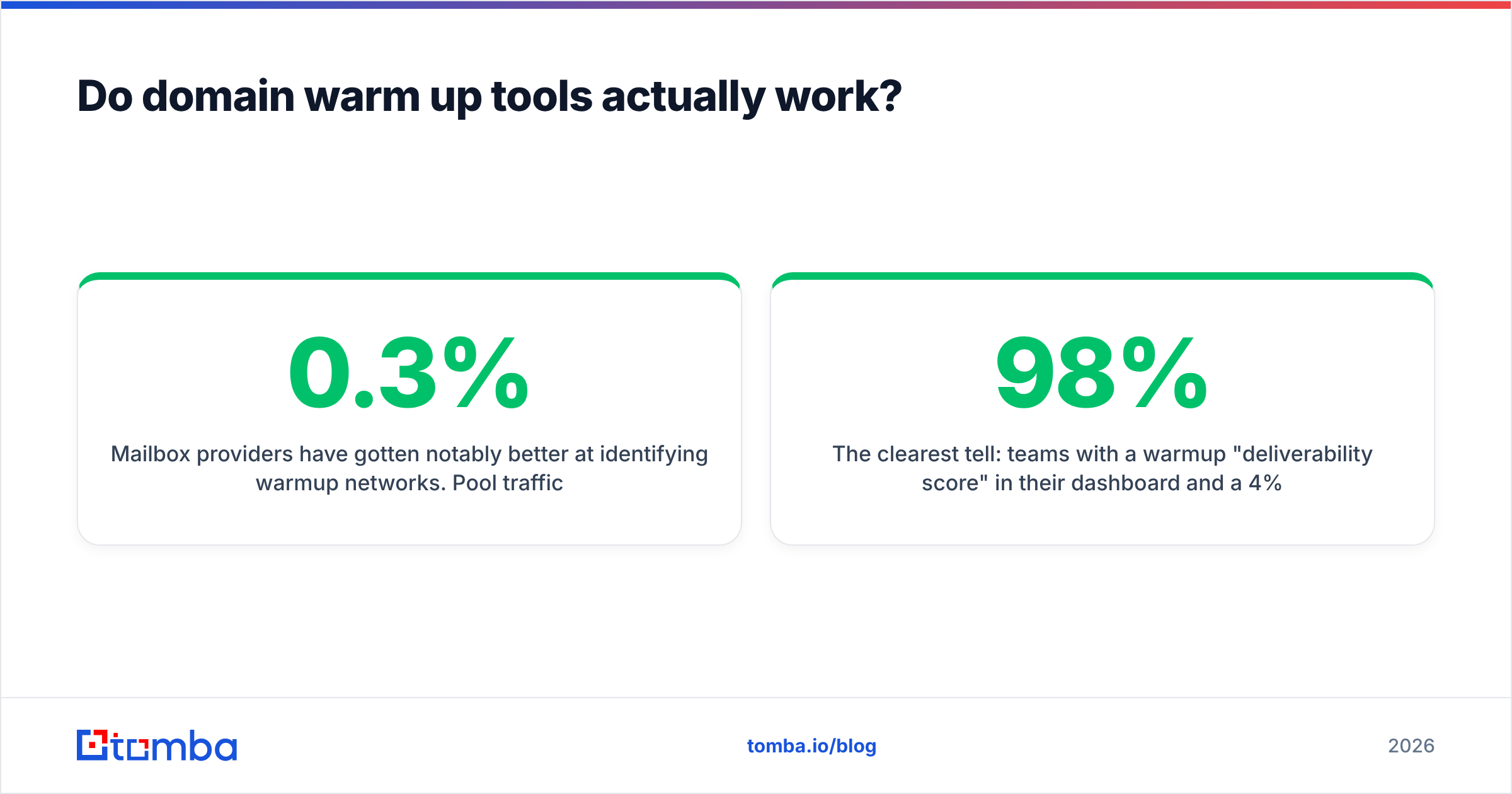
Mailbox providers have gotten notably better at identifying warmup networks. Pool traffic has a fingerprint: reciprocal send patterns, unnaturally high open rates, replies with low semantic variance, and clustering across the same IP ranges. Google's bulk sender requirements formalized what mattered in 2024 — authentication, one-click unsubscribe, and a spam complaint rate below 0.3% — and none of those are things a warmup pool can fake on your behalf.
The clearest tell: teams with a 98% warmup "deliverability score" in their dashboard and a 4% reply rate on real campaigns. The dashboard number reflects the pool, not Gmail's actual verdict on your cold sends.
Treat warmup as necessary but insufficient. It gets your domain to the starting line. What happens after depends on list quality and message relevance.
What actually drives inbox placement in 2026?#
Four inputs, roughly in order of impact:
| Input | Weight | What breaks it | How to fix it |
|---|---|---|---|
| Authentication (SPF/DKIM/DMARC) | Gate — fail and nothing else matters | Missing DMARC policy, SPF over 10 DNS lookups, unsigned subdomain | Publish DMARC at p=none minimum, flatten SPF, sign every sending subdomain |
| List hygiene | Very high | Bounces over 2%, spam traps, role addresses, catch-all guesses | Verify every address before send; drop unknowns |
| Recipient engagement | High | Low reply rate, mass deletes without opening, "report spam" clicks | Tighter targeting, shorter copy, relevant offers |
| Volume ramp | Moderate | Day-one blast, erratic daily swings | Steady curve, weekday-only sending |
| Content and links | Moderate | Link shorteners, image-heavy HTML, spam-trigger phrasing | Plain text, one link, no tracking-pixel bloat |
Bounce rate is the fastest way to destroy a domain, and it's the input most under your control. A single send to a list with 12% invalid addresses does more damage in one afternoon than three weeks of warmup repairs. Run every list through an email verifier before it touches your sequencer, and use a catch-all verifier for the domains that accept everything and tell you nothing.
Authentication is the free win most teams half-implement. Check your record with a SPF checker and confirm the DMARC alignment on your sending subdomain, not just the root. If you're sending from mail.yourcompany.com, the DKIM signature has to align there.
How do the main domain warm up tools compare?#
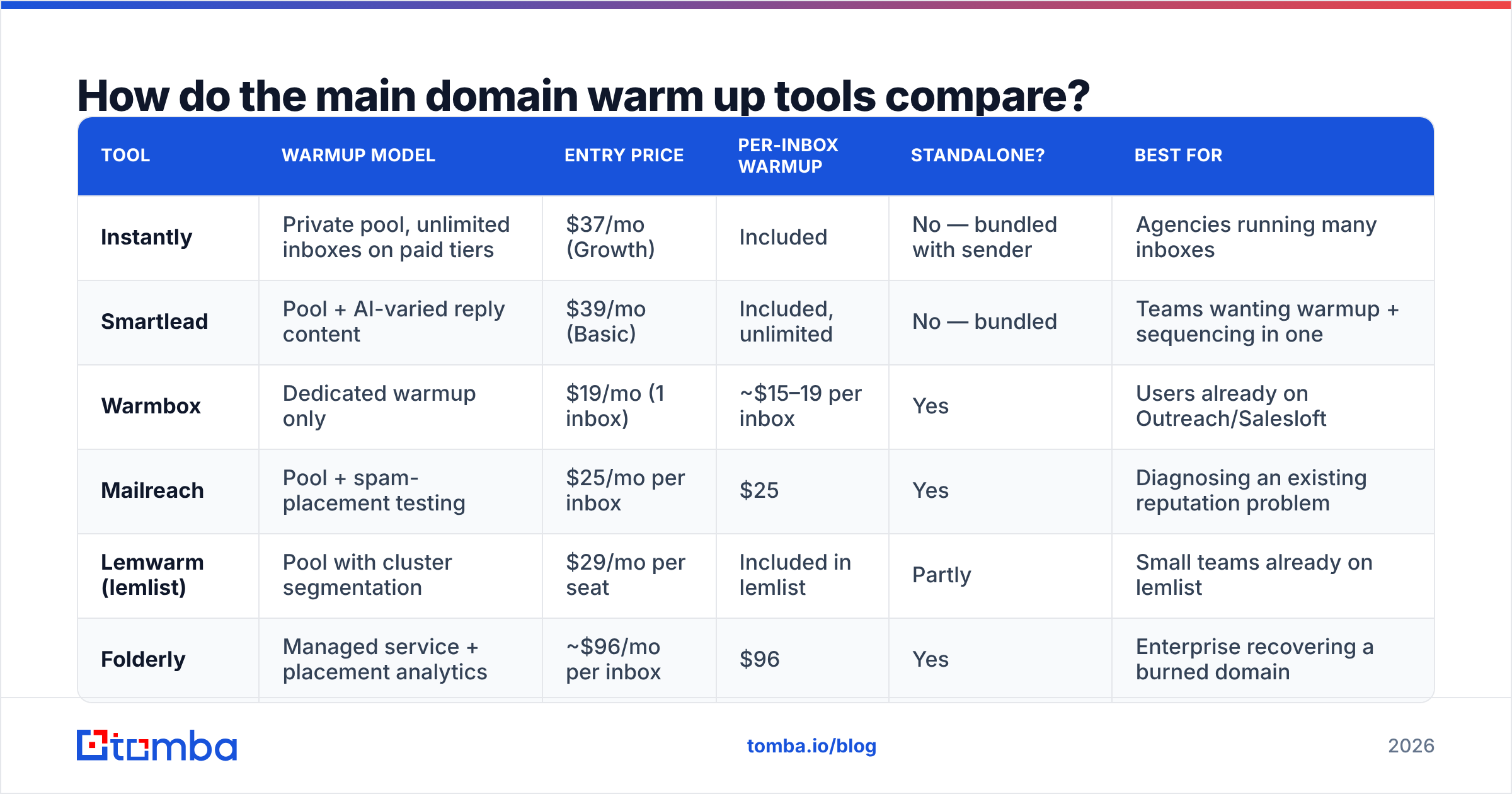
Pricing below reflects publicly listed 2026 rates. Most vendors bundle warmup into a sending platform rather than selling it standalone, which affects the real cost of adoption.
| Tool | Warmup model | Entry price | Per-inbox warmup | Standalone? | Best for |
|---|---|---|---|---|---|
| Instantly | Private pool, unlimited inboxes on paid tiers | $37/mo (Growth) | Included | No — bundled with sender | Agencies running many inboxes |
| Smartlead | Pool + AI-varied reply content | $39/mo (Basic) | Included, unlimited | No — bundled | Teams wanting warmup + sequencing in one |
| Warmbox | Dedicated warmup only | $19/mo (1 inbox) | ~$15–19 per inbox | Yes | Users already on Outreach/Salesloft |
| Mailreach | Pool + spam-placement testing | $25/mo per inbox | $25 | Yes | Diagnosing an existing reputation problem |
| Lemwarm (lemlist) | Pool with cluster segmentation | $29/mo per seat | Included in lemlist | Partly | Small teams already on lemlist |
| Folderly | Managed service + placement analytics | ~$96/mo per inbox | $96 | Yes | Enterprise recovering a burned domain |
Two patterns worth noting. First, unlimited-inbox warmup bundled into a sending platform (Instantly, Smartlead) is dramatically cheaper per mailbox than standalone tools once you pass three or four inboxes — the standalone vendors only win when you're locked into a sequencer that doesn't include warmup. Second, the expensive tier (Folderly) isn't buying you a better pool; it's buying seed-list placement testing across real provider accounts, which is a different and more useful product.
If you're evaluating the sending platform rather than the warmup component, independent review volume on G2 tends to be more informative than vendor case studies — filter to reviews from companies your size.

What warm up schedule should you follow?#
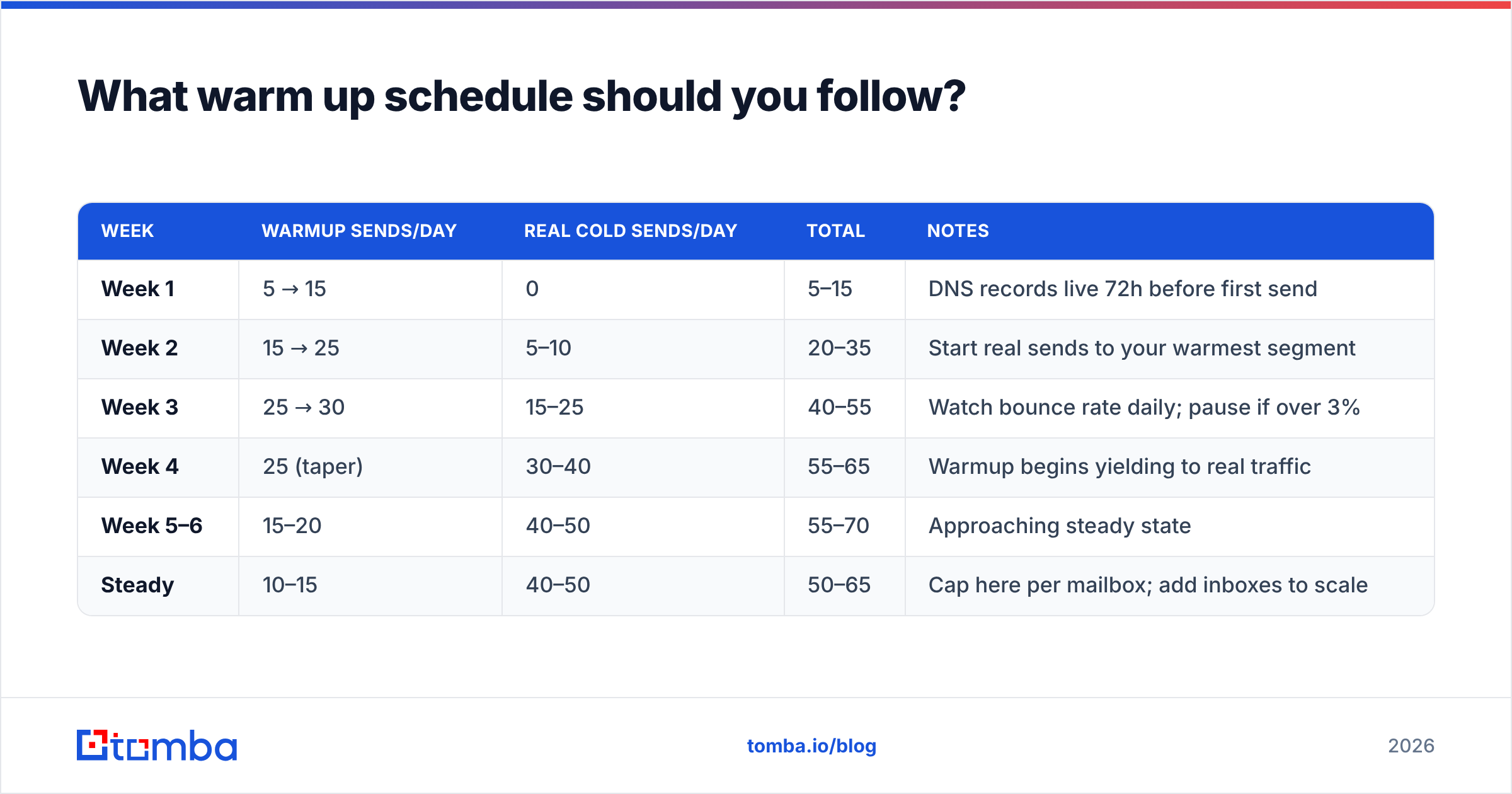
Here's a ramp that holds up under current Gmail and Outlook throttling. Volumes are per mailbox, not per domain — a domain with four mailboxes multiplies these.
| Week | Warmup sends/day | Real cold sends/day | Total | Notes |
|---|---|---|---|---|
| Week 1 | 5 → 15 | 0 | 5–15 | DNS records live 72h before first send |
| Week 2 | 15 → 25 | 5–10 | 20–35 | Start real sends to your warmest segment |
| Week 3 | 25 → 30 | 15–25 | 40–55 | Watch bounce rate daily; pause if over 3% |
| Week 4 | 25 (taper) | 30–40 | 55–65 | Warmup begins yielding to real traffic |
| Week 5–6 | 15–20 | 40–50 | 55–70 | Approaching steady state |
| Steady | 10–15 | 40–50 | 50–65 | Cap here per mailbox; add inboxes to scale |
Rules that matter more than the exact numbers:
- Never exceed 50 real cold sends per mailbox per day. Adding mailboxes is safer than raising per-mailbox volume. Providers score per-mailbox behavior.
- Weekday-only. Weekend sending from a B2B domain is an anomaly signal and gets negligible engagement anyway.
- Keep warmup running permanently at a low level. Turning it off entirely after week 6 creates a gap that shows up as reputation drift during slow campaign months.
- Pause on any bounce spike. Over 3% for two consecutive days means stop, re-verify the list, and resume at half volume.
- Use a separate domain from your primary. Send cold outreach from
getcompany.com, nevercompany.com. If the cold domain burns, your transactional and internal mail survives.
The email warmup calculator will map this curve to your specific target volume and timeline if you'd rather not do the arithmetic.
What should you do before you touch a warm up tool?#
Warmup is step four, not step one. Run this order:
- Buy the sending domain and let DNS settle. Register at least 30 days before you plan to send if you can — domain age is a weak but real signal. Point MX, then wait.
- Publish authentication in full. SPF (under 10 lookups), DKIM (2048-bit, aligned to your sending subdomain), DMARC (
p=nonewith a reporting address to start, tighten toquarantinelater). Verify with an external checker, not your provider's dashboard. - Build and verify the list before warmup finishes. This is the step teams skip. Use a real email finder rather than pattern-guessing tools, then verify — guessed addresses inflate bounce rates catastrophically. Tomba's domain search pulls verified addresses per company so you're not sending to
firstname@permutations that never existed. - Then warm up. With authentication clean and a verified list waiting, warmup does what it's meant to do: establish history so your first real campaign isn't your domain's first impression.
- Test placement before scaling. Send to a seed set of real Gmail, Outlook, and Yahoo accounts and check which folder it lands in. A spam checker catches content-level problems before they cost you reputation.
The order is the point. A warmed domain sending to a garbage list burns faster than a cold domain sending to a clean one.
Is a paid domain warm up tool worth it?#
Depends on volume and what you're replacing.
Buy one if: you're running three or more sending mailboxes, you're launching a new domain, or you're recovering a domain that recently tanked. At that scale the $20–$40/inbox is trivial next to the cost of a burned domain and the two months of rebuilding.
Skip it if: you send under 20 emails a day from a well-established domain with an existing reply history. Your real traffic is already doing the job a pool would simulate, and adding artificial volume gives you nothing.
Spend the money elsewhere if: your bounce rate is above 3%. Verification and better sourcing will improve placement more per dollar than any warmup pool, because bounces are a harder negative signal than low volume is. For a broader view of how deliverability signals interact, Mailchimp's deliverability documentation is a solid vendor-neutral primer, and the underlying concepts are covered in Tomba's email deliverability glossary entry.
One caveat on measurement: don't judge a warmup tool by its own dashboard score. Judge it by your real campaign's reply rate and spam-folder placement on seed accounts. Those are the only two numbers that reflect what mailbox providers actually decided about you.
What are the common warm up mistakes?#
- Warming up and then blasting. Six weeks of careful ramping followed by a 500-email day undoes everything. The ramp has to continue into real traffic.
- Running warmup on the primary domain. If it goes wrong, your invoices and customer replies go to spam too.
- Ignoring the reply signal. Providers weight replies heavily. A campaign that gets opens but zero replies reads worse than one with fewer opens and a 6% reply rate. Fix the offer, not the warmup settings.
- Warming up mailboxes you'll never use. Some agencies warm 40 inboxes and send from 12. The unused ones drift and the pool spend is wasted.
- Skipping catch-all handling. Catch-all domains accept everything at SMTP and bounce silently later, or worse, route to a spam trap. Identify them explicitly rather than assuming acceptance means valid.
- No DMARC reporting. Publishing
p=nonewithout arua=address means you get the policy with none of the diagnostic data. Add the reporting address.
Where does list quality fit into all this?#
It's the input warmup can't compensate for, and the reason most warmup investments underperform.
Consider two identical domains, both warmed for six weeks on the same tool. Domain A sends to 2,000 verified contacts at real companies with a 1.1% bounce rate. Domain B sends to 2,000 permutation-guessed addresses with a 14% bounce rate. Within four days, Domain B is throttled at Gmail and Domain A isn't. The warmup was identical. The list wasn't.
That's why sourcing and verification sit upstream of everything else. Pull addresses from a source that confirms them rather than generating plausible patterns, verify in bulk before every campaign, and re-verify lists older than 90 days — B2B contact data decays at roughly 2–3% per month as people change jobs.
Ready to fix the input that warmup can't? Tomba's Email Finder returns verified professional addresses with a confidence score on each one, so your warmed domain sends to real people instead of guesses. Start free with 25 searches a month, or move to the Starter plan at $49/mo when you're ready to run full campaigns — see Tomba pricing for the Growth ($99/mo) and Pro ($249/mo) tiers if you're sourcing at volume. Warm the domain, but verify the list first.
Related guides#
Ready to find emails that actually work?
Join 150,000+ professionals who stopped guessing and started sending. Free credits on signup — no credit card required.
Get the Tomba newsletter
Practical outbound tactics and product updates — once every two weeks.
About the author