Drip Campaign Examples: 9 Sequences That Book Meetings
Nine real drip campaign examples with timing, trigger logic, and copy structure — plus the data hygiene work that decides whether any of them land in the inbox.
TL;DR
- A drip campaign is a pre-built sequence of emails released on a schedule or a behavioral trigger. The examples that work share three traits: a single goal per sequence, 4–7 touches, and an exit condition that fires the moment someone replies.
- Trigger-based drips beat pure time-based drips on reply rate in almost every benchmark, but time-based is still correct for onboarding and post-purchase flows where the "trigger" is the purchase itself.
- The nine examples below include send timing, the job of each email, and where teams usually break them.
- Sequence length is not the lever most people think it is. Touch 3 and touch 4 generate a disproportionate share of replies — and most teams stop at touch 2.
- None of this matters if 20% of your list bounces. Verify before you drip; a dirty list burns the domain that every future sequence depends on.
What Is a Drip Campaign, Exactly?#
A drip campaign is a series of pre-written emails sent automatically over time, either on a fixed schedule or in response to something the recipient did. Think of it like a physical IV drip: a controlled dose over hours instead of a single injection. One big blast spikes and disappears. A drip stays in the bloodstream.
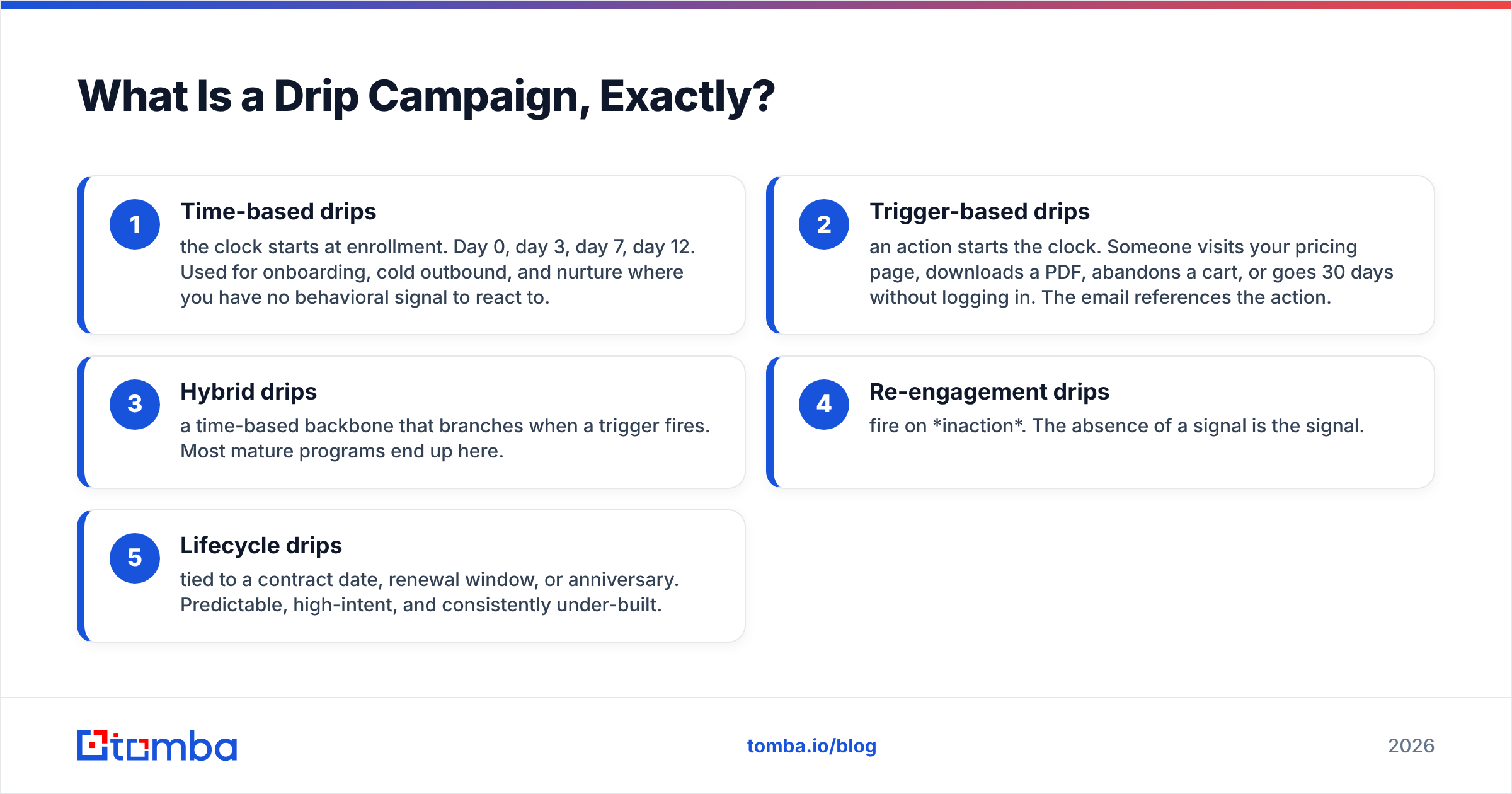
The distinction that actually matters is what starts the clock:
- Time-based drips — the clock starts at enrollment. Day 0, day 3, day 7, day 12. Used for onboarding, cold outbound, and nurture where you have no behavioral signal to react to.
- Trigger-based drips — an action starts the clock. Someone visits your pricing page, downloads a PDF, abandons a cart, or goes 30 days without logging in. The email references the action.
- Hybrid drips — a time-based backbone that branches when a trigger fires. Most mature programs end up here.
- Re-engagement drips — fire on inaction. The absence of a signal is the signal.
- Lifecycle drips — tied to a contract date, renewal window, or anniversary. Predictable, high-intent, and consistently under-built.
The word "drip" gets used interchangeably with "sequence," "cadence," and "nurture flow." They're close enough that arguing about it wastes time. What separates a good one from a bad one is whether each email has a distinct job, or whether emails 2 through 5 are just email 1 with more question marks.
What Do the Best Drip Campaign Examples Have in Common?#
Before the examples themselves, the pattern underneath them. Across the sequences that consistently produce meetings:
- One goal per sequence. A drip that tries to book a demo and drive a webinar signup and push a case study converts on none of them.
- 4 to 7 touches. Below 4, you quit before the compounding effect kicks in. Above 7, you're mostly generating unsubscribes and spam complaints.
- Descending length. Email 1 can run 120 words. Email 5 should be under 40. The shortest emails in a sequence often pull the highest reply rate because they read as human, not campaign.
- Hard exit conditions. Reply, meeting booked, unsubscribe, or bounce — any of these should stop the sequence instantly. Nothing torches credibility faster than a "just following up!" arriving 20 minutes after someone said yes.
- Thread continuity. Touches 2 through N reply to the original thread rather than starting fresh. Keeps context and improves inbox placement.
Which Drip Campaign Examples Actually Work in 2026?#
Here are nine sequences with concrete timing and the job of each email.
1. The Cold Outbound Drip (B2B, 5 touches, 14 days)#
The workhorse. Day 0: a 90-word opener with one specific observation about their business and one soft ask. Day 3: a proof touch — a customer in their vertical, one metric, no attachment. Day 6: a different angle entirely; if the first two led with cost, this one leads with speed. Day 10: the shortest email in the sequence — "Is this worth a look, or should I close the file?" Day 14: a genuine breakup that leaves the door open.
Where it breaks: reps send five variations of the same pitch. Each touch needs a new angle, not a new adjective.
2. The Lead-Magnet Nurture Drip (4 touches, 10 days)#
Fires when someone downloads a guide. Email 1 is instant delivery plus one line on what to read first. Email 2 (day 2) expands on a single idea from the asset. Email 3 (day 5) is a customer story that maps to that idea. Email 4 (day 10) makes the ask. Download-to-meeting rates live and die on email 2 — most teams skip straight from delivery to pitch.
3. The Pricing-Page Trigger Drip (3 touches, 5 days)#
Someone hit pricing twice in a week and didn't convert. Email 1 goes out within four hours: "Saw you were comparing plans — happy to sanity-check which tier fits." Email 2 (day 2) preempts the objection that stops most buyers at pricing. Email 3 (day 5) offers a 15-minute call with a specific agenda. This is the highest-intent sequence most teams don't run, usually because they can't tie anonymous traffic to a person. Website visitor reveal closes that gap.
4. The SaaS Onboarding Drip (6 touches, 21 days)#
Purely time-based, but branch on activation. Day 0: the one action that predicts retention. Day 1: how to do that action in under two minutes. Day 3: the second-most-predictive action. Day 7: a use case from a similar account. Day 14: an invite to bring a teammate in. Day 21: a check-in from a human, not a system address. If the user completes the day-0 action, skip ahead — don't nag someone about something they already did.
5. The Re-Engagement Drip (3 touches, 12 days)#
For contacts who went cold 60+ days ago. Email 1 is a plain-text, one-question note that assumes nothing. Email 2 (day 5) shares something genuinely useful with no ask at all. Email 3 (day 12) asks permission to stop: "Want me to close this out?" That last email reliably outperforms the two before it, because it's the only one that requires a decision.
6. The Post-Webinar Drip (4 touches, 9 days)#
Split attendees from no-shows on day 0 — treating them identically wastes the entire list. Attendees get the recording plus the single best moment timestamped. No-shows get the recording plus a two-line summary. Day 3 sends the related resource. Day 6 segments by whether they opened the recording. Day 9 makes the ask, scaled to engagement.
7. The Free-Trial Conversion Drip (5 touches, trial length)#
Anchored to trial expiry, not start. T-minus 10: a feature they haven't touched. T-minus 7: an ROI framing with their own usage numbers. T-minus 3: what happens to their data when the trial ends. T-minus 1: a direct, honest ask. T-plus 2: a downgrade option instead of a hard loss.
8. The Renewal-Risk Drip (4 touches, 45 days pre-renewal)#
Fires when usage drops 30%+ against the prior quarter. Day 0 comes from the CSM, not marketing. Day 7 offers a working session. Day 21 shares a benchmark against similar accounts. Day 40 escalates to a commercial conversation. Boring, unglamorous, and worth more revenue per email than anything in cold outbound.
9. The Event / Conference Drip (5 touches, spanning the event)#
Two weeks out: "Are you going?" Three days out: a specific time and place to meet. Day of: a short, mobile-friendly nudge. Day after: reference something that actually happened at the event. Week after: the ask. The day-after email is the one that converts, because it's the only one you can't fake with a merge tag.
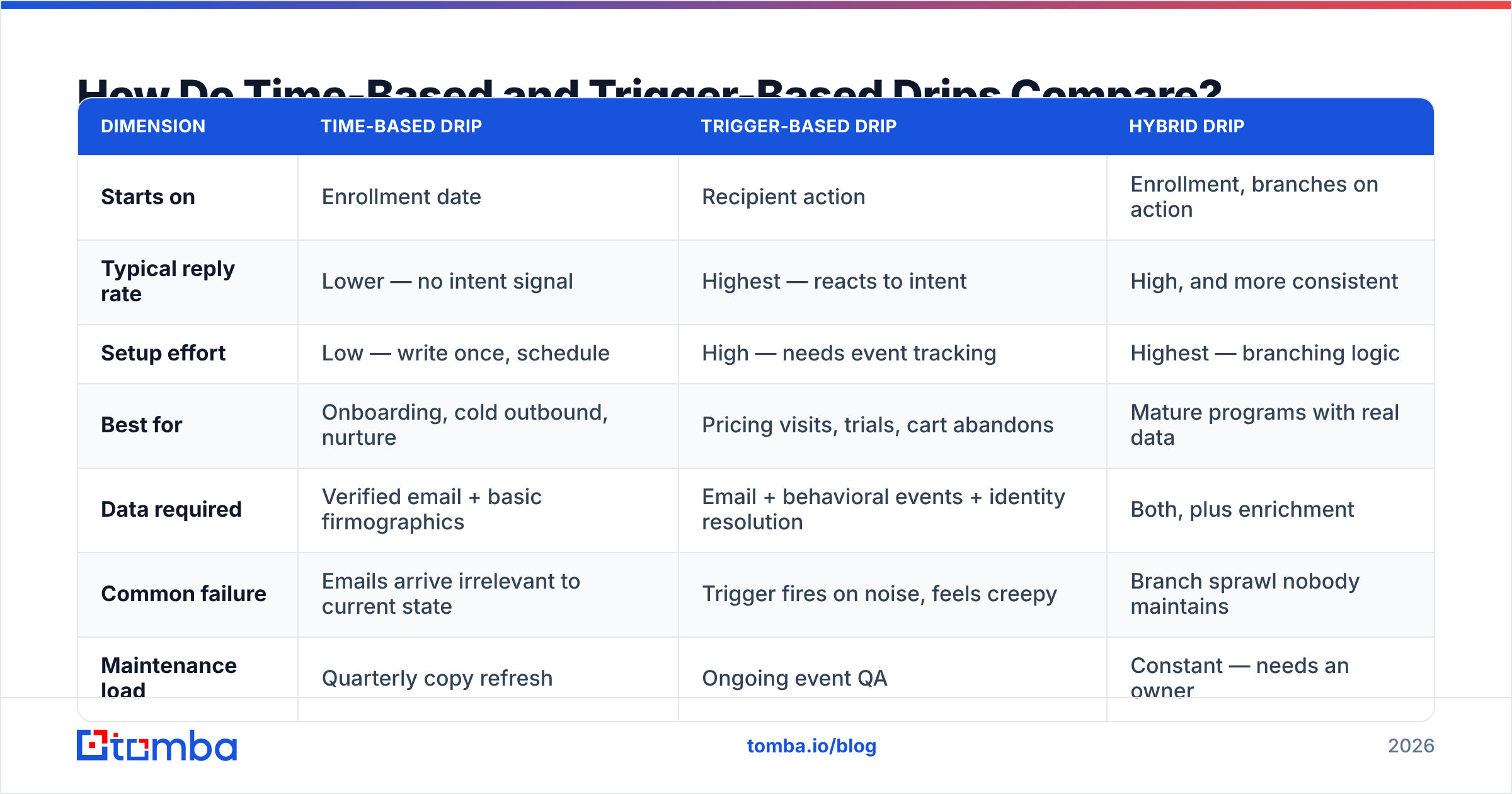
How Do Time-Based and Trigger-Based Drips Compare?#
| Dimension | Time-based drip | Trigger-based drip | Hybrid drip |
|---|---|---|---|
| Starts on | Enrollment date | Recipient action | Enrollment, branches on action |
| Typical reply rate | Lower — no intent signal | Highest — reacts to intent | High, and more consistent |
| Setup effort | Low — write once, schedule | High — needs event tracking | Highest — branching logic |
| Best for | Onboarding, cold outbound, nurture | Pricing visits, trials, cart abandons | Mature programs with real data |
| Data required | Verified email + basic firmographics | Email + behavioral events + identity resolution | Both, plus enrichment |
| Common failure | Emails arrive irrelevant to current state | Trigger fires on noise, feels creepy | Branch sprawl nobody maintains |
| Maintenance load | Quarterly copy refresh | Ongoing event QA | Constant — needs an owner |
The honest read: trigger-based wins on reply rate, but only if your event data is clean. A trigger that fires on a bot crawl or a stale cookie produces an email that reads as surveillance. Plenty of teams would get more lift from tightening a time-based sequence than from building branching logic they'll never maintain.
What Does the Copy Structure Look Like Inside Each Email?#
Every email in a working drip follows roughly the same skeleton, compressed differently by position:
- Opening line — earned, not borrowed. One specific thing about them. Not "I noticed you're in SaaS." Something they'd recognize as researched.
- The bridge — one sentence. Connect their situation to the reason you're writing. This is where most emails bloat into three paragraphs.
- The claim — one metric, one customer. "Cut list-cleaning time from six hours to twenty minutes for a 40-rep team" beats "improve efficiency."
- The ask — singular and low-friction. "Worth a look?" outperforms "Do you have 30 minutes Tuesday at 2pm ET or Thursday at 10am PT?" every time in touches 1 through 3.
- The signature — human. No banner images, no five social icons, no legal footer in touch 1. Those all cost you inbox placement.
Touch 1 uses all five. Touch 4 uses lines 1 and 4 only. If you need a starting point, cold email templates will get you a structure faster than staring at a blank draft, and a subject line generator handles the part everyone overthinks.
Why Do Most Drip Campaigns Fail Before the First Email Sends?#
Because the list is bad. This is unglamorous and it's the whole ballgame.
A drip campaign multiplies whatever you feed it. Send five touches to a list where 18% of addresses are dead, and you've generated five times the bounce volume of a single blast. Mailbox providers read that as a spam signal. Sender reputation drops, and now your good addresses land in Promotions or worse — including the ones on sequences that were working fine last month.
Google and Yahoo's bulk-sender requirements made this explicit: keep spam complaints under 0.3%, authenticate with SPF, DKIM, and DMARC, and offer one-click unsubscribe. Google's own sender guidelines are the reference document, and they are not suggestions.
The practical order of operations before you launch any of the nine examples above:
- Verify every address. Run the list through an email verifier and drop anything that isn't valid. Catch-all domains need their own handling — a catch-all verifier tells you whether the domain accepts everything or actually resolves the mailbox.
- Authenticate the sending domain. SPF, DKIM, DMARC. Check with an SPF checker before you assume it's fine.
- Warm the domain if it's new. Two to four weeks of gradual volume ramp. An email warmup calculator gives you the ramp schedule.
- Cap daily volume per mailbox. 30–50 cold sends per mailbox per day is the sane ceiling. More mailboxes, not more sends per mailbox.
- Set exit conditions before you turn it on. Reply, bounce, unsubscribe, meeting booked. Test all four.
Where you source contacts matters as much as how you clean them. Scraped lists and marketplace exports carry high decay rates. Building from a live domain search against companies you've actually qualified produces a smaller list that performs better per send. Providers like BookYourData take a different route — curated, bounce-guaranteed B2B lists — which suits teams that want volume without building a sourcing motion in-house. Both approaches work; what fails is the middle ground of unverified scraped data.
How Do You Measure Whether a Drip Is Working?#
Reply rate, not open rate. Apple Mail Privacy Protection turned open rates into noise in 2021 and they've never recovered as a metric. Track:
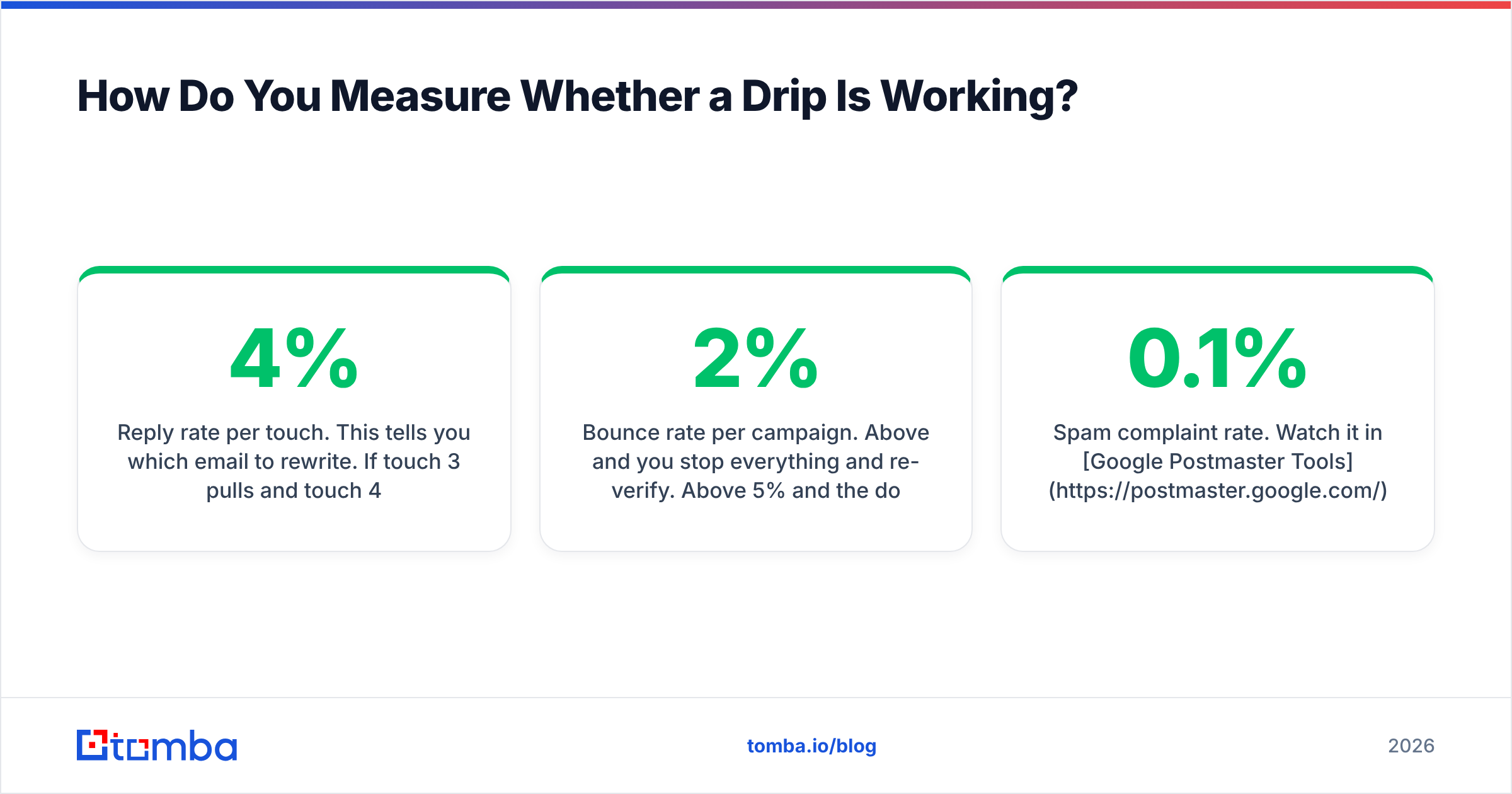
- Reply rate per touch. This tells you which email to rewrite. If touch 3 pulls 4% and touch 4 pulls 0.6%, cut touch 4 and move the breakup up.
- Positive reply rate. Separate "interested" from "unsubscribe me." Raw reply rate hides a lot of anger.
- Meetings booked per 100 contacts enrolled. The only number that survives a board meeting.
- Bounce rate per campaign. Above 2% and you stop everything and re-verify. Above 5% and the domain is already in trouble.
- Spam complaint rate. Watch it in Google Postmaster Tools. Under 0.1% is healthy; 0.3% is the cliff.
Run one variable at a time. Changing subject line, send time, and touch count in the same test tells you nothing about which one moved the number. G2's email marketing category is a reasonable place to compare the platforms that will actually run the reporting, since most sequence tools report these differently.
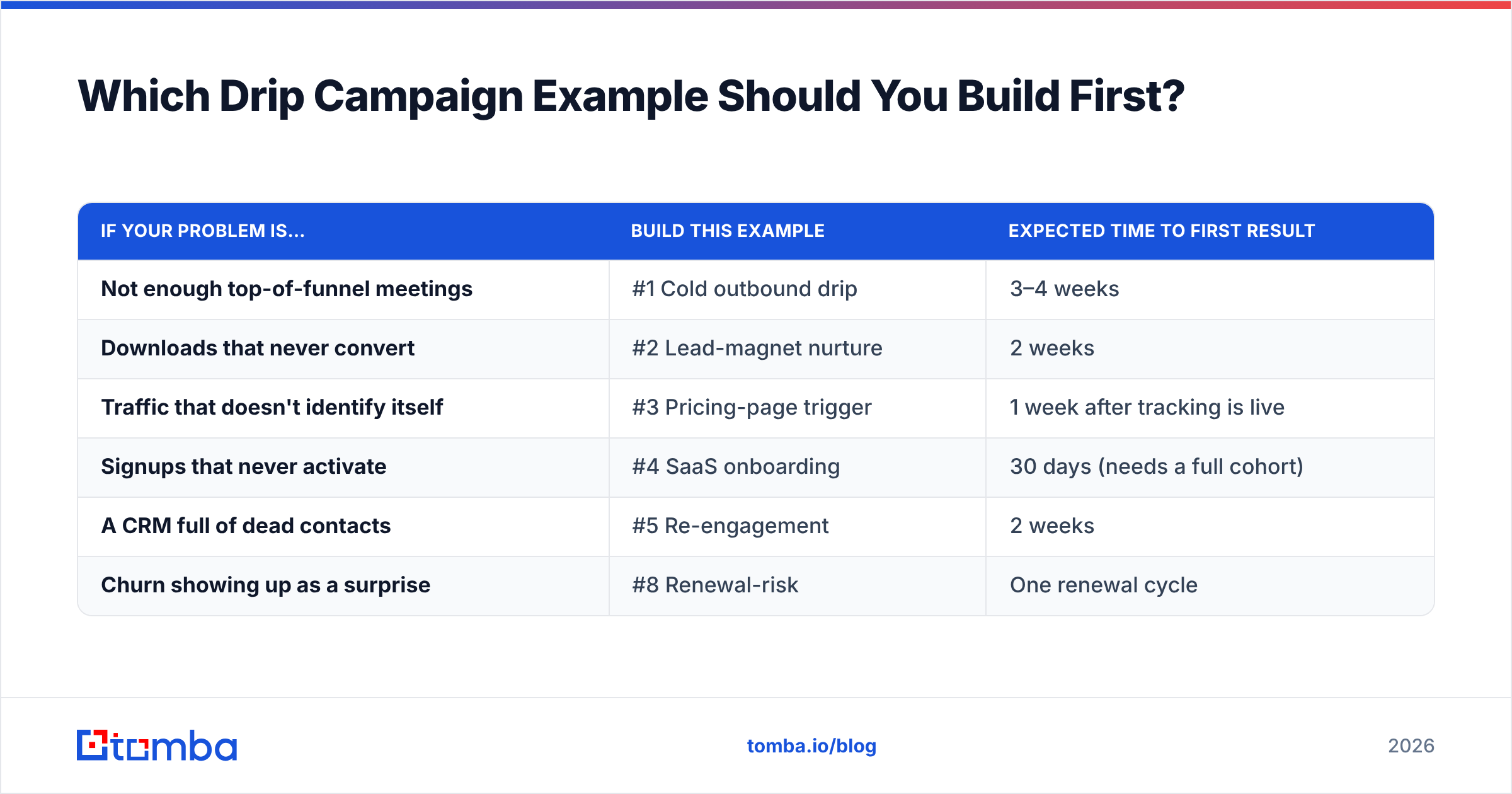
Which Drip Campaign Example Should You Build First?#
Pick based on where the leak is, not on which sequence sounds most interesting.
| If your problem is… | Build this example | Expected time to first result |
|---|---|---|
| Not enough top-of-funnel meetings | #1 Cold outbound drip | 3–4 weeks |
| Downloads that never convert | #2 Lead-magnet nurture | 2 weeks |
| Traffic that doesn't identify itself | #3 Pricing-page trigger | 1 week after tracking is live |
| Signups that never activate | #4 SaaS onboarding | 30 days (needs a full cohort) |
| A CRM full of dead contacts | #5 Re-engagement | 2 weeks |
| Churn showing up as a surprise | #8 Renewal-risk | One renewal cycle |
Most teams should start with #5. It's the cheapest to build, it runs against contacts you already own, and it tells you within two weeks how much of your database is actually alive — which is exactly the information you need before investing in anything more elaborate.
Ready to Build a List Your Drip Campaign Won't Bounce?#
Every example above assumes the addresses are real. That assumption is where most sequences quietly die. Tomba's Email Finder finds verified professional addresses by domain, name, or company, with verification built into the same workflow — so the list you enroll on day 0 is still deliverable on day 14. Start on the free tier with 25 searches a month, or move to Starter at $49/mo when you're running sequences at volume. Full Tomba pricing is public, and the Tomba API drops the same verification into whatever sequencer you're already paying for.
Build the sequence second. Build the list first.
Related guides#
Ready to find emails that actually work?
Join 150,000+ professionals who stopped guessing and started sending. Free credits on signup — no credit card required.
Get the Tomba newsletter
Practical outbound tactics and product updates — once every two weeks.
About the author