Ecommerce Email Open Rates in 2026: Benchmarks and Fixes
Apple broke open-rate reporting, but the metric still tells you something. Here are real 2026 ecommerce open-rate benchmarks by campaign type, why yours are inflated, and the five levers that actually move them.
TL;DR
- Healthy ecommerce email open rates in 2026 sit between 35% and 45% for broadcast campaigns and 50% to 65% for triggered flows (welcome, abandoned cart, post-purchase).
- Your reported number is inflated. Apple Mail Privacy Protection pre-fetches images for roughly 40-55% of consumer inboxes, so those "opens" are machines, not humans.
- Open rate is now a deliverability diagnostic, not a performance metric. Use it to detect inbox placement problems; use click-to-delivered and revenue per recipient to judge campaigns.
- The five levers that genuinely move opens: list hygiene, sender reputation, send-time segmentation, from-name recognition, and subject-line specificity — in that order of impact.
- A single bad send to a stale list can suppress opens for weeks. Prune before you optimize copy.
What counts as a good ecommerce email open rate in 2026?#
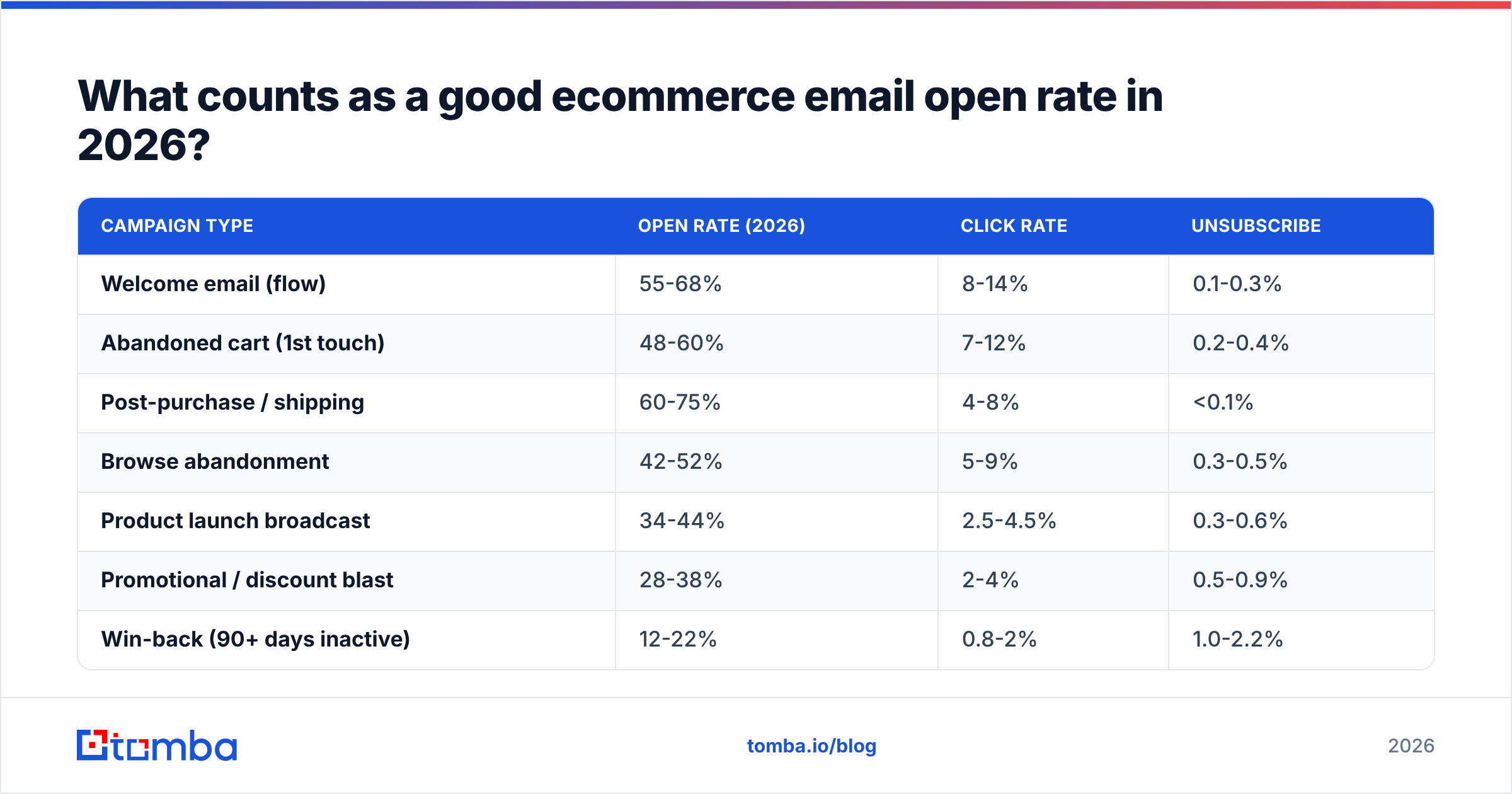
Short answer: 35-45% for a broadcast to your full engaged list, and 50%+ for automated flows. Anything under 20% on a segmented send is a deliverability problem, not a copy problem.
The ranges below reflect what mid-market ecommerce senders report across Shopify, BigCommerce, and headless stacks. They assume authenticated sending domains, a list under 18 months old, and suppression of non-openers past 180 days. Published industry aggregates like Mailchimp's email marketing benchmarks skew lower because they average in accounts with no hygiene at all.
| Campaign type | Open rate (2026) | Click rate | Unsubscribe |
|---|---|---|---|
| Welcome email (flow) | 55-68% | 8-14% | 0.1-0.3% |
| Abandoned cart (1st touch) | 48-60% | 7-12% | 0.2-0.4% |
| Post-purchase / shipping | 60-75% | 4-8% | <0.1% |
| Browse abandonment | 42-52% | 5-9% | 0.3-0.5% |
| Product launch broadcast | 34-44% | 2.5-4.5% | 0.3-0.6% |
| Promotional / discount blast | 28-38% | 2-4% | 0.5-0.9% |
| Win-back (90+ days inactive) | 12-22% | 0.8-2% | 1.0-2.2% |
| Newsletter / content | 30-40% | 1.5-3% | 0.4-0.7% |
Two things stand out. First, transactional-adjacent mail always beats marketing mail — intent does the work. Second, the spread between your best and worst campaign type is roughly 5x, which means a single blended "our open rate is 31%" number tells you almost nothing. Segment your reporting by campaign type before you draw any conclusion.
Why are your reported open rates lying to you?#
Because a large share of them were never opened by a person.
Apple Mail Privacy Protection, shipped in iOS 15 and default-on ever since, routes images through a proxy and pre-loads them whether or not the recipient reads the message. Your tracking pixel fires. Your ESP records an open. Nobody looked at the email.
The practical effects:
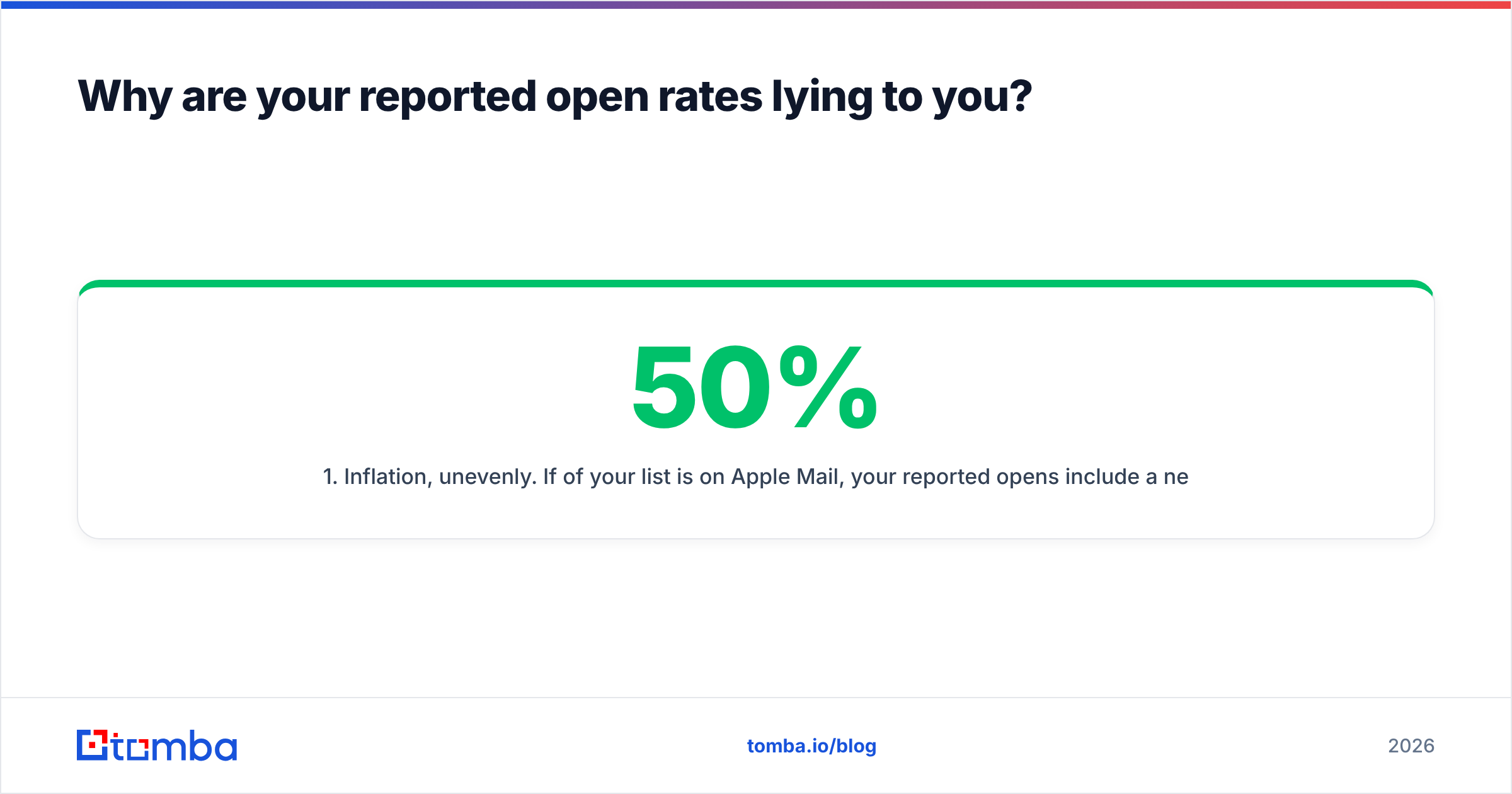
- Inflation, unevenly. If 50% of your list is on Apple Mail, your reported opens include a near-100% "open" rate for that half. A true 25% human open rate reads as roughly 60%.
- Broken A/B tests. Subject-line tests decided on open rate are measuring proxy behavior on half the sample. Statistical significance is meaningless when half the responses are automated.
- Poisoned automation. Any flow branching on "opened but did not click" will misroute Apple users into engaged buckets forever.
- Delayed timestamps. Proxy pre-fetch happens on Apple's schedule, so "opened within 1 hour" data is unreliable for send-time optimization.
- Zombie subscribers look alive. The most damaging effect: addresses that would have aged out of your engaged segment keep registering opens, so you keep mailing dead contacts and slowly burn sender reputation.
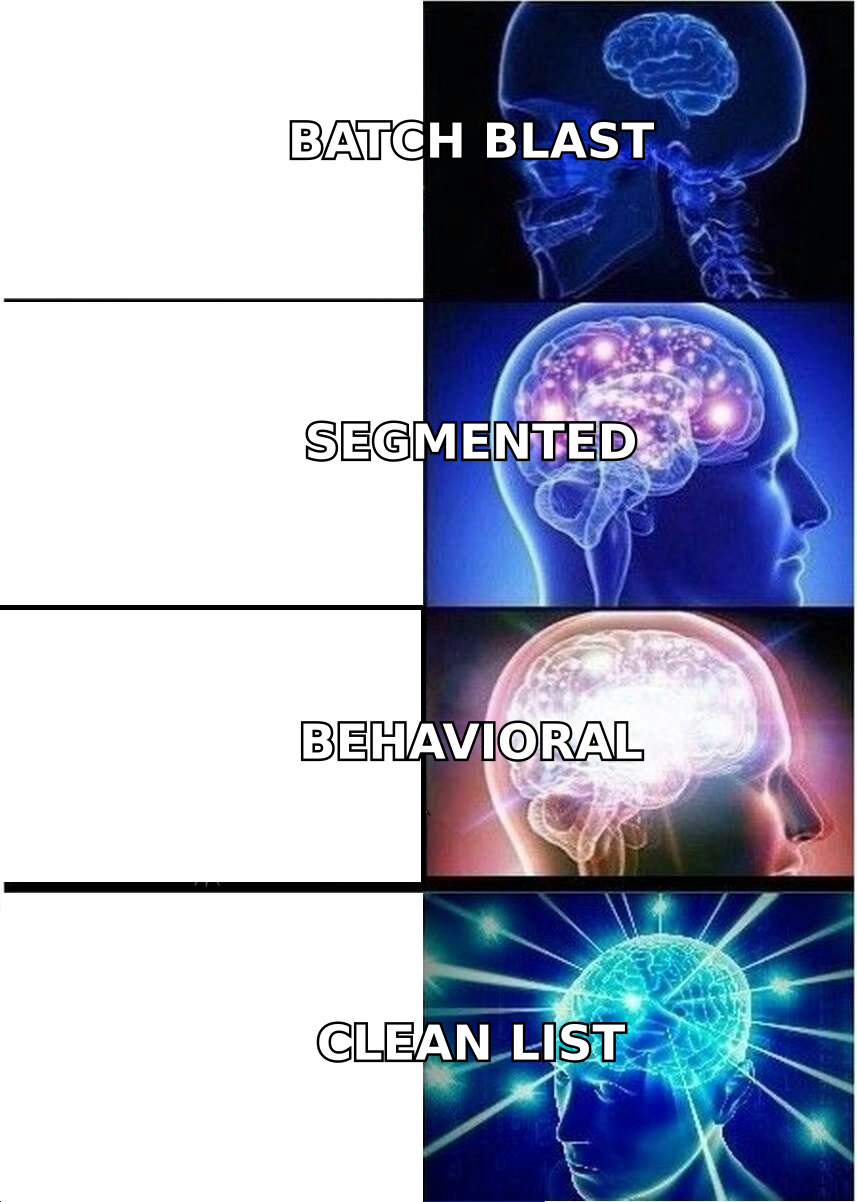
The fix is not to abandon the metric. It is to stop using it as a performance number and start using it as a placement number — and to build your engagement segments on clicks, site sessions, and purchases instead.
How should you actually measure engagement instead?#
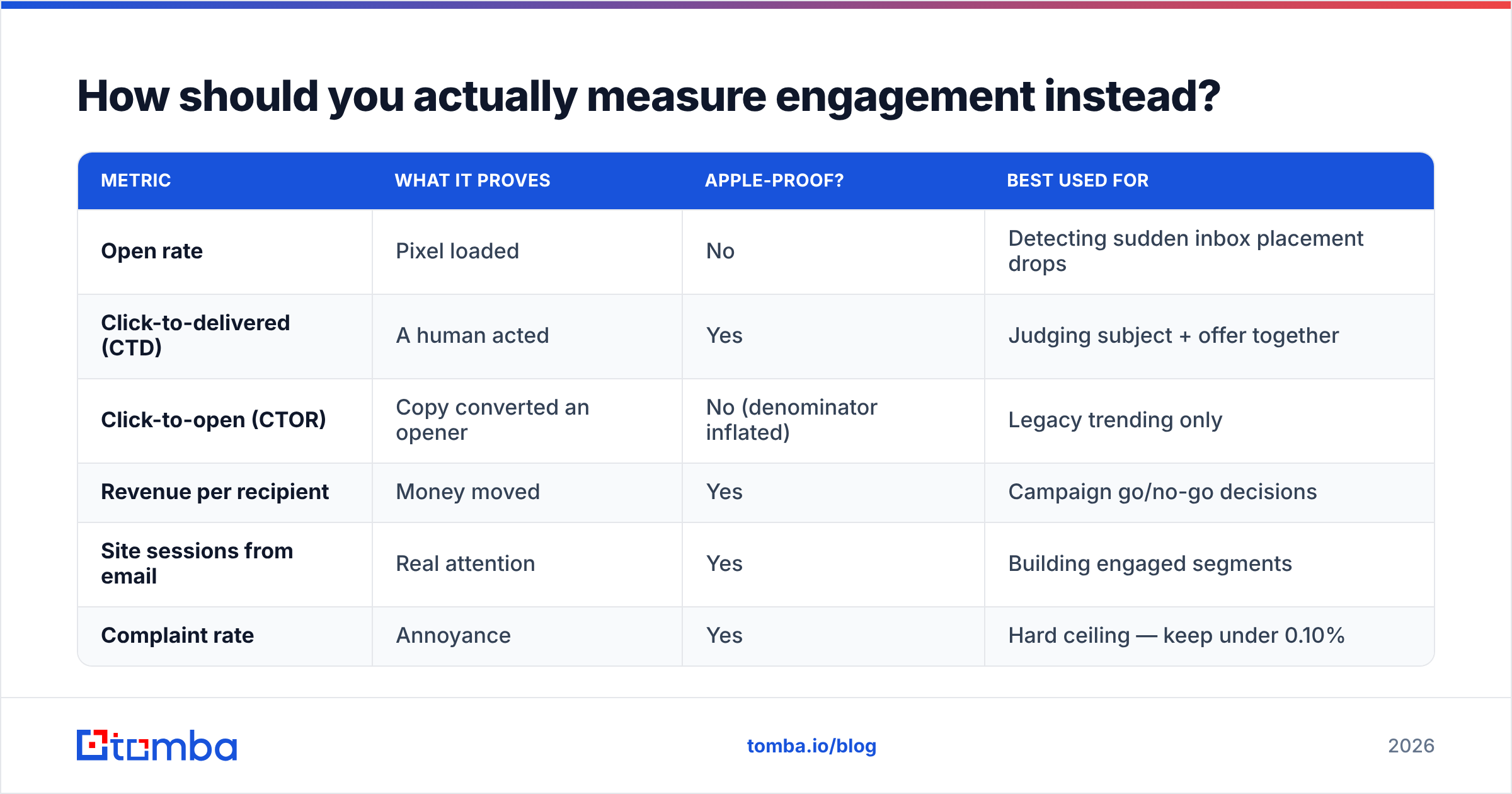
Replace open rate with a small stack of metrics that Apple cannot fake. Here is how the three main options compare:
| Metric | What it proves | Apple-proof? | Best used for |
|---|---|---|---|
| Open rate | Pixel loaded | No | Detecting sudden inbox placement drops |
| Click-to-delivered (CTD) | A human acted | Yes | Judging subject + offer together |
| Click-to-open (CTOR) | Copy converted an opener | No (denominator inflated) | Legacy trending only |
| Revenue per recipient | Money moved | Yes | Campaign go/no-go decisions |
| Site sessions from email | Real attention | Yes | Building engaged segments |
| Complaint rate | Annoyance | Yes | Hard ceiling — keep under 0.10% |
Practical setup: report CTD and revenue per recipient to stakeholders, keep open rate on a monitoring dashboard with an alert on week-over-week drops greater than 8 points, and define your engaged segment as "clicked or purchased or visited in the last 90 days."
That last definition is what protects your domain. Google and Microsoft both weight engagement signals heavily in filtering decisions, and open pixels are not the signals they use — they see reads, replies, deletions-without-open, and folder moves. You can read the vendor-neutral framing of that in Google's Postmaster documentation and in any current primer on email deliverability.
What actually raises ecommerce email open rates?#
Ranked by measured impact, highest first. Most teams do this list backwards, starting with emoji tests and ending with hygiene.
1. List hygiene (biggest lever, least glamorous)#
Invalid and abandoned addresses do two kinds of damage: they bounce, and they hit spam traps. Both push you toward the bulk folder, where nothing gets opened regardless of how good the subject line is.
Do this before anything else:
- Verify at capture. Real-time validation on your signup form and checkout stops typos and disposables at the door. A basic email verifier call at form submit costs a fraction of a cent and prevents months of bounce damage.
- Re-verify quarterly. B2C addresses decay 2-3% per month; B2B decays faster. Run the full list through a bulk verify pass every quarter and remove hard-fails.
- Suppress by behavior, not by pixel. No click, no session, no purchase in 180 days? Move to a win-back flow, then suppress. Do not keep mailing them because they "opened."
- Kill role and catch-all noise.
info@,sales@, and unverifiable catch-all domains drag your rates down. A catch-all verifier tells you which catch-all addresses are worth keeping instead of guessing.
Stores that prune 15-25% of a neglected list routinely see reported opens jump 10-18 points within two sends. Nothing changed about the copy. The denominator got honest and the placement improved.
2. Authentication and reputation#
SPF, DKIM, and DMARC are table stakes since Google and Yahoo tightened bulk-sender requirements. If any of the three is misconfigured, a meaningful slice of your volume never reaches a folder anyone looks at. Check your records with an SPF checker and confirm your sending IP or domain is not listed anywhere with a blacklist checker.
If you have recently moved ESPs or added a new subdomain, ramp volume gradually — a warmup calculator gives you a defensible daily schedule instead of a guess.
3. From-name recognition#
Recipients decide in under a second, and they scan the sender before the subject. Three rules that consistently test well for ecommerce:
- Use the brand name alone for promotional sends ("Everlane", not "Everlane Marketing Team").
- Use person + brand for founder or CX-flavored mail ("Maya at Everlane").
- Never change it mid-campaign-series. Recognition compounds; novelty costs you.
4. Send-time segmentation#
Global send times are a rounding error compared to per-segment timing. VIP buyers open early morning; discount-driven segments open evenings and weekends. Split your broadcast into three or four behavioral segments and let each have its own window. Expect 3-7 points, not 20.
5. Subject lines (real, but last)#
Specificity beats cleverness. "Your size is back in the 4 colors you viewed" outperforms "Guess what's back?" almost every time, because it carries information rather than a tease. Keep it under 45 characters so mobile does not truncate the payload, front-load the noun, and skip the false urgency — recipients have been trained to distrust it.
Test with a subject line tester for length and spam-trigger issues, and run a spam checker on the full message before a large send. Just remember: judge those tests on clicks, not opens.

Is low open rate a copy problem or a deliverability problem?#
Diagnose before you rewrite. This decision tree resolves it in about ten minutes:
- Did the drop happen suddenly, across all campaign types? That's placement. Check authentication, blacklists, and whether you recently imported a list.
- Did it drop on one segment only? That's list quality in that segment. Verify it and check when those addresses were captured.
- Are opens down but clicks flat? That's measurement noise — probably an Apple Mail share shift or a tracking-pixel block. Ignore it.
- Are opens flat but clicks down? That's copy, offer, or landing page. Now you can start testing.
- Are complaints above 0.10% or bounces above 2%? Stop sending. Fix hygiene first; everything else is wasted effort until the ceiling lifts.
- Are transactional emails also underperforming? Domain-level reputation problem. Separate marketing and transactional sending subdomains immediately.
Most "our open rates collapsed" incidents resolve at step 1 or 2. Copy is rarely the culprit when the change is abrupt.
How do ecommerce open rates differ from B2B outbound?#
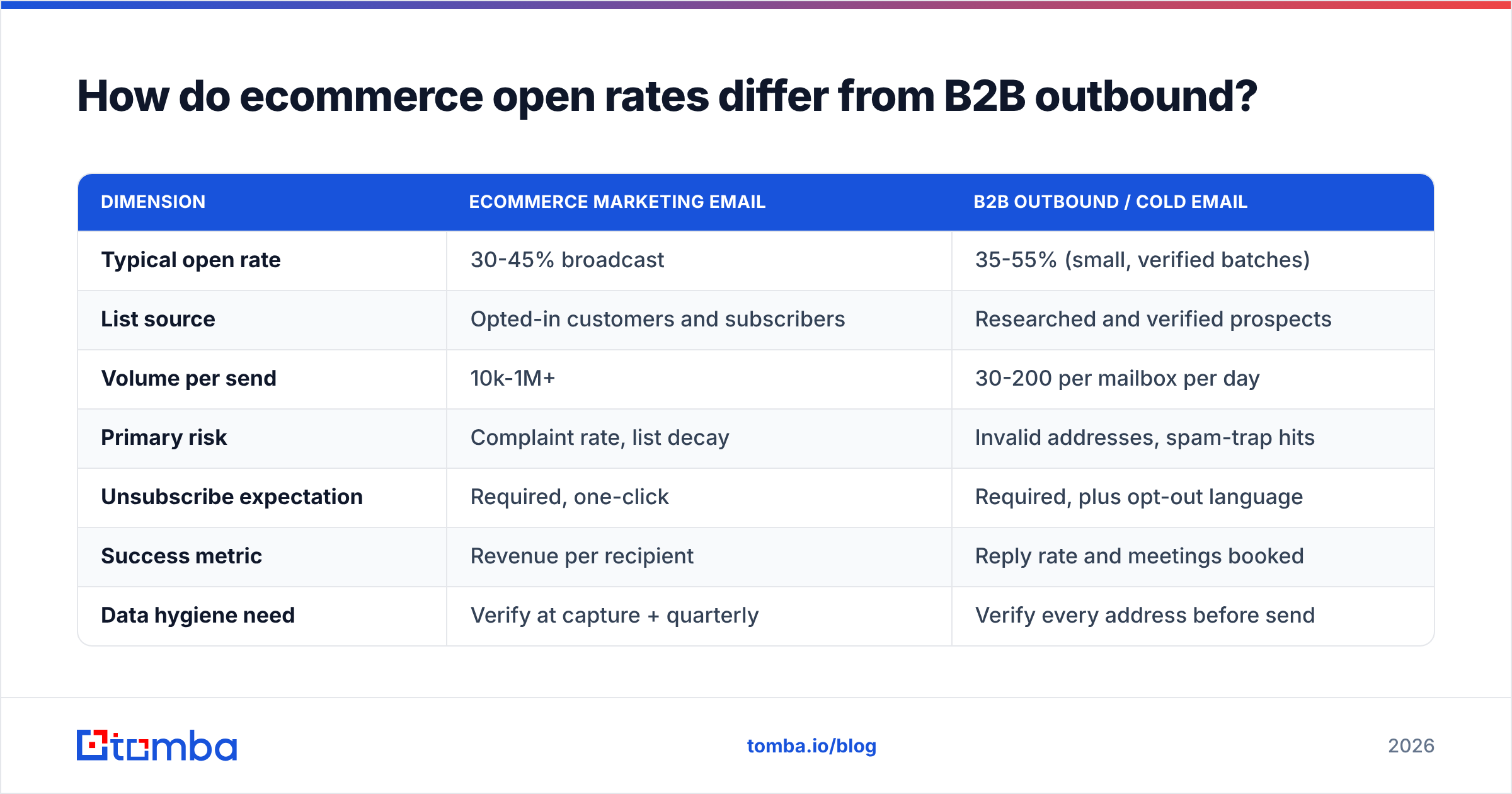
They behave differently enough that borrowing tactics across the line usually backfires.
| Dimension | Ecommerce marketing email | B2B outbound / cold email |
|---|---|---|
| Typical open rate | 30-45% broadcast | 35-55% (small, verified batches) |
| List source | Opted-in customers and subscribers | Researched and verified prospects |
| Volume per send | 10k-1M+ | 30-200 per mailbox per day |
| Primary risk | Complaint rate, list decay | Invalid addresses, spam-trap hits |
| Unsubscribe expectation | Required, one-click | Required, plus opt-out language |
| Success metric | Revenue per recipient | Reply rate and meetings booked |
| Data hygiene need | Verify at capture + quarterly | Verify every address before send |
| Personalization depth | Behavioral (browse, purchase) | Firmographic and role-based |
The overlap is data quality. In both worlds, the single highest-leverage action is sending to addresses that actually exist and actually belong to a person who wants to hear from you. Ecommerce teams get that from good capture practices; outbound teams get it from finding and validating addresses one at a time. Both fail the same way when they skip it. For a wider view of how sending practices evolved, the email marketing overview on Wikipedia is a reasonable neutral primer, and HubSpot's marketing statistics hub keeps a running aggregate of cross-industry rates.
What should you do in the next 30 days?#
A concrete sequence, ordered so each step compounds into the next:
- Week 1 — Audit. Pull open, click-to-delivered, complaint, and bounce rates by campaign type for the last 90 days. Check SPF, DKIM, DMARC. Confirm marketing and transactional traffic are on separate subdomains.
- Week 2 — Prune. Bulk-verify the whole list. Remove hard-fails and role addresses. Move 180-day non-clickers into a win-back flow with a hard suppression date.
- Week 3 — Redefine segments. Rebuild your engaged segment on clicks, sessions, and purchases. Delete any automation branch that keys on opens.
- Week 4 — Rebuild reporting. Make CTD and revenue per recipient the headline metrics. Keep open rate as a monitored alert only.
Do those four and your reported open rate will probably go up while your list gets smaller. That is the correct direction. You removed the addresses that were diluting placement.
Where does contact data quality fit into all this?#
It is the foundation, not a side quest. Every deliverability problem traces back to sending mail to addresses that should not have been on the list — typos at capture, decayed contacts, purchased data, catch-all domains you never checked.
If you are also running outbound alongside your ecommerce program — partner recruitment, wholesale prospecting, supplier outreach, creator partnerships — that side needs verified addresses from the start, because a cold list has none of the goodwill your customer list has earned.
Start with the data layer. Tomba Email Finder finds and verifies professional email addresses by name, company, or domain, with confidence scoring on every result so you know what is safe to send to before you send it. The free tier gives you 25 searches a month to test accuracy on domains you already know; paid plans start at $49/mo on Starter and scale to $99/mo on Growth — see Tomba pricing for the full breakdown. Verify first, then optimize your subject lines. That order is the whole trick.
Related guides#
Ready to find emails that actually work?
Join 150,000+ professionals who stopped guessing and started sending. Free credits on signup — no credit card required.
Get the Tomba newsletter
Practical outbound tactics and product updates — once every two weeks.
About the author