Email Authentication DNS TXT Records: The 2026 Setup Guide
SPF, DKIM, DMARC, BIMI and MTA-STS all live in DNS TXT records — and one typo kills your inbox rate. Here's exactly what each record does, what to publish, and how to verify it.
TL;DR
- Email authentication runs almost entirely on DNS TXT records: SPF, DKIM, DMARC, MTA-STS and BIMI are all published as text strings on your domain.
- SPF says which servers may send for you, DKIM proves the message wasn't altered, DMARC tells receivers what to do when those checks fail — and only DMARC gives you reporting.
- The two silent killers are the SPF 10-DNS-lookup limit and alignment failures, where SPF/DKIM technically pass but on the wrong domain.
- Google and Yahoo's bulk-sender rules (in force since February 2024) made DMARC non-optional for anyone sending 5,000+ messages a day to their users. In 2026, Microsoft enforces similar thresholds.
- Publish in this order: SPF → DKIM → DMARC at
p=none→ read reports for 2-4 weeks → move top=quarantine→p=reject.
Your cold email campaign isn't underperforming because of the subject line. Check the DNS first. A domain missing DKIM alignment or running an SPF record with 14 DNS lookups will get filtered before a single human reads the copy — and no amount of A/B testing fixes that.
This guide covers every email authentication DNS TXT record you need in 2026, what each string actually means, the limits that break them, and how to verify the whole stack before you send.
What are email authentication DNS TXT records?#
A DNS TXT record is a free-form text string attached to a domain name. It was never designed for email security — it was a general-purpose "notes" field in DNS. Email standards adopted it because every DNS provider on earth already supported it, and receiving mail servers could query it in milliseconds.
Think of it like the guest list at a venue door. Anyone can claim to be on the list (that's SMTP — the protocol has no built-in identity check). The TXT records are the list itself, published by you, readable by anyone at the door, and impossible for a stranger to forge without controlling your DNS.
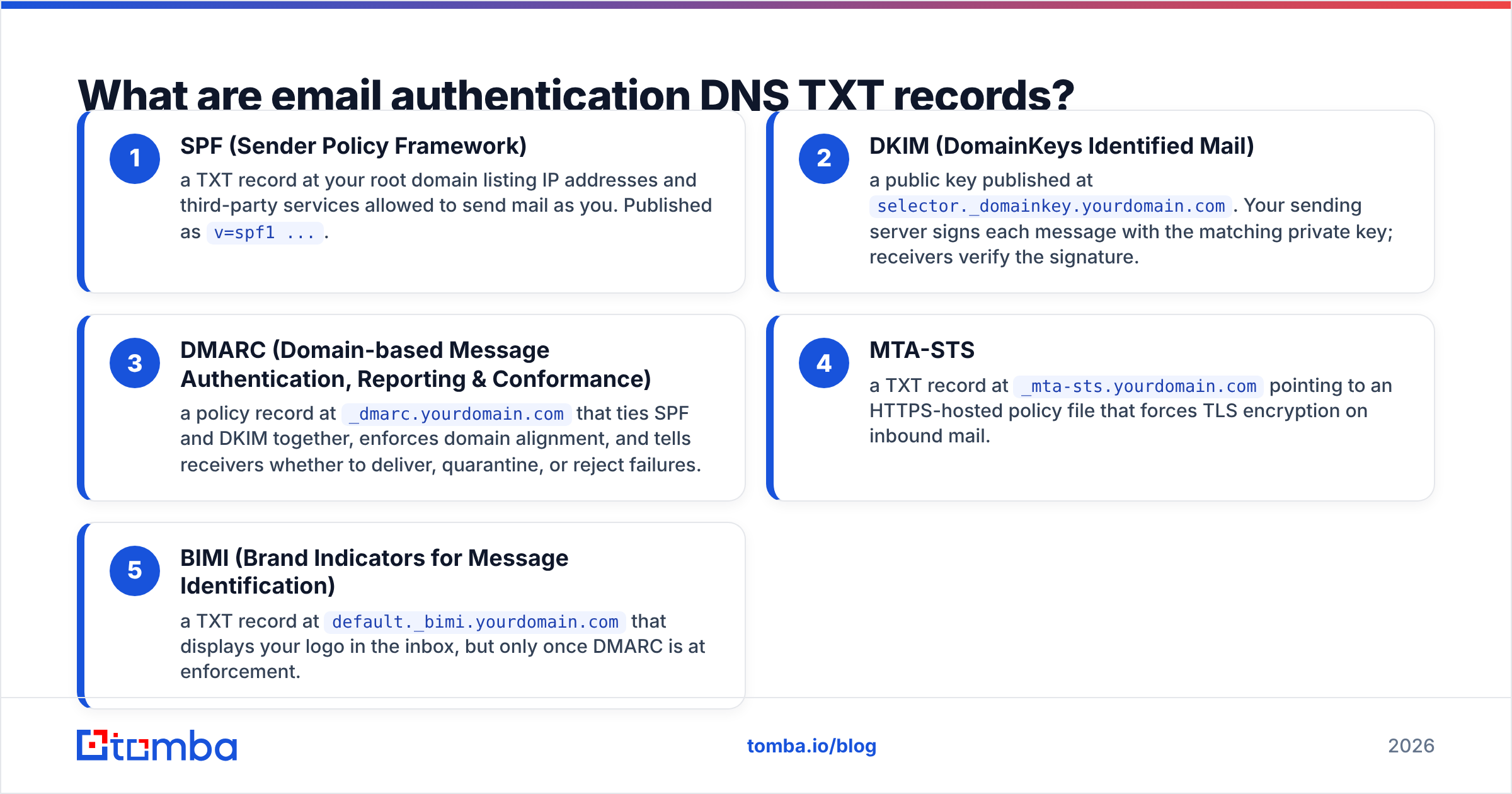
Five records make up the modern stack:
- SPF (Sender Policy Framework) — a TXT record at your root domain listing IP addresses and third-party services allowed to send mail as you. Published as
v=spf1 .... - DKIM (DomainKeys Identified Mail) — a public key published at
selector._domainkey.yourdomain.com. Your sending server signs each message with the matching private key; receivers verify the signature. - DMARC (Domain-based Message Authentication, Reporting & Conformance) — a policy record at
_dmarc.yourdomain.comthat ties SPF and DKIM together, enforces domain alignment, and tells receivers whether to deliver, quarantine, or reject failures. - MTA-STS — a TXT record at
_mta-sts.yourdomain.compointing to an HTTPS-hosted policy file that forces TLS encryption on inbound mail. - BIMI (Brand Indicators for Message Identification) — a TXT record at
default._bimi.yourdomain.comthat displays your logo in the inbox, but only once DMARC is at enforcement.
Only three of those are mandatory for deliverability. SPF, DKIM and DMARC are the load-bearing walls; MTA-STS and BIMI are trim.

How do SPF, DKIM and DMARC actually differ?#
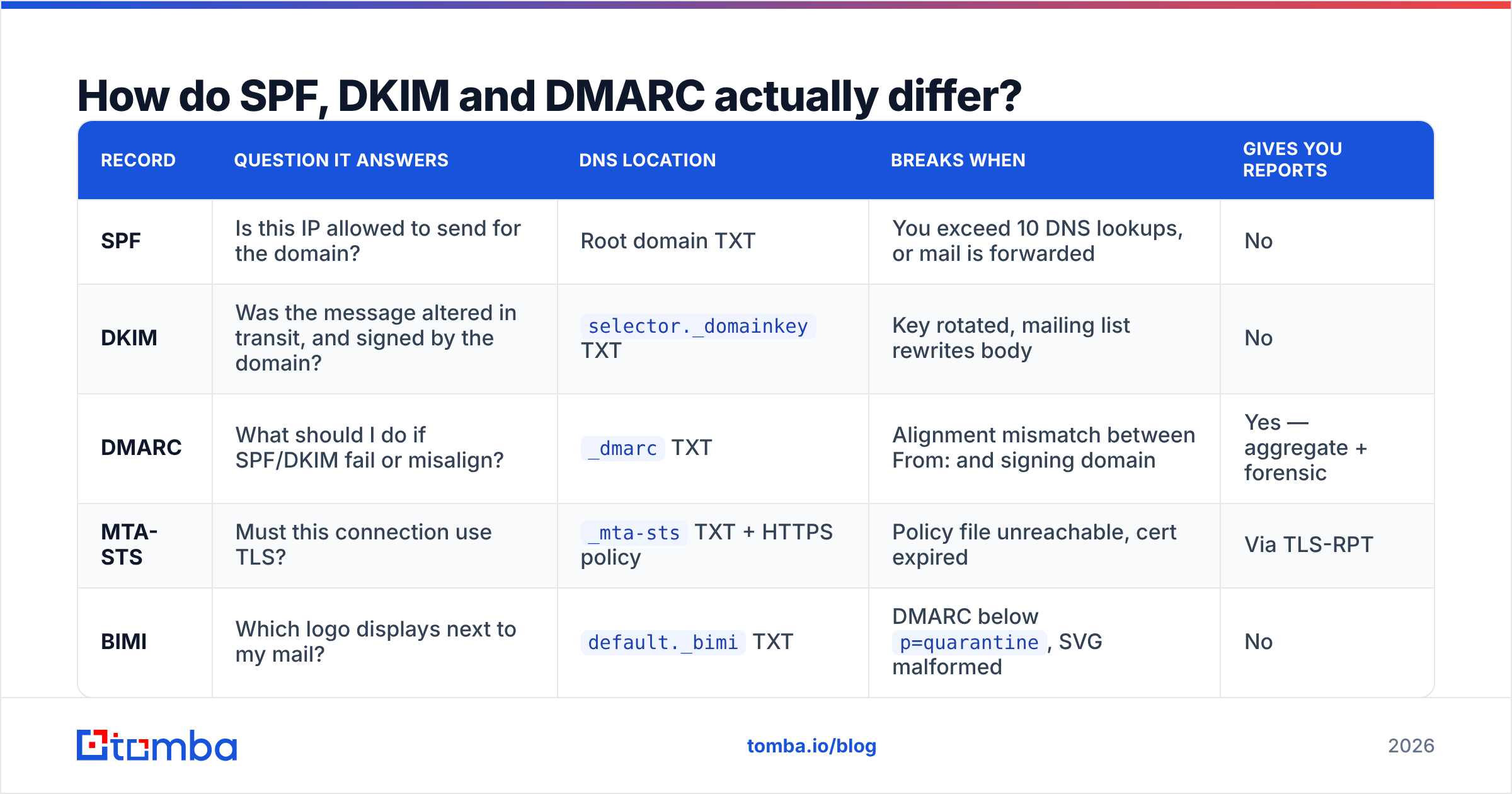
They answer three different questions, and confusing them is the most common reason a "fully authenticated" domain still lands in spam.
| Record | Question it answers | DNS location | Breaks when | Gives you reports |
|---|---|---|---|---|
| SPF | Is this IP allowed to send for the domain? | Root domain TXT | You exceed 10 DNS lookups, or mail is forwarded | No |
| DKIM | Was the message altered in transit, and signed by the domain? | selector._domainkey TXT |
Key rotated, mailing list rewrites body | No |
| DMARC | What should I do if SPF/DKIM fail or misalign? | _dmarc TXT |
Alignment mismatch between From: and signing domain | Yes — aggregate + forensic |
| MTA-STS | Must this connection use TLS? | _mta-sts TXT + HTTPS policy |
Policy file unreachable, cert expired | Via TLS-RPT |
| BIMI | Which logo displays next to my mail? | default._bimi TXT |
DMARC below p=quarantine, SVG malformed |
No |
The critical concept is alignment. SPF checks the Return-Path (envelope sender). DKIM checks the d= tag in the signature. Your recipient sees neither — they see the From: header. DMARC exists to require that at least one of those two authenticated domains matches the visible From: domain.
That's how you get the maddening scenario where SPF passes, DKIM passes, and DMARC still fails: your ESP sent through mail.esp-vendor.com, SPF validated against that domain, but your From: says you@yourcompany.com. Nothing aligns. The message fails DMARC.
What does each TXT record look like in practice?#
Here are the actual strings, annotated.
SPF — published as a TXT record on yourdomain.com:
v=spf1 include:_spf.google.com include:sendgrid.net ip4:203.0.113.45 -allv=spf1— version, always first.include:— delegates to another domain's SPF record. Each one costs a DNS lookup, and nested includes cost more.ip4:/ip6:— literal addresses, zero lookup cost. Prefer these when you control the server.-all— hard fail: reject anything not listed.~allis soft fail (mark, don't reject). Start on~all, move to-allonce you're confident nothing legitimate is missing.
DKIM — published at s1._domainkey.yourdomain.com:
v=DKIM1; k=rsa; p=MIGfMA0GCSqGSIb3DQEBAQUAA4GNADCBiQKBgQC...The s1 is the selector — an arbitrary label that lets you run multiple keys at once. That matters for rotation: publish s2, switch signing to s2, wait for in-flight mail to clear, then delete s1. Use 2048-bit keys. 1024-bit is still accepted but is being phased down by major receivers.
DMARC — published at _dmarc.yourdomain.com:
v=DMARC1; p=none; rua=mailto:dmarc@yourdomain.com; pct=100; adkim=r; aspf=rp=— the policy:none,quarantine, orreject.rua=— where aggregate XML reports go. This is the single most valuable tag; without it you're guessing.pct=— percentage of failing mail the policy applies to. Usepct=25when first moving to quarantine.adkim/aspf— alignment strictness.r(relaxed) allows subdomains to match;s(strict) requires an exact match. Relaxed is right for almost everyone.
MTA-STS — TXT at _mta-sts.yourdomain.com:
v=STSv1; id=20260115000000The id is a version string you bump whenever you change the policy file hosted at https://mta-sts.yourdomain.com/.well-known/mta-sts.txt.
BIMI — TXT at default._bimi.yourdomain.com:
v=BIMI1; l=https://yourdomain.com/logo.svg; a=https://yourdomain.com/vmc.pemThe a= tag points to a Verified Mark Certificate. Gmail requires one; it costs roughly $1,000–1,500/year from DigiCert or Entrust. Apple Mail and Yahoo display BIMI logos with looser requirements.
Why does SPF break so often?#
Because of a limit almost nobody reads about until it bites: SPF permits a maximum of 10 DNS lookups during evaluation. Exceed it and the record returns permerror — which most receivers treat as an outright fail, not a "close enough."
Every include:, a, mx, ptr, and exists mechanism costs one lookup. And includes nest. A single include:_spf.google.com internally resolves to three more records. Add Salesforce, HubSpot, Zendesk, a marketing platform, and a transactional service, and you'll blow past 10 without noticing — because the record still looks fine in your DNS panel.
Four fixes, in order of preference:
- Remove services you no longer use. Audit the record annually. Most teams are carrying includes for tools they churned from two years ago.
- Replace includes with
ip4:where possible. If a vendor publishes static IPs, hardcode them. Zero lookup cost. - Use SPF flattening carefully. Tools that expand includes into literal IPs solve the count problem but break silently when a vendor changes infrastructure. Only use a flattener that auto-updates.
- Send from subdomains. Put marketing on
mail.yourdomain.comand transactional onnotify.yourdomain.com, each with its own SPF record and its own reputation. This is the structurally correct answer and it isolates reputation damage.
The other SPF failure mode is forwarding. When a recipient auto-forwards your mail, the forwarding server becomes the sending IP — which isn't in your SPF record. SPF breaks. This is exactly why DKIM matters: DKIM signatures survive forwarding, so DMARC still passes on the DKIM leg.
How do you roll out DMARC without losing mail?#
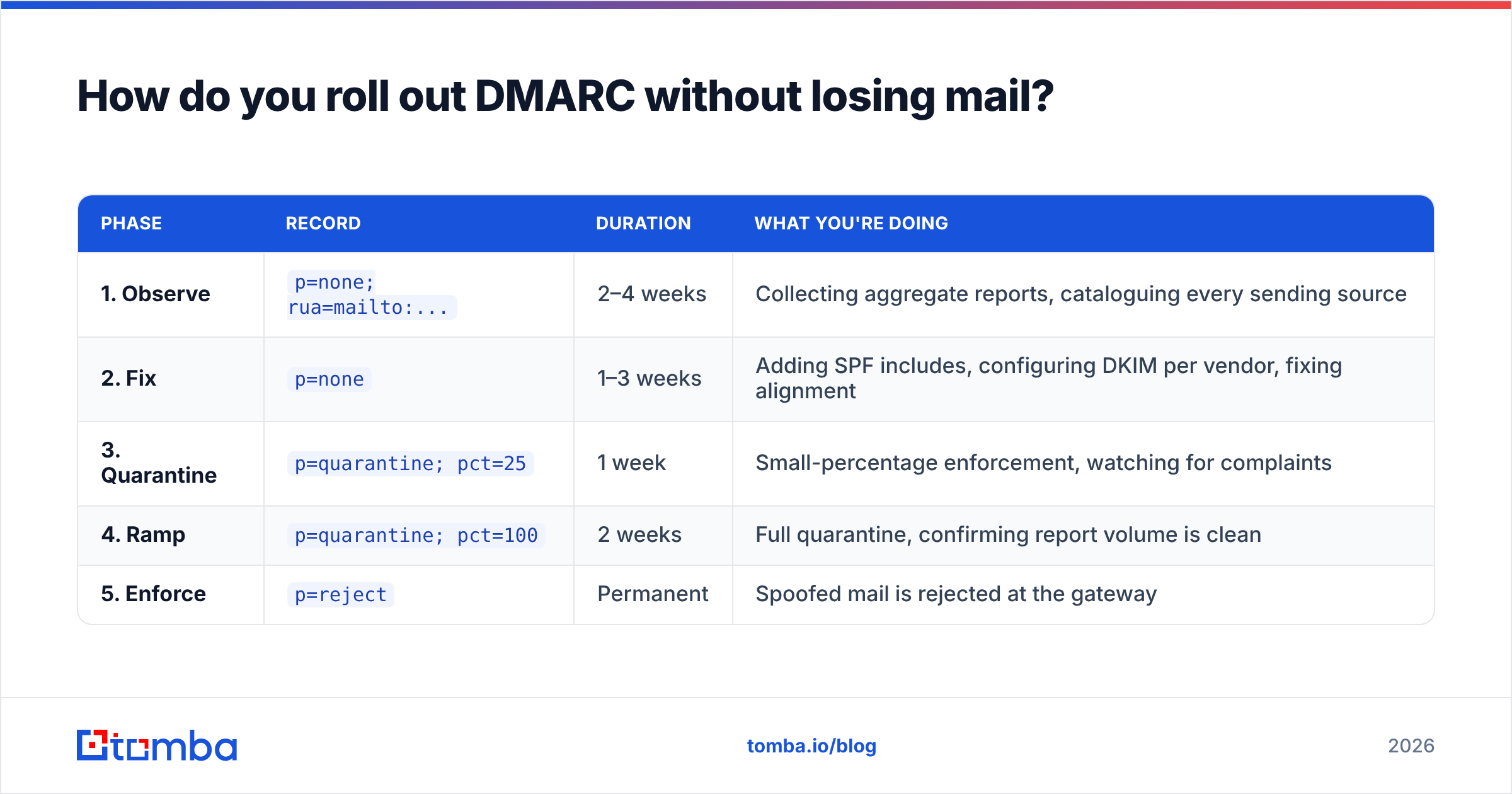
Slowly, and with reports on. The failure pattern is publishing p=reject on day one, then discovering your invoicing system, your recruiting tool, and your CEO's newsletter platform were all sending unauthenticated.
| Phase | Record | Duration | What you're doing |
|---|---|---|---|
| 1. Observe | p=none; rua=mailto:... |
2–4 weeks | Collecting aggregate reports, cataloguing every sending source |
| 2. Fix | p=none |
1–3 weeks | Adding SPF includes, configuring DKIM per vendor, fixing alignment |
| 3. Quarantine | p=quarantine; pct=25 |
1 week | Small-percentage enforcement, watching for complaints |
| 4. Ramp | p=quarantine; pct=100 |
2 weeks | Full quarantine, confirming report volume is clean |
| 5. Enforce | p=reject |
Permanent | Spoofed mail is rejected at the gateway |
Aggregate reports arrive as gzipped XML, one per receiver per day. Reading them raw is possible but miserable; Dmarcian, Valimail, and Postmark's free DMARC service all parse them into readable dashboards. Postmark's is free and adequate for most senders.
One rule that saves pain: add sp=reject once you're at enforcement. Without an explicit subdomain policy, attackers spoof accounts.yourdomain.com — a subdomain you never created — and inherit whatever default the parent implies.
What did Google, Yahoo and Microsoft actually change?#
In February 2024, Google and Yahoo began enforcing bulk-sender requirements that turned authentication from a best practice into a gate. The core requirements, still in force and now matched by Microsoft for Outlook.com traffic:
- SPF and DKIM both configured — not one or the other.
- A DMARC record published, minimum
p=none. - Alignment between the
From:domain and at least one authenticated domain. - Spam complaint rate under 0.3%, ideally under 0.1%.
- One-click unsubscribe (RFC 8058) on marketing mail.
- Valid forward and reverse DNS on sending IPs.
- TLS for transmission.
The threshold is 5,000 messages per day to a given provider, but treat that as a formality — smaller senders see the same filtering behavior applied, just without a published warning. If you're running outbound at any scale, assume the rules apply to you.

How do you verify the records are working?#
Publishing isn't proof. Verify with three independent checks.
1. Query the records directly. From any terminal:
dig +short TXT yourdomain.com
dig +short TXT _dmarc.yourdomain.com
dig +short TXT s1._domainkey.yourdomain.com
If a record doesn't appear, it isn't published — regardless of what your DNS panel shows. Propagation takes up to the TTL you set, typically 1 hour to 24 hours.
2. Send a test message and read the headers. Mail yourself at a Gmail account, open the message, and choose "Show original." You want three lines reading PASS:
SPF:   PASS with IP 203.0.113.45
DKIM:  'PASS' with domain yourdomain.com
DMARC: 'PASS'
The DKIM domain must match your From: domain. If it says the ESP's domain, you have an alignment problem — configure a custom signing domain in your ESP.
3. Run the automated checkers. An SPF checker will flag lookup-count overruns you can't spot by eye. A blacklist checker confirms your sending IP isn't on Spamhaus or SURBL. A sender reputation checker gives you the domain-level view. And a spam checker catches content-side issues once the DNS side is clean.
Then re-check after every infrastructure change. Adding a new ESP, migrating CRMs, or rotating a DKIM key all invalidate your last verification.
Does authentication alone fix deliverability?#
No — and this is where most guides stop too early.
Authentication is a permission system, not a reputation system. Perfect SPF, DKIM and DMARC records get you the right to be evaluated on your sending behavior. They do not compensate for bad behavior. A fully authenticated domain sending to a list with 12% invalid addresses will still tank.
Bounce rate is the fastest way to burn a freshly authenticated domain. Mailbox providers read hard bounces as a signal you bought or scraped your list, and the penalty applies at the domain level — it follows you across ESPs. Keeping hard bounces under 2% means validating addresses before the send, not after. Run your list through an email verifier and use a catch-all verifier for the domains that accept everything at SMTP time and bounce later.
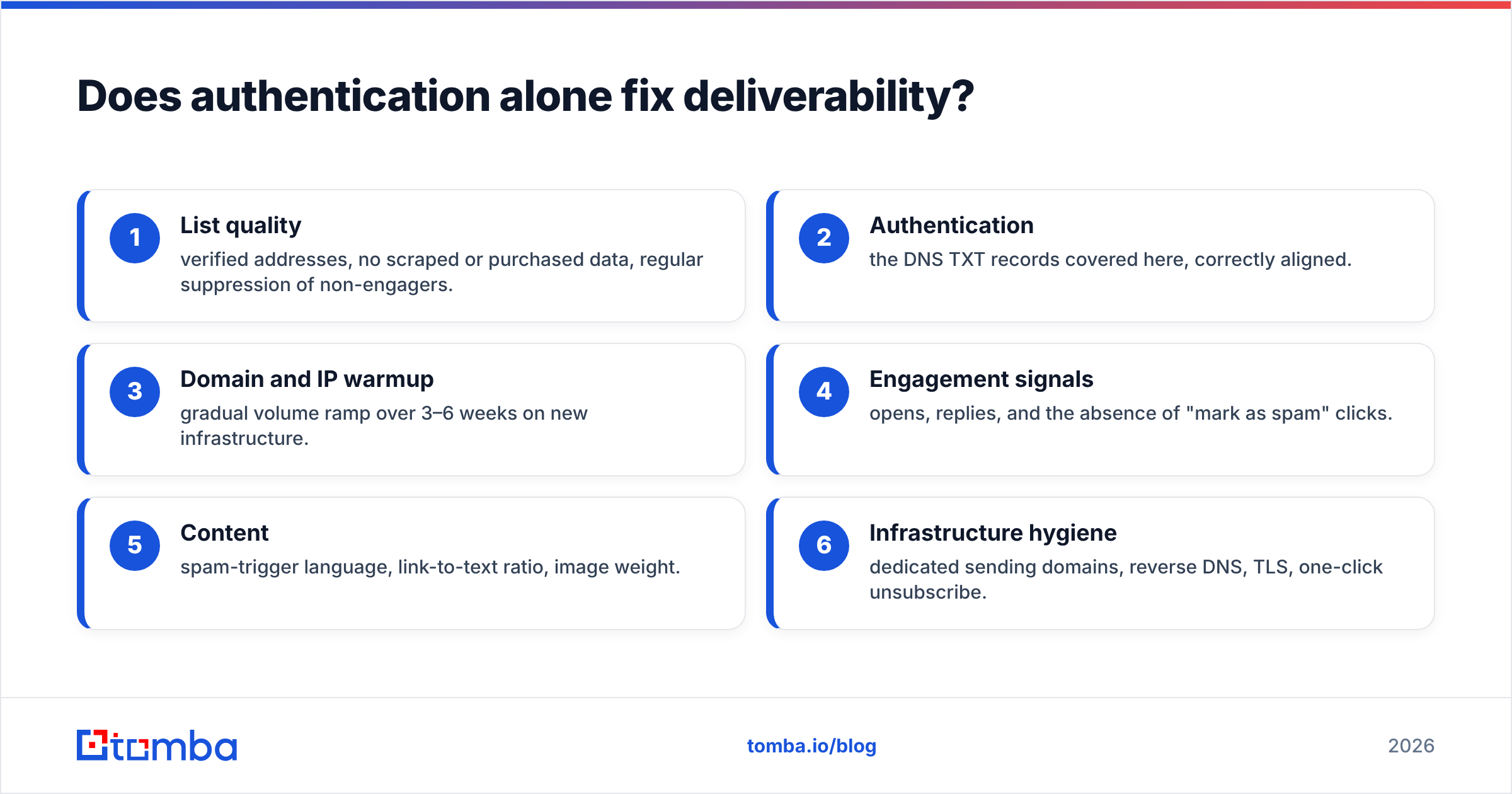
The full deliverability picture, ranked by impact:
- List quality — verified addresses, no scraped or purchased data, regular suppression of non-engagers.
- Authentication — the DNS TXT records covered here, correctly aligned.
- Domain and IP warmup — gradual volume ramp over 3–6 weeks on new infrastructure.
- Engagement signals — opens, replies, and the absence of "mark as spam" clicks.
- Content — spam-trigger language, link-to-text ratio, image weight.
- Infrastructure hygiene — dedicated sending domains, reverse DNS, TLS, one-click unsubscribe.
You control items 1 and 2 completely. They're also the two most commonly neglected. Read the email deliverability and sender reputation primers if you want the mechanics behind items 3 and 4.
What's the fastest correct setup order?#
If you're starting from zero on a new sending domain, run this sequence:
- Buy a separate sending domain. Never run cold outbound from your primary corporate domain.
yourcompany-mail.comorgetyourcompany.comisolates the risk. - Publish SPF with only the services you actually use. Verify the lookup count is under 10.
- Enable DKIM in your ESP, publish the selector record, confirm 2048-bit key.
- Publish DMARC at
p=nonewith a workingrua=address. Do this on day one even though it enforces nothing — you need the report stream. - Wait 48 hours, then verify all three with
digand a Gmail test send. - Warm the domain for 3–6 weeks, starting at 10–20 sends/day and ramping ~30% weekly. An email warmup calculator will give you a concrete schedule.
- Read your DMARC reports for a month, fix every unauthenticated source.
- Move to
p=quarantine; pct=25, then full quarantine, thenp=rejectwithsp=reject. - Add MTA-STS and BIMI last. They're refinements, not prerequisites.
Skipping step 6 is the single most expensive mistake. Authentication records propagate in hours; domain reputation takes weeks and is far harder to repair than to build.
For the full standards text rather than a summary, the DMARC specification and your ESP's own DNS documentation are the authoritative sources — vendor docs will always be more current than any blog post, this one included.
Where does verified data fit into this?#
Right at the front of the chain, before a single record matters.
The order that actually works is: find accurate contacts → verify them → authenticate your domain → warm it → send. Reverse any two of those steps and the later ones stop compensating for the earlier ones. Perfect DNS on a list of guessed addresses is a well-documented way to get a clean domain blacklisted in three weeks.
That's the case for sourcing addresses that were confirmed to exist rather than pattern-generated. Tomba's email finder returns a confidence score with every result, and its domain search pulls every discoverable address at a company so you're targeting real mailboxes rather than permutating first.last@ and hoping. Bulk lists run through bulk verify before they ever touch your sequencer. The free tier covers 25 searches a month if you want to test accuracy against a domain you already know; paid plans start at $49/mo on Starter, with full Tomba pricing published openly.
Get the DNS right, then feed it a list worth sending to. Start with the Tomba Email Finder — the authentication work you just did only pays off on addresses that actually resolve.
Related guides#
Ready to find emails that actually work?
Join 150,000+ professionals who stopped guessing and started sending. Free credits on signup — no credit card required.
Get the Tomba newsletter
Practical outbound tactics and product updates — once every two weeks.
About the author