Email Automation Best Practices for 2026: A Complete Guide
Most email automation advice stops at "personalize the first line." This guide covers the parts that actually decide whether your sequences land: list hygiene, warmup math, trigger design, sending limits, and the metrics worth tracking in 2026.
TL;DR
- Email automation fails at the data layer far more often than at the copy layer. A 12% bounce rate kills a sequence no subject line can save.
- Ramp new sending domains over 4–6 weeks. Sending 200 cold emails on day one from a fresh domain is the single fastest way to get filtered.
- Trigger-based sends (job change, funding, site visit, content download) outperform calendar-based blasts on reply rate by a wide margin in most B2B teams' own data.
- Cap sequences at 4–6 touches over 3–4 weeks. Touch 7 onward almost never converts and does raise spam complaints.
- Track reply rate, positive reply rate, and complaint rate. Open rate has been unreliable since Apple Mail Privacy Protection started pre-fetching images.
What does "email automation" actually mean in 2026?#
Email automation is any system that sends email based on rules instead of a human clicking send. That's a wide net, and the width is why advice about it is so contradictory — a lifecycle nurture flow and a cold outbound sequence share a delivery mechanism and almost nothing else.
Sort your work into these five buckets before you copy anyone's playbook:
- Cold outbound sequences — multi-step messages to people who never asked to hear from you. Highest deliverability risk, strictest data requirements, lowest tolerance for volume.
- Lifecycle and nurture flows — triggered by product or CRM events for people who opted in. Low risk, high compounding value.
- Transactional email — receipts, password resets, notifications. Separate sending domain, separate rules, near-100% expected delivery.
- Newsletter and broadcast — one-to-many on a schedule to a subscribed list. Complaint rate is the metric that matters.
- Internal workflow email — alerts, digests, handoff notifications. Nobody optimizes these and everybody should, because they train your team to ignore email.
The best practices below apply hardest to buckets 1 and 2. Mixing them — running cold outbound from the domain that sends your password resets — is the mistake that ends careers in deliverability.
Why do most automated sequences fail before the copy matters?#
Because the list is wrong. This is unglamorous and it is the whole game.
Run the arithmetic. You send 1,000 cold emails. Your list came from a scraper and a stale export, so 14% of the addresses are dead. That's 140 hard bounces. Mailbox providers read a bounce rate above roughly 2% as a signal that you don't know who you're emailing, and once that signal fires, the 860 valid addresses start landing in spam too. Your A/B test on the subject line is now measuring noise inside a folder nobody opens.
The fix is boring and it works:
- Verify before every send, not once per quarter. B2B contact data decays at roughly 20–30% per year as people change jobs. A list you verified in January is meaningfully worse in July. Run a bulk verify pass immediately before each campaign launch, not at import time.
- Separate catch-all domains into their own segment. Catch-all servers accept everything, so a standard verifier can't confirm the mailbox exists. Route them through a catch-all verifier and treat the survivors as a lower-confidence tier with reduced volume.
- Kill role accounts. info@, sales@, support@, admin@. They convert near zero and they attract complaints because whoever reads them is not your buyer.
- Suppress aggressively. Unsubscribes, complaints, bounces, closed-lost, current customers, and anyone your AE already touched this quarter. One suppression list, enforced at the sending layer, not the list-building layer.
If you're sourcing new contacts rather than cleaning old ones, pull them at the point of send. A domain search against a target account returns current addresses with confidence scores attached, which is a fundamentally different input than a CSV somebody bought in 2024.
How should you ramp a new sending domain?#
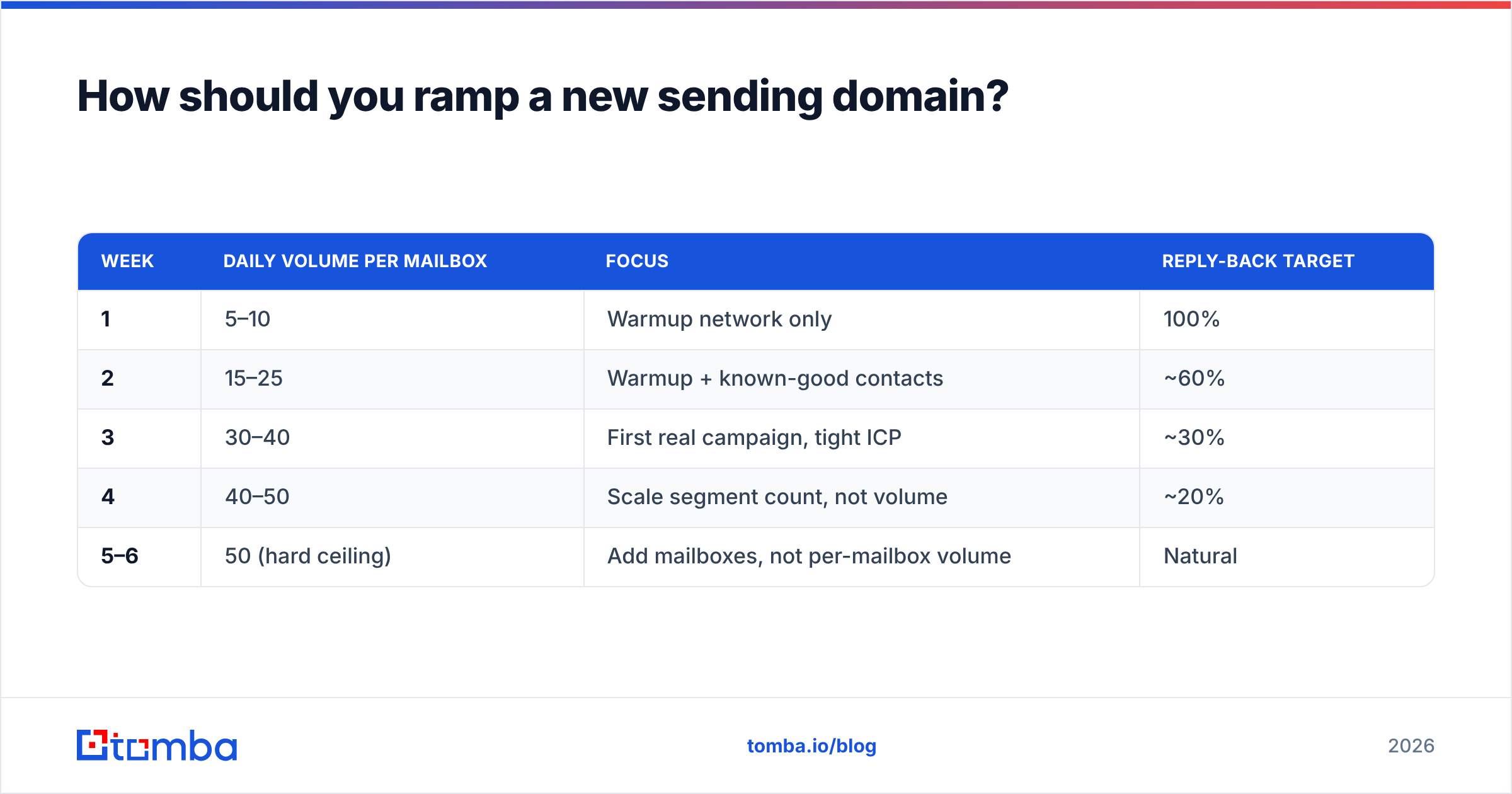
Slowly, and on a domain you can afford to burn. Never your primary company domain — buy a lookalike (get-yourcompany.com, yourcompany-mail.com), authenticate it properly, and give it six weeks before it carries real volume.
Authentication first. SPF, DKIM, and DMARC all need to pass before the first send. Google's bulk sender requirements have been enforced since 2024 and are not negotiable — unauthenticated bulk mail gets rejected outright, not filtered. Verify your record with an SPF checker rather than assuming your DNS provider got it right.
Then ramp:
| Week | Daily volume per mailbox | Focus | Reply-back target |
|---|---|---|---|
| 1 | 5–10 | Warmup network only | 100% |
| 2 | 15–25 | Warmup + known-good contacts | ~60% |
| 3 | 30–40 | First real campaign, tight ICP | ~30% |
| 4 | 40–50 | Scale segment count, not volume | ~20% |
| 5–6 | 50 (hard ceiling) | Add mailboxes, not per-mailbox volume | Natural |
Two rules people break constantly. First, 50 emails per mailbox per day is the practical ceiling for cold outbound regardless of what your tool permits — if you need 500 sends a day, you need 10 mailboxes, not one mailbox sending 500. Second, warmup is not something you turn off. Keep a background warmup running at 10–20% of your volume permanently; it maintains engagement signals during weeks when your campaigns are paused.
Run the numbers for your own targets with a warmup calculator before committing to a pipeline forecast that your infrastructure can't physically deliver.
Which triggers beat scheduled sends?#
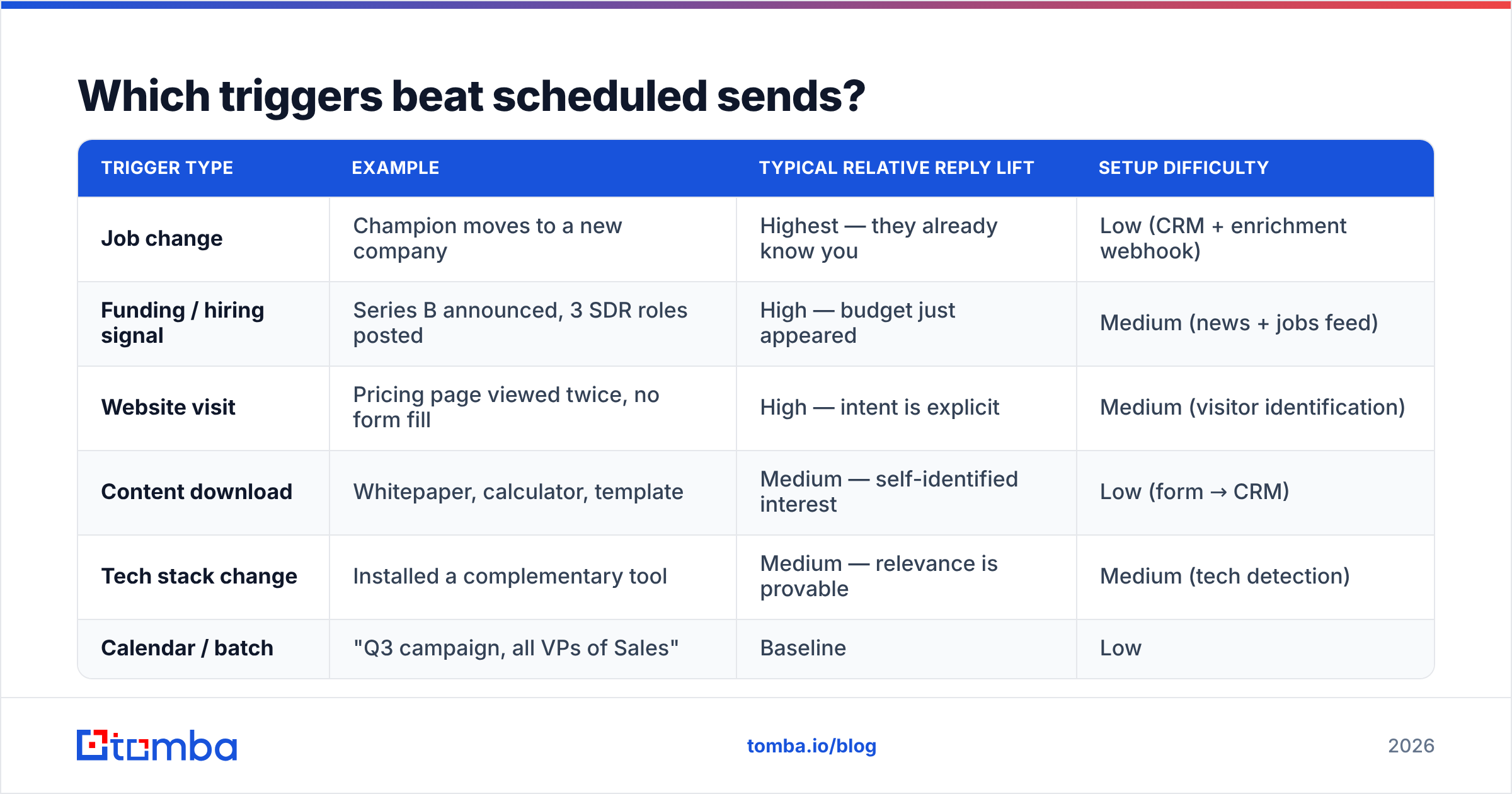
Behavior beats the calendar. A message that arrives because something happened is not the same product as a message that arrives because it's Tuesday.
| Trigger type | Example | Typical relative reply lift | Setup difficulty |
|---|---|---|---|
| Job change | Champion moves to a new company | Highest — they already know you | Low (CRM + enrichment webhook) |
| Funding / hiring signal | Series B announced, 3 SDR roles posted | High — budget just appeared | Medium (news + jobs feed) |
| Website visit | Pricing page viewed twice, no form fill | High — intent is explicit | Medium (visitor identification) |
| Content download | Whitepaper, calculator, template | Medium — self-identified interest | Low (form → CRM) |
| Tech stack change | Installed a complementary tool | Medium — relevance is provable | Medium (tech detection) |
| Calendar / batch | "Q3 campaign, all VPs of Sales" | Baseline | Low |
The operational point is that triggers need enrichment to work. A job-change alert is useless if you don't have the person's new work email within a day or two of the move. That's an API problem, not a copywriting problem — wire your email finder API into the trigger so enrichment happens automatically and the sequence fires while the signal is still fresh. A trigger you act on three weeks late is just a scheduled send with extra steps.
How long should an automated sequence be?#
Four to six touches over three to four weeks, then stop.
The data on longer sequences is consistently unflattering. Touches 1–3 produce the large majority of replies. Touches 4–5 produce a meaningful tail. Touch 6 onward produces a trickle of replies and a rising complaint rate, and complaints are the expensive currency — they damage every future send from that domain.
A structure that holds up:
- Touch 1 (day 0) — one specific observation about their business, one sentence on what you do, one low-friction ask. Under 90 words.
- Touch 2 (day 3) — new angle, not a bump. Different value proposition, different proof point. Never "just following up."
- Touch 3 (day 7) — a resource with no ask attached. Benchmark, teardown, template.
- Touch 4 (day 14) — social proof from a directly comparable company, named.
- Touch 5 (day 21) — the breakup. Short, no guilt, an explicit door left open.
Reply-to-thread for touches 2 and 3, then start a fresh thread for 4 and 5 — long unanswered threads accumulate negative engagement signals. And keep every message under 125 words. Length correlates negatively with reply rate at every seniority level, and the correlation gets stronger the more senior the recipient.

What should you personalize, and what should you skip?#
Personalize the reason for the email. Skip the decoration.
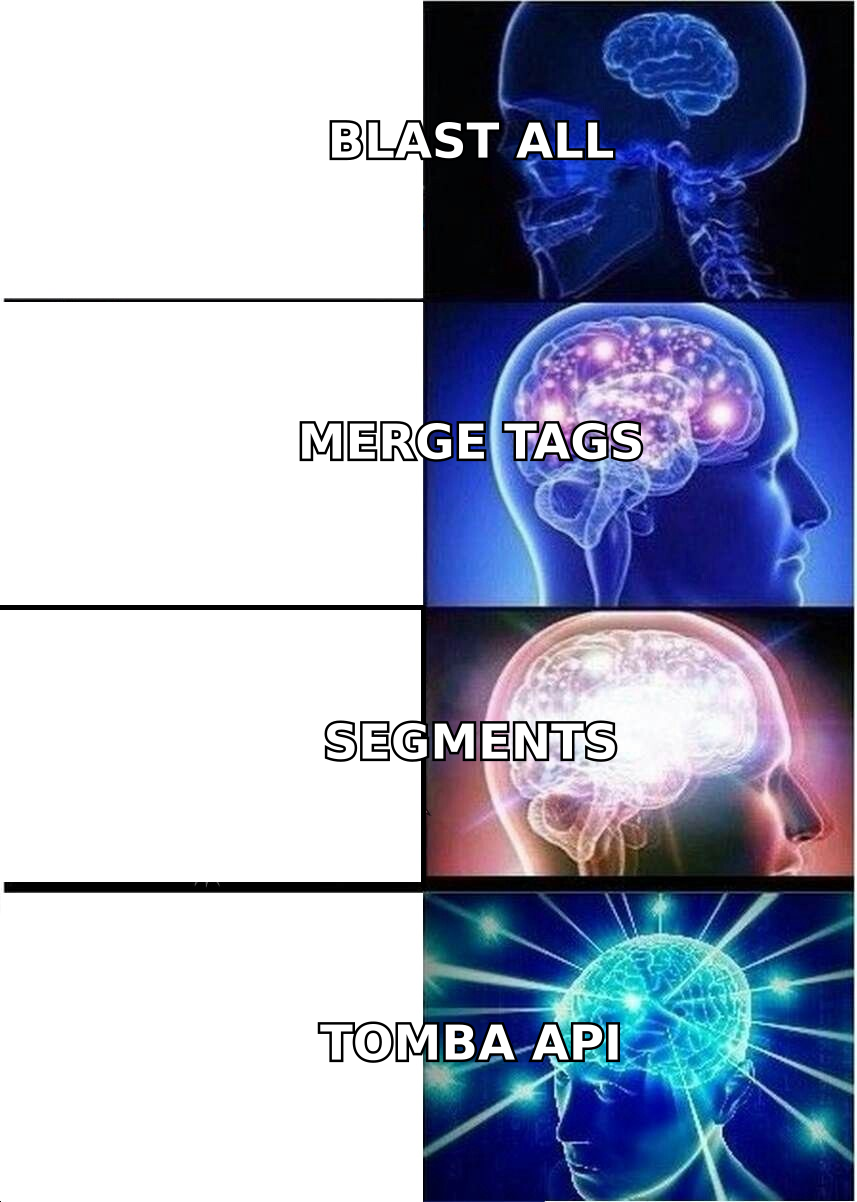
Merge tags that insert a first name and a company name are table stakes and worth roughly nothing — every recipient has seen ten thousand of them. Worse, a broken merge tag ("Hi {{first_name}}") is actively negative in a way that no personalization at all is not.
What earns replies:
- A specific, checkable observation. "You're hiring three enterprise AEs in EMEA" beats "I loved your recent post" because it can't be faked at scale without real data.
- Segment-level relevance. Ten sequences for ten tight segments outperforms one sequence with fifty merge fields. Personalization at the segment level scales; personalization at the individual level does not, past about 50 contacts a day.
- Correct role framing. A VP of Engineering and a VP of Sales at the same company need different first sentences, not the same sentence with a different title inserted.
What to skip: AI-generated compliments about LinkedIn posts, weather references, sports references, and anything that signals "a machine scraped this." Buyers have been trained by three years of AI-generated outbound to spot the pattern instantly. If your personalization sounds like a language model wrote it after skimming a profile, it's a liability, not an asset.
Test the mechanics before you test the copy — run drafts through a spam checker so you're not attributing a filtering problem to a messaging problem.
Which metrics should you actually track?#
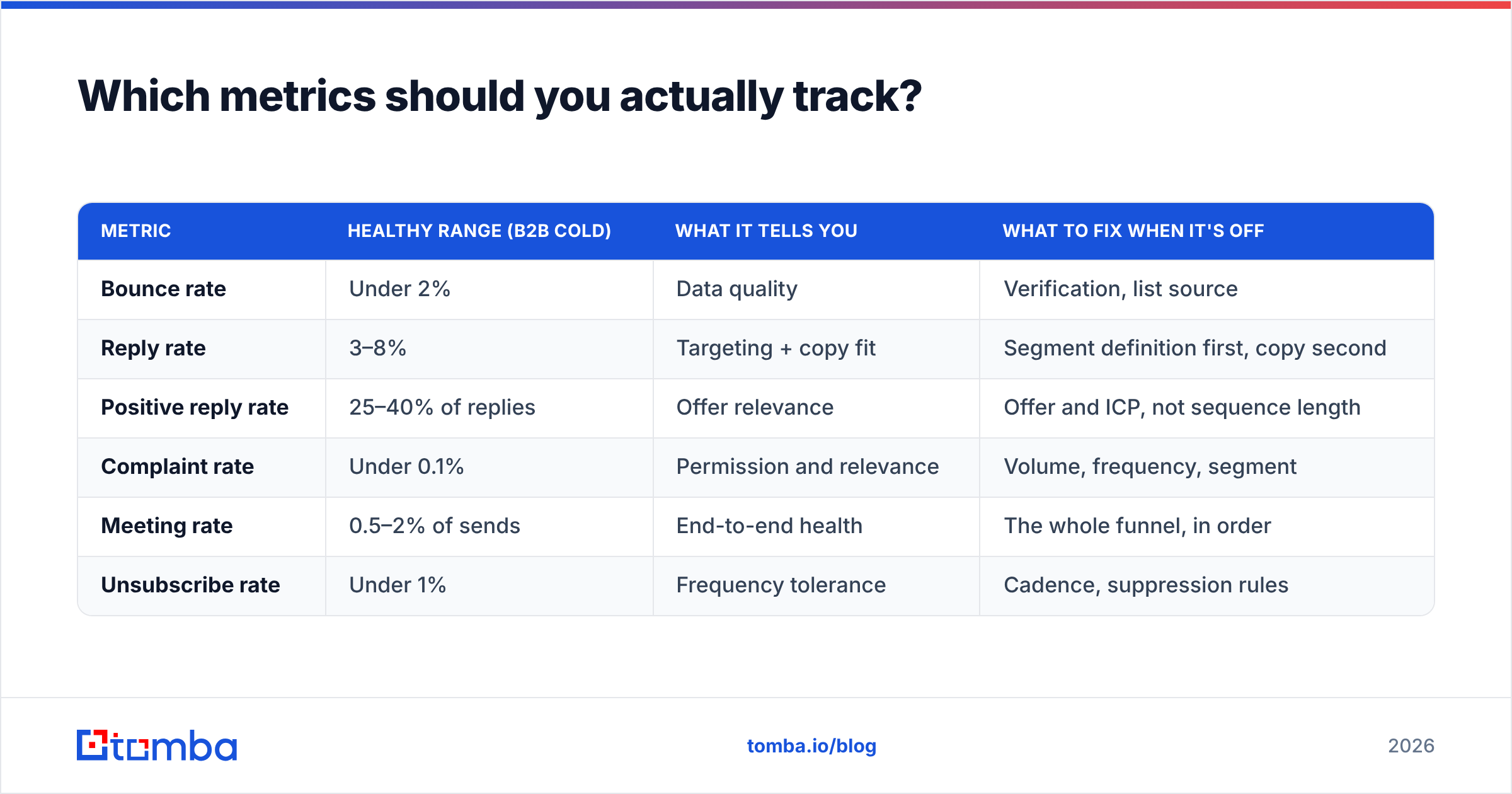
Open rate has been unreliable since Apple Mail Privacy Protection began pre-fetching tracking pixels, and the noise floor has only risen since. Optimizing to it means optimizing to a number that partly measures how many of your recipients use Apple Mail.
| Metric | Healthy range (B2B cold) | What it tells you | What to fix when it's off |
|---|---|---|---|
| Bounce rate | Under 2% | Data quality | Verification, list source |
| Reply rate | 3–8% | Targeting + copy fit | Segment definition first, copy second |
| Positive reply rate | 25–40% of replies | Offer relevance | Offer and ICP, not sequence length |
| Complaint rate | Under 0.1% | Permission and relevance | Volume, frequency, segment |
| Meeting rate | 0.5–2% of sends | End-to-end health | The whole funnel, in order |
| Unsubscribe rate | Under 1% | Frequency tolerance | Cadence, suppression rules |
Read them in that order. Bounce rate gates everything below it — there is no point tuning copy while 10% of your sends never arrive. Complaint rate is the one that compounds: cross 0.3% and mailbox providers start applying penalties that persist for months after you fix the cause.
Which tools fit which part of the stack?#
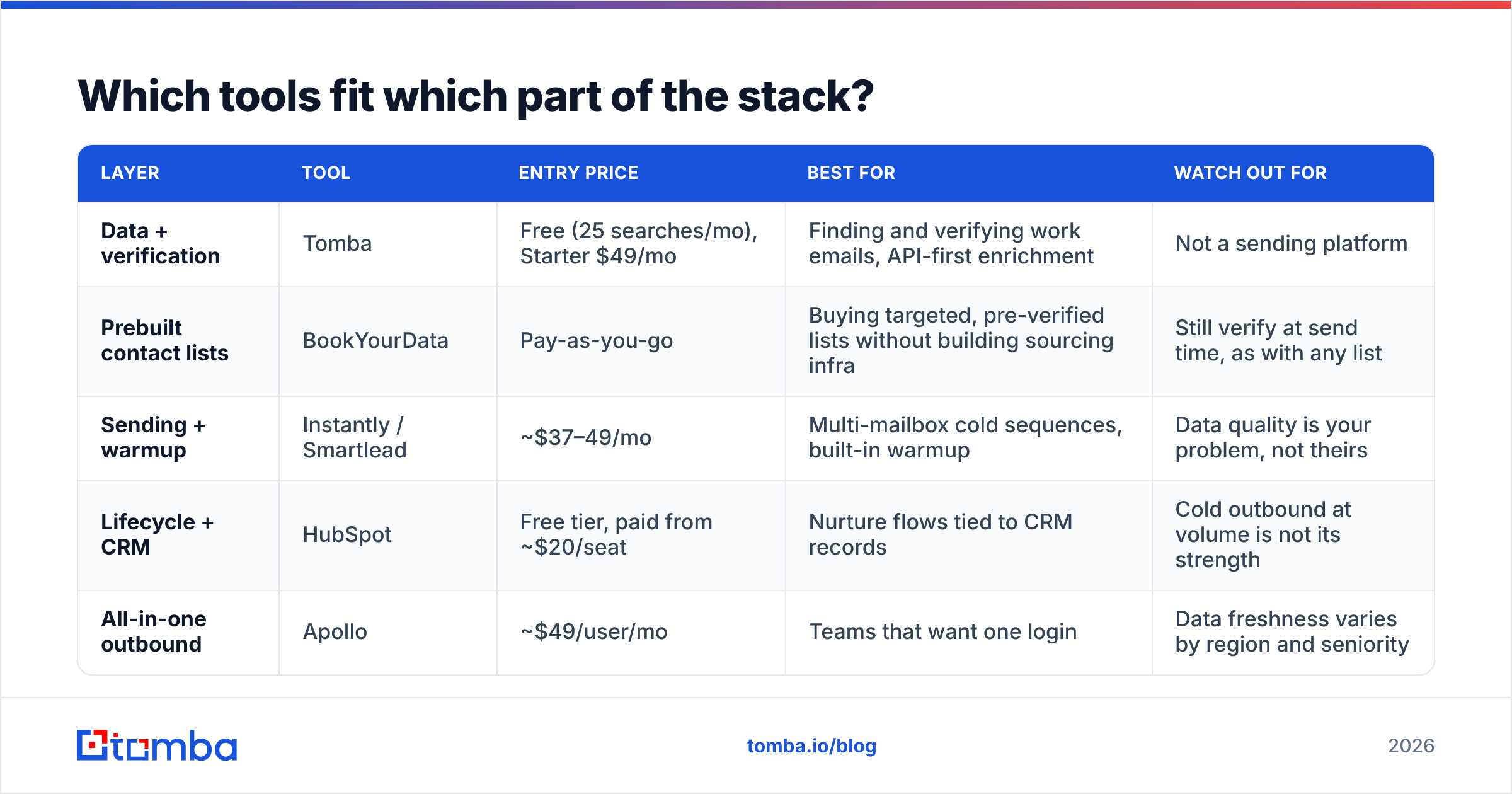
No single platform does data sourcing, verification, sending, and CRM sync equally well. The teams with the healthiest deliverability generally run a specialist for data and a specialist for sending.
| Layer | Tool | Entry price | Best for | Watch out for |
|---|---|---|---|---|
| Data + verification | Tomba | Free (25 searches/mo), Starter $49/mo | Finding and verifying work emails, API-first enrichment | Not a sending platform |
| Prebuilt contact lists | BookYourData | Pay-as-you-go | Buying targeted, pre-verified lists without building sourcing infra | Still verify at send time, as with any list |
| Sending + warmup | Instantly / Smartlead | ~$37–49/mo | Multi-mailbox cold sequences, built-in warmup | Data quality is your problem, not theirs |
| Lifecycle + CRM | HubSpot | Free tier, paid from ~$20/seat | Nurture flows tied to CRM records | Cold outbound at volume is not its strength |
| All-in-one outbound | Apollo | ~$49/user/mo | Teams that want one login | Data freshness varies by region and seniority |
The practical split most teams land on: source and verify with a data specialist, send with a sending specialist, sync to the CRM you already own. If you're evaluating replacements, category reviews on G2 and lifecycle benchmarks from HubSpot are worth reading alongside vendor claims. Compare Tomba pricing against what you currently pay per verified contact rather than per seat — per-seat pricing hides the cost of bad data.
What are the mistakes that cost the most?#
- Running cold outbound from your primary domain. One bad campaign and your invoices stop landing.
- Skipping verification because the list "looks fine." Looking fine is not a deliverability signal.
- Adding volume instead of mailboxes. Per-mailbox limits are the constraint; ignore them and you get filtered, not scaled.
- Sequences that run past six touches. Diminishing replies, rising complaints, permanent domain cost.
- Optimizing open rates. You're tuning to a number that is partly measuring Apple's proxy servers.
- No suppression enforcement at the send layer. Emailing an existing customer a cold pitch is a support ticket and a churn risk in one message.
Where to start this week#
Pick the cheapest fix with the biggest effect: clean your data before you touch anything else. Export the list feeding your highest-volume sequence, run it through verification, and check what percentage comes back invalid or risky. Most teams doing this for the first time find between 10% and 25% dead weight — which means a quarter of their sending reputation is being spent on addresses that were never going to reply.
Tomba's Email Finder handles the sourcing and verification half of that stack: find current work emails by name, domain, or company, verify them before they enter a sequence, and pull the whole thing through the API so your triggers fire on fresh data instead of a stale export. The free tier covers 25 searches a month if you want to test it against a list you already trust; Starter runs $49/mo when you're ready to wire it into production. Fix the data layer, and every downstream best practice in this guide starts working the way it's supposed to.
Related guides#
Ready to find emails that actually work?
Join 150,000+ professionals who stopped guessing and started sending. Free credits on signup — no credit card required.
Get the Tomba newsletter
Practical outbound tactics and product updates — once every two weeks.
About the author