12 Email Automation Examples That Actually Get Replies in 2026
Twelve email automation examples with the exact trigger, timing, and copy angle behind each one — plus the data-hygiene step that decides whether any of them land in the inbox.
TL;DR
- The best email automation examples are triggered by behavior or data changes, not by a calendar. A sequence that fires because someone did something beats a sequence that fires because it's Tuesday.
- Twelve workflows below cover outbound, lifecycle, onboarding, and revenue recovery — each with the trigger, the timing, and the angle that makes it work.
- Automation multiplies whatever list you feed it. Bad data at 500 sends/day produces bounces at 500 sends/day.
- Verify addresses before the first send, not after the bounce report. A 3-5% bounce rate is where mailbox providers start throttling you.
- Measure per-step reply rate and unsubscribe rate, not just open rate. Opens have been unreliable since Apple Mail Privacy Protection shipped.
What counts as email automation in 2026?#
Email automation is any email that sends itself because a condition was met. That's it. The condition can be a form fill, a pricing-page visit, a CRM stage change, a missed renewal date, a new job title in an enrichment feed, or a reply that never came.
Think of it like a thermostat versus a space heater. A space heater runs when you switch it on — that's a batch blast. A thermostat runs when the room hits a temperature — that's automation. The thermostat isn't smarter about heat; it's just wired to a signal.
The distinction matters because most teams call their weekly newsletter "automation." It isn't. It's a scheduled broadcast. Real automation has three parts:
- A trigger — the observable event that starts the workflow (form submit, page view, deal stage moves to Negotiation, trial day 3).
- A condition set — the branching logic that decides who continues (has the contact replied? is the email verified? is the account above 50 seats?).
- An exit — the event that stops the sequence immediately (a reply, a booked meeting, a purchase, an unsubscribe).
Workflows that skip the exit are the ones that email a customer a "still interested?" nudge three days after they signed the contract. Everyone has received one. Nobody forgets it.
Which email automation examples actually earn replies?#
Here are twelve workflows in production use across B2B teams, grouped by what they're trying to do. Each includes the trigger and the timing, because a good sequence with bad timing performs worse than a mediocre sequence sent at the right moment.
Outbound and prospecting
- New-hire trigger sequence. Trigger: a target-account contact starts a new role. Timing: send 10-21 days after the start date — early enough to catch budget decisions, late enough that they've found the coffee machine. Angle: "You're inheriting X. Here's how three peers handled it." Reply rates on this one routinely double a cold baseline because the timing is genuinely relevant, not manufactured.
- Website-visitor follow-up. Trigger: an anonymous visitor from a target account hits your pricing page twice in seven days. Timing: next business morning. Angle: reference the category, never the specific page — "saw some interest from the team" is friendly; "I see you visited /pricing at 4:12pm" is unsettling. Pair this with website visitor reveal so the trigger has a name attached.
- Content-download nurture. Trigger: gated asset download. Timing: instant delivery, then day 3 and day 8. Angle: the day-3 email should answer the question the asset raised, not pitch. The day-8 email earns the ask.
- Competitor-mention alert. Trigger: an account posts a job listing or news item naming a tool you replace. Timing: within 48 hours. Angle: migration cost, not feature war.
Lifecycle and onboarding
- Activation-gap sequence. Trigger: user signs up but hasn't completed the core action (imported a list, connected a mailbox, invited a teammate) within 48 hours. Timing: 48h, 5 days, 10 days. Angle: one obstacle per email, one link per email. This is the single highest-ROI workflow for most SaaS products.
- Feature-adoption nudge. Trigger: account uses feature A heavily but has never opened feature B, where B correlates with retention. Timing: after 30 days of A-only usage. Angle: show the outcome, not the button.
- Trial-expiry ladder. Trigger: days remaining on trial. Timing: day -7, -3, -1, and +2. The +2 email — after expiry — converts surprisingly well, because urgency is real rather than implied.
- Milestone celebration. Trigger: user hits a usage threshold (1,000 verified contacts, 50 meetings booked). Timing: same day. Angle: congratulate, then ask for the review or referral. Goodwill has a short half-life.
Revenue recovery and retention
- Payment-failure dunning. Trigger: failed charge. Timing: day 0, 3, 7, 12, with tone escalating from "card probably expired" to "account pauses Friday." Dunning recovers 2-4x more revenue when it's a sequence instead of a single notice.
- Usage-decline alert. Trigger: account's weekly active usage drops more than 40% versus its own trailing four-week average. Timing: within 5 days of the drop. Angle: ask a question, don't announce a health score. Route to a human if the account is above a revenue threshold.
- Renewal-runway sequence. Trigger: 90 days to contract end. Timing: -90, -60, -30, -14. Angle: each email carries one piece of proof — usage data, a result, an expansion idea.
- Closed-lost revival. Trigger: a deal marked lost 6-9 months ago, plus any new signal (new champion, funding round, competitor churn). Timing: fire on the signal, not on the anniversary. Angle: "Circumstances changed on our side too." Roughly 1 in 12 revived deals reaches a second evaluation, which is far better economics than net-new prospecting.
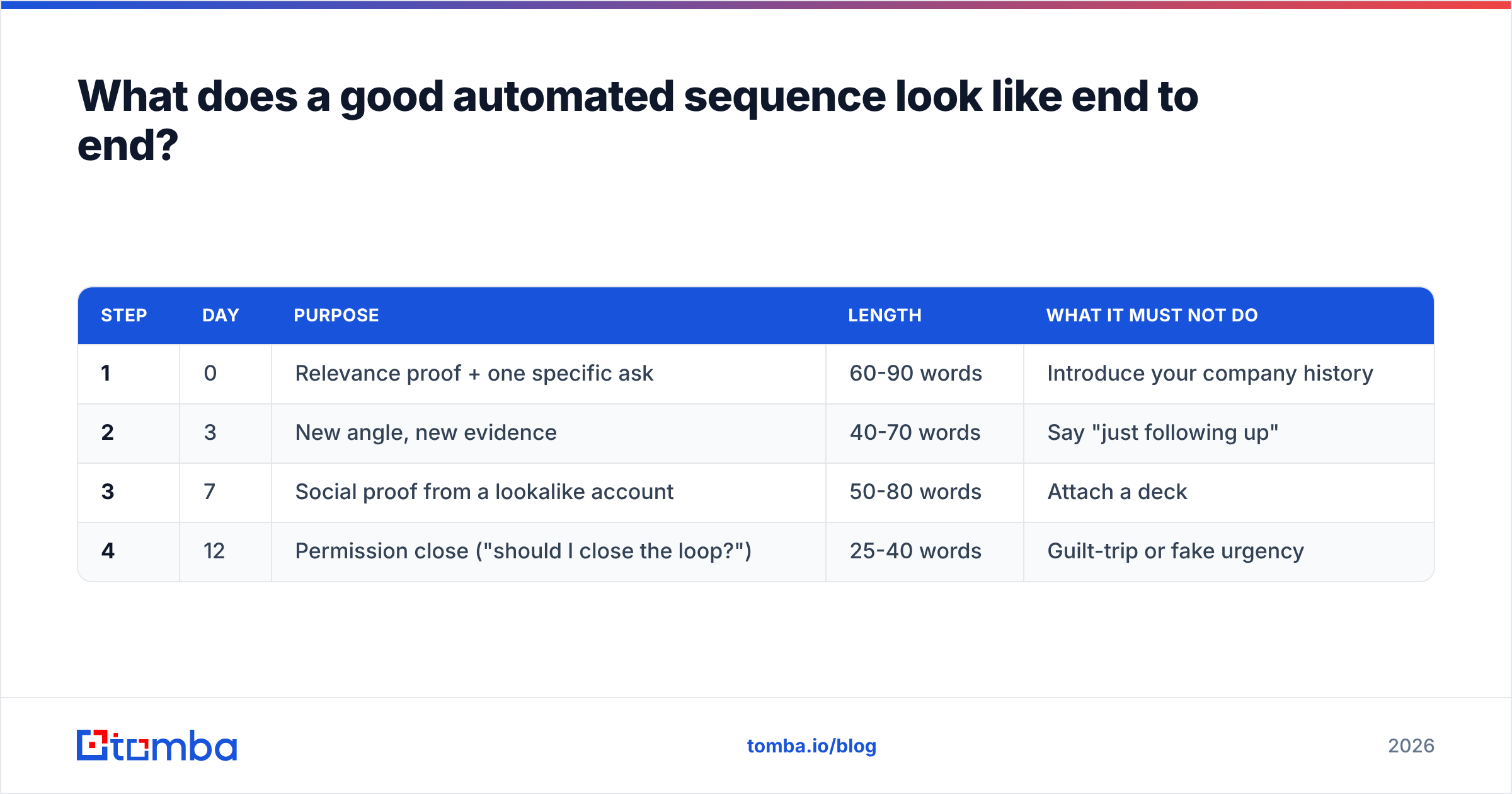
What does a good automated sequence look like end to end?#
Structure beats cleverness. This is the anatomy of a four-touch outbound sequence that consistently outperforms improvised versions:
| Step | Day | Purpose | Length | What it must not do |
|---|---|---|---|---|
| 1 | 0 | Relevance proof + one specific ask | 60-90 words | Introduce your company history |
| 2 | 3 | New angle, new evidence | 40-70 words | Say "just following up" |
| 3 | 7 | Social proof from a lookalike account | 50-80 words | Attach a deck |
| 4 | 12 | Permission close ("should I close the loop?") | 25-40 words | Guilt-trip or fake urgency |
Four rules govern every step in that table:
- One idea per email. Two asks in one message reliably produce zero replies.
- No thread-breaking. Steps 2-4 stay in the same thread so context travels with the message.
- Hard exit on reply. Any inbound reply, out-of-office excluded, kills the remaining steps immediately.
- Plain text, one link maximum. Image-heavy HTML in a 1:1 sales email signals bulk to filters and to humans.
Which email automation platform fits which job?#
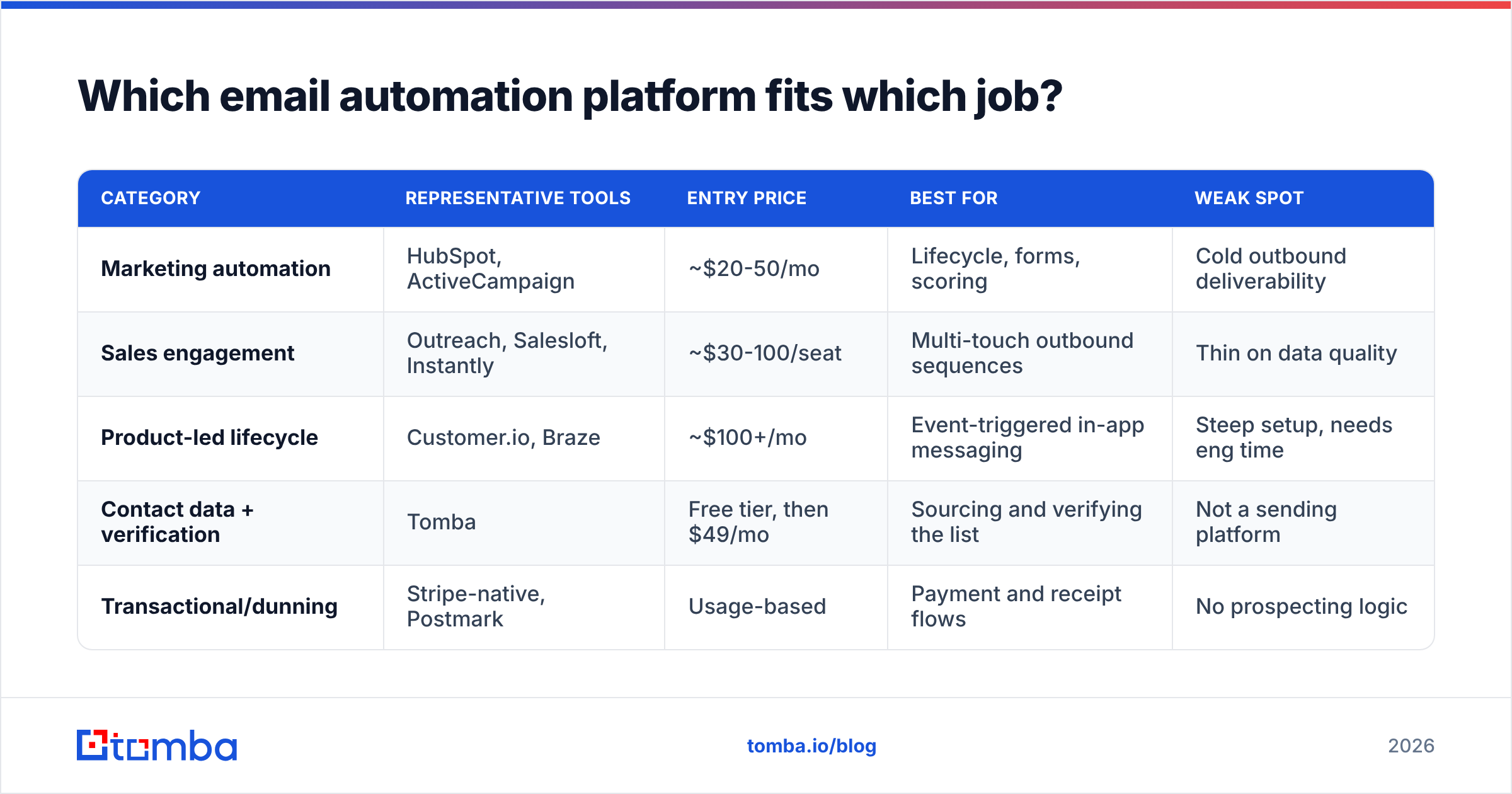
There's no universal winner here — the categories solve different problems, and most teams end up running two tools, not one. Published entry pricing as of mid-2026:
| Category | Representative tools | Entry price | Best for | Weak spot |
|---|---|---|---|---|
| Marketing automation | HubSpot, ActiveCampaign | ~$20-50/mo | Lifecycle, forms, scoring | Cold outbound deliverability |
| Sales engagement | Outreach, Salesloft, Instantly | ~$30-100/seat | Multi-touch outbound sequences | Thin on data quality |
| Product-led lifecycle | Customer.io, Braze | ~$100+/mo | Event-triggered in-app messaging | Steep setup, needs eng time |
| Contact data + verification | Tomba | Free tier, then $49/mo | Sourcing and verifying the list | Not a sending platform |
| Transactional/dunning | Stripe-native, Postmark | Usage-based | Payment and receipt flows | No prospecting logic |
The stack most B2B teams settle on looks like this: a data layer that finds and verifies contacts, a sending layer that runs the sequences, and a CRM that holds the truth. Trying to make one tool do all three is how teams end up paying for seats they don't use. If you're evaluating swaps, the Instantly alternative and Outreach alternative comparisons break down where the overlap actually sits. Independent category reviews on G2 are useful for seeing which complaints repeat across hundreds of users rather than a handful.
Why do most email automation examples fail in practice?#
Because the workflow was never the bottleneck. Three failure modes account for nearly all of it.
Failure 1: the list was never verified. Automation makes bad data worse at scale. A list with 12% invalid addresses sent manually produces an awkward afternoon. The same list running through a 500/day sequence produces a bounce rate that trips throttling at Google and Microsoft within 72 hours. Google's bulk sender guidelines put the spam-complaint ceiling at 0.3%, and bounces feed the same reputation signal. Run addresses through an email verifier before the first send, and handle catch-all domains separately with a catch-all verifier rather than guessing.
Failure 2: no exit conditions. Sequences that don't stop on reply, on meeting-booked, or on purchase generate the most damaging emails you will ever send — the ones that prove nobody is reading. Audit every live workflow for its exit list quarterly.
Failure 3: volume before warmup. A brand-new sending domain pushed to 200 emails on day one gets filtered, and that reputation damage takes weeks to undo. Ramp over 3-4 weeks. Run the numbers with an email warmup calculator and check your authentication with an SPF checker before anything goes live. Sending infrastructure hygiene is boring and it decides everything downstream — HubSpot's marketing automation resources cover the lifecycle side well, but reputation is on you.
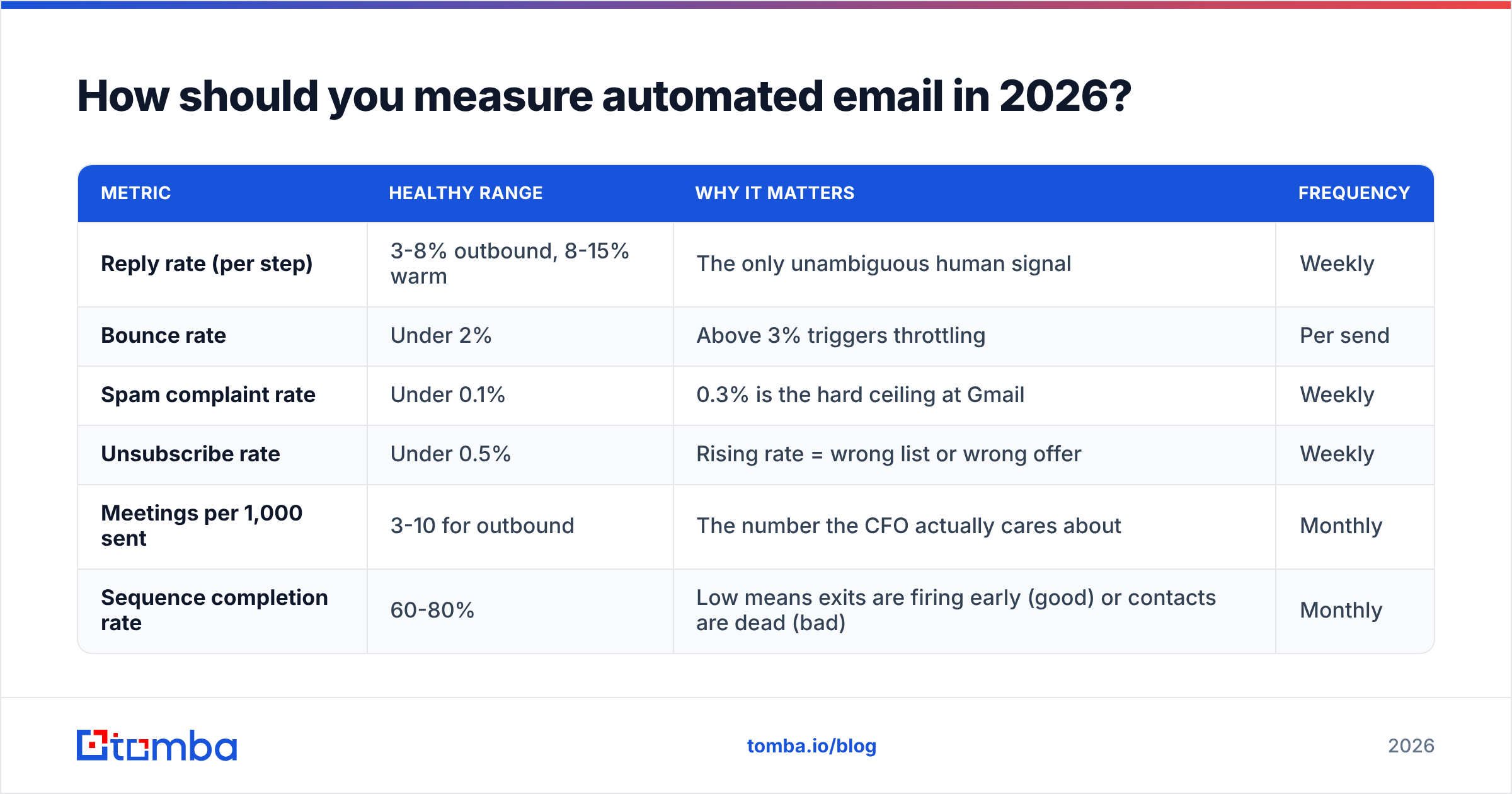
How should you measure automated email in 2026?#
Open rate is close to useless now. Apple Mail Privacy Protection pre-fetches images for a large share of consumer and mixed-device traffic, which means a meaningful percentage of your "opens" are machines. Build your dashboard on signals that require a human.
| Metric | Healthy range | Why it matters | Frequency |
|---|---|---|---|
| Reply rate (per step) | 3-8% outbound, 8-15% warm | The only unambiguous human signal | Weekly |
| Bounce rate | Under 2% | Above 3% triggers throttling | Per send |
| Spam complaint rate | Under 0.1% | 0.3% is the hard ceiling at Gmail | Weekly |
| Unsubscribe rate | Under 0.5% | Rising rate = wrong list or wrong offer | Weekly |
| Meetings per 1,000 sent | 3-10 for outbound | The number the CFO actually cares about | Monthly |
| Sequence completion rate | 60-80% | Low means exits are firing early (good) or contacts are dead (bad) | Monthly |
Track reply rate per step, not per sequence. Averages hide the truth. A sequence at 5% overall reply might be 11% on step 1 and 0.4% on steps 2-4 — which tells you to cut three emails and write one better first touch, something the blended number would never reveal.
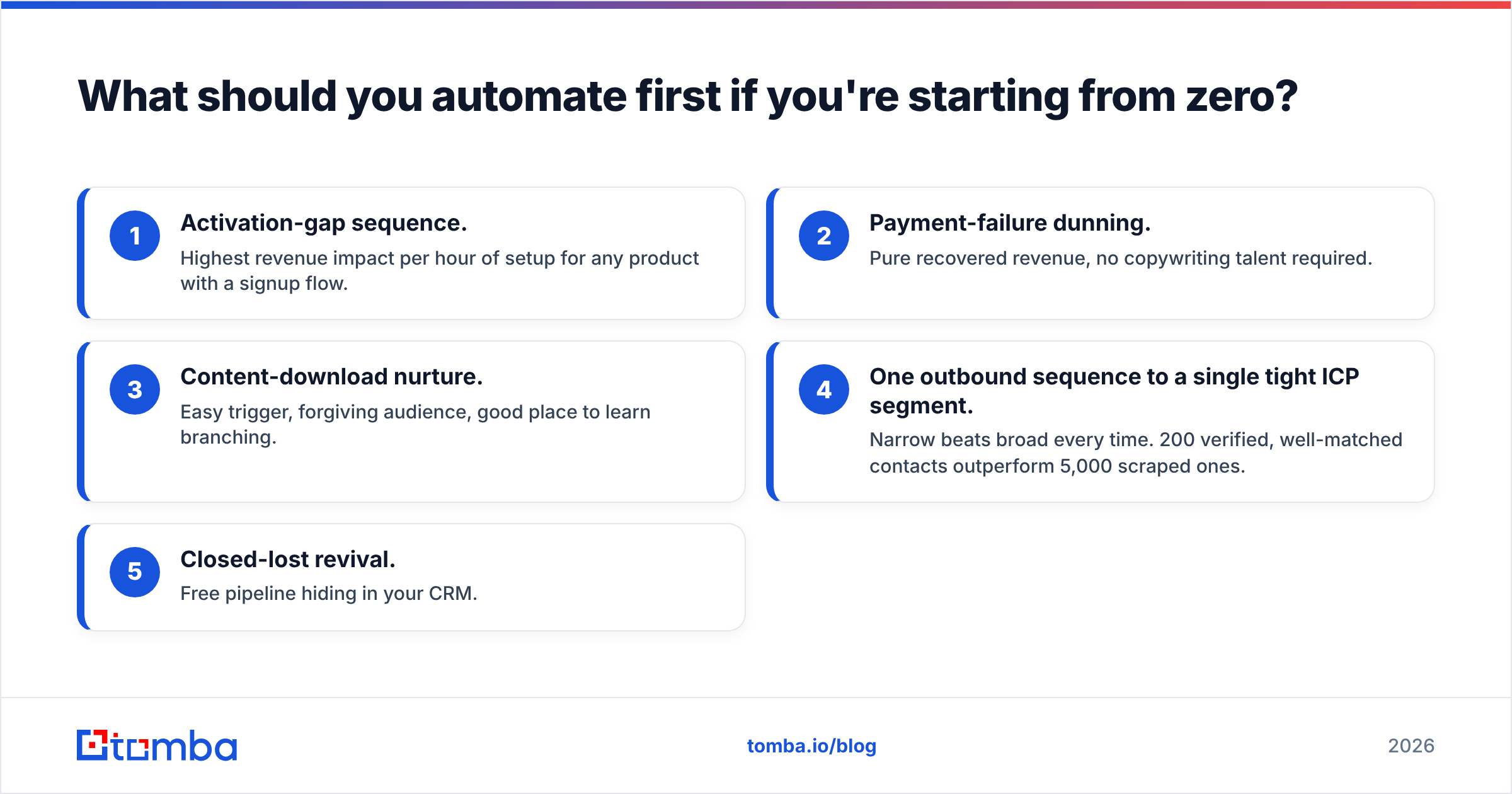
What should you automate first if you're starting from zero?#
In order, and only move to the next once the previous one is stable:
- Activation-gap sequence. Highest revenue impact per hour of setup for any product with a signup flow.
- Payment-failure dunning. Pure recovered revenue, no copywriting talent required.
- Content-download nurture. Easy trigger, forgiving audience, good place to learn branching.
- One outbound sequence to a single tight ICP segment. Narrow beats broad every time. 200 verified, well-matched contacts outperform 5,000 scraped ones.
- Closed-lost revival. Free pipeline hiding in your CRM.
Before step 4, spend an afternoon on the list itself. Pull contacts by company with domain search, enrich the records so your personalization tokens have something to render, and verify everything. A sequence built on 200 confirmed addresses with accurate titles will beat one built on 2,000 guesses — and it won't cost you your sending domain.
Ready to build sequences on data that holds up?#
Every workflow on this page assumes the address is real and the person still works there. That assumption is where most automation quietly breaks. Start with the Tomba Email Finder to source verified professional addresses by domain, name, or company, then push clean records straight into whichever sending platform you've chosen. The free tier gives you 25 searches a month to test the workflow end to end, and paid plans start at $49/mo — see Tomba pricing for the full breakdown. Build the list right, and the automation takes care of itself.
Related guides#
Ready to find emails that actually work?
Join 150,000+ professionals who stopped guessing and started sending. Free credits on signup — no credit card required.
Get the Tomba newsletter
Practical outbound tactics and product updates — once every two weeks.
About the author