Email Automation Workflows: The Complete 2026 Playbook
Most email automation workflows fail for boring reasons: stale data, bad triggers, and sends nobody asked for. Here's the trigger map, the platform comparison, and the numbers that tell you a workflow is working.
TL;DR
- Email automation workflows are trigger-based sequences — a contact does something (or a data field changes), and the system sends the right message without a human clicking send.
- The five workflows that pay for themselves in almost every B2B org: welcome/onboarding, lead nurture, re-engagement, post-demo follow-up, and churn-risk outreach.
- Platform choice matters less than most teams think. Data quality, trigger design, and suppression rules decide whether a workflow works.
- The single biggest killer is decayed contact data. B2B email lists degrade roughly 22–30% per year, and every bounce inside an automated flow compounds because nobody is watching.
- Build workflows that can be measured per step — reply rate and pipeline per branch, not just open rate for the whole sequence.
What are email automation workflows?#
An email automation workflow is a sequence of emails triggered by a condition rather than a calendar date. Think of it like a thermostat instead of a space heater on a timer: the thermostat reacts to the actual temperature in the room, the timer just fires whether you need it or not. A batch newsletter is the timer. A workflow is the thermostat.
Three components define every workflow:
- The trigger — what starts it. A form fill, a pricing-page visit, a CRM stage change, a lifecycle score crossing a threshold, a webhook from your product, or a new row appearing in an enriched list.
- The branches — what changes based on behavior. Opened but didn't click? Different path. Booked a call? Exit the workflow immediately.
- The exit and suppression rules — when someone stops receiving mail. This is the part teams skip, and it's the part that generates angry replies when a prospect who already signed gets a "still interested?" email on day nine.
The distinction between "email automation" and "email marketing" is worth nailing down. Marketing sends the same message to a segment. Automation sends a different message to each contact based on state. A good workflow feels like it was written for one person because, functionally, it was assembled for one person.

Which email automation workflows actually earn their keep?#
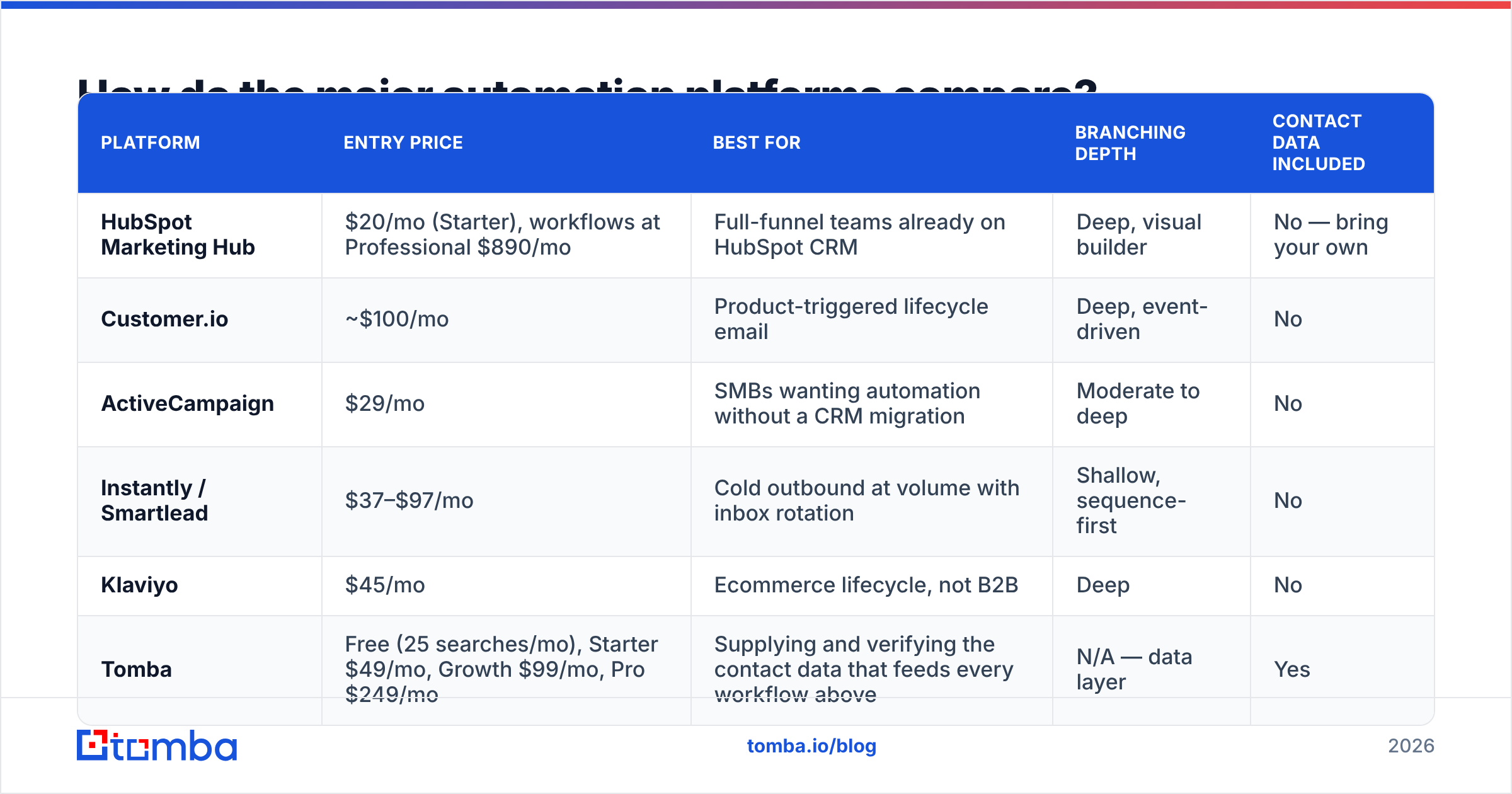
Not every workflow deserves to exist. Here's the honest breakdown of the ones that consistently produce revenue versus the ones that produce busywork.
| Workflow | Trigger | Typical length | Realistic reply/conversion | Worth building first? |
|---|---|---|---|---|
| Welcome / onboarding | Signup or first login | 4–6 emails over 14 days | 25–45% engagement rate | Yes — highest ROI, lowest risk |
| Post-demo follow-up | Meeting marked complete in CRM | 3 emails over 10 days | 15–25% reply rate | Yes |
| Lead nurture (MQL) | Score threshold or content download | 5–8 emails over 6 weeks | 3–8% meeting rate | Yes, after the first two |
| Cold outbound sequence | New verified contact added to campaign | 4–5 emails over 18 days | 2–6% reply rate | Only with verified data |
| Re-engagement / win-back | 90 days no activity | 2–3 emails | 5–12% reactivation | Yes — cheap, protects list health |
| Churn-risk alert | Usage drop detected | 1–2 emails + task | Varies wildly | Later, needs product data |
| Birthday / anniversary | Date field | 1 email | ~0% in B2B | No |
The pattern: workflows triggered by an action the contact took outperform workflows triggered by a date on your calendar, usually by 3–5x on reply rate. If you only build two things this quarter, build onboarding and post-demo follow-up.
A note on cold outbound: it belongs on this list, but it is the only workflow where data quality is a hard gate rather than a nice-to-have. Sending an automated five-touch sequence to an unverified list is the fastest way to torch a sending domain. Run the list through an email verifier before a single message leaves the queue, and treat catch-all domains as a separate risk tier rather than lumping them in with valid addresses.
What does a real workflow look like end to end?#
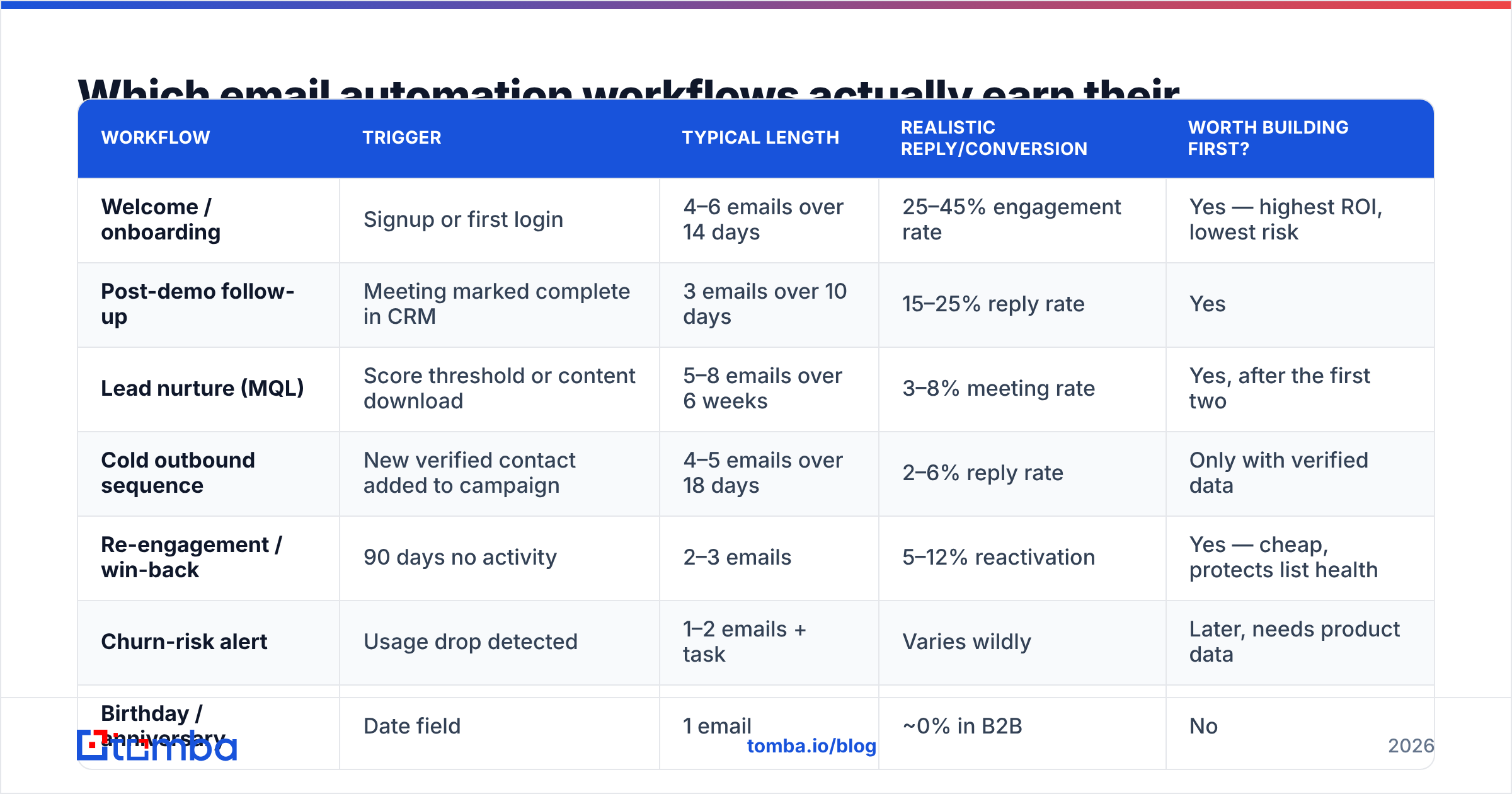
Here is a post-demo follow-up workflow as it actually runs, step by step. Use it as a template and swap the content.
- Trigger fires — the CRM meeting record flips to "completed." A webhook pushes the contact into the workflow. No rep action required.
- Enrichment check runs — before anything sends, the system confirms the contact record has a verified email, a job title, and a company size. If a field is missing, data enrichment fills it and the workflow continues; if the email fails verification, the contact routes to a manual queue instead of sending.
- Email 1 sends within 2 hours — recap, the one thing they said mattered most, and a single link to the resource they asked for. Sent from the rep's address, not a marketing domain.
- Branch at day 3 — if they clicked the resource, send the case study for their segment. If they didn't, send a short "did I misread the priority?" note instead. Two different emails, one condition.
- Branch at day 7 — if any reply arrives at any point, the workflow exits instantly and creates a task. Silence gets a final email with a specific next step and a hard close.
- Exit and suppress — contact drops into a 60-day suppression list so no other workflow can reach them. This is the rule that keeps your automation from feeling like a machine.
Steps 2 and 6 are the ones most teams omit, and they're the ones that separate a workflow that books meetings from a workflow that generates complaints.
How do the major automation platforms compare?#
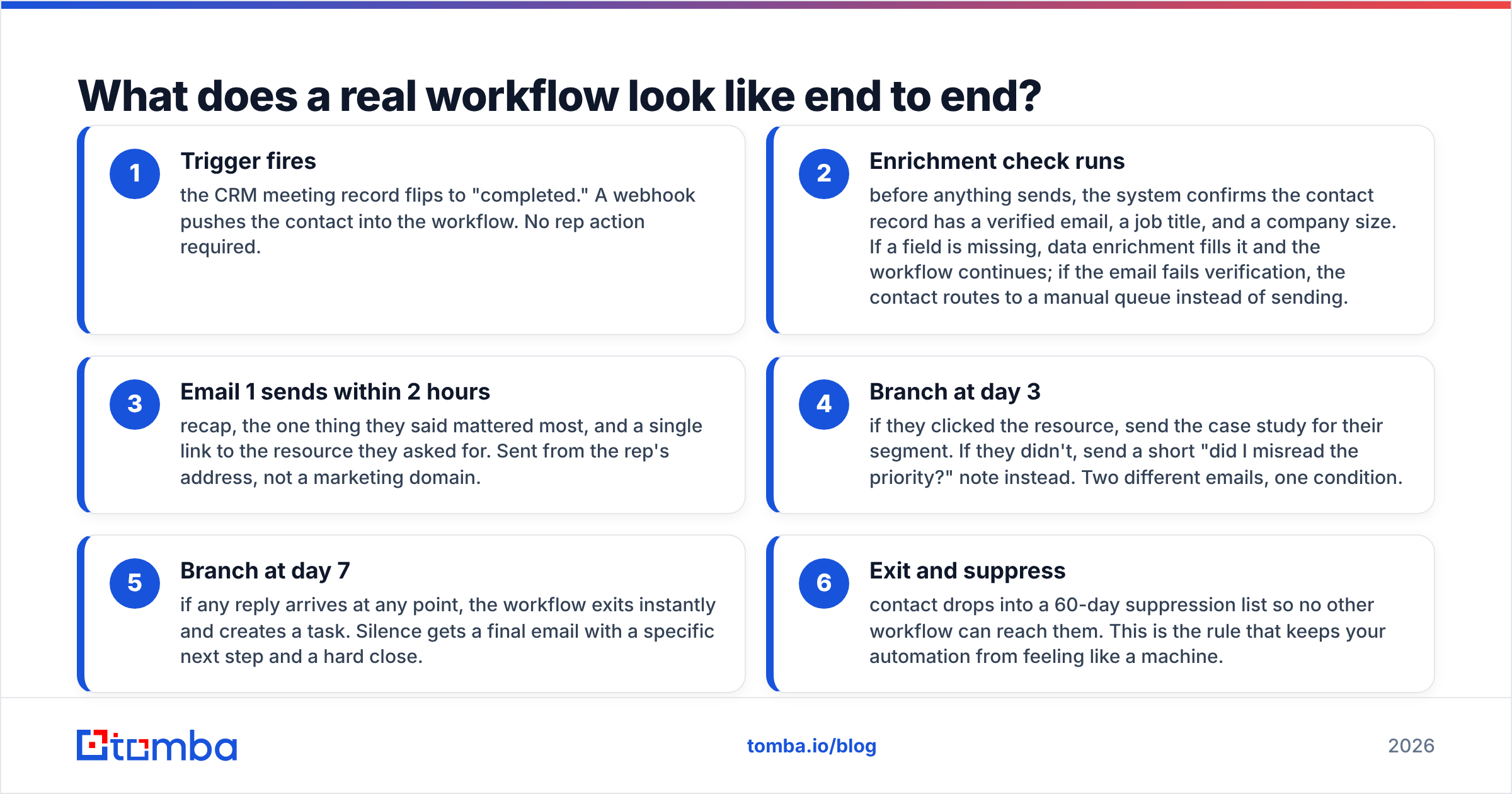
Platform selection is a budget question more than a capability question — most tools can build the workflow above. What differs is how much data work you have to do outside the tool, and what happens to the bill when your contact count grows.
| Platform | Entry price | Best for | Branching depth | Contact data included |
|---|---|---|---|---|
| HubSpot Marketing Hub | $20/mo (Starter), workflows at Professional $890/mo | Full-funnel teams already on HubSpot CRM | Deep, visual builder | No — bring your own |
| Customer.io | ~$100/mo | Product-triggered lifecycle email | Deep, event-driven | No |
| ActiveCampaign | $29/mo | SMBs wanting automation without a CRM migration | Moderate to deep | No |
| Instantly / Smartlead | $37–$97/mo | Cold outbound at volume with inbox rotation | Shallow, sequence-first | No |
| Klaviyo | $45/mo | Ecommerce lifecycle, not B2B | Deep | No |
| Tomba | Free (25 searches/mo), Starter $49/mo, Growth $99/mo, Pro $249/mo | Supplying and verifying the contact data that feeds every workflow above | N/A — data layer | Yes |
Read that last column again. Almost every automation platform assumes you already have accurate contacts. They are execution engines, not data sources. That's why the realistic stack for most B2B teams is two products: a sending/automation platform, and a data layer that keeps records clean before they hit it. Compare Tomba pricing against a per-contact enrichment add-on from your automation vendor and the math usually favors keeping the data layer separate.
For a wider vendor landscape, G2's marketing automation category is the least biased public comparison set, and HubSpot's workflow documentation is worth reading even if you use a competitor — their trigger taxonomy is the de facto industry vocabulary.
Why do most email automation workflows fail?#
They fail for unglamorous reasons. In order of how often we see them:
Decayed contact data. People change jobs. Domains get retired. A list that was 96% deliverable in January is often below 80% by December. Inside a manual send, someone notices the bounce. Inside an automated workflow, the bounce happens at 3 a.m. on a Tuesday and nobody sees it until the domain reputation has already slipped. This is why bulk verification before enrollment — not after — is non-negotiable, and why running a bulk verify pass on quarterly cadence beats any clever copy change you could make.
Triggers that fire on the wrong signal. "Visited pricing page" sounds like intent. It's also what your own employees, your competitors, and a bored candidate do. Combine signals — pricing page plus a known company plus a second session — before enrolling someone in a sales sequence.
No exit conditions. If replying doesn't stop the sequence, the workflow will eventually email someone who already told you no. Every workflow needs at least three exits: replied, booked, unsubscribed.
Over-automation of the wrong stage. Automating top-of-funnel education is smart. Automating the message you send after a prospect raises a pricing objection is not. The rule of thumb: automate anything you'd be comfortable sending to 500 people; write by hand anything that references something specific a person said.
Sending volume outpacing domain warmth. A new domain that goes from 0 to 400 sends a day will land in spam regardless of content quality. Ramp gradually and use a warmup calculator to set a realistic schedule instead of guessing.
How do you keep automated sends out of spam?#
Authentication first, content second. In 2026 the bar set by Google and Yahoo for bulk senders is table stakes, not optional:
- SPF, DKIM, and DMARC all publishing and aligned. If DMARC is at
p=noneand has been for a year, you're not monitoring anything — move to quarantine once your reports are clean. - Spam complaint rate under 0.3%. Above that, delivery degrades fast and recovery takes weeks.
- One-click unsubscribe in the header, not just a footer link.
- Bounce rate under 2%. This is entirely a data-quality metric, and it's the one automation makes worse if you're careless.
- Consistent volume. Erratic spikes look like a compromised account to filtering systems.
Separate your domains by function. Transactional mail, marketing mail, and cold outbound should not share a sending domain. If the cold sequence gets flagged, you don't want password resets caught in the blast radius. Check your current setup with an SPF checker before you scale volume, and read the glossary entry on sender reputation if the concept is fuzzy — reputation is per-domain and per-IP, and it takes months to rebuild.
How do you measure whether a workflow is working?#
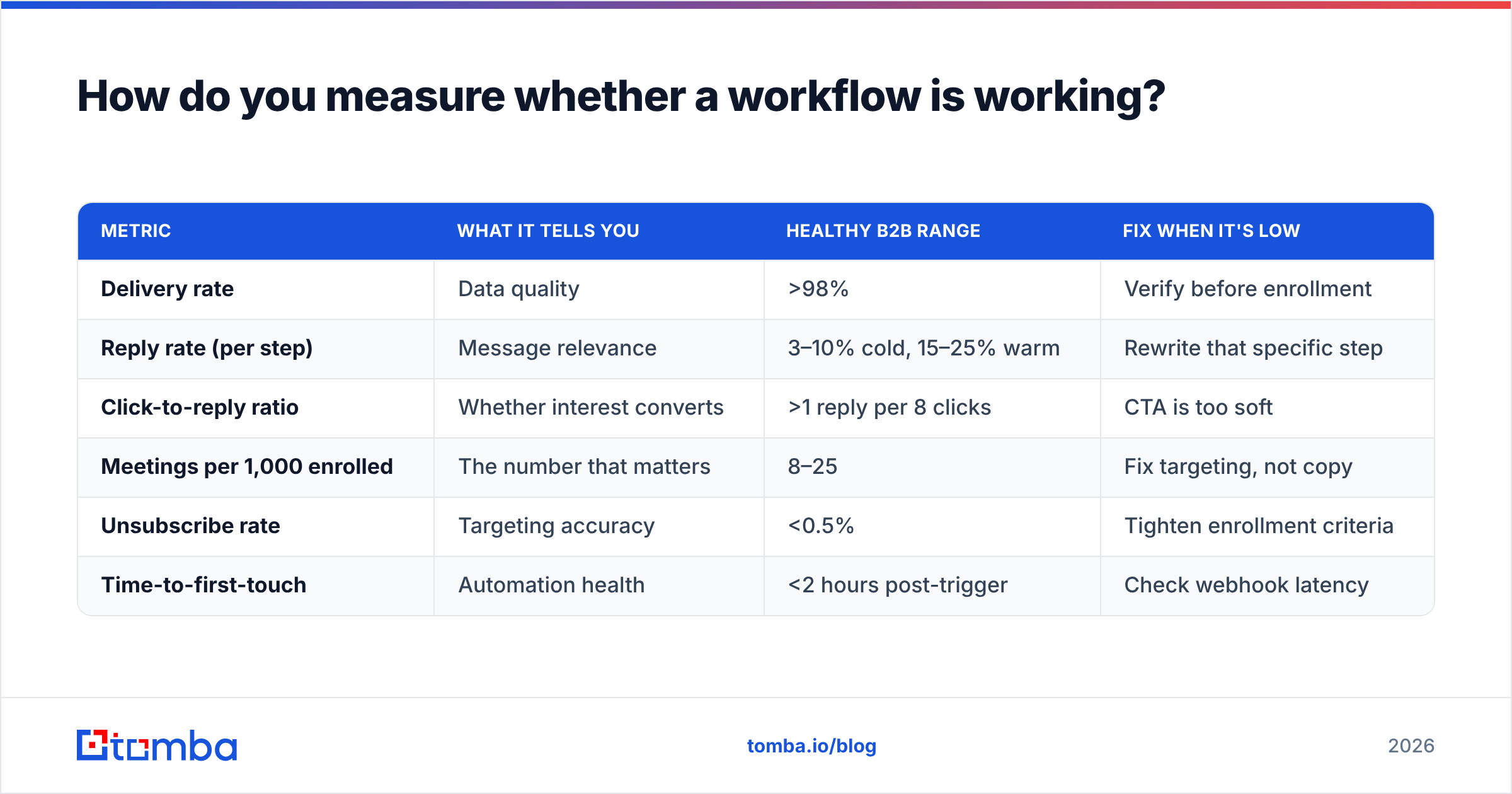
Open rate has been unreliable since Apple's Mail Privacy Protection started pre-fetching images. Judge workflows on downstream metrics instead.
| Metric | What it tells you | Healthy B2B range | Fix when it's low |
|---|---|---|---|
| Delivery rate | Data quality | >98% | Verify before enrollment |
| Reply rate (per step) | Message relevance | 3–10% cold, 15–25% warm | Rewrite that specific step |
| Click-to-reply ratio | Whether interest converts | >1 reply per 8 clicks | CTA is too soft |
| Meetings per 1,000 enrolled | The number that matters | 8–25 | Fix targeting, not copy |
| Unsubscribe rate | Targeting accuracy | <0.5% | Tighten enrollment criteria |
| Time-to-first-touch | Automation health | <2 hours post-trigger | Check webhook latency |
Measure per step, not per workflow. A five-email sequence with a 6% overall reply rate might be one excellent email and four that annoy people. Aggregate numbers hide that; step-level numbers make the cut obvious.
When should you not automate?#
Automation has a ceiling, and it's lower than vendors suggest. Skip it when:
- The audience is under ~50 contacts. Manual research beats any sequence at that scale.
- The deal is enterprise and multi-threaded. Six stakeholders getting the same automated nurture is a credibility problem.
- The trigger is emotionally loaded — a support escalation, a failed renewal, a public incident. Send those by hand.
- You can't verify the data. An unverified list is not a workflow input, it's a liability.
The teams that get the most out of automation are usually the ones automating the least glamorous parts: data hygiene, routing, follow-up reminders, and the first two touches. The human part stays human.
Where should you start?#
Pick one workflow — post-demo follow-up is the easiest win — and build it end to end including the enrichment check and the exit rules. Run it for 30 days. Read the step-level numbers. Then build the second one.
Before any of that, fix the input. Every workflow on this page is downstream of one question: are these email addresses real and current? Tomba's Email Finder finds verified professional addresses by domain, name, or company, and the Tomba API drops that verification step directly into the workflow so bad records never reach your sending platform in the first place. Start on the free tier with 25 searches a month, and scale to Starter at $49/mo when the workflow proves itself.
Related guides#
Ready to find emails that actually work?
Join 150,000+ professionals who stopped guessing and started sending. Free credits on signup — no credit card required.
Get the Tomba newsletter
Practical outbound tactics and product updates — once every two weeks.
About the author