Email Blacklist Removal: How to Get Delisted in 2026
Getting delisted is the easy part. Staying off is where most senders fail. Here's how to identify the blacklist, fix the root cause, and file a removal request that actually sticks.
TL;DR
- Email blacklist removal is a two-part job: get delisted, then fix whatever got you listed. Skip part two and you'll be back on within weeks — usually with a longer cooldown.
- Not every blacklist matters. Spamhaus, Barracuda, and Invaluement move inbox placement. UCEPROTECT Level 2/3 and a dozen hobbyist DNSBLs mostly don't.
- Most B2B listings trace back to three causes: a purchased or stale list, an unauthenticated domain, or a spam trap hit. Bounce rate above ~3% is the single loudest signal.
- Self-service delisting exists on most major lists and takes minutes. Spamhaus SBL and Microsoft blocks require a written explanation of what you changed.
- The cheapest fix is prevention: verify every address before it enters a sequence, warm new domains slowly, and monitor bounce rate weekly.
What is an email blacklist, and why did you land on one?#
An email blacklist (technically a DNSBL — DNS-based blocklist) is a public database of IP addresses and domains that mail providers query in real time before accepting a message. Think of it like a bouncer with a shared clipboard: every club in the city checks the same list, so one bad night at one venue follows you everywhere.
When a receiving mail server gets a connection from your IP, it does a DNS lookup against the blocklists it subscribes to. A hit means one of three outcomes: hard rejection at the SMTP level (you get a bounce with the blocklist name in the error string), silent routing to spam, or a throttled connection that slows your sends to a crawl.
The listing itself is a symptom. Blocklist operators don't list senders arbitrarily — they list based on spam trap hits, complaint volume from feedback loops, high invalid-recipient rates, or reputation inherited from a shared IP neighbor. Your sender reputation is what actually decides inbox placement, and the blacklist entry is just the public receipt.
That distinction matters for email blacklist removal. Filing a delisting request without changing your sending behavior is like wiping a fever without treating the infection. Most major operators track repeat listings and apply progressively longer cooldowns.
How do you confirm you're actually blacklisted?#
Before you panic, confirm the diagnosis. A drop in open rate is not evidence of a blacklist — it could be a subject-line change, a seed-list problem, or Apple Mail Privacy Protection noise.
Run these four checks in order:
- Read the actual bounce message. Hard bounces from a blocklist rejection contain the operator's name and a URL. A string like
550 5.7.1 Service unavailable; Client host [1.2.3.4] blocked using zen.spamhaus.orgis a definitive answer. No such string, no blacklist. - Query the lists directly. Use a multi-list lookup like Tomba's blacklist checker or the official Spamhaus lookup to test both your sending IP and your sending domain. Check both — domain listings (DBL) and IP listings (SBL/XBL/CSS) have different removal paths.
- Check provider-side dashboards. Google Postmaster Tools and Microsoft SNDS report reputation and complaint rates that no public DNSBL exposes. A "Bad" domain reputation in Google Postmaster Tools will tank your Gmail delivery even with a clean DNSBL record.
- Verify authentication is intact. A broken SPF record after a DNS migration produces symptoms that look identical to a blacklist. Run your domain through an SPF checker before assuming the worst.
If steps 1–3 all come back clean, you have a content or authentication problem, not a listing.

Which blacklists actually matter in 2026?#
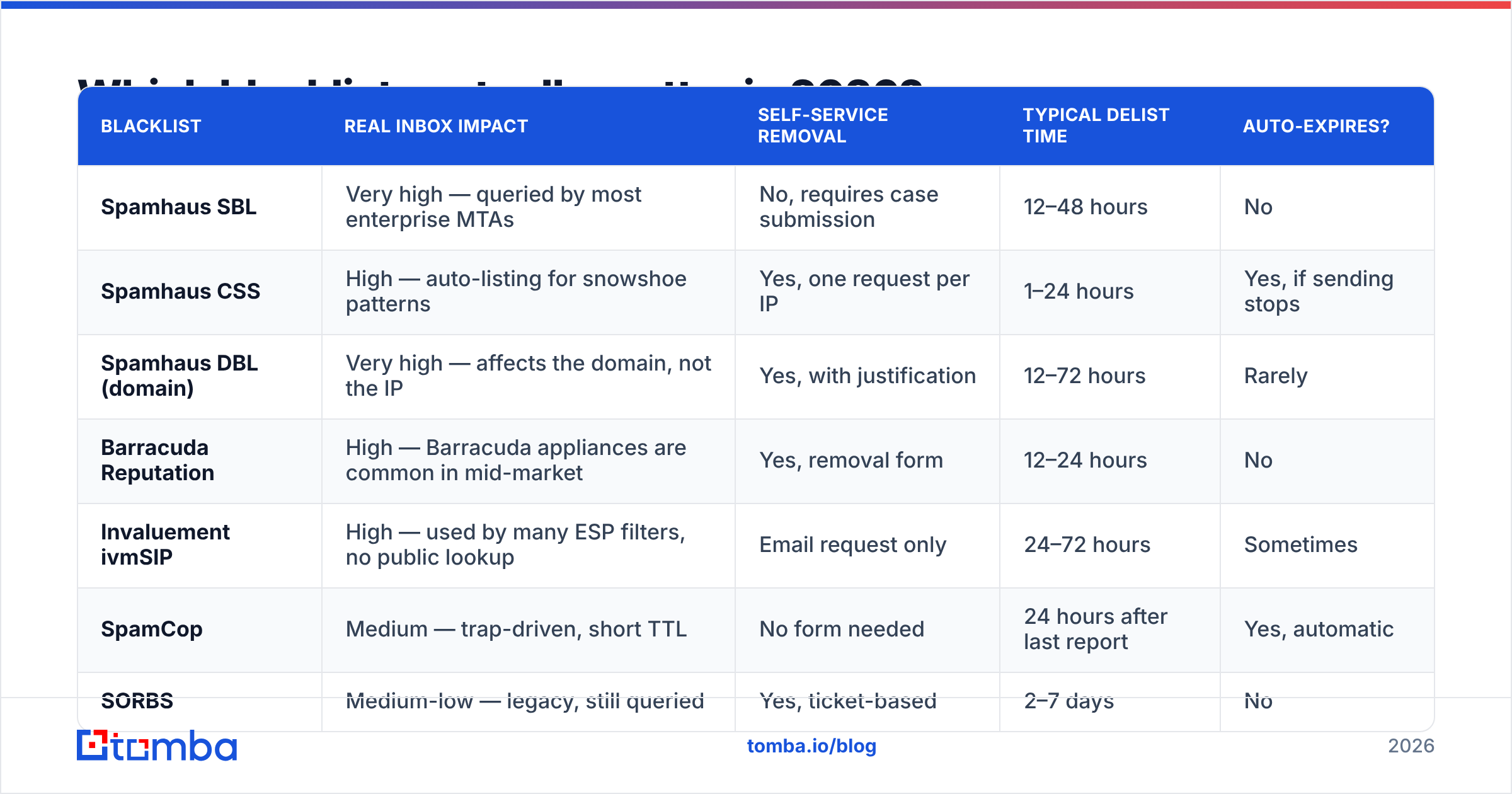
There are hundreds of DNSBLs. Fewer than ten influence meaningful inbox volume. Chasing removal from every list you appear on is a waste of a week — prioritize by how many receiving servers actually query the list.
| Blacklist | Real inbox impact | Self-service removal | Typical delist time | Auto-expires? |
|---|---|---|---|---|
| Spamhaus SBL | Very high — queried by most enterprise MTAs | No, requires case submission | 12–48 hours | No |
| Spamhaus CSS | High — auto-listing for snowshoe patterns | Yes, one request per IP | 1–24 hours | Yes, if sending stops |
| Spamhaus DBL (domain) | Very high — affects the domain, not the IP | Yes, with justification | 12–72 hours | Rarely |
| Barracuda Reputation | High — Barracuda appliances are common in mid-market | Yes, removal form | 12–24 hours | No |
| Invaluement ivmSIP | High — used by many ESP filters, no public lookup | Email request only | 24–72 hours | Sometimes |
| SpamCop | Medium — trap-driven, short TTL | No form needed | 24 hours after last report | Yes, automatic |
| SORBS | Medium-low — legacy, still queried | Yes, ticket-based | 2–7 days | No |
| UCEPROTECT L2/L3 | Low — lists entire ASNs, widely ignored | Paid "express" only | N/A | Yes, 7 days |
The practical rule: fix Spamhaus, Barracuda, and Invaluement first. If UCEPROTECT Level 3 listed your whole hosting provider's ASN, ignore it — paying their express removal fee doesn't help, and the listing expires on its own.
What actually causes a listing in the first place?#
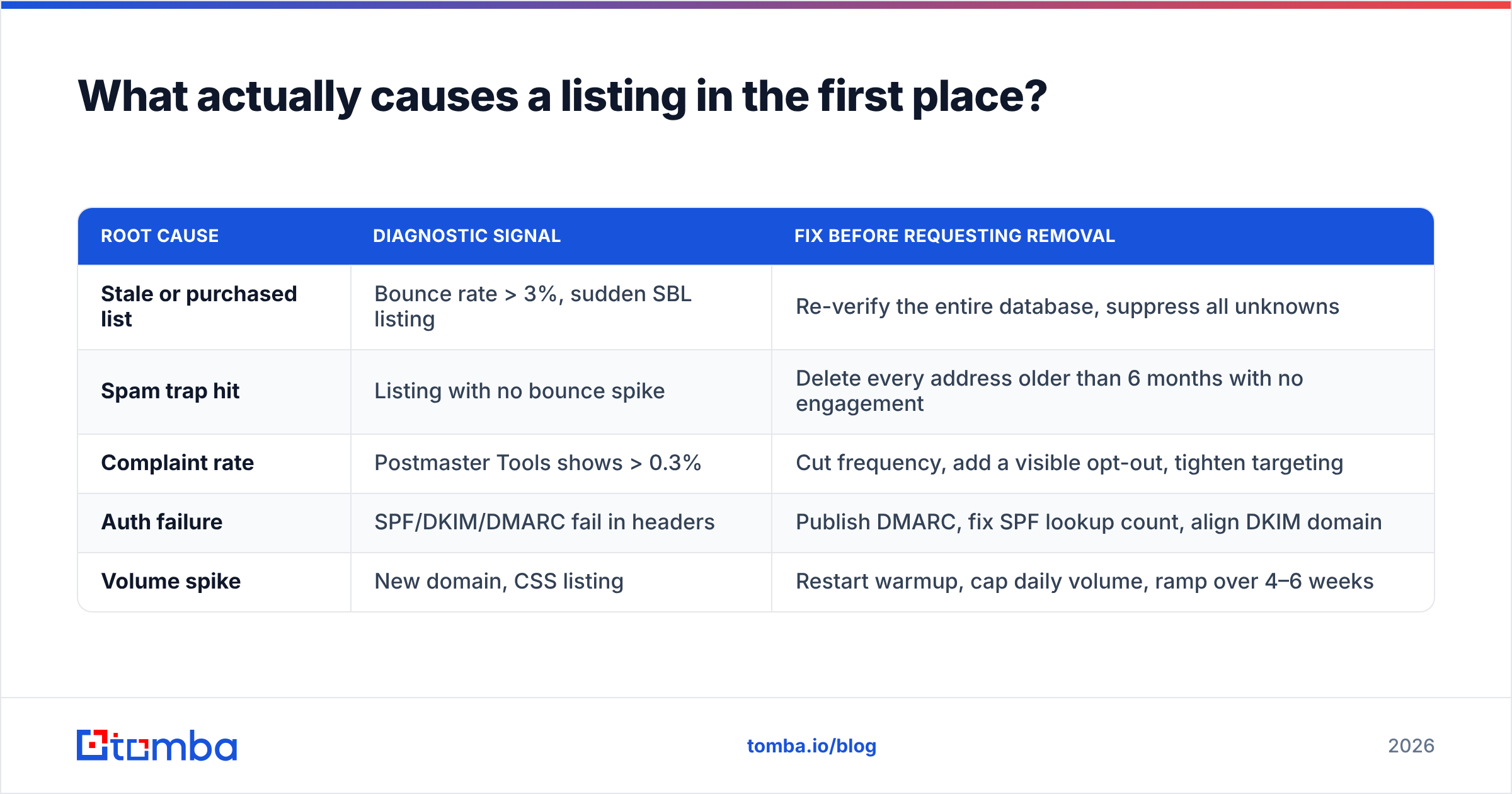
Blacklist operators publish their triggers, and they're consistent across the industry. In B2B outbound, five causes account for the overwhelming majority of listings:
- High invalid-recipient rate. Receiving servers report unknown-user rejections. Sustained bounce rates above 3–5% read as list-scraping to every filter in the chain. This is the number one cause in cold outreach, and the easiest to eliminate.
- Spam trap hits. Pristine traps (addresses never used by a human) mean purchased data. Recycled traps (abandoned addresses repurposed by the provider) mean stale data you never cleaned. One pristine trap hit can produce an immediate Spamhaus listing.
- Complaint rate above 0.3%. Gmail and Microsoft both treat 0.3% as the ceiling. Above it, provider-side filtering kicks in before any public list gets involved.
- Missing or misaligned authentication. No DMARC record, an SPF record with more than 10 DNS lookups, or a DKIM signature that doesn't align with the From domain. Since the 2024 Gmail and Yahoo bulk-sender requirements, this stopped being optional.
- Volume spikes on a cold IP or domain. Going from 50 to 5,000 sends a day on a domain registered last month is the textbook snowshoe pattern that Spamhaus CSS auto-lists.
Map your symptom to the fix before you file anything:
| Root cause | Diagnostic signal | Fix before requesting removal |
|---|---|---|
| Stale or purchased list | Bounce rate > 3%, sudden SBL listing | Re-verify the entire database, suppress all unknowns |
| Spam trap hit | Listing with no bounce spike | Delete every address older than 6 months with no engagement |
| Complaint rate | Postmaster Tools shows > 0.3% | Cut frequency, add a visible opt-out, tighten targeting |
| Auth failure | SPF/DKIM/DMARC fail in headers | Publish DMARC, fix SPF lookup count, align DKIM domain |
| Volume spike | New domain, CSS listing | Restart warmup, cap daily volume, ramp over 4–6 weeks |
How do you fix the root cause before requesting removal?#
Do this work first. Delisting forms ask what changed, and operators can tell when nothing did.
Clean the list, completely. Not the last import — the whole database. Run every address through an email verifier and suppress anything that returns invalid, unknown, or disposable. For catch-all domains, which return "accept-all" at the SMTP layer and hide invalid mailboxes behind a wildcard, use a dedicated catch-all verifier rather than guessing. On a list that's been running for a year without cleaning, expect 15–25% removal. That's normal, and it's the number that gets you delisted.
Purge by age, not just by validity. Recycled spam traps pass verification — they accept mail. Any address you haven't successfully engaged in 12 months is a liability regardless of what a verifier says.
Fix authentication properly. Publish SPF, DKIM, and DMARC. Start DMARC at p=none with an rua reporting address, read the reports for two weeks, then move to p=quarantine. Confirm DKIM alignment — a valid signature on a different domain than your From header still fails DMARC.
Slow down. Cut daily volume by half and hold for two weeks. If you were sending from a domain registered under 90 days ago, restart warmup entirely and use a warmup calculator to set a realistic ramp instead of eyeballing it.
Separate your streams. Transactional mail, marketing mail, and cold outreach should never share a sending domain. One bad outbound campaign shouldn't take your password resets down with it.
How do you file an email blacklist removal request that sticks?#
Once the root cause is genuinely fixed, the request itself is straightforward. The pattern is nearly identical across operators.
Step 1 — Gather your evidence. Note the exact IP or domain listed, the listing reference number, and the date. Screenshot your current bounce rate and complaint rate. If you re-verified your list, record the before/after counts.
Step 2 — Use the operator's official channel only. Spamhaus removals go through their own portal. Barracuda has a public form. Invaluement takes email. There is no third-party service that can remove you from a major blacklist, and anyone charging for it on Spamhaus or Barracuda is selling you something they don't control.
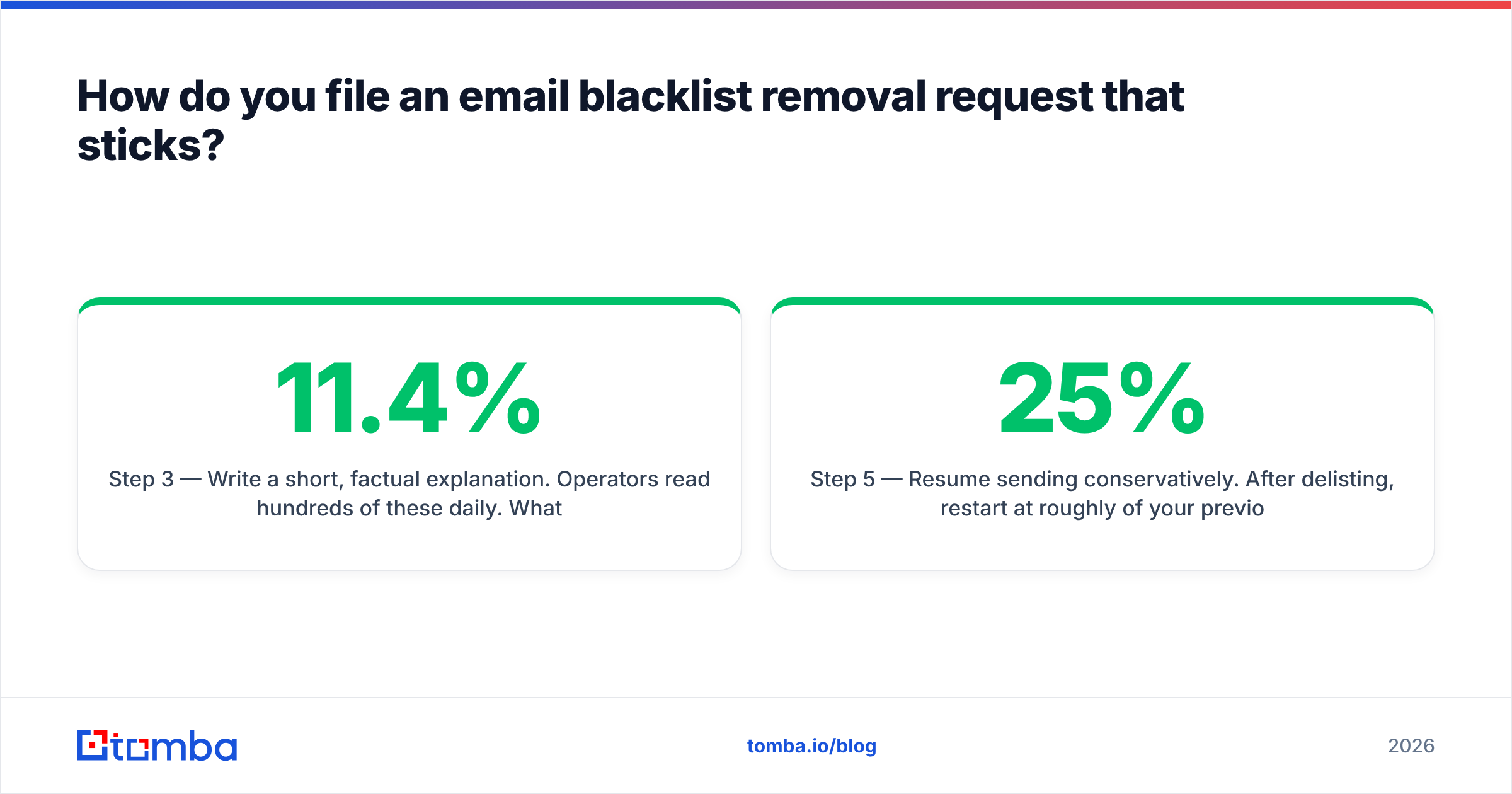
Step 3 — Write a short, factual explanation. Operators read hundreds of these daily. What works: "We identified a stale segment of 8,400 contacts imported in 2024 that was never re-verified. We ran the full 31,000-record database through verification, suppressed 6,200 invalid and unknown addresses, and our bounce rate dropped from 11.4% to 0.4%. We have also published a DMARC record and reduced daily volume from 4,000 to 800." What doesn't work: "We are a legitimate business and this must be a mistake."
Step 4 — Request removal once. Do not submit duplicate tickets. Repeated submissions get flagged and slow the queue.
Step 5 — Resume sending conservatively. After delisting, restart at roughly 25% of your previous volume and ramp over three to four weeks. Send to your most-engaged contacts first. Engagement signals rebuild reputation faster than volume does.
Step 6 — Monitor weekly. Set a recurring check on your IP and domain across the major lists, plus a look at your email reputation score. Catching a listing on day one is a 24-hour problem; catching it on day thirty is a quarter-long one.
How long does email blacklist removal actually take?#
Delisting is usually fast. Reputation recovery is not.
For automated lists (Spamhaus CSS, SpamCop, most UCEPROTECT entries), removal typically lands within 24 hours and sometimes within minutes. For manual review lists (Spamhaus SBL and DBL, Barracuda, Invaluement), expect 12–72 hours, longer over weekends.
Reputation recovery runs on a different clock. Gmail's domain reputation, once it drops to "Low" or "Bad," takes four to eight weeks of consistent, clean sending to climb back. Microsoft is slower still and less transparent. Budget a full quarter before your outbound numbers look like they did pre-listing — and plan pipeline accordingly rather than pretending the gap won't exist.
How do you stay off blacklists after delisting?#
Prevention costs roughly one-tenth of what remediation costs, and it's mostly mechanical.
- Verify at the point of entry. Every address that enters a sequence should be verified first — not batch-cleaned quarterly. If you source contacts through an API or CRM workflow, wire verification into the same step so bad data never reaches your sending tool. For list-building at scale, run imports through a bulk verify pass before anything ships.
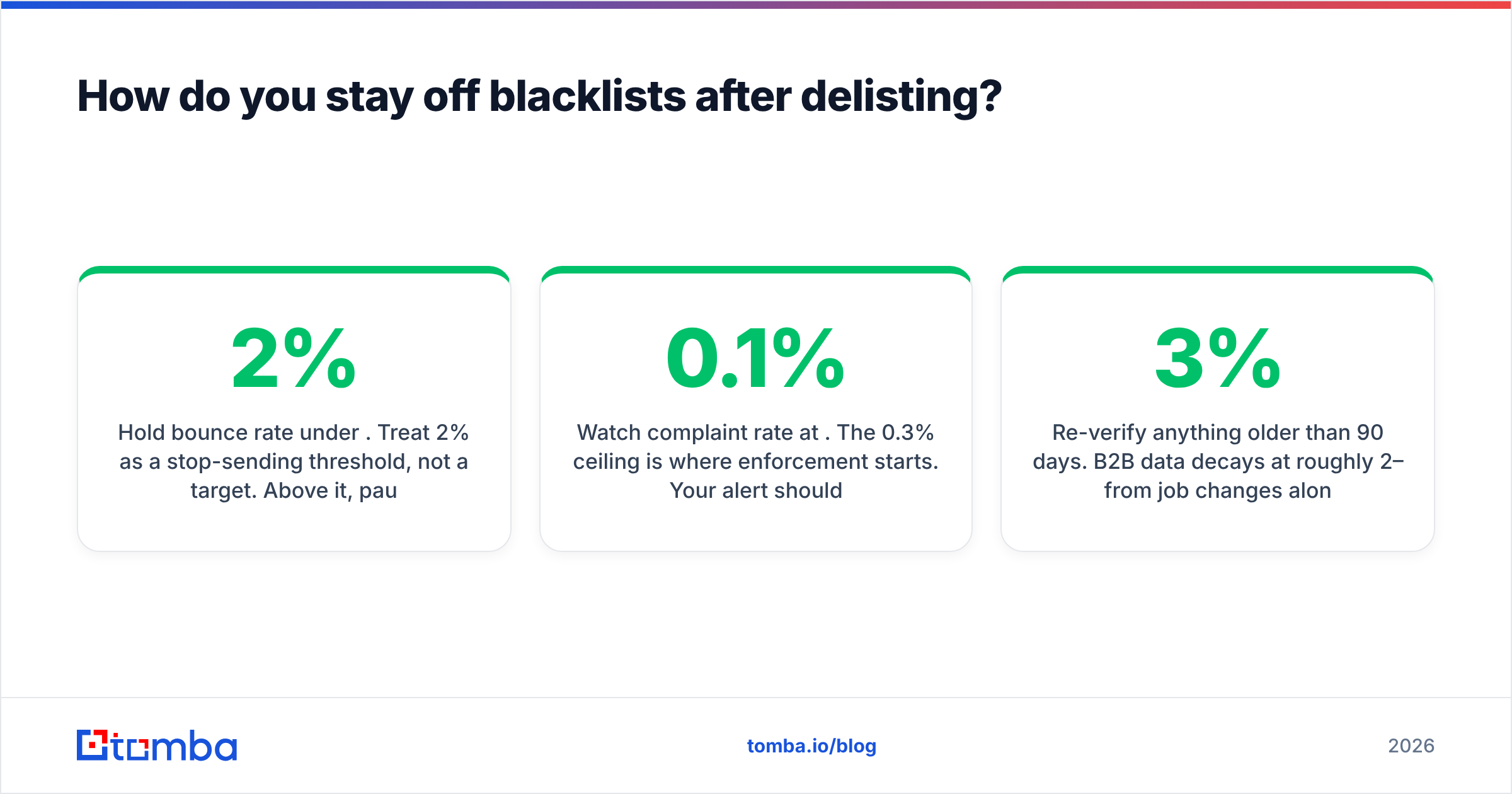
- Hold bounce rate under 2%. Treat 2% as a stop-sending threshold, not a target. Above it, pause and re-clean.
- Watch complaint rate at 0.1%. The 0.3% ceiling is where enforcement starts. Your alert should fire well before that.
- Re-verify anything older than 90 days. B2B data decays at roughly 2–3% per month from job changes alone.
- Never buy a static list. Purchased CSVs are the single most reliable route to a pristine trap hit. If you need contacts at volume, source them from a live-verified provider — vendors like BookYourData and Tomba both build around verification-at-query rather than shipping stale exports, which is the distinction that matters here.
- Keep sending domains separate and subdomain-scoped.
mail.yourcompany.comfor marketing,go.yourcompany.comfor outbound, root domain for transactional.
What if the listing came from your ESP's shared IP?#
If you send through a shared-IP ESP, you may be listed because of someone else's behavior. You can't file a removal request for an IP you don't control — the ESP has to do it.
Open a support ticket with the listing reference, ask them to confirm whether the IP is shared, and ask what their remediation timeline is. If this is the second listing in six months on the same shared pool, that's your signal to move to a dedicated IP (viable above roughly 100,000 sends per month) or switch providers. Note that domain-level listings on the DBL are always yours to fix regardless of who owns the IP.
Clean data is the actual fix#
Nearly every email blacklist removal case in B2B outbound traces back to the same root: addresses that shouldn't have been mailed in the first place. Fix the input and the listings stop happening.
That's the case for building lists from verified sources instead of cleaning up after them. Tomba's Email Finder returns professional addresses with a confidence score and SMTP-level verification at lookup time, so invalid contacts never reach your sequence. The free tier includes 25 searches a month to test accuracy against a segment you already know; paid plans start at $49/mo on Starter and $99/mo on Growth, with full pricing details published up front. Run your next import through verification before you send — it's a fraction of the cost of a quarter spent rebuilding reputation.
Related guides#
Ready to find emails that actually work?
Join 150,000+ professionals who stopped guessing and started sending. Free credits on signup — no credit card required.
Get the Tomba newsletter
Practical outbound tactics and product updates — once every two weeks.
About the author