Email Blast in 2026: What It Is and When It Still Works
Email blasts are not dead — but the batch-and-blast version is. Here's what an email blast actually is in 2026, when it still outperforms segmentation, and the list hygiene that keeps it out of spam.
TL;DR
- An email blast is a single message sent to your entire list (or a very large slice of it) at once, with little or no personalization. It is a delivery pattern, not a channel.
- Blasts are not dead. They are wrong for cold outreach and right for product announcements, outages, webinars, and time-boxed offers going to people who already opted in.
- The thing that kills blasts is not the size — it's the hygiene. A 50,000-address blast to an unverified list will torch your domain reputation in one send.
- Google and Yahoo's bulk-sender rules (5,000+ messages/day) make spam complaint rate under 0.10% a hard requirement, not a nice-to-have. Blasts are the fastest way to breach it.
- Rule of thumb: blast when the message is genuinely identical for everyone and the list is genuinely opted in. Segment when either of those is false.
What is an email blast?#
An email blast is one email, sent one time, to a large group of recipients simultaneously — the same subject line, the same body, the same call to action for everybody. The term comes from the mailing-list era, when "blast" described the mechanical act of pushing a message out to every address in the database at once.
That's the whole definition. Everything else people argue about — whether blasts are lazy, whether they're spam, whether they still convert — is about execution, not the format.
Three things distinguish a blast from other email sends:
- No meaningful segmentation. You're sending to the full list or a huge chunk of it, not a behavior-defined cohort.
- Minimal personalization. Maybe a first-name merge tag. Usually not even that.
- A single send event. No drip, no sequence, no branching logic based on opens or clicks.
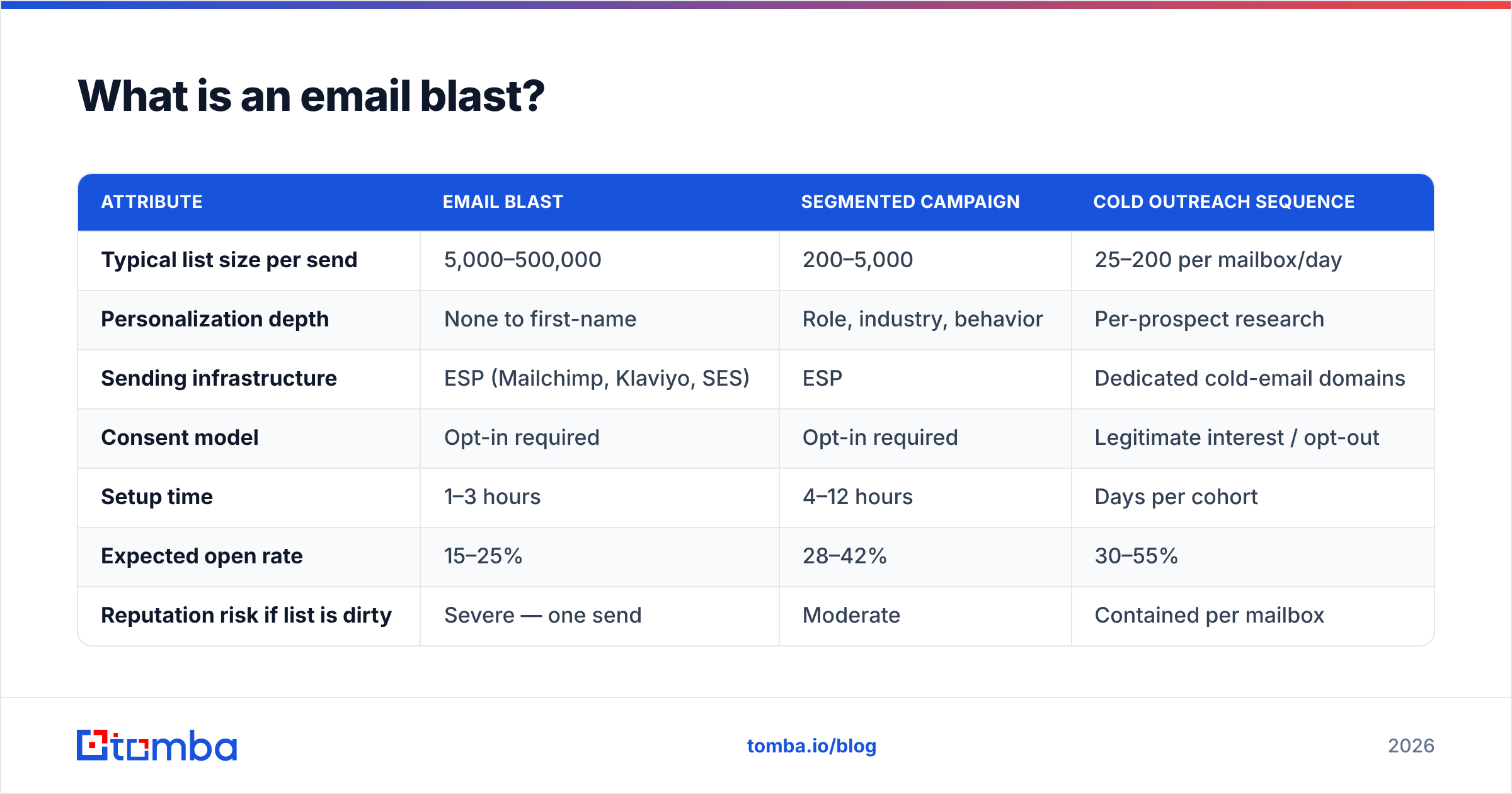
Compare that to the alternatives and the tradeoffs get concrete:
| Attribute | Email blast | Segmented campaign | Cold outreach sequence |
|---|---|---|---|
| Typical list size per send | 5,000–500,000 | 200–5,000 | 25–200 per mailbox/day |
| Personalization depth | None to first-name | Role, industry, behavior | Per-prospect research |
| Sending infrastructure | ESP (Mailchimp, Klaviyo, SES) | ESP | Dedicated cold-email domains |
| Consent model | Opt-in required | Opt-in required | Legitimate interest / opt-out |
| Setup time | 1–3 hours | 4–12 hours | Days per cohort |
| Expected open rate | 15–25% | 28–42% | 30–55% |
| Reputation risk if list is dirty | Severe — one send | Moderate | Contained per mailbox |
| Best for | Announcements, outages, launches | Nurture, upsell, re-engagement | New-logo pipeline |
The pattern here: a blast trades relevance for speed and reach. That trade is sometimes correct. It is correct far less often than the average marketing calendar assumes.
Is an email blast the same thing as spam?#
No — but the distance between them is smaller than most senders think, and it's measured in three variables: consent, relevance, and complaint rate.
A blast to 40,000 people who explicitly subscribed to your product newsletter, announcing a pricing change that affects all of them, is legitimate email. A blast of the same size to a purchased list, pitching a service nobody asked about, is spam by every operational definition that matters — including the one your recipients' mailbox providers use.
Mailbox providers don't read your intent. They read signals:
- Spam complaint rate. Google's bulk sender guidelines require senders of 5,000+ messages per day to Gmail addresses to keep reported spam under 0.10% and never exceed 0.30%. At 50,000 recipients, that's 50 complaints before you're in trouble. Fifty people out of fifty thousand is nothing. That's the problem.
- Bounce rate. Above roughly 2–3% hard bounces and providers start treating the send as list-quality evidence against you.
- Engagement collapse. If a blast goes out and 3% open it while your usual is 30%, providers infer the content is unwanted and start routing future sends to spam.
- Authentication. Missing or misaligned SPF, DKIM, and DMARC records now cause outright rejection at bulk volume, not just a spam-folder penalty. Check yours with an SPF checker before any large send.
The thing to internalize: a blast concentrates all of your reputation risk into a single moment. A segmented program spreads the same volume across weeks, so a bad list segment produces a bad week. A blast produces a bad quarter.
When does an email blast still outperform segmentation?#
Blasts win in four specific situations, and it's worth naming them precisely because "just segment everything" is advice that costs teams real money in wasted hours.
The message is genuinely universal. A security incident, a pricing change, a domain migration, a service outage. Segmenting a status update is theater — every recipient needs identical information, and slicing it introduces the risk that someone in a forgotten segment never hears about it.
The window is short. A 48-hour Black Friday offer or a webinar starting Thursday doesn't survive a three-week segmentation build. Speed has value that relevance can't always outweigh.
Your list is small enough that segments become statistically meaningless. Below roughly 2,000 subscribers, cutting into six segments gives you cohorts of 300 where a 2% response difference is noise. Send once, learn from the aggregate, segment when you have volume.
You're re-establishing a baseline. After a long silence, a single well-written "here's what we've been up to, click here if you still want these" send tells you who's alive. It's a sunset campaign in blast form — and it's the cheapest list-hygiene tool you have.
Outside those four, segmentation wins on nearly every metric. HubSpot's research on email marketing has consistently shown segmented and personalized sends outperforming undifferentiated ones on open and click rates, and the gap has widened as inbox filtering has gotten better at reading engagement.
How do you run an email blast without wrecking your domain?#
Conclusion first: verify the list, warm the send, and stage the volume. In that order. Everything else is secondary.
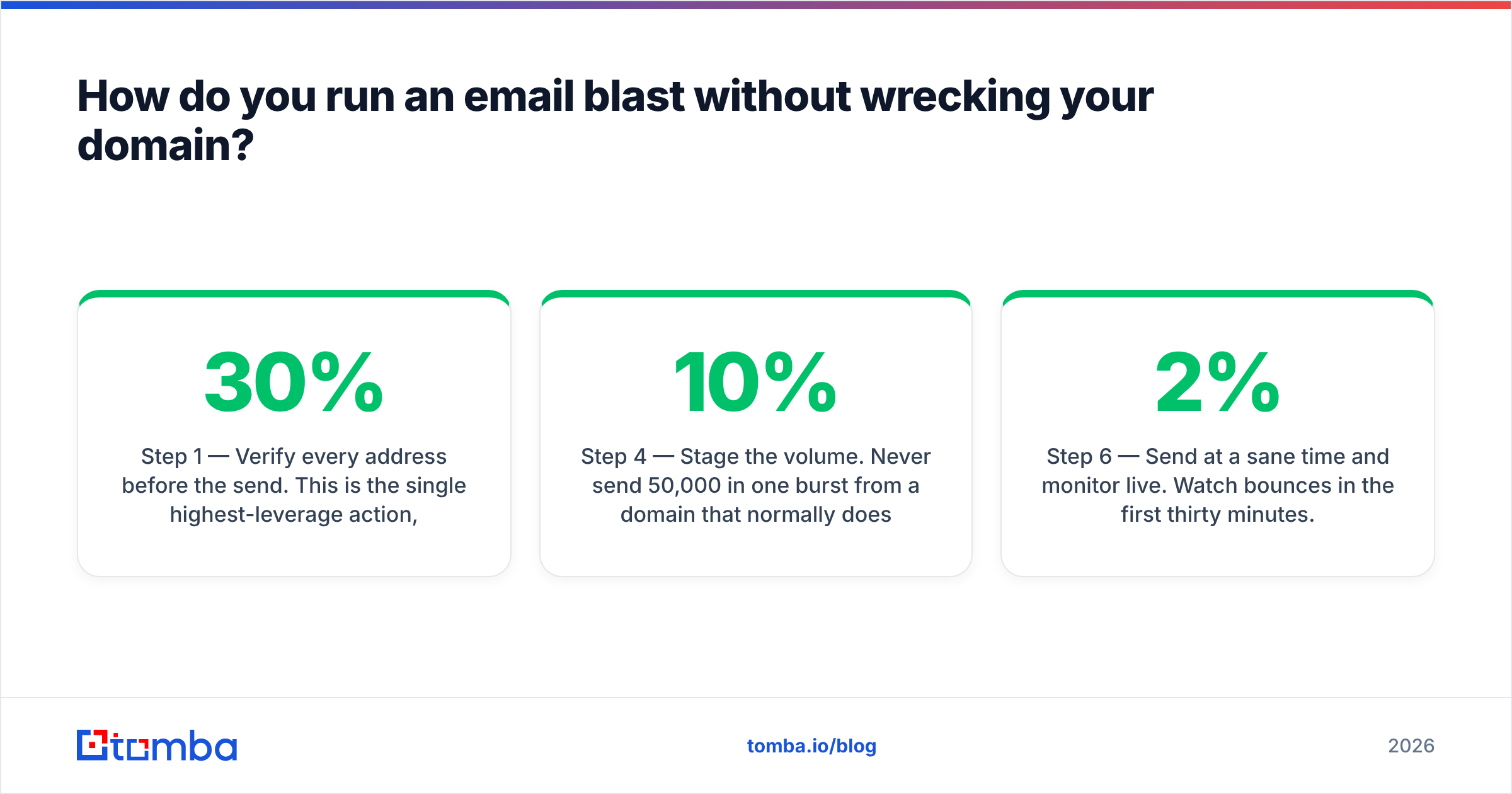
Step 1 — Verify every address before the send. This is the single highest-leverage action, and it's the one most teams skip because the list "was fine last quarter." B2B email data decays at roughly 22–30% per year as people change jobs. A list you built in January is measurably worse in July. Run the full file through an email verifier and drop anything that comes back invalid or risky. For lists above 10,000 rows, use a bulk verify job rather than one-by-one API calls.
Step 2 — Handle catch-all domains explicitly. A large share of B2B domains accept mail to any address at the SMTP layer, which means a standard verifier returns "unknown" rather than valid or invalid. Those addresses are the silent bounce generators in a blast. Use a catch-all verifier to score them, then decide: include the high-confidence ones, hold back the rest for a separate smaller send where a bounce spike won't matter.
Step 3 — Confirm authentication is aligned. SPF, DKIM, and DMARC all passing and aligned to your From domain. If you've added a new ESP since your last big send, this needs re-checking — a new sending service almost always requires a DNS change you may have half-finished. Your sender reputation is the asset at stake.
Step 4 — Stage the volume. Never send 50,000 in one burst from a domain that normally does 2,000. Split into batches: 10% on hour one, check bounce and complaint telemetry, then 30%, then the rest. Most ESPs support throttled sending natively. If yours doesn't, split the list manually. This one habit converts a catastrophic send into a recoverable one.
Step 5 — Make the unsubscribe obvious and one-click. Bulk senders are required to support one-click unsubscribe (RFC 8058 List-Unsubscribe-Post) and to process opt-outs within two days. Burying it also backfires practically: a recipient who can't find the unsubscribe hits "report spam" instead, and that costs you far more than a lost subscriber.
Step 6 — Send at a sane time and monitor live. Watch bounces in the first thirty minutes. If hard bounces cross 2%, pause the remaining batches. You can always finish tomorrow. You cannot un-send a reputation hit.
What should you check before every blast?#
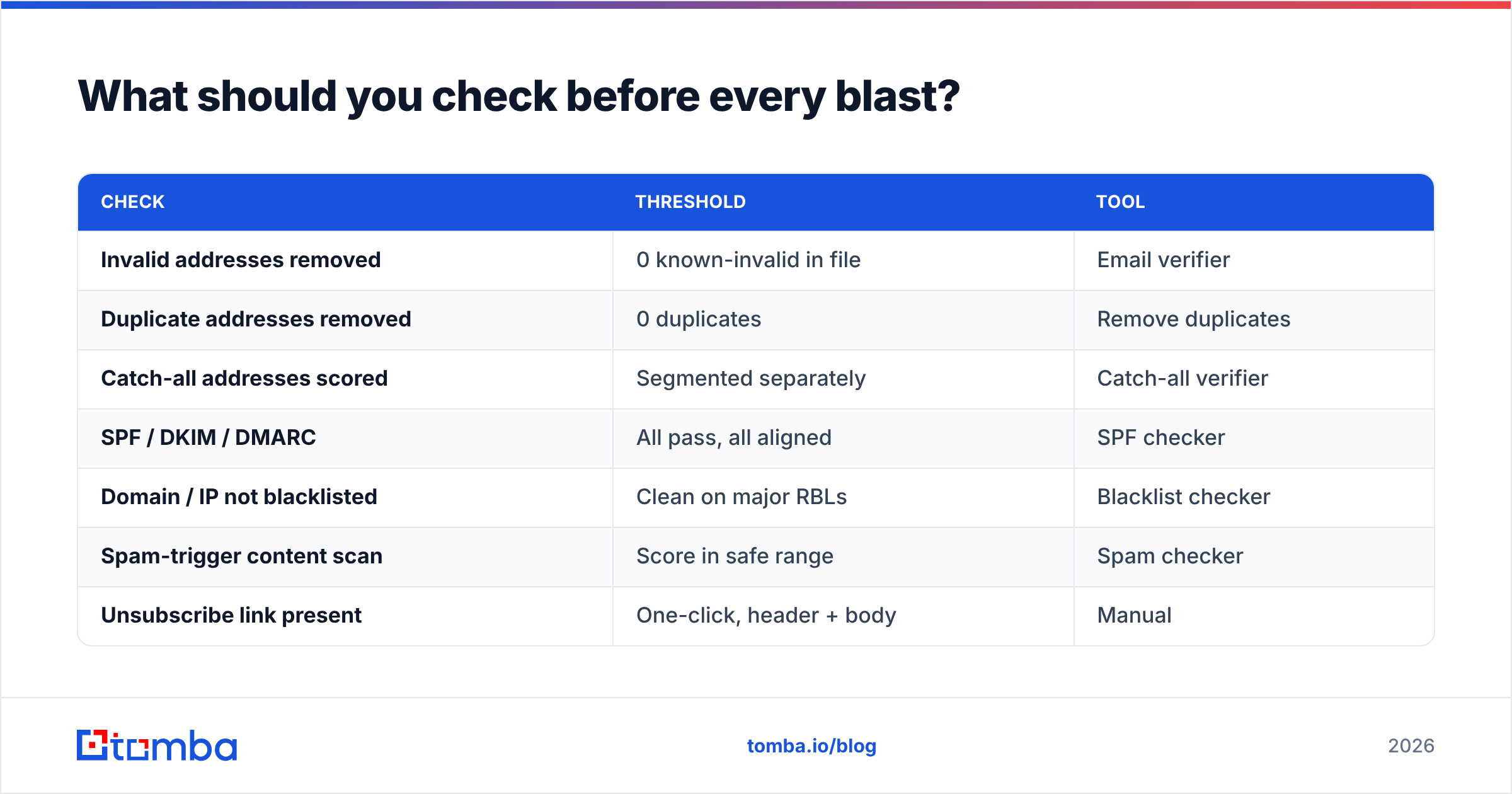
A pre-flight list you can actually run in twenty minutes:
| Check | Threshold | Tool |
|---|---|---|
| Invalid addresses removed | 0 known-invalid in file | Email verifier |
| Duplicate addresses removed | 0 duplicates | Remove duplicates |
| Catch-all addresses scored | Segmented separately | Catch-all verifier |
| SPF / DKIM / DMARC | All pass, all aligned | SPF checker |
| Domain / IP not blacklisted | Clean on major RBLs | Blacklist checker |
| Spam-trigger content scan | Score in safe range | Spam checker |
| Unsubscribe link present | One-click, header + body | Manual |
| Send staged in batches | ≤ 25% per batch | ESP settings |
Run this every time. Not the first time, not when it feels risky — every time. The cost is twenty minutes. The cost of skipping it is a domain you have to rebuild over six weeks.

Which tools do you actually need for a blast?#
Two categories, and people confuse them constantly: sending tools and data tools.
Sending tools push the message. Data tools decide who's on the list and whether those addresses are real. An ESP will happily send to a list that's 30% dead — that's not what it's for, and its bounce reporting arrives after the damage.
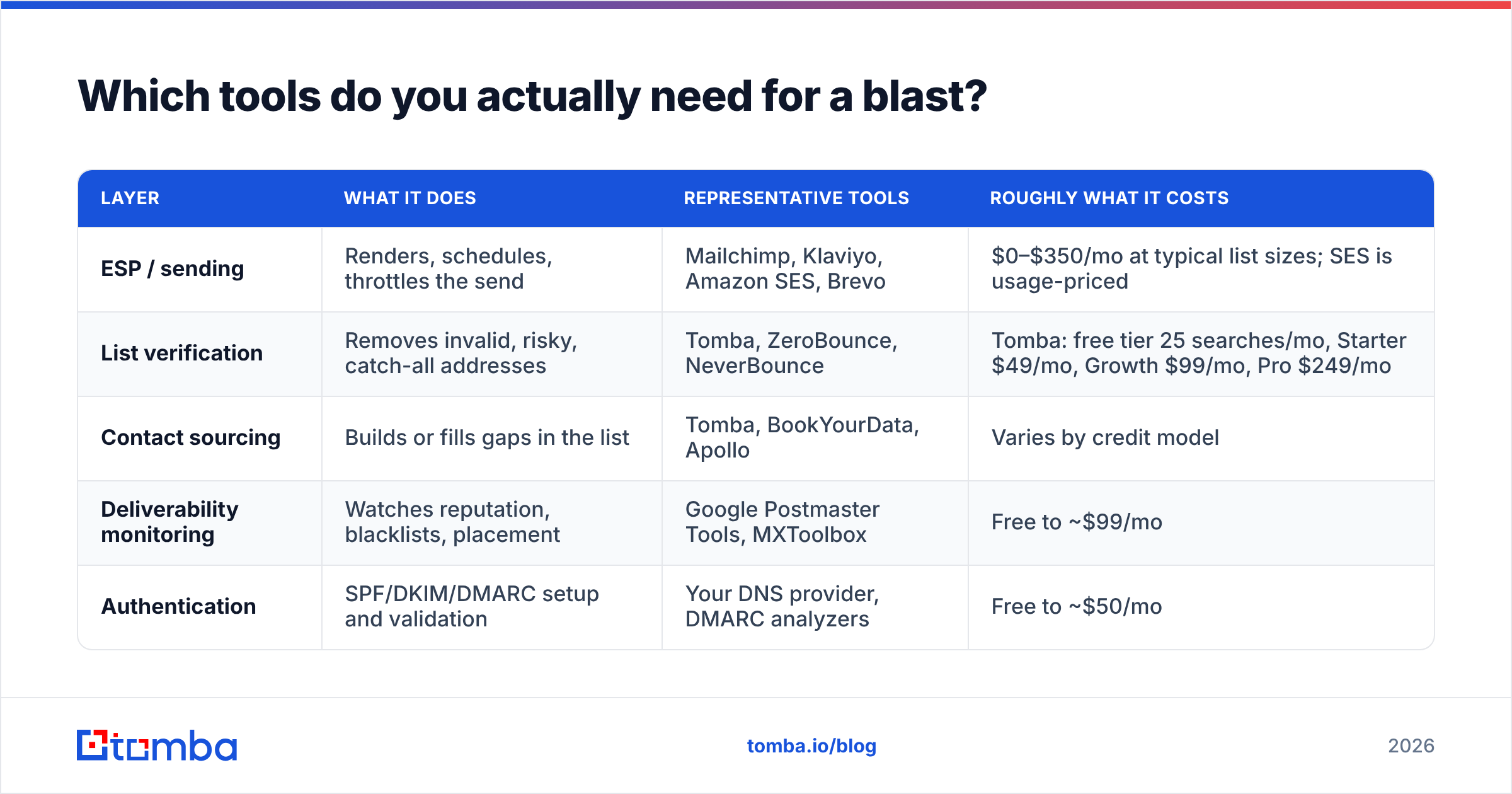
| Layer | What it does | Representative tools | Roughly what it costs |
|---|---|---|---|
| ESP / sending | Renders, schedules, throttles the send | Mailchimp, Klaviyo, Amazon SES, Brevo | $0–$350/mo at typical list sizes; SES is usage-priced |
| List verification | Removes invalid, risky, catch-all addresses | Tomba, ZeroBounce, NeverBounce | Tomba: free tier 25 searches/mo, Starter $49/mo, Growth $99/mo, Pro $249/mo |
| Contact sourcing | Builds or fills gaps in the list | Tomba, BookYourData, Apollo | Varies by credit model |
| Deliverability monitoring | Watches reputation, blacklists, placement | Google Postmaster Tools, MXToolbox | Free to ~$99/mo |
| Authentication | SPF/DKIM/DMARC setup and validation | Your DNS provider, DMARC analyzers | Free to ~$50/mo |
A note on sourcing: if you're building the list rather than growing it organically, the sourcing tool's accuracy determines your blast's bounce rate more than anything downstream. Tomba's email finder and domain search return addresses with confidence scores and, where available, the public sources they were derived from — which matters, because a score you can audit is worth more than a score you have to trust. BookYourData takes a different route with a pay-as-you-go verified-contact model that suits teams who don't want a subscription. Both are reasonable; pick based on whether your volume is steady or spiky.
For a broader view of how vendors compare on data quality and pricing, G2's email marketing category is a decent starting point for user-reported reliability, though as always, run your own sample before committing to a contract.
How do you measure whether a blast worked?#
Open rate is now the least trustworthy metric you have. Apple Mail Privacy Protection and similar features pre-fetch images, inflating opens for a large share of your list. Treat opens as directional, not decisional.
What to measure instead:
- Click-through rate on the primary CTA. The only engagement signal that requires a human decision.
- Complaint rate. Target below 0.05%. At 0.10% you're at Google's threshold. At 0.30% you have an emergency.
- Hard bounce rate. Below 2%. Above that, your verification step failed and you should audit the list source.
- Unsubscribe rate. 0.2–0.5% is normal for a blast. Above 1% means the message didn't match what people signed up for.
- Downstream conversion. Replies, demos booked, revenue attributed. A blast with a 40% open rate and zero pipeline is a failed blast.
- Reputation delta. Check Google Postmaster Tools before and 72 hours after. If your domain reputation dropped a tier, pause all sending and diagnose before the next campaign.
The uncomfortable truth about blasts is that their most important metric is a negative one. A great segmented campaign is judged by what it produced. A great blast is largely judged by what it didn't cost you.
What should you do instead of blasting cold prospects?#
Don't blast cold lists. Not "blast them carefully" — don't do it.
Cold outreach and blasting are structurally incompatible. Cold email requires low volume per mailbox, distinct sending domains, per-prospect relevance, and multi-touch sequencing. A blast has none of those properties. Sending 5,000 cold emails from your primary domain in one afternoon is the single fastest way to lose your company's ability to send email at all — including invoices, support replies, and password resets.
The functional alternative:
- Source accurately. Build the list with a tool that returns confidence scores, not scraped guesses. A LinkedIn finder or domain-level search gives you addresses tied to a real company pattern.
- Verify before it touches a sequence. Same verification step as a blast, applied earlier.
- Split across dedicated domains and mailboxes. 25–50 sends per mailbox per day, warmed for at least three weeks first.
- Sequence, don't broadcast. Three to five touches, each adding information, with reply-based exit logic.
- Keep your primary domain out of it entirely. Cold outreach runs from lookalike domains. Your main domain sends transactional and opted-in mail only.
That's slower. It's also the difference between a program that compounds and one that ends with a deliverability post-mortem. If you want the mechanics of the underlying constraint, our glossary entry on email deliverability covers how providers actually score senders.
The honest verdict on email blasts in 2026#
Blasts survive because a specific job still exists: tell everyone the same thing, right now. Nothing has replaced them for that job. What's changed is the margin for error. In 2015, a dirty list meant a mediocre campaign. In 2026, it means an authenticated bulk sender crossing a published complaint threshold, and mailbox providers acting on it within a single send cycle.
So the decision framework is short:
- Is the message identical for every recipient? If no, segment.
- Did every recipient opt in? If no, don't send.
- Is the list verified within the last 30 days? If no, verify first.
- Can you stage the send in batches and monitor? If no, fix that before you schedule.
Four yeses and a blast is a perfectly professional tool. One no and you're gambling with an asset that takes months to rebuild.
The part that's fully in your control is the list. Before your next large send, run the whole file through Tomba's Email Finder to fill gaps and confirm the addresses you already have resolve to real, current mailboxes — the free tier covers 25 searches a month so you can test the accuracy on a sample before committing, and paid plans start at $49/mo when you're ready to run the full file. Clean data doesn't make a blast a good idea. It just makes sure a good idea doesn't get ruined by a list you never checked.
Related guides#
Ready to find emails that actually work?
Join 150,000+ professionals who stopped guessing and started sending. Free credits on signup — no credit card required.
Get the Tomba newsletter
Practical outbound tactics and product updates — once every two weeks.
About the author