Email Bounce Test: How to Check Your List Before You Send
A bounce test tells you what your inbox provider won't: how much of your list is dead before you hit send. Here's how to run one properly in 2026 — methods, tools, thresholds, and the traps.

TL;DR
- An email bounce test is a pre-send check that predicts how many addresses on your list will fail — run it before the campaign, not as a post-mortem on your bounce report.
- There are three real methods: SMTP-level verification, a small seed-send probe, and syntax/DNS screening. Serious teams use all three in sequence.
- Keep hard bounces under 2%. Google and Microsoft both throttle senders who cross it repeatedly, and Google's bulk sender rules made spam-rate limits explicit in 2024.
- Catch-all domains are the hard part. No verifier can prove a mailbox exists on a catch-all, so treat "accept-all" as its own risk bucket instead of pretending it's valid.
- Bulk verification runs $0.0004–$0.01 per email depending on vendor and volume. That's cheaper than one blown domain.
What is an email bounce test?#
An email bounce test is any process that estimates — before you send a campaign — which addresses on your list will be rejected by the receiving mail server.
Think of it like a pressure test on plumbing. You don't wait for water on the floor to find the leak; you push air through the pipes first and listen for hissing. A bounce test pushes a low-risk signal at each address and listens for the mail server's answer, so you learn which pipes are cracked without flooding the house.
The "flooding" here is real. When you send to a list full of dead addresses, the receiving provider doesn't just discard those messages. It records that you sent them, adjusts its opinion of your sending domain downward, and applies that opinion to the messages that were going to good addresses. One 12% bounce campaign can suppress inbox placement for weeks afterward.
Two distinctions matter before you go further:
- Hard bounce vs. soft bounce. A hard bounce is permanent — the mailbox doesn't exist, the domain doesn't resolve, the account was deleted. A soft bounce is temporary — mailbox full, server down, message too large, greylisting. Bounce tests predict hard bounces well and soft bounces poorly.
- Bounce test vs. bounce report. A bounce report is what your ESP shows you after the damage. A bounce test is what you run 24 hours earlier so the report is boring.
Why does a high bounce rate cost you more than the bounced emails?#
Because the penalty applies to your whole domain, not to the failed sends.
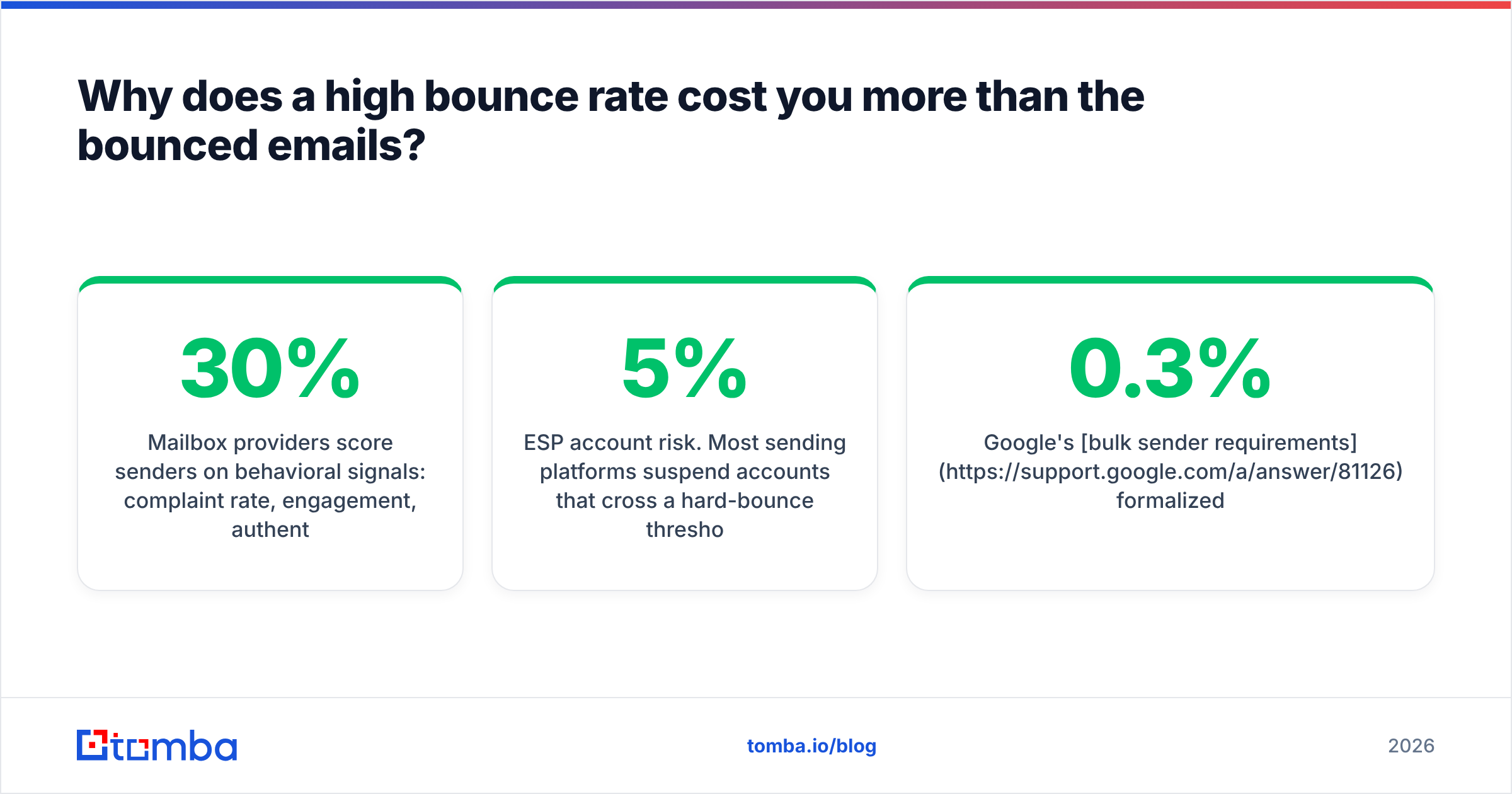
Mailbox providers score senders on behavioral signals: complaint rate, engagement, authentication, and invalid-recipient rate. A spike in invalid recipients is one of the loudest signals that you bought or scraped a list, because legitimate opt-in lists decay slowly and predictably (roughly 22–30% per year as people change jobs), while purchased lists arrive dead on day one.
The concrete costs stack up like this:
- Reputation damage. Your sender reputation drops and stays down for weeks. Recovery is slower than the fall.
- Throttling. Providers start rate-limiting your connections. Your 10,000-message send takes three days instead of two hours.
- Spam-folder placement for valid contacts. The people who would have replied never see the message.
- ESP account risk. Most sending platforms suspend accounts that cross a hard-bounce threshold (commonly 5%, sometimes 3%) on repeated sends.
- Wasted credits. Minor compared to the rest, but you paid to send into a void.
Google's bulk sender requirements formalized what used to be folklore: authenticate, keep spam complaints under 0.3%, and make unsubscribing easy. Bounce rate isn't in that list explicitly, but it feeds the reputation model those thresholds are drawn from.
What are the three ways to run an email bounce test?#
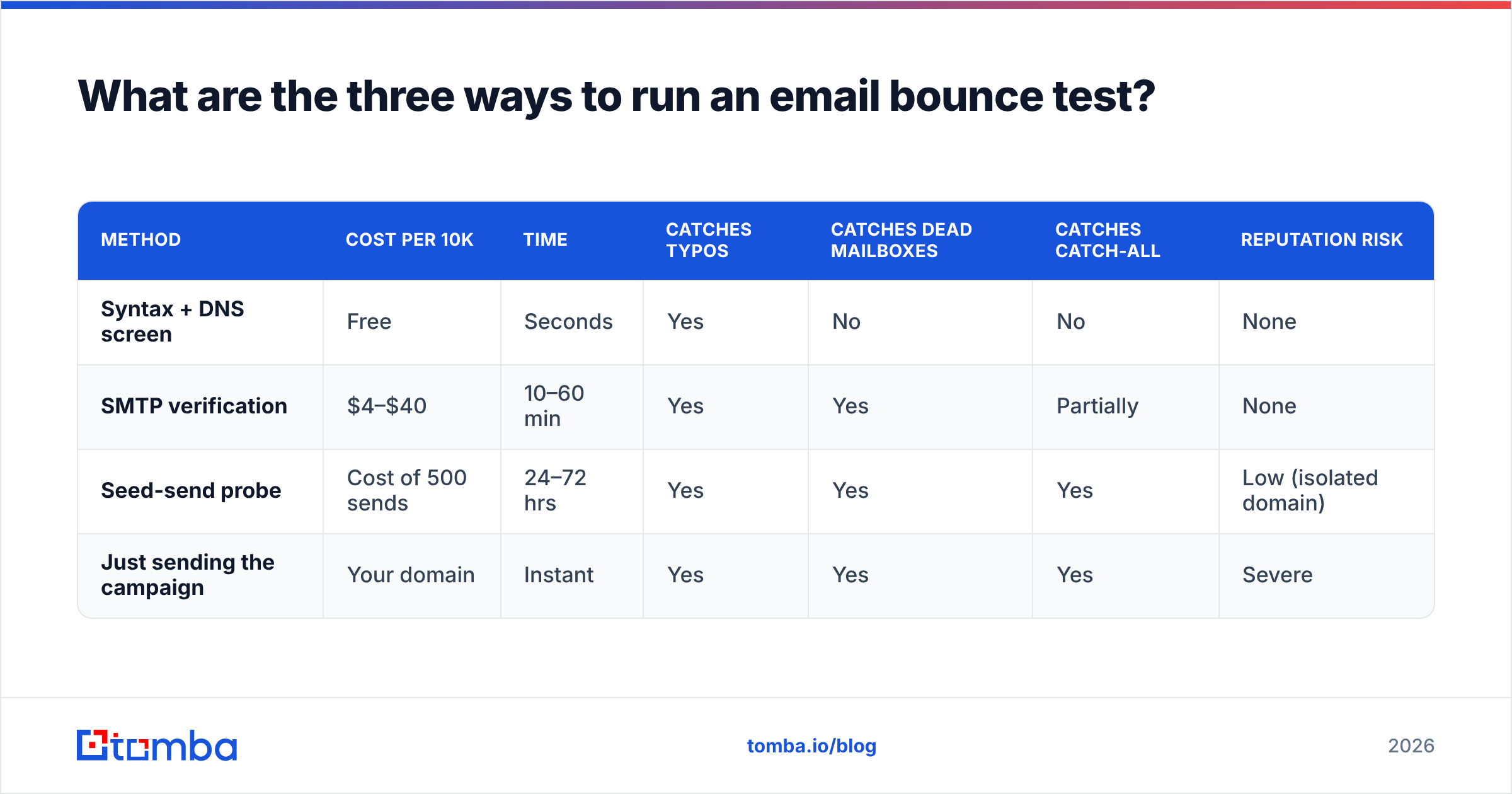
There are three methods, and they answer different questions. Running only one is the most common mistake.
1. Syntax and DNS screening (free, instant, shallow). Checks the address is formatted correctly, the domain resolves, and MX records exist. This catches typos (gmial.com), dead domains, and role addresses. It cannot tell you whether sarah@realcompany.com exists. Use a free email checker for spot checks and a bulk pass for the whole file.
2. SMTP handshake verification (cheap, fast, deep). The verifier opens a conversation with the recipient's mail server, issues RCPT TO, reads the response code, and disconnects without sending anything. A 250 means the mailbox is accepted; a 550 means it doesn't exist. This is what commercial verifiers do at scale, and it's the closest thing to a real bounce test that doesn't involve sending.
3. Seed-send probe (slowest, most honest). Take a random 200–500 address sample from your list, send a real, low-key message from a warmed secondary domain, and measure actual bounces. Multiply the rate across the full list. This is the only method that accounts for provider-specific filtering, greylisting, and reputation effects your verifier can't see.
The sequence that works: screen syntax on everything → SMTP-verify what survives → seed-probe a sample of what's left → send.
How do the methods compare in practice?#
| Method | Cost per 10k | Time | Catches typos | Catches dead mailboxes | Catches catch-all | Reputation risk |
|---|---|---|---|---|---|---|
| Syntax + DNS screen | Free | Seconds | Yes | No | No | None |
| SMTP verification | $4–$40 | 10–60 min | Yes | Yes | Partially | None |
| Seed-send probe | Cost of 500 sends | 24–72 hrs | Yes | Yes | Yes | Low (isolated domain) |
| Just sending the campaign | Your domain | Instant | Yes | Yes | Yes | Severe |
The last row is included deliberately, because "just send it and see" is still the most-used method in the wild. It works exactly once.
How do you actually run the test, step by step?#
Here's the operational sequence. Budget half a day for a list under 50,000.
- Deduplicate first. Duplicates inflate your list count and get counted twice in bounce math. Run a remove duplicates pass before you pay per-record for anything.
- Strip obvious junk. Role accounts (
info@,sales@,noreply@), free-mail addresses if you're B2B-only, and anything from a domain with no MX record. This is typically 5–15% of a scraped list. - Run bulk SMTP verification. Upload the survivors to a bulk verify job. You'll get back four buckets: valid, invalid, catch-all/accept-all, and unknown.
- Segment by result, don't just delete. Valid goes to the main send. Invalid gets deleted permanently — never "retry later." Catch-all and unknown go into a separate, slower, lower-volume segment.
- Seed-probe the catch-all bucket. This is where the real uncertainty lives. Send to a 200-address sample from an isolated domain and measure.
- Check your own sending setup. A bounce test on the list is worthless if your DNS is broken. Verify your SPF record, DKIM signing, and DMARC policy resolve correctly before the send.
- Send in ramped batches. Even a clean list sent at 10x your normal volume looks like an attack. Ramp over three to five days.
Step 4 is where most teams lose money. Deleting the entire catch-all bucket throws away real contacts — at many mid-size companies, catch-all is the default MX configuration, and the addresses inside it are perfectly deliverable.
What bounce rate is actually acceptable in 2026?#
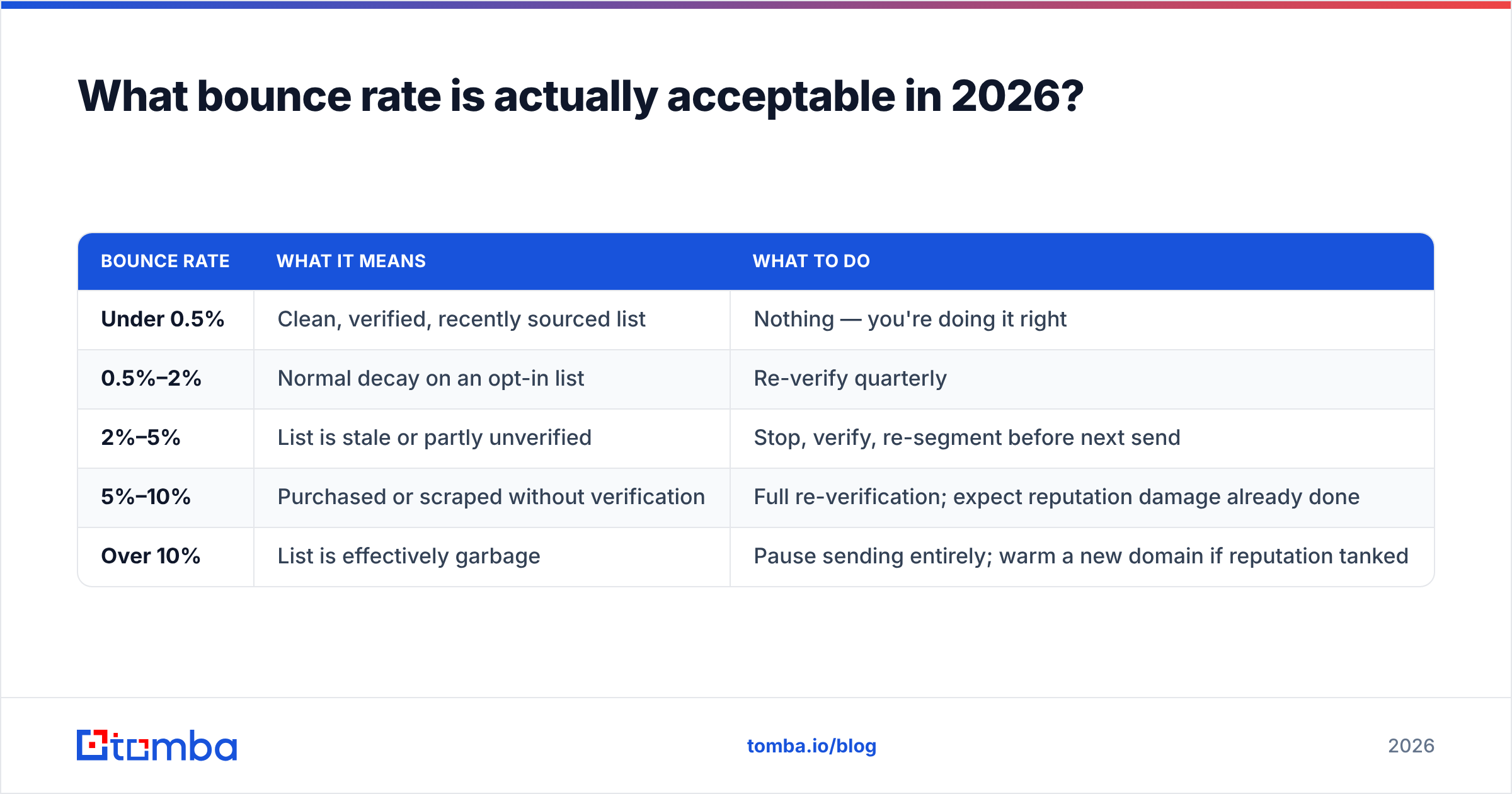
Below 2% hard bounces. That's the number to hold yourself to, and it's stricter than what most ESPs will formally enforce.
| Bounce rate | What it means | What to do |
|---|---|---|
| Under 0.5% | Clean, verified, recently sourced list | Nothing — you're doing it right |
| 0.5%–2% | Normal decay on an opt-in list | Re-verify quarterly |
| 2%–5% | List is stale or partly unverified | Stop, verify, re-segment before next send |
| 5%–10% | Purchased or scraped without verification | Full re-verification; expect reputation damage already done |
| Over 10% | List is effectively garbage | Pause sending entirely; warm a new domain if reputation tanked |
Two footnotes. First, these are hard bounce numbers — soft bounces of 3–4% on a large B2B send are unremarkable and often just greylisting. Second, the tolerance is tighter on a cold domain than a warm one. A three-year-old domain with consistent engagement absorbs a 3% bounce campaign that would flatten a two-week-old domain.
Which bounce test and verification tools should you compare?#
The market splits into three groups: dedicated verifiers, finder-plus-verifier platforms, and data providers with verification bundled in. What you should compare is accuracy on catch-all domains, per-record price at your volume, API availability, and whether the tool also finds addresses or only checks them you already have.
| Tool | Type | Entry price | Free tier | Verification | Also finds emails | API |
|---|---|---|---|---|---|---|
| Tomba | Finder + verifier | $49/mo (Starter) | 25 searches/mo | SMTP + catch-all handling | Yes | Yes |
| ZeroBounce | Dedicated verifier | Pay-as-you-go from ~$16 | 100 credits | SMTP + activity data | No | Yes |
| NeverBounce | Dedicated verifier | Pay-as-you-go from ~$8 | 1,000 free (trial) | SMTP + real-time | No | Yes |
| BookYourData | B2B data + verification | Pay-as-you-go credits | Sample credits | Verified-at-purchase, 97%+ accuracy claim | Yes (prebuilt lists) | Yes |
| Bouncer | Dedicated verifier | Pay-as-you-go from ~$7 | 100 credits | SMTP + toxicity check | No | Yes |
A few honest notes on that table.
If you already have the list, a dedicated verifier is the cheaper path — you're paying for one job and they do it well. ZeroBounce and Bouncer both handle high volumes without hand-holding.
If you're building the list as you go, a combined platform saves a round trip. Finding an address and verifying it in the same call means you never store a dead record in your CRM in the first place. Tomba's email verifier and email finder run off the same infrastructure, and Tomba pricing starts at $49/mo for Starter with a free tier at 25 searches per month.
If you'd rather buy pre-verified data than build it, BookYourData is a reasonable option — their lists ship verified at point of purchase, which shifts the bounce-test burden onto the vendor. That's a genuinely different model from running your own verification, and for teams without deliverability expertise in-house it removes a whole category of mistakes.
None of these will give you 100% accuracy, and any vendor claiming it is measuring something other than what you think. Independent testing on G2 consistently shows the top verifiers clustering in the 95–98% range on non-catch-all domains, with much wider spread on catch-all.
Why do catch-all domains break every bounce test?#
Because a catch-all server says "yes" to everything, and a verifier has no way to distinguish "yes, that mailbox exists" from "yes, I accept all mail and will decide later."
A catch-all (or accept-all) configuration tells the mail server to accept every message addressed to the domain, regardless of whether the local part matches a real mailbox. Companies set this up so mail to jon.smith@ still lands when the actual address is j.smith@. Perfectly sensible administration, and it makes SMTP verification blind.
What happens next varies. Some catch-all servers route unknown recipients to a junk mailbox nobody reads. Some bounce them asynchronously hours later — which shows up in your bounce report even though the initial handshake returned 250. Some genuinely deliver everything.
Three ways to handle it, in order of effort:
- Pattern-match against known-good addresses. If you've confirmed
first.last@company.comworks for three people, a fourth address in that format is probably real. A company email pattern check does this systematically. - Use a dedicated catch-all check. Tools like the catch-all verifier apply additional heuristics beyond the SMTP handshake — checking whether the pattern matches the org's known format, whether the person exists at the company, and whether the address appears in other verified sources.
- Isolate and probe. Send the catch-all segment separately, from a separate subdomain, at low volume. If asynchronous bounces come back, you've contained the damage.
The wrong move is to treat catch-all as valid and merge it into the main send. Estimates vary, but a meaningful share of B2B domains run accept-all, and dumping that bucket into a clean campaign is how a "verified" list still produces a 6% bounce rate.
What mistakes still burn people?#
Verifying once and never again. A list verified in January is not clean in July. B2B contact data decays at roughly 2–2.5% per month through job changes, restructures, and departures. Re-verify anything older than 90 days before a send.
Retrying hard bounces. A 550 user unknown is permanent. Sending again next month doesn't make the mailbox exist — it just adds another invalid-recipient event to your reputation record. Delete, don't recycle.
Testing the list but not the infrastructure. You can have a perfectly clean list and still bounce if your SPF record has too many DNS lookups, your DKIM key rotated without updating DNS, or your IP landed on a blocklist. Run an SPF checker and a blacklist checker as part of the same pre-send routine.
Confusing bounces with blocks. A 550 5.7.1 message rejected due to policy is not a bounce test failure — the mailbox exists, your content or reputation got rejected. Your ESP may lump these together in one "bounce" number. Read the actual SMTP codes before you conclude your list is bad.
Sending everything at once after verification. Clean list, cold domain, 20,000 messages in an hour. Providers read volume spikes as compromise indicators regardless of list quality.
Trusting a vendor's accuracy claim over your own seed test. Every verifier publishes a number. Run 500 addresses through your own probe and compare. It takes a day and settles the argument permanently.
How often should you re-run the test?#
Tie it to a trigger, not a calendar reminder you'll ignore.
- Before every cold campaign, no exceptions — cold lists are the highest-risk sends you make.
- Quarterly for warm/opt-in lists, which decay slowly but do decay.
- Immediately after any import from a new data source, a conference badge scan, or a partner list.
- Any time bounce rate exceeds 2% on a send — that's the signal your last verification aged out.
- Before re-engaging dormant contacts. A 12-month-dormant segment is a bounce minefield; verify it before you try to win it back.
If you're pulling contacts continuously rather than in batches, wire verification into the pipeline instead of running it as a periodic chore. The email verification API lets you check an address at the moment it enters your CRM, which means the "stale list" problem never accumulates in the first place.
Ready to stop guessing before you hit send?#
A bounce test isn't a compliance chore — it's the difference between a campaign that reaches decision-makers and one that quietly trains Google to distrust your domain. The workflow is simple: find the address correctly, verify it before it enters your system, re-check anything older than a quarter, and treat catch-all as its own segment.
Start where the leverage is highest — at the point of acquisition. The Tomba Email Finder returns addresses with a confidence score and verification status attached, so dead records never make it into your sequence to begin with. The free tier gives you 25 searches a month to test the accuracy against your own data, and Starter runs $49/mo when you're ready to scale. Verify at the source, and the bounce report takes care of itself.
Related guides#
Ready to find emails that actually work?
Join 150,000+ professionals who stopped guessing and started sending. Free credits on signup — no credit card required.
Get the Tomba newsletter
Practical outbound tactics and product updates — once every two weeks.
About the author