Email Campaign Best Practices in 2026: A Complete Guide
Most email campaign advice is recycled from 2018. Here's the setup, list hygiene, sequencing, and benchmarks that actually move reply rates in 2026 — plus the mistakes that quietly kill deliverability.
TL;DR
- Deliverability is now a gating function, not a tuning knob. Gmail and Yahoo enforce authentication and a 0.3% spam-complaint ceiling — miss it and no amount of copywriting saves the campaign.
- List quality beats copy quality. A verified list at 2% bounce will outperform a clever sequence sent to a 12% bounce list every single time.
- Segment before you scale. Campaigns sent to fewer than 200 tightly-matched contacts consistently beat 5,000-contact blasts on reply rate and pipeline created.
- Three to five touches over 12–18 days is the sweet spot for cold outbound. Beyond touch six, incremental replies fall off a cliff while spam complaints rise.
- Track reply rate and positive-reply rate, not open rate. Apple Mail Privacy Protection has made opens directionally useful at best.
What counts as an "email campaign" in 2026?#
An email campaign is any coordinated sequence of messages sent to a defined audience with a single measurable goal. That definition covers three very different animals, and conflating them is the root cause of most bad advice you'll read.
- Cold outbound campaigns go to people who have no prior relationship with you. Legal footing: legitimate interest (GDPR) or CAN-SPAM compliance in the US. Volume is low, personalization is high, and deliverability risk is highest.
- Nurture / lifecycle campaigns go to opted-in contacts already in your CRM. Consent is explicit, volume is medium, and the main failure mode is irrelevance, not spam folders.
- Broadcast / newsletter campaigns go to your full subscriber base. Highest volume, lowest personalization, and the place where list decay does the most damage.
- Re-engagement campaigns target contacts who have gone quiet. These are the highest-risk sends on your calendar — dormant addresses are the ones most likely to have become spam traps.
The best practices below apply across all four, but where the guidance diverges I'll say so explicitly. If you take one structural idea away, make it this: treat each campaign type as having its own sending identity, its own list hygiene cadence, and its own success metric.
Why do most email campaigns underperform?#
Because teams optimize the last 10% and ignore the first 90%. The typical postmortem blames the subject line. The actual cause is almost always upstream.
Here's the failure stack, in the order problems actually occur:
- Bad list input. Scraped or stale addresses produce hard bounces. Hard bounces above roughly 3% put your domain on watch lists; above 5% most ESPs will throttle or suspend you.
- Broken authentication. No DMARC policy, a misaligned SPF record, or a DKIM key that was rotated and never updated. Google's bulk sender requirements made all three mandatory for anyone sending meaningful volume to Gmail addresses.
- Cold domain, hot volume. A brand-new sending domain pushed to 500 sends/day in week one. Mailbox providers read that as a spam signal regardless of content.
- Wrong audience. The message is fine; the recipient has no reason to care. This shows up as opens with zero replies.
- Weak offer or ask. The email is readable but ends with "let me know if you'd like to learn more" — a request that costs the reader effort and gives them nothing.
Only after those five are handled does subject-line testing produce measurable lift. Copy is a multiplier on a foundation, not a substitute for one.
What sending infrastructure do you need before campaign one?#
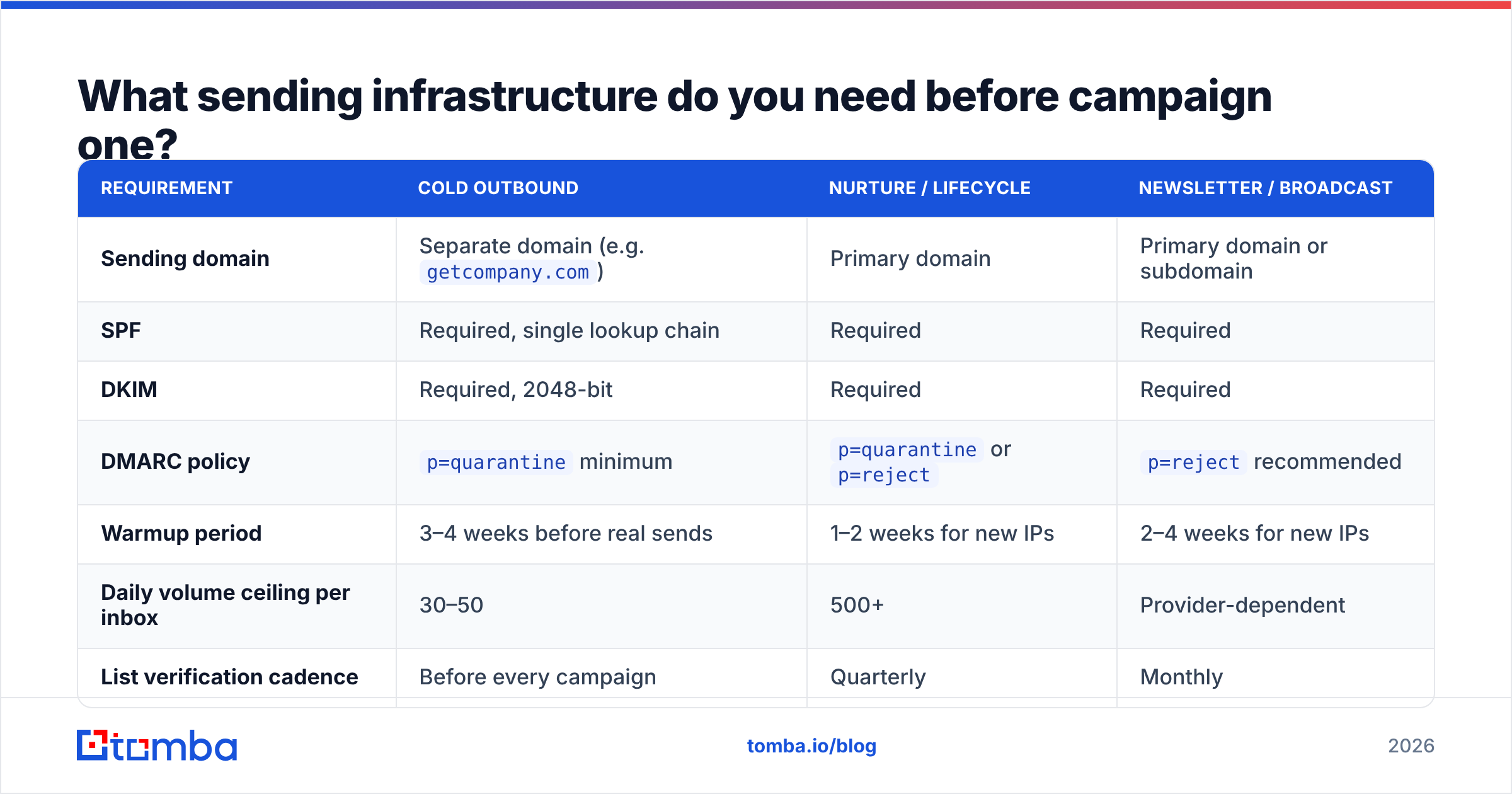
Set this up once, correctly, and you stop firefighting deliverability forever. The table below is the minimum viable configuration by campaign type.
| Requirement | Cold outbound | Nurture / lifecycle | Newsletter / broadcast |
|---|---|---|---|
| Sending domain | Separate domain (e.g. getcompany.com) |
Primary domain | Primary domain or subdomain |
| SPF | Required, single lookup chain | Required | Required |
| DKIM | Required, 2048-bit | Required | Required |
| DMARC policy | p=quarantine minimum |
p=quarantine or p=reject |
p=reject recommended |
| Warmup period | 3–4 weeks before real sends | 1–2 weeks for new IPs | 2–4 weeks for new IPs |
| Daily volume ceiling per inbox | 30–50 | 500+ | Provider-dependent |
| List verification cadence | Before every campaign | Quarterly | Monthly |
| Unsubscribe mechanism | Plain-text opt-out line | One-click header + footer link | One-click header + footer link |
| Realistic bounce target | Under 2% | Under 1% | Under 0.5% |
A few notes on the rows that trip people up.
Separate domains for cold outbound are non-negotiable. If your cold campaign torches sender reputation, you do not want that reputation attached to the domain your invoices and password resets flow through. Buy a lookalike domain, authenticate it properly, and keep it isolated.
Warmup is not optional and it is not fast. Ramp from roughly 10 sends per day, adding 5–10 per day, until you reach your ceiling. A warmup calculator will give you a schedule rather than a guess. Skipping warmup is the single most common reason a technically-perfect campaign lands in Promotions or worse.
Check your records before you blame the copy. Run an SPF checker and confirm your DMARC record actually publishes a policy. "We have SPF" and "our SPF passes alignment" are different claims.
How do you build a list that doesn't bounce?#
This is where the leverage is, and it's the step teams rush.
The workflow that holds up under volume looks like this:
- Define the account list first, contacts second. Start from firmographics — industry, headcount band, tech stack, funding stage, geography. A list of 150 accounts you can articulate a reason for beats 5,000 pulled from a filter you set once and forgot.
- Find contacts by role, not by name dump. Use domain search to pull the addresses that exist at a company, then filter to the two or three roles who own the problem you solve. Pulling every address at a 400-person company is how you end up emailing
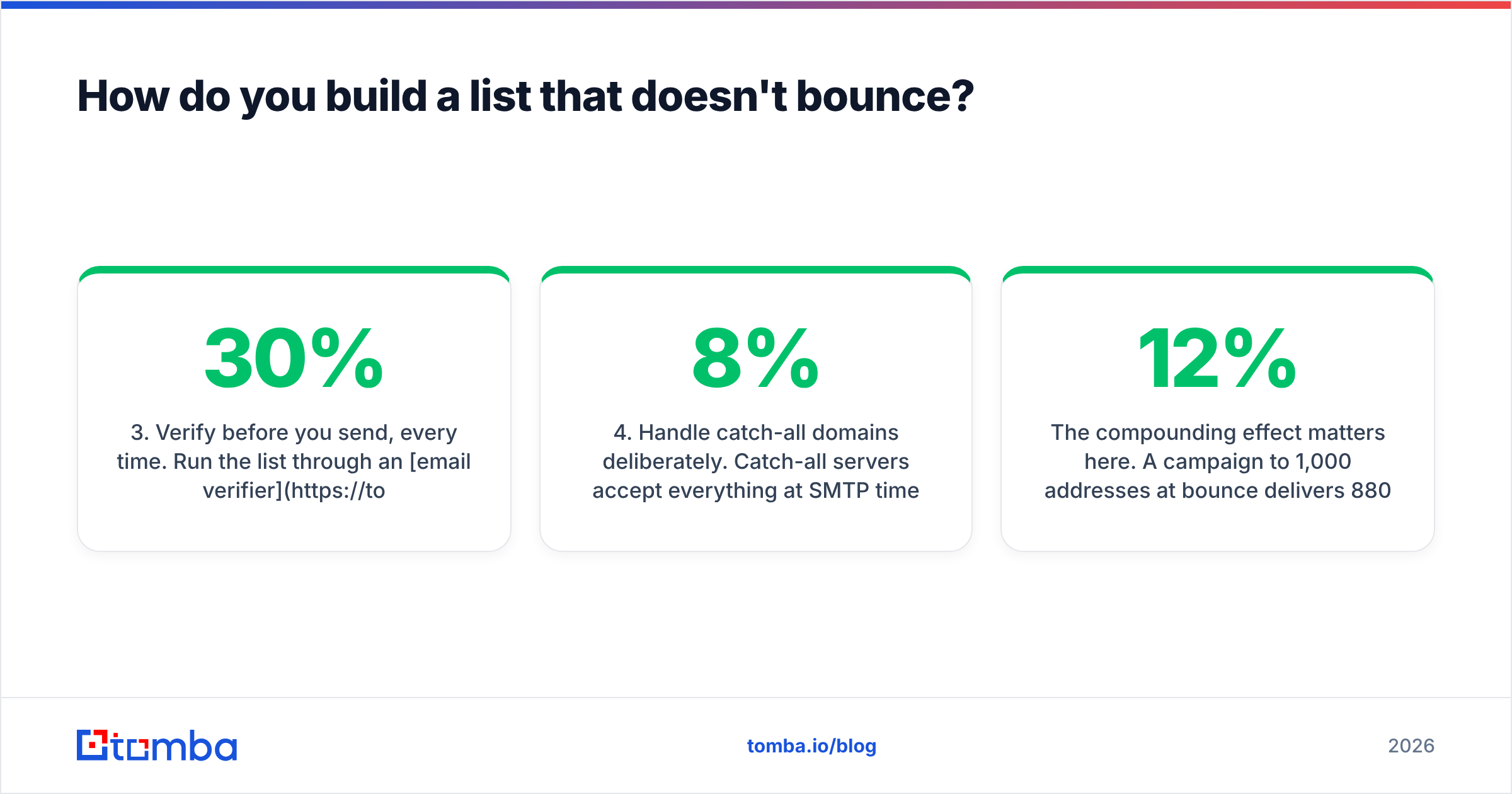
careers@andlegal@. - Verify before you send, every time. Run the list through an email verifier and drop anything that returns invalid or risky. Verification results decay — a list verified 90 days ago is not a verified list. B2B data goes stale at roughly 22–30% per year as people change jobs.
- Handle catch-all domains deliberately. Catch-all servers accept everything at SMTP time, so standard verification returns "unknown." You either exclude them, or use a catch-all verifier that infers validity from pattern and engagement signals. Blindly including them is what pushes a "verified" list back to 8% bounce.
- Deduplicate across campaigns. The same person receiving three sequences from three reps in the same month is the fastest route to a spam complaint. Enforce a suppression list at the account level, not just the contact level.
- Enrich for personalization inputs. Job title alone is thin. Contact enrichment that returns seniority, department, and company signals gives you variables worth merging into copy.
The compounding effect matters here. A campaign to 1,000 addresses at 12% bounce delivers 880 messages and damages your domain. The same campaign to 800 verified addresses delivers 784 messages, protects reputation, and produces more replies because the surviving addresses are real people at real companies.
What does a campaign sequence actually look like?#
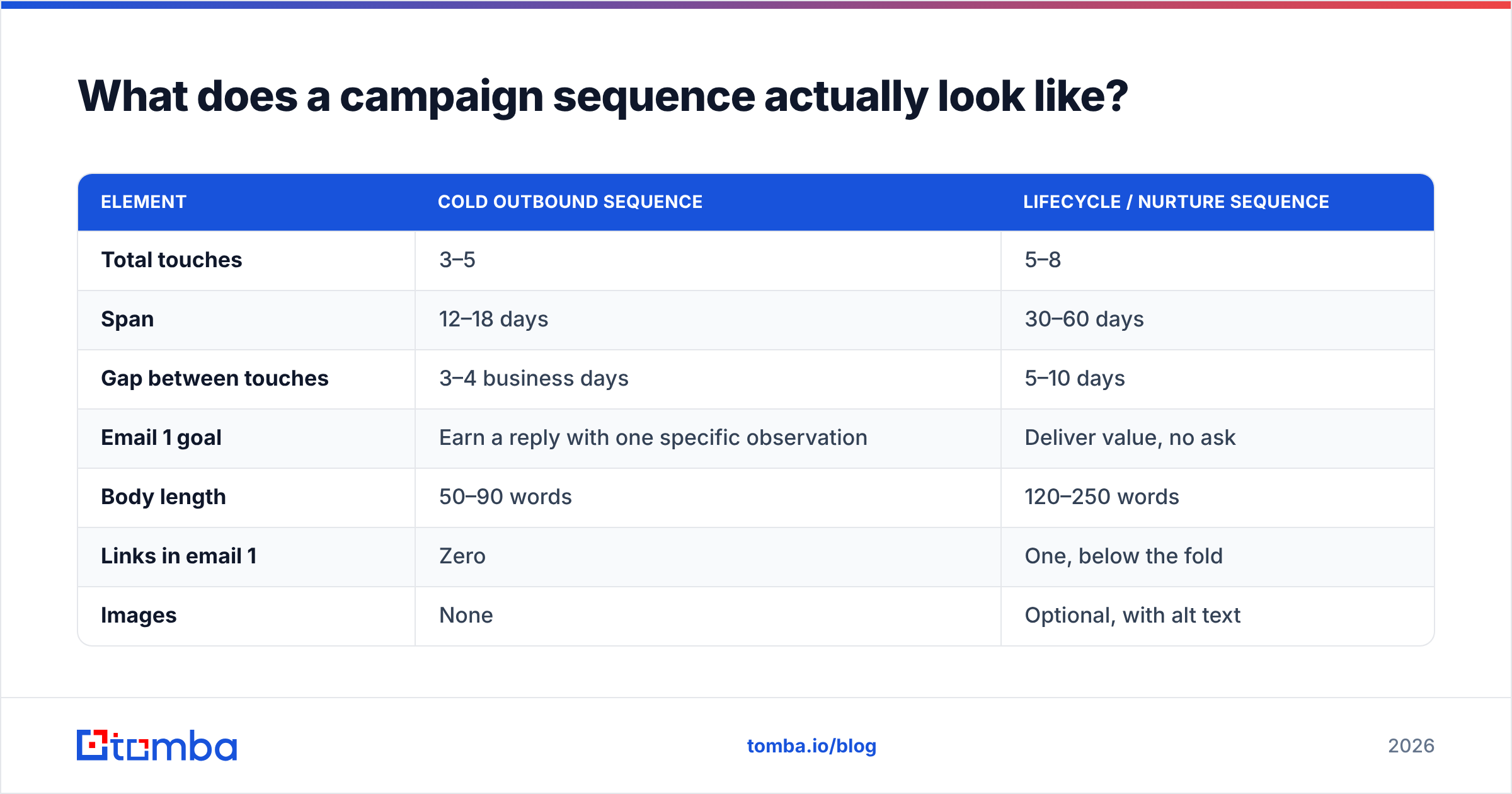
Structure beats volume. Here's the shape that consistently performs for B2B outbound, and how it differs from lifecycle sends.
| Element | Cold outbound sequence | Lifecycle / nurture sequence |
|---|---|---|
| Total touches | 3–5 | 5–8 |
| Span | 12–18 days | 30–60 days |
| Gap between touches | 3–4 business days | 5–10 days |
| Email 1 goal | Earn a reply with one specific observation | Deliver value, no ask |
| Body length | 50–90 words | 120–250 words |
| Links in email 1 | Zero | One, below the fold |
| Images | None | Optional, with alt text |
| CTA style | Single low-friction question | Single clear next step |
| Personalization depth | Per-contact (1–2 unique lines) | Per-segment |
| Benchmark reply rate | 5–12% | N/A (measure CTR) |
The cold column is stricter for a reason. A first cold email with three links, an image signature, and a 200-word pitch reads like a marketing blast to a filter and like a chore to a human. Strip it to a single observation about their business, a one-sentence relevance claim, and a question that takes under ten seconds to answer.
For follow-ups, add information rather than pressure. "Just bumping this to the top of your inbox" adds nothing and trains people to ignore you. A follow-up that says "we published a teardown of how three companies your size handle this — want it?" gives the reader a reason to engage that didn't exist in email one.
On timing: send windows matter less than they used to, because everyone reads that same advice and Tuesday 10am is now crowded. What still matters is sending within the recipient's business hours in their timezone, and not stacking all touches into a single week.
What benchmarks should you actually hold yourself to?#
Metrics discipline is where campaign programs either compound or plateau. Open rate has been unreliable since Apple Mail Privacy Protection began pre-fetching images in 2021, which inflates opens for a large share of your audience. Use it as a directional trend within a single campaign, never as a success criterion.
The numbers below are reasonable 2026 B2B targets. Treat them as thresholds for investigation, not guarantees.
| Metric | Healthy | Investigate | Stop and fix |
|---|---|---|---|
| Hard bounce rate | Under 2% | 2–4% | Over 4% |
| Spam complaint rate | Under 0.1% | 0.1–0.3% | Over 0.3% |
| Cold reply rate | 5–12% | 2–5% | Under 2% |
| Positive reply rate | 1–3% | 0.5–1% | Under 0.5% |
| Unsubscribe rate (nurture) | Under 0.5% | 0.5–1% | Over 1% |
| Meetings booked per 100 sends | 1–3 | 0.5–1 | Under 0.5 |
The 0.3% spam complaint ceiling is not an industry convention — it's the threshold Gmail publishes for bulk senders, and crossing it produces immediate, visible throttling. Monitor it in Google Postmaster Tools rather than guessing.
Track cohorts, not aggregates. A blended 6% reply rate across four segments can easily hide one segment at 14% and three at 1%. The 14% segment is your entire business case; the aggregate hides it.
Cold campaigns vs marketing campaigns: what changes?#
The mechanics look similar and the constraints are completely different.
- Consent model. Marketing campaigns require opt-in in most jurisdictions. Cold B2B outbound operates under legitimate interest in the EU and CAN-SPAM in the US — both require an easy opt-out and honest identification, neither requires prior consent.
- Volume economics. Marketing scales by adding recipients. Cold outbound scales by adding senders — more inboxes at 40 sends/day each, not one inbox at 400.
- Format. Marketing emails can be HTML with images and tracked links. Cold emails should be plain text or near-plain text, because a rich template signals bulk to filters and to humans.
- Success metric. Marketing measures click-through and downstream conversion. Cold outbound measures positive reply rate — clicks are close to irrelevant when the goal is a conversation.
- Failure cost. A bad marketing campaign costs you unsubscribes. A bad cold campaign costs you domain reputation, which takes months to rebuild.
If you run both from the same domain with the same tooling, you will eventually let cold-outbound risk bleed into transactional and lifecycle delivery. Separate them.
What compliance rules can't you skip?#
Three regimes cover most B2B senders, and none of them are optional.
CAN-SPAM (US). You must identify the message as commercial where applicable, include a valid physical postal address, honor opt-outs within 10 business days, and never use deceptive headers or subject lines. The FTC's compliance guide is short and worth reading in full — penalties are assessed per email.
GDPR (EU/UK). B2B cold email is generally permissible under legitimate interest, but you must be able to document the balancing test, name your data source on request, and honor erasure requests. "We bought a list" is not a defensible source. Check where your provider's data comes from before you rely on it — Tomba publishes its data sources for exactly this reason.
Mailbox provider rules. Not law, but enforced harder than law. One-click unsubscribe headers, authenticated sending, and complaint rates under 0.3% are now table stakes for anyone sending above 5,000 messages a day to Gmail or Yahoo.
Practical takeaway: build the opt-out link into your template so it can't be forgotten, log consent and source per contact in your CRM, and keep a suppression list that survives tool migrations.
How do you improve a campaign that's already running?#
Change one variable at a time, and give each test enough volume to mean something. At a 6% reply rate, you need roughly 400–600 sends per variant before a difference is distinguishable from noise.
Test in this order, because that's the order of effect size:
- Audience segment — the biggest lever by a wide margin. Splitting one campaign into three tighter ICPs routinely doubles reply rate.
- Offer and ask — what you're proposing and how much effort the reply costs.
- First line — the observation that proves you did homework.
- Subject line — real but smaller effect than the internet suggests.
- Send timing — marginal. Test last, if at all.
Also audit what's already breaking. Run finished campaigns through a spam checker to catch trigger phrasing and structural issues, and check whether your sending IP or domain has landed on a blocklist before you conclude your copy is the problem. G2's category reviews are a reasonable place to sanity-check whether your tooling is the bottleneck, and HubSpot's email research is useful for cross-checking your benchmarks against a broad sample.
Where should you start?#
If you're building from zero: authenticate your domain, warm it for three weeks, build a 200-account list you can defend, verify every address, and send a five-touch sequence over 15 days. Measure positive replies. Then scale the segment that worked and kill the rest.
If you're fixing something broken: pull your last campaign's bounce rate and complaint rate first. If bounce is above 4%, the problem is your list, not your writing, and no amount of copy iteration will fix it.
Either path starts with contact data you can trust. The Tomba Email Finder finds verified professional addresses by domain, name, or company, with verification built into the same workflow so you're not stitching two tools together. The free tier gives you 25 searches a month to test list quality against your current source; paid plans start at $49/mo, with full Tomba pricing published upfront. Fix the input, and the rest of your campaign math gets a lot easier.
Related guides#
Ready to find emails that actually work?
Join 150,000+ professionals who stopped guessing and started sending. Free credits on signup — no credit card required.
Get the Tomba newsletter
Practical outbound tactics and product updates — once every two weeks.
About the author