Email Campaign Management: A Complete 2026 Playbook
Most B2B email campaigns fail before the first send. Here's the operating system behind email campaign management that actually books meetings: list hygiene, sequencing, sending infrastructure, and the four metrics worth tracking.
TL;DR
- Email campaign management is an operating system, not a send button: audience definition, data hygiene, sequencing, infrastructure, and measurement all sit inside one loop.
- The single biggest lever is list quality. A 12% bounce rate kills a domain faster than bad copy ever will — verify before you load anything into a sender.
- Choose your platform by sending model (marketing broadcast vs. outbound sequence), not by feature-count comparisons.
- Track reply rate, positive reply rate, meetings booked, and bounce rate. Open rate has been unreliable since Apple Mail Privacy Protection and is worse now.
- A weekly 90-minute review — kill, keep, iterate — beats a quarterly overhaul every time.
What is email campaign management?#
Email campaign management is the end-to-end process of planning, building, sending, monitoring, and improving a set of emails aimed at a defined audience with a defined goal. It covers everything between "we should reach out to mid-market ops leaders" and "we booked 14 meetings from 900 contacts."
Think of it like running a restaurant kitchen. The recipe (your copy) matters, but the kitchen only works because someone manages ingredient sourcing (data), prep order (segmentation), station timing (sequencing), and health inspection (deliverability). A great recipe cooked with spoiled ingredients still sends people home sick.
That distinction matters because most teams treat campaign management as a copywriting exercise. They rewrite subject lines for three weeks while a 15% invalid-contact rate quietly torches their sender reputation. Campaign management is 60% operations, 30% data, and 10% wordsmithing — in that order.
Two campaign types live under the same umbrella and get confused constantly:
- Marketing campaigns — one-to-many broadcasts and nurture flows to opted-in contacts. High volume, HTML-friendly, tracked by clicks and conversions.
- Outbound campaigns — one-to-few sequences to cold or warm prospects. Low volume per inbox, plain-text, tracked by replies and meetings.
The infrastructure, tooling, and success metrics differ enough that running both from the same sending domain is a common and expensive mistake.
What are the core components of an email campaign management stack?#
Every functional stack has six parts. Missing any one of them is where campaigns break.
- Audience and segmentation layer — the ICP definition, firmographic filters, and trigger events that decide who gets contacted and why. This is where a campaign either earns relevance or loses it.
- Data sourcing and enrichment — where contact records come from and how they're kept current. B2B contact data decays roughly 22–30% per year as people change roles, so this is maintenance, not a one-time purchase.
- Verification and hygiene — syntax, MX, SMTP, catch-all, and role-account checks that run before a single send. Non-negotiable.
- Sending infrastructure — domains, mailboxes, SPF/DKIM/DMARC records, warmup schedules, and per-inbox volume caps.
- Sequencing and orchestration — the platform that decides who receives what, on which day, and what happens when they reply, bounce, or click.
- Measurement and feedback — reply classification, pipeline attribution, and the weekly review loop that turns results into the next iteration.

If you can't name the owner and the tool for each of those six lines, you don't have campaign management — you have a mail merge with ambitions.
How do you build a campaign audience that doesn't waste sends?#
Start narrower than feels comfortable. A campaign to 300 tightly-matched contacts with a specific, believable premise will out-perform a campaign to 5,000 loosely-matched ones on every metric that matters, and it will cost you a fraction of the sender reputation risk.
Work the segmentation in three passes:
Pass one — firmographic fit. Industry, headcount band, region, and revenue range. Cut anything you can't credibly serve. If your best customers are 50–500 employee SaaS companies in North America, a 4,000-person European manufacturer isn't an edge case, it's noise.
Pass two — role fit. Identify the actual buyer and the actual champion. These are usually different people, and they need different campaigns. Sending the same email to a VP of Revenue Operations and a Sales Development Rep guarantees at least one of them ignores you.
Pass three — trigger fit. New funding, a relevant hire, a tech-stack change, a job posting, a conference appearance. A trigger gives your first line a reason to exist. Without it, your opener is "I saw you work at [Company]," which is the outbound equivalent of "Hi, I'm reading your website out loud to you."
Once the segment is defined, sourcing gets mechanical. You need work emails for the named roles at the named domains. A domain search pulls every discoverable address pattern at a company, and an email finder resolves a specific first-name/last-name/domain combination. For a list of 300+ accounts, run it through a bulk email finder rather than one at a time.
Which email campaign management platform should you actually use?#
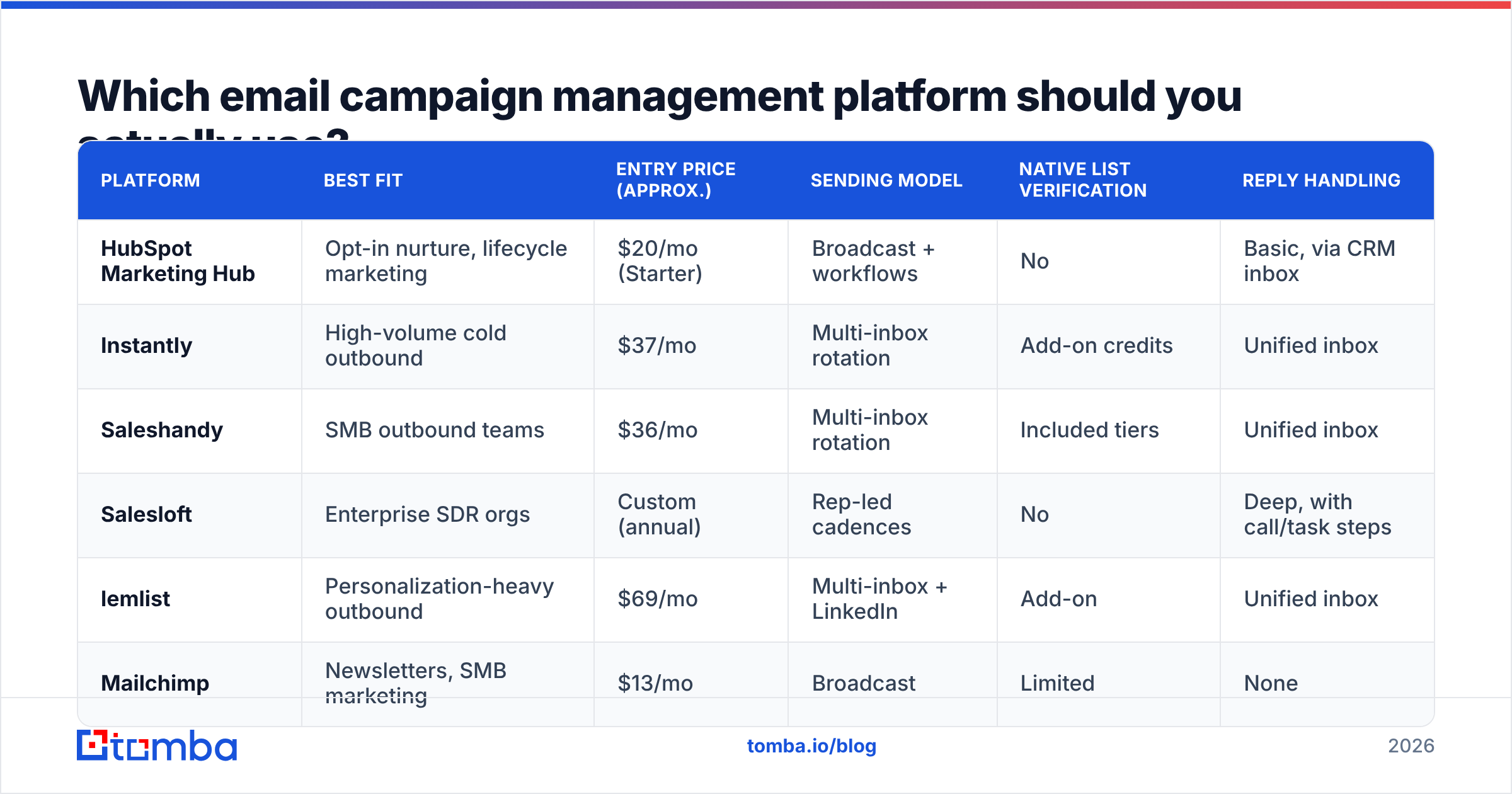
Platform choice follows sending model. Broadcast tools and sequence tools are built on incompatible assumptions — one optimizes for volume and design, the other for per-inbox reputation and reply handling.
| Platform | Best fit | Entry price (approx.) | Sending model | Native list verification | Reply handling |
|---|---|---|---|---|---|
| HubSpot Marketing Hub | Opt-in nurture, lifecycle marketing | $20/mo (Starter) | Broadcast + workflows | No | Basic, via CRM inbox |
| Instantly | High-volume cold outbound | $37/mo | Multi-inbox rotation | Add-on credits | Unified inbox |
| Saleshandy | SMB outbound teams | $36/mo | Multi-inbox rotation | Included tiers | Unified inbox |
| Salesloft | Enterprise SDR orgs | Custom (annual) | Rep-led cadences | No | Deep, with call/task steps |
| lemlist | Personalization-heavy outbound | $69/mo | Multi-inbox + LinkedIn | Add-on | Unified inbox |
| Mailchimp | Newsletters, SMB marketing | $13/mo | Broadcast | Limited | None |
Two practical notes on that table. First, published pricing changes constantly and every one of these vendors gates real usage behind contact or credit limits — check the vendor's own pricing page before you budget. Second, "native verification" being listed as included rarely means what you think it means; most bundled verifiers do syntax and MX checks and stop short of SMTP and catch-all resolution. Running a dedicated email verifier before import is still the safer default, regardless of platform.
Peer review sites like G2's email marketing category are useful for filtering the shortlist, less useful for the final decision — review volume correlates with marketing spend more than product quality.
Why do most campaigns fail before the first email sends?#
Because the list was never cleaned. That's the honest answer for the majority of underperforming campaigns.
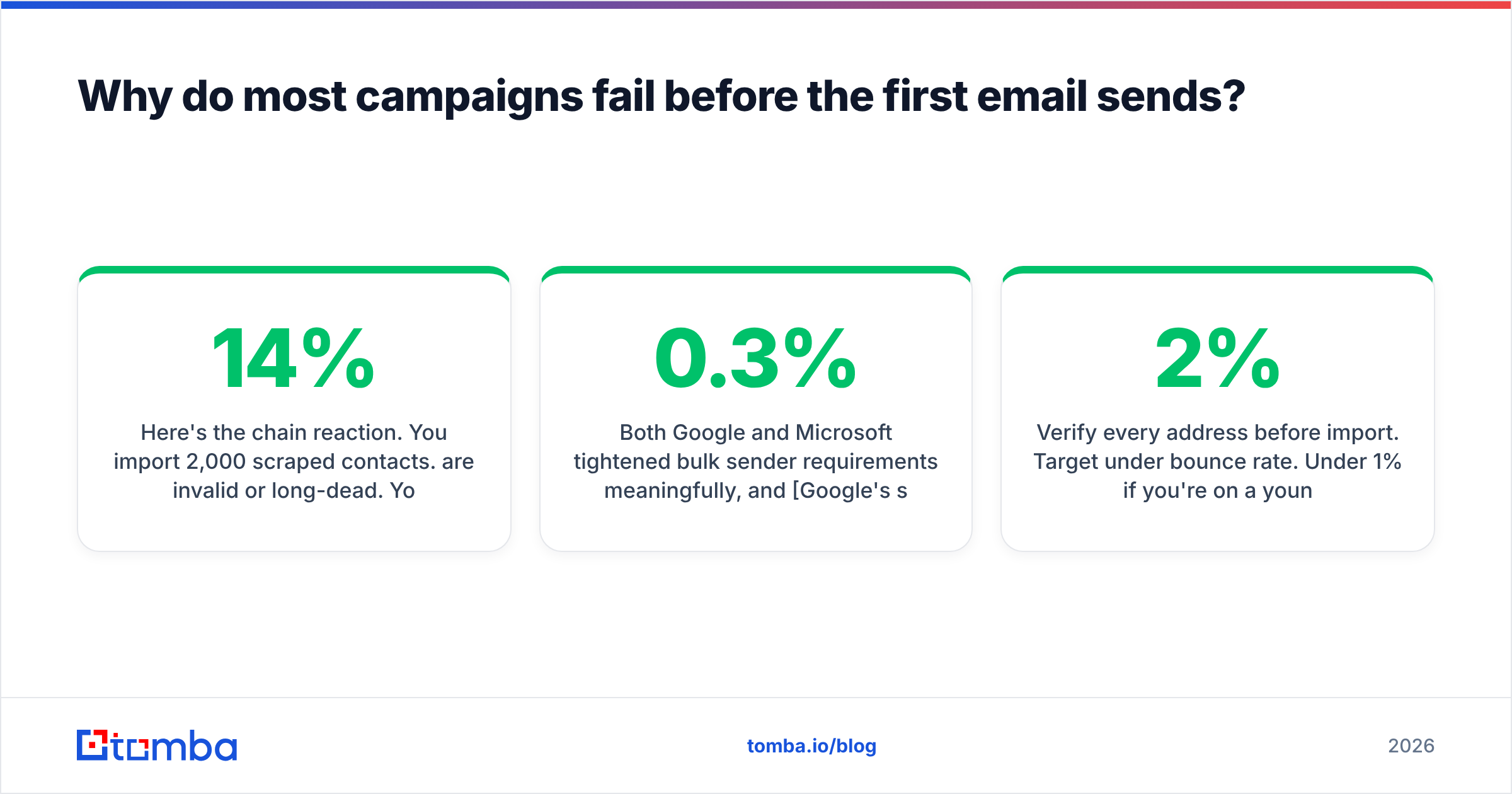
Here's the chain reaction. You import 2,000 scraped contacts. 14% are invalid or long-dead. Your first send produces 280 hard bounces. Mailbox providers read that bounce rate as a signal that you don't know your recipients — which is exactly what it is. Your sender reputation drops. Subsequent sends land in spam. Now your reply rate is 0.4% and you conclude your messaging is weak, so you spend three weeks rewriting copy that was never the problem.
Both Google and Microsoft tightened bulk sender requirements meaningfully, and Google's sender guidelines now spell out authentication, one-click unsubscribe, and a spam-complaint threshold of 0.3%. That threshold is low. It takes very few annoyed recipients on a poorly-targeted list to cross it.
The fix is unglamorous and takes an hour:
- Verify every address before import. Target under 2% bounce rate. Under 1% if you're on a young domain.
- Strip role accounts. info@, sales@, support@, and admin@ generate complaints and rarely convert. Remove them unless the campaign specifically targets shared inboxes.
- Resolve catch-all domains separately. A catch-all domain accepts everything, so standard verification returns "unknown." A catch-all verifier applies deeper checks so you can decide whether to send or hold.
- Deduplicate across campaigns. The same person getting two different sequences from two reps in the same week is a reputation problem and an embarrassment.
- Suppress existing customers, open opportunities, and prior opt-outs. This should be automated against your CRM, not manual.
How should you structure the campaign sequence itself?#
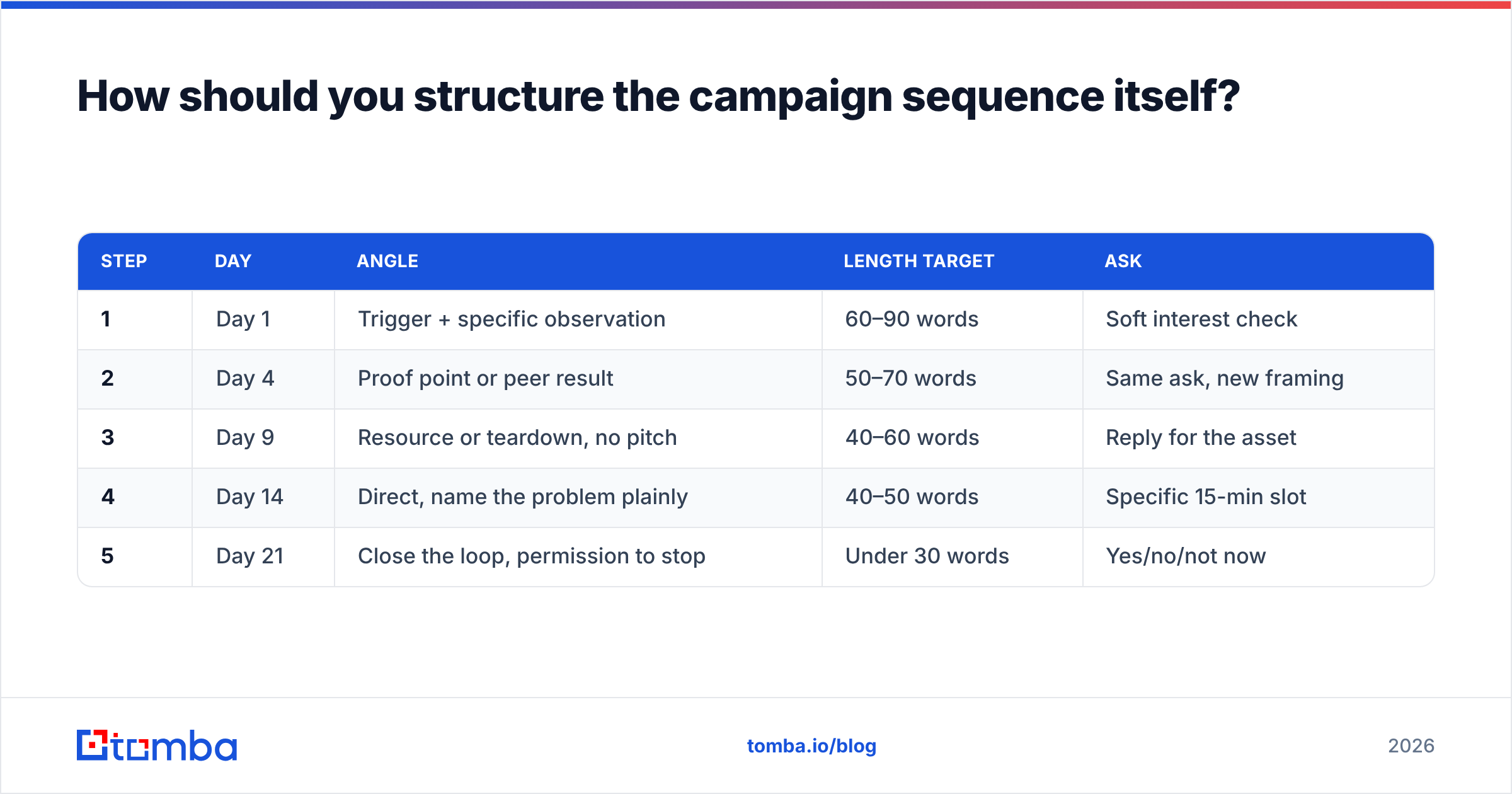
Four to six touches over 18–21 business days, with each message carrying a distinct angle rather than repeating the previous one louder.
| Step | Day | Angle | Length target | Ask |
|---|---|---|---|---|
| 1 | Day 1 | Trigger + specific observation | 60–90 words | Soft interest check |
| 2 | Day 4 | Proof point or peer result | 50–70 words | Same ask, new framing |
| 3 | Day 9 | Resource or teardown, no pitch | 40–60 words | Reply for the asset |
| 4 | Day 14 | Direct, name the problem plainly | 40–50 words | Specific 15-min slot |
| 5 | Day 21 | Close the loop, permission to stop | Under 30 words | Yes/no/not now |
The step-five breakup email consistently produces disproportionate replies, largely because it's the only message in most sequences that gives the recipient an easy exit. Give people a graceful no and a surprising number of them will explain why — which is free ICP research.
On personalization: the goal is relevance at scale, not a custom essay per prospect. One verified, specific line about the prospect's company beats four paragraphs of generic empathy. If you need help generating structure fast, a cold email AI draft is fine as a starting point — but the specific line still has to come from you.
Which email campaign metrics actually matter in 2026?#
Open rate is functionally dead as a decision metric. Apple's Mail Privacy Protection pre-fetches images, inflating opens for a large slice of your audience regardless of whether a human looked at anything. Treat it as directional noise, not evidence.
| Metric | What it tells you | Healthy B2B range | Act when |
|---|---|---|---|
| Bounce rate | List quality and data freshness | Under 2% | Above 3% — stop sending, re-verify |
| Reply rate | Relevance of targeting + opener | 4–10% | Below 3% — rework segment first, copy second |
| Positive reply rate | Message-to-market fit | 1–3% | Below 1% with healthy replies — the offer is off |
| Meetings booked | The only metric that pays rent | Varies by ACV | Track per 100 contacts, not per campaign |
| Spam complaint rate | Permission and targeting failure | Under 0.1% | Above 0.2% — pause everything |
| Unsubscribe rate | Audience mismatch | Under 0.5% | Rising trend across campaigns |
The distinction between reply rate and positive reply rate is where most teams stop looking too early. A 9% reply rate that's mostly "please remove me" is worse than a 4% rate that's mostly "what does this cost?" Classify replies weekly into interested / not now / not a fit / negative, and grade campaigns on the first two.
How do you keep campaigns deliverable as volume grows?#
Volume growth is where healthy programs break. The rules are boring and they work.
Separate your domains. Never send cold outbound from your primary company domain. Buy lookalike domains, authenticate them properly, and treat them as expendable infrastructure. If one gets burned, your corporate email keeps working.
Cap per-inbox volume. 30–50 cold sends per mailbox per day is a defensible ceiling. Scale by adding mailboxes, not by pushing any single one harder. If you want 500 sends a day, that's roughly 12 mailboxes, not one heroic account.
Warm up before and during. New domains need 3–4 weeks of ramp before real campaign volume. Keep warmup running at low levels afterward — it isn't a one-time onboarding step. A warmup calculator will size the ramp for your target volume.
Authenticate completely. SPF, DKIM, and a DMARC policy that starts at p=none and moves to p=quarantine once you've confirmed alignment. Verify with an SPF checker rather than assuming your DNS is right, because it usually isn't.
Monitor, don't assume. Google Postmaster Tools, Microsoft SNDS, and a blacklist checker on a weekly cadence. Deliverability degrades gradually, then all at once — the gradual phase is where you can still fix it cheaply.
For a deeper treatment of the mechanics, HubSpot's deliverability resources and the broader concept of email deliverability are worth an hour of your time before you scale sending.
What does a weekly campaign management routine look like?#
Ninety minutes, same slot every week, three questions.
Kill (20 min). Which campaigns are below 2% reply rate after 200+ contacts? Stop them. Don't iterate on a dead segment — a bad audience cannot be rescued by better copy.
Keep (20 min). Which campaigns are above 6% reply rate? Expand the audience using the same criteria. Most teams under-scale their winners for months.
Iterate (30 min). For everything in between, change exactly one variable: the segment, the opener, or the offer. Changing all three at once means you learn nothing.
Hygiene (20 min). Re-verify any list older than 90 days, check bounce trends across sending domains, review the blacklist and Postmaster dashboards, and process unsubscribes and suppressions.
Log the outcome of each review somewhere shared. Campaign management compounds when the team can see what's already been tested; it resets to zero every quarter when nobody wrote it down. And where you're sourcing new segments, a well-maintained B2B database or a vetted list provider such as BookYourData can shortcut the first pass — just verify whatever comes out of any source before it touches your sender.
Where should you start?#
If you're building or rebuilding email campaign management from scratch, sequence the work in this order: define one narrow segment, source and verify the contacts, set up authenticated sending infrastructure, write a five-step sequence with distinct angles, send to 200 contacts, review after two weeks, then scale what worked. Do not skip step two to get to step four faster. Everyone tries; it never works.
The data layer is the part you can fix today. Tomba's Email Finder resolves verified work emails from a name and domain — or across an entire company via domain search — so the list going into your campaign platform is clean before it costs you a single bounce. The free tier covers 25 searches a month if you want to test accuracy against a sample of your own accounts first, and paid plans start at $49/mo with bulk processing and API access included. Check the full Tomba pricing breakdown, run a batch of 50 known-good contacts through it, and compare the hit rate against whatever you're using now. Campaign management gets a lot easier when the list underneath it is real.
Related guides#
Ready to find emails that actually work?
Join 150,000+ professionals who stopped guessing and started sending. Free credits on signup — no credit card required.
Get the Tomba newsletter
Practical outbound tactics and product updates — once every two weeks.
About the author