Email Campaign Optimization: A Complete 2026 Playbook
Most email campaigns fail on inputs, not copy. Here's the exact 2026 optimization order — list quality, deliverability, segmentation, subject lines, timing — with benchmarks and a testing framework you can run this week.
TL;DR
- Email campaign optimization has an order of operations. List quality → deliverability → segmentation → offer → subject line → send timing. Most teams start at the bottom and wonder why nothing changes.
- A 3% bounce rate is not a rounding error. It is the single fastest way to torch your sending domain and drop every future campaign into spam.
- Open rate died as a primary metric when Apple Mail Privacy Protection started pre-fetching images. Optimize for reply rate, click-to-reply ratio, and meetings booked.
- Segmentation beats personalization tokens. A campaign written for 200 people who share one specific problem outperforms 2,000
{{first_name}}merges every time. - Test one variable at a time, with at least 400 sends per arm, and give it 7 days before you call a winner.
What Is Email Campaign Optimization, Really?#
Email campaign optimization is the process of systematically improving the inputs and mechanics of an email campaign — list, infrastructure, segmentation, message, and cadence — so that more of the right people see it, open it, and respond.
That definition matters because "optimization" has been hijacked by copywriting. Search the term and you'll find 40 articles about subject lines. Subject lines are real, but they're the last 10% of the problem. If 22% of your list bounces, no subject line saves you. If your SPF record is broken, no amount of A/B testing on the CTA moves the needle.
Think of it like a restaurant. You can obsess over plating, but if the ingredients are spoiled and the oven is broken, the plate is irrelevant. Your list is the ingredients. Your sending infrastructure is the oven. Copy is the plating.
Here is the order that actually produces results, ranked by typical impact per hour invested:
- List accuracy — Removing invalid, catch-all, and role-based addresses. Highest leverage, lowest effort. A list at 97%+ deliverable protects everything downstream.
- Authentication and domain health — SPF, DKIM, DMARC, dedicated sending domain, and warmup. This is binary: either it's set up correctly or your campaign is capped at a fraction of the inbox.
- Segmentation — Splitting one campaign into 4–6 audience slices with a distinct problem statement per slice. This is where reply rate doubles.
- Offer and first line — What you're actually asking for, and whether the opening sentence proves you did research. Personalization tokens are not research.
- Subject line and preview text — Real, but bounded. A great subject line on a bad list is a great subject line nobody reads.
- Send timing and cadence — Marginal gains, worth capturing once everything above is stable.
Most teams invert this list. They spend three weeks on copy variants and thirty seconds on the CSV they bought.
Why Do Most Email Campaigns Underperform?#
Four failure modes account for the overwhelming majority of campaigns that flatline. None of them are copy problems.
Failure mode 1: the list was never verified. Purchased and scraped lists routinely carry 15–30% invalid addresses. Every hard bounce is a signal to mailbox providers that you don't know who you're emailing. Two or three campaigns at a 5% bounce rate and your domain reputation is measurably damaged — and reputation recovers far more slowly than it degrades.
Failure mode 2: authentication is incomplete. Google and Yahoo tightened bulk sender requirements in 2024, and enforcement has only hardened since. SPF, DKIM, and a DMARC policy are now table stakes, not best practice. You can check your setup with a SPF checker in under a minute, and Google's own sender guidelines spell out the current thresholds — including the 0.3% spam-complaint ceiling that quietly disqualifies careless senders.
Failure mode 3: one message for everyone. A campaign that says "we help companies improve efficiency" is optimized for nobody. The reason segmentation works isn't sophistication — it's that a narrower audience lets you make a sharper, more falsifiable claim.
Failure mode 4: measuring the wrong thing. Since Apple Mail Privacy Protection began pre-loading images regardless of user behavior, open rates are inflated by anywhere from 10 to 40 points depending on your audience's client mix. Teams still optimizing subject lines against open rate are tuning a broken gauge.
Which Metrics Should You Optimize For in 2026?#
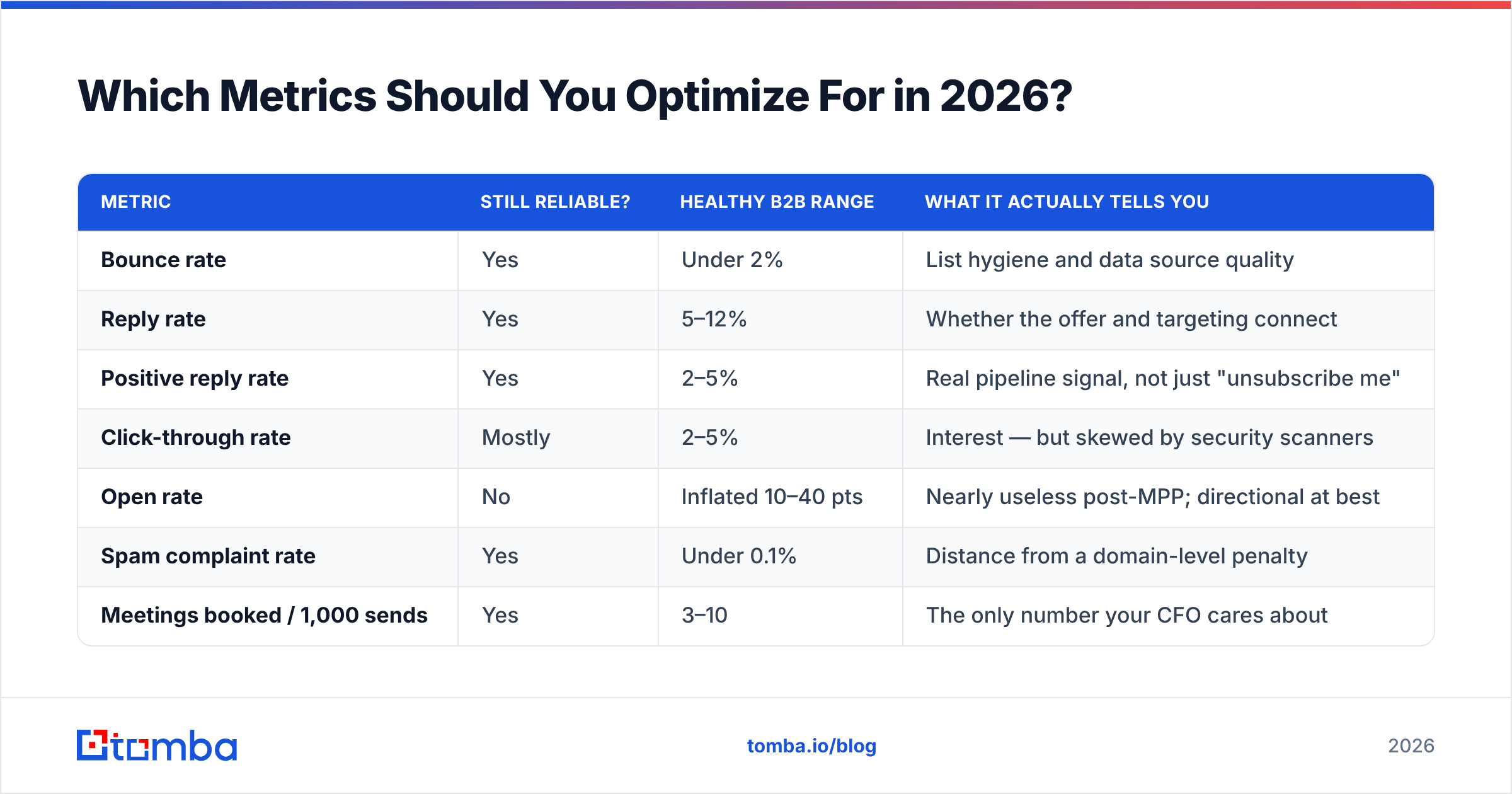
Replace open rate with a metric stack that survives privacy changes. Here's how the common metrics rank on reliability and what a healthy B2B number looks like.
| Metric | Still reliable? | Healthy B2B range | What it actually tells you |
|---|---|---|---|
| Bounce rate | Yes | Under 2% | List hygiene and data source quality |
| Reply rate | Yes | 5–12% | Whether the offer and targeting connect |
| Positive reply rate | Yes | 2–5% | Real pipeline signal, not just "unsubscribe me" |
| Click-through rate | Mostly | 2–5% | Interest — but skewed by security scanners |
| Open rate | No | Inflated 10–40 pts | Nearly useless post-MPP; directional at best |
| Spam complaint rate | Yes | Under 0.1% | Distance from a domain-level penalty |
| Meetings booked / 1,000 sends | Yes | 3–10 | The only number your CFO cares about |
Two notes on reading this table. First, click-through rate is contaminated by corporate link scanners that fire every URL in an inbound message — if your CTR spikes but replies don't, you're measuring firewalls. Second, positive reply rate is worth tracking manually for the first 500 sends of any new campaign. Automated sentiment tagging is improving but still miscategorizes polite declines as interest.
For a deeper definition of the downstream metric everything feeds into, the response rate entry in Tomba's glossary is a useful reference point when you're aligning definitions across a team.
How Do You Fix List Quality Before You Send?#
Start with the assumption that your list is worse than you think, then prove otherwise.
The workflow that consistently produces a sub-1% bounce rate has four steps:
- Source deliberately. Build lists from a live lookup rather than a static export. Contact data decays at roughly 25–30% per year as people change roles — a database exported six months ago is already meaningfully stale. Use a domain search to pull current addresses per target company rather than trusting a file someone shared in 2024.
- Verify every address, every time. Run the full list through an email verifier before import. Syntax checks are trivial; what you want is MX validation plus SMTP-level confirmation. Anything returned as invalid gets deleted, not "tried once to see."
- Handle catch-all domains separately. Catch-all servers accept everything, so standard verification returns "unknown." Roughly 15–20% of B2B domains are catch-all, and blindly emailing them is how a clean list turns dirty. A catch-all verifier applies deeper pattern and signal checks; anything still ambiguous goes into a separate low-volume segment sent from a secondary domain.
- Strip role accounts and known complainers.
info@,sales@,support@, andadmin@addresses generate complaints at several times the rate of individual mailboxes. Remove them unless your ICP genuinely is a shared inbox.
Run this once and your bounce rate drops from wherever it is to under 1%. That single change has a larger effect on total campaign performance than every subject-line test you will run this year.

How Should You Segment a Campaign?#
Segment by problem, not by firmographic convenience.
The default segmentation — industry, company size, job title — is easy because it's what your CRM stores. But "VP of Marketing at a 200-person SaaS company" isn't a problem statement, it's a filing category. Two VPs of Marketing at identically sized companies can have completely unrelated priorities.
Better segmentation axes, in rough order of usefulness:
- Observable trigger. They just hired for a role, raised a round, launched a product, or switched a tool in their stack. The trigger gives you a legitimate reason to be in their inbox this week specifically.
- Technology in use. A company running a competitor's product has a different conversation available than one running nothing. A website tech stack check gives you this signal cheaply.
- Stated priority. Something they published, posted, or said on a podcast. Slow to gather, extremely high converting.
- Stage of relationship. Cold, previously replied, went dark, closed-lost 12 months ago. These deserve entirely different sequences and most teams lump them together.
The practical target: 4–6 segments per campaign, 150–400 contacts each, one distinct opening line per segment. Not one template with a swapped variable — a genuinely different first sentence that would be false if sent to the wrong segment. That falsifiability test is the whole trick. If your opener could be sent to any of your segments without becoming inaccurate, it isn't personalization.
What Does a Good Testing Framework Look Like?#
Most A/B tests in cold email are statistically meaningless. Here's how to run ones that aren't.
Test one variable per experiment. If you change the subject line and the opening paragraph, you've learned nothing about either. This is tedious and it's also the only way the results mean anything.
Size the arms properly. At a 6% reply rate, detecting a 2-point improvement with any confidence needs roughly 400–500 sends per arm. Below 200 per arm you're reading noise. If your total list is 300 people, don't A/B test — just send the better-reasoned version.
Wait a full week. Reply distribution in B2B is long-tailed. A meaningful share of replies arrive on days 3–7. Calling a winner at 48 hours systematically favors whichever variant happened to catch a Tuesday morning.
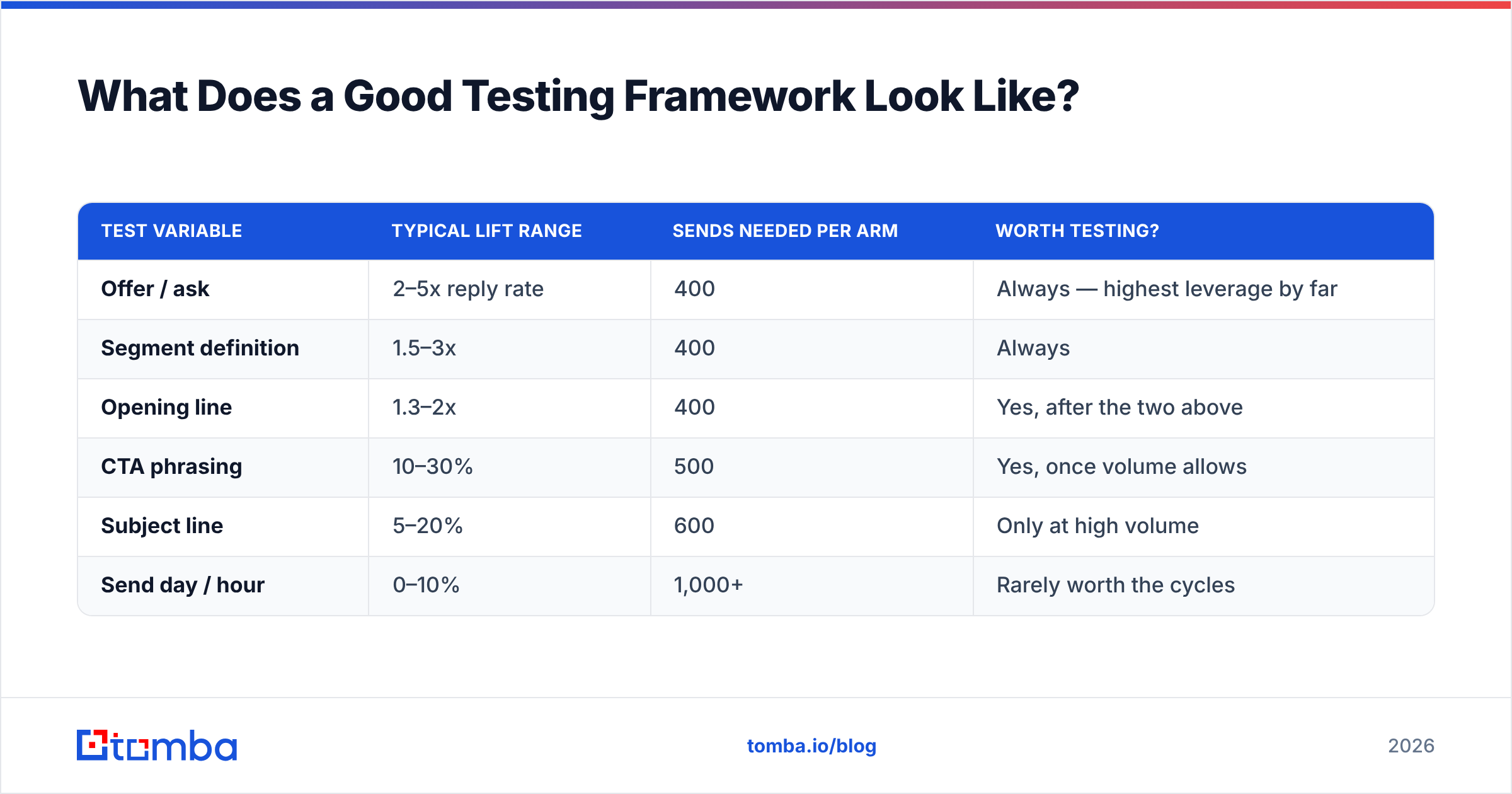
Test in this priority order: offer → segment definition → opening line → CTA phrasing → subject line → send day. Effect sizes shrink as you move down that list.
| Test variable | Typical lift range | Sends needed per arm | Worth testing? |
|---|---|---|---|
| Offer / ask | 2–5x reply rate | 400 | Always — highest leverage by far |
| Segment definition | 1.5–3x | 400 | Always |
| Opening line | 1.3–2x | 400 | Yes, after the two above |
| CTA phrasing | 10–30% | 500 | Yes, once volume allows |
| Subject line | 5–20% | 600 | Only at high volume |
| Send day / hour | 0–10% | 1,000+ | Rarely worth the cycles |
Note the asymmetry. Changing what you ask for can multiply your reply rate. Changing your send time from Tuesday to Thursday moves it by single-digit percentages, if at all — yet send-time optimization gets more blog coverage than offer design.

How Do You Protect Deliverability While Scaling?#
Volume is the enemy of reputation if you scale it faster than your infrastructure earns trust.
The rules that hold up in practice:
- Separate your sending domain from your primary domain. Use
yourcompany.coorget-yourcompany.comfor outbound. If reputation degrades, your corporate email keeps working. - Warm up for 3–4 weeks minimum. Start at 10–20 sends per day per mailbox and increase roughly 20% weekly. A warmup calculator removes the guesswork on ramp schedules.
- Cap at 40–50 cold sends per mailbox per day. Scale by adding mailboxes, not by pushing individual mailboxes harder. Providers watch per-mailbox volume patterns closely.
- Monitor complaint rate weekly. Above 0.1% is a warning; above 0.3% is enforcement territory under current Google and Yahoo policy.
- Keep an unsubscribe path visible. A one-line opt-out at the bottom converts would-be spam complaints into harmless unsubscribes. Complaints hurt your domain; unsubscribes don't.
- Re-verify quarterly. Contacts that were valid in January are not necessarily valid in July. A bulk verify pass every quarter on your active list keeps decay from accumulating.
The broader mechanics of email deliverability deserve their own study, but the compressed version is this: mailbox providers are modeling whether recipients want your mail. Every bounce, complaint, and ignored message is evidence against you. Every reply is evidence for you. Optimize for evidence-for.
Which Tools Fit Which Part of the Stack?#
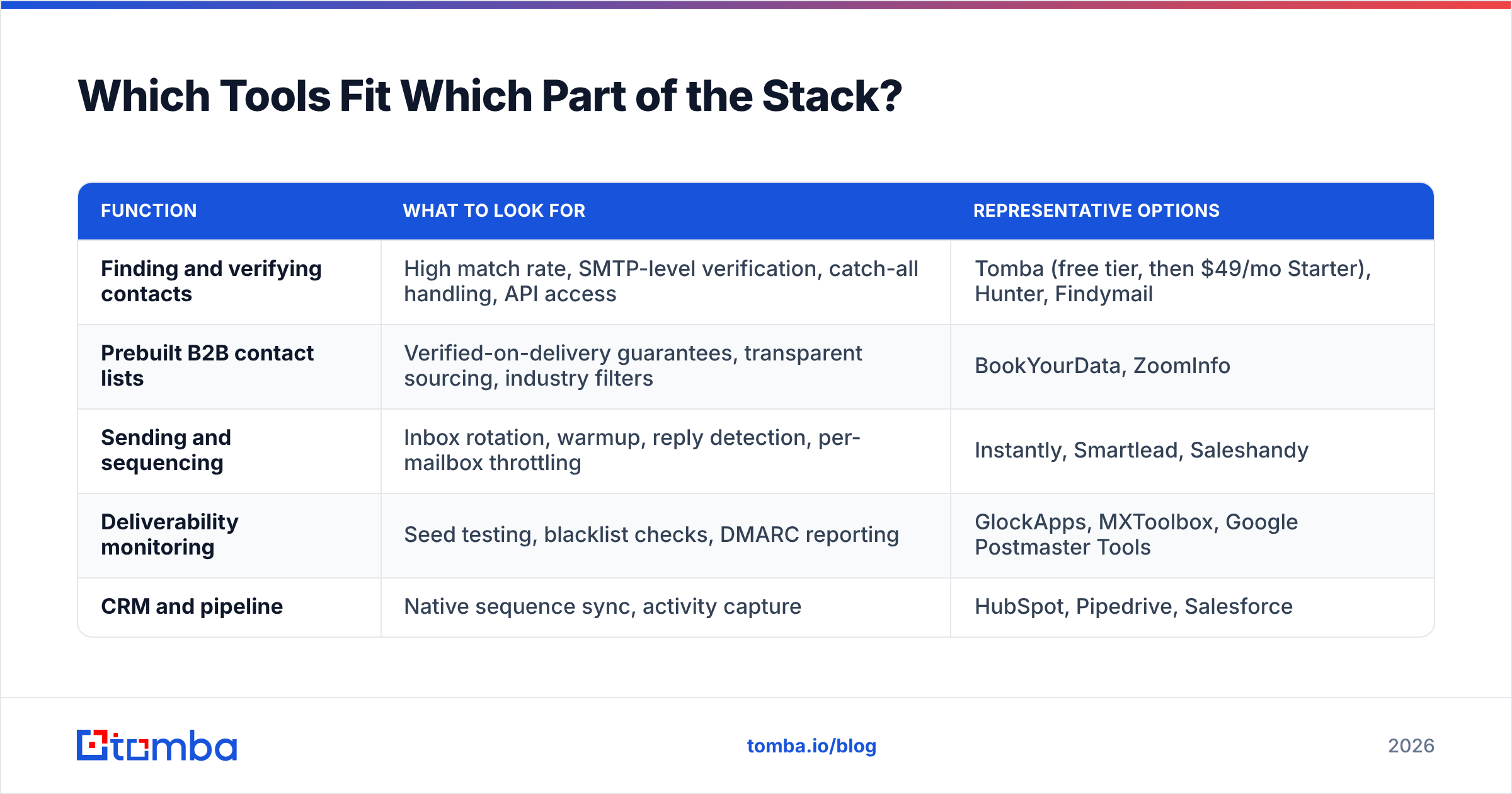
No single tool does all of this well, and the ones that claim to usually do one part well and the rest adequately. Here's an honest split by function.
| Function | What to look for | Representative options |
|---|---|---|
| Finding and verifying contacts | High match rate, SMTP-level verification, catch-all handling, API access | Tomba (free tier, then $49/mo Starter), Hunter, Findymail |
| Prebuilt B2B contact lists | Verified-on-delivery guarantees, transparent sourcing, industry filters | BookYourData, ZoomInfo |
| Sending and sequencing | Inbox rotation, warmup, reply detection, per-mailbox throttling | Instantly, Smartlead, Saleshandy |
| Deliverability monitoring | Seed testing, blacklist checks, DMARC reporting | GlockApps, MXToolbox, Google Postmaster Tools |
| CRM and pipeline | Native sequence sync, activity capture | HubSpot, Pipedrive, Salesforce |
A few honest notes. BookYourData is a solid fit when you want a prebuilt, verified list handed to you rather than assembling one — different job than a live finder, and worth considering when speed matters more than granular targeting. Tomba sits at the data-acquisition layer: find email addresses by domain or name, verify them, and push them into whatever sender you use. It is not a sequencer and doesn't pretend to be. If you need sequencing, pair it with a dedicated sending platform. Tomba pricing starts with a free tier at 25 searches per month, then $49/mo Starter, $99/mo Growth, and $249/mo Pro — which matters mostly because it lets you verify a list before committing budget to a sending platform.
For evaluating any vendor in these categories, G2's email marketing software category is a reasonable starting point for filtering by company size and use case, though read the reviews rather than the aggregate scores.
What Does an Optimized Campaign Actually Look Like?#
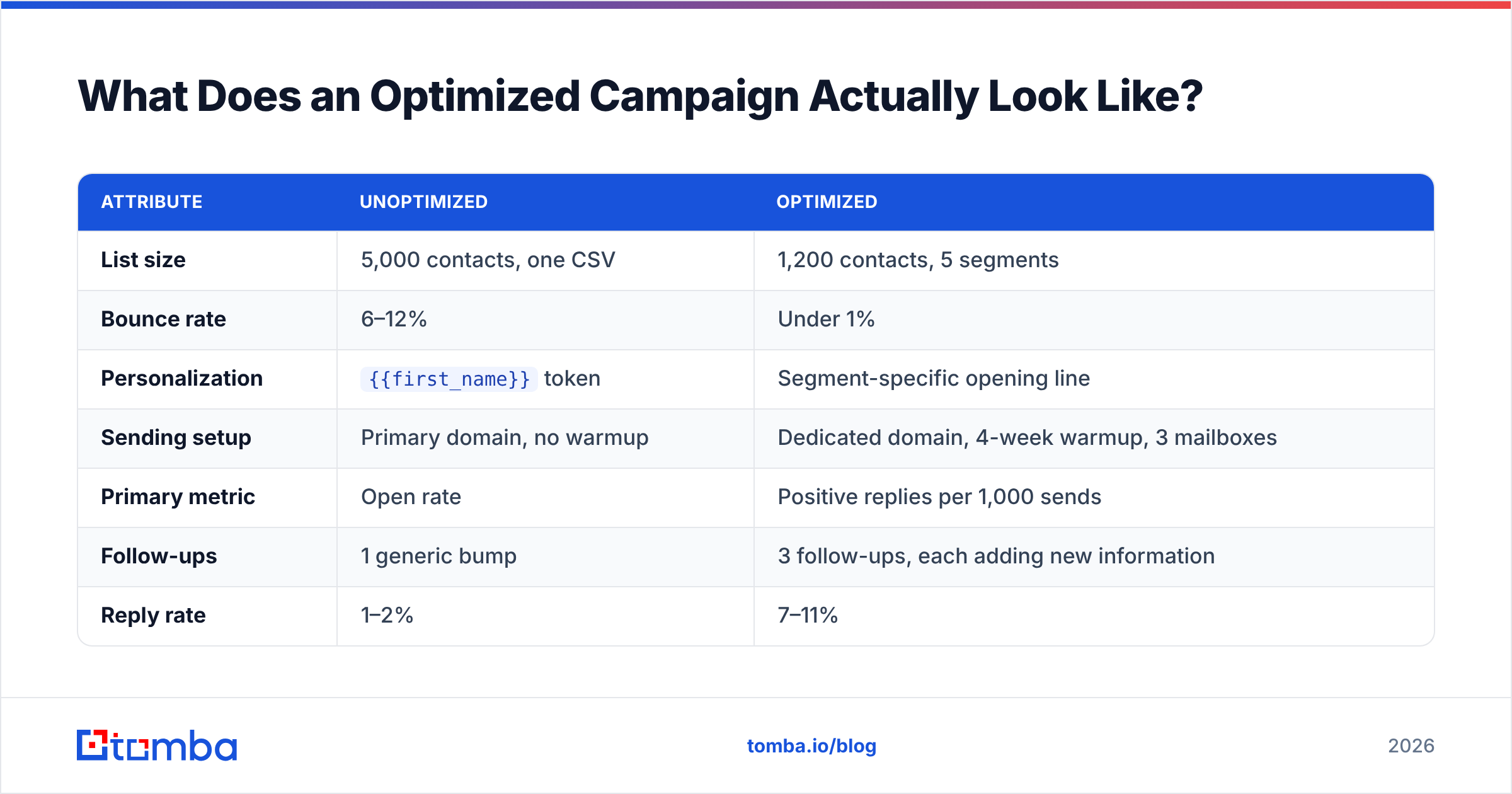
Concretely, here's the profile of a campaign that's been through this process versus one that hasn't.
| Attribute | Unoptimized | Optimized |
|---|---|---|
| List size | 5,000 contacts, one CSV | 1,200 contacts, 5 segments |
| Bounce rate | 6–12% | Under 1% |
| Personalization | {{first_name}} token |
Segment-specific opening line |
| Sending setup | Primary domain, no warmup | Dedicated domain, 4-week warmup, 3 mailboxes |
| Primary metric | Open rate | Positive replies per 1,000 sends |
| Follow-ups | 1 generic bump | 3 follow-ups, each adding new information |
| Reply rate | 1–2% | 7–11% |
| Meetings per 1,000 | 0–2 | 5–9 |
The optimized campaign sends 76% fewer emails and books several times more meetings. That's the entire argument for optimization compressed into one row: fewer, better-targeted, verified sends outperform volume in every measurable dimension — and they don't burn the domain you'll need next quarter.
Where Should You Start This Week?#
Pick the highest-leverage unfinished item and do only that.
If you've never verified your list: verify it. That's the whole task. It takes an afternoon and it will change your numbers more than anything else on this page.
If your list is clean but authentication isn't set up: fix SPF, DKIM, and DMARC, then buy a separate sending domain and start warmup. Four weeks of patience buys you a year of inbox placement.
If both of those are done: split your next campaign into five segments and write five genuinely different opening lines. Measure positive replies per thousand sends, not opens.
If all three are done, you've earned the right to test subject lines. Enjoy it — it's the fun part, and it's worth roughly 10% of what the first three were worth.
Start with the input that determines everything else. Before your next campaign, run your target domains through Tomba Email Finder to build a current, verified contact list — with domain search, catch-all handling, and SMTP-level verification in one place. The free tier gives you 25 searches per month to test match quality against your own target accounts before you pay anything, and Starter is $49/mo when you're ready to scale. A campaign built on verified data doesn't need rescuing later.
Related guides#
Ready to find emails that actually work?
Join 150,000+ professionals who stopped guessing and started sending. Free credits on signup — no credit card required.
Get the Tomba newsletter
Practical outbound tactics and product updates — once every two weeks.
About the author