Email Checker Online: How to Verify Any Address in 2026
Free email checkers catch typos. Paid ones protect your sender reputation. Here's what an email checker online actually tests, where the accuracy claims break down, and how the main tools compare on price and depth.
TL;DR
- An email checker online runs four layers of tests: syntax, domain/MX, mailbox (SMTP), and risk classification. Free tools usually stop at layer two.
- Syntax validity means nothing.
noreply@stripe.comis perfectly valid syntax and will never accept your pitch. - Catch-all domains are where most checkers quietly fail. They accept every address at SMTP, so a naive tool marks the whole domain "valid" and you find out the truth from your bounce report.
- Realistic accuracy for a good verifier on non-catch-all domains is 95-98%. Anyone claiming 99.9% across all domains is measuring something other than deliverability.
- Verify before every send, not once at import. B2B email data decays roughly 22-30% per year, and job changes are the biggest driver.
What is an email checker online?#
An email checker online is a web tool that tells you whether an address will accept mail before you send to it. Think of it like calling a hotel to confirm a room exists and the guest is still registered — you're not writing the letter yet, you're confirming there's someone at the other end.
The useful ones run a stack of independent checks, each answering a narrower question:
- Syntax validation — Does the string conform to RFC 5322? Catches
john@@acme,com, missing TLDs, illegal characters. Costs nothing, catches maybe 2% of bad data. - Domain and MX record lookup — Does
acme.comresolve, and does it publish mail exchanger records? A domain with no MX record cannot receive email, full stop. This kills dead companies and typo'd domains likegmial.com. - SMTP handshake (mailbox check) — The checker opens a connection to the receiving mail server and asks, in effect, "would you accept mail for this specific mailbox?" without delivering anything. A
250response means the mailbox exists. A550means it doesn't. - Risk classification — Is this a role account (
info@,sales@), a disposable address (mailinator.com), a known spam trap pattern, or a catch-all domain where the SMTP answer is meaningless?
Layers one and two are cheap and every free tool does them. Layer three requires clean sending IPs and rate management, because mail servers throttle or blacklist anyone who hammers them with verification probes. Layer four requires an actual data corpus. That's the entire price gap between free and paid.
Why do free email checkers report addresses that still bounce?#
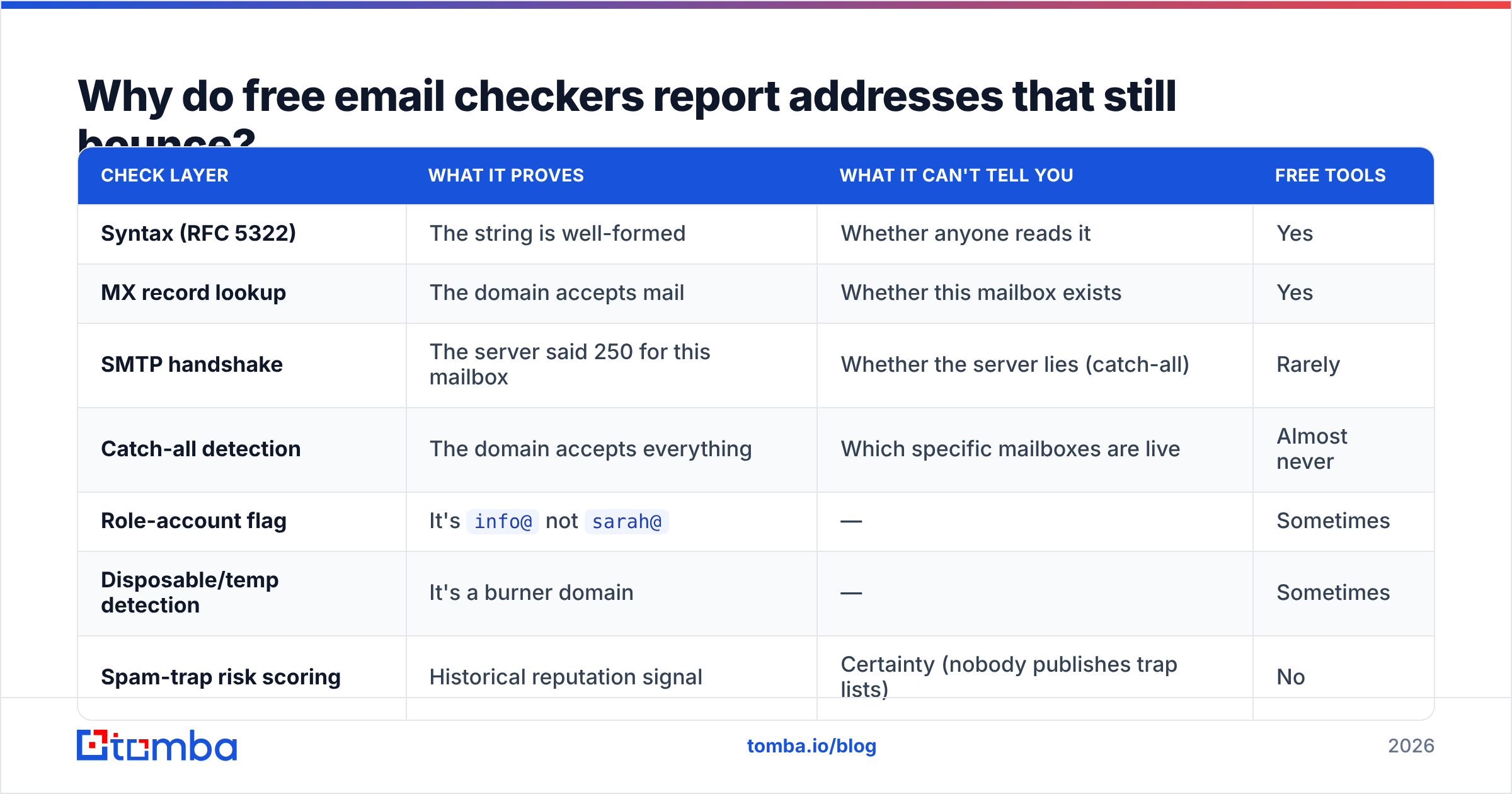
Because they're grading a different exam. Here's the gap between what a tool reports and what your mail server experiences.
| Check layer | What it proves | What it can't tell you | Free tools |
|---|---|---|---|
| Syntax (RFC 5322) | The string is well-formed | Whether anyone reads it | Yes |
| MX record lookup | The domain accepts mail | Whether this mailbox exists | Yes |
| SMTP handshake | The server said 250 for this mailbox | Whether the server lies (catch-all) | Rarely |
| Catch-all detection | The domain accepts everything | Which specific mailboxes are live | Almost never |
| Role-account flag | It's info@ not sarah@ |
— | Sometimes |
| Disposable/temp detection | It's a burner domain | — | Sometimes |
| Spam-trap risk scoring | Historical reputation signal | Certainty (nobody publishes trap lists) | No |
The failure mode that costs you the most is the catch-all. Roughly 15-20% of B2B domains — heavily skewed toward enterprises using Microsoft 365 with a wildcard rule — accept mail addressed to any local part. asdkjhasd@bigcorp.com returns 250 OK. A checker that only reads the SMTP code marks it valid, you send, and the message either lands in a black-hole mailbox or bounces internally two hops later.
Good tools handle this by probing with a deliberately nonsense address first. If the fake one is accepted too, the domain is flagged catch-all and downgraded to "risky" rather than "valid." Better tools go a step further and cross-reference the address against observed patterns and known-good data — that's what a dedicated catch-all verifier does, and it's the single most useful feature to look for if you sell to enterprises.
The second failure mode is greylisting. Some servers deliberately return a soft failure to unknown senders on first contact, expecting a legitimate mail server to retry. A verifier that doesn't retry reads that as "unknown" or, worse, "invalid," and you throw away a real prospect.
How accurate is an email checker online, really?#
Set your expectations by domain type, not by the vendor's headline number.
- Non-catch-all business domains: 95-98% accuracy is achievable and is what serious vendors deliver. The remaining error is timing — someone left the company between your check and your send.
- Catch-all domains: No SMTP-based method can be certain. Tools that offer a confidence score here are pattern-matching and historical data, and honest ones tell you so.
- Free consumer providers (Gmail, Outlook, Yahoo): Gmail deliberately obscures SMTP responses to prevent enumeration. Accuracy on personal Gmail addresses is materially lower than on business domains for every tool.
- Freshly created addresses: Propagation lag means a mailbox created yesterday may still read as invalid.
The bigger threat to your list isn't verification error, it's decay. B2B contact data goes stale at roughly 22-30% per year, driven mostly by job changes. Gartner and most RevOps teams treat data hygiene as a continuous process for this reason. A list you verified in January is materially wrong by July. Verify at send time, not at import time.

What happens to your sender reputation if you skip verification?#
Bounce rate is a direct input to how mailbox providers score you. The commonly cited safe threshold is under 2% hard bounces; above 5% you're in visible trouble, and Google and Yahoo's bulk-sender requirements (in force since 2024) formalized spam-complaint ceilings alongside authentication mandates.
The chain works like this: unverified list → high bounce rate → mailbox providers downgrade your domain → your verified recipients stop seeing you in the inbox. One bad campaign to a scraped list can suppress deliverability for weeks after you stop sending.
Three things compound the damage:
- Spam traps. Recycled traps are abandoned addresses that providers reactivate specifically to catch senders using old lists. Hitting one is a stronger negative signal than a plain bounce. Pristine traps — addresses never used by a human — mark you as a scraper.
- Role accounts.
info@,support@, andadmin@are technically valid and get forwarded to shared inboxes where complaint rates run high. A verifier should flag them so you can decide, not silently pass them. - Authentication gaps. Verification doesn't help if your SPF, DKIM, and DMARC records are wrong. Run an SPF checker alongside verification; they solve different halves of the same problem. If your domain is new, pair both with a warmup plan before volume sending — email deliverability is a compounding asset, not a switch.
How do the main email checker tools compare in 2026?#
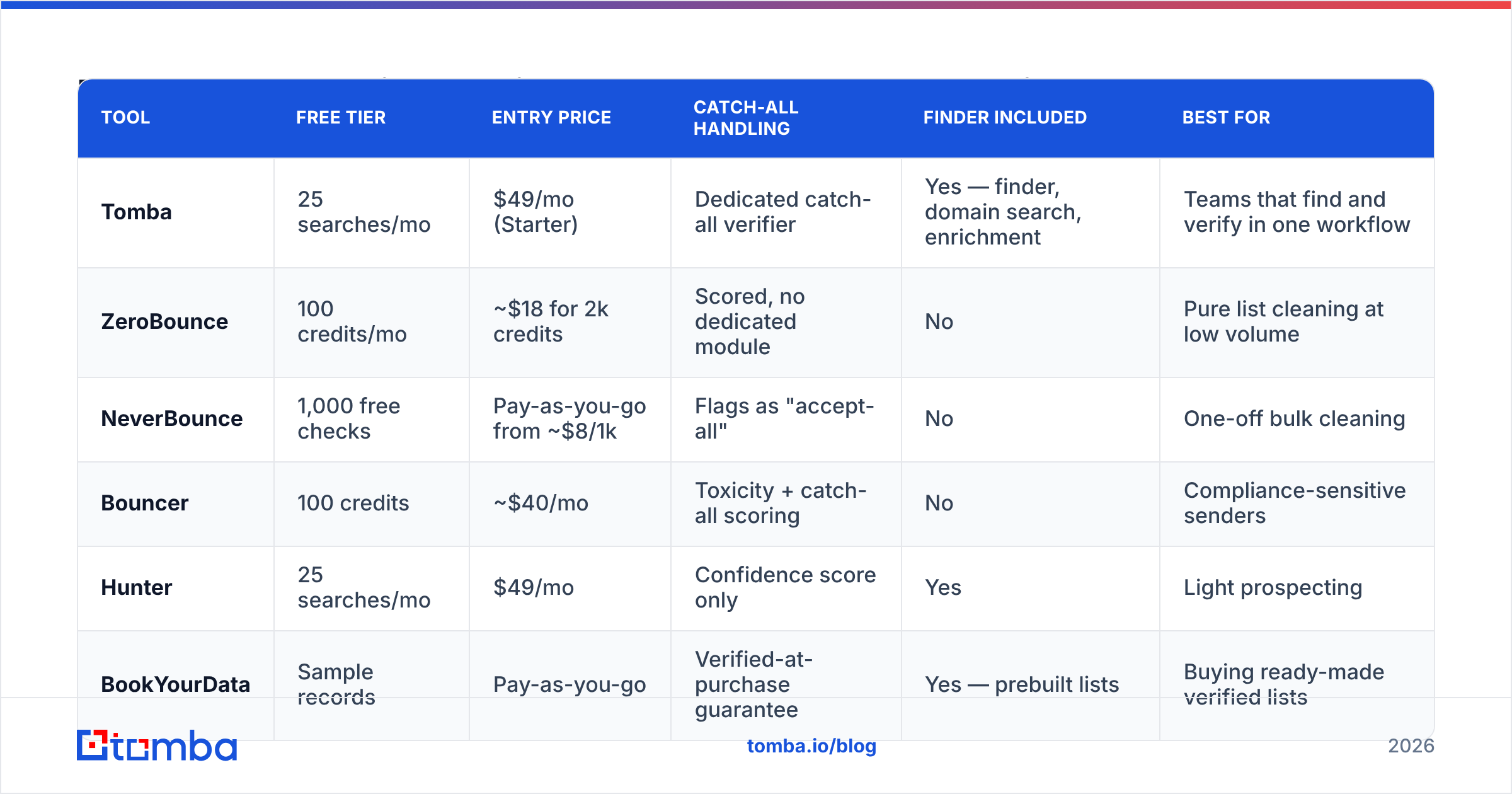
Prices below reflect published entry tiers. Verification is usually credit-metered, so compare cost per verified address rather than headline monthly price.
| Tool | Free tier | Entry price | Catch-all handling | Finder included | Best for |
|---|---|---|---|---|---|
| Tomba | 25 searches/mo | $49/mo (Starter) | Dedicated catch-all verifier | Yes — finder, domain search, enrichment | Teams that find and verify in one workflow |
| ZeroBounce | 100 credits/mo | ~$18 for 2k credits | Scored, no dedicated module | No | Pure list cleaning at low volume |
| NeverBounce | 1,000 free checks | Pay-as-you-go from ~$8/1k | Flags as "accept-all" | No | One-off bulk cleaning |
| Bouncer | 100 credits | ~$40/mo | Toxicity + catch-all scoring | No | Compliance-sensitive senders |
| Hunter | 25 searches/mo | $49/mo | Confidence score only | Yes | Light prospecting |
| BookYourData | Sample records | Pay-as-you-go | Verified-at-purchase guarantee | Yes — prebuilt lists | Buying ready-made verified lists |
Two structural differences matter more than the price column.
Verifier-only vs. finder + verifier. If you're cleaning a list someone handed you, a pure verifier is fine and cheaper. If you're building the list yourself, paying two vendors and moving CSVs between them costs more in time than the license difference. Tomba bundles the email finder and email verifier under one credit pool, which is why the per-address math usually favors bundled tools once you're sourcing your own contacts. BookYourData takes the opposite and equally valid route — it sells pre-verified records outright, which suits teams who'd rather buy coverage than build it.
Credit accounting. Read the fine print on what consumes a credit. Some vendors charge for "unknown" results; some don't. Some charge separately for a find and a verify on the same contact. At 50,000 addresses that difference is the whole budget.


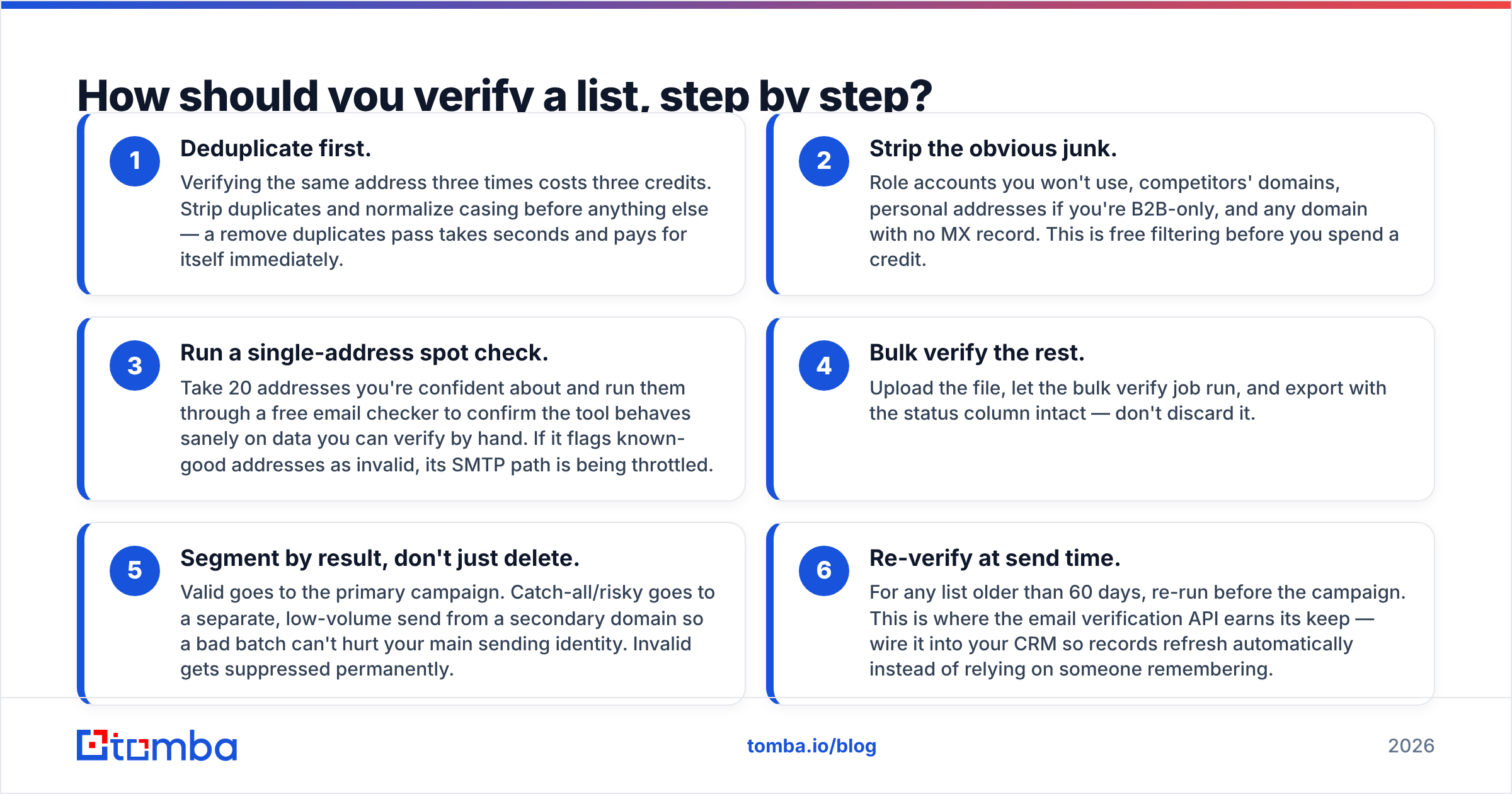
How should you verify a list, step by step?#
A workflow that survives contact with a real campaign:
- Deduplicate first. Verifying the same address three times costs three credits. Strip duplicates and normalize casing before anything else — a remove duplicates pass takes seconds and pays for itself immediately.
- Strip the obvious junk. Role accounts you won't use, competitors' domains, personal addresses if you're B2B-only, and any domain with no MX record. This is free filtering before you spend a credit.
- Run a single-address spot check. Take 20 addresses you're confident about and run them through a free email checker to confirm the tool behaves sanely on data you can verify by hand. If it flags known-good addresses as invalid, its SMTP path is being throttled.
- Bulk verify the rest. Upload the file, let the bulk verify job run, and export with the status column intact — don't discard it.
- Segment by result, don't just delete. Valid goes to the primary campaign. Catch-all/risky goes to a separate, low-volume send from a secondary domain so a bad batch can't hurt your main sending identity. Invalid gets suppressed permanently.
- Re-verify at send time. For any list older than 60 days, re-run before the campaign. This is where the email verification API earns its keep — wire it into your CRM so records refresh automatically instead of relying on someone remembering.
That last step is the one teams skip and the one that actually moves bounce rate. A verified-in-January list sent in July carries roughly a quarter of its contacts as job-changers.
When is a free email checker enough?#
Honestly? More often than vendors admit. Use the free path when:
- You're checking a handful of addresses before a manual, high-value outreach.
- Your list came from your own opt-in form and you just want to catch typos at signup.
- You're validating a single format hypothesis for a company — for that, an email permutator plus a free check on the candidates is a perfectly good workflow.
Move to paid when any of these are true: your list exceeds a few thousand addresses, you're sending from a domain whose reputation you can't afford to damage, you sell to enterprises (catch-all density is highest there), or you need verification inside an automated pipeline rather than as a manual upload.
The economics are straightforward. Verification runs roughly $0.001-$0.01 per address. A damaged sending domain costs weeks of pipeline. You don't need to model that decision carefully — the ratio isn't close.
What should you look for in a verifier's output?#
Reject any tool that returns a bare valid/invalid boolean. You need the reasoning to make routing decisions:
- Status — valid, invalid, catch-all/accept-all, unknown, disposable, role.
- Reason code —
no_mx_record,mailbox_not_found,greylisted,timeout. "Greylisted" and "mailbox_not_found" are wildly different situations and should never share a bucket. - Confidence score — most useful on catch-all domains where binary answers don't exist.
- Free vs. business domain flag — changes how you interpret everything else.
- MX provider — knowing a domain sits on Microsoft 365 vs. Google Workspace tells you which throttling behavior to expect.
If the tool exposes all of that over an API with sane rate limits, you can build routing logic on top of it. If it only gives you a CSV with a color-coded column, you're stuck doing manual triage forever. Check the data sources documentation of any vendor you're evaluating — how a provider sources and refreshes data predicts its accuracy better than any marketing number. Third-party review aggregates on G2 are also worth ten minutes, mostly for the complaint patterns rather than the star ratings.
Frequently asked questions#
Does verifying an email send anything to the recipient?
No. A proper SMTP check terminates the connection before the DATA command, so no message is delivered and nothing appears in the recipient's inbox. Some poorly built tools do send, which is both rude and a reputation risk — another reason to avoid unknown free tools for anything sensitive.
Can I verify Gmail addresses reliably? Less reliably than business domains. Google restricts SMTP-level enumeration deliberately. Expect lower confidence and treat "valid" on a personal Gmail as a softer signal.
How often should I re-verify? Every 60-90 days for an active list, or at send time via API. Faster if you sell into high-churn industries like tech and agencies.
Is verification the same as warming up a domain? No. Verification cleans your list; warmup builds your domain's sending history. You need both, and warmup only works on a clean list — sending warmup volume to bad addresses is actively counterproductive.
Where to start#
If your job is cleaning a list someone else built, a standalone verifier is enough. If your job is building the list and keeping it clean — sourcing contacts by domain, checking them, and pushing them into a sequence — you want the find and verify steps in one place so nothing is lost in translation between vendors.
That's the case for Tomba Email Finder: find addresses by domain, name, or company, verify them against the same data layer, and route the risky ones through catch-all handling before they ever touch your sending domain. Start on the free tier at 25 searches per month to test accuracy on companies you already know, then check Tomba pricing — Starter runs $49/mo, Growth $99/mo, Pro $249/mo — once you know the numbers hold up on your own data. Verify what the tool claims before you pay for it. That's the only benchmark that counts.
Related guides#
Ready to find emails that actually work?
Join 150,000+ professionals who stopped guessing and started sending. Free credits on signup — no credit card required.
Get the Tomba newsletter
Practical outbound tactics and product updates — once every two weeks.
About the author