Email Clean Up in 2026: How to Fix a Dying Email List
Most lists rot at roughly 2% per month. Here is a practical email clean up process: what to delete, what to re-permission, which verifier to buy, and how to keep bounce rates under 2% for good.
TL;DR
- B2B email lists decay at roughly 2–2.5% per month, so a list you built 18 months ago is likely 30%+ dead on arrival.
- An email clean up is three jobs, not one: remove invalid addresses, segment out unengaged-but-valid contacts, and fix the intake process that let junk in.
- Keep hard bounces under 2% and spam complaints under 0.10% — those are the thresholds Google and Yahoo enforce for bulk senders.
- Verification pricing ranges from about $0.003 to $0.010 per email; the real cost difference is how each vendor handles catch-all domains.
- Cleaning is a maintenance habit, not a rescue mission. Verify at capture, re-verify at send, and audit quarterly.
What Does "Email Clean Up" Actually Mean?#
Email clean up is the process of removing addresses from your sending list that will bounce, complain, or never open — and repairing the pipeline that keeps adding them.
Think of it like a gym membership roster. Some members moved cities and their card declines (invalid addresses). Some members are still paying but haven't walked in for a year (unengaged). Some never signed up at all — a friend put their name down (bad-intake contacts). If you keep charging all three groups, the bank starts flagging you. Mailbox providers work the same way: they judge you on the aggregate behavior of everyone you send to.
Most people collapse all three problems into "run the list through a verifier." That handles group one only. Group two is where the deliverability damage usually comes from, because a valid-but-dead address often becomes a spam trap — a recycled mailbox that a provider reactivates specifically to catch senders who never prune.
Why Do Email Lists Decay So Fast?#
People change jobs. That's the whole story in B2B.
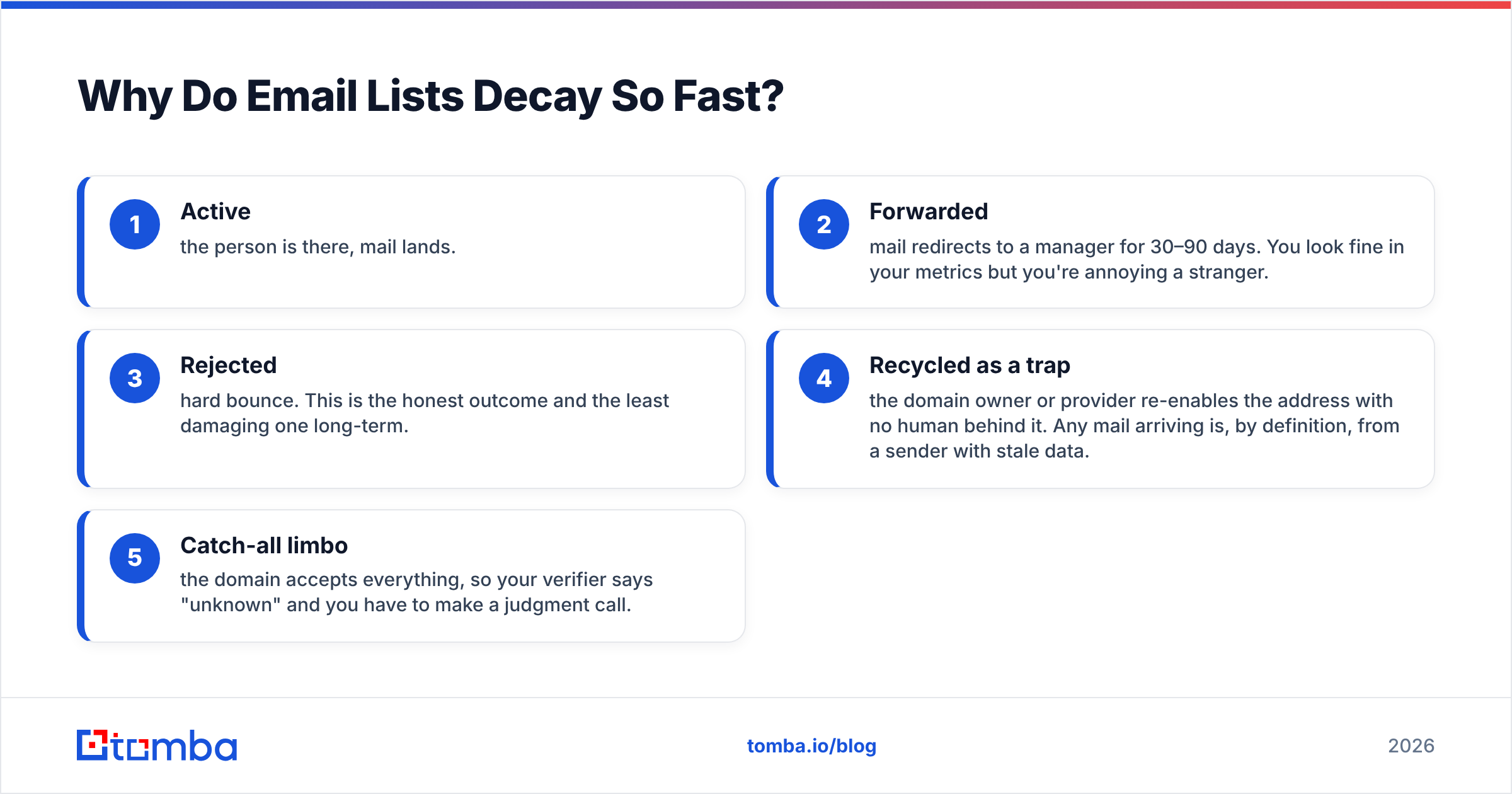
Average tenure in tech and sales roles sits under three years, and the churn is concentrated in exactly the personas you prospect — SDRs, marketing managers, ops leads. When someone leaves, their firstname@company.com mailbox goes through a predictable lifecycle:
- Active — the person is there, mail lands.
- Forwarded — mail redirects to a manager for 30–90 days. You look fine in your metrics but you're annoying a stranger.
- Rejected — hard bounce. This is the honest outcome and the least damaging one long-term.
- Recycled as a trap — the domain owner or provider re-enables the address with no human behind it. Any mail arriving is, by definition, from a sender with stale data.
- Catch-all limbo — the domain accepts everything, so your verifier says "unknown" and you have to make a judgment call.
Stage 4 is the expensive one. You get no bounce signal, no complaint, no unsubscribe — just a quiet reputation penalty. That's why "my bounce rate is fine" is not evidence that your list is clean.
How Do You Know Your List Needs Cleaning?#
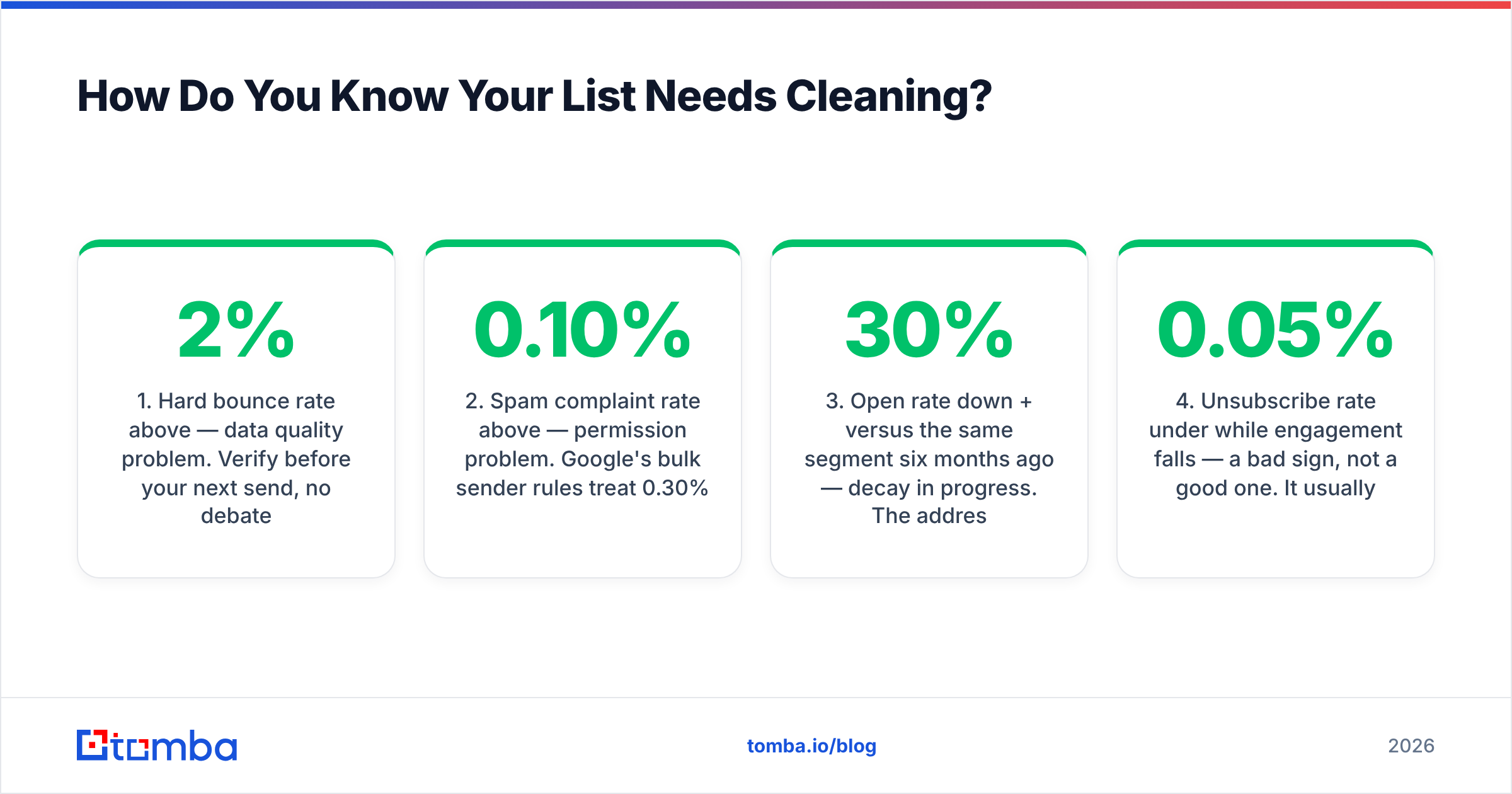
Run these five checks before you spend a dollar on verification credits. Each one has a threshold that tells you whether the problem is data quality, targeting, or content.
- Hard bounce rate above 2% — data quality problem. Verify before your next send, no debate.
- Spam complaint rate above 0.10% — permission problem. Google's bulk sender rules treat 0.30% as a hard failure and 0.10% as the ceiling you should never approach.
- Open rate down 30%+ versus the same segment six months ago — decay in progress. The addresses still resolve; the humans stopped caring or left.
- Unsubscribe rate under 0.05% while engagement falls — a bad sign, not a good one. It usually means mail is landing in spam, so nobody sees the unsubscribe link.
- More than 15% of a segment has zero opens in 180 days — segmentation problem. These contacts are dragging down the aggregate signal for everyone else.
- Any list you imported, bought, or scraped without verification — treat it as contaminated until proven otherwise, regardless of what the source claimed.
If two or more of these are true, you're not doing an email clean up. You're doing a list rebuild, and the sequencing matters — see the process section below.
What Are the Different Types of Bad Addresses?#
Not every "bad" address deserves deletion. Knowing the categories saves you from throwing out contacts that are perfectly reachable.
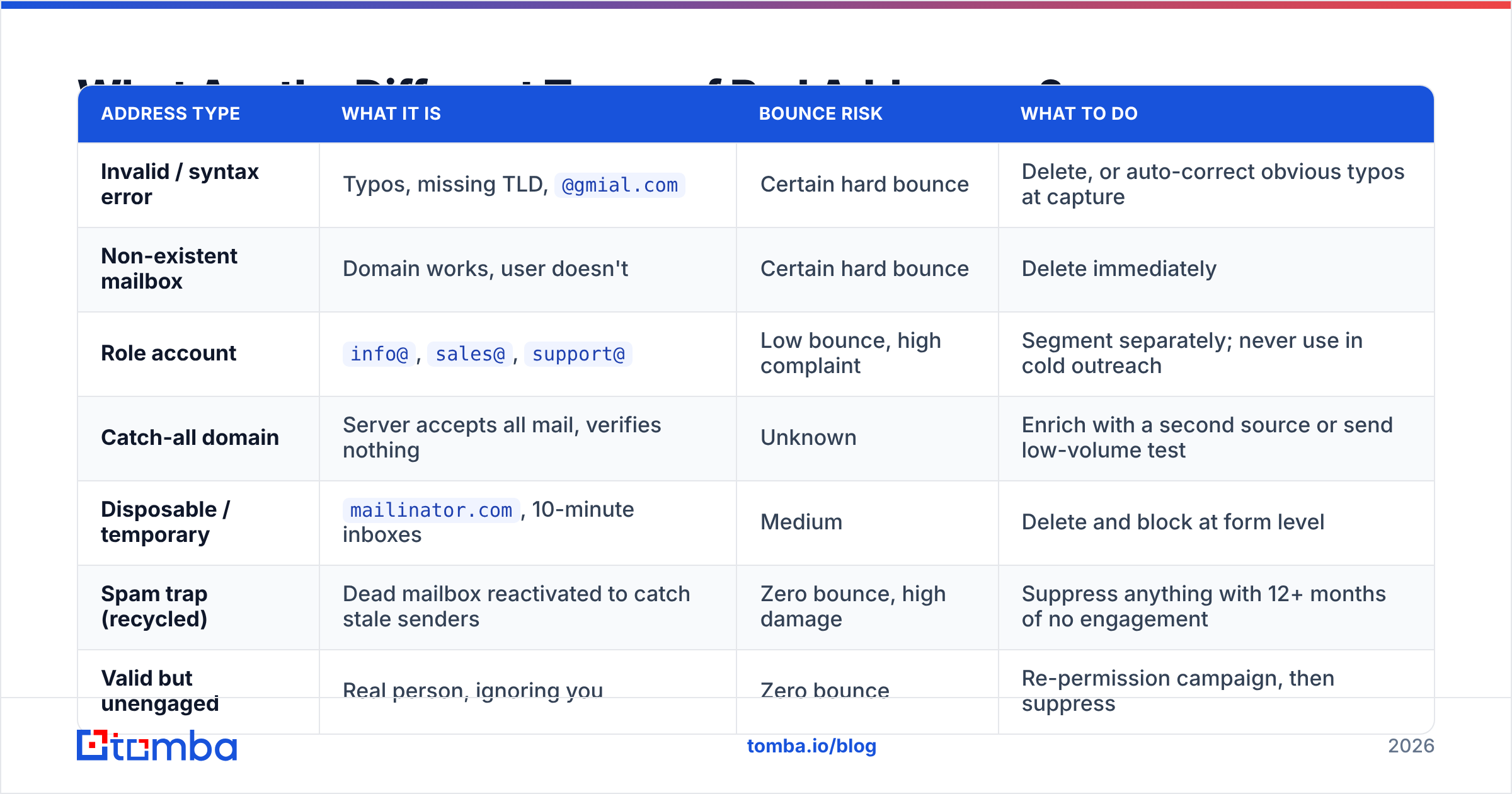
| Address type | What it is | Bounce risk | What to do |
|---|---|---|---|
| Invalid / syntax error | Typos, missing TLD, @gmial.com |
Certain hard bounce | Delete, or auto-correct obvious typos at capture |
| Non-existent mailbox | Domain works, user doesn't | Certain hard bounce | Delete immediately |
| Role account | info@, sales@, support@ |
Low bounce, high complaint | Segment separately; never use in cold outreach |
| Catch-all domain | Server accepts all mail, verifies nothing | Unknown | Enrich with a second source or send low-volume test |
| Disposable / temporary | mailinator.com, 10-minute inboxes |
Medium | Delete and block at form level |
| Spam trap (recycled) | Dead mailbox reactivated to catch stale senders | Zero bounce, high damage | Suppress anything with 12+ months of no engagement |
| Valid but unengaged | Real person, ignoring you | Zero bounce | Re-permission campaign, then suppress |
The two rows people get wrong are catch-all and unengaged. Catch-all domains are common in enterprise — Microsoft 365 tenants configured to accept everything — and blanket-deleting them can remove 20–30% of an enterprise list that was mostly fine. Use a dedicated catch-all verifier that probes deeper rather than returning a flat "unknown," and only then decide.
What Is the Actual Email Clean Up Process?#
Here's the order that works. Doing these steps out of sequence wastes credits — verifying before deduplication means paying twice for the same address.
Step 1 — Export and snapshot. Pull the full list with engagement metadata: date added, source, last open, last click, last reply. If your CRM can't export last-engagement dates, fix that first; every decision below depends on it.
Step 2 — Deduplicate. Same person appears as j.smith@, john.smith@, and jsmith@? Merge on the canonical address. Use a remove duplicates pass before verification, not after.
Step 3 — Suppress by rule, not by verifier. Cut these before spending credits: anything with 24+ months of no engagement, anyone who previously complained, anyone on a suppression list from a prior tool, and every disposable domain. This is free and typically removes 10–20% of a stale list.
Step 4 — Verify what remains. Run the survivors through an email verifier. Expect three buckets back: deliverable, undeliverable, risky/catch-all. Delete undeliverable. Keep deliverable.
Step 5 — Resolve the risky bucket. Don't delete it and don't blast it. Send to catch-all contacts in small batches from a secondary domain, or re-find them with a domain search to confirm the company's current email pattern. If a company switched from first.last@ to flast@, your entire list for that account is stale in the same predictable way — which is fixable in one pass.
Step 6 — Re-permission the unengaged-but-valid group. One plain-text email: "Still want these? Click here." Anyone who clicks stays. Everyone else moves to suppression. Painful, effective, and it protects the engaged remainder.
Step 7 — Fix intake. Add verification at the point of capture — form submission, CRM create, CSV import. Cleaning without fixing intake means you'll be back here in six months.
Which Email Verification Tool Should You Use?#
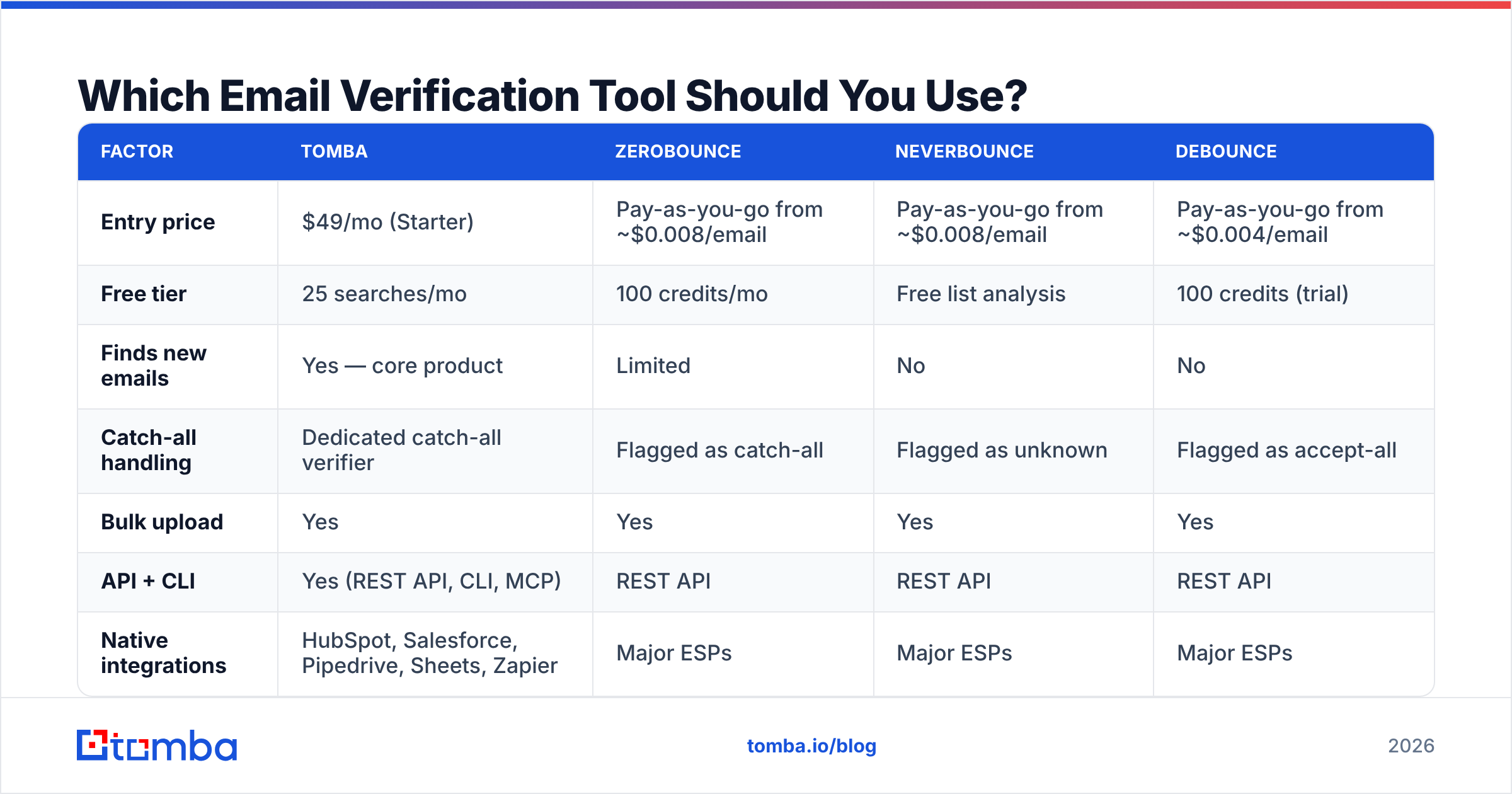
The market is commoditized on the basic check. Every credible vendor does syntax validation, MX lookup, and SMTP handshake. The differences that matter are catch-all handling, whether finding and verifying live in the same product, and how credits are priced.
| Factor | Tomba | ZeroBounce | NeverBounce | Debounce |
|---|---|---|---|---|
| Entry price | $49/mo (Starter) | Pay-as-you-go from ~$0.008/email | Pay-as-you-go from ~$0.008/email | Pay-as-you-go from ~$0.004/email |
| Free tier | 25 searches/mo | 100 credits/mo | Free list analysis | 100 credits (trial) |
| Finds new emails | Yes — core product | Limited | No | No |
| Catch-all handling | Dedicated catch-all verifier | Flagged as catch-all | Flagged as unknown | Flagged as accept-all |
| Bulk upload | Yes | Yes | Yes | Yes |
| API + CLI | Yes (REST API, CLI, MCP) | REST API | REST API | REST API |
| Native integrations | HubSpot, Salesforce, Pipedrive, Sheets, Zapier | Major ESPs | Major ESPs | Major ESPs |
| Best for | Teams that also need to build lists | High-volume ESP list hygiene | One-off list scrubs | Cost-sensitive bulk cleaning |
Pricing moves; check each vendor's current page before you commit. Pure-play verifiers like ZeroBounce are strong if your only job is scrubbing an existing marketing database of hundreds of thousands of records. If your list is small but constantly being rebuilt — classic outbound sales — a combined find-and-verify tool costs less in practice because you're not paying two vendors to touch the same contact. Tomba pricing starts at $49/mo for Starter and $99/mo for Growth, with a free tier for testing the workflow before you commit.
For an unfiltered read on any of these, the G2 email verification category is more useful than vendor case studies — filter reviews to the last twelve months, since accuracy claims from 2023 don't reflect current provider behavior.
How Often Should You Clean Your Email List?#
Match the cadence to how fast your list moves, not to the calendar.
- Cold outbound lists: verify immediately before every send. Contact data older than 30 days is already degrading, and a cold send has no engagement history to protect you.
- Warm marketing lists (weekly sends): full verification quarterly, suppression rules monthly.
- Newsletter lists (monthly sends): full verification twice a year, plus continuous removal of anyone at 180 days without an open.
- CRM records overall: annual audit, with enrichment on accounts that show job-change signals.
- After any import: always. No exceptions, including "verified" purchased data.
Between full cleans, watch your sending reputation directly instead of guessing. Google Postmaster Tools shows domain reputation, spam rate, and authentication pass rates for Gmail recipients — which is most of your B2B audience by volume. If your spam rate line starts creeping toward 0.10%, that's your signal to clean early rather than on schedule.
Does Cleaning Actually Improve Deliverability?#
Yes, but not instantly, and not on its own.
Removing bad addresses stops the bleeding — bounces drop within one send cycle. Reputation recovery is slower, because mailbox providers weight recent history heavily but don't forget the last 30 days overnight. Expect two to four weeks of consistent, low-bounce, decent-engagement sending before inbox placement measurably improves.
Cleaning also can't fix problems it doesn't touch. If your SPF, DKIM, and DMARC records are misconfigured, a perfectly clean list still lands in spam. Run an SPF checker and confirm DMARC is publishing at least p=none with reporting enabled. If your content trips filters — link shorteners, image-heavy templates, spam-trigger phrasing — clean data just delivers your bad email more reliably to the spam folder.
The honest framing: email deliverability is authentication plus list quality plus content plus consistency. Clean-up is one of four legs. Removing it collapses the table; adding it alone doesn't make the table stand.
What Should You Do Instead of Cleaning Repeatedly?#
Stop treating clean-up as an event. The teams with the best deliverability run three habits:
Verify at the point of entry. Wire verification into your form, your CRM create action, and your import step. An API call at capture costs a fraction of a cent and prevents the address from ever entering your database. The Tomba API handles this in a single request, and the same call works from a CLI script or a spreadsheet add-on if you don't have engineering time.
Enrich instead of delete when the account matters. If sarah@targetaccount.com bounces, the account is still worth pursuing — the person moved. Re-finding the current contact at that company is a better outcome than a shrinking list. This is where a combined finder-plus-verifier earns its cost.
Segment by engagement, always. Keep your active segment small and responsive. Providers judge you on who you send to most, so the fastest way to protect inbox placement is to stop mailing people who never respond, even before they technically go bad.
Ready to Clean Up and Rebuild?#
If your list is bouncing, the fix is rarely just "delete the bad ones" — it's replacing them with current, verified contacts at the same accounts. That's what the Tomba Email Finder is built for: find the person who actually holds the role now, verify the address before it ever reaches your sequence, and keep your bounce rate where mailbox providers stop noticing you. Start on the free tier with 25 searches a month, run one stale segment through it, and compare the bounce rate on your next send. The delta will tell you whether it's worth the $49.
Related guides#
Ready to find emails that actually work?
Join 150,000+ professionals who stopped guessing and started sending. Free credits on signup — no credit card required.
Get the Tomba newsletter
Practical outbound tactics and product updates — once every two weeks.
About the author