Email Cleaning in 2026: The Complete List Hygiene Guide
Bounce rates above 3% will get your domain throttled. Here's what email cleaning actually catches, what no verifier can catch, and how to build a hygiene routine that keeps your sends landing.
TL;DR
- Email cleaning is the process of removing invalid, risky, and dead addresses from a list before you send. It is not optional in 2026 — Google and Yahoo throttle senders whose bounce rates drift past ~2-3%.
- A good verifier catches syntax errors, dead domains, non-existent mailboxes, role accounts, disposables, and spam traps it has previously seen. It cannot reliably catch catch-all domains, freshly abandoned mailboxes, or brand-new traps.
- Cleaning cost is trivial compared to the cost of a burned domain. Most tools price between $0.001 and $0.008 per verification depending on volume.
- The highest-ROI habit is not the tool — it's the cadence: verify at capture, re-verify before every send, and suppress on the first hard bounce.
- If you are also sourcing the addresses, buy finding and verification from the same vendor so the data is validated before it ever hits your CRM.
What is email cleaning?#
Email cleaning (also called list hygiene, list scrubbing, or email validation) is the process of running every address on your list through a series of checks and removing or quarantining the ones that will bounce, harm your sender reputation, or waste your send quota.
Think of it like airport security for your mailing list. Every address queues up, gets scanned in layers — ID check, bag scan, occasionally a manual pat-down — and only the ones that clear every layer board the plane. The ones flagged as risky get pulled aside, not because they're definitely dangerous, but because letting them through costs you more than leaving them behind.
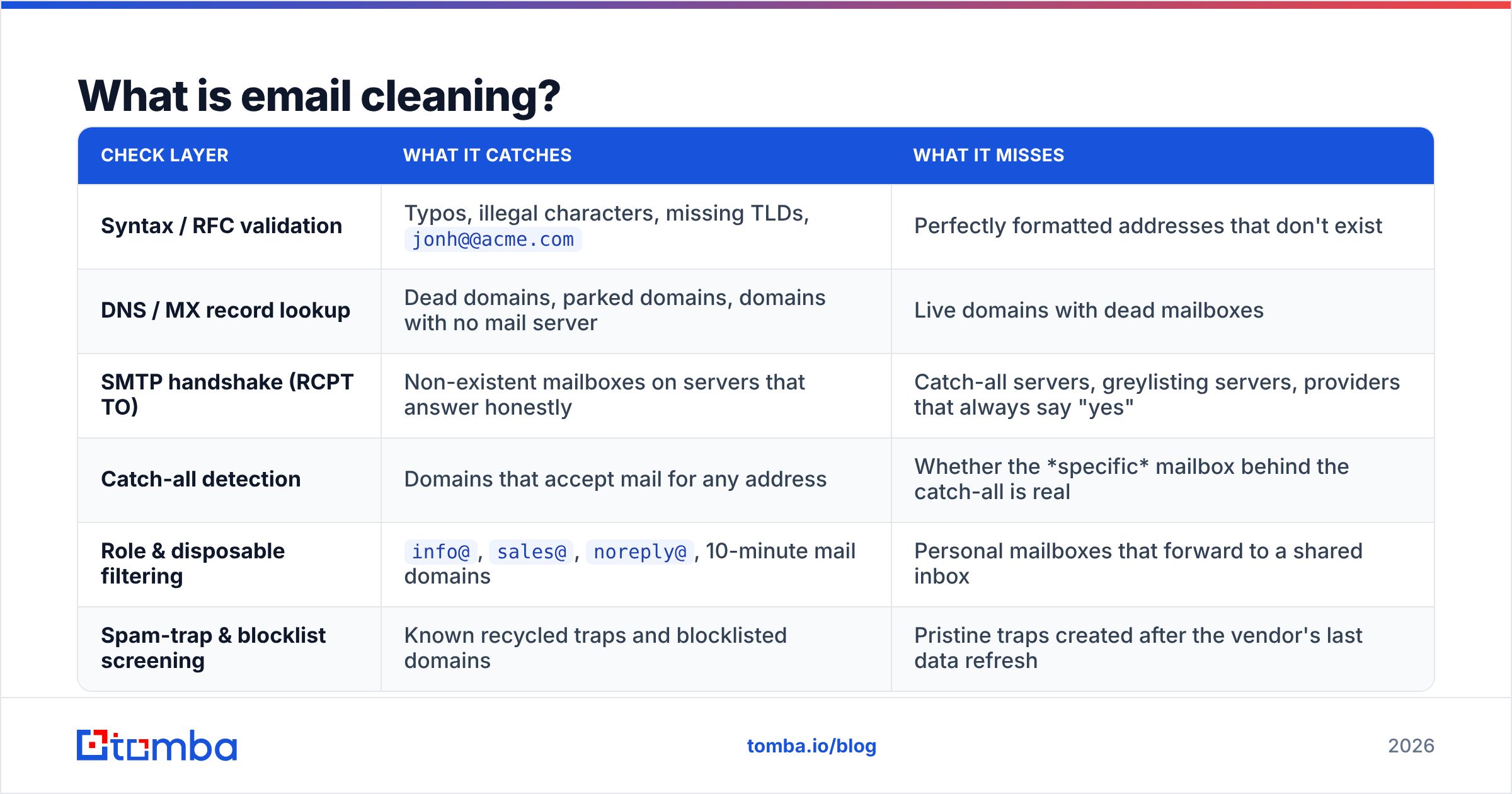
Technically, cleaning is a stack of independent checks run in sequence. Each one is cheap to run and each one catches a different failure mode.
| Check layer | What it catches | What it misses |
|---|---|---|
| Syntax / RFC validation | Typos, illegal characters, missing TLDs, jonh@@acme.com |
Perfectly formatted addresses that don't exist |
| DNS / MX record lookup | Dead domains, parked domains, domains with no mail server | Live domains with dead mailboxes |
| SMTP handshake (RCPT TO) | Non-existent mailboxes on servers that answer honestly | Catch-all servers, greylisting servers, providers that always say "yes" |
| Catch-all detection | Domains that accept mail for any address | Whether the specific mailbox behind the catch-all is real |
| Role & disposable filtering | info@, sales@, noreply@, 10-minute mail domains |
Personal mailboxes that forward to a shared inbox |
| Spam-trap & blocklist screening | Known recycled traps and blocklisted domains | Pristine traps created after the vendor's last data refresh |
The important column is the third one. Every vendor markets the second column. The third column is what determines whether your "99% accurate" cleaned list actually behaves like a 99% accurate list.
Why does email cleaning matter more in 2026 than it did in 2022?#
Because mailbox providers stopped grading on a curve.
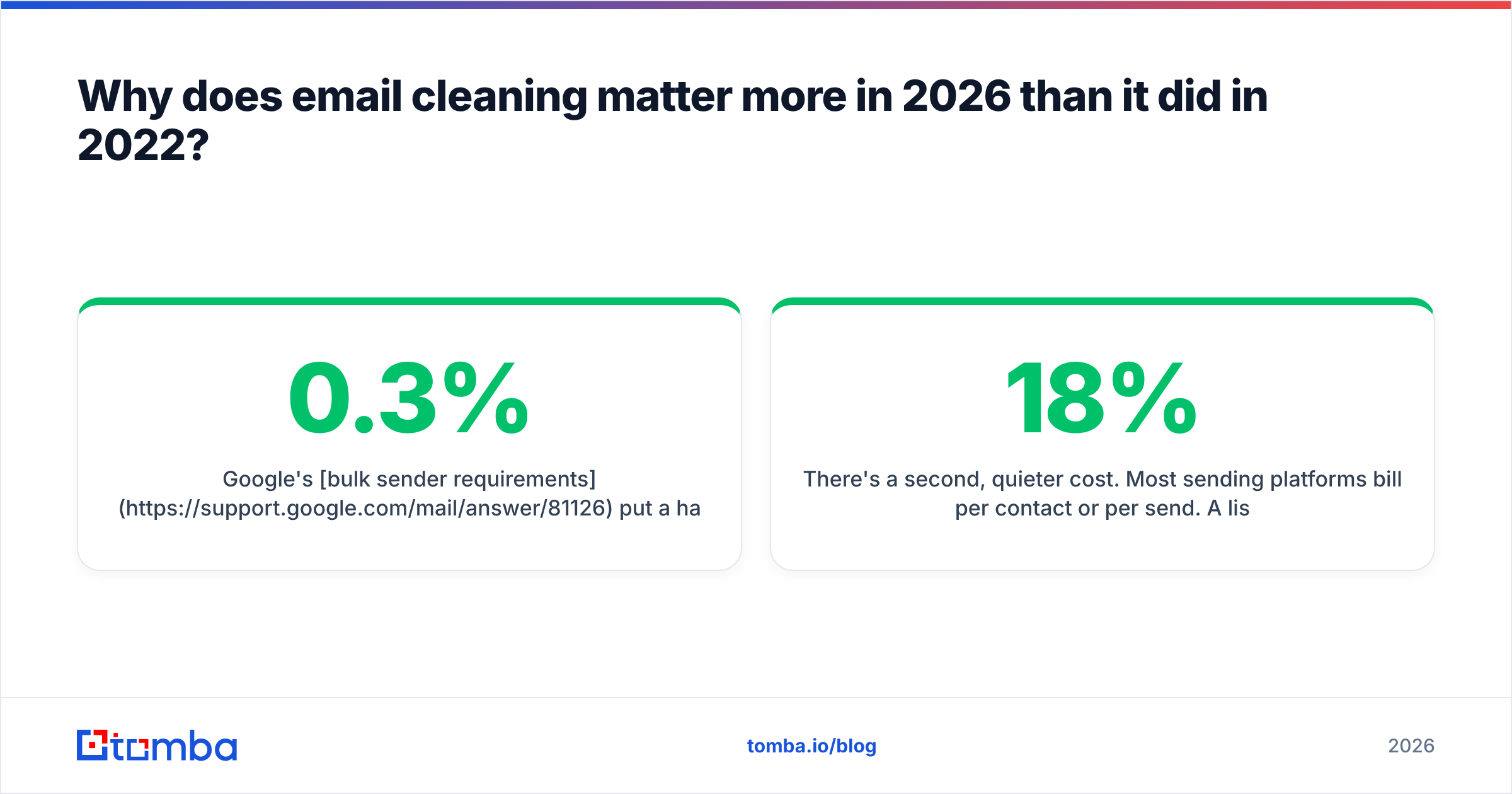
Google's bulk sender requirements put a hard number on it: keep your spam complaint rate under 0.3%, authenticate with SPF, DKIM, and DMARC, and honor one-click unsubscribe. Yahoo followed with near-identical rules. Microsoft tightened enforcement on high-volume senders shortly after. None of those regimes publish a bounce threshold, but every deliverability consultant working with them will tell you the same thing: sustained hard-bounce rates above 2-3% get you throttled, and above 5% you start seeing outright rejections.
The mechanism is straightforward. A bounce message telling you a mailbox doesn't exist is also a signal to the receiving provider that you don't know who you're mailing. Senders who know their audience have clean lists. Senders who scraped a CSV in 2023 and never touched it again do not. Providers infer intent from bounce behavior, and once your sender reputation drops, it takes weeks of clean sending to recover.
There's a second, quieter cost. Most sending platforms bill per contact or per send. A list with 18% dead addresses means you are paying an 18% tax on every campaign forever, plus the compounding cost of skewed open-rate metrics that make your A/B tests meaningless.

How dirty does a list actually get?#
Faster than most teams expect. Standard industry decay estimates put B2B email list rot at roughly 2-2.5% per month — people change jobs, companies get acquired, mailboxes get deprovisioned. That compounds:
- Month 0 — freshly verified list, ~0.5% expected bounce rate.
- Month 6 — roughly 13-15% of the list is now stale. Bounce rate climbs into the danger zone.
- Month 12 — a quarter of the list is dead weight. You're paying to store it and being penalized for mailing it.
- Month 18+ — recycled spam traps start appearing. Abandoned mailboxes get repurposed by providers specifically to catch senders who never clean.
- Month 24 — the list is functionally unusable without a full re-verification pass, and any domain reputation you built is likely already damaged.
The takeaway: a one-time cleaning is a snapshot, not a solution. Cleaning is a recurring process, and the interval should match your list's decay rate rather than your budget cycle.
What does a proper email cleaning workflow look like?#
Four checkpoints, not one big annual purge.
1. Clean at the point of capture. Every address that enters your system — form fill, CSV import, CRM sync, conference badge scan — gets validated in real time via API before it's written to the database. This is the cheapest possible moment to catch a typo, and it's the only moment where you can ask the person to correct it. A real-time email verification API call adds under a second to form submission.
2. Clean in bulk before every major send. Anything sitting in your database for more than 60-90 days gets re-verified. Upload the segment, run it through a bulk verify job, and pull the results back before the campaign builds. For lists over 50,000 this is where per-credit pricing starts mattering.
3. Suppress aggressively on bounce. One hard bounce means permanent suppression, no exceptions, no "let's try again next quarter." Soft bounces get three strikes across separate sends, then suppression. This should be automated inside your sending platform, not a monthly manual chore.
4. Sunset unengaged contacts. An address that has received twelve campaigns and opened none of them is not a deliverability asset, even if it verifies clean. Move it to a re-engagement sequence, then to a suppression list. Verifiers cannot tell you a mailbox is abandoned-but-accepting; engagement data can.
Before any of that, deduplicate. Duplicate rows inflate your contact count, double-send to the same human, and skew every metric downstream. A quick pass through a deduplicate email list tool costs nothing and often trims 3-8% off an imported file.
Which email cleaning tools are worth paying for?#
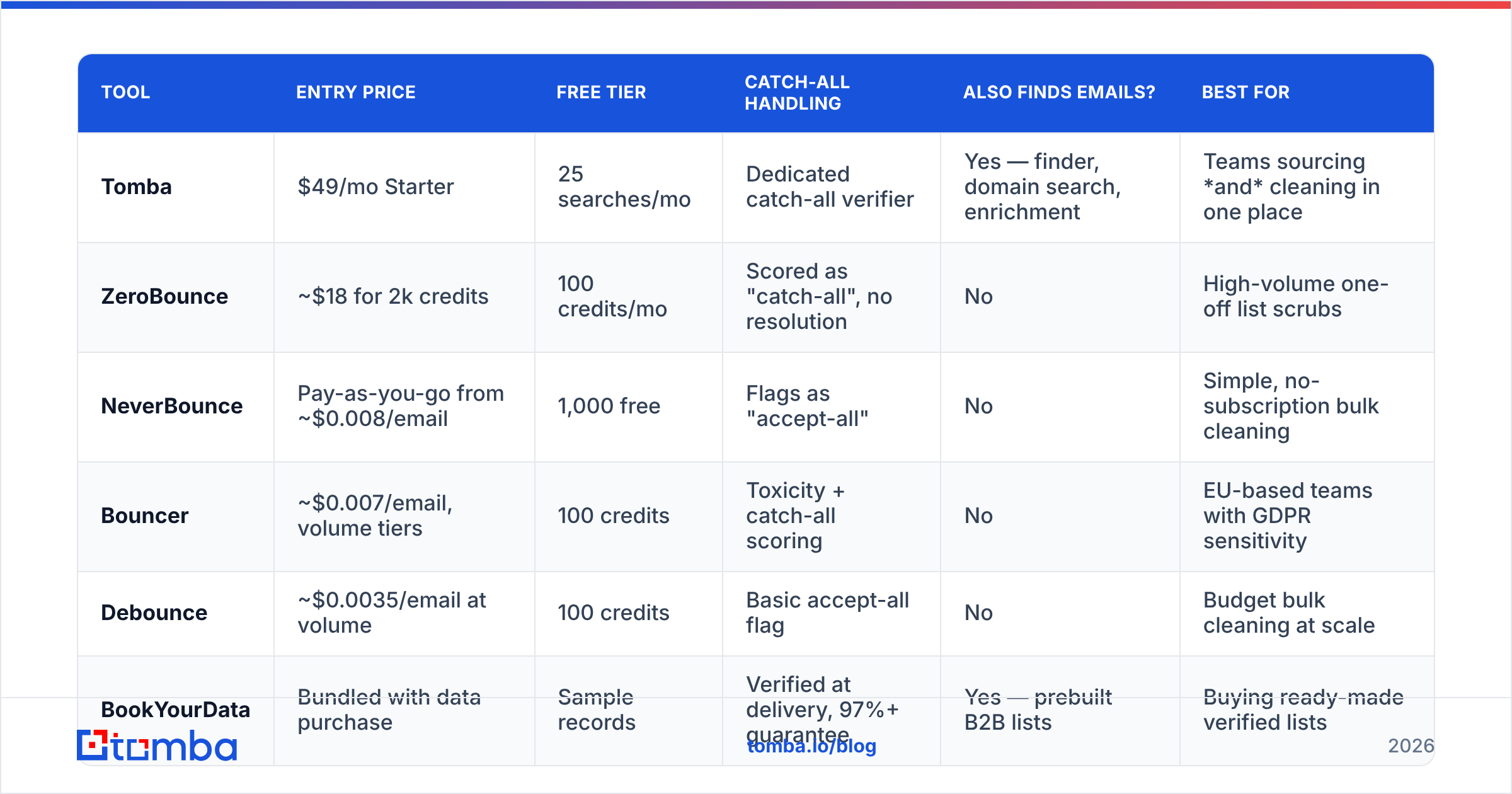
Pricing shifts, so treat the numbers below as directional and check each vendor's current page before you commit. The structural differences matter more than the exact per-credit rate.
| Tool | Entry price | Free tier | Catch-all handling | Also finds emails? | Best for |
|---|---|---|---|---|---|
| Tomba | $49/mo Starter | 25 searches/mo | Dedicated catch-all verifier | Yes — finder, domain search, enrichment | Teams sourcing and cleaning in one place |
| ZeroBounce | ~$18 for 2k credits | 100 credits/mo | Scored as "catch-all", no resolution | No | High-volume one-off list scrubs |
| NeverBounce | Pay-as-you-go from ~$0.008/email | 1,000 free | Flags as "accept-all" | No | Simple, no-subscription bulk cleaning |
| Bouncer | ~$0.007/email, volume tiers | 100 credits | Toxicity + catch-all scoring | No | EU-based teams with GDPR sensitivity |
| Debounce | ~$0.0035/email at volume | 100 credits | Basic accept-all flag | No | Budget bulk cleaning at scale |
| BookYourData | Bundled with data purchase | Sample records | Verified at delivery, 97%+ guarantee | Yes — prebuilt B2B lists | Buying ready-made verified lists |
Two honest observations from this table.
First, most dedicated verifiers are cheaper per credit than platforms that bundle finding and verification. If all you ever do is upload a CSV and download a cleaned CSV, a pure-play verifier will be the lower unit cost. That's a real advantage and worth saying plainly.
Second, per-credit cost stops being the deciding factor the moment you're also sourcing contacts. Every handoff between a finder and a separate verifier is a place where records get lost, formats break, and stale data slips through. If your workflow is "find prospects → verify → push to CRM," a combined platform removes an entire integration from the chain. Tomba's email verifier runs on the same infrastructure as its finder, so addresses are validated before they're ever returned — you're not cleaning your own output after the fact. See Tomba pricing for how verification credits map to the $49 Starter, $99 Growth, and $249 Pro tiers.
If you want to sanity-check any vendor's claims before buying, the review volume on G2's email verification category is a more reliable signal than the accuracy percentage on the vendor's own landing page.
What about catch-all domains?#
This is the single biggest gap in most cleaning workflows, and it's worth its own section.
A catch-all (or accept-all) domain is configured to accept mail addressed to any mailbox at that domain, real or not. nonsense-string-9481@company.com gets accepted at the SMTP layer exactly the same way sarah.chen@company.com does. Standard verification cannot distinguish between them, so most tools return a shrug: "accept-all", "unknown", "risky".
Depending on the vertical, 15-30% of a B2B list can sit behind catch-all domains. Larger enterprises are disproportionately likely to run them. So if you drop everything marked "risky," you're deleting a meaningful slice of exactly the accounts you most want to reach. And if you keep them all, you're gambling on your bounce rate.
Neither is a good answer. The better approach is a second-pass resolution layer that uses pattern intelligence, historical send data, and provider-specific behavior to score which catch-all addresses are actually deliverable. Tomba's catch-all verifier does exactly this, returning a confidence score rather than a binary unknown. Whatever tool you use, the rule is the same: segment catch-all addresses into their own campaign, send at low volume from a secondary domain first, and let the real-world bounce data tell you what to do with the rest.
What does email cleaning not fix?#
Cleaning is necessary. It is not sufficient. Teams routinely scrub a list, watch bounces drop, and then get confused when open rates stay flat and replies stay at zero. Cleaning fixed the delivery problem; it did not fix the other three.
- Authentication. No amount of cleaning compensates for a missing or misconfigured SPF, DKIM, or DMARC record. Run an SPF record lookup and confirm all three are aligned before you blame the list.
- Domain and IP reputation. If you're already on a blocklist, a clean list won't get you off it. Check with a blacklist checker and work through delisting first.
- Content and volume. Spam-triggering copy, image-heavy templates, and a cold domain ramping from 0 to 5,000 sends overnight will land you in spam with a perfectly verified list.
- Relevance. Verification confirms a mailbox exists. It says nothing about whether that person wants to hear from you. Complaint rate — the metric Google actually enforces at 0.3% — is driven almost entirely by targeting, not by list validity.
Full context on how these interact lives in the broader email deliverability fundamentals, but the short version is that cleaning is the floor, not the ceiling.
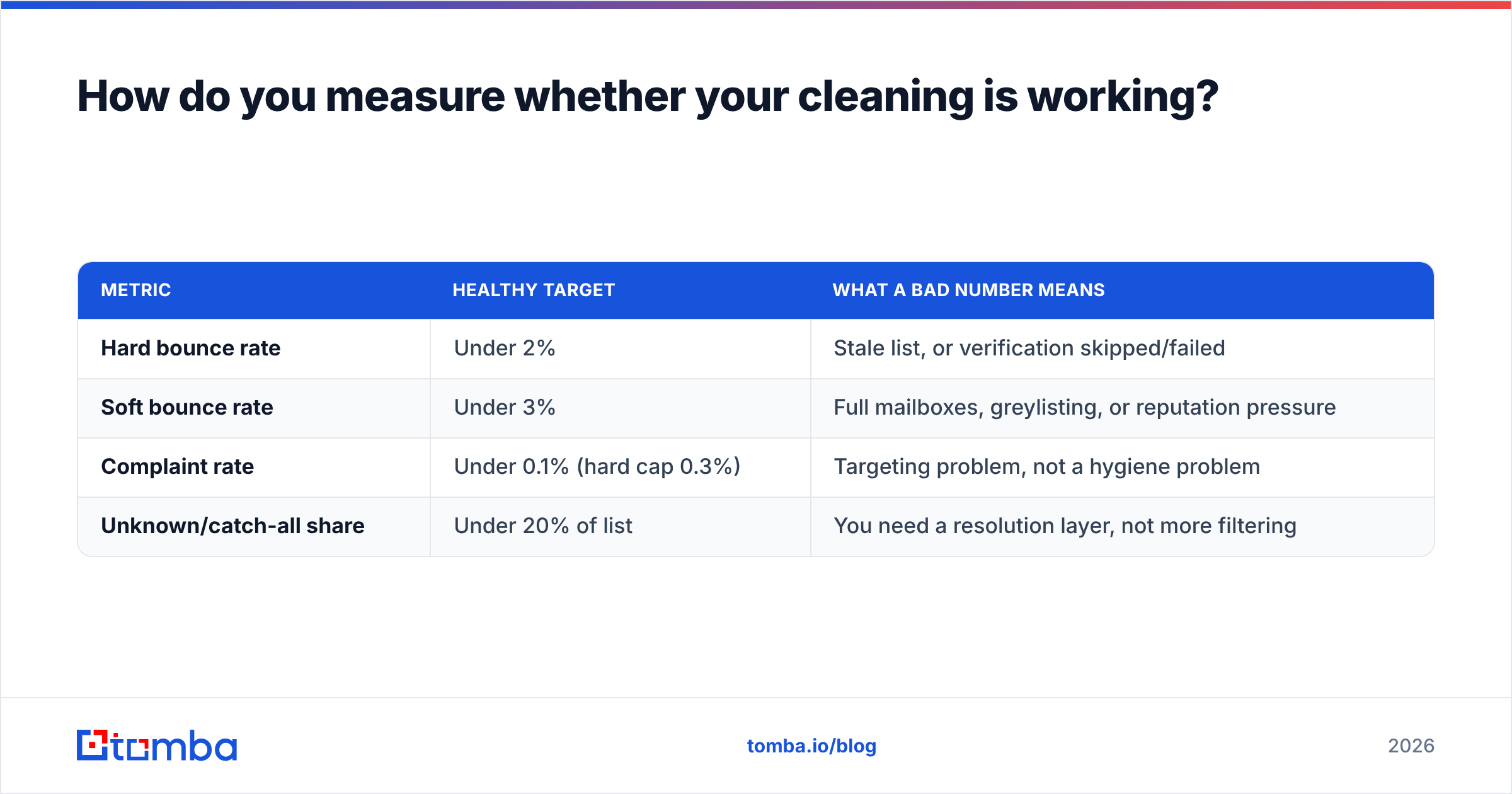
How do you measure whether your cleaning is working?#
Track four numbers, before and after each cleaning cycle:
| Metric | Healthy target | What a bad number means |
|---|---|---|
| Hard bounce rate | Under 2% | Stale list, or verification skipped/failed |
| Soft bounce rate | Under 3% | Full mailboxes, greylisting, or reputation pressure |
| Complaint rate | Under 0.1% (hard cap 0.3%) | Targeting problem, not a hygiene problem |
| Unknown/catch-all share | Under 20% of list | You need a resolution layer, not more filtering |
If your hard bounce rate is still above 2% after a full clean, the failure is upstream: either your source data is bad, or the verifier is returning optimistic results for a provider it doesn't handle well. Test by pulling 200 random addresses, sending a low-volume campaign from a throwaway subdomain, and comparing actual bounces to the verifier's predictions. Vendors that overstate accuracy get caught by this test in about ten minutes.
Where should you start?#
If you're inheriting a list you didn't build: deduplicate, run a full bulk verification, suppress every hard invalid, segment the catch-alls, and re-verify anything older than 90 days. Budget roughly $0.004-0.008 per address and expect to lose 10-25% of the file. That loss is the point.
If you're building a list from scratch: verify at capture and never let an unvalidated address into the database. The cheapest cleaning is the cleaning you never have to do.
And if the real problem is that your source data was bad to begin with — scraped, purchased from an unnamed broker, or exported from a CRM nobody has maintained since 2023 — cleaning is treating a symptom. Start with a verified source instead. The Tomba Email Finder returns addresses that have already passed syntax, MX, SMTP, and catch-all checks before they reach you, with confidence scores attached to every result. Start on the free tier with 25 searches a month, or move to the $49/mo Starter plan when you're ready to run volume — either way, you'll spend less time cleaning because there's less to clean.
Sources: Google bulk sender guidelines, Bounce message (Wikipedia), G2 email verification category
Related guides#
Ready to find emails that actually work?
Join 150,000+ professionals who stopped guessing and started sending. Free credits on signup — no credit card required.
Get the Tomba newsletter
Practical outbound tactics and product updates — once every two weeks.
About the author