Email Deliverability in 2026: The Complete Inbox Placement Guide
Your 2024 deliverability playbook is now a liability. Google and Yahoo's bulk-sender rules, one-click unsubscribe, and a hard 0.3% spam threshold changed the rules — here's what actually works in 2026.
TL;DR
- The 2024 Google/Yahoo bulk-sender rules are no longer "new requirements" — they are the floor. SPF, DKIM, DMARC, one-click unsubscribe, and a spam-complaint rate under 0.3% are table stakes in 2026.
- Deliverability is now dominated by engagement signals, not authentication. Passing DMARC gets you considered; replies, opens, and non-deletions get you into the primary tab.
- List quality is the single highest-leverage lever. A 6% bounce rate can tank a domain that is otherwise perfectly configured.
- Microsoft tightened its own bulk-sender enforcement in 2025, so "it works fine on Gmail" is no longer a passing grade.
- Fix order that actually works: authenticate → clean the list → warm the domain → fix content → monitor postmaster data weekly.
What is email deliverability, and how is it different from delivery?#
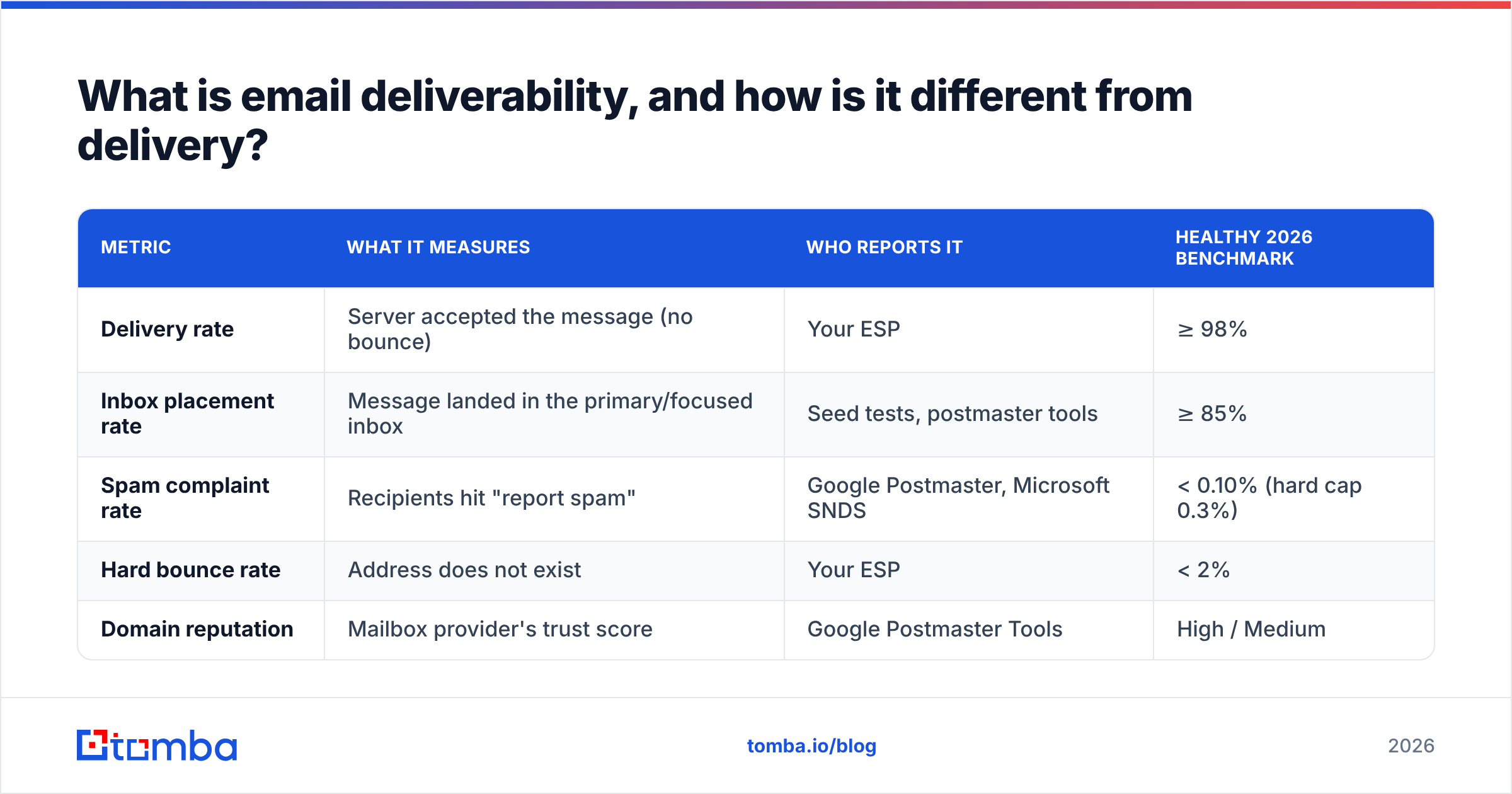
Deliverability is whether your email reaches the inbox. Delivery is whether the receiving server accepted the message at all. They are not the same number, and confusing them is the most common reason teams think their program is healthy when it is quietly dying.
Think of it like a building with a doorman and a mailroom. Delivery means the doorman let your envelope through the front door — that is your 98% "delivered" stat in your ESP dashboard. Deliverability means the mailroom actually put it in the recipient's box instead of the trash chute in the basement. Your ESP can only see the doorman. It has no idea what the mailroom did.
That gap is why a campaign can show 99% delivered and 4% open. The messages landed in spam, and nobody told you.
| Metric | What it measures | Who reports it | Healthy 2026 benchmark |
|---|---|---|---|
| Delivery rate | Server accepted the message (no bounce) | Your ESP | ≥ 98% |
| Inbox placement rate | Message landed in the primary/focused inbox | Seed tests, postmaster tools | ≥ 85% |
| Spam complaint rate | Recipients hit "report spam" | Google Postmaster, Microsoft SNDS | < 0.10% (hard cap 0.3%) |
| Hard bounce rate | Address does not exist | Your ESP | < 2% |
| Domain reputation | Mailbox provider's trust score | Google Postmaster Tools | High / Medium |
If you only track the first row, you are flying blind on the four rows that decide revenue.
What actually changed between 2024 and 2026?#
February 2024 was the inflection point. Google and Yahoo simultaneously enforced bulk-sender requirements that had been "best practice" for a decade. In 2026, the situation has moved again — and most teams are still running a 2024 checklist.
Here is the honest before/after:
- Authentication moved from optional to assumed. In 2024, adding DMARC was a project. In 2026, a missing or
p=none-forever DMARC record reads as neglect. Providers increasingly want to see a policy you actually intend to enforce, and BIMI (which requiresp=quarantineorp=reject) has become the visible reward for getting there. - The 0.3% spam-complaint threshold became a real cliff, not a guideline. Google's own guidance is to stay under 0.3% and target below 0.1%. Crossing it does not produce a warning email — it produces a silent, weeks-long throttle.
- One-click unsubscribe (RFC 8058) is enforced, not suggested. A
List-Unsubscribe-Postheader is now expected on bulk marketing mail. Burying the opt-out in a footer image is a complaint generator. - Microsoft caught up. Outlook/Hotmail rolled out its own bulk-sender enforcement in 2025 with the same SPF/DKIM/DMARC baseline. Roughly a third of B2B inboxes are Microsoft-hosted, so a Gmail-only strategy leaves a huge blind spot.
- Engagement weighting increased. Providers lean harder on whether a human did something with your mail. Deleted-without-reading is now a meaningfully negative signal, not a neutral one.
- AI-generated volume raised the noise floor. Filters got more aggressive about templated, high-similarity messages sent at scale — which is exactly what a badly configured sequencer produces.
The practical translation: the technical bar is lower to clear than it looks, and the behavioral bar is much higher than most teams assume.
Which technical records do you actually need?#
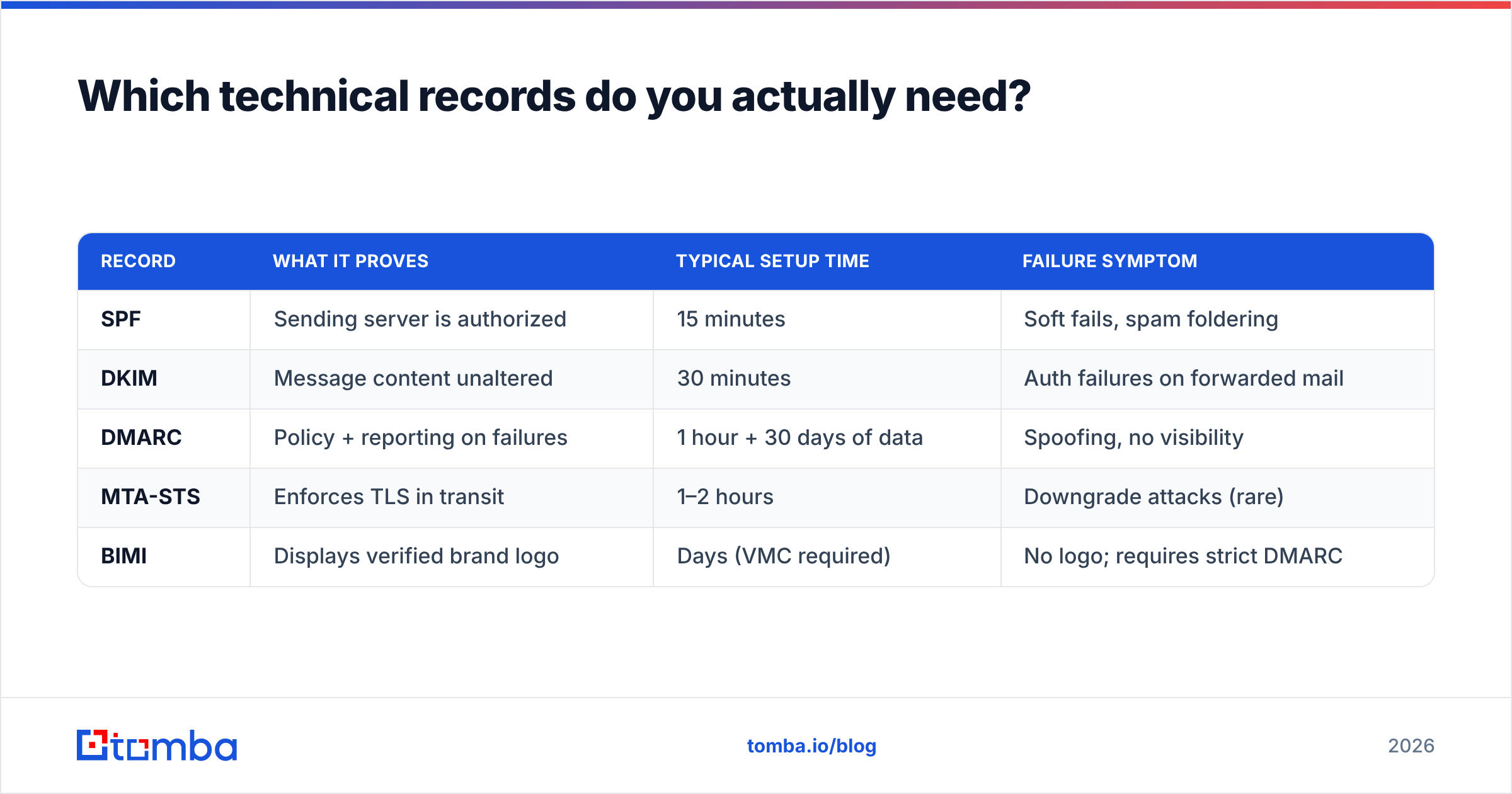
Three records, in this order. Get them exactly right once and you rarely touch them again.
SPF publishes which servers may send on your domain's behalf. Keep it under 10 DNS lookups — exceeding that returns a permerror and silently invalidates the record. Use an SPF checker to confirm the lookup count, not just the syntax.
DKIM cryptographically signs each message so the receiver can verify it was not altered in transit. Use a 2048-bit key. Rotate it annually. If you send from multiple platforms — your ESP, your CRM, your billing system — each needs its own selector.
DMARC tells receivers what to do when SPF and DKIM fail, and — critically — sends you reports. Start at p=none to collect data, move to p=quarantine within 30 days, then p=reject. Staying at p=none for two years is the most common half-finished deliverability project in B2B.
| Record | What it proves | Typical setup time | Failure symptom |
|---|---|---|---|
| SPF | Sending server is authorized | 15 minutes | Soft fails, spam foldering |
| DKIM | Message content unaltered | 30 minutes | Auth failures on forwarded mail |
| DMARC | Policy + reporting on failures | 1 hour + 30 days of data | Spoofing, no visibility |
| MTA-STS | Enforces TLS in transit | 1–2 hours | Downgrade attacks (rare) |
| BIMI | Displays verified brand logo | Days (VMC required) | No logo; requires strict DMARC |
Two more housekeeping items that punch above their weight: set up reverse DNS (PTR) for any IP you control, and make sure your From domain resolves to a real website with a real privacy policy. Filters check.
Why is list quality more important than everything else combined?#
Because bounces and complaints are the only two signals you fully control, and they are the two that cause the most damage.
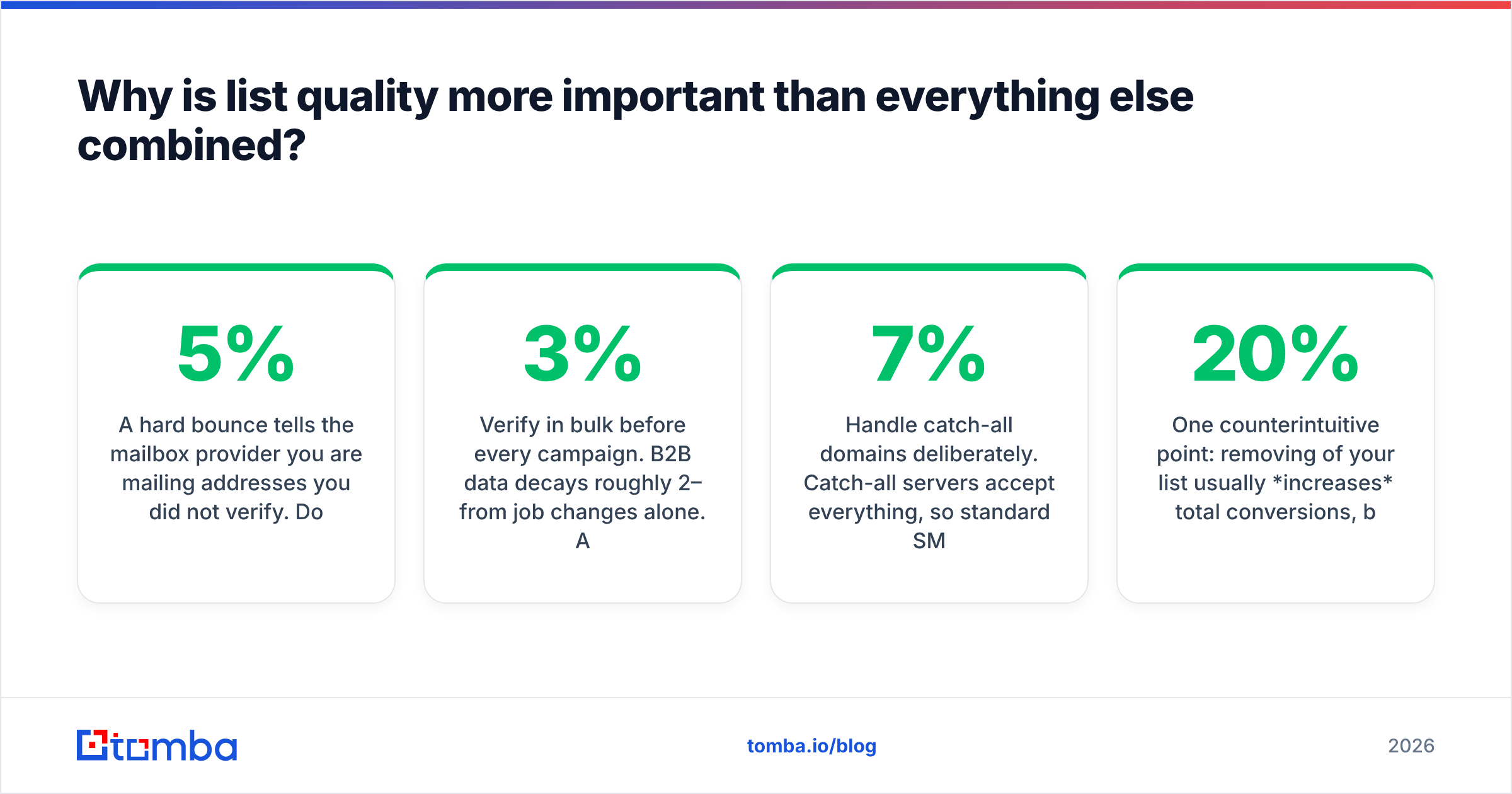
A hard bounce tells the mailbox provider you are mailing addresses you did not verify. Do that at volume and you look exactly like a spammer working from a scraped list — because functionally, you are. Most providers start throttling around a 5% bounce rate; some react earlier.
The fix is boring and it works: verify before you send, every time.
- Verify at capture. A free email checker on your form catches typos like
gmial.combefore they enter your CRM. - Verify in bulk before every campaign. B2B data decays roughly 2–3% per month from job changes alone. A list you cleaned in January is measurably worse in April. Run it through an email verifier before each send.
- Handle catch-all domains deliberately. Catch-all servers accept everything, so standard SMTP checks return "unknown." A dedicated catch-all verifier uses pattern and source evidence instead of guessing — and guessing on catch-alls is how a clean list turns into a 7% bounce rate.
- Source addresses that were real to begin with. Pattern-guessed addresses (
first.last@) bounce far more than sourced-and-confirmed ones. If you are building lists, an email finder that returns a confidence score beats a permutator that returns twelve maybes. - Suppress aggressively. Anyone who has not opened in 180 days is costing you reputation. Sunset them or move them to a low-frequency track.
One counterintuitive point: removing 20% of your list usually increases total conversions, because the remaining 80% stops landing in spam. Deliverability is one of the few areas where sending to fewer people makes you more money.
How do you warm up a domain without wrecking it?#
Slowly, and with real replies.
A brand-new sending domain has zero reputation, which providers treat closer to "bad" than "neutral." Jumping from 0 to 500 sends per day on week one is the fastest way to get a domain permanently flagged.
A workable 2026 ramp for a cold-outbound domain:
- Week 1: 10–15 sends/day, all to engaged internal or partner addresses. Reply to every one.
- Week 2: 25–40/day. Introduce a small percentage of real prospects.
- Week 3: 50–75/day. Watch bounce and complaint rates daily, not weekly.
- Week 4: 100–150/day. If complaint rate exceeds 0.1%, stop scaling and fix content first.
- Week 5+: Cap at roughly 200–300/day per mailbox regardless of what your tool allows.
Two rules people break constantly. First, never warm on your primary corporate domain — use a lookalike (getcompany.com, company-hq.com) so a mistake does not poison the domain your invoices go out on. Second, replies matter more than opens during warmup. An email warmup calculator helps you model the ramp, but no tool substitutes for genuine conversation volume in weeks one and two.
If you are running dedicated IPs, the same logic applies with a longer horizon — 4 to 8 weeks before you approach steady-state volume.
What content patterns get filtered in 2026?#
Filters no longer key off a static list of trigger words. "Free" in a subject line will not, by itself, sink you. What does:
- High template similarity at volume. Ten thousand messages with identical structure and one swapped variable is a fingerprint. Vary sentence structure across your sequence, not just the merge fields.
- Link-to-text ratio. More than two or three links in a cold email — especially tracking-wrapped ones — reads as commercial bulk. One link maximum in a first-touch email.
- Redirect-heavy tracking domains. Shared click-tracking domains inherit every other sender's reputation. Use a custom tracking subdomain, or turn open-tracking off entirely for cold outbound; the data is unreliable post-MPP anyway.
- Image-heavy, text-light HTML. Plain text (or very light HTML) outperforms designed templates for one-to-one outbound by a wide margin.
- Attachments on a first touch. Almost always filtered. Link instead.
- Mismatched envelope and display identity. If the
Fromname, reply-to, and signature domain disagree, filters notice.
Before a big send, run the copy through a spam checker to catch the mechanical issues, then read it aloud. If it sounds like a broadcast, it will be treated like one.
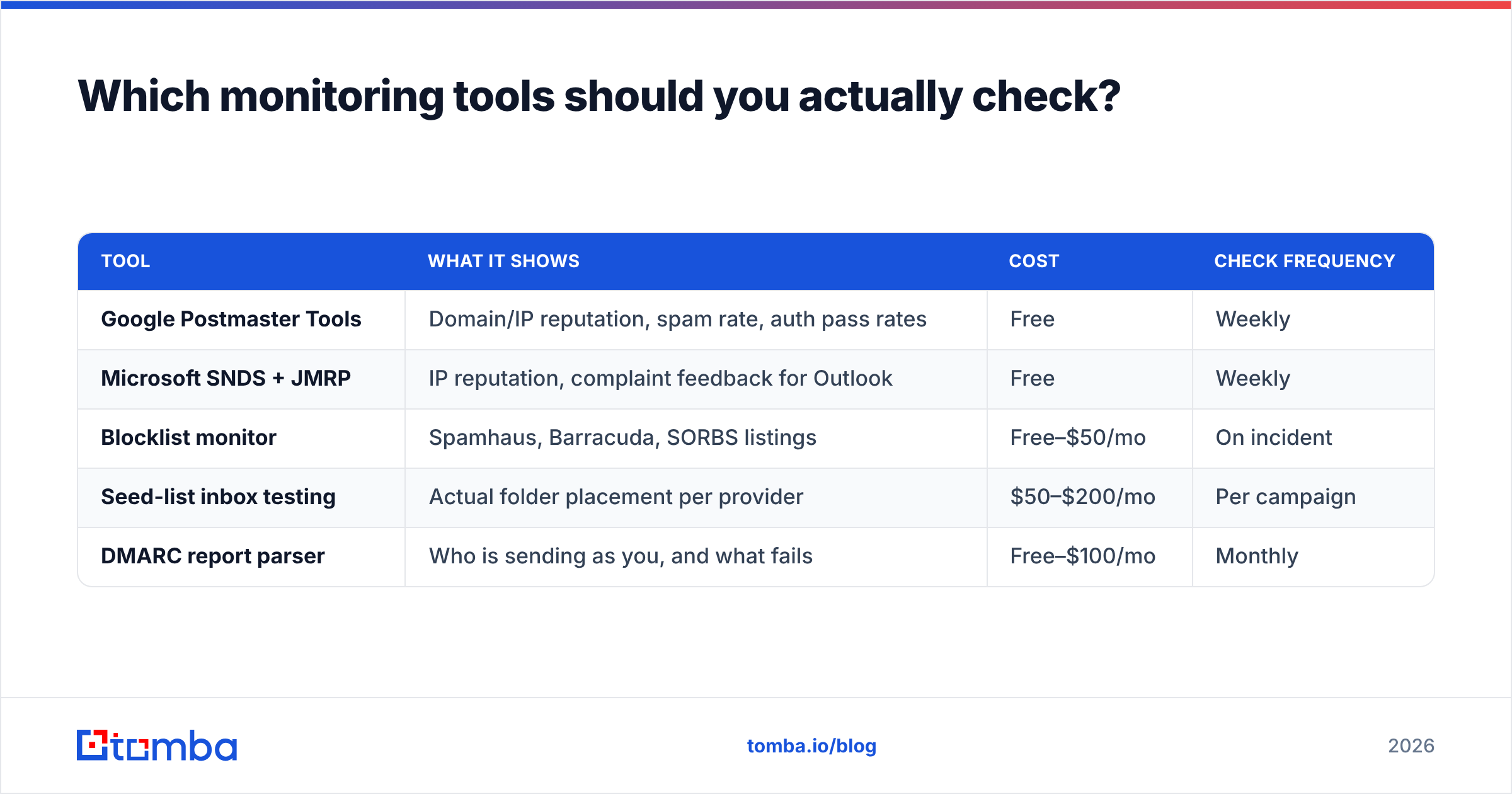
Which monitoring tools should you actually check?#
You need three views: what Google sees, what Microsoft sees, and whether you are on a blocklist.
| Tool | What it shows | Cost | Check frequency |
|---|---|---|---|
| Google Postmaster Tools | Domain/IP reputation, spam rate, auth pass rates | Free | Weekly |
| Microsoft SNDS + JMRP | IP reputation, complaint feedback for Outlook | Free | Weekly |
| Blocklist monitor | Spamhaus, Barracuda, SORBS listings | Free–$50/mo | On incident |
| Seed-list inbox testing | Actual folder placement per provider | $50–$200/mo | Per campaign |
| DMARC report parser | Who is sending as you, and what fails | Free–$100/mo | Monthly |
Google Postmaster is non-negotiable and takes ten minutes to set up — you need the domain verified and at least a few hundred daily sends to Gmail before data appears. Microsoft's SNDS covers the IP side; if you are on shared ESP infrastructure you will not see much, which is itself an argument for a dedicated IP once you exceed roughly 100k sends per month.
For blocklists, Spamhaus is the one that matters most. A listing there is an emergency; most others are noise. Check with a blacklist checker when volume drops unexpectedly.
What does a realistic 30-day fix plan look like?#
If your deliverability is already broken, do these in order. Skipping ahead wastes the work.
Days 1–3 — Stop the bleeding. Pause all cold sequences. Pull your last 90 days of bounce and complaint data. If complaint rate is above 0.3%, the list or the copy is the problem, not the DNS.
Days 4–7 — Fix authentication. SPF under 10 lookups, DKIM 2048-bit on every sending platform, DMARC at p=none with a reporting address you actually read. Verify with a real DNS lookup, not your ESP's green checkmark.
Days 8–14 — Rebuild the list. Bulk-verify everything. Remove hard bounces, role accounts (info@, sales@, admin@), and anyone dormant past 180 days. Re-source the contacts that mattered using a verified domain search rather than re-guessing patterns.
Days 15–21 — Restart at 20% volume. Resume sending on your warmed secondary domain only. Watch Postmaster daily. Do not scale until complaint rate sits below 0.1% for a full week.
Days 22–30 — Fix content and re-scale. Cut links, shorten copy, personalize the first line with something a template cannot produce. Move DMARC to p=quarantine. Then ramp back toward normal volume over two more weeks.
Most teams want to skip days 8–14 because list cleaning feels like a step backward. It is the step that determines whether the other 23 days accomplish anything.
Where do most B2B teams still get this wrong?#
Three recurring mistakes, in order of cost:
They treat deliverability as a one-time setup. Records get configured, the box gets ticked, and nobody looks again until open rates halve. Deliverability is a maintained metric, like uptime.
They optimize the send and ignore the source. A perfectly authenticated domain mailing a 40%-stale list will still land in spam. Where your contacts come from — and how recently they were confirmed — matters more than any header. That is the entire argument for building lists from verified sources instead of scraped exports; Tomba's data sources approach exists precisely because unverified data is a deliverability problem disguised as a data problem.
They confuse volume with pipeline. Sending 3,000 emails a day at 40% inbox placement produces less pipeline than 800 at 92%, and it costs you a domain in the process.
Deliverability is not a growth hack. It is infrastructure hygiene, and the teams that treat it that way compound an advantage every quarter their competitors spend rebuilding burned domains.
Ready to fix the input, not just the output?#
The fastest deliverability win available to most B2B teams is not a DNS change — it is sending to addresses that are actually real. Tomba's Email Finder returns verified professional emails with a confidence score on every result, so your bounce rate stops being a reputation liability. Start free with 25 searches a month, or move to Starter at $49/mo for volume work; full Tomba pricing runs from there up to Growth at $99/mo and Pro at $249/mo. Clean input, clean reputation, inbox placement that holds.
Related guides#
Ready to find emails that actually work?
Join 150,000+ professionals who stopped guessing and started sending. Free credits on signup — no credit card required.
Get the Tomba newsletter
Practical outbound tactics and product updates — once every two weeks.
About the author