Email Deliverability Best Practices: The 2026 Playbook
Authentication, list hygiene, volume ramps, and content all move inbox placement — but not equally. Here is what actually changes your deliverability in 2026, in priority order, with the numbers to watch.
TL;DR
- Authentication is table stakes, not an advantage. SPF, DKIM, and a DMARC policy at
p=rejectget you to the starting line — they don't win you the inbox. - Bounce rate is the single fastest way to destroy a sending domain. Keep it under 2%, and under 1% if you're cold.
- Complaint rate above 0.3% at Gmail is a hard ceiling. Google publishes that number; treat it as a compliance limit, not a target.
- Volume ramps matter more than copy. A new domain sending 500/day in week one will land in spam regardless of how good the email is.
- Most "deliverability tools" only measure. The fixes are list hygiene, authentication, and sending behavior — in that order.
What is email deliverability, and why is it not the same as delivery rate?#
Delivery rate is whether the receiving server accepted your message. Deliverability is whether a human ever saw it. Those two numbers can differ by 40 points and your sending platform will only show you the flattering one.
Think of it like a mailroom in an office building. Delivery rate means the courier handed the envelope to the front desk and got a signature. Deliverability means it made it onto the recipient's desk instead of into the bin behind the front desk. Gmail, Outlook, and every corporate filter accept almost everything at the SMTP layer, then decide placement afterward — inbox, Promotions, Junk, or silently quarantined. Your ESP sees a 99.2% "delivered" and reports success.
The gap between those two numbers is where your pipeline leaks. And in 2026 the gap has widened, because Gmail and Yahoo's 2024 bulk-sender requirements normalized enforcement that used to be discretionary: authenticated mail, one-click unsubscribe, and a complaint rate under 0.3%. Microsoft followed with similar requirements for high-volume senders into Outlook.com in 2025. What was once "best practice" is now a gate.
If you want the formal definition and the surrounding vocabulary, the email deliverability glossary entry covers the terminology used throughout this post.
What actually decides inbox placement in 2026?#
Mailbox providers don't publish their algorithms, but the observable inputs cluster into five buckets. They are not weighted equally, and this is the part most guides get wrong — they present a 30-item checklist as if every item moves the needle the same amount.
Here's the honest ranking, based on what actually recovers a burned domain:
- Recipient engagement signals. Opens are weak and getting weaker (Apple Mail Privacy Protection has poisoned that well since 2021). Replies, forwards, moves-out-of-spam, and "not spam" clicks are strong. Deletion without opening is a negative. This is the heaviest input at Gmail by a wide margin.
- Complaint and bounce rates. Spam complaints above 0.3% and hard bounces above 2% are the two fastest routes to a filtered domain. Both are entirely within your control before you press send.
- Sending behavior consistency. Sudden volume spikes, erratic schedules, and identical send bursts read as automation. Steady, predictable volume reads as a business.
- Authentication and infrastructure. SPF, DKIM, DMARC, reverse DNS, a dedicated sending domain. Necessary, but binary — you get no bonus for doing it well, only a penalty for doing it wrong.
- Content signals. Spam-trigger words, link-to-text ratio, image-heavy HTML, shortened URLs, tracking-domain reputation. Real, but the smallest lever. If your content is the problem, you usually have a bigger problem upstream.
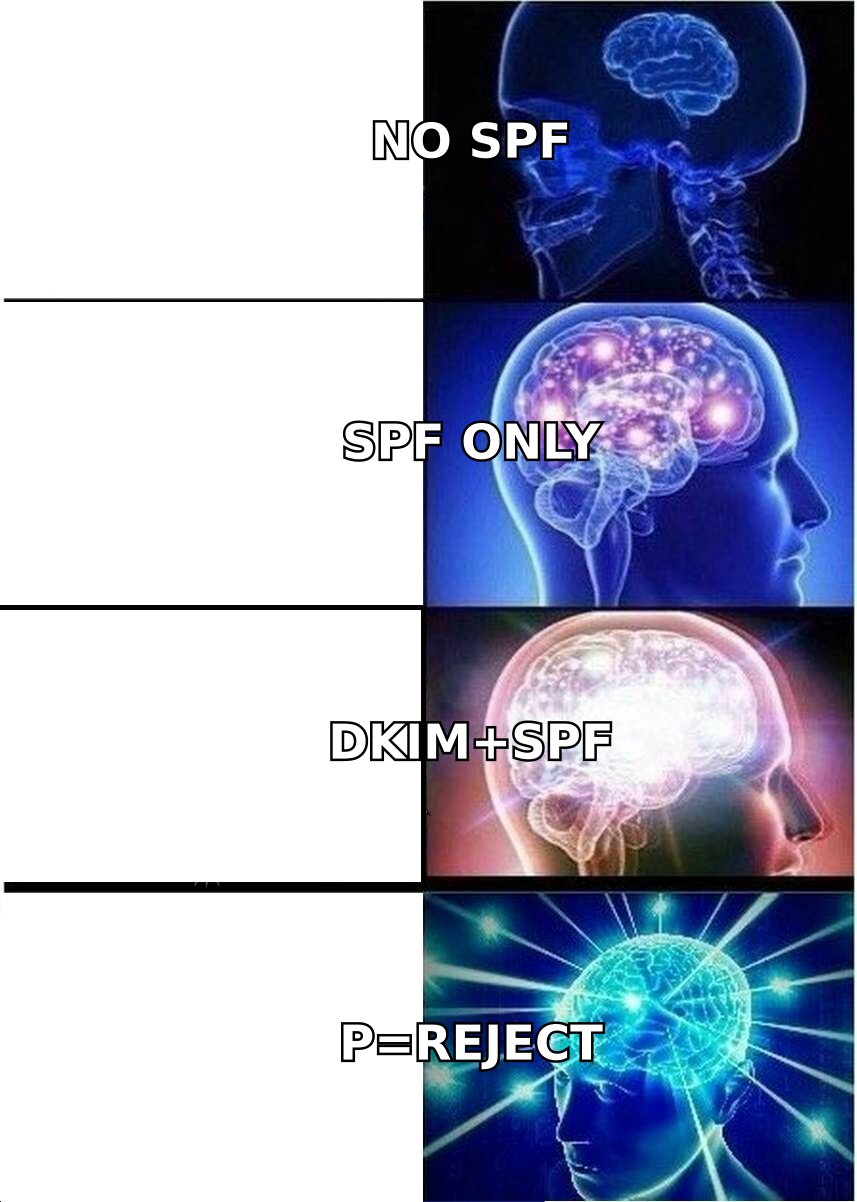
The practical implication: if you're spending your week rewriting subject lines while sending to a list you never verified, you're optimizing item five and ignoring item two.
How do you set up authentication correctly?#
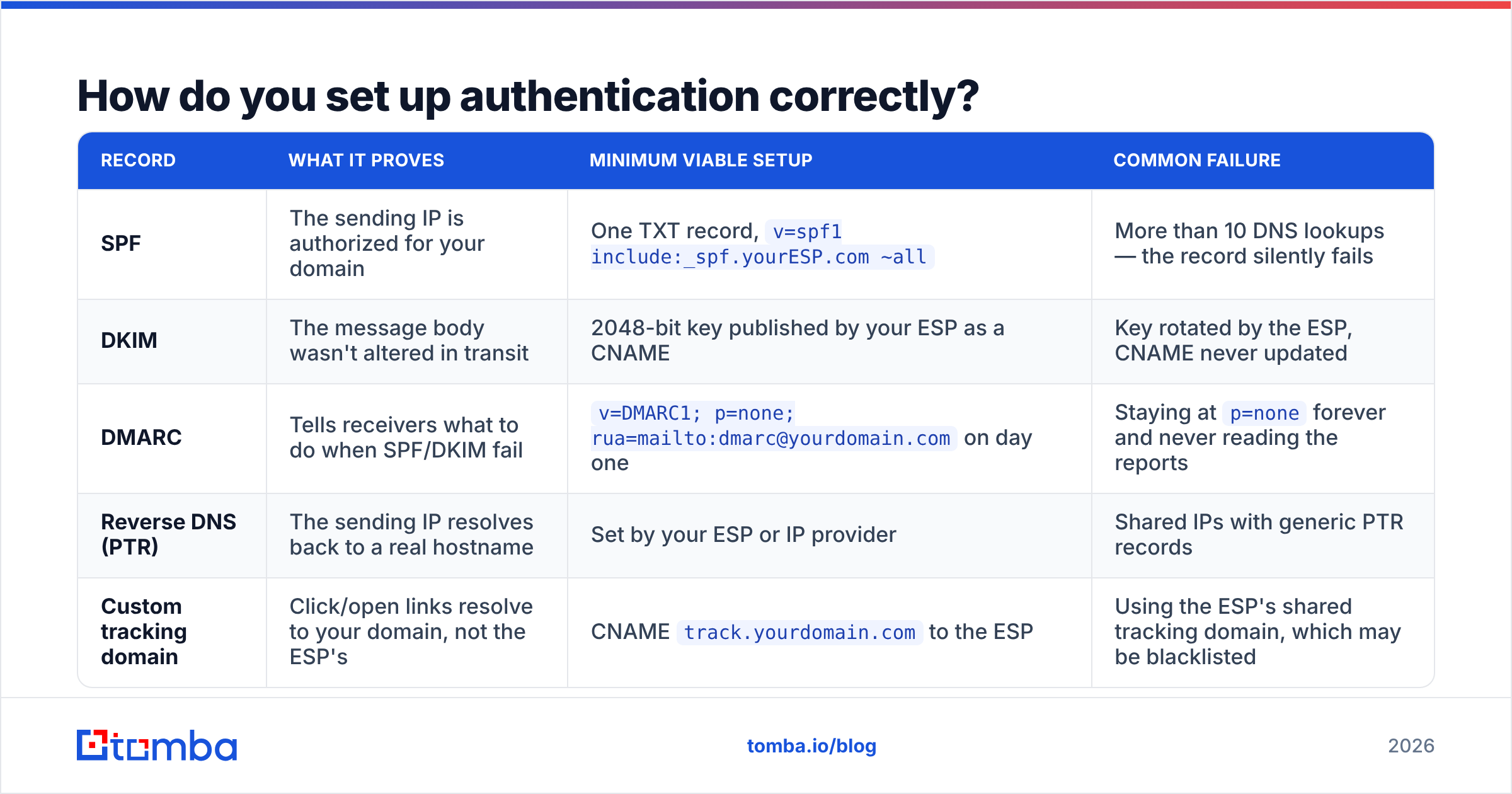
Three DNS records, one subdomain decision, and roughly 40 minutes of work. Do it once, verify it, and stop thinking about it.
| Record | What it proves | Minimum viable setup | Common failure |
|---|---|---|---|
| SPF | The sending IP is authorized for your domain | One TXT record, v=spf1 include:_spf.yourESP.com ~all |
More than 10 DNS lookups — the record silently fails |
| DKIM | The message body wasn't altered in transit | 2048-bit key published by your ESP as a CNAME | Key rotated by the ESP, CNAME never updated |
| DMARC | Tells receivers what to do when SPF/DKIM fail | v=DMARC1; p=none; rua=mailto:dmarc@yourdomain.com on day one |
Staying at p=none forever and never reading the reports |
| Reverse DNS (PTR) | The sending IP resolves back to a real hostname | Set by your ESP or IP provider | Shared IPs with generic PTR records |
| Custom tracking domain | Click/open links resolve to your domain, not the ESP's | CNAME track.yourdomain.com to the ESP |
Using the ESP's shared tracking domain, which may be blacklisted |
The DMARC progression is where most teams stall. Start at p=none for two weeks and actually read the aggregate reports — they'll reveal every system sending mail as you, including the invoicing tool nobody remembered. Then move to p=quarantine for two weeks, then p=reject. Jumping straight to p=reject will break your own transactional mail. The DMARC specification on Wikipedia is a decent neutral primer if you want to understand the mechanism before deploying it.
Two more infrastructure decisions that pay for themselves:
Send cold outreach from a separate domain. Buy yourcompany.co or get-yourcompany.com, warm it independently, and keep your primary domain for transactional and marketing mail. If the cold domain burns, your invoices and password resets still deliver.
Verify your records before you trust them. A free SPF checker will catch the lookup-limit problem that silently invalidates a third of SPF records in the wild, and a blacklist checker tells you whether your IP or domain is already listed on Spamhaus, SORBS, or Barracuda before you diagnose anything else.
Google's own sender guidelines are the authoritative source for what Gmail requires. Read them directly rather than a blog's summary of them, including this one.
How clean does your list actually need to be?#
Clean enough that hard bounces stay under 2%, and for cold outreach, under 1%.
That number sounds achievable until you look at what happens to B2B data. Contact data decays at roughly 22–30% per year — people change jobs, companies restructure, domains get consolidated after acquisitions. A list you built in January is materially wrong by August. If you exported 5,000 contacts from a CRM last year and send to them cold today, you should expect 800 to 1,500 of them to be invalid.
Send that, and here's the sequence: bounce rate spikes to 15%, the receiving providers flag the sending domain as a list-buyer, your inbox placement drops for every subsequent send including to valid addresses, and you spend six weeks rebuilding reputation you destroyed in one afternoon.
The fix is unglamorous. Before any campaign:
- Run every address through verification. An email verifier checks syntax, domain existence, MX records, and mailbox existence via SMTP handshake. Anything marked invalid gets removed, not "sent anyway to see what happens."
- Handle catch-all domains explicitly. Roughly 15–20% of B2B domains accept mail for any address, so standard verification returns "unknown." A catch-all verifier applies pattern confidence and secondary signals to separate the likely-real from the guessed. Send to unverified catch-alls at your own risk, and segment them separately so their bounces don't contaminate your main domain metrics.
- Purge role accounts and spam traps.
info@,sales@,admin@,abuse@— these generate complaints at multiples of the rate of personal addresses, and recycled spam traps live in old purchased lists. - Suppress non-engagers on a schedule. If someone hasn't opened or clicked in 180 days, stop mailing them. They're not going to convert, and they are actively dragging your engagement average down.
- Never buy a list. Not because it's morally wrong, but because purchased lists are the single highest-probability source of spam traps, and one pristine trap hit can list your domain for months.
The alternative to cleaning a bad list is not building one in the first place. Sourcing addresses through a verified email finder at collection time — rather than scraping and hoping — means your list arrives already validated, and your bounce rate is a non-event.

What warmup schedule should a new domain follow?#
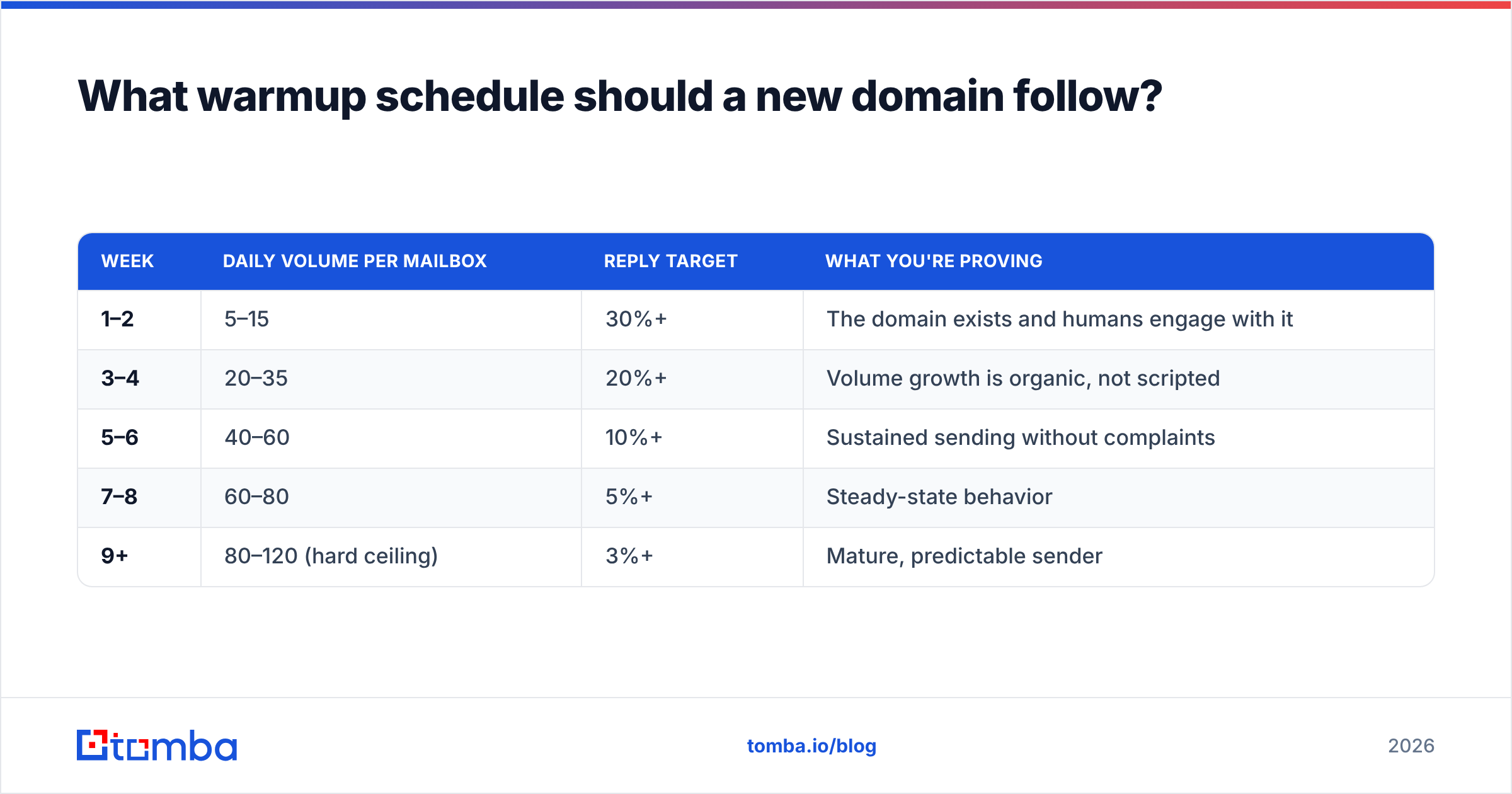
Slower than you want. The instinct after buying a domain is to start sending at target volume in week two. That's the most common self-inflicted deliverability wound in outbound.
| Week | Daily volume per mailbox | Reply target | What you're proving |
|---|---|---|---|
| 1–2 | 5–15 | 30%+ | The domain exists and humans engage with it |
| 3–4 | 20–35 | 20%+ | Volume growth is organic, not scripted |
| 5–6 | 40–60 | 10%+ | Sustained sending without complaints |
| 7–8 | 60–80 | 5%+ | Steady-state behavior |
| 9+ | 80–120 (hard ceiling) | 3%+ | Mature, predictable sender |
A few rules that matter more than the exact numbers:
Never exceed ~120 emails/day per mailbox on Google Workspace or Microsoft 365. Above that, you're outside normal human behavior and the filters know it. Need more volume? Add mailboxes, not throughput per mailbox.
Warmup tools are a supplement, not a substitute. Automated warmup networks generate artificial engagement between participating inboxes. They help establish a baseline, but providers have gotten better at recognizing warmup-pool traffic patterns. Real replies from real prospects are worth ten times as much. A warmup calculator can model your ramp, but the schedule only works if you also send genuinely reply-worthy mail during it.
Keep sending on weekends at reduced volume. A sender that goes completely silent Friday evening and floods Monday morning looks like a machine. Trickle 20% volume through the weekend.
Do content and copy still affect deliverability?#
Yes, but less than you've been told, and in specific ways.
The "spam word" mythology is mostly obsolete. Modern filters use machine learning on the full context of a message plus sender history — a single "free" in your subject line will not send you to junk if your domain has good engagement. What genuinely hurts:
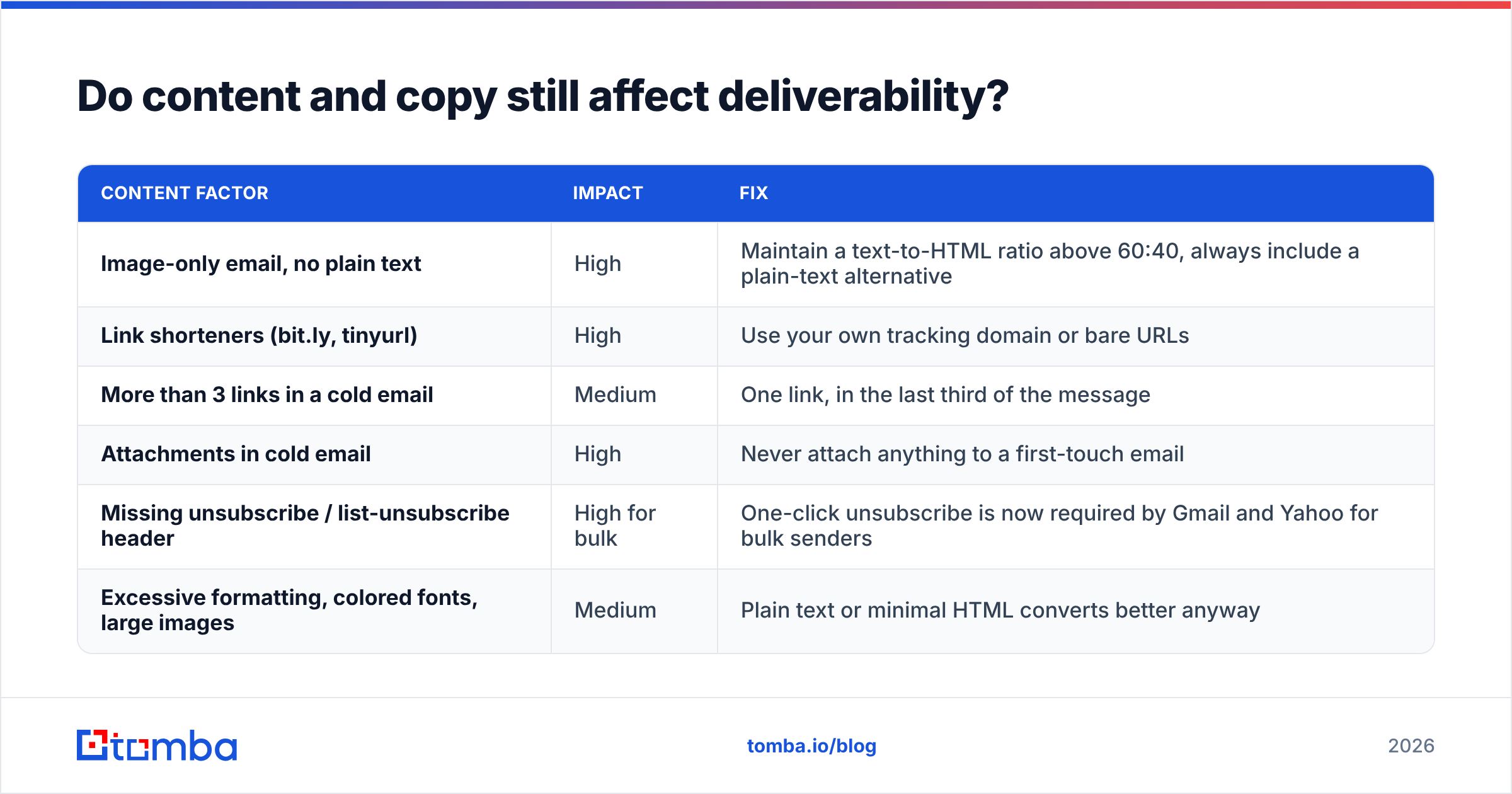
| Content factor | Impact | Fix |
|---|---|---|
| Image-only email, no plain text | High | Maintain a text-to-HTML ratio above 60:40, always include a plain-text alternative |
| Link shorteners (bit.ly, tinyurl) | High | Use your own tracking domain or bare URLs |
| More than 3 links in a cold email | Medium | One link, in the last third of the message |
| Attachments in cold email | High | Never attach anything to a first-touch email |
| Missing unsubscribe / list-unsubscribe header | High for bulk | One-click unsubscribe is now required by Gmail and Yahoo for bulk senders |
| Excessive formatting, colored fonts, large images | Medium | Plain text or minimal HTML converts better anyway |
Run a message through a spam checker before a campaign goes out. It's a five-second check that catches the obvious stuff. Just don't mistake a good spam score for good deliverability — the score measures content in isolation, and content is the weakest of the five inputs.
One thing that does move the needle: write emails that get replies. Reply rate is the strongest positive signal available to you. A 90-word email asking one specific question outperforms a 250-word pitch on both conversion and deliverability, and the deliverability gain compounds across every future send.
How do you diagnose a sudden deliverability drop?#
Work top-down, cheapest check first. Most teams start by rewriting copy, which is the last thing to check, not the first.
- Check blacklists. Spamhaus, Barracuda, SORBS. If you're listed, nothing else matters until you delist. Follow the listing organization's own removal process.
- Check Google Postmaster Tools. Postmaster Tools shows domain reputation, IP reputation, spam rate, and authentication pass rates for Gmail specifically. If your spam rate crossed 0.3%, that's your answer. Set it up before you need it — data is not retroactive.
- Verify authentication is still passing. ESPs rotate DKIM keys. SPF include chains change when a vendor updates infrastructure. Re-check both.
- Audit the last campaign's bounce rate. If it spiked, the list was the cause and the reputation damage is already done. Pause sending for 7–10 days, then resume at 30% volume.
- Segment by provider. If Gmail placement collapsed but Outlook is fine, it's an engagement problem. If both dropped simultaneously, it's authentication, blacklisting, or bounces.
- Only then look at content. And when you do, compare against a campaign that performed well rather than a generic checklist.
Recovery is slower than damage. Expect three to six weeks of disciplined, low-volume sending to rebuild a reputation that took one bad campaign to lose. There is no faster path, and any vendor promising one is selling you something.
Which metrics should you review weekly?#
Five numbers. If all five are green, you don't have a deliverability problem, whatever your gut says.
| Metric | Green | Amber | Red |
|---|---|---|---|
| Hard bounce rate | Under 1% | 1–3% | Above 3% |
| Spam complaint rate | Under 0.1% | 0.1–0.3% | Above 0.3% |
| Reply rate (cold) | Above 5% | 2–5% | Under 2% |
| Gmail domain reputation | High | Medium | Low / Bad |
| Unsubscribe rate | Under 0.5% | 0.5–1% | Above 1% |
Track these per sending domain, not aggregated. An aggregate that looks fine can hide one burned domain dragging a portfolio average. And review sender reputation trends monthly rather than reacting to single-day noise — reputation moves slowly in both directions.
What does a complete deliverability stack look like?#
You need four capabilities, and they don't have to come from four vendors:
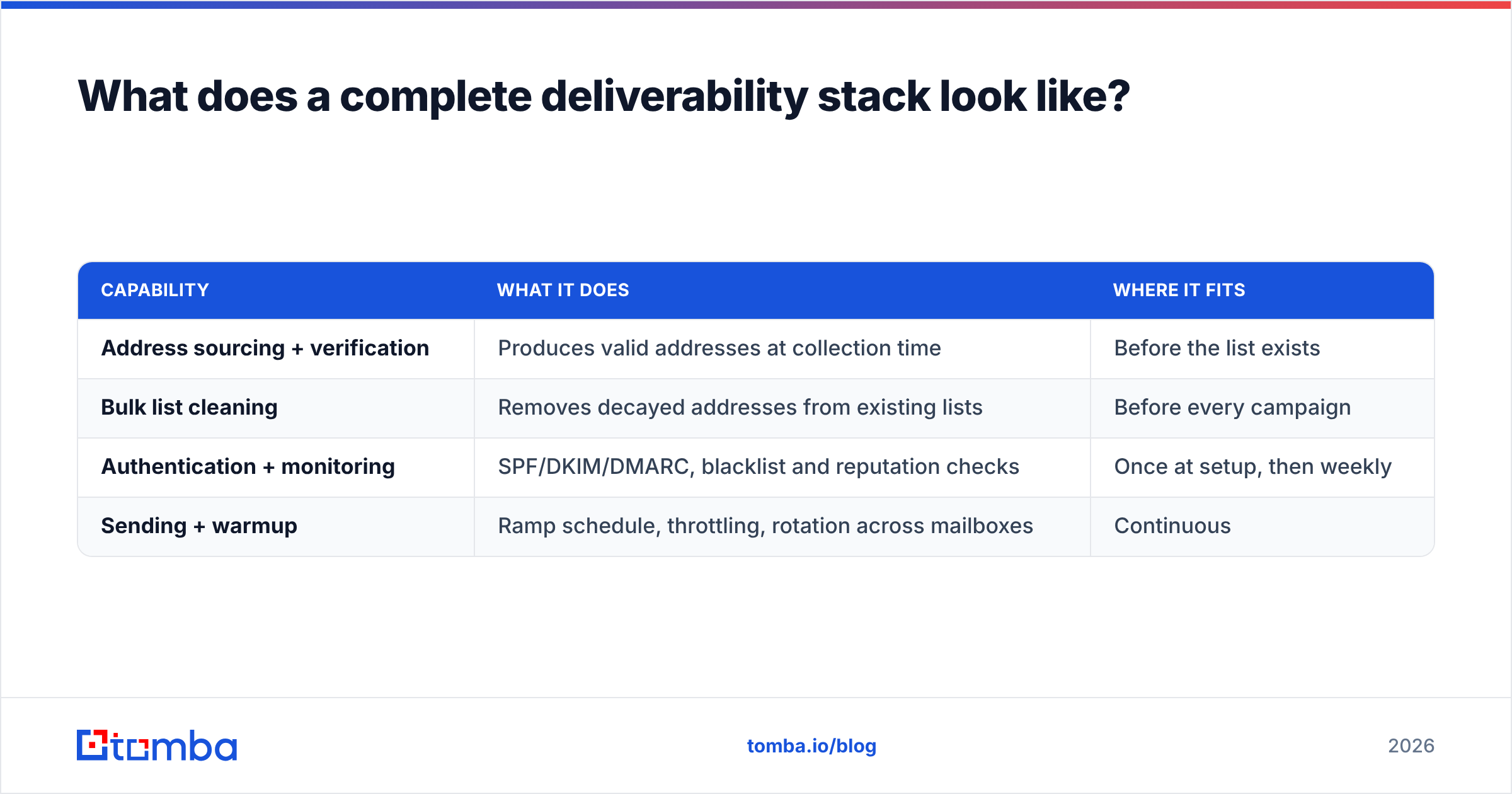
| Capability | What it does | Where it fits |
|---|---|---|
| Address sourcing + verification | Produces valid addresses at collection time | Before the list exists |
| Bulk list cleaning | Removes decayed addresses from existing lists | Before every campaign |
| Authentication + monitoring | SPF/DKIM/DMARC, blacklist and reputation checks | Once at setup, then weekly |
| Sending + warmup | Ramp schedule, throttling, rotation across mailboxes | Continuous |
The mistake is buying a monitoring tool and calling it a deliverability strategy. Dashboards tell you the house is on fire; they don't put it out. The two capabilities that prevent fires are sourcing verified addresses and cleaning lists before you send — everything else is instrumentation.
For teams working from existing spreadsheets, a bulk verify pass costs a fraction of what a burned domain costs to replace. Tomba pricing starts with a free tier at 25 searches/month, with Starter at $49/mo, Growth at $99/mo, and Pro at $249/mo — enough to clean a mid-size list well before it costs you a domain.
Where to start this week#
Pick the highest-impact thing you're not doing. For most teams that's list hygiene, not authentication and not copy.
Run your next campaign list through verification before it sends, and source new contacts already validated rather than scraping and cleaning afterward. The Tomba Email Finder returns addresses with a confidence score and verification status attached, so the list you build is the list you can send to — no separate cleaning step, no 12% bounce rate discovered after the damage is done. Start on the free tier, run it against one campaign, and compare the bounce rate to your last send. That single comparison usually settles the argument about where deliverability actually comes from.
Related guides#
Ready to find emails that actually work?
Join 150,000+ professionals who stopped guessing and started sending. Free credits on signup — no credit card required.
Get the Tomba newsletter
Practical outbound tactics and product updates — once every two weeks.
About the author