Email Deliverability Checker: How to Test Inbox Placement in 2026
Most deliverability checkers grade your DNS and call it a day. Here's what a real inbox-placement test measures, which tools actually do it, and how to read the score without fooling yourself.
TL;DR
- An email deliverability checker tests two very different things: your technical setup (SPF, DKIM, DMARC, blacklists, content) and your actual inbox placement (where mail lands at Gmail, Outlook, Yahoo). Most free tools only do the first.
- A perfect 10/10 spam score is table stakes, not a result. Plenty of domains score 10/10 and still land in Promotions or spam because of reputation, list hygiene, and engagement.
- Seed-list placement tests are the only checkers that answer the question you actually care about — but they measure a proxy inbox, not your prospect's.
- The single highest-ROI deliverability fix is not a DNS record. It's not sending to addresses that bounce. Bounce rate above 3% drags placement down faster than any header problem.
- Run technical checks once per domain per quarter; run placement tests before every new campaign and after every infrastructure change.
You set up SPF, DKIM, and DMARC. You ran three free checkers. All green. Then you sent 400 cold emails and got a 0.4% reply rate with no bounces, no complaints, and no explanation.
That gap — between a clean checker report and mail nobody sees — is the whole reason this article exists. Deliverability tools measure things that are easy to measure, and inbox placement is not easy to measure. Understanding what your checker actually tested is the difference between fixing the real problem and re-reading your DNS records for the fifth time.
What is an email deliverability checker?#
An email deliverability checker is a diagnostic tool that evaluates whether your emails are likely to reach the inbox rather than the spam folder. In practice, "checker" is an umbrella term covering four distinct categories of test, and vendors rarely tell you which ones they run.
- Authentication checks — Does your domain publish valid SPF, DKIM, and DMARC records? Do they align with your sending domain? This is a DNS lookup and takes milliseconds. Tools: MXToolbox, Google Admin Toolbox, any SPF checker.
- Blacklist / RBL checks — Is your sending IP or domain listed on Spamhaus, SORBS, Barracuda, or one of ~80 other realtime blocklists? Also a DNS lookup. A listing on a major RBL is a five-alarm fire; a listing on an obscure one usually is not.
- Content and spam-filter scoring — Your message body is run through SpamAssassin (or a clone) and scored against a rule set: link-to-text ratio, spammy phrases, image weight, missing plain-text part, URL shorteners. Output is a number like "0.8 / 10 — passes."
- Seed-list inbox placement testing — You send your real campaign to a list of monitored mailboxes across Gmail, Outlook, Yahoo, Zoho, and corporate hosts. The tool reports what percentage landed in Inbox vs Promotions vs Spam vs missing. This is the only category that measures placement rather than predicting it.
The first three are prerequisites. The fourth is the outcome. Most "free deliverability checker" results you see online are categories 1–3 dressed up as an overall score, which is how a domain with a 340-day-old reputation problem gets a green checkmark.
Which type of check catches which problem?#
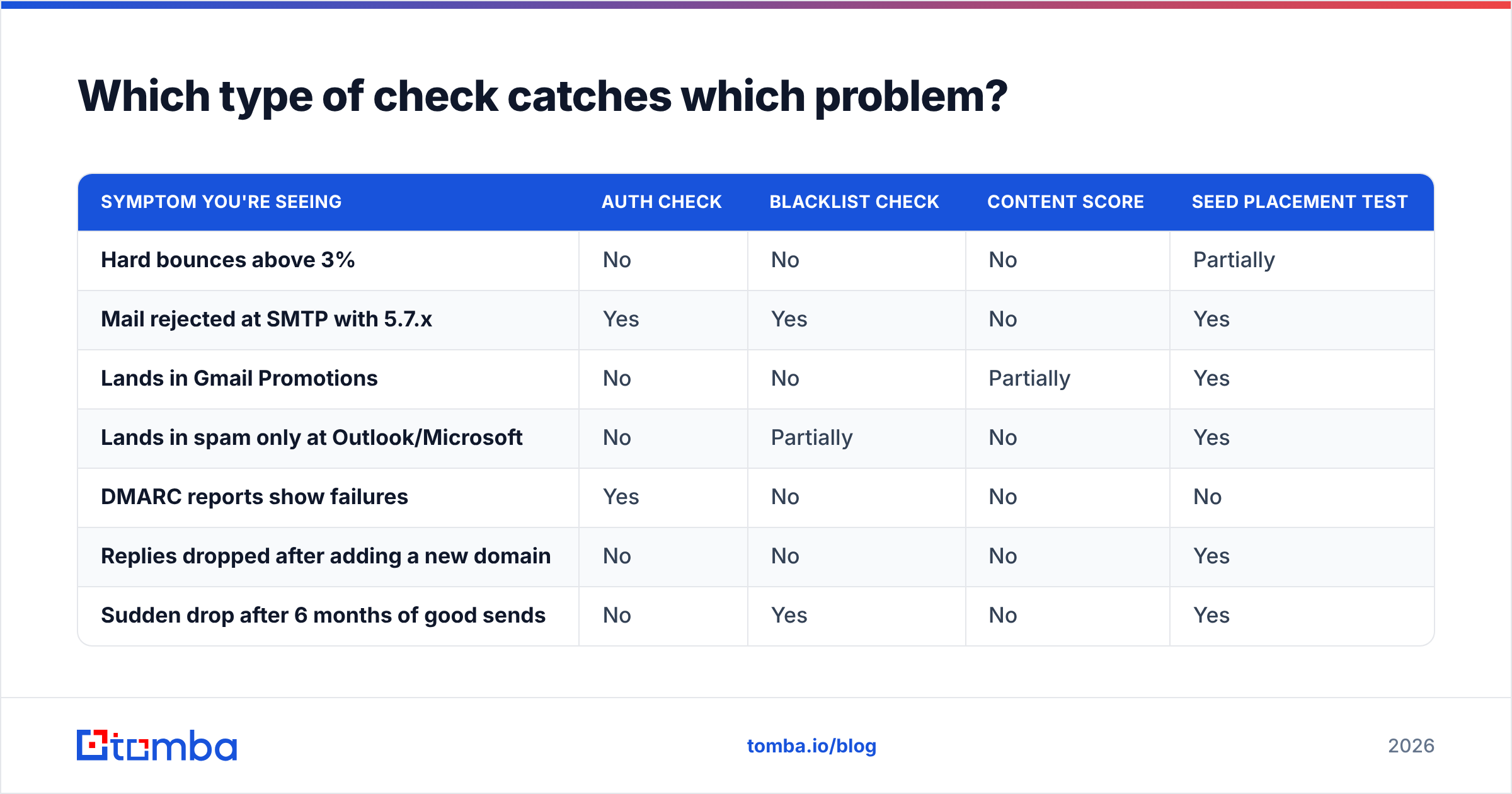
Here is the mapping most people never see laid out. Match the symptom to the test that actually detects it.
| Symptom you're seeing | Auth check | Blacklist check | Content score | Seed placement test |
|---|---|---|---|---|
| Hard bounces above 3% | No | No | No | Partially |
| Mail rejected at SMTP with 5.7.x | Yes | Yes | No | Yes |
| Lands in Gmail Promotions | No | No | Partially | Yes |
| Lands in spam only at Outlook/Microsoft | No | Partially | No | Yes |
| DMARC reports show failures | Yes | No | No | No |
| Replies dropped after adding a new domain | No | No | No | Yes |
| Sudden drop after 6 months of good sends | No | Yes | No | Yes |
Read the column of "No"s next to "hard bounces above 3%." That is the punchline of this entire category. Bounce rate is the strongest single predictor of whether Google and Microsoft start filtering you — Google's own sender guidelines put spam-rate thresholds and list hygiene ahead of everything except authentication — and not one of the DNS-based checkers can see it. You detect it by validating addresses before you send, not by scanning your setup afterward.
How do the main deliverability checkers compare?#
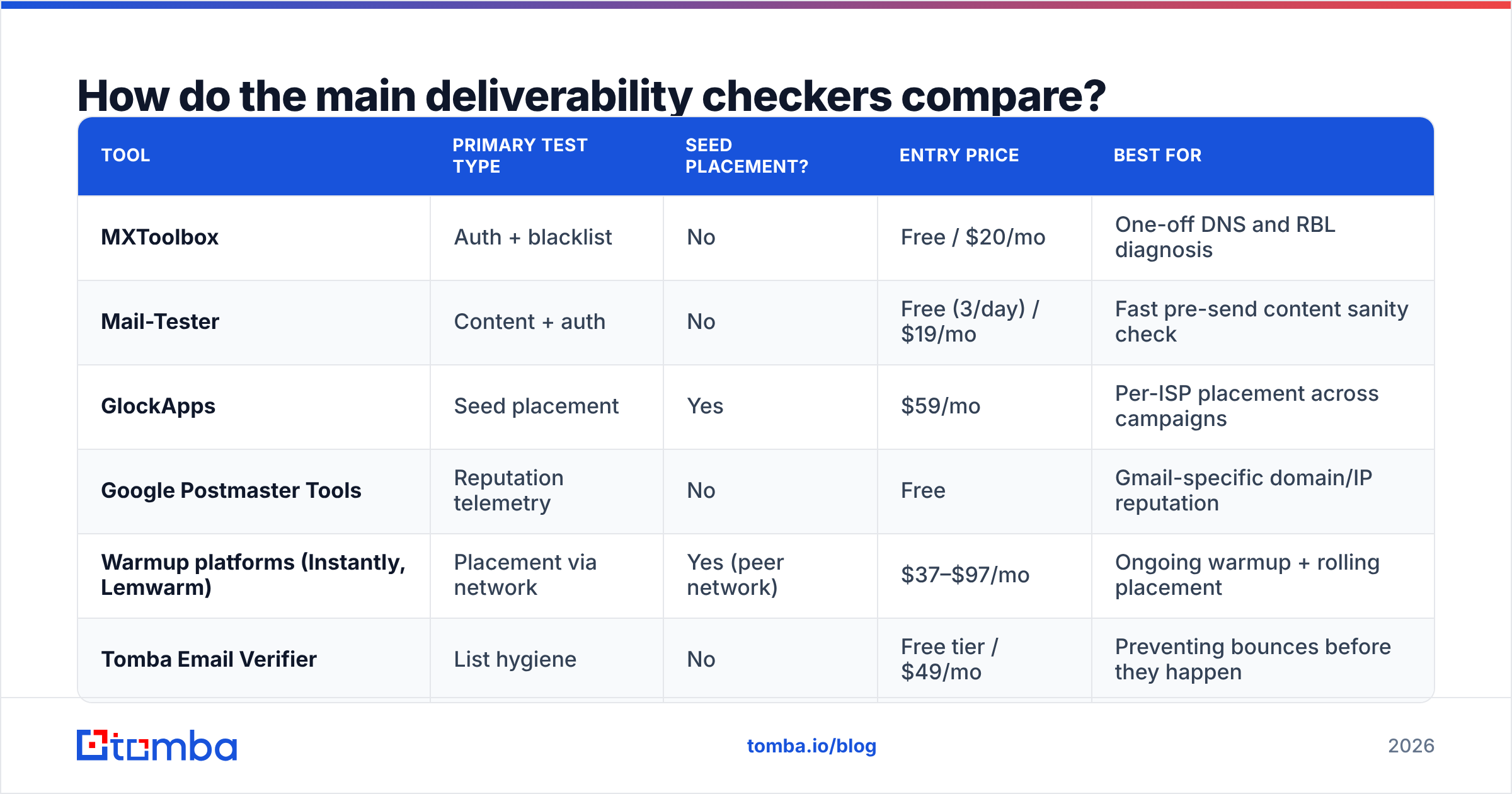
The tools below occupy genuinely different slots. Prices are list prices as of mid-2026 and move around; check the vendor before you commit.
| Tool | Primary test type | Seed placement? | Entry price | Best for |
|---|---|---|---|---|
| MXToolbox | Auth + blacklist | No | Free / $20/mo | One-off DNS and RBL diagnosis |
| Mail-Tester | Content + auth | No | Free (3/day) / $19/mo | Fast pre-send content sanity check |
| GlockApps | Seed placement | Yes | $59/mo | Per-ISP placement across campaigns |
| Google Postmaster Tools | Reputation telemetry | No | Free | Gmail-specific domain/IP reputation |
| Warmup platforms (Instantly, Lemwarm) | Placement via network | Yes (peer network) | $37–$97/mo | Ongoing warmup + rolling placement |
| Tomba Email Verifier | List hygiene | No | Free tier / $49/mo | Preventing bounces before they happen |
Note the last row is doing something the others structurally cannot. A free email checker or bulk email verifier does not tell you where mail lands — it removes the addresses that would have hurt placement in the first place. That is prevention, not diagnosis, and it belongs in a different part of your workflow.
A realistic stack#
Most teams over-buy here. You need three things, not six:
- One free auth/blacklist checker, run when you set up a domain and after any DNS change. MXToolbox or the Google Admin Toolbox is enough.
- Google Postmaster Tools, connected permanently. It is free, it is Gmail's own reputation data, and it is the closest thing to ground truth for the mailbox provider that matters most in B2B.
- A verifier in your pre-send pipeline, so invalid addresses never enter a campaign.
Add a paid seed-placement tool only when you are sending enough volume that a 10-point placement swing is worth $59/month. Below roughly 2,000 sends a month, the money is better spent on list quality.
Why does a 10/10 spam score still land in spam?#
Because the score measures your message, and filters measure your history.
SpamAssassin-style scoring was designed for an era when spam was identifiable by content. Modern filtering at Gmail and Microsoft is dominated by engagement and reputation signals that no external tool can inspect:
- Domain and IP reputation — accumulated over months from complaint rates, spam-folder placements, and deletions-without-reads.
- Engagement — opens are unreliable post-MPP, but replies, "not spam" clicks, and stars are strong positive signals.
- Recipient-side history — has this specific recipient ever engaged with your domain? Filtering is personalized; your mail can inbox for one Gmail user and land in spam for another at the same company.
- Sending pattern — 0 to 300 emails a day on a two-week-old domain looks exactly like a spam operation, regardless of headers.
- List quality — spam traps and dead addresses tell providers you acquired the list rather than earned it.
A content checker sees none of this. It sees whether you wrote "free" in the subject line. That is why "I got 10/10 on Mail-Tester" and "my emails are in spam" are entirely compatible statements, and why arguing about the score wastes a week.
How do you run a proper deliverability test?#
A test is only useful if it isolates one variable. Here is a sequence that does.
Step 1 — Verify the technical baseline (once per domain).
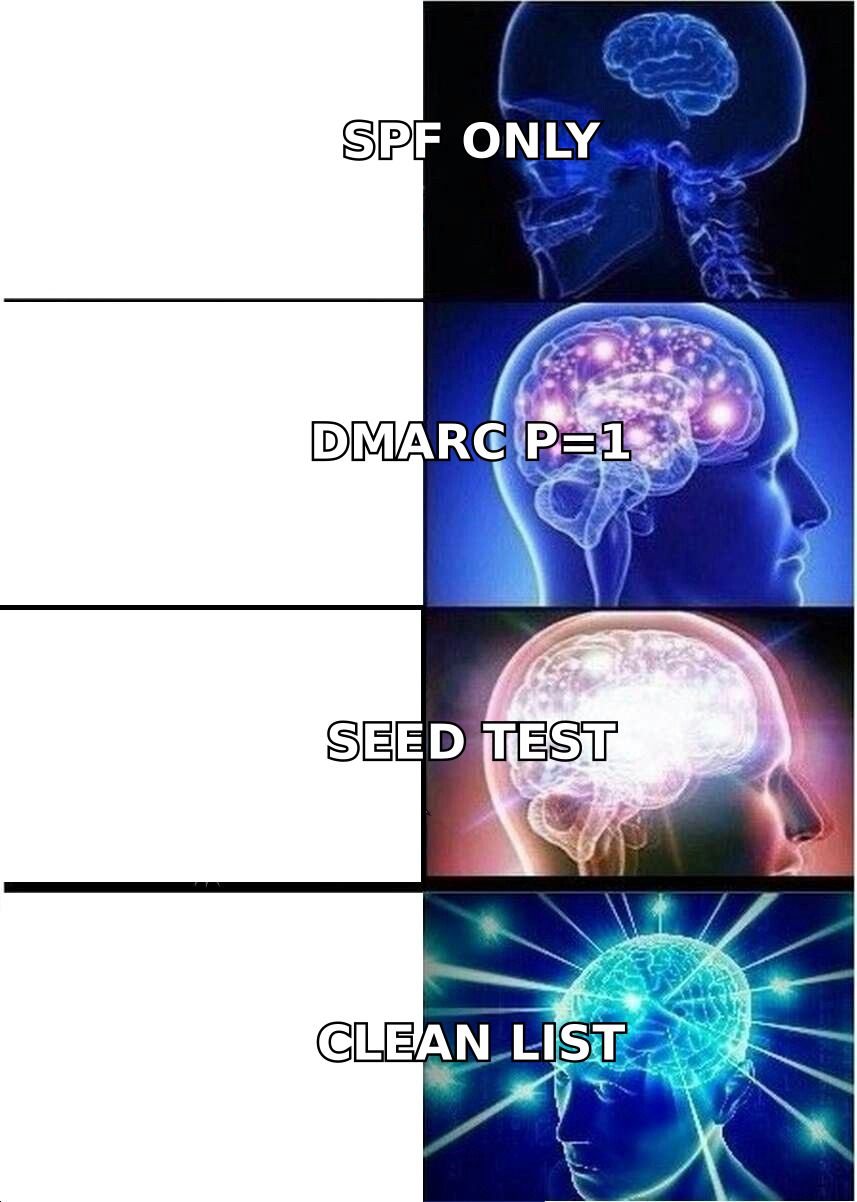
Publish SPF with a single include chain under 10 DNS lookups. Publish DKIM with a 2048-bit key. Publish DMARC at p=none with a reporting address, read the reports for two weeks, then move to p=quarantine. Confirm with any auth checker. If this passes, never touch it again unless you change ESP.
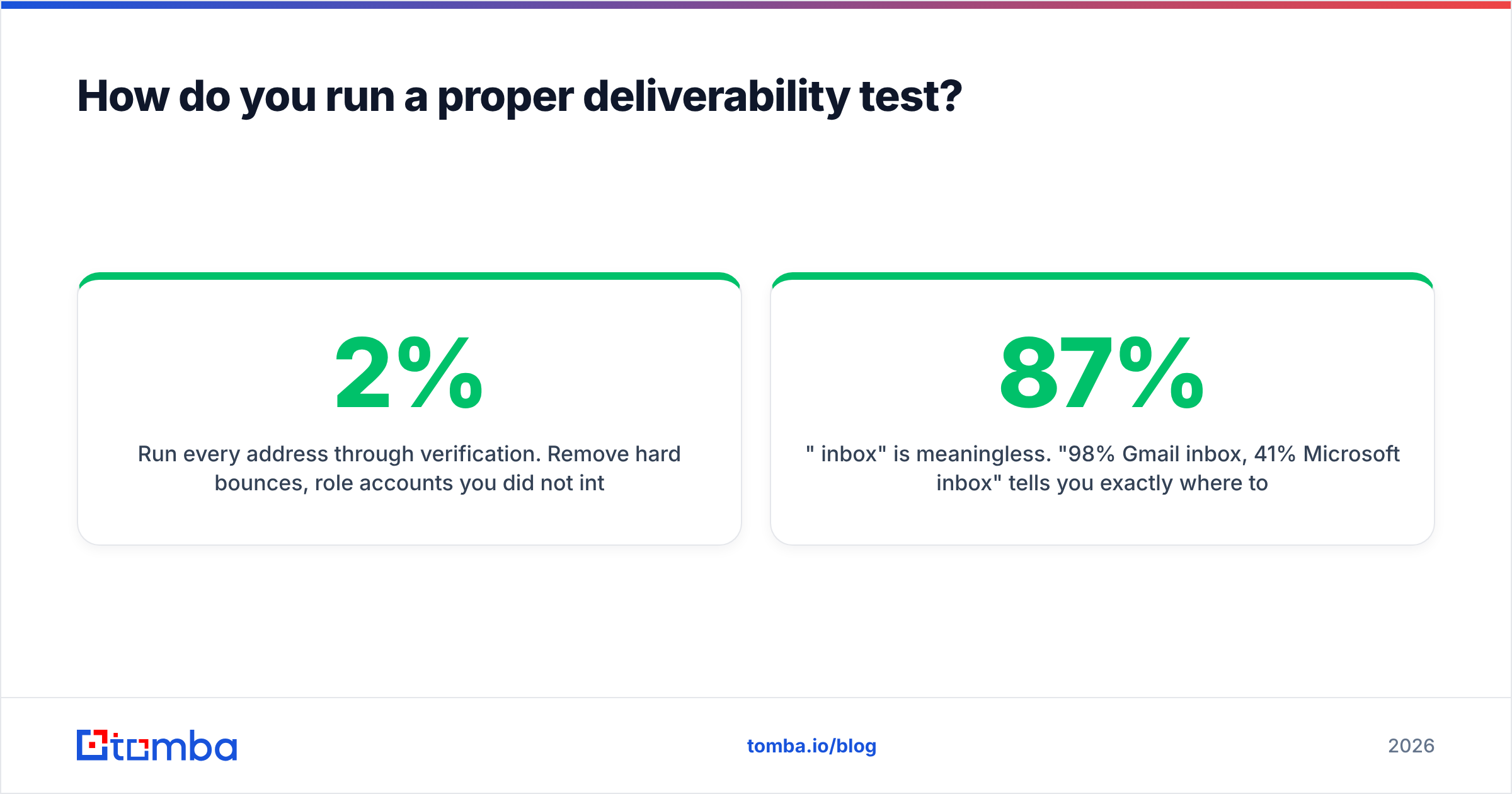
Step 2 — Clean the list before it touches a sending tool. Run every address through verification. Remove hard bounces, role accounts you did not intend to target, and anything flagged as a trap risk. Catch-all domains need a separate decision — a catch-all verifier can tell you whether a domain accepts everything, which means SMTP validation cannot confirm the individual mailbox. Some teams send to catch-alls anyway at low volume; some exclude them entirely. Pick one, document it, and keep bounce rate under 2%.
Step 3 — Establish reputation before volume. Warm the domain for 3–4 weeks, ramping from ~10 sends/day. Use an email warmup calculator to plan the ramp rather than guessing. Skipping this is the single most common cause of "my new domain went straight to spam."
Step 4 — Run a seed placement test with your actual campaign copy. Not a test email. The real sequence, from the real sending account, at the real send rate. Anything else measures a scenario you will never run.
Step 5 — Read the result per provider, not in aggregate. "87% inbox" is meaningless. "98% Gmail inbox, 41% Microsoft inbox" tells you exactly where to spend your afternoon — and Microsoft/Outlook is where most B2B deliverability problems live, since corporate tenants layer their own filtering on top.
Step 6 — Change one thing, re-test. Swap the copy, or the domain, or the send rate. Not all three. Deliverability debugging fails when people fix five things at once and never learn which one mattered.
What should you monitor after launch?#
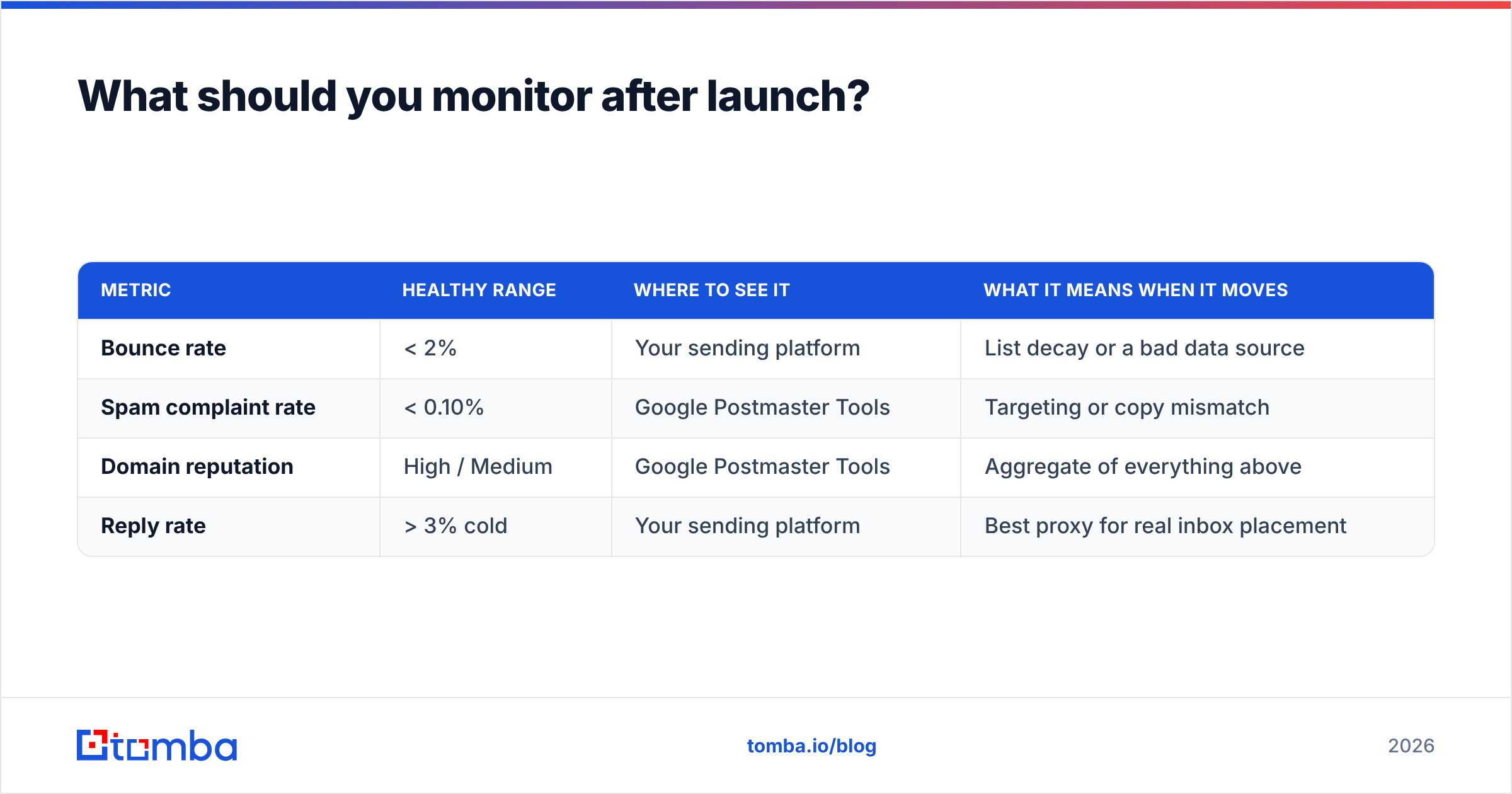
Testing is a snapshot; monitoring is the film. Three numbers, checked weekly:
| Metric | Healthy range | Where to see it | What it means when it moves |
|---|---|---|---|
| Bounce rate | < 2% | Your sending platform | List decay or a bad data source |
| Spam complaint rate | < 0.10% | Google Postmaster Tools | Targeting or copy mismatch |
| Domain reputation | High / Medium | Google Postmaster Tools | Aggregate of everything above |
| Reply rate | > 3% cold | Your sending platform | Best proxy for real inbox placement |
Reply rate deserves the last word. If replies hold steady, you are in the inbox — no tool required. If replies collapse while volume and copy stay constant, you have a placement problem, and then you spend $59 on a seed test to find out which provider is blocking you. Working backward from the outcome beats scanning your DNS on a schedule.
Which checker should you actually pay for?#
Depends entirely on what is broken.
- New domain, nothing sent yet — free auth checker + warmup. Do not buy a placement tool; you have no reputation to measure.
- Established domain, sudden drop — blacklist check first (30 seconds, free), then Google Postmaster Tools reputation graph, then a seed test if both look clean.
- High volume, multiple domains, agency setup — GlockApps or an equivalent. Per-domain, per-ISP placement over time is worth real money at that scale.
- Cold outreach with purchased or scraped lists — stop and fix the list. No checker saves you here. Verification and better sourcing do. Vendors like BookYourData sell pre-verified B2B contacts if you'd rather buy clean than clean what you bought, and running any purchased file through your own verification pass before import is still worth the credits.
- Building the list yourself from company domains — a domain search plus verification gives you addresses that are current by construction, which sidesteps most of the bounce problem before it starts.
One thing to avoid: paying for a "deliverability suite" that bundles a warmup network, a seed test, and a sending tool, then judging your placement with the same vendor's peer network that generated the engagement. That is a closed loop. Peer-network warmup inflates positive signals from mailboxes that will never buy from you, and the vendor's own placement report treats those signals as evidence. Use an independent seed list or Postmaster Tools to check the work.
Common questions#
Does a deliverability checker slow down my sends? No. Auth and blacklist checks are DNS lookups run out-of-band. Verification adds a preprocessing step to your list build, typically seconds per thousand records via API.
Can I test Outlook placement for free? Partially. Microsoft's SNDS gives IP-level data if you send from a dedicated IP, which most cold-email teams do not. For shared-IP senders, a seed test is the practical answer.
How often should I re-run checks? Auth: after any DNS or ESP change. Blacklists: monthly, or immediately on a volume drop. Placement: before each new campaign or domain. Verification: every list, every time — B2B email data decays roughly 20–30% per year as people change jobs.
Is a paid checker better than a free one for authentication? No. SPF, DKIM, and DMARC validation is a solved, deterministic problem. Free tools get it right. Pay only for placement data and monitoring.
Do open rates tell me anything about deliverability? Less than they used to. Apple Mail Privacy Protection pre-fetches images, inflating opens. Treat replies and click-through as the honest signals.
Where to start this week#
Run the free checks first — they cost nothing and rule out the obvious. Then look hard at where your addresses came from, because that is where most placement problems originate and no checker will point at it for you.
If your list is built from names and company domains, the Tomba Email Finder resolves them to verified, deliverable addresses with a confidence score attached, so bad data never reaches your sending tool. The free tier covers 25 searches a month to test the accuracy on your own accounts; paid plans start at $49/mo, with bulk and API access on higher tiers — see Tomba pricing for the full breakdown. Fix the list first, then argue about spam scores.
Related guides#
Ready to find emails that actually work?
Join 150,000+ professionals who stopped guessing and started sending. Free credits on signup — no credit card required.
Get the Tomba newsletter
Practical outbound tactics and product updates — once every two weeks.
About the author