Email Deliverability Checklist 2026: 42 Fixes That Land Mail
A 42-point email deliverability checklist covering DNS authentication, list hygiene, warmup pacing, content triggers, and the Gmail and Yahoo bulk-sender rules you cannot skip in 2026.
TL;DR
- Deliverability is decided in three places: your DNS records, your list quality, and your sending behavior. Content matters far less than most people think.
- Google and Yahoo's bulk-sender rules made SPF, DKIM, DMARC, one-click unsubscribe, and a spam-complaint rate under 0.3% non-negotiable for anyone sending 5,000+ messages a day.
- Bounce rate above 2% is the single fastest way to torch a new domain. Verify every address before the first send, not after the first bounce report.
- Warmup is a pacing problem, not a tool problem. Ramp 20-30% per week per mailbox and stop when reply rate drops.
- Run this checklist quarterly on every sending domain. Reputation decays silently — you find out when a quarter's pipeline is already in spam.
Your emails are not landing because of a spam word. That myth has cost more sales teams more pipeline than any subject line ever did. Inbox placement in 2026 is a math problem: authenticated domain, clean recipient list, predictable volume, low complaints. Miss any one of those and no amount of copy editing rescues you.
This is the full checklist, grouped by the order you should actually work through it. Start at DNS, end at monitoring. Skipping ahead to "fix my copy" is why most audits fail.
What Is an Email Deliverability Checklist?#
An email deliverability checklist is a repeatable audit of every technical, behavioral, and list-level factor that determines whether a mailbox provider routes your message to the inbox, the promotions tab, spam, or nowhere at all.
Think of it like a pre-flight check. A pilot doesn't run through the list because they expect a broken flap — they run it because the cost of one missed item is catastrophic and the cost of checking is two minutes. Same logic here: a single unauthenticated subdomain or one stale list can wipe out a domain's reputation for months, and reputation recovery takes far longer than reputation loss.
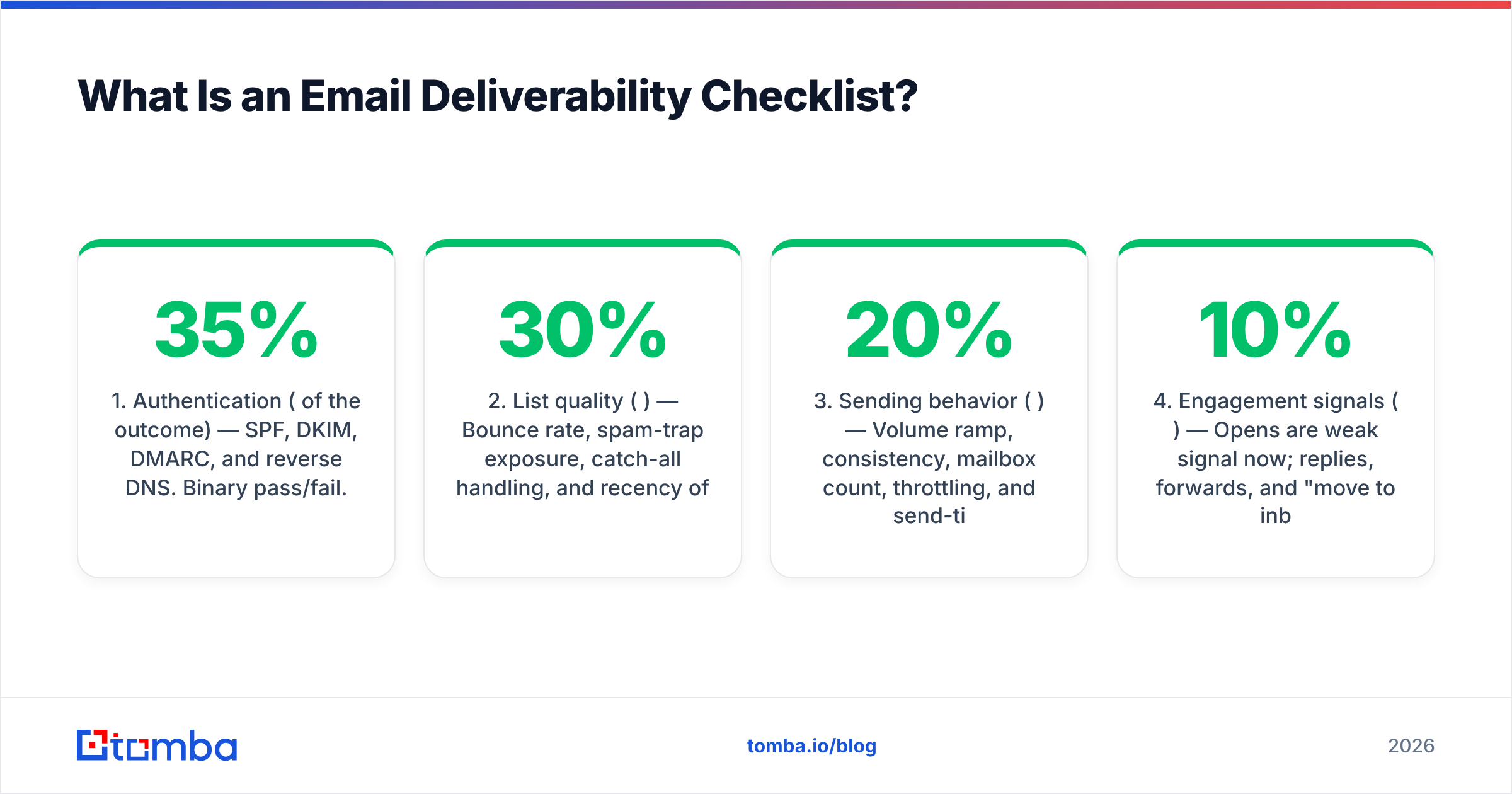
The checklist splits into five layers, and they are not equally weighted:
- Authentication (35% of the outcome) — SPF, DKIM, DMARC, and reverse DNS. Binary pass/fail. Providers reject or junk unauthenticated mail before evaluating anything else.
- List quality (30%) — Bounce rate, spam-trap exposure, catch-all handling, and recency of the data. This is where most cold outbound dies.
- Sending behavior (20%) — Volume ramp, consistency, mailbox count, throttling, and send-time distribution.
- Engagement signals (10%) — Opens are weak signal now; replies, forwards, and "move to inbox" are strong. Complaints and deletes-without-reading are strongly negative.
- Content and formatting (5%) — Link count, image-to-text ratio, tracking domain reputation, and unsubscribe presence.
Notice content is last and smallest. If you have been rewriting subject lines for three weeks while your DMARC record says p=none and your list came from a 2023 scrape, you have been polishing the wrong thing.
Which DNS Records Are Mandatory in 2026?#
All four. There is no partial credit here.
SPF. Publish a single TXT record listing every service allowed to send as your domain — your ESP, your CRM, your invoicing tool, your help desk. Keep it under 10 DNS lookups or it fails silently. End with ~all or -all, never ?all. Verify it with a SPF checker after every vendor change, because adding a new tool is the most common way a working record breaks.
DKIM. A 2048-bit key, published per sending service, rotated at least annually. If your ESP still offers 1024-bit as default, generate a new pair. DKIM is what survives forwarding, which is exactly when you need authentication most.
DMARC. Start at p=none with an rua= reporting address for two weeks, read the aggregate reports, then move to p=quarantine and finally p=reject. Google explicitly requires a DMARC policy for bulk senders, and staying at p=none forever is the compliance equivalent of leaving your front door unlocked with a sign that says "reporting break-ins only."
Reverse DNS and MX. Your sending IP needs a PTR record that resolves back to a hostname on your domain. Your sending domain needs valid MX records — a domain that cannot receive mail looks disposable to a filter.
Two more that separate serious senders from the rest: BIMI (needs p=quarantine or stricter plus a VMC certificate — it puts your logo in Gmail and lifts open rates measurably) and MTA-STS with TLS-RPT, which enforce encrypted transport and report failures.
How Do You Audit List Quality Before Sending?#
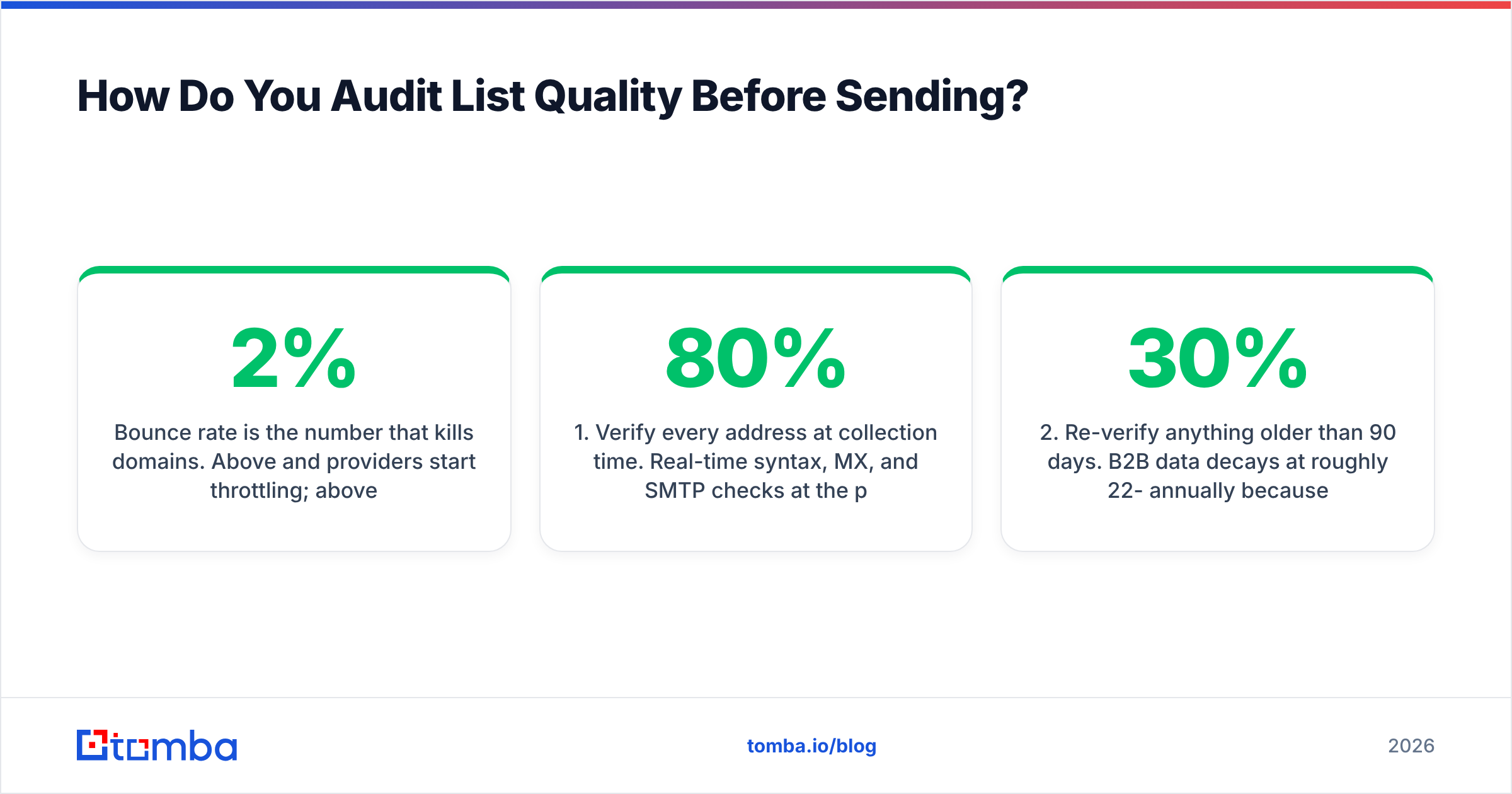
Bounce rate is the number that kills domains. Above 2% and providers start throttling; above 5% and you are effectively shadowbanned across Gmail and Outlook simultaneously. The fix is upstream, not downstream — you cannot bounce-clean your way out after the damage.
Work through this before any campaign:
- Verify every address at collection time. Real-time syntax, MX, and SMTP checks at the point of capture prevent 80% of future bounces. An email verifier run costs a fraction of a cent per record; a burned domain costs a quarter of pipeline.
- Re-verify anything older than 90 days. B2B data decays at roughly 22-30% annually because people change jobs. A list you verified in January is measurably worse in April.
- Segment catch-all domains separately. Catch-all servers accept everything, so standard verification returns "unknown." Use a catch-all verifier to score them by pattern confidence, then send to them on a separate subdomain so an unexpected bounce spike stays contained.
- Purge role accounts and known traps.
info@,sales@,admin@,webmaster@— these generate complaints and often sit on spam-trap lists. Remove them unless the role account is genuinely your buyer. - Suppress across every tool. Unsubscribes, hard bounces, and complaints must sync to a global suppression list shared by your ESP, CRM, and sequencer. Mailing someone who opted out from a different tool is both a deliverability hit and, under GDPR and CAN-SPAM, a legal one.
- Never buy an unverified list. If a vendor cannot show you their sourcing and refresh cadence, the list contains recycled traps. Reputable providers publish this — check where the data comes from before you commit budget.
Sourcing matters as much as cleaning. Building lists from verified, pattern-confirmed discovery — using a domain search against target companies rather than a bulk export — produces materially lower bounce rates than any post-hoc cleaning pass on a scraped file.
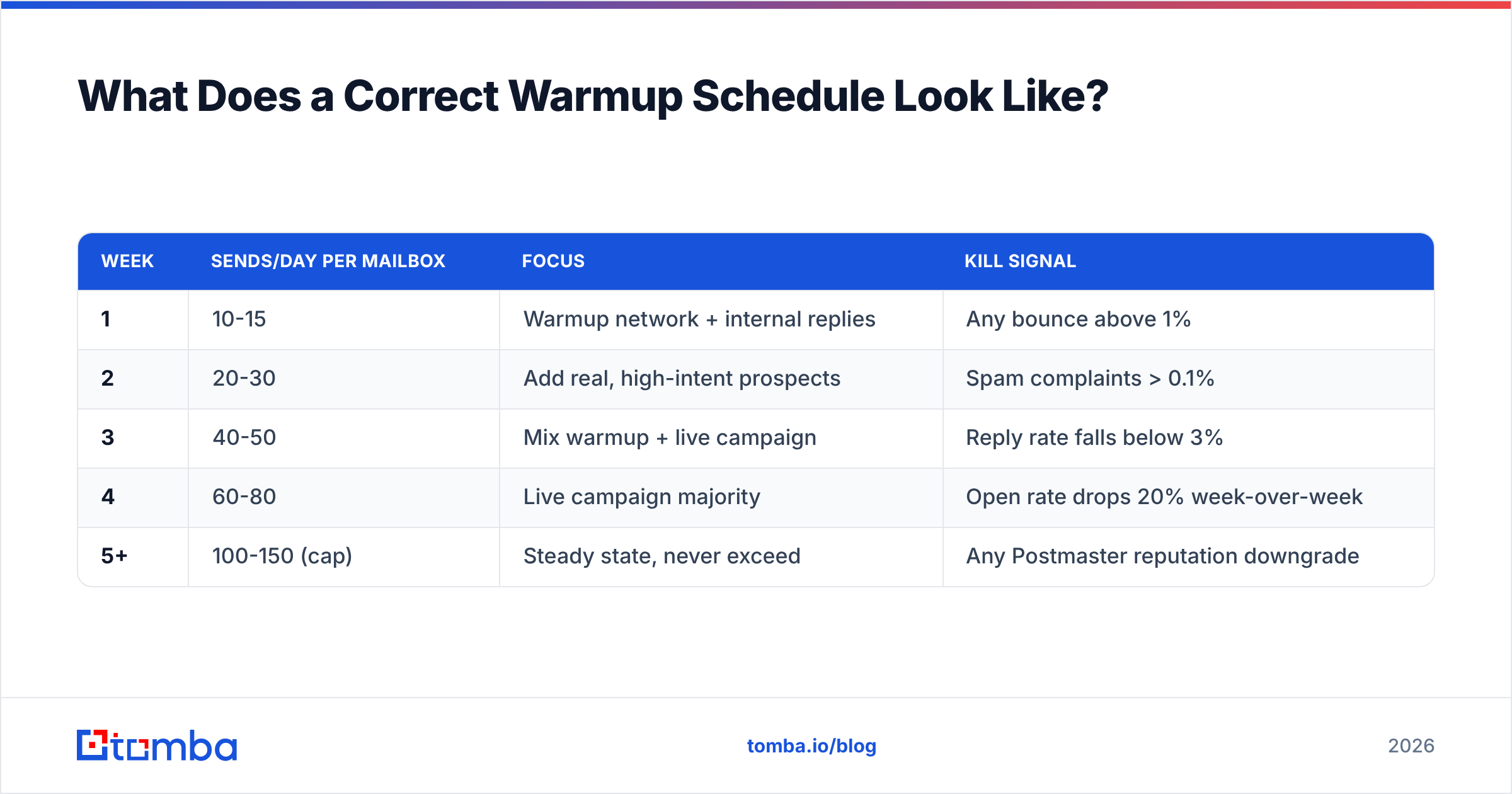
What Does a Correct Warmup Schedule Look Like?#
Slow and boring. Warmup exists to establish a volume baseline so filters have a prior; jumping from 0 to 200 sends a day reads as a compromised account.
| Week | Sends/day per mailbox | Focus | Kill signal |
|---|---|---|---|
| 1 | 10-15 | Warmup network + internal replies | Any bounce above 1% |
| 2 | 20-30 | Add real, high-intent prospects | Spam complaints > 0.1% |
| 3 | 40-50 | Mix warmup + live campaign | Reply rate falls below 3% |
| 4 | 60-80 | Live campaign majority | Open rate drops 20% week-over-week |
| 5+ | 100-150 (cap) | Steady state, never exceed | Any Postmaster reputation downgrade |
Rules that matter more than the numbers:
- Cap at 150/day per mailbox, and keep 50 as your target if you can afford more mailboxes. Volume per mailbox is riskier than total volume.
- Send on a schedule with jitter. Perfectly even 30-second intervals are a bot fingerprint. Randomize within business hours in the recipient's timezone.
- Never pause and restart cold. A two-week gap resets your baseline; ramp back up at 50%.
- Use subdomains for cold outbound.
mail.yourcompany.comorgo.yourcompany.comisolates reputation damage from your corporate domain. Your invoices and password resets should never share fate with a cold sequence. - One domain, multiple mailboxes beats one mailbox, high volume — but ten lookalike domains all pointed at the same landing page is a pattern filters now cluster and penalize together.
The email warmup calculator will give you a mailbox count for a target monthly volume, which is the calculation most teams get backwards — they pick a volume first, then discover they needed nine inboxes.

Which Content Factors Actually Trigger Filters?#
Far fewer than folklore suggests. "Free," "guarantee," and exclamation points are not what's sending you to spam in 2026 — Bayesian keyword filtering has been a minor input for over a decade. These are the content factors with measurable impact:
Links. One or two per email, maximum. Zero links in the first touch performs best in cold outbound. Every additional link is another domain reputation being evaluated alongside yours.
Tracking domains. Shared open-tracking domains are poisoned by whoever else uses them. Set up a custom tracking domain (CNAME on your sending subdomain) or turn open tracking off entirely — the data is unreliable post-MPP anyway, and pixel-loading is itself a mild spam signal.
Image-to-text ratio. Plain text or lightly formatted HTML wins in cold outbound. Image-heavy templates belong in newsletters where recipients opted in. Never send an image-only email.
Attachments. Never in a cold email. Not a PDF, not a calendar invite.
Unsubscribe. One-click List-Unsubscribe header (RFC 8058) is mandatory for bulk senders and smart for everyone. A visible unsubscribe line in cold outbound reduces complaint rate — people who want out will use whichever exit you give them, and "mark as spam" is the one that costs you.
Spelling and rendering. Broken merge tags (Hi {{first_name}},) are the single highest-complaint content defect in outbound. Test every template with a spam checker and send a live test to seed accounts on Gmail, Outlook, and one corporate Microsoft 365 tenant before launch.
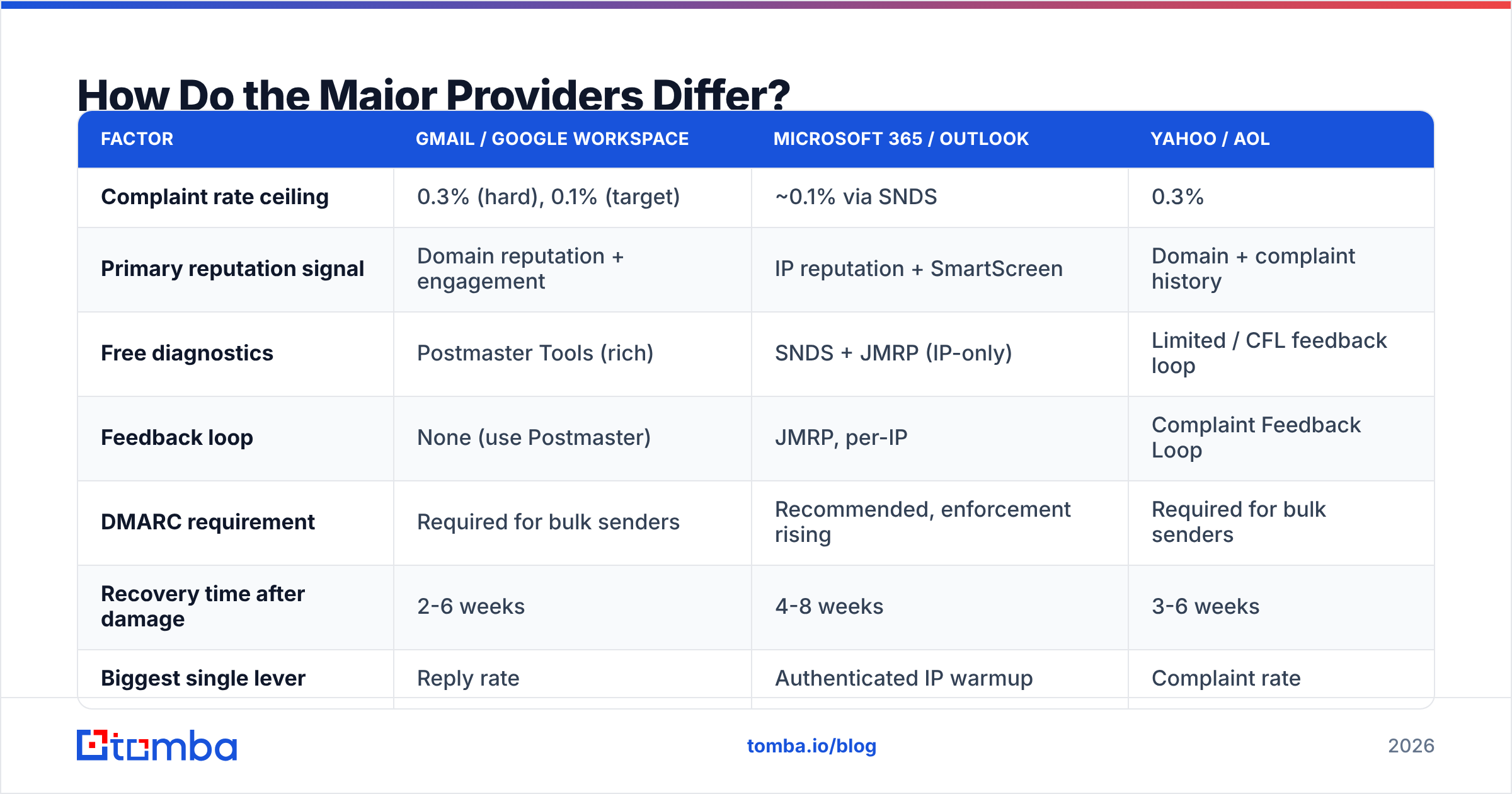
How Do the Major Providers Differ?#
They enforce the same fundamentals but weight them differently, and the tooling they expose to you varies wildly.
| Factor | Gmail / Google Workspace | Microsoft 365 / Outlook | Yahoo / AOL |
|---|---|---|---|
| Complaint rate ceiling | 0.3% (hard), 0.1% (target) | ~0.1% via SNDS | 0.3% |
| Primary reputation signal | Domain reputation + engagement | IP reputation + SmartScreen | Domain + complaint history |
| Free diagnostics | Postmaster Tools (rich) | SNDS + JMRP (IP-only) | Limited / CFL feedback loop |
| Feedback loop | None (use Postmaster) | JMRP, per-IP | Complaint Feedback Loop |
| DMARC requirement | Required for bulk senders | Recommended, enforcement rising | Required for bulk senders |
| Recovery time after damage | 2-6 weeks | 4-8 weeks | 3-6 weeks |
| Biggest single lever | Reply rate | Authenticated IP warmup | Complaint rate |
Two practical consequences. First, register for Google Postmaster Tools on day one — it is the only free window into how Gmail actually scores your domain, and Gmail is the majority of most B2B lists. Second, Microsoft is slower to forgive. Outlook reputation damage takes roughly twice as long to recover as Gmail, so if your ICP is Microsoft-heavy, be more conservative with volume.
What Should You Monitor Weekly?#
Deliverability degrades quietly. By the time someone says "our replies dried up," you are four weeks into the problem. Set a weekly 15-minute review:
- Bounce rate, split hard vs soft, per campaign and per domain. Hard bounces above 2% — stop the campaign, re-verify the list.
- Spam complaint rate in Postmaster Tools and SNDS. Anything trending toward 0.1% is an early warning, not a safe zone.
- Reply rate per mailbox. A single mailbox underperforming the others by 50%+ is usually a per-mailbox reputation issue, not a copy issue.
- Domain and IP reputation in Postmaster Tools. "Medium" is a warning; "Low" means stop sending today.
- Blacklist status across Spamhaus, SURBL, and Barracuda. Run a blacklist checker weekly on both your sending domain and your tracking domain — people forget the tracking domain constantly.
- Authentication pass rates from DMARC aggregate reports. A sudden drop usually means a new vendor started sending as you without being added to SPF.
- Seed inbox placement. Manual seed tests on Gmail, Outlook, and a Microsoft 365 tenant catch tab placement (Promotions vs Primary) that no metric reports.
For a deeper definition of the underlying concepts, Tomba's glossary entries on email deliverability and sender reputation are a useful reference to share with a team that is new to this.
What Do the Official Requirements Actually Say?#
Do not take secondhand summaries — including this one — as final. The two documents that govern bulk sending are published and short:
- Google's Email sender guidelines define the 5,000/day threshold, the 0.3% complaint ceiling, one-click unsubscribe, and required authentication.
- Yahoo's Sender Best Practices mirror most of Google's requirements with their own complaint-feedback tooling.
- For the underlying spec on one-click unsubscribe, RFC 8058 is the authoritative source your ESP should be implementing.
Read the primary sources once a quarter. These rules changed materially in 2024 and have been tightened incrementally since.
The Full 42-Point Checklist#
Print this. Run it per sending domain, quarterly.
Authentication (1-9): SPF published · SPF under 10 lookups · SPF ends -all or ~all · DKIM 2048-bit · DKIM per sending service · DKIM rotated within 12 months · DMARC at p=quarantine or p=reject · rua= reporting active and monitored · PTR record resolves.
Domain setup (10-16): Sending subdomain separate from corporate · Domain aged 30+ days before first send · MX records valid · Custom tracking domain via CNAME · MTA-STS policy published · TLS-RPT enabled · BIMI configured if eligible.
List quality (17-25): Every address verified pre-send · Re-verification within 90 days · Catch-alls segmented and scored · Role accounts removed · Global suppression list synced across tools · No purchased unverified data · Hard bounces suppressed permanently · Unsubscribes honored within 24 hours · Consent basis documented per region.
Sending behavior (26-33): Warmup ramp under 30%/week · Volume capped at 150/mailbox/day · Send times randomized with jitter · Business-hours sending in recipient timezone · No cold restarts after pauses · Mailbox count matched to target volume · Consistent daily volume, no spikes · Throttling configured per provider.
Content (34-38): Two links maximum · No attachments · Plain-text-weighted formatting · One-click List-Unsubscribe header present · Merge tags tested against live data.
Monitoring (39-42): Postmaster Tools and SNDS registered · Weekly blacklist scan on sending and tracking domains · Seed inbox placement tested per campaign · DMARC reports reviewed weekly.
Where Should You Start?#
If you can only do three things this week: publish DMARC at p=quarantine, verify your entire active list, and cut your per-mailbox volume by half. That combination fixes the majority of deliverability problems I have seen in outbound programs, and none of it requires new software.
The list quality piece is the one most teams underestimate — and it is upstream of everything else. Bad addresses cause bounces, bounces cause reputation damage, reputation damage causes spam placement, and no amount of DNS configuration undoes it.
Build the list right the first time. Tomba's Email Finder returns verified, pattern-confirmed business addresses with a confidence score attached, so you know a contact's status before it ever enters a sequence. The free tier covers 25 searches a month to test the accuracy against your own known-good contacts; paid plans start at $49/mo, with full Tomba pricing and API access for teams wiring verification directly into their capture forms and CRM. Verify first, then send — that order is the whole game.
Related guides#
Ready to find emails that actually work?
Join 150,000+ professionals who stopped guessing and started sending. Free credits on signup — no credit card required.
Get the Tomba newsletter
Practical outbound tactics and product updates — once every two weeks.
About the author