Email Deliverability Factors in 2026: A Complete Guide
Most deliverability advice is a pile of tips with no ranking. This guide sorts the email deliverability factors by how much they actually move inbox placement — and shows you how to fix the broken ones first.
TL;DR
- Deliverability is not one setting. It is roughly a dozen signals, and mailbox providers weight them very unevenly.
- The three that move placement most: authentication (SPF, DKIM, DMARC alignment), list hygiene (bounce rate under 2%), and recipient engagement (opens, replies, "not spam" votes).
- Content and subject lines matter far less than people think — they only bite once your reputation is already shaky.
- Gmail, Outlook, and Yahoo enforce different thresholds. A campaign can hit the inbox at Gmail and land in Junk at Outlook on the same day.
- Fixing deliverability is a sequence, not a checklist: authenticate → clean the list → warm the domain → throttle volume → then tune copy.
What are email deliverability factors, really?#
They are the signals mailbox providers use to decide whether your message reaches the inbox, the spam folder, or nothing at all. Think of a mailbox provider as a bouncer at a club with a memory. The bouncer checks your ID (authentication), remembers whether people you brought last time caused trouble (reputation), and notices if you show up with 8,000 guests when you usually bring 200 (volume patterns). Your outfit — the subject line and copy — is the last thing they look at, and only if something else already looks off.
That ordering matters, because most teams work it backwards. They rewrite subject lines for a week while an unaligned DMARC record and a 14% bounce rate quietly torch their sender reputation.
Delivery and placement are also different things. Delivered means the receiving server accepted the message. Placed means a human will actually see it. You can hit 99% delivered and 30% inbox placement at the same time, which is why "our ESP says 99% delivered" is a meaningless comfort blanket.
Which email deliverability factors matter most in 2026?#
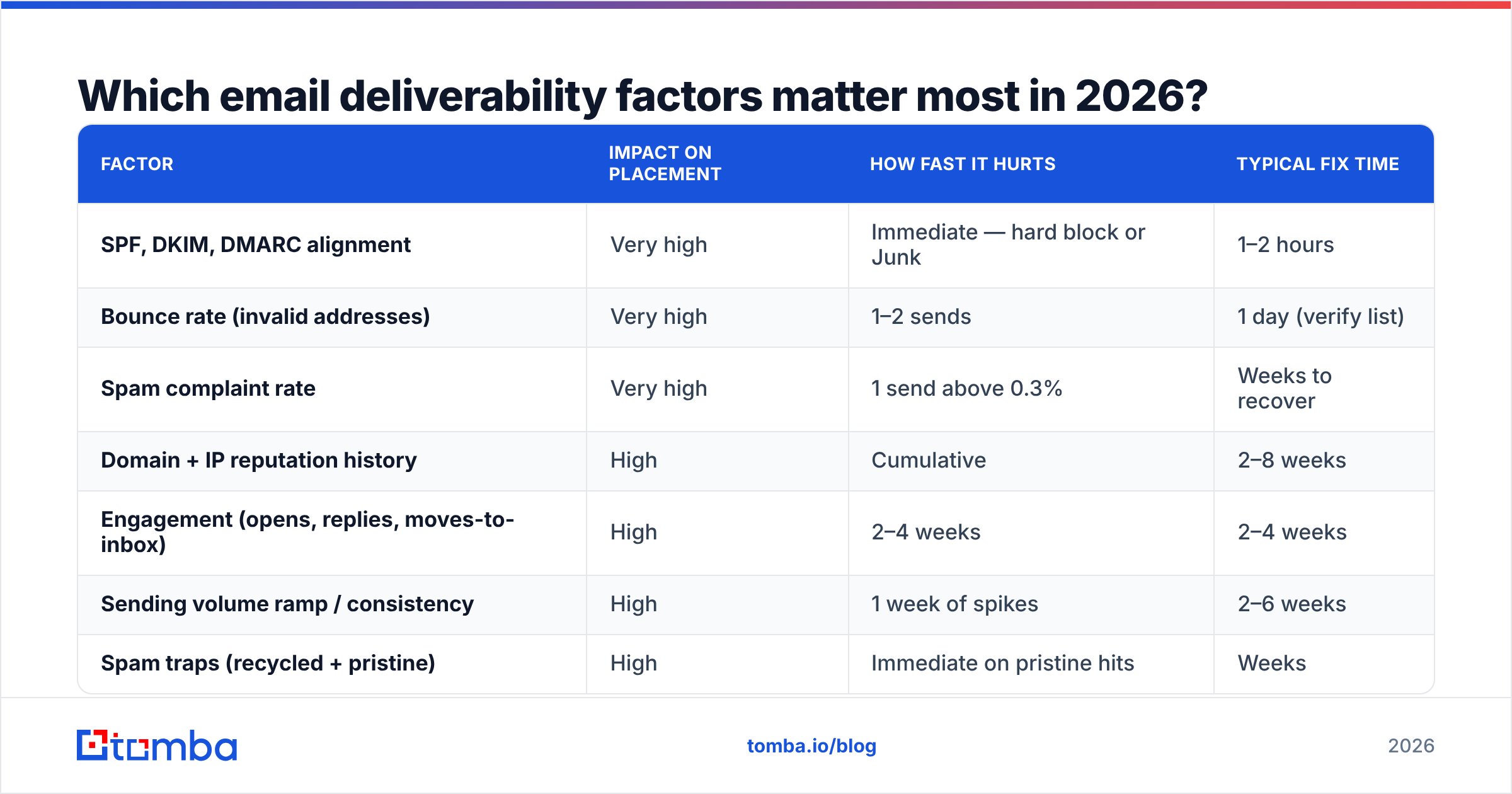
Here is the honest ranking. Weights are directional — nobody outside Google and Microsoft has the exact model — but the tiering reflects what actually breaks campaigns in practice.
| Factor | Impact on placement | How fast it hurts | Typical fix time |
|---|---|---|---|
| SPF, DKIM, DMARC alignment | Very high | Immediate — hard block or Junk | 1–2 hours |
| Bounce rate (invalid addresses) | Very high | 1–2 sends | 1 day (verify list) |
| Spam complaint rate | Very high | 1 send above 0.3% | Weeks to recover |
| Domain + IP reputation history | High | Cumulative | 2–8 weeks |
| Engagement (opens, replies, moves-to-inbox) | High | 2–4 weeks | 2–4 weeks |
| Sending volume ramp / consistency | High | 1 week of spikes | 2–6 weeks |
| Spam traps (recycled + pristine) | High | Immediate on pristine hits | Weeks |
| List acquisition source | Medium-high | Cumulative | Ongoing |
| Domain age and DNS hygiene | Medium | Slow | Weeks |
| Content, links, and HTML weight | Medium | Only when reputation is weak | Hours |
| Unsubscribe mechanics (one-click) | Medium | Immediate at Gmail/Yahoo | Hours |
| Sending infrastructure (shared vs dedicated) | Low-medium | Cumulative | Days |
The pattern is clear: everything in the top half is a data-and-plumbing problem, not a copywriting problem.
How much does authentication actually matter?#
It is the price of entry, not a differentiator. Since the Google and Yahoo bulk-sender rules tightened in 2024, any sender pushing meaningful volume needs all three records correct and aligned. Google's bulk sender guidelines spell out the requirements: SPF and DKIM on every message, a DMARC policy on the sending domain, one-click unsubscribe on bulk mail, and a complaint rate kept below 0.3%.
The three records, in plain terms:
- SPF — a DNS list of servers allowed to send as your domain. Break it and receivers treat your mail as unvouched. Check yours with an SPF checker before every infrastructure change, because adding a new sending tool is the classic way to blow past the 10-lookup limit.
- DKIM — a cryptographic signature proving the message was not altered in transit. Rotate keys yearly; use 2048-bit.
- DMARC — the policy that tells receivers what to do when SPF or DKIM fails, plus where to send reports. Start at
p=noneto collect data, then move toquarantine, thenreject. DMARC is the record most teams publish and then never read the reports from, which defeats the point. - Alignment — the quiet killer. SPF can pass while the visible
From:domain does not match the authenticated domain. Passing without alignment still fails DMARC.
Authentication will not get you into the inbox on its own. It will absolutely keep you out if it is wrong.
Is list quality the factor everyone underrates?#
Yes, and it is the one you control most directly. A bounce is not a neutral event. Every hard bounce is a data point telling the receiver you do not know who your recipients are — and senders who do not know their recipients look like senders who bought a list.
The rough thresholds worth internalizing:
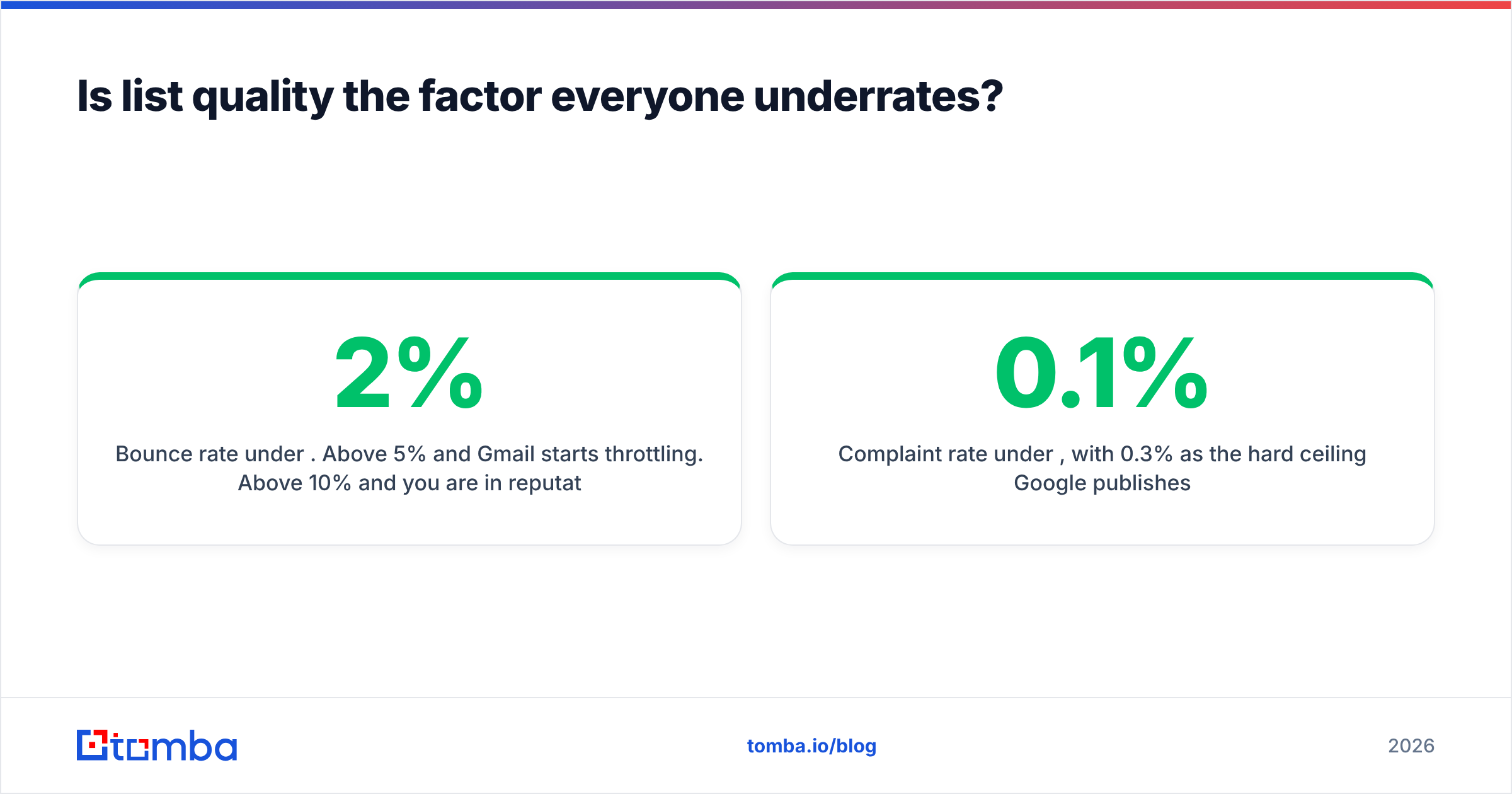
- Bounce rate under 2%. Above 5% and Gmail starts throttling. Above 10% and you are in reputation-repair territory.
- Complaint rate under 0.1%, with 0.3% as the hard ceiling Google publishes.
- Unknown-user rate near zero. Recycled spam traps live in old, abandoned mailboxes and they are the reason a two-year-old list is a liability, not an asset.
This is why email verification sits upstream of everything else. Verifying a list before the send costs a fraction of a cent per record; re-earning a burned domain reputation costs six to eight weeks of throttled sending. Run the check at import, not after the bounce report.
Catch-all domains deserve a separate mention. A catch-all server accepts every address at the domain, so a standard SMTP check returns "accepted" for asdfgh@company.com just as happily as for the real CFO. That is not verification, that is a shrug. Use a dedicated catch-all verifier that scores pattern confidence rather than trusting the accept, or segment catch-alls into their own low-volume stream so their unknowable bounce risk never contaminates your main domain.
What sending patterns trigger filters?#
Volume shape matters as much as volume size. Receivers build a behavioral profile of your domain, and abrupt changes read as compromise or as a burst campaign from a list you just acquired.
The patterns that cause trouble:
- Cold-start blasts. A brand-new domain sending 2,000 emails on day one is the single most reliable way to get filtered. Ramp from 20–30/day and roughly double weekly.
- Sawtooth volume. 5,000 on Monday, zero until the next Monday. Consistency beats total volume.
- Identical send bursts. Thousands of messages hitting one provider in a two-minute window. Throttle and randomize.
- One domain, many tools. Your CRM, your newsletter platform, and three sequencers all sending as the same domain multiply your risk surface. Separate transactional, marketing, and cold outbound onto distinct subdomains.
Domain warmup is the mechanic that covers all four. If you are ramping a new sending domain, model the curve first with a warmup calculator rather than guessing — the difference between a 4-week ramp and a 10-day ramp is usually the difference between stable placement and a permanent Junk-folder residency at Outlook.
Do Gmail, Outlook, and Yahoo weigh factors differently?#
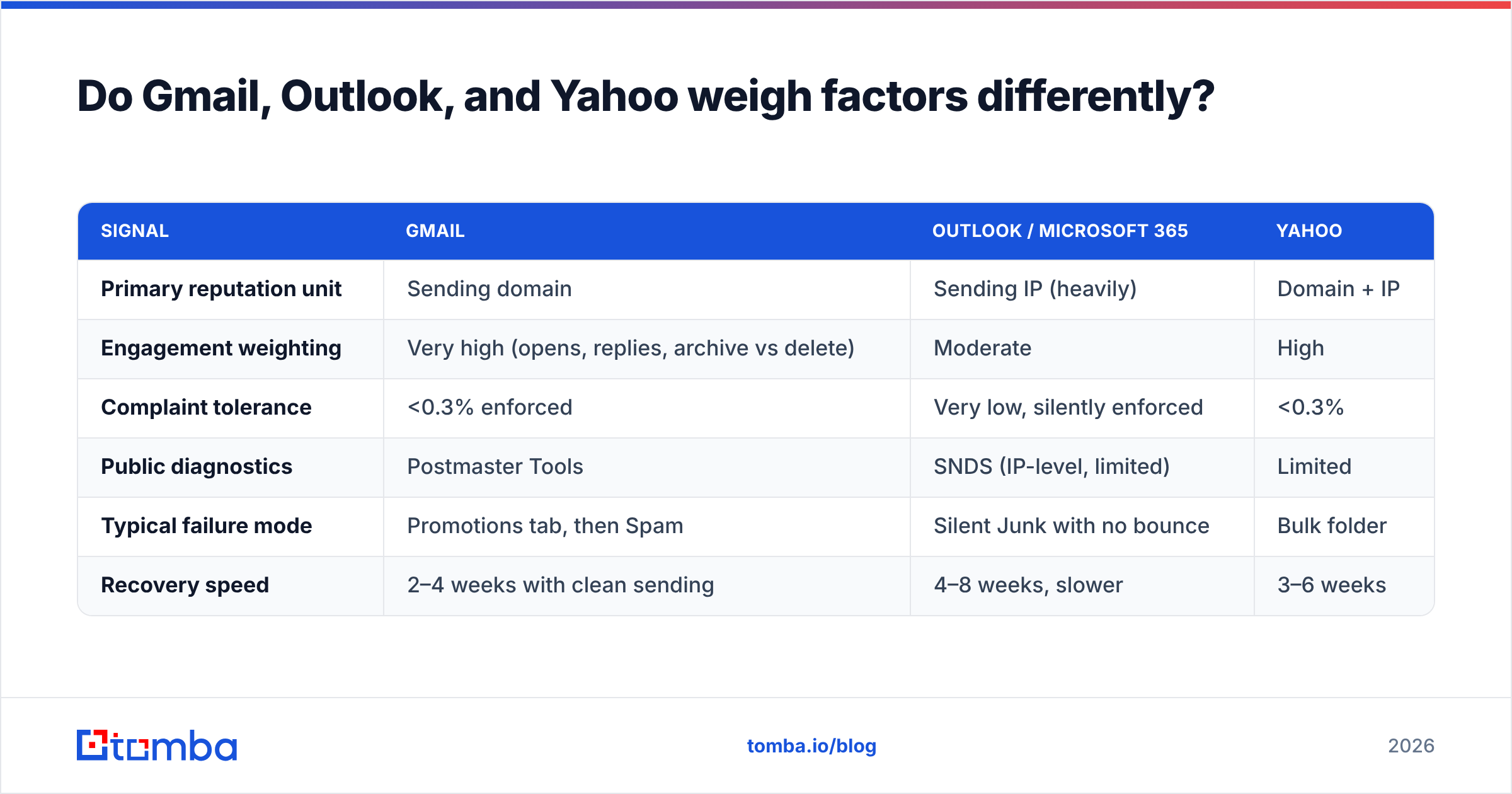
They do, and this is why "our deliverability is fine" is almost always a Gmail-only statement.
| Signal | Gmail | Outlook / Microsoft 365 | Yahoo |
|---|---|---|---|
| Primary reputation unit | Sending domain | Sending IP (heavily) | Domain + IP |
| Engagement weighting | Very high (opens, replies, archive vs delete) | Moderate | High |
| Complaint tolerance | <0.3% enforced | Very low, silently enforced | <0.3% |
| Public diagnostics | Postmaster Tools | SNDS (IP-level, limited) | Limited |
| Typical failure mode | Promotions tab, then Spam | Silent Junk with no bounce | Bulk folder |
| Recovery speed | 2–4 weeks with clean sending | 4–8 weeks, slower | 3–6 weeks |
Two practical consequences. First, Microsoft's filtering is largely invisible — you get a 250 OK and the message lands in Junk with no signal at all, so you must seed-test rather than trust logs. Second, because Gmail leans on domain reputation and Microsoft leans on IP, a shared-IP ESP can leave you fine at Gmail and blocked at Outlook through no fault of your own.
If you send any real volume, enroll in Google Postmaster Tools. It is free, it shows domain reputation, spam rate, and authentication pass rates, and it converts deliverability from folklore into a graph you can look at.
Does content still affect deliverability?#
Less than the 2010-era advice suggests, but not zero. Modern filters are behavioral first and lexical second. The word "free" in a subject line will not sink a sender with good reputation. It might tip a borderline sender over the edge.
What still moves the needle on the content side:
- Link reputation. A single link to a blacklisted or newly registered domain does more damage than a hundred spammy adjectives. Link shorteners are especially risky — they inherit every other user's reputation.
- Text-to-image ratio. Image-only emails with a two-word body are a long-standing spam signature.
- HTML bloat. Heavy nested-table templates from drag-and-drop builders get clipped by Gmail past ~102KB, which kills tracking and engagement.
- From-name and reply-to consistency. Changing the display name every campaign resets recipient recognition.
- One-click unsubscribe (RFC 8058). Now mandatory for bulk senders at Gmail and Yahoo. Missing it is a policy failure, not a style choice.
Before a large send, running the copy through a spam checker takes two minutes and catches the obvious content-side own-goals. Just don't expect it to rescue a domain with a 12% bounce history.
How do you diagnose which factor is broken?#
Work top-down, because fixing content while authentication is broken is theatre. This is the triage order that finds the real cause fastest:
- Check authentication first. Send a message to a seed inbox and read the raw headers. If SPF, DKIM, or DMARC shows anything other than
passwith alignment, stop and fix that. Nothing else matters yet. - Pull the bounce report. Segment hard bounces by domain. If one domain accounts for most of them, it is a data-source problem, not a reputation problem.
- Check the complaint rate in Postmaster Tools. Anything trending above 0.1% means your targeting or your opt-in is wrong, and no technical fix will save it.
- Check blacklists. Run your sending domain and IP through a blacklist checker. A Spamhaus listing explains a sudden cliff better than any gradual theory.
- Compare placement by provider. If Gmail is fine and Outlook is dead, look at IP reputation and shared infrastructure. If everything is dead at once, look at the domain.
- Only then look at copy and volume shape. By this point you have eliminated the causes that account for most incidents.
The most common finding at the end of this sequence is boring: the list was never verified, the bounce rate crossed 8%, the sender reputation dropped, and engagement collapsed because half the campaign was in Junk. Deliverability incidents are usually data incidents wearing a technical costume.
What does a healthy sending setup look like?#
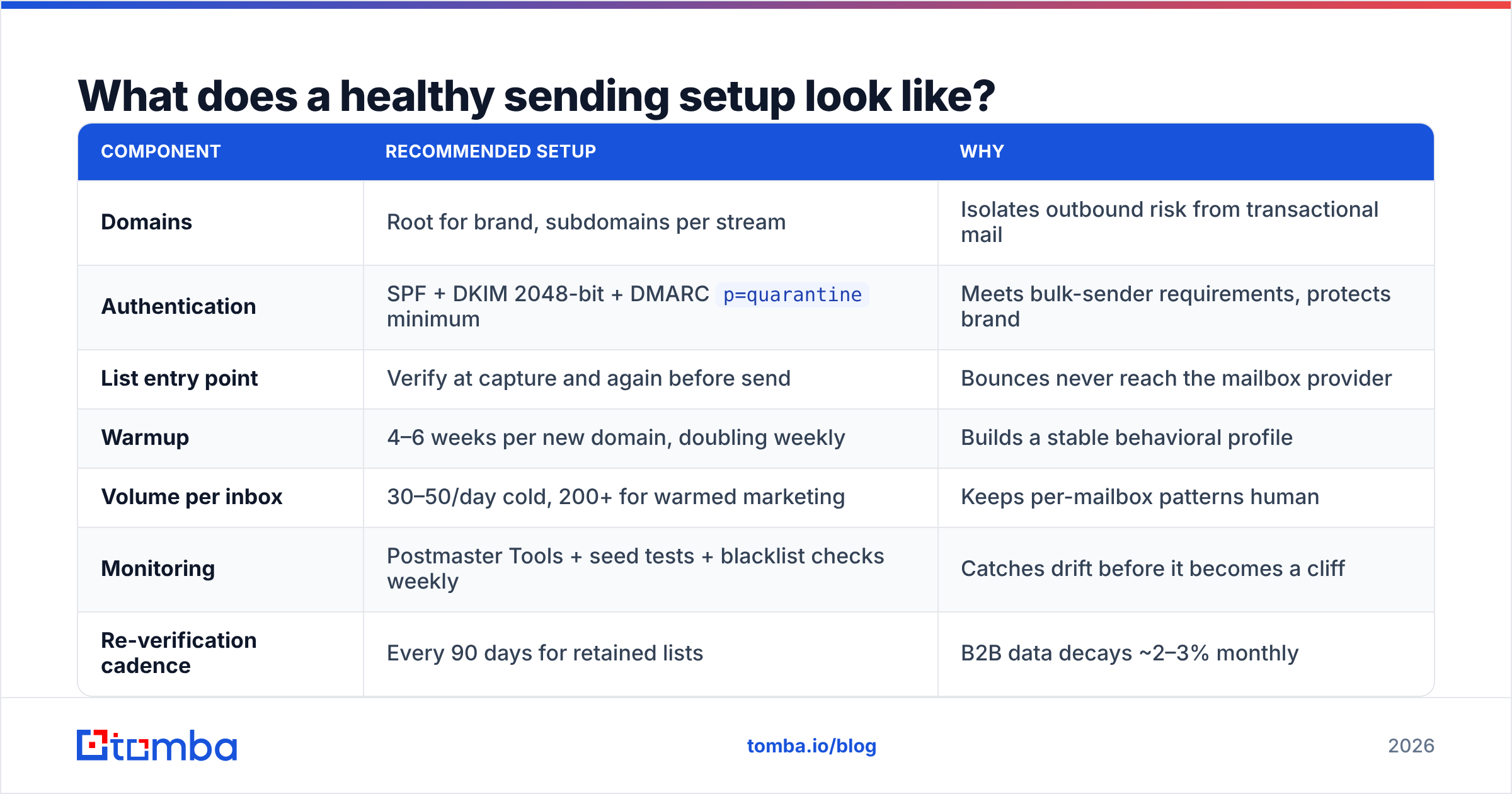
A reference configuration for a B2B team sending cold outbound plus marketing:
| Component | Recommended setup | Why |
|---|---|---|
| Domains | Root for brand, subdomains per stream | Isolates outbound risk from transactional mail |
| Authentication | SPF + DKIM 2048-bit + DMARC p=quarantine minimum |
Meets bulk-sender requirements, protects brand |
| List entry point | Verify at capture and again before send | Bounces never reach the mailbox provider |
| Warmup | 4–6 weeks per new domain, doubling weekly | Builds a stable behavioral profile |
| Volume per inbox | 30–50/day cold, 200+ for warmed marketing | Keeps per-mailbox patterns human |
| Monitoring | Postmaster Tools + seed tests + blacklist checks weekly | Catches drift before it becomes a cliff |
| Re-verification cadence | Every 90 days for retained lists | B2B data decays ~2–3% monthly |
That last row is the one teams skip. Job changes, domain migrations, and company shutdowns mean a list that verified clean in January is measurably dirty by April. If you maintain a large database, bulk verification on a quarterly schedule is cheaper than any single reputation recovery.
Worth noting: a genuinely good data provider — whether that's Tomba, BookYourData, or another vendor with real sourcing discipline — reduces this problem at the source. Where your addresses come from is itself a deliverability factor, and scraped-then-permutated lists behave very differently from validated ones no matter how well you configure DNS.
Where should you start if everything is broken?#
Sequence, in this order, and do not skip ahead:
- Publish and align SPF, DKIM, DMARC. One afternoon.
- Verify your entire active list and suppress everything that is not
deliverable. One day. - Pause sending from any domain with a complaint rate above 0.3% and move outbound to a fresh warmed subdomain. One week to set up, four to six to ramp.
- Cap daily volume per mailbox and hold it steady for 30 days.
- Cut your list to only recipients with a plausible reason to reply. Engagement is a factor you influence through targeting, not through copy.
- Then, and only then, iterate on subject lines.
Steps 1 through 4 fix roughly 80% of real-world deliverability problems. Step 6 gets 80% of the attention.
Start with the data, not the DNS#
Every factor on this page compounds downward from one thing: whether the addresses you send to are real, current, and reachable. Authentication is a one-time configuration. Warmup is a schedule. But list quality is a decision you make on every single send, and it is the factor that most reliably separates senders who see 90%+ inbox placement from senders who quietly slide into Junk over a quarter.
If you are building lists from scratch, Tomba Email Finder returns verified, source-attributed addresses with a confidence score rather than guessed permutations — so bounce risk is filtered before it ever touches your sending domain. The free tier covers 25 searches a month to test the accuracy on your own target accounts; paid plans start at $49/mo, with full Tomba pricing laid out if you need volume or API access. Clean data first, then everything else on this list gets easier.
Related guides#
Ready to find emails that actually work?
Join 150,000+ professionals who stopped guessing and started sending. Free credits on signup — no credit card required.
Get the Tomba newsletter
Practical outbound tactics and product updates — once every two weeks.
About the author