Email Deliverability Issues: The 2026 Diagnostic Guide
Your cold emails aren't getting ignored — they're getting filtered. Here's how to diagnose the real cause of email deliverability issues in 2026, from auth records to list hygiene, and fix them in order.
TL;DR
- Most email deliverability issues trace back to six root causes: broken authentication, bad list hygiene, domain/IP reputation damage, volume spikes, content triggers, and engagement collapse. Diagnose in that order.
- Check authentication first. SPF, DKIM, and DMARC take 30 minutes to fix and block roughly a third of all placement problems on their own.
- A bounce rate above 3% is the single loudest signal that your list — not your copy — is the problem. Google and Microsoft both treat it as a spam proxy.
- Warmup does not fix a bad list. It just distributes the damage more slowly.
- Fix in order, measure for 14 days, then change one variable at a time. Shotgun fixes make diagnosis impossible.
You send 500 emails. The dashboard says 497 delivered. Your reply rate is 0.4%. Nobody is being rude — most of those messages were routed to Spam or Promotions before a human ever saw them, and your sending tool has no way to tell you that.
That gap between "delivered" and "seen" is where email deliverability issues live. This guide walks the diagnostic ladder in the order that actually resolves problems fastest, based on how Gmail, Outlook, and Yahoo filter mail in 2026.
What are email deliverability issues, exactly?#
Email deliverability issues are any condition that prevents your message from landing in the recipient's primary inbox, even when the receiving server accepts it.
Think of it like a mailroom in a large office building. The building accepts your package at the loading dock — that's delivery, and it's what your ESP reports as a 99% success rate. What happens next is placement: the mailroom clerk decides whether your package goes to the executive's desk, the shared bin nobody checks, or the shredder. Delivery is a technical handshake. Placement is a judgment call made by a filtering model that knows more about your sending history than you do.
Here are the six root causes, ordered by how often they're the actual culprit and how cheap they are to fix:
- Authentication gaps — Missing or misaligned SPF, DKIM, or DMARC records. Since Google and Yahoo's February 2024 bulk-sender requirements, this went from "recommended" to "your mail gets rejected." Fastest fix, biggest single lever.
- List hygiene failures — Invalid addresses, role accounts, spam traps, and stale contacts. Drives bounce rate, which drives everything else.
- Domain and IP reputation damage — Accumulated complaints, blacklist entries, or a history of sending to dead addresses. Slow to build, slow to repair.
- Volume and ramp errors — Sending 2,000 emails on day three from a domain registered last month. Filters read this as a burner-domain pattern.
- Content and link triggers — Spam-word density, link-to-text ratio, tracking-pixel domains with poor reputation, single-image emails.
- Engagement collapse — Low opens, low replies, high delete-without-read. This is the modern dominant signal, and it's downstream of targeting quality more than copywriting.
Most teams start at #5 because rewriting subject lines feels productive. It's the least impactful place to begin.

Why did your inbox placement drop suddenly?#
A sudden drop almost always has a discrete cause; a gradual drop is usually reputation decay.
If placement fell off a cliff in a week, check these in order:
- A new domain or new inbox went live without warmup and started sending at volume.
- You imported a new list from a scraper, a purchased CSV, or an old export. Spam traps hide in old data — an address that was valid in 2021 and abandoned in 2023 may now be a recycled trap.
- A DNS change broke authentication. Migrating your website, changing DNS providers, or adding a new sending tool without updating your SPF record are all classic triggers. SPF has a hard 10-DNS-lookup limit, and adding one more
include:can silently push you over it. - You hit a blacklist. Spamhaus, SORBS, or Barracuda listings hit hard and fast. Run your sending IP and domain through a blacklist checker before you assume anything else.
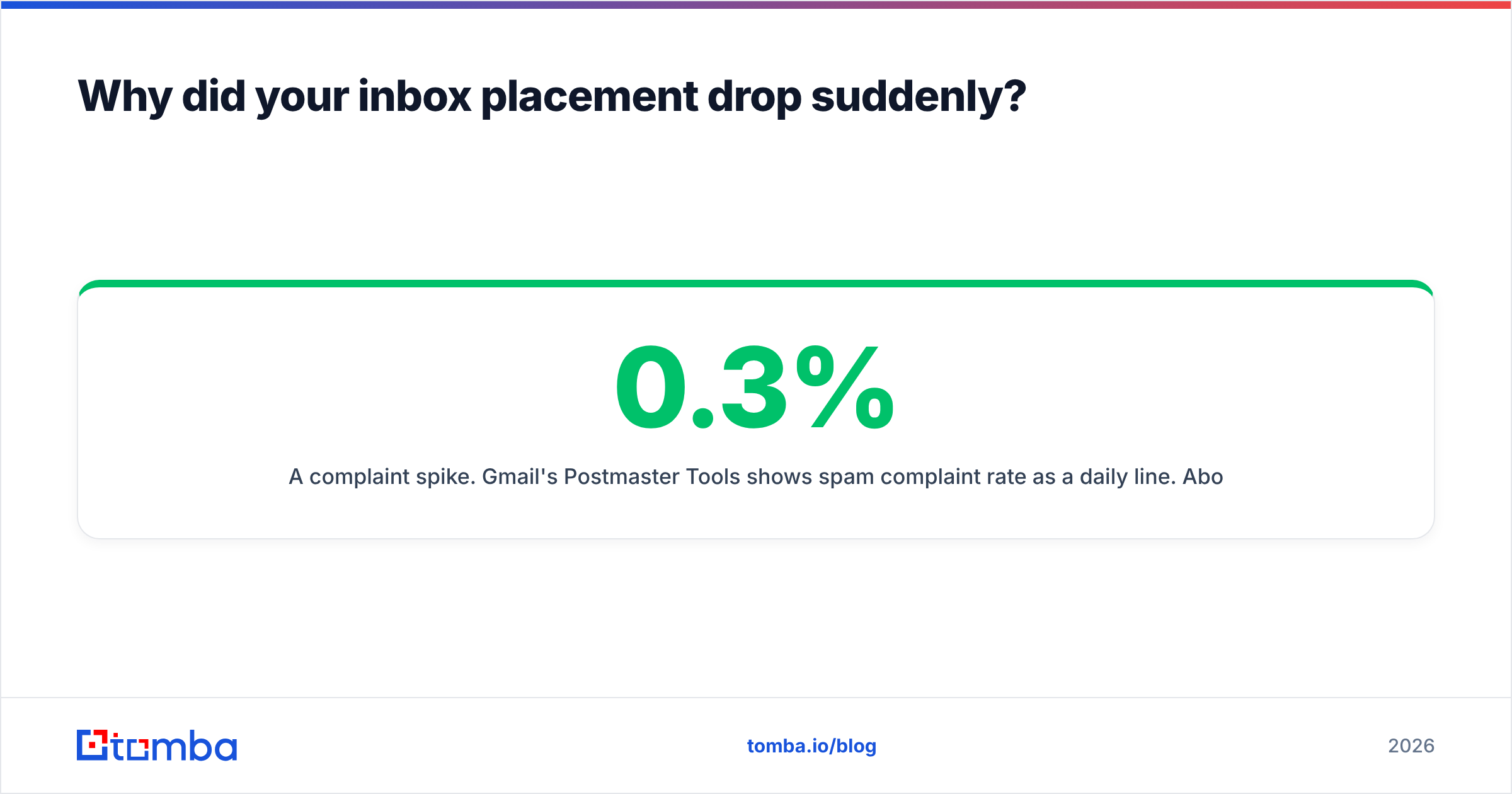
- A complaint spike. Gmail's Postmaster Tools shows spam complaint rate as a daily line. Above 0.3% is trouble; above 0.5% is an emergency. Google's threshold is 0.3% and it is enforced, not aspirational.
Gradual decline is different. It usually means your list is aging faster than you're replacing it, your engagement rate is drifting down, and your sender reputation is slowly repricing you into the Promotions tab.
[Screenshot placeholder: Google Postmaster Tools domain reputation graph showing a drop from "High" to "Medium" over a 14-day window, with the spam complaint rate overlay]
How do you diagnose email deliverability issues in 20 minutes?#
Run this sequence. Don't skip ahead — each step rules out the ones below it.
Step 1 — Authentication (5 minutes). Check that SPF, DKIM, and DMARC all pass and that the DMARC domain aligns with your From domain. Use an SPF checker to confirm your record resolves inside the 10-lookup limit. If DMARC is missing entirely, publish p=none today and move to quarantine once you've read 30 days of reports.
Step 2 — Bounce rate (5 minutes). Pull your last 1,000 sends. Anything above 3% hard bounce means the list is your problem and no amount of copy tuning will help. Above 5% and you are actively burning your domain.
Step 3 — Reputation lookup (3 minutes). Google Postmaster Tools for Gmail, Microsoft SNDS for Outlook. Check domain reputation, IP reputation, and complaint rate. Run a blacklist scan on both domain and IP.
Step 4 — Seed test (5 minutes). Send the exact live campaign to a seed set spanning Gmail, Outlook, Yahoo, and one corporate Microsoft 365 tenant. Record which folder each lands in. Corporate M365 with Defender is the hardest environment and the one your B2B prospects actually use.
Step 5 — Content scan (2 minutes). Run the message through a spam checker. Look at link count, image-to-text ratio, and whether your tracking domain is a shared subdomain used by thousands of other senders.
If steps 1 through 3 are clean and step 4 still shows Spam placement, your issue is engagement or content. If step 2 fails, stop and fix the list before touching anything else.
Which deliverability problem should you fix first?#
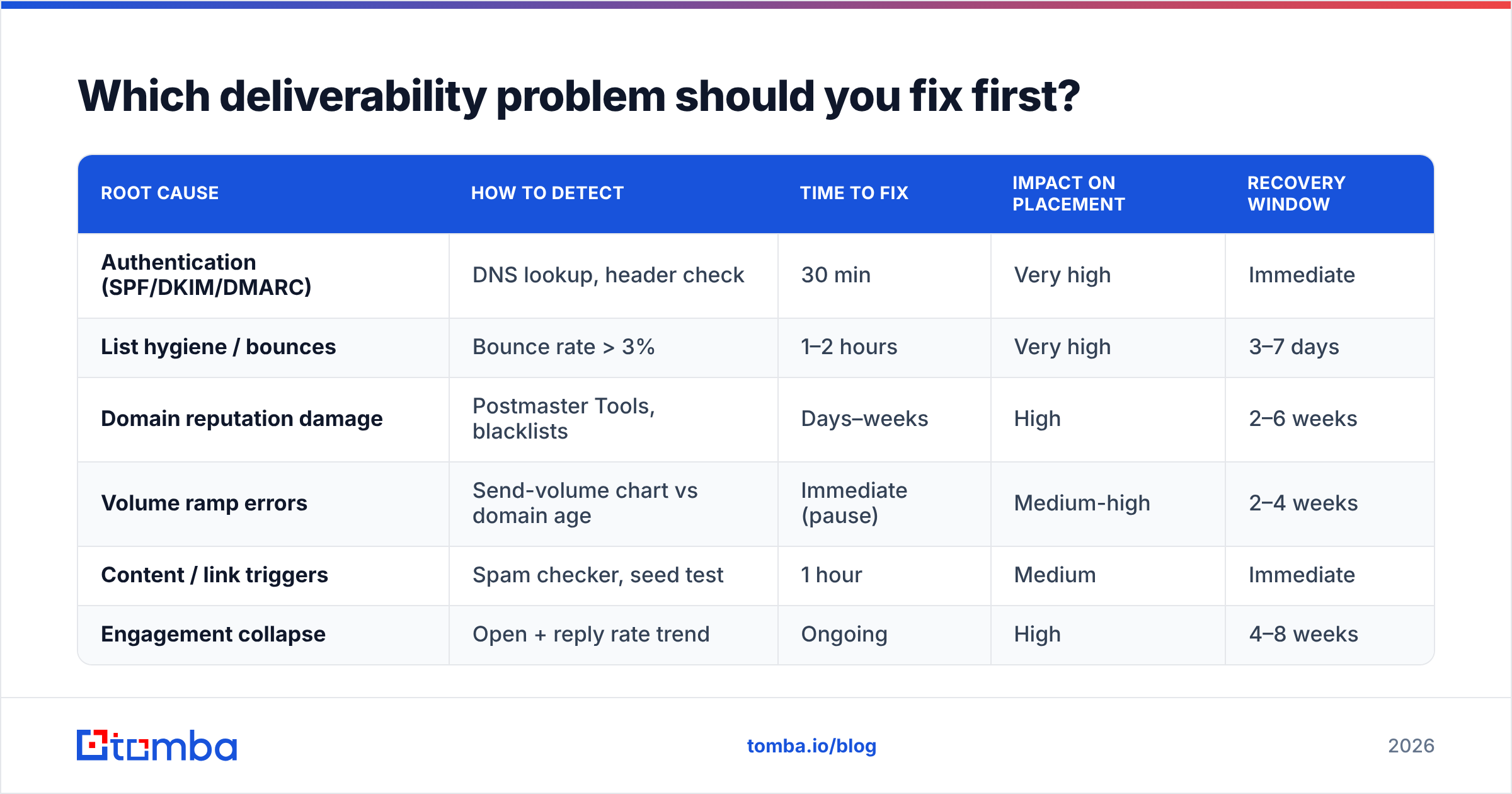
Fix in cost-to-impact order. Here's how the six causes actually compare:
| Root cause | How to detect | Time to fix | Impact on placement | Recovery window |
|---|---|---|---|---|
| Authentication (SPF/DKIM/DMARC) | DNS lookup, header check | 30 min | Very high | Immediate |
| List hygiene / bounces | Bounce rate > 3% | 1–2 hours | Very high | 3–7 days |
| Domain reputation damage | Postmaster Tools, blacklists | Days–weeks | High | 2–6 weeks |
| Volume ramp errors | Send-volume chart vs domain age | Immediate (pause) | Medium-high | 2–4 weeks |
| Content / link triggers | Spam checker, seed test | 1 hour | Medium | Immediate |
| Engagement collapse | Open + reply rate trend | Ongoing | High | 4–8 weeks |
The pattern is clear: the two cheapest fixes — authentication and list hygiene — carry the highest impact. Reputation repair is the expensive one, which is why prevention beats remediation by a wide margin.
How much does list quality actually matter?#
More than everything else combined, because it's the input that determines your bounce rate, your complaint rate, and your engagement rate simultaneously.
A bad address does three things at once. It bounces, which signals to the filter that you don't know who you're mailing. It never engages, which drags your engagement average down. And if it's a recycled spam trap, it directly poisons your domain reputation with no bounce signal at all — the trap accepts the mail and files a complaint silently.
This is why verification is not optional maintenance. Running a list through an email verifier before a campaign removes syntax errors, dead mailboxes, disposable domains, and role accounts. On catch-all domains — where the server accepts everything and validates nothing — you need a dedicated catch-all verifier, because a standard SMTP check will return "valid" for addresses that don't exist.
The practical thresholds for B2B cold outreach in 2026:
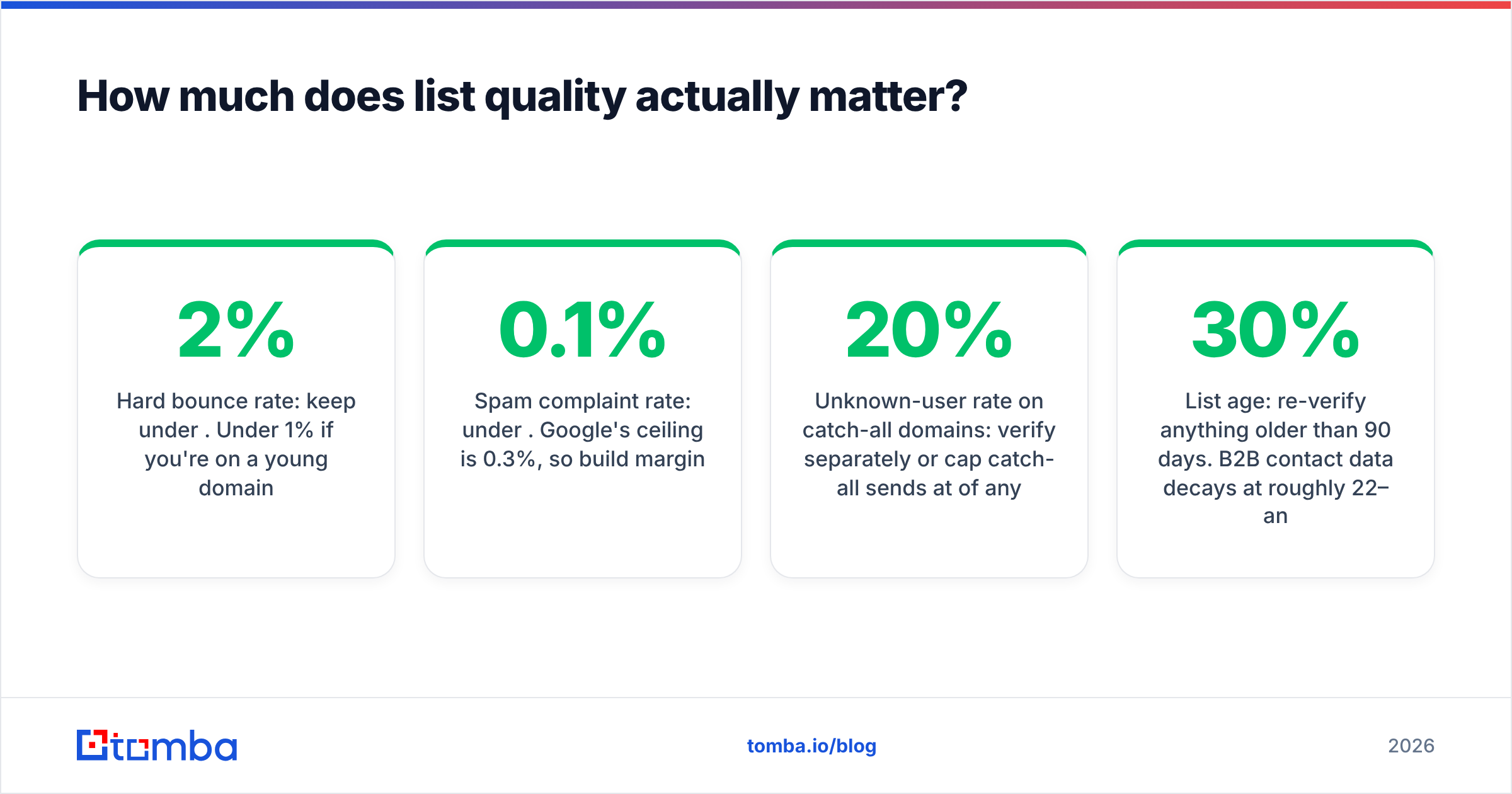
- Hard bounce rate: keep under 2%. Under 1% if you're on a young domain.
- Spam complaint rate: under 0.1%. Google's ceiling is 0.3%, so build margin.
- Unknown-user rate on catch-all domains: verify separately or cap catch-all sends at 20% of any batch.
- List age: re-verify anything older than 90 days. B2B contact data decays at roughly 22–30% annually as people change jobs.
Sourcing matters as much as cleaning. If you build lists with a tool that returns a confidence score and source attribution — like Tomba's email finder or its domain search for mapping a company's full contact surface — you're starting from verified data rather than pattern-guessed permutations. Pattern guessing produces first.last@ addresses that are correct maybe 60% of the time, and the 40% that are wrong land in your bounce column.
BookYourData takes a different approach worth knowing about: a pre-verified purchased database with a bounce guarantee, which suits teams that want volume without a build step. Tomba leans toward on-demand, source-attributed lookup. Both are legitimate models — pick based on whether your ICP is broad and stable (database) or narrow and shifting (on-demand finder).
Is warming up your domain still necessary in 2026?#
Yes, but it's insurance, not a cure — and the industry has badly oversold it.
Warmup does one thing: it establishes a sending history so that filters have data on you before you send at volume. A domain with 60 days of low-volume, high-engagement history is treated very differently from one that appeared last week.
What warmup does not do:
- It does not repair a damaged reputation. Once complaints are logged, warming up just resumes sending more slowly.
- It does not compensate for a bad list. Warmup traffic between mailboxes in a warmup network is not real engagement, and Gmail has gotten notably better at recognizing reciprocal-network patterns.
- It does not substitute for authentication. An unauthenticated domain fails at the gate regardless of history.
Reasonable ramp for a new B2B sending domain: 10–20 sends/day in week one, doubling weekly, capping around 50/day per mailbox for cold outreach. Use an email warmup calculator to map the curve against your target volume, then add mailboxes rather than raising per-mailbox volume. Fifty emails a day across ten inboxes is a far safer profile than 500 from one.
Also: use a subdomain for cold outreach (mail.yourcompany.com or a separate lookalike domain entirely). If your cold sending torches a domain's reputation, you do not want that domain to be the one your invoices and support replies come from.
What content mistakes still trigger filters?#
Fewer than people think, but the ones that remain are unforgiving.
Modern filters weight sender reputation and engagement far above keyword matching. The old spam-word lists — "free," "guarantee," "act now" — are mostly folklore in 2026. What actually hurts:
- Link-heavy messages. More than two links in a cold first-touch reads as promotional. One is safer.
- Shared tracking domains. If your sequencer uses a default tracking subdomain shared across all its customers, you inherit their reputation. Use a custom tracking domain. This is one of the highest-impact 15-minute fixes available.
- Open-tracking pixels themselves. Tracking pixels add a remote image load to every message. Some corporate filters flag it, and Apple Mail Privacy Protection has made open data unreliable anyway. Consider turning open tracking off entirely and measuring on replies.
- HTML-heavy templates. Plain text with minimal formatting outperforms designed templates in cold B2B. It also matches the "one human writing to another" pretext your message depends on.
- Attachments in first touch. Nearly always a filter trigger. Link instead, or ask first.
- Unsubscribe handling. One-click list-unsubscribe headers are required for bulk senders under the Gmail and Yahoo rules. Include them even at low volume — an easy unsubscribe is much cheaper than a spam complaint.
A quick sanity check: read your email aloud. If it sounds like marketing, it will be filed as marketing. That's not a copywriting opinion, it's a placement one — Gmail's Promotions tab classifier is very good at recognizing sales register.
How do you rebuild after reputation damage?#
Slowly, and with a clean list, or not at all.
If Postmaster Tools shows "Low" or "Bad" domain reputation, you're in remediation. The realistic path:
- Stop sending from the damaged domain immediately. Every additional send with a bad list deepens the hole.
- Purge and re-verify the entire list. Not a sample — all of it. Use bulk verify and remove everything that isn't a confirmed valid, non-role, non-catch-all address.
- Fix authentication and move DMARC to
p=quarantineif you haven't. - Resume at 10% of prior volume, targeting only your most-engaged segment — people who have opened or replied before.
- Measure for 14 days before changing anything else. Reputation recovery on Gmail typically takes 3–6 weeks of consistent, clean sending.
If the domain is deeply blacklisted with repeated Spamhaus listings, a new sending subdomain plus a full list rebuild is often faster than remediation. Delisting requests work, but only once the underlying behavior has changed — Spamhaus re-lists aggressively.
For the technical baseline on what filters are actually evaluating, Google's Postmaster Tools documentation and the M3AAWG sender best practices are the two references worth reading in full. Vendor blogs recycle their contents; the primary sources are more precise.
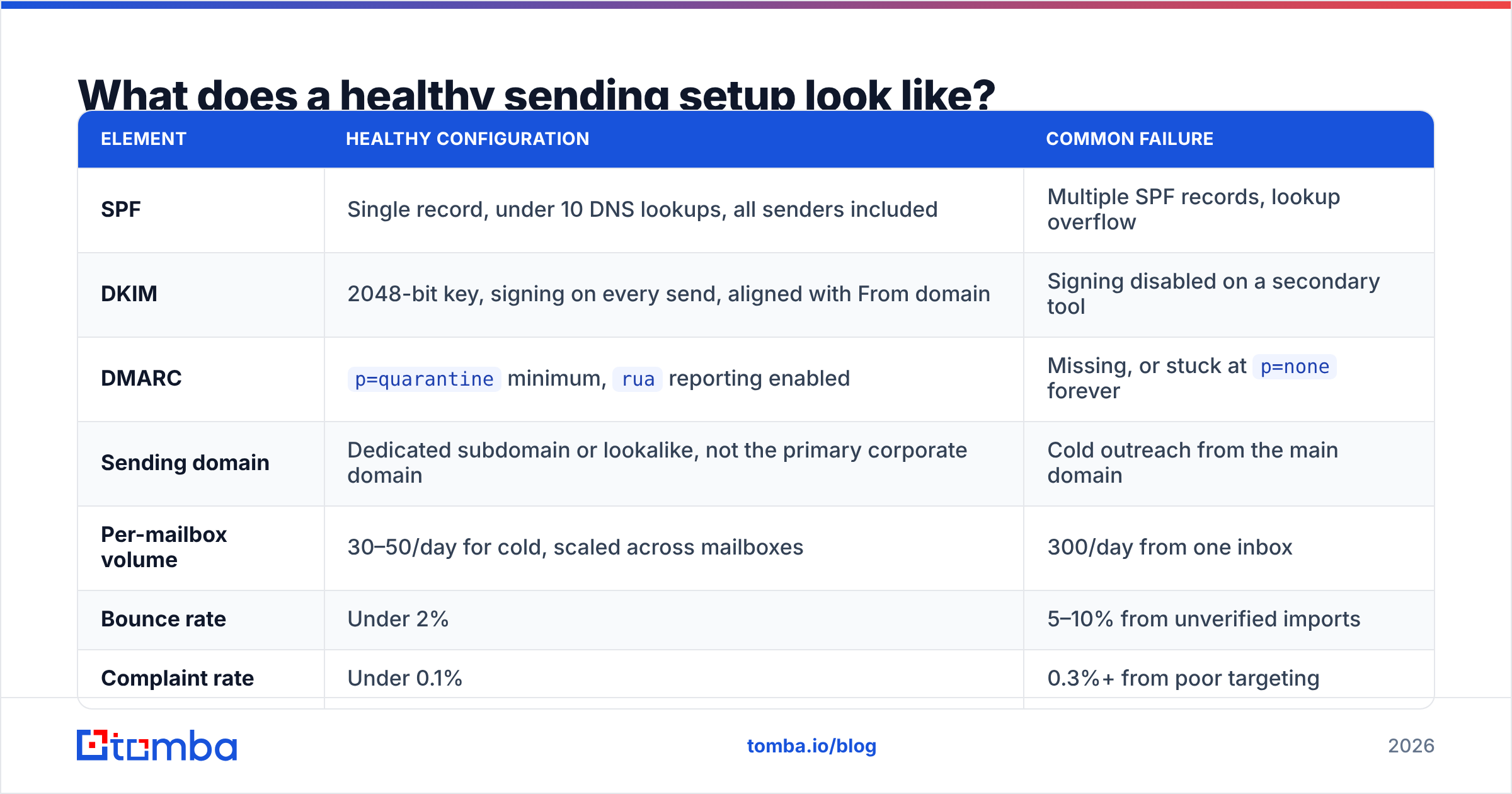
What does a healthy sending setup look like?#
Here's the target state to audit against:
| Element | Healthy configuration | Common failure |
|---|---|---|
| SPF | Single record, under 10 DNS lookups, all senders included | Multiple SPF records, lookup overflow |
| DKIM | 2048-bit key, signing on every send, aligned with From domain | Signing disabled on a secondary tool |
| DMARC | p=quarantine minimum, rua reporting enabled |
Missing, or stuck at p=none forever |
| Sending domain | Dedicated subdomain or lookalike, not the primary corporate domain | Cold outreach from the main domain |
| Per-mailbox volume | 30–50/day for cold, scaled across mailboxes | 300/day from one inbox |
| Bounce rate | Under 2% | 5–10% from unverified imports |
| Complaint rate | Under 0.1% | 0.3%+ from poor targeting |
| Tracking domain | Custom, on your own subdomain | Shared sequencer default |
| List verification | Pre-send, plus 90-day re-verification | Verified once at import, never again |
Audit against this quarterly. Most email deliverability issues are prevented here, not fixed later.
Where should you start today?#
Start with the two cheapest checks: authentication and bounce rate. Between them they explain the majority of placement failures, and both are fixable this afternoon.
Then attack the input. Deliverability is largely a data-quality problem wearing a technical costume — clean, source-verified contacts produce low bounces, low complaints, and healthy engagement, and healthy engagement is what filters reward. Building lists from a source with confidence scoring and real-time verification means you stop generating the signals that cause problems in the first place.
The Tomba Email Finder does exactly that: it finds professional addresses by domain, name, or company with source attribution and confidence scoring, and it pairs with built-in verification so you're not shipping guesses into a live campaign. The free tier gives you 25 searches a month to test the data quality against a list you already trust; Starter runs $49/mo and Growth $99/mo if you need volume. See Tomba pricing for the full breakdown, or start with the free tier and check its accuracy against your own bounce logs before committing to anything.
Related guides#
Ready to find emails that actually work?
Join 150,000+ professionals who stopped guessing and started sending. Free credits on signup — no credit card required.
Get the Tomba newsletter
Practical outbound tactics and product updates — once every two weeks.
About the author