Email Deliverability Salesforce Teams Can Trust: 2026 Guide
Salesforce sends from shared IPs, hides bounce data behind three different UIs, and silently deactivates users after hard bounces. Here's how to diagnose and fix Salesforce email deliverability for good.

TL;DR
- Email deliverability Salesforce teams fight with breaks for three reasons: unsigned sending domains, shared IPs you don't control, and stale contact data that hard-bounces.
- The biggest single fix is list hygiene. Salesforce cuts off a user's sending after repeated hard bounces. Bad addresses are an outage, not just a metric.
- Email Relay, DKIM signing, and a strict DMARC policy get you authenticated. Everything else comes after that.
- Marketing Cloud, Sales Cloud, and Account Engagement (Pardot) each send mail through different pipes. Each reports bounces differently. Find the right one before you touch DNS.
- Verify addresses before they enter Salesforce, not after. Design for a 2% bounce ceiling.
Email deliverability Salesforce problems: why do they stay hidden?#
Because Salesforce tells you the message was sent. And "sent" is not "delivered."
Think of it like handing a letter to a mailroom clerk. The clerk stamps your outbound log. As far as your log is concerned, the job is done. What happens next is three buildings away. The letter may reach a mailbox, come back, or land in a bin marked "suspicious." Salesforce Activity History shows you the stamp. Gmail's spam folder is the bin.
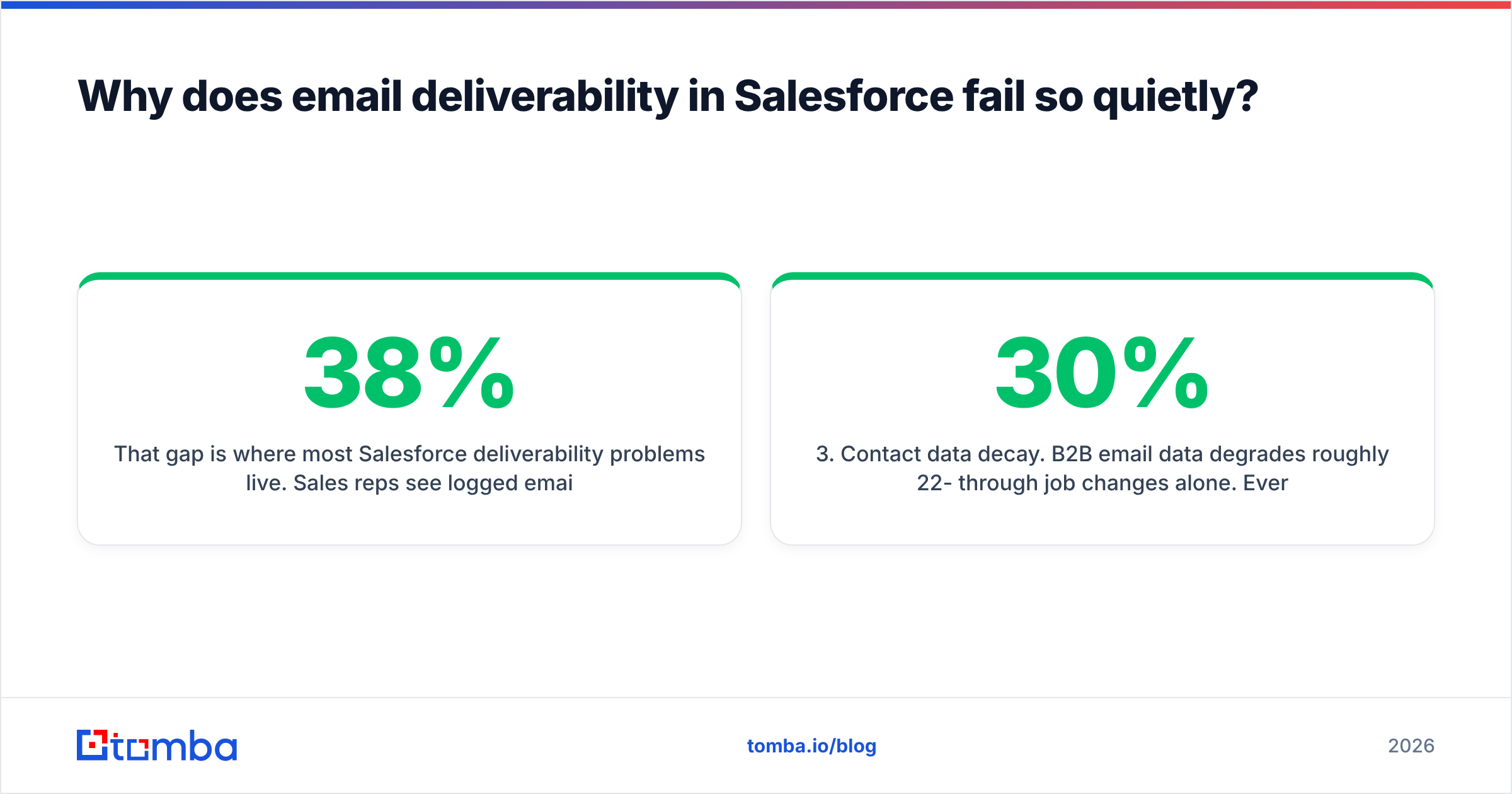
That gap is where most Salesforce problems live. Reps see logged emails and clean activity timelines. Meanwhile open rates slide from 38% to 11% over a quarter. Nobody can point to the day it changed.
There are three structural causes. Here they are, ranked by how often they turn out to be the real one:
- Unsigned sending domain. Salesforce sends on your behalf from its own servers. Without SPF, DKIM, and DMARC alignment, Gmail and Microsoft see a stranger using your domain.
- Shared IP reputation. Standard Sales Cloud mail leaves from Salesforce IP pools. Thousands of other orgs share those pools. One bad neighbor drags your placement down.
- Contact data decay. B2B email data goes stale by 22-30% a year through job changes alone. Every dead record is a hard bounce waiting to fire.
What are the different ways Salesforce actually sends email?#
This matters more than any DNS change. The fix depends on which pipe your mail leaves through. Teams routinely add DKIM records for Marketing Cloud while the bounce problem sits in Sales Cloud.
| Sending method | Product | IP type | Bounce visibility | Best for |
|---|---|---|---|---|
| Salesforce-hosted send | Sales Cloud | Shared Salesforce pool | Weak — Bounce field on Contact/Lead | Low-volume 1:1 rep email |
| Email Relay | Sales Cloud | Your own mail server / ESP | Full — in your relay logs | Orgs with existing mail infra |
| Marketing Cloud Engagement | MC | Dedicated or shared, per contract | Strong — Tracking + Send Log | Bulk marketing sends |
| Account Engagement (Pardot) | Pardot | Shared by default, dedicated on request | Moderate — Prospect audits | Nurture and drip programs |
| Third-party sequencer (Outreach, Salesloft, Instantly) | Any | Your Google/Microsoft mailbox | Strong — native reporting | Cold outbound at scale |
The practical read is simple. If reps send from Sales Cloud without Email Relay, you have the least control on that table. You also have the least visibility. That is the setup that fails in silence.
How do you authenticate a Salesforce sending domain correctly?#
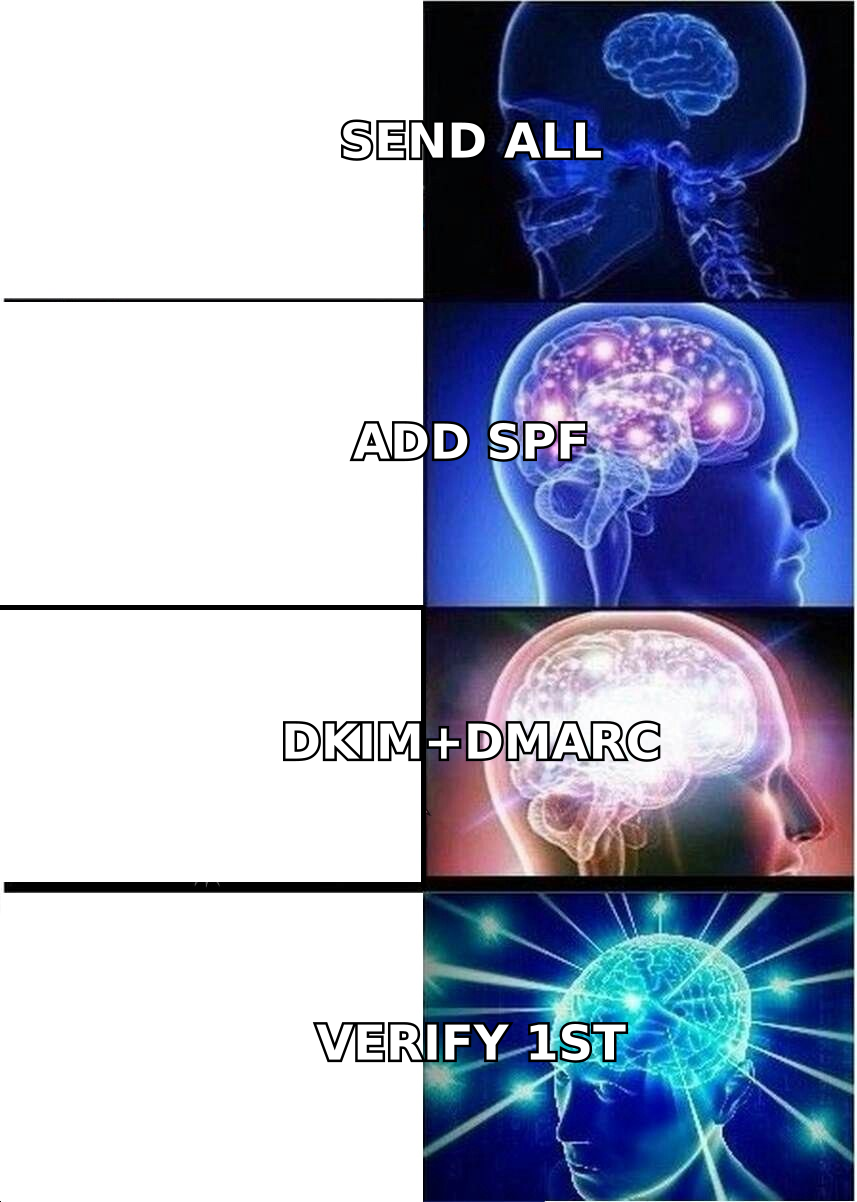
Four records, in this order. Do not skip to step three because "SPF is already set up." SPF alone stopped being enough when Google and Yahoo shipped their 2024 bulk-sender rules.
1. SPF — approve the sender. Add Salesforce's include mechanism to your SPF TXT record. You get one SPF record per domain. You also get a hard limit of 10 DNS lookups. Most broken records break because someone added a fifth include: and blew that budget. Run your record through an SPF checker before and after every edit.
2. DKIM — sign the mail. In Salesforce Setup, search "DKIM Keys." Create a key for your domain. Then publish the two CNAME records it gives you. Salesforce rotates keys, so use CNAMEs rather than a static TXT value. Unsigned mail from a shared pool is the fastest route to the spam folder.
3. DMARC — set policy and get reports. Start at p=none with an rua= reporting address. Read two weeks of reports. Confirm Salesforce traffic passes alignment. Then move to p=quarantine, and later p=reject. Publishing p=reject before you read reports is how companies block their own invoices.
4. Email Relay — take back control. Route Salesforce mail through your own server or ESP. Your IPs, your reputation, your logs. Most orgs put this off for years, then wish they had done it first.
One caveat on relay. It only helps if the server you relay through already has a good sender reputation. Relaying through a neglected legacy Exchange box moves the problem. It does not solve it.
Why does Salesforce turn off email sending after bounces?#
Because Salesforce protects its shared IP pool. Your bad data is a risk to every other tenant on it.
The mechanics differ by product, but the pattern holds. After enough hard bounces from a user or an org, Salesforce limits or blocks that sender. In Marketing Cloud, repeat bounces push an address to the Held or Undeliverable list on their own. In Account Engagement, prospects with hard bounces get flagged and suppressed.
You will find out the way most teams do. A rep says "my emails aren't sending" on a Thursday afternoon during a quarter-close push.
The input you control is bounce rate. The numbers are blunt:
- Under 2% — healthy. Normal decay from job changes.
- 2-5% — warning zone. Mailbox providers start slowing you down.
- Over 5% — damage in progress. Expect placement drops within days.
- Over 10% — you are on the road to a blocklist and a Salesforce-side block.
A bought list with no verification usually lands between 15% and 30% bounce rate. One import can undo a year of careful work. That is why the fix has to happen before the CRM.
What's the fastest way to cut Salesforce bounce rates?#
Verify before import, not after the bounce. That is the whole strategy. It flips what most teams do today.
The common flow is: source contacts, import to Salesforce, send, watch bounces, clean up. Every one of those bounces already cost you reputation. You learned the address was bad too late. The better flow is: source contacts, verify, import only the good ones, then send.
Here is what that pipeline looks like in practice:
- Source with pattern confidence. Use a domain search to pull known addresses and the confirmed pattern for a company. Guessing
first.last@and hoping is not a plan. - Check syntax, MX, and mailbox. An email verifier runs SMTP-level checks. It returns a status before the address touches your CRM.
- Handle catch-all domains on their own. Roughly 15-20% of B2B domains accept all mail at the server. A standard verifier returns "unknown" for those. A catch-all verifier adds more signals, so you don't have to guess or discard.
- Re-check every quarter. Contacts older than 90 days should be re-tested in bulk. Bulk verification on your active segment costs a fraction of one incident.
- Route the results. Good addresses go to Salesforce. Risky and dead ones stay out, or go to a suppression object you can audit later.

How do the data-quality options compare?#
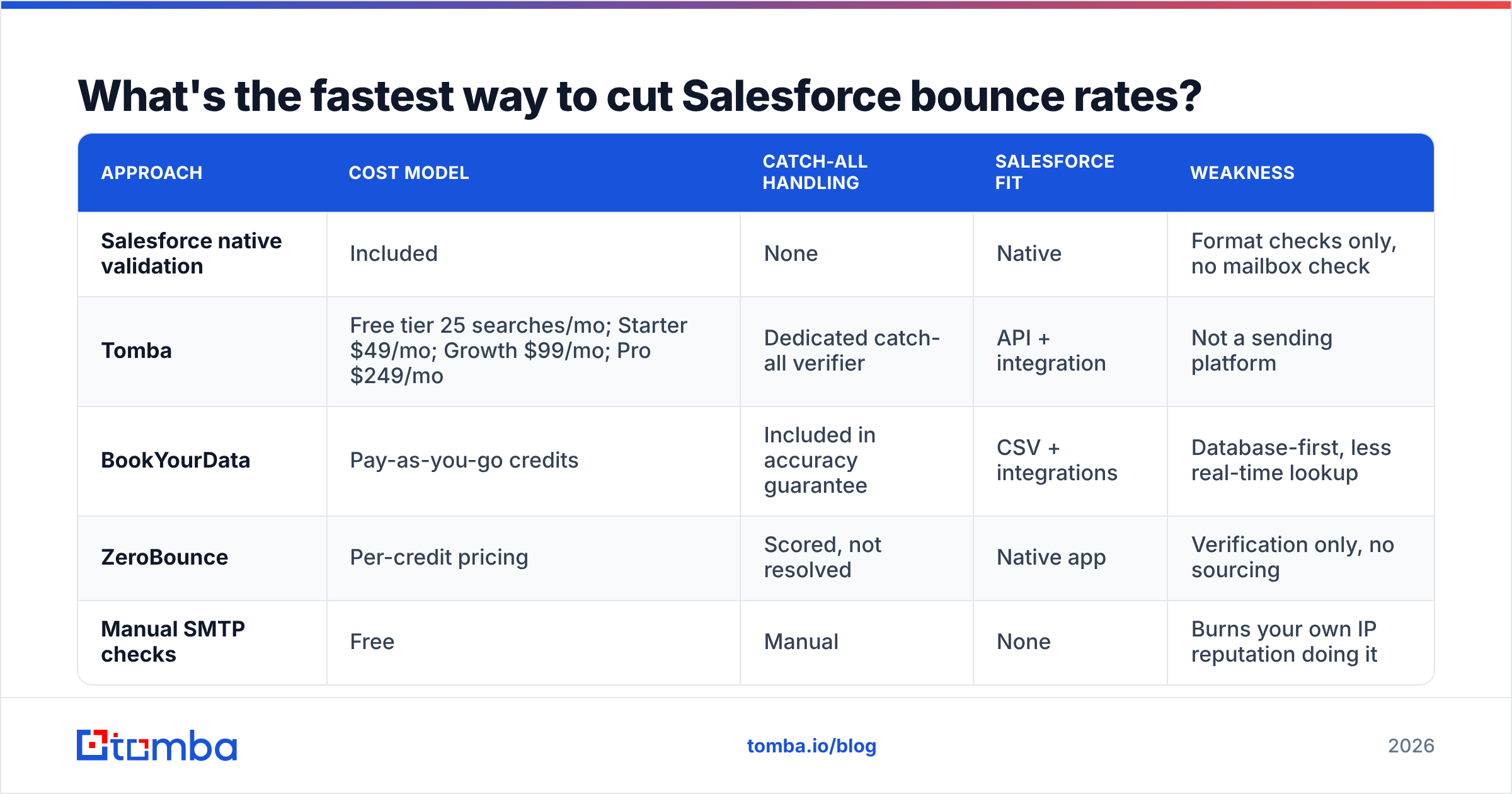
If you are deciding where the verification layer lives, here are the honest trade-offs:
| Approach | Cost model | Catch-all handling | Salesforce fit | Weakness |
|---|---|---|---|---|
| Salesforce native validation | Included | None | Native | Format checks only, no mailbox check |
| Tomba | Free tier 25 searches/mo; Starter $49/mo; Growth $99/mo; Pro $249/mo | Dedicated catch-all verifier | API + integration | Not a sending platform |
| BookYourData | Pay-as-you-go credits | Included in accuracy guarantee | CSV + integrations | Database-first, less real-time lookup |
| ZeroBounce | Per-credit pricing | Scored, not resolved | Native app | Verification only, no sourcing |
| Manual SMTP checks | Free | Manual | None | Burns your own IP reputation doing it |
One distinction is worth keeping in mind. Verification tools tell you if an address you already have is real. Sourcing tools find the address in the first place. If your bounces come from old imported lists, you need verification. If they come from reps guessing addresses in the Activity panel, you need a proper email finder feeding clean data in from the start.
How do you diagnose an active problem?#
Work outward from the message to the network. Jumping straight to DNS can waste days. The real cause may be a single blocked IP.
Step 1 — Confirm it's placement, not sending. Send test messages to seed addresses on Gmail, Outlook, and a corporate Microsoft 365 tenant. If mail lands in spam, it's placement. If it never lands at all, check Salesforce Email Log Files (Setup → Email Log Files) for the raw SMTP response.
Step 2 — Read the bounce codes. Salesforce shows the raw response in the Bounce Reason field. 550 5.1.1 means the mailbox doesn't exist, so it's a data problem. 421 or 4.7.x means throttling or reputation, so it's an infrastructure problem. The fixes are completely different, and teams often apply the wrong one.
Step 3 — Check IPs and domain against blocklists. Run both through a blacklist checker. Spamhaus and Barracuda listings tank placement at once. They often clear within 48 hours of delisting.
Step 4 — Audit content. Salesforce templates pick up cruft over time: tracking pixels, short links, heavy HTML, and unsubscribe blocks that don't match your sending domain. Run a few templates through a spam checker and strip whatever scores.
Step 5 — Check Google Postmaster Tools. If you send real volume to Gmail, Google Postmaster Tools shows domain reputation, spam rate, and auth pass rate from the receiving side. Nothing in Salesforce gives you that view. Google's bulk sender guidelines set the 0.3% complaint threshold you must stay under.
Step 6 — Split the data by recipient domain. Pivot bounces and opens by domain. A problem only on outlook.com is a Microsoft reputation issue. A problem spread evenly across domains points to auth or content.
Is Marketing Cloud better than Sales Cloud here?#
Yes for volume, no for simplicity. The answer depends on how you send.
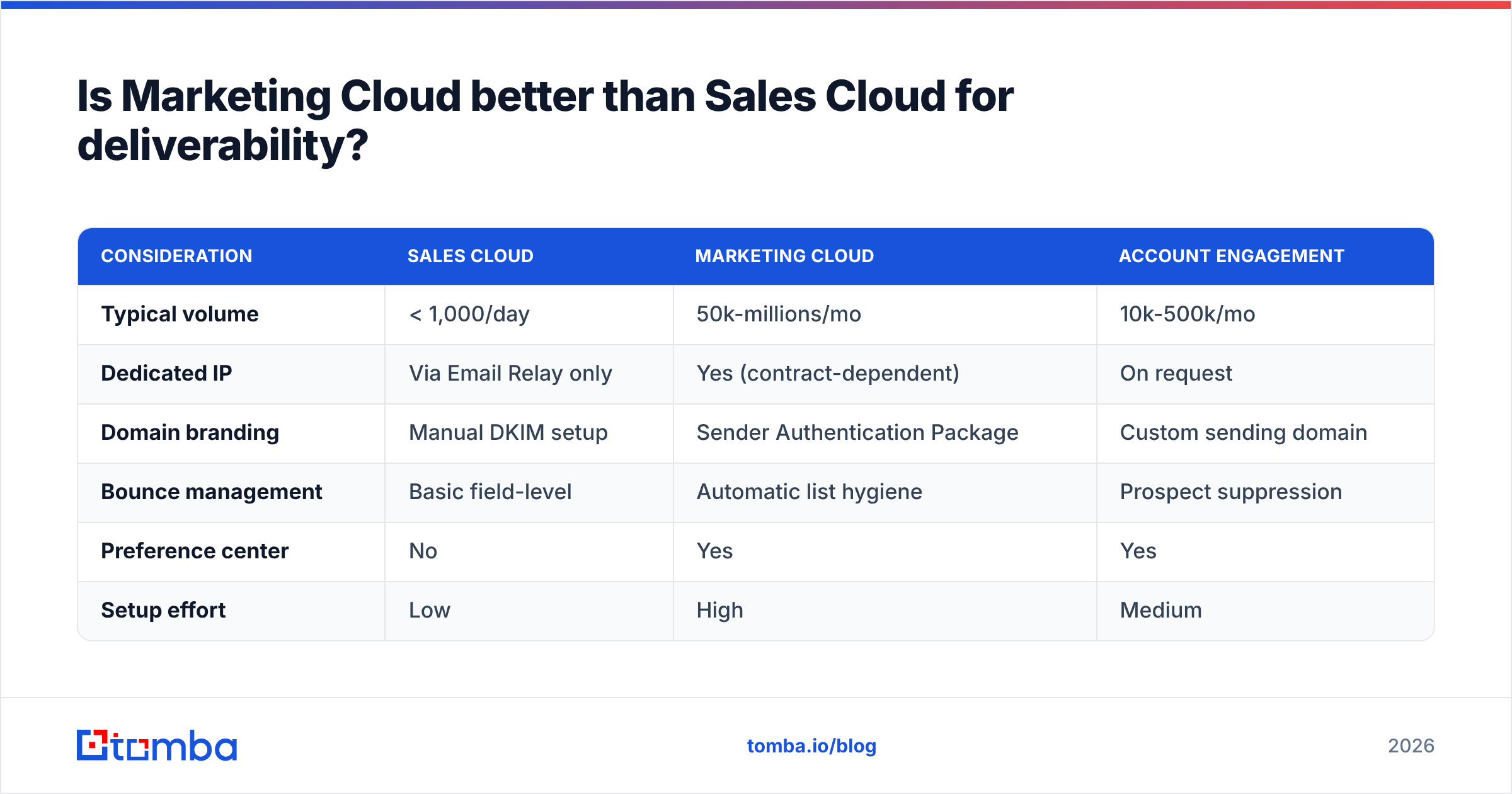
Marketing Cloud Engagement gives you dedicated IPs on the right contract. You also get the Sender Authentication Package for full domain branding, detailed tracking, and real deliverability tooling. If you send 50,000+ marketing emails a month, that setup earns its cost.
Sales Cloud email is built for 1:1 rep messages. It is not a lightweight marketing tool. It is a different tool. Running bulk campaigns through Sales Cloud list email causes a lot of damage. You are pushing marketing-sized volume through a system built for conversations.
| Consideration | Sales Cloud | Marketing Cloud | Account Engagement |
|---|---|---|---|
| Typical volume | < 1,000/day | 50k-millions/mo | 10k-500k/mo |
| Dedicated IP | Via Email Relay only | Yes (contract-dependent) | On request |
| Domain branding | Manual DKIM setup | Sender Authentication Package | Custom sending domain |
| Bounce management | Basic field-level | Automatic list hygiene | Prospect suppression |
| Preference center | No | Yes | Yes |
| Setup effort | Low | High | Medium |
For cold outbound, neither one is the right answer. Sequencing tools send through your real Google Workspace or Microsoft 365 mailboxes. That gives you per-mailbox reputation, send limits, and warmup. They sync activity back to Salesforce too. See how Outreach alternatives and Instantly alternatives handle that split if you are shopping.
What does a healthy Salesforce sending setup look like in 2026?#
The checklist below is what a well-run org has in place. Most teams have four of these seven.
- SPF, DKIM, and DMARC all passing, with DMARC at
p=quarantineor stricter. Confirm it by reading reports, not by assuming. - Email Relay configured, so mail leaves through infrastructure you own and log.
- A verification gate on every import path — data loader, integration, form fill, manual entry. No unchecked address reaches the Contact or Lead object.
- Bounce rate watched weekly, with an alert at 3%. A quarterly review is too slow.
- Quarterly re-checks of contacts older than 90 days on active segments.
- Separate domains for cold outbound and billing or marketing mail. If cold outreach burns one domain, it should not take your invoices with it.
- Google Postmaster Tools and Microsoft SNDS enrolled, so you see reputation from the receiving side instead of guessing from open rates.
There is an org point under all seven. Deliverability belongs to RevOps, not to whoever sent the last campaign. When nobody owns the bounce rate, it drifts. When revenue operations owns it as a tracked metric, it stays under 2%.
One more thing. A lot of "deliverability problems" are really volume problems. A rep sending 400 cold emails a day from a mailbox that never sent more than 30 will get throttled. Perfect DNS will not save that. If you are scaling volume, model the ramp with a warmup calculator first.
Where should you start?#
Start with your data. It is the input everything else amplifies. Perfect auth on a list with 18% dead addresses still creates a crisis. You have only made the bad mail look more like you.
Pull 500 contacts from your most-emailed Salesforce segment. Run them through verification. Look at the deliverable percentage. That number tells you whether your problem is data or setup, and it takes an afternoon.
For most orgs, the answer is data. In that case, the fix for email deliverability Salesforce admins can actually control is a sourcing and verification layer in front of the CRM. Tomba's Email Finder finds verified professional addresses by domain, name, or company. Every result comes with a confidence score, so only good contacts reach Salesforce. It connects through the Salesforce integration, the Tomba API, or bulk CSV. The free tier gives you 25 searches a month, so you can test accuracy against your own records first. Full Tomba pricing starts at $49/mo for Starter.
Clean data in, clean deliverability out. Everything else comes after that.
Related guides#
Ready to find emails that actually work?
Join 150,000+ professionals who stopped guessing and started sending. Free credits on signup — no credit card required.
Get the Tomba newsletter
Practical outbound tactics and product updates — once every two weeks.
About the author