Email Deliverability Score: How to Measure and Fix It in 2026
Your email deliverability score is not one number — it's four signals stacked together. Here's how each one is calculated, what actually moves it, and the fixes that work in 2026.
TL;DR
- There is no official "email deliverability score." Mailbox providers publish reputation signals, not a single grade — every score you see in a dashboard is a vendor's estimate.
- Four inputs drive placement: authentication (SPF, DKIM, DMARC), domain and IP reputation, list hygiene (bounces, spam traps), and recipient engagement.
- Google Postmaster Tools and Microsoft SNDS are the only free sources of first-party reputation data. Everything else is inference.
- Spam-checker "scores" (SpamAssassin points, 10/10 grades) measure content, not reputation — a 10/10 email still lands in spam if your bounce rate is 8%.
- The fastest score improvements come from list hygiene, not copy tweaks. Cutting invalid addresses from 12% to under 2% moves inbox placement more than any subject-line rewrite.
What is an email deliverability score?#
An email deliverability score is a vendor-calculated estimate of how likely your emails are to land in the inbox rather than spam. It is a proxy metric — Gmail, Outlook, and Yahoo do not publish a number, and no third-party tool has access to their internal filtering models.
Think of it like a credit score for your sending domain. No single bank publishes your creditworthiness; agencies infer it from observable behavior — payment history, utilization, account age. Deliverability scores work the same way: tools observe your authentication setup, bounce patterns, blacklist status, and seed-list placement, then compress it into one number.
That number is useful as a trend line and dangerous as a target. Two tools will give the same domain a 72 and a 94 because they weight inputs differently. What matters is which underlying signal is red.
Here's the distinction that trips up most senders: deliverability is whether the mailbox provider accepted your message. Inbox placement is whether the recipient actually sees it. You can have 99.4% deliverability and 41% inbox placement — the other 58% went to the spam folder and was still counted as "delivered."
What actually goes into your deliverability score?#
Four categories, roughly in order of impact:
- Authentication (SPF, DKIM, DMARC) — Table stakes since Google and Yahoo's February 2024 bulk-sender requirements. Missing DMARC on a domain sending 5,000+/day to Gmail means outright rejection, not spam-foldering. Check your SPF record alignment first; misaligned SPF is the single most common failure.
- Domain and IP reputation — Built over 30–90 days of consistent sending. A domain registered last month with no sending history has no reputation, which filters treat as suspicious by default. Shared IP pools mean you inherit your neighbors' behavior.
- List hygiene — Hard bounce rate, spam-trap hits, and role-based address density. A recycled spam trap (an abandoned address reactivated by the provider) is a strong negative signal; a pristine trap (never used by a human) suggests you scraped the address.
- Recipient engagement — Opens, replies, forwards, "not spam" clicks on the positive side; deletes-without-reading, spam complaints, and ignores on the negative. Gmail weights this heavily. A complaint rate above 0.3% triggers throttling; above 0.5% and you are effectively blocked.
- Infrastructure hygiene — Reverse DNS, valid MX, TLS support, consistent From/Return-Path, no blacklisted IPs. Mostly binary pass/fail, but a failure here caps everything else.
- Sending patterns — Volume consistency, ramp rate, and time-of-day distribution. Going from 50 to 5,000 emails in a day looks exactly like a compromised account.

Note the ordering. Copy and subject lines do not appear in the top six. They matter — a message stuffed with "FREE!!! ACT NOW" triggers content filters — but content is the last thing filters evaluate, after your reputation has already sorted you into a bucket.
How do the major scoring tools compare?#
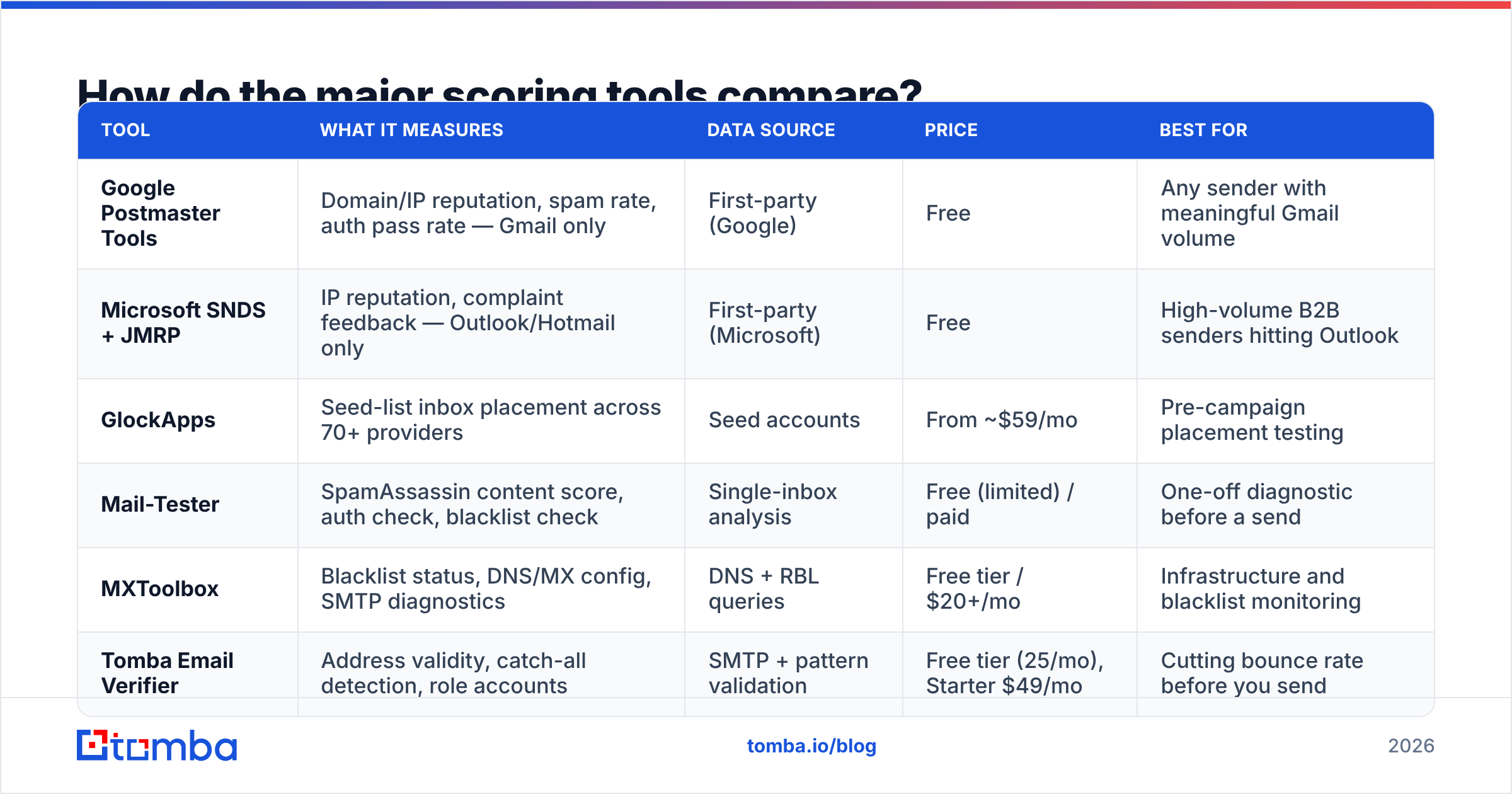
Each tool answers a different question. Picking the wrong one means optimizing a metric that does not correlate with your actual problem.
| Tool | What it measures | Data source | Price | Best for |
|---|---|---|---|---|
| Google Postmaster Tools | Domain/IP reputation, spam rate, auth pass rate — Gmail only | First-party (Google) | Free | Any sender with meaningful Gmail volume |
| Microsoft SNDS + JMRP | IP reputation, complaint feedback — Outlook/Hotmail only | First-party (Microsoft) | Free | High-volume B2B senders hitting Outlook |
| GlockApps | Seed-list inbox placement across 70+ providers | Seed accounts | From ~$59/mo | Pre-campaign placement testing |
| Mail-Tester | SpamAssassin content score, auth check, blacklist check | Single-inbox analysis | Free (limited) / paid | One-off diagnostic before a send |
| MXToolbox | Blacklist status, DNS/MX config, SMTP diagnostics | DNS + RBL queries | Free tier / $20+/mo | Infrastructure and blacklist monitoring |
| Tomba Email Verifier | Address validity, catch-all detection, role accounts | SMTP + pattern validation | Free tier (25/mo), Starter $49/mo | Cutting bounce rate before you send |
The pattern: free first-party tools tell you where you stand; paid third-party tools tell you where you'll land. Use Postmaster Tools as your ground truth and seed testing as a pre-flight check. Do not pay for a "deliverability score" dashboard until you have read your Postmaster data for 30 days.
One caveat on seed-list testing: seed accounts do not behave like humans. They never reply, never move messages, never mark "important." Gmail knows this. Seed results overstate spam placement for warm lists and understate it for cold ones. Treat them as directional.
Is a spam-checker score the same as a deliverability score?#
No, and conflating them is the most expensive mistake in this space.
A spam-checker score — SpamAssassin points, or a 10/10 grade from Mail-Tester — evaluates the message: HTML-to-text ratio, link count, spam-trigger phrases, image weight, authentication headers. It is a content audit run in isolation.
Your deliverability score depends on sender history: who you are, what you've sent before, and how recipients reacted. A 10/10 message from a domain with a 0.8% complaint rate goes to spam. A 6/10 message from a domain with 40% reply rates lands in Primary.
Where content scores still earn their keep:
- Catching broken authentication. If SPF or DKIM fails, a spam checker surfaces it in seconds.
- Finding accidental spam triggers. All-image emails, URL shorteners, mismatched display names.
- Validating template changes. Run the spam checker before rolling out a new HTML template to 50,000 contacts.
What they cannot see: your bounce history, your complaint rate, your engagement trend, or your domain's age. Those are the things filters weigh most.
How do you actually measure your deliverability score?#
Run this sequence. It takes about two hours the first time and 15 minutes a week after.
Step 1 — Verify authentication. Confirm SPF passes with alignment, DKIM signs with a 2048-bit key, and DMARC is published at minimum p=none with an RUA address collecting reports. Use an SPF checker and read the actual DNS response, not a green checkmark.
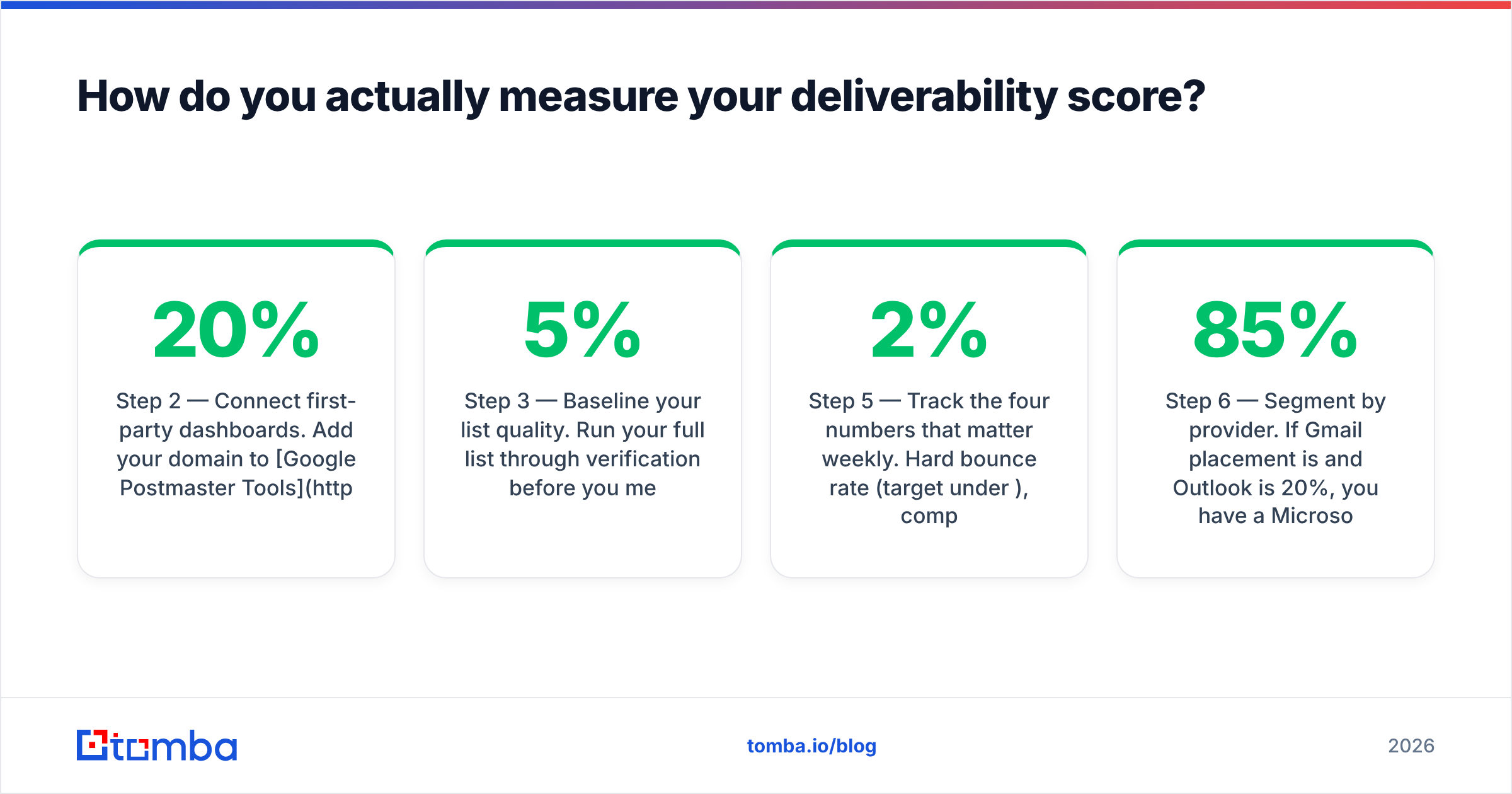
Step 2 — Connect first-party dashboards. Add your domain to Google Postmaster Tools and your sending IPs to Microsoft SNDS. Postmaster needs 7 days and roughly 100 daily Gmail recipients before it shows reputation data. This is non-negotiable if Gmail is more than 20% of your list.
Step 3 — Baseline your list quality. Run your full list through verification before you measure anything else. If more than 5% of addresses are invalid, your score problem is a data problem. An email verifier will separate deliverable, risky, catch-all, and invalid addresses so you know what you're actually working with.
Step 4 — Seed test one representative campaign. Send your real template to a seed list across Gmail, Outlook, Yahoo, and a corporate Microsoft 365 tenant. Record folder placement per provider — aggregate numbers hide provider-specific blocks.
Step 5 — Track the four numbers that matter weekly. Hard bounce rate (target under 2%), complaint rate (under 0.1%), Postmaster domain reputation (High or Medium), and reply rate. Everything else is secondary.
Step 6 — Segment by provider. If Gmail placement is 85% and Outlook is 20%, you have a Microsoft-specific problem — usually IP reputation or a missing SNDS enrollment — not a general deliverability problem.
What fixes actually move your deliverability score?#
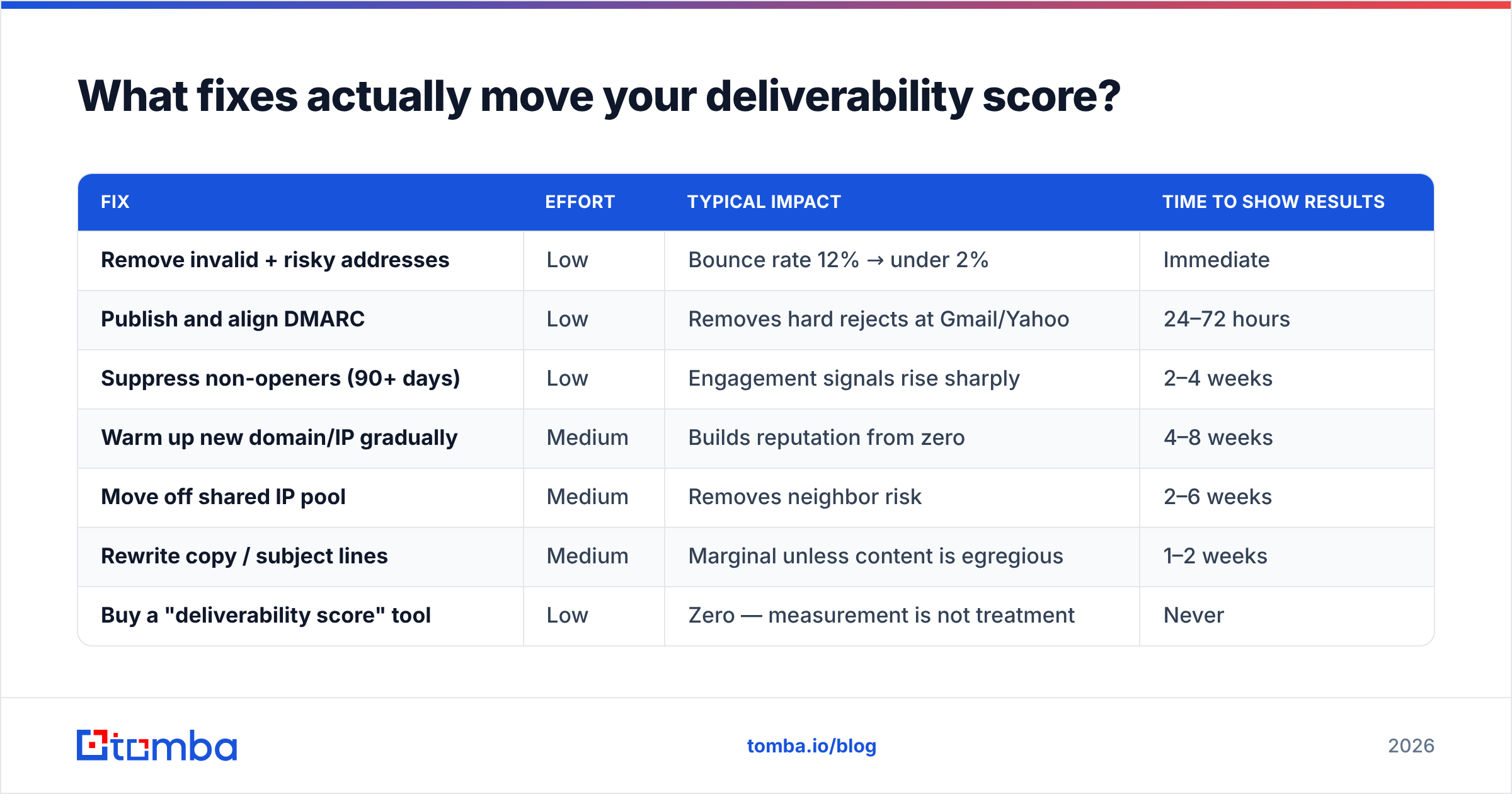
Ranked by impact per hour of effort:
| Fix | Effort | Typical impact | Time to show results |
|---|---|---|---|
| Remove invalid + risky addresses | Low | Bounce rate 12% → under 2% | Immediate |
| Publish and align DMARC | Low | Removes hard rejects at Gmail/Yahoo | 24–72 hours |
| Suppress non-openers (90+ days) | Low | Engagement signals rise sharply | 2–4 weeks |
| Warm up new domain/IP gradually | Medium | Builds reputation from zero | 4–8 weeks |
| Move off shared IP pool | Medium | Removes neighbor risk | 2–6 weeks |
| Rewrite copy / subject lines | Medium | Marginal unless content is egregious | 1–2 weeks |
| Buy a "deliverability score" tool | Low | Zero — measurement is not treatment | Never |
Start at the top. Most senders skip straight to copy rewrites because it feels productive, then wonder why nothing changed after three weeks.

On list hygiene specifically: every invalid address you send to is a direct hit to reputation. If you're building lists from scraped sources or old CRM exports, verification is not optional. The bulk workflow — collect, verify, suppress the risky tier, then send — costs a fraction of what a domain reputation recovery costs. Bulk verification on a 50,000-row list takes minutes and is the highest-leverage thing on this page.
On catch-all domains: roughly 15–20% of B2B domains accept every address at the SMTP layer, which makes standard verification return "unknown." Sending blind to those is how bounce rates creep back up. A dedicated catch-all verifier uses pattern confidence and historical data to grade them instead of guessing.
On warmup: ramp new domains at roughly 20–50 emails/day for week one, doubling weekly while watching bounce and complaint rates. If either spikes, hold volume flat for a week. The warmup calculator will generate a schedule based on your target volume.
What deliverability score should you aim for?#
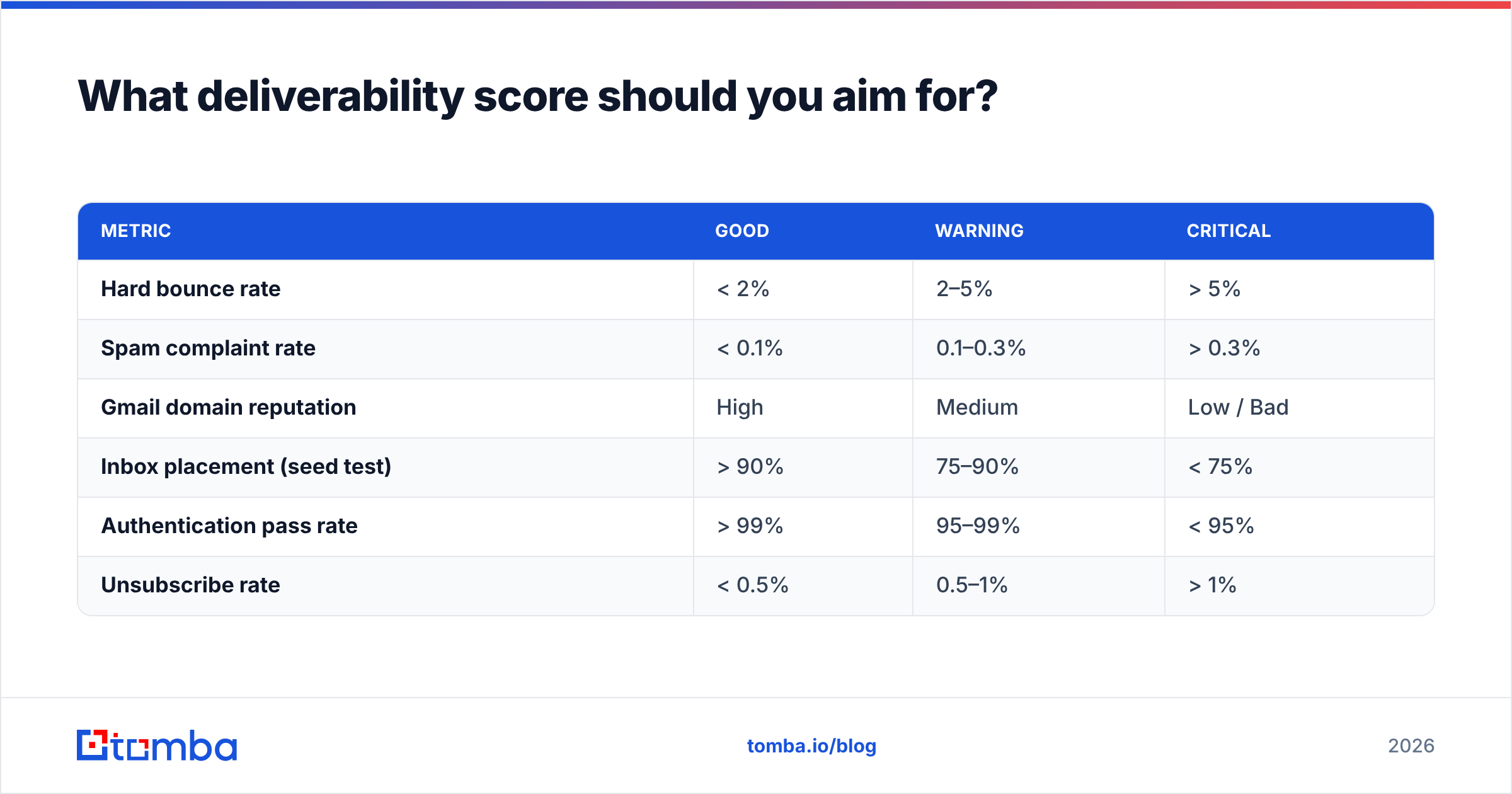
Depends on the tool, which is why absolute targets are less useful than these thresholds:
| Metric | Good | Warning | Critical |
|---|---|---|---|
| Hard bounce rate | < 2% | 2–5% | > 5% |
| Spam complaint rate | < 0.1% | 0.1–0.3% | > 0.3% |
| Gmail domain reputation | High | Medium | Low / Bad |
| Inbox placement (seed test) | > 90% | 75–90% | < 75% |
| Authentication pass rate | > 99% | 95–99% | < 95% |
| Unsubscribe rate | < 0.5% | 0.5–1% | > 1% |
The Gmail and Yahoo bulk-sender rules make two of these hard requirements rather than goals: complaint rate must stay under 0.3% (Google recommends under 0.1%), and one-click unsubscribe must be implemented via List-Unsubscribe. Read Google's bulk sender guidelines directly — vendor summaries drift.
If you're evaluating a sending platform on deliverability claims, check independent review data on G2 rather than vendor case studies. Case studies are selected; reviews are self-selected but at least the sample is larger.
How does list quality connect to your deliverability score?#
Directly and mechanically. A hard bounce is a mailbox provider telling you the address does not exist — and inferring that you did not have permission to email it. Enough of those and filters conclude you bought a list.
The chain runs: bad data → bounces and trap hits → damaged sender reputation → spam placement → fewer opens → worse engagement signals → deeper spam placement. It compounds downward, and copy edits do not interrupt it.
Where the leverage is:
- Source quality at acquisition. Emails found through pattern-matching plus SMTP validation at the point of discovery bounce far less than guessed permutations. A proper email finder returns a confidence score with the address — use it as a filter, not decoration.
- Verification before every send, not just at import. B2B addresses decay roughly 2–3% per month as people change jobs. A list verified in January is measurably worse by April.
- Suppression discipline. Hard bounces, complaints, and unsubscribes go into a permanent suppression list applied across every tool you send from. One re-import of an old CSV can undo six weeks of reputation work.
- Role-account handling.
info@,sales@, andsupport@addresses are valid but generate disproportionate complaints. Segment them or exclude them from cold sequences.
Know where your data comes from before you trust it. Reviewing a provider's data sources and how frequently records are refreshed tells you more about future bounce rates than any accuracy percentage on a pricing page.
Frequently asked questions#
How long does it take to recover a damaged sender reputation? Typically 4–8 weeks of clean, consistent sending at reduced volume. There is no reset button. If domain reputation is "Bad" in Postmaster Tools, pause cold sending entirely, mail only your most engaged segment for two weeks, then ramp.
Does a dedicated IP improve my deliverability score? Only above roughly 100,000 emails/month with consistent volume. Below that, a dedicated IP has too little traffic to build reputation and you're better off on a well-managed shared pool.
Can I check my deliverability score for free? Yes — Google Postmaster Tools, Microsoft SNDS, and Mail-Tester's free tier cover the essentials. Paid tools add multi-provider seed testing and monitoring, not fundamentally better data.
Do open rates still affect deliverability in 2026? Less than they did. Apple Mail Privacy Protection inflates opens, so filters weight replies, forwards, and folder moves more heavily. Optimize for replies, not opens.
Where to start this week#
Pick the highest-leverage item you can finish in one sitting: verify your list. Bounce rate is the fastest-moving input to every deliverability score that exists, and it is the one you control completely.
If you're building outbound lists from scratch, start upstream. The Tomba Email Finder returns verified professional addresses with confidence scoring, so invalid contacts never reach your sequencer in the first place. The free tier covers 25 searches a month; paid plans start at $49/mo with bulk processing and API access — see Tomba pricing for the breakdown. Clean data in, clean reputation out.
Related guides#
Ready to find emails that actually work?
Join 150,000+ professionals who stopped guessing and started sending. Free credits on signup — no credit card required.
Get the Tomba newsletter
Practical outbound tactics and product updates — once every two weeks.
About the author